System Protection - Turn On or Off

How to Turn System Protection On or Off in Windows 7

   Information
System Restore regularly tracks changes to your computer's system files, and uses a feature called System Protection to create restore points of selected hard disks in your computer. System Protection is turned on by default for the Windows 7 hard disk or partition on your computer.

This will show you how to turn System Protection On or Off for creating System Restore Points for system settings and previous versions (shadow copies) of files in Windows 7. You could also use previous versions (shadow copies) to restore older copies of files and folders.

You can select which disks have System Protection turned on for.

   Note
It is not recommended to turn off system protection for your C: system drive (Windows 7) since it is a great tool to easily undo a mistake, for example one that may have crippled Windows 7, by just doing a system restore to go back to a previous restore point of your system dated before the mistake.
   Warning

  • System Restore doesn't protect FAT32 and other FAT disks because FAT disks don't support the use of shadow copies. Shadow copies contain information about changes to documents and system files. Shadow copies require the NTFS file system. Windows 7 uses the NTFS file system.
  • Turning off System Protection for a disk deletes all restore points for that disk. You cannot restore the disk until you turn on System Protection again and a restore point is created for that disk.


Here's How: 1. Open the Control Panel (Icons View). A) Click on the System icon.

B) Go to step 3.
OR

2. Open the Start Menu. A) Right click on the Computer button and click on Properties.
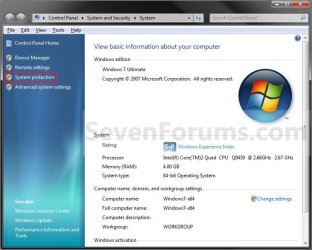
3. Click on the System Protection link. (see screenshot below) System.jpg
4. If prompted by UAC, then click on Yes if administrator or type in the adminstrator's password if standard user.

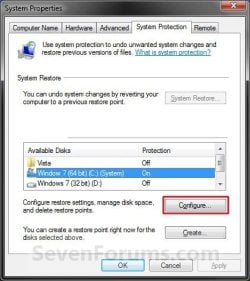
5. Click on the available hard disk drive or partition, that you want to turn System Protection on or off for, to select it. (see screenshot below step 6)
NOTE: Windows 7 should be the C: drive with (System). Under the Protection column, you will see if System Protection is turned On or Off for the available disk.

6. Click on the Configure button. (see screenshot below) System_Properties.jpg
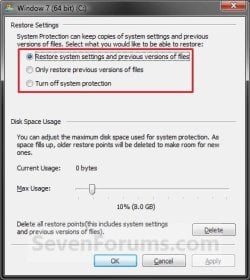
7. To Turn On System Protection for System Settings and Previous Versions of Files A) Dot Restore system settings and previous versions of files. (see screenshot below step 10)
NOTE: This turns on creating restore points and Previous Versions for the selected drive in step 5.

B) Move the Max Usage slider to set the maximum disk space usage you want to be used by system protection on the selected drive letter.

C) Go to step 10.

8. To Turn On System Protection for Only Previous Versions of Files A) Dot Only restore previous versions of files. (see screenshot below step 10)
NOTE: This turns on only Previous Versions for the selected drive in step 5.

B) Move the Max Usage slider to set the maximum disk space usage you want to be used by system protection on the selected drive letter.

C) Go to step 10.
9. To Turn Off System Protection for the Selected Disk A) Dot Turn off system protection. (see screenshot below step 10)
NOTE: This turns off both creating restore points and Previous Versions for the selected drive in step 5.

B) Go to step 10.
10. Click on OK. (see screenshot below) Configure.jpg
11. Repeat steps 5 to 10 if you wanted to turn System Protection on or off for another listed drive.

12. When finished, click on OK. (see screenshot below step 6)
That's it,
Shawn


Last edited:
Worked perfectly! Thanks!
 

My Computer

Computer Manufacturer/Model Number
HP Pavilion slimline 3300f
OS
windows 7 pro 64 bit
CPU
AMD Athlon(tm) 64 x2 Dual Core Processor 5000+ 2.60 GHz
Memory
2 gb
Monitor(s) Displays
Samsung SyncMaster 191T
Screen Resolution
1200px by 1024px
Hard Drives
500 gb
Internet Speed
1500kb/s
Anyway to turn off System Restores at boot or shutdown?
 

My Computer

Computer Manufacturer/Model Number
Toshiba Satellite A215-S4757
OS
Windows 7 Home Premium x86
Motherboard
AMD Turion™ 64 X2 Dual-Core Mobile Technology TL56 1.8 GHz
Memory
4096MB (2 x 2048) DDR2 667mhz Corsair
Graphics Card(s)
ATI Radeon® X1200 128MB-319MB dynamically allocated shared g
Sound Card
Realtek
Monitor(s) Displays
15.4” diagonal widescreen TruBrite®TFT LCD display at 1280x8
Screen Resolution
1280x800
Hard Drives
Internal HD: 250GB (4200RPM); Serial ATA HDD
External HD: Western Digital 320GB My Passport Elite WDMLZ3200TN USB 2.0 Portable Hard Drive (Bronze)
Case
Targus
Mouse
Logitech G7
Internet Speed
6meg

My Computer

Computer type
PC/Desktop
Computer Manufacturer/Model Number
Self built custom
OS
64-bit Windows 11 Pro for Workstations
CPU
Intel i7-8700K OC'd to 5 GHz
Motherboard
ASUS ROG Maximus XI Formula Z390
Memory
64 GB (4x16GB) G.SKILL TridentZ RGB DDR4 3600 MHz
Graphics Card(s)
ASUS ROG-STRIX-GTX1080TI-O11G-GAMING
Sound Card
Integrated
Monitor(s) Displays
2 x Samsung Odyssey G7 27"
Screen Resolution
2560x1440
Hard Drives
1TB Samsung 990 PRO M.2,
4TB Samsung 990 PRO PRO M.2,
TerraMaster F8 SSD Plus NAS
PSU
Seasonic Prime Titanium 850W
Case
Thermaltake Core P3
Cooling
Corsair Hydro H115i
Keyboard
Logitech wireless K800
Mouse
Logitech MX Master 4
Internet Speed
2 Gb/s Download and 100 Mb/s Upload
Antivirus
Malwarebyte Anti-Malware Premium
Browser
Google Chrome
Other Info
Logitech Z625 speaker system,
Logitech BRIO 4K Pro webcam,
HP Color LaserJet Pro MFP M477fdn,
APC SMART-UPS RT 1000 XL - SURT1000XLI,
Galaxy S23 Plus phone
Thanks Shawn!
 

My Computer

Computer Manufacturer/Model Number
Toshiba Satellite A215-S4757
OS
Windows 7 Home Premium x86
Motherboard
AMD Turion™ 64 X2 Dual-Core Mobile Technology TL56 1.8 GHz
Memory
4096MB (2 x 2048) DDR2 667mhz Corsair
Graphics Card(s)
ATI Radeon® X1200 128MB-319MB dynamically allocated shared g
Sound Card
Realtek
Monitor(s) Displays
15.4” diagonal widescreen TruBrite®TFT LCD display at 1280x8
Screen Resolution
1280x800
Hard Drives
Internal HD: 250GB (4200RPM); Serial ATA HDD
External HD: Western Digital 320GB My Passport Elite WDMLZ3200TN USB 2.0 Portable Hard Drive (Bronze)
Case
Targus
Mouse
Logitech G7
Internet Speed
6meg
You're welcome. :)
 

My Computer

Computer type
PC/Desktop
Computer Manufacturer/Model Number
Self built custom
OS
64-bit Windows 11 Pro for Workstations
CPU
Intel i7-8700K OC'd to 5 GHz
Motherboard
ASUS ROG Maximus XI Formula Z390
Memory
64 GB (4x16GB) G.SKILL TridentZ RGB DDR4 3600 MHz
Graphics Card(s)
ASUS ROG-STRIX-GTX1080TI-O11G-GAMING
Sound Card
Integrated
Monitor(s) Displays
2 x Samsung Odyssey G7 27"
Screen Resolution
2560x1440
Hard Drives
1TB Samsung 990 PRO M.2,
4TB Samsung 990 PRO PRO M.2,
TerraMaster F8 SSD Plus NAS
PSU
Seasonic Prime Titanium 850W
Case
Thermaltake Core P3
Cooling
Corsair Hydro H115i
Keyboard
Logitech wireless K800
Mouse
Logitech MX Master 4
Internet Speed
2 Gb/s Download and 100 Mb/s Upload
Antivirus
Malwarebyte Anti-Malware Premium
Browser
Google Chrome
Other Info
Logitech Z625 speaker system,
Logitech BRIO 4K Pro webcam,
HP Color LaserJet Pro MFP M477fdn,
APC SMART-UPS RT 1000 XL - SURT1000XLI,
Galaxy S23 Plus phone
Missing System Protection Tab on System Properties

I've just installed Windows 7 Home Premium and want to create restore points as I install apps.

The problem: there are only four tabs on System Properties and the System Protection tab is missing!

I checked Volume Shadowing service; it was off, so I set it to automatically start and then re-booted, but still no Protection tab.

I have plenty of space on the C: partition, although when I first did the install I had a smaller partition, which I subsequently enlarged to 400gb.

- Tom
 

My Computer

Computer Manufacturer/Model Number
HP Pavilion s3020n
OS
Windows 7
Hello Tom, and welcome to Seven Forums.

You may have had something go wrong during installation. Was this a clean or upgrade install that you did? You might consider doing a clean (format) install instead or again to see if it is there afterwards.

Hope this helps,
Shawn
 

My Computer

Computer type
PC/Desktop
Computer Manufacturer/Model Number
Self built custom
OS
64-bit Windows 11 Pro for Workstations
CPU
Intel i7-8700K OC'd to 5 GHz
Motherboard
ASUS ROG Maximus XI Formula Z390
Memory
64 GB (4x16GB) G.SKILL TridentZ RGB DDR4 3600 MHz
Graphics Card(s)
ASUS ROG-STRIX-GTX1080TI-O11G-GAMING
Sound Card
Integrated
Monitor(s) Displays
2 x Samsung Odyssey G7 27"
Screen Resolution
2560x1440
Hard Drives
1TB Samsung 990 PRO M.2,
4TB Samsung 990 PRO PRO M.2,
TerraMaster F8 SSD Plus NAS
PSU
Seasonic Prime Titanium 850W
Case
Thermaltake Core P3
Cooling
Corsair Hydro H115i
Keyboard
Logitech wireless K800
Mouse
Logitech MX Master 4
Internet Speed
2 Gb/s Download and 100 Mb/s Upload
Antivirus
Malwarebyte Anti-Malware Premium
Browser
Google Chrome
Other Info
Logitech Z625 speaker system,
Logitech BRIO 4K Pro webcam,
HP Color LaserJet Pro MFP M477fdn,
APC SMART-UPS RT 1000 XL - SURT1000XLI,
Galaxy S23 Plus phone
Missing System Protection Tab after 'clean' install

Shawn,

Thanks for your reply.

I did a 'clean install' which seemed to go without a hitch, and I have already installed 32 apps and performed additional organization and configuration of the new system. Doing another 'clean install' would be very 'distasteful' and a repeat of more than a day's work (I do not do these things, hastily). I was using a 3-pak installation disk. Might it have a different 'build' with things missing? I understand that in some builds, some essentail drivers had not been included, causing installation headaches.

So, if it is true that a new restore point is created after each exit/reboot, perhaps I'll forgo the luxury of setting the restore point, manually, and just reboot whenever I want to set a new one. Of course, I'd lose the labeling feature of a manually set restore point.

Whadaya think?

- Tom
 

My Computer

Computer Manufacturer/Model Number
HP Pavilion s3020n
OS
Windows 7
Tom,

Normally a restore point will be created at each startup if a change to the system has been detected since the last restore point that was made. However, since you are misssing the "System Protection" tab, System Protection may not be enabled to have any restore points.

See if running a sfc /scannow command, then restart the computer afterwards may be able to restore it.
 

My Computer

Computer type
PC/Desktop
Computer Manufacturer/Model Number
Self built custom
OS
64-bit Windows 11 Pro for Workstations
CPU
Intel i7-8700K OC'd to 5 GHz
Motherboard
ASUS ROG Maximus XI Formula Z390
Memory
64 GB (4x16GB) G.SKILL TridentZ RGB DDR4 3600 MHz
Graphics Card(s)
ASUS ROG-STRIX-GTX1080TI-O11G-GAMING
Sound Card
Integrated
Monitor(s) Displays
2 x Samsung Odyssey G7 27"
Screen Resolution
2560x1440
Hard Drives
1TB Samsung 990 PRO M.2,
4TB Samsung 990 PRO PRO M.2,
TerraMaster F8 SSD Plus NAS
PSU
Seasonic Prime Titanium 850W
Case
Thermaltake Core P3
Cooling
Corsair Hydro H115i
Keyboard
Logitech wireless K800
Mouse
Logitech MX Master 4
Internet Speed
2 Gb/s Download and 100 Mb/s Upload
Antivirus
Malwarebyte Anti-Malware Premium
Browser
Google Chrome
Other Info
Logitech Z625 speaker system,
Logitech BRIO 4K Pro webcam,
HP Color LaserJet Pro MFP M477fdn,
APC SMART-UPS RT 1000 XL - SURT1000XLI,
Galaxy S23 Plus phone
Shawn,

FYI, I tried sfc /scannow and it came up clean; i.e., Windows Resource Protection did not find any integrity violations.

Regarding restore points, I started System Restore and checked the list of restore points. There was one for each Window Update and Java Update, and restore points for numerous app Installs and Removals. While I did more installs than appear in the list, I did not reboot after each, so those that appear may have the be last before rebooting.

Therefore, for the time being I'm going to let things remain as they are. Perhaps a future Windows Update will correct the problem. In the meantime I can always 'force' setting a new restore point by installing/removing some trivial app and then rebooting. Not pretty, but....

Thanks for your advice.

- Tom
 

My Computer

Computer Manufacturer/Model Number
HP Pavilion s3020n
OS
Windows 7
Tom,

I must admit that I'm stomped as to why you would be missing the "System Protection" tab after a clean (format) install. :confused:
 

My Computer

Computer type
PC/Desktop
Computer Manufacturer/Model Number
Self built custom
OS
64-bit Windows 11 Pro for Workstations
CPU
Intel i7-8700K OC'd to 5 GHz
Motherboard
ASUS ROG Maximus XI Formula Z390
Memory
64 GB (4x16GB) G.SKILL TridentZ RGB DDR4 3600 MHz
Graphics Card(s)
ASUS ROG-STRIX-GTX1080TI-O11G-GAMING
Sound Card
Integrated
Monitor(s) Displays
2 x Samsung Odyssey G7 27"
Screen Resolution
2560x1440
Hard Drives
1TB Samsung 990 PRO M.2,
4TB Samsung 990 PRO PRO M.2,
TerraMaster F8 SSD Plus NAS
PSU
Seasonic Prime Titanium 850W
Case
Thermaltake Core P3
Cooling
Corsair Hydro H115i
Keyboard
Logitech wireless K800
Mouse
Logitech MX Master 4
Internet Speed
2 Gb/s Download and 100 Mb/s Upload
Antivirus
Malwarebyte Anti-Malware Premium
Browser
Google Chrome
Other Info
Logitech Z625 speaker system,
Logitech BRIO 4K Pro webcam,
HP Color LaserJet Pro MFP M477fdn,
APC SMART-UPS RT 1000 XL - SURT1000XLI,
Galaxy S23 Plus phone
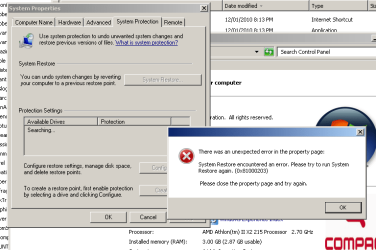
The problem as I see similar for another member is: there are only four tabs on System Properties actually working: the System Protection tab although present does not work and gives me an error when I click on sytem protection tab edit: I have just discovered that if I choose the advanced system setting I can then use the system protection restore facilty it shows my drives and I can configure and restore successfully..can anyone explain why this is so please
 

My Computer

Computer type
PC/Desktop
Computer Manufacturer/Model Number
Compaq Presario
OS
Windows 7 64 bit
Hello Artinusa,

Strange, the System Protection tab should be the same whether you opened it from the System protection link or Advanced system settings link in the System window. Could you post a screenshot of what it looks like from both locations to see what is different?
 

My Computer

Computer type
PC/Desktop
Computer Manufacturer/Model Number
Self built custom
OS
64-bit Windows 11 Pro for Workstations
CPU
Intel i7-8700K OC'd to 5 GHz
Motherboard
ASUS ROG Maximus XI Formula Z390
Memory
64 GB (4x16GB) G.SKILL TridentZ RGB DDR4 3600 MHz
Graphics Card(s)
ASUS ROG-STRIX-GTX1080TI-O11G-GAMING
Sound Card
Integrated
Monitor(s) Displays
2 x Samsung Odyssey G7 27"
Screen Resolution
2560x1440
Hard Drives
1TB Samsung 990 PRO M.2,
4TB Samsung 990 PRO PRO M.2,
TerraMaster F8 SSD Plus NAS
PSU
Seasonic Prime Titanium 850W
Case
Thermaltake Core P3
Cooling
Corsair Hydro H115i
Keyboard
Logitech wireless K800
Mouse
Logitech MX Master 4
Internet Speed
2 Gb/s Download and 100 Mb/s Upload
Antivirus
Malwarebyte Anti-Malware Premium
Browser
Google Chrome
Other Info
Logitech Z625 speaker system,
Logitech BRIO 4K Pro webcam,
HP Color LaserJet Pro MFP M477fdn,
APC SMART-UPS RT 1000 XL - SURT1000XLI,
Galaxy S23 Plus phone
Ststem protection - restore error message pics

Thanks for you extended and very helpful help

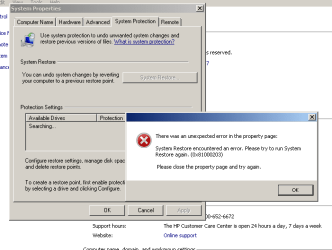
Her are pics of what happens on the two screens on the first one it sends error immediatly protection is clicked as per the white box error

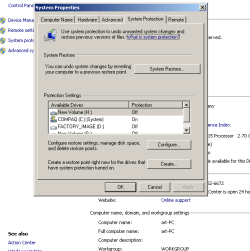
On clicking on the advanced sytem stting I get the second screen as shown whereby I can access the restore etc

Art

Not real sure of how to do this. upload but here goes.apologies if its not correct pics are in as attachment


system off clearer shot.png

system protection on.png

sytem protect screen off.png
 

My Computer

Computer type
PC/Desktop
Computer Manufacturer/Model Number
Compaq Presario
OS
Windows 7 64 bit
Art,

You might see if running a sfc /scannow command may be able to fix this for you. If not, then a repair install should be able to.
 

My Computer

Computer type
PC/Desktop
Computer Manufacturer/Model Number
Self built custom
OS
64-bit Windows 11 Pro for Workstations
CPU
Intel i7-8700K OC'd to 5 GHz
Motherboard
ASUS ROG Maximus XI Formula Z390
Memory
64 GB (4x16GB) G.SKILL TridentZ RGB DDR4 3600 MHz
Graphics Card(s)
ASUS ROG-STRIX-GTX1080TI-O11G-GAMING
Sound Card
Integrated
Monitor(s) Displays
2 x Samsung Odyssey G7 27"
Screen Resolution
2560x1440
Hard Drives
1TB Samsung 990 PRO M.2,
4TB Samsung 990 PRO PRO M.2,
TerraMaster F8 SSD Plus NAS
PSU
Seasonic Prime Titanium 850W
Case
Thermaltake Core P3
Cooling
Corsair Hydro H115i
Keyboard
Logitech wireless K800
Mouse
Logitech MX Master 4
Internet Speed
2 Gb/s Download and 100 Mb/s Upload
Antivirus
Malwarebyte Anti-Malware Premium
Browser
Google Chrome
Other Info
Logitech Z625 speaker system,
Logitech BRIO 4K Pro webcam,
HP Color LaserJet Pro MFP M477fdn,
APC SMART-UPS RT 1000 XL - SURT1000XLI,
Galaxy S23 Plus phone
Restore

I did the scannow some time ago..all was well

Sadly I do not have a restore type disc my win 7 was pre-loaded I use that term loosly as I have so many problems with the machine from HP..I may have to use the recovery disk I created and there is also a HP recovery area on the hard disc...I dont really want to do this as I have about 100GB of programs that I would lose and have to reinstall etc..since I have no back-ups I woul dhave to probable revert back to factory condition.....HP have been useless at this ...they always suggest, that since 'I have put software on the system' its not theie fault.. I ask you..?

The system is running in a way that I could accept without many basic functions working in a GUI way..

I appreciate the help this forum is providing and the quality of information streaming from it..well done sir
Art
 

My Computer

Computer type
PC/Desktop
Computer Manufacturer/Model Number
Compaq Presario
OS
Windows 7 64 bit
ART,

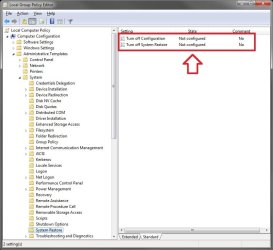
Also double check these items as well.

1. Open gpedit.msc from Start Search box.
2. Navigate to the following branch.
Computer Configuration\Administrative Template\System\System Restore.
3. In the right pane, please configure the “Turn off system restore” policy. Please set it to Not Configured.
GPEDIT.jpg

AND

1. Open Services, and make sure that the Microsoft Software Shadow Copy Provider service is not disabled and set to manual.
 

My Computer

Computer type
PC/Desktop
Computer Manufacturer/Model Number
Self built custom
OS
64-bit Windows 11 Pro for Workstations
CPU
Intel i7-8700K OC'd to 5 GHz
Motherboard
ASUS ROG Maximus XI Formula Z390
Memory
64 GB (4x16GB) G.SKILL TridentZ RGB DDR4 3600 MHz
Graphics Card(s)
ASUS ROG-STRIX-GTX1080TI-O11G-GAMING
Sound Card
Integrated
Monitor(s) Displays
2 x Samsung Odyssey G7 27"
Screen Resolution
2560x1440
Hard Drives
1TB Samsung 990 PRO M.2,
4TB Samsung 990 PRO PRO M.2,
TerraMaster F8 SSD Plus NAS
PSU
Seasonic Prime Titanium 850W
Case
Thermaltake Core P3
Cooling
Corsair Hydro H115i
Keyboard
Logitech wireless K800
Mouse
Logitech MX Master 4
Internet Speed
2 Gb/s Download and 100 Mb/s Upload
Antivirus
Malwarebyte Anti-Malware Premium
Browser
Google Chrome
Other Info
Logitech Z625 speaker system,
Logitech BRIO 4K Pro webcam,
HP Color LaserJet Pro MFP M477fdn,
APC SMART-UPS RT 1000 XL - SURT1000XLI,
Galaxy S23 Plus phone
System Protection & HP

Could the problem be an 'HP problem,' as the system on which I installed Windows 7 and had the System Protection problem was a HP Vista system (HP Pavilion Slimline PC, model n3020s) and Art's was a HP system, too?

My ultimate solution was a third clean install. :cry:

- Tom
 

My Computer

Computer Manufacturer/Model Number
HP Pavilion s3020n
OS
Windows 7
Sadly once more I do not have the gpedit.msc snap in on my machine, I searched and its not part of this system maybe becasue its a Home Premium Windows 7. Can this be done thro the registry direct?

This HP version seem to have such many facilities missing..I have set the VSS module to both manual and auto..no change..I also set the MS shadow copy facility to the same..no change..looks like if I need these services I will have to do a recovery..wish I had not bought this product now...hindsight eh..maybe I will put all these issues together and add to my blogs..lol..
 

My Computer

Computer type
PC/Desktop
Computer Manufacturer/Model Number
Compaq Presario
OS
Windows 7 64 bit
Back
Top