System Protection?

badspell68

New member
Member
VIP
Local time
4:06 PM
Messages
231
Location
PA
How does System Protection work...does it save information to a separate partition?

I have a 7gb partition on my drive that I do not know what it is for. I deleted it and was am thinking of adding it to my main C: partition. Did destroy the System Protection partition?
 

My Computer

OS
Windows 7
That partition was likely put there by the manufacturer to help you restore the PC to factory specs if you ever needed to do that.

If you in fact deleted the partition and do not have "recovery disks", you will have problems restoring to factory specs.

Do you have any install discs at all? What happens if your hard drive fails in 30 minutes?

System protection is not the same as "system restore", which you may be thinking of. System restore returns the operating system to the way it was on the date the restore point was made---typically somewhere in the last couple of weeks-----not to factory specs. System restore points are stored on your C drive along with Windows.

Can you post a screen shot of Disk Management?
 

My Computer

Computer type
PC/Desktop
Computer Manufacturer/Model Number
Ignatz Special; 4 speed manual gearbox; factory air conditioning; one of one
OS
Windows 7 Home Premium SP1, 64-bit
CPU
Intel Skylake i5-6600K, not overclocked
Motherboard
AsRock Z170M Extreme 4, micro ATX
Memory
8 GB HyperX DDR4-2666 (2 x 4 GB)
Graphics Card(s)
none; graphics are integrated on CPU
Sound Card
onboard: Realtek ALC1150; external: USB Behringer UF0-202
Monitor(s) Displays
Dell S2340M 23 inch IPS
Screen Resolution
1600 x 900
Hard Drives
System: Crucial MX100 series SSD, 128 GB;
Data: Samsung Spinpoint 103SJ, 1 TB;
Backup: WD Caviar Green WD30EZRX-00D8PB0, 3 TB
PSU
Rosewill SilentNight 500 watt fanless, semi-modular
Case
Antec Solo II
Cooling
Noctua NH-U12S; Noctua F12 intake, Noctua S12A exhaust
Keyboard
Microsoft 200 6JH-00001 USB
Mouse
Dell or Microsoft optical wired; USB
Antivirus
Microsoft Security Essentials and Malwarebytes Premium
Browser
Pale Moon
Other Info
All fans PWM; speeds at idle: CPU circa 500 rpm; intake circa 600 rpm; exhaust circa 600 rpm; CPU temps 27 idle and 47 C load in a warm room (27 C/81 F) when running Intel Extreme Tuning Utility stress test.
I have a bunch of restore disks I made from the manufactures software just after purchasing the computer, including the OS restore software, so I'm not too concerned about that. I was just wondering if the partition had anything to do with System Restore or System Protection because I would like to delete it and then ad its space to c: partition?
 

My Computer

OS
Windows 7
It has nothing to do with System Restore.

It presumably has something to do with restoring the PC to a factory state. It could be the PC manufacturer's tools of some type.

What is in it?

If you are positive you can do whatever restoration you need to do with the discs you made, then you wouldn't need it as far as I know.

How easily you can add the space to C depends on what your Disk Management picture looks like. In one case, you can do add it to C from within Windows. In another case, you would have to use a third party application.

That's why I asked to see the picture.

Your original post says you already deleted it.
 

My Computer

Computer type
PC/Desktop
Computer Manufacturer/Model Number
Ignatz Special; 4 speed manual gearbox; factory air conditioning; one of one
OS
Windows 7 Home Premium SP1, 64-bit
CPU
Intel Skylake i5-6600K, not overclocked
Motherboard
AsRock Z170M Extreme 4, micro ATX
Memory
8 GB HyperX DDR4-2666 (2 x 4 GB)
Graphics Card(s)
none; graphics are integrated on CPU
Sound Card
onboard: Realtek ALC1150; external: USB Behringer UF0-202
Monitor(s) Displays
Dell S2340M 23 inch IPS
Screen Resolution
1600 x 900
Hard Drives
System: Crucial MX100 series SSD, 128 GB;
Data: Samsung Spinpoint 103SJ, 1 TB;
Backup: WD Caviar Green WD30EZRX-00D8PB0, 3 TB
PSU
Rosewill SilentNight 500 watt fanless, semi-modular
Case
Antec Solo II
Cooling
Noctua NH-U12S; Noctua F12 intake, Noctua S12A exhaust
Keyboard
Microsoft 200 6JH-00001 USB
Mouse
Dell or Microsoft optical wired; USB
Antivirus
Microsoft Security Essentials and Malwarebytes Premium
Browser
Pale Moon
Other Info
All fans PWM; speeds at idle: CPU circa 500 rpm; intake circa 600 rpm; exhaust circa 600 rpm; CPU temps 27 idle and 47 C load in a warm room (27 C/81 F) when running Intel Extreme Tuning Utility stress test.
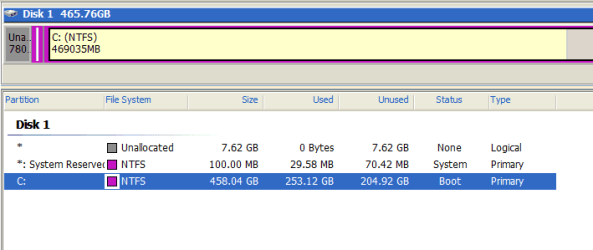
I'm using Easeus Partition Master. Here is the picture of the drive layout. The first partition is the on, I deleted all the data so it is empty now.

drive.PNG
 

My Computer

OS
Windows 7
You can add the gray "unallocated space" at the far right to C from Windows itself.

Or I assume you can do it with Easeus.
 

My Computer

Computer type
PC/Desktop
Computer Manufacturer/Model Number
Ignatz Special; 4 speed manual gearbox; factory air conditioning; one of one
OS
Windows 7 Home Premium SP1, 64-bit
CPU
Intel Skylake i5-6600K, not overclocked
Motherboard
AsRock Z170M Extreme 4, micro ATX
Memory
8 GB HyperX DDR4-2666 (2 x 4 GB)
Graphics Card(s)
none; graphics are integrated on CPU
Sound Card
onboard: Realtek ALC1150; external: USB Behringer UF0-202
Monitor(s) Displays
Dell S2340M 23 inch IPS
Screen Resolution
1600 x 900
Hard Drives
System: Crucial MX100 series SSD, 128 GB;
Data: Samsung Spinpoint 103SJ, 1 TB;
Backup: WD Caviar Green WD30EZRX-00D8PB0, 3 TB
PSU
Rosewill SilentNight 500 watt fanless, semi-modular
Case
Antec Solo II
Cooling
Noctua NH-U12S; Noctua F12 intake, Noctua S12A exhaust
Keyboard
Microsoft 200 6JH-00001 USB
Mouse
Dell or Microsoft optical wired; USB
Antivirus
Microsoft Security Essentials and Malwarebytes Premium
Browser
Pale Moon
Other Info
All fans PWM; speeds at idle: CPU circa 500 rpm; intake circa 600 rpm; exhaust circa 600 rpm; CPU temps 27 idle and 47 C load in a warm room (27 C/81 F) when running Intel Extreme Tuning Utility stress test.
How would I do it from within windows?

Thanks!
 

My Computer

OS
Windows 7
and the partition space is listed as un-allocated...so, will I still be able to ad it to c: or will I have to allocate it?
 

My Computer

OS
Windows 7
go to disk management

right click your C partition and you should see a choice for expand. Actually, I think it is called "extend".
 

My Computer

Computer type
PC/Desktop
Computer Manufacturer/Model Number
Ignatz Special; 4 speed manual gearbox; factory air conditioning; one of one
OS
Windows 7 Home Premium SP1, 64-bit
CPU
Intel Skylake i5-6600K, not overclocked
Motherboard
AsRock Z170M Extreme 4, micro ATX
Memory
8 GB HyperX DDR4-2666 (2 x 4 GB)
Graphics Card(s)
none; graphics are integrated on CPU
Sound Card
onboard: Realtek ALC1150; external: USB Behringer UF0-202
Monitor(s) Displays
Dell S2340M 23 inch IPS
Screen Resolution
1600 x 900
Hard Drives
System: Crucial MX100 series SSD, 128 GB;
Data: Samsung Spinpoint 103SJ, 1 TB;
Backup: WD Caviar Green WD30EZRX-00D8PB0, 3 TB
PSU
Rosewill SilentNight 500 watt fanless, semi-modular
Case
Antec Solo II
Cooling
Noctua NH-U12S; Noctua F12 intake, Noctua S12A exhaust
Keyboard
Microsoft 200 6JH-00001 USB
Mouse
Dell or Microsoft optical wired; USB
Antivirus
Microsoft Security Essentials and Malwarebytes Premium
Browser
Pale Moon
Other Info
All fans PWM; speeds at idle: CPU circa 500 rpm; intake circa 600 rpm; exhaust circa 600 rpm; CPU temps 27 idle and 47 C load in a warm room (27 C/81 F) when running Intel Extreme Tuning Utility stress test.
There is only an option to "shrink"...could this be because the empty space is not allocated?
 
Last edited:

My Computer

OS
Windows 7
The Unallocated isn't the grey (unused space) at end of C, but on the far left side of the System Reserved boot partition.

Make sure you have a Win7 DVD or Repair CD standing by in case repairs need to be made to boot sector after resizing. Back up your files and a Win7 backup image externally.
http://www.sevenforums.com/tutorials/2083-system-repair-disc-create.html
http://www.sevenforums.com/tutorials/663-backup-complete-computer-create-image-backup.html

To recover the space into C, use free Partition Wizard bootable CD, rightclick 100mb System Reserved partition, select Resize, grab and drag whole partition intact to the far left, click OK. Make sure it stays exactly the same size.

Next rightclick C, select Resize, drag left grey border to the left to take up space made by moving 100mb partition, OK, Apply all Steps.

If WIn7 fails to start, boot WIn7 DVD Repair Console or Repair CD to run Startup Repair up to 3 separate times with reboots to repair the System MBR: http://www.sevenforums.com/tutorials/105541-startup-repair-run-3-separate-times.html
 
Hi, badspell68 you have deleted your Factory Image. If I were you I would start looking for a tutorial to make changes to that partition and combine it with your "C" drive. Hope this helps.
 

My Computer

Computer Manufacturer/Model Number
HP Pavilion Elite HPE
OS
Windows 7 Home Premium x64
CPU
3.33 gigahertz Intel Core i7 975; 32 kilobyte primary memory
Motherboard
Board: PEGATRON CORPORATION TRUCKEE 1.04E01
Memory
12280 Megabytes Usable Installed Memory
Graphics Card(s)
ATI Radeon HD 4800 Series [Display adapter]
Sound Card
ATI High Definition Audio Device
Monitor(s) Displays
ATV AT240HP [Monitor] (23.6"vis, s/n AT936M1001155, Septembe
Hard Drives
ST31500341AS [Hard drive] (1500.30 GB) -- drive 0, s/n 9VS2P2Z3, SMART Status: Healthy
7200 RPM
Case
Tower
Keyboard
Wireless
Mouse
Wireless
Internet Speed
Broadband 6-10 MB/s
Other Info
Windows Experience Index (WEI) 5.9, based upon Hard Drive
Hi, badspell68 you have deleted your Factory Image. If I were you I would start looking for a tutorial to make changes to that partition and combine it with your "C" drive. Hope this helps.

The steps are given just above your post.
 
Back
Top