System Reserved HD?

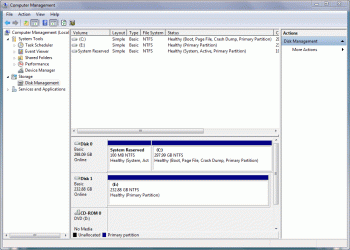
I plugged the other HD in and while I had the case open I checked to see which SATA plugs they were in - C drive is in SATA_0 and the second HD is in SATA_1. The second HD shows up as drive F.
 

Attachments

  • systemreserved4.gif
    systemreserved4.gif
    51.7 KB · Views: 12

My Computer

OS
Windows 7 Home Premium
CPU
Intel Q6600 SLACR (2.7GHz)
Motherboard
Gigabyte P35-DS4 (Rev 2.1)
Memory
8GB G.SKILL PC6400
Graphics Card(s)
ASUS EN9600GSO GeForce 9600 GSO 512MB
Monitor(s) Displays
LG W2252TQ 22" Widescreen
Screen Resolution
1680 x 1050
Hard Drives
2 x SeaGate Barracuda SATA (250GB, 320GB)
PSU
PCP&C Silencer 610
Case
Ultra m998
Cooling
ThermalRight Ultra 120E
Keyboard
Logitech K360
Mouse
Logitech Performance MX
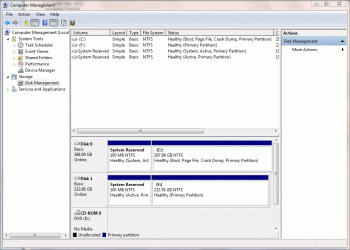
I deleted the two partitions on the second HD and then did a quick format. Here's what it looks like now...
 

Attachments

  • systemreserved5.gif
    systemreserved5.gif
    52.4 KB · Views: 13

My Computer

OS
Windows 7 Home Premium
CPU
Intel Q6600 SLACR (2.7GHz)
Motherboard
Gigabyte P35-DS4 (Rev 2.1)
Memory
8GB G.SKILL PC6400
Graphics Card(s)
ASUS EN9600GSO GeForce 9600 GSO 512MB
Monitor(s) Displays
LG W2252TQ 22" Widescreen
Screen Resolution
1680 x 1050
Hard Drives
2 x SeaGate Barracuda SATA (250GB, 320GB)
PSU
PCP&C Silencer 610
Case
Ultra m998
Cooling
ThermalRight Ultra 120E
Keyboard
Logitech K360
Mouse
Logitech Performance MX
Yes, of course that will work.

It's only any use to do it that way if you don't need the data on any of the partitions you are deleting.

I think it was assumed you had stuff on F you wanted to keep.
 

My Computers

System One System Two

  • Computer type
    PC/Desktop
    OS
    7 X64
    CPU
    i5 8400
    Motherboard
    gigabyte b365m ds3h
    Memory
    2x8gb 3200mhz
    Hard Drives
    various
    PSU
    pure power 11 400w cm
    Case
    Coolermaster
    Cooling
    cryorig m9i
  • Computer type
    PC/Desktop
    OS
    7x64
    CPU
    g5400
    Motherboard
    ga b365m ds3h
    Memory
    8gb ddr4 2400
    PSU
    xfx pro 450w
System Reserved

I recently installed a brand new hard drive in my system.

I want to take the old hard drive and pull data off it to use in a hard drive enclosure, but when I put it in the system, it comes up as system reserved. How do I get access to the data on the old drive?

I can put it in the system as normal SATA if need be.

Thanks.
 

My Computer

OS
CT
So you installed an os with your old drive disconnected, correct ?
And now when you add the old drive back to your new install it is not installing the drivers and opening autoplay to explore the drive ?

Also, you should have started a new thread.
 

My Computer

Computer type
PC/Desktop
Computer Manufacturer/Model Number
Skylake Special #666
OS
Windows 10 Pro x64
CPU
Intel Core i7 6700K
Motherboard
Asus Sabertooth Z170 Mark 1
Memory
GSkill TridentZ RGB 16GB 3600 16-16-16-36
Graphics Card(s)
EVGA GTX 980 Ti SC x2
Sound Card
Realtek High Definition
Monitor(s) Displays
AOC G2460PG
Screen Resolution
1920 x 1080 144Hz
Hard Drives
Samsung 860 Pro 256GB, Seagate Barracuda 4TB x2
PSU
EVGA 1000 P2, EVGA White Custom Braided Cables
Case
Corsair Vengeance C70 Gunmetal Black
Cooling
Corsair H100i v2, Corsair ML120 x2, Thermal Grizzly Kryonaut
Keyboard
Logitech G910 Orion Spectrum
Mouse
Logitech G700s
Internet Speed
Verizon Fios Quantum Gateway 75/75
Antivirus
Windows Defender, Malwarebytes Free 3.8.3
Browser
Chrome
Other Info
Corsair SP120 x4, LG Blu-ray Drive, Durabrand HT-395 100 Watt Dolby Digital Amp, Corsair H2100 Wireless 7.1 Headset
Slave the old HD to the new System which I assume you've installed an OS on.

Then access the data via Explorer to copy it out. The correct way to remove the old OS and it's System Reserved partition is to Delete in Disk Mgmt. To get it even cleaner wipe the HD with Diskpart Clean Command .

As long as you don't have the old HD set first to boot, it shouldn't try to boot it.
 
Well, I did do a totally clean install with the old hard drive disconnected. If try to use explorer and copy stuff it won't let me...seems as if it's not there....but if I put that drive in as the main drive by itself everything is
 

My Computer

OS
CT
With all drives attached, please post back a screenshot of your maximized Disk Management drive map and listings:

1. Type Disk Management in Start Search box.
2. Open Disk Mgmt window and maximize it, spread column headers so all listings are readable.
3. Type Snipping Tool in Start Search box.
4. Open Snipping Tool, choose Rectangular Snip, draw a box around full map and all listings.
5, Save Snip, attach using paper clip in Reply Box.

Tell us what is on each partition.
 
That isn't the other HD, but the System Reserved partition on your new install. So that answers one question.

Can you plug the old install into another SATA or IDE port? When you do does it show up in BIOS setup?

Maybe it is installed in IDE instead of AHCI mode or vice versa? This could explain why it won't show up.

But if nothing becomes clear since you can boot it and access it otherwise you can copy out the data using Copy & Paste - in Windows Recovery Console, then wipe the HD using Diskpart Clean Command to repartition in Disk Mgmt, use as data drive.
 
Well, i threw the old install in a usb 2.0 hard drive enclosure should I try attaching it via SATA directly to the motherboard?? Tonight, I don't have time to do any more than I have, but maybe Sunday.
 

My Computer

OS
CT
Yeah the USB converter is not working correctly which does happen. Have you tried this converter on another HD successfully before? Are you using USB 2.0?

You can plug it in via SATA to use as a storage drive, copy out the files, boot the old install, or when ready wipe the old HD to repatition it to use for storage. Wiping it and fresh formatting may get the USB working, too. If not we'll help you get it working.
 
Well, I'd like to get some data off the old hard drive first before totally formatting it
 

My Computer

OS
CT
Then I'd slave it via SATA or boot it to copy out the data. Is this a desktop with another SATA port?
 
Yes, its a desktop...but I tried to copy data last week and for some reason it wouldnt let me....should I have it as a master or slave on the drive pins?
 

My Computer

OS
CT
If it's SATA there's no master/slave just plug it into next available port.

If it's IDE set it as slave with HD as master, is best, unless there's another port for a ribbon cable.
 
It's SATA...I'll try it again Sunday and see what happens...
 

My Computer

OS
CT
Back
Top