System Reserved HD?

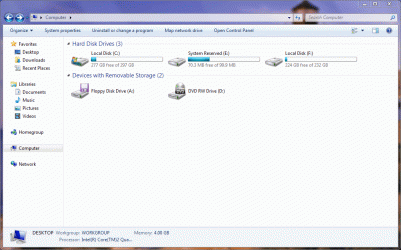
Another odd thing this time around is that in My Computer the reserved now appears as a drive with a drive letter.
 

Attachments

  • mycomputer.gif
    mycomputer.gif
    64.3 KB · Views: 10

My Computer

OS
Windows 7 Home Premium
CPU
Intel Q6600 SLACR (2.7GHz)
Motherboard
Gigabyte P35-DS4 (Rev 2.1)
Memory
8GB G.SKILL PC6400
Graphics Card(s)
ASUS EN9600GSO GeForce 9600 GSO 512MB
Monitor(s) Displays
LG W2252TQ 22" Widescreen
Screen Resolution
1680 x 1050
Hard Drives
2 x SeaGate Barracuda SATA (250GB, 320GB)
PSU
PCP&C Silencer 610
Case
Ultra m998
Cooling
ThermalRight Ultra 120E
Keyboard
Logitech K360
Mouse
Logitech Performance MX
thats alright thats easily fixed, go t your start menu and right click Computer, then click manage, when the window opens, click "Disk Management", right click the System Reserved Partition and then go "add or remove a drive letter" (might just be called drive letters cant remember =/ and im at work and cant check) when the window comes up, select the letter and then just press remove.
 

My Computer

Computer type
PC/Desktop
Computer Manufacturer/Model Number
Medion Erazer (note to self: insert model number) - with custom additions
OS
Windows 10 Pro x64
CPU
Intel Core i5 7400 @ 3.00GHz
Motherboard
OEM supllied with PC
Memory
8GB 2133Mhz DDR4 (OEM supplied)
Graphics Card(s)
Gygabyte Windforce GTX 1050Ti (Factory Overclocked)
Sound Card
Realtek
Monitor(s) Displays
Acer Al1980 + HKC
Screen Resolution
1360*768(HKC) / 1280*1024(Acer)
Hard Drives
1TB Toshiba
1TB WD Caviar Green
120GB Samsung Evo 840
PSU
OEM supplied (no power rating on case)
Case
OEM Supplied
Cooling
Stock
Keyboard
Logitech Wireless
Mouse
Logitect Wireless
Internet Speed
40Mb/s Down 10Mb/s Up
Antivirus
Defender
Browser
Firefox
Martin, thanks for the tip. Now to just figure out why the OS made a system reserved on the other HD. Maybe that's just a normal thing for Win7?
 

My Computer

OS
Windows 7 Home Premium
CPU
Intel Q6600 SLACR (2.7GHz)
Motherboard
Gigabyte P35-DS4 (Rev 2.1)
Memory
8GB G.SKILL PC6400
Graphics Card(s)
ASUS EN9600GSO GeForce 9600 GSO 512MB
Monitor(s) Displays
LG W2252TQ 22" Widescreen
Screen Resolution
1680 x 1050
Hard Drives
2 x SeaGate Barracuda SATA (250GB, 320GB)
PSU
PCP&C Silencer 610
Case
Ultra m998
Cooling
ThermalRight Ultra 120E
Keyboard
Logitech K360
Mouse
Logitech Performance MX
nope :shock: I have an almost identical setup to you HDD wise and mine is where it is supposed to be, If I were to take a guess I would say that either, at some point you had vista on the other HDD and it confused 7, or the HDD was plugged into SATA port 0 at installation.... then again it could just be Windows being "creative" it seems to do that alot
 

My Computer

Computer type
PC/Desktop
Computer Manufacturer/Model Number
Medion Erazer (note to self: insert model number) - with custom additions
OS
Windows 10 Pro x64
CPU
Intel Core i5 7400 @ 3.00GHz
Motherboard
OEM supllied with PC
Memory
8GB 2133Mhz DDR4 (OEM supplied)
Graphics Card(s)
Gygabyte Windforce GTX 1050Ti (Factory Overclocked)
Sound Card
Realtek
Monitor(s) Displays
Acer Al1980 + HKC
Screen Resolution
1360*768(HKC) / 1280*1024(Acer)
Hard Drives
1TB Toshiba
1TB WD Caviar Green
120GB Samsung Evo 840
PSU
OEM supplied (no power rating on case)
Case
OEM Supplied
Cooling
Stock
Keyboard
Logitech Wireless
Mouse
Logitect Wireless
Internet Speed
40Mb/s Down 10Mb/s Up
Antivirus
Defender
Browser
Firefox
Nope, never had Vista. I had Windows XP Home before. So what is "where it is supposed to be" look like?
 

My Computer

OS
Windows 7 Home Premium
CPU
Intel Q6600 SLACR (2.7GHz)
Motherboard
Gigabyte P35-DS4 (Rev 2.1)
Memory
8GB G.SKILL PC6400
Graphics Card(s)
ASUS EN9600GSO GeForce 9600 GSO 512MB
Monitor(s) Displays
LG W2252TQ 22" Widescreen
Screen Resolution
1680 x 1050
Hard Drives
2 x SeaGate Barracuda SATA (250GB, 320GB)
PSU
PCP&C Silencer 610
Case
Ultra m998
Cooling
ThermalRight Ultra 120E
Keyboard
Logitech K360
Mouse
Logitech Performance MX
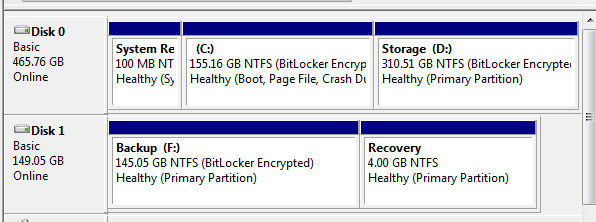
The 100MB partition will ususally end up on the Port 0 disk.
 

My Computer

Computer Manufacturer/Model Number
HP, Dell, Gateway, Toshiba - 4 laptops and 2 desktops
OS
Vista, Windows7, Mint Mate, Zorin, Windows 8
CPU
from 1.6GHz Duo to i7
Monitor(s) Displays
2x HP w2207
Hard Drives
5x HDD, 7x SSD, 12x Externals
Keyboard
with trackball - no mices
Mouse
Trackball mice
Internet Speed
DSL 6000
here's mine, as you can see System Reserved is on Port 0
management.PNG

silly question (or not maybe) but did you delete the System reserved from the HDD on port 1 after you plugged it back in?
 

My Computer

Computer type
PC/Desktop
Computer Manufacturer/Model Number
Medion Erazer (note to self: insert model number) - with custom additions
OS
Windows 10 Pro x64
CPU
Intel Core i5 7400 @ 3.00GHz
Motherboard
OEM supllied with PC
Memory
8GB 2133Mhz DDR4 (OEM supplied)
Graphics Card(s)
Gygabyte Windforce GTX 1050Ti (Factory Overclocked)
Sound Card
Realtek
Monitor(s) Displays
Acer Al1980 + HKC
Screen Resolution
1360*768(HKC) / 1280*1024(Acer)
Hard Drives
1TB Toshiba
1TB WD Caviar Green
120GB Samsung Evo 840
PSU
OEM supplied (no power rating on case)
Case
OEM Supplied
Cooling
Stock
Keyboard
Logitech Wireless
Mouse
Logitect Wireless
Internet Speed
40Mb/s Down 10Mb/s Up
Antivirus
Defender
Browser
Firefox
silly question (or not maybe) but did you delete the System reserved from the HDD on port 1 after you plugged it back in?

No. I was going to format the disc after I got back on the desktop, but I haven't yet.
 

My Computer

OS
Windows 7 Home Premium
CPU
Intel Q6600 SLACR (2.7GHz)
Motherboard
Gigabyte P35-DS4 (Rev 2.1)
Memory
8GB G.SKILL PC6400
Graphics Card(s)
ASUS EN9600GSO GeForce 9600 GSO 512MB
Monitor(s) Displays
LG W2252TQ 22" Widescreen
Screen Resolution
1680 x 1050
Hard Drives
2 x SeaGate Barracuda SATA (250GB, 320GB)
PSU
PCP&C Silencer 610
Case
Ultra m998
Cooling
ThermalRight Ultra 120E
Keyboard
Logitech K360
Mouse
Logitech Performance MX
aha thats why :cool: you can ignore the System Reserved on HDD port 1 thats the one that was causing you the issues to start off with, the one on HDD port 0 is the one you need to keep
 

My Computer

Computer type
PC/Desktop
Computer Manufacturer/Model Number
Medion Erazer (note to self: insert model number) - with custom additions
OS
Windows 10 Pro x64
CPU
Intel Core i5 7400 @ 3.00GHz
Motherboard
OEM supllied with PC
Memory
8GB 2133Mhz DDR4 (OEM supplied)
Graphics Card(s)
Gygabyte Windforce GTX 1050Ti (Factory Overclocked)
Sound Card
Realtek
Monitor(s) Displays
Acer Al1980 + HKC
Screen Resolution
1360*768(HKC) / 1280*1024(Acer)
Hard Drives
1TB Toshiba
1TB WD Caviar Green
120GB Samsung Evo 840
PSU
OEM supplied (no power rating on case)
Case
OEM Supplied
Cooling
Stock
Keyboard
Logitech Wireless
Mouse
Logitect Wireless
Internet Speed
40Mb/s Down 10Mb/s Up
Antivirus
Defender
Browser
Firefox
But the C drive is the one I want to keep, right? That's on Disk 1, not Disk 0.
 

My Computer

OS
Windows 7 Home Premium
CPU
Intel Q6600 SLACR (2.7GHz)
Motherboard
Gigabyte P35-DS4 (Rev 2.1)
Memory
8GB G.SKILL PC6400
Graphics Card(s)
ASUS EN9600GSO GeForce 9600 GSO 512MB
Monitor(s) Displays
LG W2252TQ 22" Widescreen
Screen Resolution
1680 x 1050
Hard Drives
2 x SeaGate Barracuda SATA (250GB, 320GB)
PSU
PCP&C Silencer 610
Case
Ultra m998
Cooling
ThermalRight Ultra 120E
Keyboard
Logitech K360
Mouse
Logitech Performance MX
woops sorry i got my wires crossed a bit there :o just so im clear

Disk 1 was the only hard drive plugged in when you installed?
then you plugged disk 0 in, which was the one that had the original system reserved on it?

If so then delete the one on disk 0 NOT on disk 1
 

My Computer

Computer type
PC/Desktop
Computer Manufacturer/Model Number
Medion Erazer (note to self: insert model number) - with custom additions
OS
Windows 10 Pro x64
CPU
Intel Core i5 7400 @ 3.00GHz
Motherboard
OEM supllied with PC
Memory
8GB 2133Mhz DDR4 (OEM supplied)
Graphics Card(s)
Gygabyte Windforce GTX 1050Ti (Factory Overclocked)
Sound Card
Realtek
Monitor(s) Displays
Acer Al1980 + HKC
Screen Resolution
1360*768(HKC) / 1280*1024(Acer)
Hard Drives
1TB Toshiba
1TB WD Caviar Green
120GB Samsung Evo 840
PSU
OEM supplied (no power rating on case)
Case
OEM Supplied
Cooling
Stock
Keyboard
Logitech Wireless
Mouse
Logitect Wireless
Internet Speed
40Mb/s Down 10Mb/s Up
Antivirus
Defender
Browser
Firefox
Disk 1 was the only hard drive plugged in when you installed? Then you plugged disk 0 in, which was the one that had the original system reserved on it?

Yes to both. Now do I right click on it in Disk Management and delete it, or format it?
 

My Computer

OS
Windows 7 Home Premium
CPU
Intel Q6600 SLACR (2.7GHz)
Motherboard
Gigabyte P35-DS4 (Rev 2.1)
Memory
8GB G.SKILL PC6400
Graphics Card(s)
ASUS EN9600GSO GeForce 9600 GSO 512MB
Monitor(s) Displays
LG W2252TQ 22" Widescreen
Screen Resolution
1680 x 1050
Hard Drives
2 x SeaGate Barracuda SATA (250GB, 320GB)
PSU
PCP&C Silencer 610
Case
Ultra m998
Cooling
ThermalRight Ultra 120E
Keyboard
Logitech K360
Mouse
Logitech Performance MX
Maybe I am wrong, but as I see it your MBR is on the System reserved partition on disk 0. If you delete it, you can't boot.
 

My Computer

Computer Manufacturer/Model Number
HP, Dell, Gateway, Toshiba - 4 laptops and 2 desktops
OS
Vista, Windows7, Mint Mate, Zorin, Windows 8
CPU
from 1.6GHz Duo to i7
Monitor(s) Displays
2x HP w2207
Hard Drives
5x HDD, 7x SSD, 12x Externals
Keyboard
with trackball - no mices
Mouse
Trackball mice
Internet Speed
DSL 6000
Attached Thumbnails

He reinstalled earlier to DISK1 with DISK0 unplugged, then plugged DISK0 back in.

I suggest you power down and unplug DISK0 again to make sure DISK1 will definitely start on its own.

Then you can plug DISK0 back in and delete or format System Reserved partition on DISK0 in Disk Management, if it will allow it. If not, we can give you commands to type to use to force its deletion.
 
I unplugged my other HD and the computer fired up without any problems. I don't know if the numbers changed because the other HD isn't there anymore, but C drive is now Disk 0 in the screenshot...
 

Attachments

  • systemreserved3.gif
    systemreserved3.gif
    47.2 KB · Views: 6

My Computer

OS
Windows 7 Home Premium
CPU
Intel Q6600 SLACR (2.7GHz)
Motherboard
Gigabyte P35-DS4 (Rev 2.1)
Memory
8GB G.SKILL PC6400
Graphics Card(s)
ASUS EN9600GSO GeForce 9600 GSO 512MB
Monitor(s) Displays
LG W2252TQ 22" Widescreen
Screen Resolution
1680 x 1050
Hard Drives
2 x SeaGate Barracuda SATA (250GB, 320GB)
PSU
PCP&C Silencer 610
Case
Ultra m998
Cooling
ThermalRight Ultra 120E
Keyboard
Logitech K360
Mouse
Logitech Performance MX
OK You can plug the other HD back in now to delete it and repartition as you want, then format.

Make sure you verify that you are deleting the correct HD in Disk Management.

If it won't delete because it thinks the 100mb SysReserved partition is still active, let us know and we will give you DISKPART commands to force delete it and clean the HD at the same time if you want.
 
OK You can plug the other HD back in now to delete it and repartition as you want, then format.

Why delete, partition, then format? Why not simply right-click choose format?
 

My Computer

OS
Windows 7 Home Premium
CPU
Intel Q6600 SLACR (2.7GHz)
Motherboard
Gigabyte P35-DS4 (Rev 2.1)
Memory
8GB G.SKILL PC6400
Graphics Card(s)
ASUS EN9600GSO GeForce 9600 GSO 512MB
Monitor(s) Displays
LG W2252TQ 22" Widescreen
Screen Resolution
1680 x 1050
Hard Drives
2 x SeaGate Barracuda SATA (250GB, 320GB)
PSU
PCP&C Silencer 610
Case
Ultra m998
Cooling
ThermalRight Ultra 120E
Keyboard
Logitech K360
Mouse
Logitech Performance MX
Don't you want a partition bigger than 100mb there?

Is there data on the other partition F: on that HD?

If so, your choices are:

1) move any data off, delete both partitions, repartition the HD as you want, then move the data back in, or

2) delete the 100mb Sys Reserved partition, then use free Partition Wizard bootable CD to Resize F: to its left into the deleted 100mb space so that you have that partition occupying the entire HD.

Perhaps if you tell us exactly what you want on that HD, we can give you the steps.
 
I thought when you format it you could choose the size you want. Maybe I was mistaken? I just want a full HD without any reserved crap. I was going to make it a scratch disk for Photoshop and perhaps store extra stuff on it.
 

My Computer

OS
Windows 7 Home Premium
CPU
Intel Q6600 SLACR (2.7GHz)
Motherboard
Gigabyte P35-DS4 (Rev 2.1)
Memory
8GB G.SKILL PC6400
Graphics Card(s)
ASUS EN9600GSO GeForce 9600 GSO 512MB
Monitor(s) Displays
LG W2252TQ 22" Widescreen
Screen Resolution
1680 x 1050
Hard Drives
2 x SeaGate Barracuda SATA (250GB, 320GB)
PSU
PCP&C Silencer 610
Case
Ultra m998
Cooling
ThermalRight Ultra 120E
Keyboard
Logitech K360
Mouse
Logitech Performance MX
You will need to delete the 100mb partition to create unallocated space.

Then use PW to extend your large partition to the left to incorporate that unallocated space.

PW can't merge two existing partitions.
 

My Computers

System One System Two

  • Computer type
    PC/Desktop
    OS
    7 X64
    CPU
    i5 8400
    Motherboard
    gigabyte b365m ds3h
    Memory
    2x8gb 3200mhz
    Hard Drives
    various
    PSU
    pure power 11 400w cm
    Case
    Coolermaster
    Cooling
    cryorig m9i
  • Computer type
    PC/Desktop
    OS
    7x64
    CPU
    g5400
    Motherboard
    ga b365m ds3h
    Memory
    8gb ddr4 2400
    PSU
    xfx pro 450w
Back
Top