
System Reserved Partition - Delete

How to Remove the 100MB "System Reserved" Partition in Windows 7


   Information
The 100 MB System Reserved partition is included when doing a clean install of Windows 7 on an unallocated disk. The System Reserved partition serves two functions. First, it holds the Boot Manager code and the Boot Configuration Database. Second, it reserves space for the startup files required by the BitLocker Drive Encryption feature. If you ever decide to encrypt your system drive using BitLocker, you won’t have to repartition your system drive to make it possible.

This tutorial will show you how to delete the 100MB System Reserved partition created during the installation of Windows 7.


   Warning
This involves deleting the boot partition, then repairing. Failure to follow these instructions exactly may leave your computer in a non-bootable state.
   Note

  • Make sure the C drive is a Primary partition before you begin. Type diskmgmt.msc into the start menu to access the above window.
  • You must have a Windows 7 Installation or Repair disc to do this. If you do not have a DVD, you can create a Repair Disc.
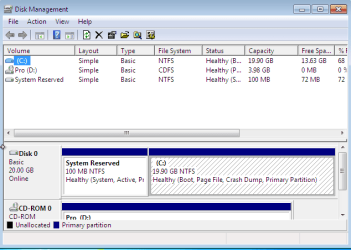
EXAMPLE: 100 MB System Reserved Partition
Capture.PNG

Here's How:

   Note
Press enter between each of these commands.

1. Boot from your installation or repair disc.

2. When you get to the language screen, press Shift+F10.
Capture1.PNG
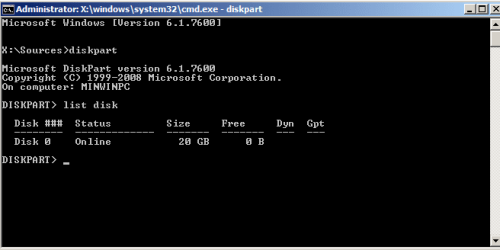
3. Enter diskpart, then list disk after diskpart is loaded.
Capture2.PNG
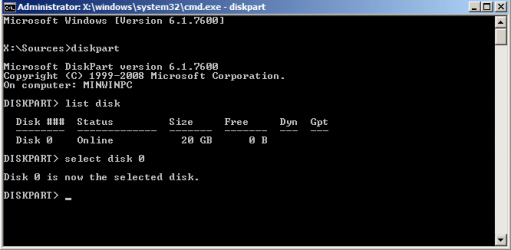
4. Enter select disk [Windows disk number].
Capture3.PNG
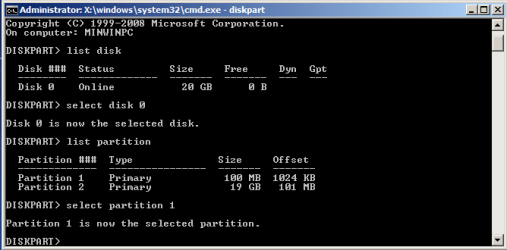
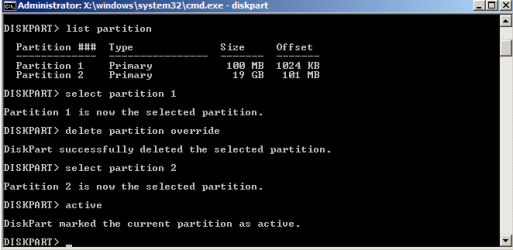
5. Enter list partition, followed by select partition [100MB partition number].
Capture4.PNG
6. Enter delete partition override.

7. Enter select partition [Windows partition from step 5], then enter active.
Capture5.PNG
8. Close the command prompt.
We have deleted the partition, and Windows will be unable to boot at this point. Now it is time to write a new boot loader and BCD to the Windows partition.
9. Follow the instructions in Brink's tutorial for running a startup repair.
That should do it! If you have any problems, feel free to ask for help below.


Last edited by a moderator:
I thought the 1MB indicated a dynamic disk. Unfortunately your disk is dynamic.
It should be made "Basic" again.
See this tutorial
http://www.sevenforums.com/tutorials/26829-convert-dynamic-disk-basic-disk.html
Using free Partition Wizard 4.2 (NOT free 5.2) is the easiest way to convert and retain your data.
Note: Back everything up. Anticipate the worst when you do any partition operation.
PW 4.2 link courtesy JK.
http://cid-24a0e9031e104daf.skydrive.live.com/self.aspx/.Public/partition%20wizard%204.2%20free.zip
 

My Computer

Computer type
PC/Desktop
Computer Manufacturer/Model Number
Own build
OS
Windows 7x64 Home Premium SP1
CPU
Intel i7 2600k
Motherboard
ASUS P8Z68 Deluxe
Memory
G.Skill Ripjaws (DDR3-1600) 2x4GB
Graphics Card(s)
Nvidia GeForce GTS 450; Intel HD Graphics 3000(GT2+)
Monitor(s) Displays
Dell Ultrasharp IPS panel U2311H, Samsung SyncMaster P2350
Screen Resolution
1920x1080
Hard Drives
Samsung 850 Pro SSD 256GB, Samsung SSD 840 120GB, Seagates 1TB Barracuda ST31000528AS x2
PSU
Seasonic M12II 520W
Case
Lian Li Lancool PC-K60
Cooling
Case: 1x120mm, 3x140mm CPU: Hyper 212+
Keyboard
Logitech MK520 (wireless)
Mouse
Logitech MK520
Internet Speed
6-7 Mbps
Antivirus
Norton Security Premium, Malwarebytes on 2 (MSE on 3rd PC)
Browser
FireFox
Other Info
Audio: Logitech Z523 2.1
hi guys thanks for this post i have successfully deleted system partition but now after restarting my pc i am getting "ntldr missing" error at boot up..... please help.... i tryied system repair it shows it has repaired th problem but after restart i again get the same error....:confused:
 

My Computer

Computer Manufacturer/Model Number
kobain
OS
window 7 professional 32 bit
CPU
intel dual core
Motherboard
simmtronics
Memory
1gb
Graphics Card(s)
intel g33 express
Sound Card
realtek
Monitor(s) Displays
dell
Hard Drives
seagate

My Computer

Computer Manufacturer/Model Number
Custom
OS
Windows 7 Professional x64
CPU
Intel i7 2600K OC'd @ 4620 MHz
Motherboard
Asus P8Z68-V Pro
Memory
16GB GSkill Sniper 2133 Mhz (4x4GB)
Graphics Card(s)
EVGA GeForce GTX 480 SuperClocked+
Sound Card
Realtek High Definition Audio
Monitor(s) Displays
2x Acer S273HLbmii 27"
Screen Resolution
2 x 1920x1080
Hard Drives
64GB Crucial M4 SSD

Storage: Hitachi 1TB 5400RPM, Samsung 1.5TB 5400RPM
PSU
Corsair HW Series 750w (modular)
Case
Cooler Master HAF 932 Advanced Blue Edition
Cooling
CM Hyper 212+ CPU cooler, 3x 230mm + 1x 140mm case fans
Keyboard
Logitech MK320 (wireless)
Mouse
Logitech MK320 (wireless)
Internet Speed
30 Mb/s : 2 Mb/s
thnX ffrnd now i am in actually i ran system repair three times and it solved the problem....

thnx again....:D:)
 

My Computer

Computer Manufacturer/Model Number
kobain
OS
window 7 professional 32 bit
CPU
intel dual core
Motherboard
simmtronics
Memory
1gb
Graphics Card(s)
intel g33 express
Sound Card
realtek
Monitor(s) Displays
dell
Hard Drives
seagate
I deleted the system reserve with acrinis backup and restore CD then I made the windows partition active. I rebooted and got bootmgr missing ctrl alt del
 

My Computer

OS
Windows 7 ultimate x64
CPU
amd sempron 145
Motherboard
ASrock N68c-S FX
Memory
2 gb ddr 2 pc2 - 8500 @333mhz
Graphics Card(s)
nvidia geforce 8400 gs 512 mb
Hard Drives
2 x 500 gb 7200 rpm Seagates
PSU
500 w
Hello Nate, and welcome to Seven Forums.

Deleting the "System Reserved" partition also deletes the bootmgr that was on that partition. Running startup repair at boot on your Windows 7 partition should be able to fix this for you. You may need to run it more than once though. :)

Hope this helps,
Shawn
 

My Computer

Computer type
PC/Desktop
Computer Manufacturer/Model Number
Self built custom
OS
64-bit Windows 11 Pro for Workstations
CPU
Intel i7-8700K OC'd to 5 GHz
Motherboard
ASUS ROG Maximus XI Formula Z390
Memory
64 GB (4x16GB) G.SKILL TridentZ RGB DDR4 3600 MHz
Graphics Card(s)
ASUS ROG-STRIX-GTX1080TI-O11G-GAMING
Sound Card
Integrated
Monitor(s) Displays
2 x Samsung Odyssey G7 27"
Screen Resolution
2560x1440
Hard Drives
1TB Samsung 990 PRO M.2,
4TB Samsung 990 PRO PRO M.2,
TerraMaster F8 SSD Plus NAS
PSU
Seasonic Prime Titanium 850W
Case
Thermaltake Core P3
Cooling
Corsair Hydro H115i
Keyboard
Logitech wireless K800
Mouse
Logitech MX Master 4
Internet Speed
2 Gb/s Download and 100 Mb/s Upload
Antivirus
Malwarebyte Anti-Malware Premium
Browser
Google Chrome
Other Info
Logitech Z625 speaker system,
Logitech BRIO 4K Pro webcam,
HP Color LaserJet Pro MFP M477fdn,
APC SMART-UPS RT 1000 XL - SURT1000XLI,
Galaxy S23 Plus phone
\boot\bcd
0xc000000f

I've been using wondershare live boot 2012 after following your instructions. Only because I dont have a windows startup disc. And I've long since lost my installation disc. Any alternatives in wonder share that anybody knows of?
 

My Computer

OS
Windows 7 ultimate x64
CPU
amd sempron 145
Motherboard
ASrock N68c-S FX
Memory
2 gb ddr 2 pc2 - 8500 @333mhz
Graphics Card(s)
nvidia geforce 8400 gs 512 mb
Hard Drives
2 x 500 gb 7200 rpm Seagates
PSU
500 w

My Computer

Computer type
PC/Desktop
Computer Manufacturer/Model Number
Self built custom
OS
64-bit Windows 11 Pro for Workstations
CPU
Intel i7-8700K OC'd to 5 GHz
Motherboard
ASUS ROG Maximus XI Formula Z390
Memory
64 GB (4x16GB) G.SKILL TridentZ RGB DDR4 3600 MHz
Graphics Card(s)
ASUS ROG-STRIX-GTX1080TI-O11G-GAMING
Sound Card
Integrated
Monitor(s) Displays
2 x Samsung Odyssey G7 27"
Screen Resolution
2560x1440
Hard Drives
1TB Samsung 990 PRO M.2,
4TB Samsung 990 PRO PRO M.2,
TerraMaster F8 SSD Plus NAS
PSU
Seasonic Prime Titanium 850W
Case
Thermaltake Core P3
Cooling
Corsair Hydro H115i
Keyboard
Logitech wireless K800
Mouse
Logitech MX Master 4
Internet Speed
2 Gb/s Download and 100 Mb/s Upload
Antivirus
Malwarebyte Anti-Malware Premium
Browser
Google Chrome
Other Info
Logitech Z625 speaker system,
Logitech BRIO 4K Pro webcam,
HP Color LaserJet Pro MFP M477fdn,
APC SMART-UPS RT 1000 XL - SURT1000XLI,
Galaxy S23 Plus phone
Hi Brink,

I purchased an HP Business desktop a few weeks ago. It came with Windows 7 (which I don't really like using) and I have been trying to get a partition for Win XP.

Most of the issues I have come up against have been resolved to a greater or lesser extent within sevenforums - much of it with your tutorials. I had enormous trouble slipstreaming the appropriate SATA drivers into the XP disk, but finally got that sorted out a day or two ago.

I have tried to follow your instructions to delete the 100mb System drive that Win 7 thoughtfully created. I made a Win 7 Repair Disk (DVD) OK, (although I was disappointed to discover here that it's only a repair disk, and not a full recover/reinstall disk). When I re-boot the computer, and select "Boot from CD/DVD" the OS loads OK.

However my "Language" screen which appears looks very different to the one shown on your tutorial, and it won't allow me to get the CMD screen using Shift-F10. Can you help here?

Also, probably not the appropriate thread, but can I get rid of the 100mb HP_Tools drive also?

many thanks for your input.
 

My Computer

Computer Manufacturer/Model Number
HP
OS
Win 7
CPU
Intel i3
Memory
4GB
Graphics Card(s)
integrated
Sound Card
integrated
Monitor(s) Displays
various
Hello Maddog, and welcome to Seven Forums.

Since this is an HP (OEM) computer, you do not want to delete the 100MB System and 100MB HP_Tools partitions. These are your HP factory recovery partitions used to be able to reinstall Windows back to factory conditions with.

You may be able to use step 2 in OPTION ONE of the tutorial below to open the command prompt with instead.

http://www.sevenforums.com/tutorials/682-command-prompt-startup.html

Hope this helps, :)

Shawn
 

My Computer

Computer type
PC/Desktop
Computer Manufacturer/Model Number
Self built custom
OS
64-bit Windows 11 Pro for Workstations
CPU
Intel i7-8700K OC'd to 5 GHz
Motherboard
ASUS ROG Maximus XI Formula Z390
Memory
64 GB (4x16GB) G.SKILL TridentZ RGB DDR4 3600 MHz
Graphics Card(s)
ASUS ROG-STRIX-GTX1080TI-O11G-GAMING
Sound Card
Integrated
Monitor(s) Displays
2 x Samsung Odyssey G7 27"
Screen Resolution
2560x1440
Hard Drives
1TB Samsung 990 PRO M.2,
4TB Samsung 990 PRO PRO M.2,
TerraMaster F8 SSD Plus NAS
PSU
Seasonic Prime Titanium 850W
Case
Thermaltake Core P3
Cooling
Corsair Hydro H115i
Keyboard
Logitech wireless K800
Mouse
Logitech MX Master 4
Internet Speed
2 Gb/s Download and 100 Mb/s Upload
Antivirus
Malwarebyte Anti-Malware Premium
Browser
Google Chrome
Other Info
Logitech Z625 speaker system,
Logitech BRIO 4K Pro webcam,
HP Color LaserJet Pro MFP M477fdn,
APC SMART-UPS RT 1000 XL - SURT1000XLI,
Galaxy S23 Plus phone
Hi Shawn, Thank you so much for your prompt response.

Please excuse me if I ask the obvious....

If I need to keep the 1) System partition, 2) Win7 partition (C:) 3) HD_Tools partitions, then I don't really need access to the CMD prompt? or is there something else I need it for that I'm missing?

With the above partitions required, to install XP for a dual-boot setup, do I set up XP with its own Recovery partition, or just as a single D: partition for XP. I have Partition Assistant installed

Regards
 

My Computer

Computer Manufacturer/Model Number
HP
OS
Win 7
CPU
Intel i3
Memory
4GB
Graphics Card(s)
integrated
Sound Card
integrated
Monitor(s) Displays
various

My Computer

Computer type
PC/Desktop
Computer Manufacturer/Model Number
Self built custom
OS
64-bit Windows 11 Pro for Workstations
CPU
Intel i7-8700K OC'd to 5 GHz
Motherboard
ASUS ROG Maximus XI Formula Z390
Memory
64 GB (4x16GB) G.SKILL TridentZ RGB DDR4 3600 MHz
Graphics Card(s)
ASUS ROG-STRIX-GTX1080TI-O11G-GAMING
Sound Card
Integrated
Monitor(s) Displays
2 x Samsung Odyssey G7 27"
Screen Resolution
2560x1440
Hard Drives
1TB Samsung 990 PRO M.2,
4TB Samsung 990 PRO PRO M.2,
TerraMaster F8 SSD Plus NAS
PSU
Seasonic Prime Titanium 850W
Case
Thermaltake Core P3
Cooling
Corsair Hydro H115i
Keyboard
Logitech wireless K800
Mouse
Logitech MX Master 4
Internet Speed
2 Gb/s Download and 100 Mb/s Upload
Antivirus
Malwarebyte Anti-Malware Premium
Browser
Google Chrome
Other Info
Logitech Z625 speaker system,
Logitech BRIO 4K Pro webcam,
HP Color LaserJet Pro MFP M477fdn,
APC SMART-UPS RT 1000 XL - SURT1000XLI,
Galaxy S23 Plus phone
Shawn,

You're a gem! Clarified all these little things that I just couldn't get sorted out on my own.

Thank you very much for offering your knowledge and precious time to help those of us who need some guidance to get it right.

Andrew
 

My Computer

Computer Manufacturer/Model Number
HP
OS
Win 7
CPU
Intel i3
Memory
4GB
Graphics Card(s)
integrated
Sound Card
integrated
Monitor(s) Displays
various
You're most welcome Andrew. Thank you. :)
 

My Computer

Computer type
PC/Desktop
Computer Manufacturer/Model Number
Self built custom
OS
64-bit Windows 11 Pro for Workstations
CPU
Intel i7-8700K OC'd to 5 GHz
Motherboard
ASUS ROG Maximus XI Formula Z390
Memory
64 GB (4x16GB) G.SKILL TridentZ RGB DDR4 3600 MHz
Graphics Card(s)
ASUS ROG-STRIX-GTX1080TI-O11G-GAMING
Sound Card
Integrated
Monitor(s) Displays
2 x Samsung Odyssey G7 27"
Screen Resolution
2560x1440
Hard Drives
1TB Samsung 990 PRO M.2,
4TB Samsung 990 PRO PRO M.2,
TerraMaster F8 SSD Plus NAS
PSU
Seasonic Prime Titanium 850W
Case
Thermaltake Core P3
Cooling
Corsair Hydro H115i
Keyboard
Logitech wireless K800
Mouse
Logitech MX Master 4
Internet Speed
2 Gb/s Download and 100 Mb/s Upload
Antivirus
Malwarebyte Anti-Malware Premium
Browser
Google Chrome
Other Info
Logitech Z625 speaker system,
Logitech BRIO 4K Pro webcam,
HP Color LaserJet Pro MFP M477fdn,
APC SMART-UPS RT 1000 XL - SURT1000XLI,
Galaxy S23 Plus phone
Thanks SO much for this guide! It helped me delete the reserved partition and repair my startup successfully! I had NO idea that it might take as many as three times repairing the startup to fully fix it, and I've been repairing Windows PCs for years! Thanks again for the awesome guide!

@JK
That's really a nice tool. But it's shareware and wont let me do my job until i register it.. Cant afford now. Any freeware alternative?
Thanks anyways.
You can also download and boot up a Linux LiveCD/DVD, then use gparted to expand the partition, and shift it to the left if you need to. It's free, and there are tons of guides on Google. :OD
 

My Computer

OS
Windows 7 Home Premium x64
Hi,
Could you clarify that at step 7 of the process the larger partition is selected ie NOT the 100mb one and this partition is marked active.
How many times does one go through the Start up Repair process?
 

My Computer

OS
windows7 ultuimate
Hello Greshoff,

At step 7 you would want to select the partition that Windows 7 is installed on to mark it active, and not the 100MB partition. In the example screenshot, it would be Partition 2.

Hope this helps, :)
Shawn
 

My Computer

Computer type
PC/Desktop
Computer Manufacturer/Model Number
Self built custom
OS
64-bit Windows 11 Pro for Workstations
CPU
Intel i7-8700K OC'd to 5 GHz
Motherboard
ASUS ROG Maximus XI Formula Z390
Memory
64 GB (4x16GB) G.SKILL TridentZ RGB DDR4 3600 MHz
Graphics Card(s)
ASUS ROG-STRIX-GTX1080TI-O11G-GAMING
Sound Card
Integrated
Monitor(s) Displays
2 x Samsung Odyssey G7 27"
Screen Resolution
2560x1440
Hard Drives
1TB Samsung 990 PRO M.2,
4TB Samsung 990 PRO PRO M.2,
TerraMaster F8 SSD Plus NAS
PSU
Seasonic Prime Titanium 850W
Case
Thermaltake Core P3
Cooling
Corsair Hydro H115i
Keyboard
Logitech wireless K800
Mouse
Logitech MX Master 4
Internet Speed
2 Gb/s Download and 100 Mb/s Upload
Antivirus
Malwarebyte Anti-Malware Premium
Browser
Google Chrome
Other Info
Logitech Z625 speaker system,
Logitech BRIO 4K Pro webcam,
HP Color LaserJet Pro MFP M477fdn,
APC SMART-UPS RT 1000 XL - SURT1000XLI,
Galaxy S23 Plus phone
Hello Greshoff,

At step 7 you would want to select the partition that Windows 7 is installed on to mark it active, and not the 100MB partition. In the example screenshot, it would be Partition 2.

Hope this helps, :)
Shawn
Thanks. Does one run the Start up Repair process once to repair the start up?
 

My Computer

OS
windows7 ultuimate
Usually running Startup Repair once does the job, but sometimes it may take up to 3 times.
 

My Computer

Computer type
PC/Desktop
Computer Manufacturer/Model Number
Self built custom
OS
64-bit Windows 11 Pro for Workstations
CPU
Intel i7-8700K OC'd to 5 GHz
Motherboard
ASUS ROG Maximus XI Formula Z390
Memory
64 GB (4x16GB) G.SKILL TridentZ RGB DDR4 3600 MHz
Graphics Card(s)
ASUS ROG-STRIX-GTX1080TI-O11G-GAMING
Sound Card
Integrated
Monitor(s) Displays
2 x Samsung Odyssey G7 27"
Screen Resolution
2560x1440
Hard Drives
1TB Samsung 990 PRO M.2,
4TB Samsung 990 PRO PRO M.2,
TerraMaster F8 SSD Plus NAS
PSU
Seasonic Prime Titanium 850W
Case
Thermaltake Core P3
Cooling
Corsair Hydro H115i
Keyboard
Logitech wireless K800
Mouse
Logitech MX Master 4
Internet Speed
2 Gb/s Download and 100 Mb/s Upload
Antivirus
Malwarebyte Anti-Malware Premium
Browser
Google Chrome
Other Info
Logitech Z625 speaker system,
Logitech BRIO 4K Pro webcam,
HP Color LaserJet Pro MFP M477fdn,
APC SMART-UPS RT 1000 XL - SURT1000XLI,
Galaxy S23 Plus phone
THanks, So to clarify if after running Startup Repair the system does not boot one boots from Windows CD and runs Startup Repair again, retry booting from hard drive, if this does not work run Startup Repair for a 3rd time
 

My Computer

OS
windows7 ultuimate
Back
Top