System Reserved Partition

Yes that is only what i did and the next quote explain something
>>> Only what i need is to recover the data good without any problem and how any program can see my important partition if it became an unallocated ,, i tried to make that clear for the good people but !!! ..... i know that i can delete them and recover from the partitions with some program, but that is not good solution, i donot know how my data return and how its name will be and it will come good or !!!. I need or say if you do this method i am sure you can restore at least some of !!! good or Yes you can do this and you will recover your idea OR sorry you need to try and wait for your luck......
Do you understand me i know ways for recover but i can not seach for thousand of PDF files to get my 5 or 7 iportant boot i need and you can say for other files.....
What is the best way exactly ?!

there is smoething i donot mention in my topic
i had Linux system in my hard before that.....
, something had happened with me so i install xp again on its partition.
why i say it ?
as i try install win 7 after this stat so you can guess that there is a swap partition on my hard.
So
After the problem happened the hard view list at installing win7 progress was:
some giga partition (win7 and xp partition i guess ) then swap partition then the whole of other partition.
then after that i decided yesterday to reinstall a new win7 on the first partition
maybe be now i can't do Startup repair
??!!

I hope make my topic more clear ,, But excuse my If anyone can but his solution clear as i learn ways to do ,not remember ways to do
Thanks for eveyone
 

My Computer

OS
Windows 7 Professional 32-bit
The best way for you to proceed is to start Win7 back up.

When you delete the 100mb System Reserved boot partition you need to take two steps to start Win7 up again:

First you need to mark Win7 partition Active: Boot Win7 DVD, press Shift F10 at first screen to open a Command Line, type:

DISKPART
LIST DISK
SELECT DISK # (replace # with the DISK number for Windows 7 DISK)
LIST PARTITION
SELECT PARTITION # (replace # with the number for the Win7 partition, judging by size and position)
ACTIVE
EXIT

Next boot back into Win7 DVD, select Repair My Computer on second screen, click through to Recovery Tools list to run Startup Repair up to 3 separate times with reboots until Win7 starts up. http://www.sevenforums.com/tutorials/105541-startup-repair-run-3-separate-times.html

You can also copy out your files with the Win7 DVD using this method: http://www.sevenforums.com/tutorials/93347-copy-paste-windows-recovery-console.html
 
can you give an example for every # in your code..
And what you mean with windows partition .... the exiting partition or the previous and how to know the data for the # sign in your code and if it is the exiting, it is already active as i boot now from a win7 as i say previous so why active it can you say more please....
 

My Computer

OS
Windows 7 Professional 32-bit
If you deleted the 100mb System Reserved image then the boot files were removed for Windows 7. They need to be restored.

I will help you determine which is the correct Partition to choose to mark Active.

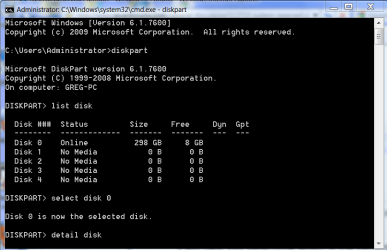
Choose the Win7 disk from the LIST DISK command results. There may only be one, probably DISK0.

If so, type: SELECT DISK 0

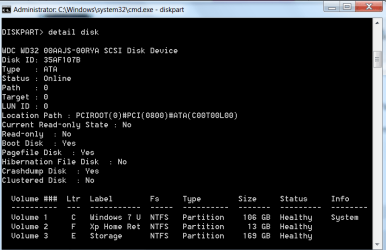
then: DETAIL DISK

Post back the details for Volumes.
 

Attachments

  • Capture.PNG
    Capture.PNG
    25 KB · Views: 25
  • Capture1.PNG
    Capture1.PNG
    16.3 KB · Views: 24
DISKPART

LIST DISK
## OUTPUT
DISK ### STATUS SIZE FREE DYN GPT
--------- ---------- ------- -------- -------- --------
DISK 0 Online 298 GB 27 GB

SELECT DISK 0
## OUTPUT
Disk 0 is now the selected disk.

LIST PARTITION
## OUTPUT
Partition ### Type Size Offset
-------------- ------------------- -------- ----------
Partition 1 Primary 100 MB 1024 KB
Partition 2 Primary 31 MB 101 MB
Partition 0 Extended 27 GB 31 GB
Partition 3 Primary 2055 MB 63 GB


Then what i must choose or do !!
 

My Computer

OS
Windows 7 Professional 32-bit
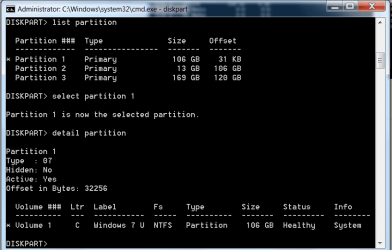
What makes you think you deleted the 100mb System Reserved partition? It appears to be Partition 1

Type: SELECT PARTITION 1
DETAIL PARTITION
report back details

Then: SELECT PARTITION 0
DETAIL PARTITION
report back details

Then: SELECT PARTITION 3
DETAIL PARTITION
report back details
 

Attachments

  • Capture.PNG
    Capture.PNG
    17.6 KB · Views: 14
SELECT PARTITION 1
partition 1 is now the selected partition.

DETAIL PARTITION
Partition 1
Type : 07
hidden : no
active : Yes
Offset in bytes : 1048576

volume ### ltr label fs type size status info
volume 1 C system reserved NTFS partition 100 MB Healthy
------------------------------------------------------------------

SELECT PARTITION 0
partition 0 is now the selected partition.

DETAIL PARTITION
Partition 0
Type : 05
hidden : no
active : no
Offset in bytes : 33616711168

there is no volume associated with this partition.
-----------------------------------------------------

SELECT PARTITION 3
partition 3 is now the selected partition.

DETAIL PARTITION
Partition 3
Type : 82
hidden : yes
active : no
Offset in bytes : 68162927616

there is no volume associated with this partition.


But i think the reserved partition is for the currently win 7,,,, What Do you think ?!
 

My Computer

OS
Windows 7 Professional 32-bit
Yes, there is an Active System Reserved boot partition there for WIn7 which is Partition 1.

But Which partition contains Win7? The only ones listed which have enough size both report no volume.

What exactly did you delete, and how?

You were installing WIn7 while files were still on the hard drive? Do you need these files now? I don't think they are there, but you can browse for them this way: http://www.sevenforums.com/tutorials/93347-copy-paste-windows-recovery-console.html
 
when i tried to install win 7 again i delete the system reserved partition from DVD at booting for installation then the hard list divided into these sections:
a partition its size about 50 -60 or more and i guess that is the previous win xp and 7
a partition called swap for previous linux i installed in my pc.
a partition its size i guess the all of my rest space of hard.
that only , and all was called unallocated except the swap.
what you understand from the previous details i write is that mean there is no exiting win 7 !!
Or there is no like what i say now !!
i don't know what tis mean!!
that all what i did !!
 

My Computer

OS
Windows 7 Professional 32-bit
See this details when i go into the installation disk :

disk 0 partition 1: System Reserved 100 MB 71 MB system
disk 0 partition 2 31.2 GB 22.5 GB Primary
disk 0 Unallocated space 27.3 GB 27.3 GB Extended
disk 0 Unallocated space 4.8 GB 4.8 GB
disk 0 partition 4 2 GB 0 GB primary
disk 0 Unallocated space 232.6 GB 232.6 GB

can this info help !!
 

My Computer

OS
Windows 7 Professional 32-bit
Do you have a WIn7 installation you are trying to start up?

Partition 2 would be the only place it could be and it's Details said it has no volume!

You said you have files you need to rescue. Is this correct?

Where were these files located, on what operating system or what partition?

I see nothing there except the System Reserved partition.

If you had GRUB on the disk, you need to wipe it and clean install Win7.

If you had files on the disk, we can try to recover them first.
 
right now i have windows 7 in the 31.2 partition 2 you see.
but i tried install it as someone said to me that install it again may be it reads the partitions again after that.
but that does not success .

my data is 232.6 partition
but i donot know why it has this free space.....
 

My Computer

OS
Windows 7 Professional 32-bit
Your data appears to have been deleted somehow. Or the DISKPART details could be wrong.

Did WIndows 7 complete installing when you reinstalled it? Did it ever start up?

You can try booting the Win7 DVD, select Repair My Computer on second screen, then click through to Recovery Tools list to run Startup Repair to see if you can start your Win7 installation. You may need to try this more than once: http://www.sevenforums.com/tutorials/105541-startup-repair-run-3-separate-times.html

When booting into the Win7 DVD, try using these steps here to see if you can locate your data and copy it out: http://www.sevenforums.com/tutorials/93347-copy-paste-windows-recovery-console.html
 
but how can i see my partitions to copy it here if it is an unallocated.
that is the problem
do you want me to format it and recover.


the windows is starting good there is no problem here.
 

My Computer

OS
Windows 7 Professional 32-bit
i tried this
Copy & Paste - in Windows Recovery Console

but only what i see is
system reserved and win7 and boot partitions
 

My Computer

OS
Windows 7 Professional 32-bit
i did but i does not see any files for me
 

My Computer

OS
Windows 7 Professional 32-bit
i said this at the first time when i try explain the problem
 

My Computer

OS
Windows 7 Professional 32-bit
Is Windows 7 starting up now? How long has it been starting?

We have been trying to help you repair it.
 
Back
Top