System restore keeps switching off

k0065126

New member
Local time
11:47 PM
Messages
42
This is the second time in the last year that my computer has switched System Restore off. When I look at System Properties, System Protection tab I see the following :-
Available drive Protection
Documents (D:/) Off
Arch Files (E:/) Off
Photos (F:/) Off
Local Disk (C:/) (System ) Off
(C:/) (Missing) On
(C:/) (Missing) On

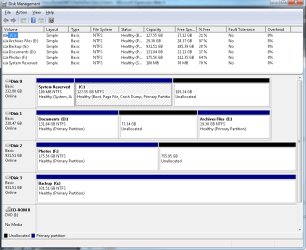
Disk1 (an SSD) contains my C: drive with a 100MB NTFS System reserved section at the beginning and an unallocated section containing 105GB after the C: drive.
Disk2 (an SSD) contains my D: drive with an unallocated section and the E: drive at the end.
Disk3 (a normal HD) contains my F: drive, plus an unallocated section.
Disk4 (a normal HD) contains my G: drive with no unallocated space.

I am puzzled that the drives are not shown in alphabetical order, and why there are 3 of them, or is that because the drive has 3 sections?
Can anyone advise why System Protection keeps turning itself off, now that I have turned it back on for the drive labelled System, and should I be concerned that there are 3 C: drives?
Thanks,
Viv
 

My Computer

Computer type
PC/Desktop
Computer Manufacturer/Model Number
Self built custom
OS
Microsoft Windows 7 Professional 64-bit 7601 Multiprocessor Free Service Pack 1
CPU
AMD FX(tm)-8150 Eight-Core Processor
Motherboard
ASUSTeK COMPUTER INC. SABERTOOTH 990FX R2.0
Memory
16.00 GB
Graphics Card(s)
NVIDIA GeForce GT 610
Sound Card
(1) NVIDIA Virtual Audio Device (Wave Extensible) (WDM) (2
Monitor(s) Displays
iiyama Prolite XB2776QS-B1 & Dell Ultrasharp U2412M 24 inch
Screen Resolution
2560 x 1440 x 32 bits (4294967296 colors) @ 59 Hz
Hard Drives
(1) Corsair Performance Pro SATA Disk Device (2) INTEL SS DSC2MH250A2 SATA Disk Device (3) WDC WD10 01FALS-00J7B1 SATA Disk Device (4) WDC WD10 01FALS-00J7B1 SATA Disk Device
Keyboard
Logitech K740 Illuminated
Mouse
Wacom intuos 3
Internet Speed
38Mbps / 8Mbps
Antivirus
MSE
Browser
IE11, Firefox, Chrome
Hmmm, sounds as though System Protection needs a kick in the derrier.

Tell me what you see when you follow this tutorial: http://www.sevenforums.com/tutorials/330-system-protection-turn-off.html

Are any buttons inactive (greyed out), specifically the Configure button?
Post screen shots as we go through the steps
See http://www.sevenforums.com/tutorials/9733-screenshots-files-upload-post-seven-forums.html

Also check that the Volume Shadow Copy service is started.
In the Start Menu search box, type:
Services
then hit the enter key

In the Services window, scroll down to Volume Shadow Copy and look in the upper left area of that window to check the status. Started is good, stopped is not so good.

That's a good start. I'll wait for your respones.

Bill
.
 

My Computer

Computer type
Laptop
Computer Manufacturer/Model Number
HP Pavilion dv6-6c10us
OS
x64 (6.3.9600) Win8.1 Pro & soon dual boot x64 (6.1.7601) Win7_SP1 HomePrem
CPU
AMD A6-3420M APU with Radeon(tm) HD Graphics
Motherboard
Hewlett-Packard 1805
Memory
6.00 GB
Graphics Card(s)
AMD Radeon(TM) HD 6520G
Sound Card
(1) AMD High Definition Audio Device (2) IDT High Definiti
Monitor(s) Displays
HP W2072a 20" LCD (1600 x 900) @ 60 Hz
Screen Resolution
1366 x 768 x 32 bits (4294967296 colors) @ 60 Hz
Hard Drives
ST640LM0 00 HM641JI SATA Disk Device
Keyboard
Logitech k520 wireless KB
Mouse
Logitech m320 wireless mouse (bundled with KB)
Internet Speed
15/5 | 54 MB Wireless 'n'
Antivirus
Realtime: Defender or Avast | On-demand: Malwarebytes, ESET
Browser
IE 11 on Win8, IE 10 on win 7
Other Info
Media: [Gimp, Audacity, VLC] || Comm: [WEmail 2012, Skype] || Productivity: [OpenOffice,| Textpad] || Utils: [Sysinternals, cCleaner, Speccy, Defraggler]
Thanks Bill for your quick response.

I am able to switch system protection on for my C:(System) drive so all 3 C: drives are now at on. There were no greyed out boxes or buttons in the Configure procedure.
Volume Shadow Copy is Started, Automatic, log on as Local System.

Viv
 

My Computer

Computer type
PC/Desktop
Computer Manufacturer/Model Number
Self built custom
OS
Microsoft Windows 7 Professional 64-bit 7601 Multiprocessor Free Service Pack 1
CPU
AMD FX(tm)-8150 Eight-Core Processor
Motherboard
ASUSTeK COMPUTER INC. SABERTOOTH 990FX R2.0
Memory
16.00 GB
Graphics Card(s)
NVIDIA GeForce GT 610
Sound Card
(1) NVIDIA Virtual Audio Device (Wave Extensible) (WDM) (2
Monitor(s) Displays
iiyama Prolite XB2776QS-B1 & Dell Ultrasharp U2412M 24 inch
Screen Resolution
2560 x 1440 x 32 bits (4294967296 colors) @ 59 Hz
Hard Drives
(1) Corsair Performance Pro SATA Disk Device (2) INTEL SS DSC2MH250A2 SATA Disk Device (3) WDC WD10 01FALS-00J7B1 SATA Disk Device (4) WDC WD10 01FALS-00J7B1 SATA Disk Device
Keyboard
Logitech K740 Illuminated
Mouse
Wacom intuos 3
Internet Speed
38Mbps / 8Mbps
Antivirus
MSE
Browser
IE11, Firefox, Chrome
Ok, thanks.

Don't change anything in the registry - just look.

In the registry, what is defined for the following key:
HKEY_LOCAL_MACHINE\SOFTWARE\Policies\Microsoft\Windows NT

The default should be a blank string "" (value not set).
On the subkey SystemRestore, do you see either of these values in the right hand pane, below the default?
:ar: DisableConfig or DisableSR

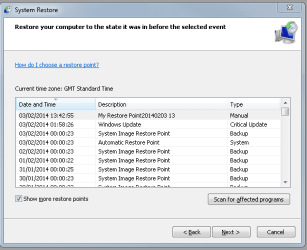
If not, then I'll have to chase something else down.

One other question, when this occurs do you lose the Restore Points or can you turn protection on and still see old restore points. If you manually turn protection off, you lose the restore point. I don't know what happens in the case of the issue you're facing.

Bill
.
 
Last edited:

My Computer

Computer type
Laptop
Computer Manufacturer/Model Number
HP Pavilion dv6-6c10us
OS
x64 (6.3.9600) Win8.1 Pro & soon dual boot x64 (6.1.7601) Win7_SP1 HomePrem
CPU
AMD A6-3420M APU with Radeon(tm) HD Graphics
Motherboard
Hewlett-Packard 1805
Memory
6.00 GB
Graphics Card(s)
AMD Radeon(TM) HD 6520G
Sound Card
(1) AMD High Definition Audio Device (2) IDT High Definiti
Monitor(s) Displays
HP W2072a 20" LCD (1600 x 900) @ 60 Hz
Screen Resolution
1366 x 768 x 32 bits (4294967296 colors) @ 60 Hz
Hard Drives
ST640LM0 00 HM641JI SATA Disk Device
Keyboard
Logitech k520 wireless KB
Mouse
Logitech m320 wireless mouse (bundled with KB)
Internet Speed
15/5 | 54 MB Wireless 'n'
Antivirus
Realtime: Defender or Avast | On-demand: Malwarebytes, ESET
Browser
IE 11 on Win8, IE 10 on win 7
Other Info
Media: [Gimp, Audacity, VLC] || Comm: [WEmail 2012, Skype] || Productivity: [OpenOffice,| Textpad] || Utils: [Sysinternals, cCleaner, Speccy, Defraggler]
Bill,

In HKEY_LOCAL_MACHINE\SOFTWARE\Policies\Microsoft\Windows NT there are 2 entries in the left hand pane - Terminal Services and Windows File Protection.
In the right hand pane Default is REG_SZ, value not set and CommonID is REG_BINARY, string of hex characters.
For Terminal Services I have Default, REG_SZ, value not set.
For Windows File Protection Default, REG_SZ, value not set and Known DllList, REG_SZ, nlhtml.dll.

I have not edited the registry.

I created a restore point after switching System Restore on for my C: drive System. When I look the only restore points are those created by the backup and restore which runs at midnight, and has entries going back to mid October. There should be more points which were created by Revo Uninstaller when I used it to uninstall programs, but they are all missing.

Viv
 

My Computer

Computer type
PC/Desktop
Computer Manufacturer/Model Number
Self built custom
OS
Microsoft Windows 7 Professional 64-bit 7601 Multiprocessor Free Service Pack 1
CPU
AMD FX(tm)-8150 Eight-Core Processor
Motherboard
ASUSTeK COMPUTER INC. SABERTOOTH 990FX R2.0
Memory
16.00 GB
Graphics Card(s)
NVIDIA GeForce GT 610
Sound Card
(1) NVIDIA Virtual Audio Device (Wave Extensible) (WDM) (2
Monitor(s) Displays
iiyama Prolite XB2776QS-B1 & Dell Ultrasharp U2412M 24 inch
Screen Resolution
2560 x 1440 x 32 bits (4294967296 colors) @ 59 Hz
Hard Drives
(1) Corsair Performance Pro SATA Disk Device (2) INTEL SS DSC2MH250A2 SATA Disk Device (3) WDC WD10 01FALS-00J7B1 SATA Disk Device (4) WDC WD10 01FALS-00J7B1 SATA Disk Device
Keyboard
Logitech K740 Illuminated
Mouse
Wacom intuos 3
Internet Speed
38Mbps / 8Mbps
Antivirus
MSE
Browser
IE11, Firefox, Chrome
This is what I thiink you're describing. I want to focus on the top key only and any values there.
I appreciate the extra info on the sub-keys. It might come in handy later.

left pane | right pane
HKEY_LOCAL_MACHINE\SOFTWARE\Policies\Microsoft\Windows NT | Default (not set)
| CommonID is REG_BINARY
-> Terminal Services | subkey is fine
-> Windows File Protection | subkey is fine

The next paragraph is interesting. You're able to access older Restore Points (RP) back to October, but you think there should be more, specifically related to Revo.

One of us should check Revo - I'm not sure if it creates RPs or if there isn't a setting to control the creation of RPs

The important point I get from the paragraph is that the RPs are still present. I need to think about this: are the RPs only backups and not RPs created when something is installed or a user manually creates a RP.

I also need to dig up some info on the CommonID binary value on the key referenced.

Another member might offer some suggestions - see if they can help resolve this.

Could you post a screen shot of your System Protection window showing how much space is configured for RPs on the drive(s).

I'll stop back and post when I have something more definitive.

Thanks,

Bill
.
 

My Computer

Computer type
Laptop
Computer Manufacturer/Model Number
HP Pavilion dv6-6c10us
OS
x64 (6.3.9600) Win8.1 Pro & soon dual boot x64 (6.1.7601) Win7_SP1 HomePrem
CPU
AMD A6-3420M APU with Radeon(tm) HD Graphics
Motherboard
Hewlett-Packard 1805
Memory
6.00 GB
Graphics Card(s)
AMD Radeon(TM) HD 6520G
Sound Card
(1) AMD High Definition Audio Device (2) IDT High Definiti
Monitor(s) Displays
HP W2072a 20" LCD (1600 x 900) @ 60 Hz
Screen Resolution
1366 x 768 x 32 bits (4294967296 colors) @ 60 Hz
Hard Drives
ST640LM0 00 HM641JI SATA Disk Device
Keyboard
Logitech k520 wireless KB
Mouse
Logitech m320 wireless mouse (bundled with KB)
Internet Speed
15/5 | 54 MB Wireless 'n'
Antivirus
Realtime: Defender or Avast | On-demand: Malwarebytes, ESET
Browser
IE 11 on Win8, IE 10 on win 7
Other Info
Media: [Gimp, Audacity, VLC] || Comm: [WEmail 2012, Skype] || Productivity: [OpenOffice,| Textpad] || Utils: [Sysinternals, cCleaner, Speccy, Defraggler]
Bill,

Revo tries to create an RP whenever it uninstalls a program, and I have uninstalled programs since the middle of November, although I cannot remember the last time I saw a message that creation had failed.

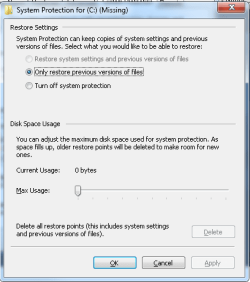
When I look at the System Protection screen for the bottom two C: (Missing) drives Restore Settings has the middle radio button for 'Only restore previous versions of files' set and Disk Space Max Usage is set to the minimum with Current Usage of 0 bytes. The top radio button for 'Restore system settings and previous versions of files' is greyed out, but 'Turn off System protection' is available to click.

Looking at the same screen for Local Disk C: all three radio buttons are available to click, the top one is currently selected since I clicked it earlier today. Disk Space Usage has Current Usage of 775.82MB and Max Usage is set at 2% (2.55GB).

Viv
 

My Computer

Computer type
PC/Desktop
Computer Manufacturer/Model Number
Self built custom
OS
Microsoft Windows 7 Professional 64-bit 7601 Multiprocessor Free Service Pack 1
CPU
AMD FX(tm)-8150 Eight-Core Processor
Motherboard
ASUSTeK COMPUTER INC. SABERTOOTH 990FX R2.0
Memory
16.00 GB
Graphics Card(s)
NVIDIA GeForce GT 610
Sound Card
(1) NVIDIA Virtual Audio Device (Wave Extensible) (WDM) (2
Monitor(s) Displays
iiyama Prolite XB2776QS-B1 & Dell Ultrasharp U2412M 24 inch
Screen Resolution
2560 x 1440 x 32 bits (4294967296 colors) @ 59 Hz
Hard Drives
(1) Corsair Performance Pro SATA Disk Device (2) INTEL SS DSC2MH250A2 SATA Disk Device (3) WDC WD10 01FALS-00J7B1 SATA Disk Device (4) WDC WD10 01FALS-00J7B1 SATA Disk Device
Keyboard
Logitech K740 Illuminated
Mouse
Wacom intuos 3
Internet Speed
38Mbps / 8Mbps
Antivirus
MSE
Browser
IE11, Firefox, Chrome

My Computer

Computer type
PC/Desktop
Computer Manufacturer/Model Number
Custom Build
OS
Windows 7 Home Premium 32-Bit - Build 7600 SP1
CPU
Intel Core i3-2120 3.30Ghz
Motherboard
Asus P8Z68-V LX Intel Z68 Socket H2 ATX
Memory
Kingston 4 GB DDR3 1333 mhz
Graphics Card(s)
AMD Radeon HD6670
Sound Card
Sound Blaster Audigy SE 24-Bit
Monitor(s) Displays
Asus VE228
Screen Resolution
1440 X 900
Hard Drives
OCZ Vertex 3 120 GB Sata 3 SSD ==
Kingston SH103/S3 120 G Hyper X 120 GB SSD ==
Western Digital 500 GB Caviar Green 7200 RPM ==
PSU
Corsair CX600M == 600 Watt
Case
NZXT Apollo - Silver with Clear Side Panel
Cooling
Three 120 mm Fans
Keyboard
Microsoft Natural 4000
Mouse
Microsoft Custom Optical 3000
Internet Speed
AT&T Fiber Optic Wireless Network
Antivirus
Microsoft Security Essentials
Browser
Chrome
Other Info
120 mm Blue LED Fan -- Three Blue LED Lazer Light Sticks
Here is the screenshot.

Viv
Capture.PNG
 
Last edited:

My Computer

Computer type
PC/Desktop
Computer Manufacturer/Model Number
Self built custom
OS
Microsoft Windows 7 Professional 64-bit 7601 Multiprocessor Free Service Pack 1
CPU
AMD FX(tm)-8150 Eight-Core Processor
Motherboard
ASUSTeK COMPUTER INC. SABERTOOTH 990FX R2.0
Memory
16.00 GB
Graphics Card(s)
NVIDIA GeForce GT 610
Sound Card
(1) NVIDIA Virtual Audio Device (Wave Extensible) (WDM) (2
Monitor(s) Displays
iiyama Prolite XB2776QS-B1 & Dell Ultrasharp U2412M 24 inch
Screen Resolution
2560 x 1440 x 32 bits (4294967296 colors) @ 59 Hz
Hard Drives
(1) Corsair Performance Pro SATA Disk Device (2) INTEL SS DSC2MH250A2 SATA Disk Device (3) WDC WD10 01FALS-00J7B1 SATA Disk Device (4) WDC WD10 01FALS-00J7B1 SATA Disk Device
Keyboard
Logitech K740 Illuminated
Mouse
Wacom intuos 3
Internet Speed
38Mbps / 8Mbps
Antivirus
MSE
Browser
IE11, Firefox, Chrome
Bill,

Revo tries to create an RP whenever it uninstalls a program, and I have uninstalled programs since the middle of November, although I cannot remember the last time I saw a message that creation had failed.

When I look at the System Protection screen for the bottom two C: (Missing) drives Restore Settings has the middle radio button for 'Only restore previous versions of files' set and Disk Space Max Usage is set to the minimum with Current Usage of 0 bytes. The top radio button for 'Restore system settings and previous versions of files' is greyed out, but 'Turn off System protection' is available to click.

Looking at the same screen for Local Disk C: all three radio buttons are available to click, the top one is currently selected since I clicked it earlier today. Disk Space Usage has Current Usage of 775.82MB and Max Usage is set at 2% (2.55GB).

Viv

Viv,

Thanks for the Revo info and the Disk Mgmnt shot - is C: an SSD?

Please post a screen shot of System Protection. I'm confused by
the bottom two C: (Missing) drives

2% is very conservative - you might consider 5-7 % allocation for RPs
I understand the storage constraints of your C:\ drive

I still need to look into CommonID under policy - I'll post what I find.

Bill
.
 

My Computer

Computer type
Laptop
Computer Manufacturer/Model Number
HP Pavilion dv6-6c10us
OS
x64 (6.3.9600) Win8.1 Pro & soon dual boot x64 (6.1.7601) Win7_SP1 HomePrem
CPU
AMD A6-3420M APU with Radeon(tm) HD Graphics
Motherboard
Hewlett-Packard 1805
Memory
6.00 GB
Graphics Card(s)
AMD Radeon(TM) HD 6520G
Sound Card
(1) AMD High Definition Audio Device (2) IDT High Definiti
Monitor(s) Displays
HP W2072a 20" LCD (1600 x 900) @ 60 Hz
Screen Resolution
1366 x 768 x 32 bits (4294967296 colors) @ 60 Hz
Hard Drives
ST640LM0 00 HM641JI SATA Disk Device
Keyboard
Logitech k520 wireless KB
Mouse
Logitech m320 wireless mouse (bundled with KB)
Internet Speed
15/5 | 54 MB Wireless 'n'
Antivirus
Realtime: Defender or Avast | On-demand: Malwarebytes, ESET
Browser
IE 11 on Win8, IE 10 on win 7
Other Info
Media: [Gimp, Audacity, VLC] || Comm: [WEmail 2012, Skype] || Productivity: [OpenOffice,| Textpad] || Utils: [Sysinternals, cCleaner, Speccy, Defraggler]
Bill,

Yes, C: is an SSD, as is D:, the other 2 disks are standard HDs. I will change the allocation to 5% as I have plenty of unallocated space.

I am also confused by the number of C: drives which appear in System Protection.

Capture5.PNG

Viv

PS, I have just checked and restore points back to 17/10/2013 are listed, with the exception of the one I created manually in the last 24 hours, all of the ones listed are ones Windows decided to create when the overnight backup runs. I have just created an RP and will check later to see if it is still there.
Capture6.PNG
 

My Computer

Computer type
PC/Desktop
Computer Manufacturer/Model Number
Self built custom
OS
Microsoft Windows 7 Professional 64-bit 7601 Multiprocessor Free Service Pack 1
CPU
AMD FX(tm)-8150 Eight-Core Processor
Motherboard
ASUSTeK COMPUTER INC. SABERTOOTH 990FX R2.0
Memory
16.00 GB
Graphics Card(s)
NVIDIA GeForce GT 610
Sound Card
(1) NVIDIA Virtual Audio Device (Wave Extensible) (WDM) (2
Monitor(s) Displays
iiyama Prolite XB2776QS-B1 & Dell Ultrasharp U2412M 24 inch
Screen Resolution
2560 x 1440 x 32 bits (4294967296 colors) @ 59 Hz
Hard Drives
(1) Corsair Performance Pro SATA Disk Device (2) INTEL SS DSC2MH250A2 SATA Disk Device (3) WDC WD10 01FALS-00J7B1 SATA Disk Device (4) WDC WD10 01FALS-00J7B1 SATA Disk Device
Keyboard
Logitech K740 Illuminated
Mouse
Wacom intuos 3
Internet Speed
38Mbps / 8Mbps
Antivirus
MSE
Browser
IE11, Firefox, Chrome
I think the "C: missing" has to do with the unallocated space in Disk Management. What do you think Bill?
 

My Computer

Computer type
PC/Desktop
Computer Manufacturer/Model Number
Custom Build
OS
Windows 7 Home Premium 32-Bit - Build 7600 SP1
CPU
Intel Core i3-2120 3.30Ghz
Motherboard
Asus P8Z68-V LX Intel Z68 Socket H2 ATX
Memory
Kingston 4 GB DDR3 1333 mhz
Graphics Card(s)
AMD Radeon HD6670
Sound Card
Sound Blaster Audigy SE 24-Bit
Monitor(s) Displays
Asus VE228
Screen Resolution
1440 X 900
Hard Drives
OCZ Vertex 3 120 GB Sata 3 SSD ==
Kingston SH103/S3 120 G Hyper X 120 GB SSD ==
Western Digital 500 GB Caviar Green 7200 RPM ==
PSU
Corsair CX600M == 600 Watt
Case
NZXT Apollo - Silver with Clear Side Panel
Cooling
Three 120 mm Fans
Keyboard
Microsoft Natural 4000
Mouse
Microsoft Custom Optical 3000
Internet Speed
AT&T Fiber Optic Wireless Network
Antivirus
Microsoft Security Essentials
Browser
Chrome
Other Info
120 mm Blue LED Fan -- Three Blue LED Lazer Light Sticks
I honestly don't know.... I don't think it has anything to do with the unallocated space though.
With regards to C: -> DskMgmt is ok, System Protection (SP) is whacky

Because Retore Points (RP) are stored in Volume Information on the partition they're created, I'm not sure what SP considers C:
SP doesn't use drive letters, it uses base drive / partition addressing. Still there are more than one C: and possibly more than one base address

Switching gears:
There are two RPs (1) Windows update and (1) Manually created in the image posted.
Viv is testing to see if they stick around or if SP turns off and they are removed.

I didn't find anything useful re: CommonID, so that's back burner for now.

I did find some interesting things re: Disabling SP - that in turn referenced Enabling SP.

While SP is in an OK state (you can create an RP), please type (or copy) the entire line that follows into an elevated command prompt:

REG QUERY "HKLM\SOFTWARE\Policies\Microsoft\Windows NT\SystemRestore"

I checked my system, but SP is off so a "key not found" error was returned.

I think based on an early post, that you will also get the "key not found" error.
We also touched on two string values for the key above, but the key didn't exist on your system.

queries on my system (with SP off on all drives)
Code:
reg query "HKLM\SOFTWARE\Policies\Microsoft\Windows NT\SystemRestore"
--> ERROR: The system was unable to find the specified registry key or value.
 
reg query "HKLM\SOFTWARE\Policies\Microsoft\Windows NT"
--> HKEY_LOCAL_MACHINE\SOFTWARE\Policies\Microsoft\Windows Nt\Terminal Services
--> HKEY_LOCAL_MACHINE\SOFTWARE\Policies\Microsoft\Windows Nt\Windows File Protection

What's next?

Viv: please fill in your system specs so members can easily reference your system: System Specs (see How to - System Specs).

What happens if you highlight/select one of the C: (missing) drives and hit the configure button?
and the 2nd C: (missing) drive?

I'm thinking you might just be able to turn those ghost drives off in SP.

Why are there ghost drives? There's been at least one C: drive change (HDD to SSD). I'll guess that the HDD was put back in service and somehow SP found the RP, but got confused and still marks it as C: - or some other convoluted out-of-sync condition. Just guessing here.

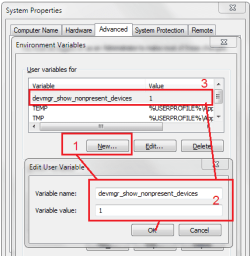
I'd like to see a Device Manager (DevMgr) screen shot(s) showing View->Show hidden devices, but
before opening DevMgr I want you to add an envoriment vaiable to your user profile
devmgr_show_nonpresent_devices
with a value of
1
Include the two storage categories in the snapshot(s):
Storage volume shadow copies
Storage Volumes

That's good for now, I'll read the results in Viv's next post

Bill
.
 

Attachments

  • DevMgrHidDEvs.PNG
    DevMgrHidDEvs.PNG
    17.3 KB · Views: 15

My Computer

Computer type
Laptop
Computer Manufacturer/Model Number
HP Pavilion dv6-6c10us
OS
x64 (6.3.9600) Win8.1 Pro & soon dual boot x64 (6.1.7601) Win7_SP1 HomePrem
CPU
AMD A6-3420M APU with Radeon(tm) HD Graphics
Motherboard
Hewlett-Packard 1805
Memory
6.00 GB
Graphics Card(s)
AMD Radeon(TM) HD 6520G
Sound Card
(1) AMD High Definition Audio Device (2) IDT High Definiti
Monitor(s) Displays
HP W2072a 20" LCD (1600 x 900) @ 60 Hz
Screen Resolution
1366 x 768 x 32 bits (4294967296 colors) @ 60 Hz
Hard Drives
ST640LM0 00 HM641JI SATA Disk Device
Keyboard
Logitech k520 wireless KB
Mouse
Logitech m320 wireless mouse (bundled with KB)
Internet Speed
15/5 | 54 MB Wireless 'n'
Antivirus
Realtime: Defender or Avast | On-demand: Malwarebytes, ESET
Browser
IE 11 on Win8, IE 10 on win 7
Other Info
Media: [Gimp, Audacity, VLC] || Comm: [WEmail 2012, Skype] || Productivity: [OpenOffice,| Textpad] || Utils: [Sysinternals, cCleaner, Speccy, Defraggler]
Viv,

Could you post another Disk Management screen shot? Make sure the Status column is fully visible.

Everything looks good from that I can read, but it's always good to see the entire contents of the Status column.

Thanks.
 

My Computer

Computer type
Laptop
Computer Manufacturer/Model Number
HP Pavilion dv6-6c10us
OS
x64 (6.3.9600) Win8.1 Pro & soon dual boot x64 (6.1.7601) Win7_SP1 HomePrem
CPU
AMD A6-3420M APU with Radeon(tm) HD Graphics
Motherboard
Hewlett-Packard 1805
Memory
6.00 GB
Graphics Card(s)
AMD Radeon(TM) HD 6520G
Sound Card
(1) AMD High Definition Audio Device (2) IDT High Definiti
Monitor(s) Displays
HP W2072a 20" LCD (1600 x 900) @ 60 Hz
Screen Resolution
1366 x 768 x 32 bits (4294967296 colors) @ 60 Hz
Hard Drives
ST640LM0 00 HM641JI SATA Disk Device
Keyboard
Logitech k520 wireless KB
Mouse
Logitech m320 wireless mouse (bundled with KB)
Internet Speed
15/5 | 54 MB Wireless 'n'
Antivirus
Realtime: Defender or Avast | On-demand: Malwarebytes, ESET
Browser
IE 11 on Win8, IE 10 on win 7
Other Info
Media: [Gimp, Audacity, VLC] || Comm: [WEmail 2012, Skype] || Productivity: [OpenOffice,| Textpad] || Utils: [Sysinternals, cCleaner, Speccy, Defraggler]
The RP I created 6 hours ago is still shown.

I tried pasting the 'REG QUERY ...' line into an Administrator Command Prompt at C:\Users\Viv> and saw the message 'ERROR: The system was unable to find the specified registry key or value.' This also applied when I changed to c:\.

I have added my system specs as requested.

Hitting the Configure button for both of the C: (Missing) drives shown in this image :-
Capture4.PNG

I built the computer in October 2012 which was when I installed the SSD and Windows was installed from scratch.

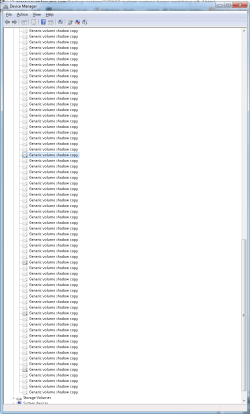
I have added the devmgr entry and attach the views of Device Manager which you requested. I am surprised at the number of Generic Volumes and Generic Shadow Copies, most of which are apparently not attached. Would it be worth deleting these?

Viv

Capture7.PNG Capture8.PNG Capture9.PNG
 

My Computer

Computer type
PC/Desktop
Computer Manufacturer/Model Number
Self built custom
OS
Microsoft Windows 7 Professional 64-bit 7601 Multiprocessor Free Service Pack 1
CPU
AMD FX(tm)-8150 Eight-Core Processor
Motherboard
ASUSTeK COMPUTER INC. SABERTOOTH 990FX R2.0
Memory
16.00 GB
Graphics Card(s)
NVIDIA GeForce GT 610
Sound Card
(1) NVIDIA Virtual Audio Device (Wave Extensible) (WDM) (2
Monitor(s) Displays
iiyama Prolite XB2776QS-B1 & Dell Ultrasharp U2412M 24 inch
Screen Resolution
2560 x 1440 x 32 bits (4294967296 colors) @ 59 Hz
Hard Drives
(1) Corsair Performance Pro SATA Disk Device (2) INTEL SS DSC2MH250A2 SATA Disk Device (3) WDC WD10 01FALS-00J7B1 SATA Disk Device (4) WDC WD10 01FALS-00J7B1 SATA Disk Device
Keyboard
Logitech K740 Illuminated
Mouse
Wacom intuos 3
Internet Speed
38Mbps / 8Mbps
Antivirus
MSE
Browser
IE11, Firefox, Chrome
good stuff Viv, thanks

I'm going into shorthand mode: if somethings not clear, just ask.

Reg Query: an admin cmd usually has c:\windows\system32 > as the prompt.
It sounds to me that maybe a std cmd prompt was launched ( C:\Users\Viv >)
also make certain you include the qoutes(") in the copy.

Both of the C: (Missing) drives show Current usage: 0
Turn off system protection on both of those missing drives.

See how that affects SP.

Yeah, you can delete the ghost DevMgr entries, but hold off until later. I'd like to know if the C: (missing) SP change resolves the issue. It might take two or three weeks, give the test time to give you results.

When you feel that it was the C: (Missing) entries, post something, I'll see it on a list of subscribed threads. Or if the issue crops up again, post something, I'll still see it :).

I'm feeling pretty good that it was those erroneous C: entries in SP, but..... time will tell.

You can clean up the ghosts anytime now that you have the environment varialble set.
Be really really careful when you do - sometimes it's hard to tell a ghost from a live entry - not sure, leave it. Just go slow.

Bill
.
 

My Computer

Computer type
Laptop
Computer Manufacturer/Model Number
HP Pavilion dv6-6c10us
OS
x64 (6.3.9600) Win8.1 Pro & soon dual boot x64 (6.1.7601) Win7_SP1 HomePrem
CPU
AMD A6-3420M APU with Radeon(tm) HD Graphics
Motherboard
Hewlett-Packard 1805
Memory
6.00 GB
Graphics Card(s)
AMD Radeon(TM) HD 6520G
Sound Card
(1) AMD High Definition Audio Device (2) IDT High Definiti
Monitor(s) Displays
HP W2072a 20" LCD (1600 x 900) @ 60 Hz
Screen Resolution
1366 x 768 x 32 bits (4294967296 colors) @ 60 Hz
Hard Drives
ST640LM0 00 HM641JI SATA Disk Device
Keyboard
Logitech k520 wireless KB
Mouse
Logitech m320 wireless mouse (bundled with KB)
Internet Speed
15/5 | 54 MB Wireless 'n'
Antivirus
Realtime: Defender or Avast | On-demand: Malwarebytes, ESET
Browser
IE 11 on Win8, IE 10 on win 7
Other Info
Media: [Gimp, Audacity, VLC] || Comm: [WEmail 2012, Skype] || Productivity: [OpenOffice,| Textpad] || Utils: [Sysinternals, cCleaner, Speccy, Defraggler]
Bill,

Thanks for putting me right about an elevated command prompt, I now get 'The system was unable to find the specified registry key or value.'.

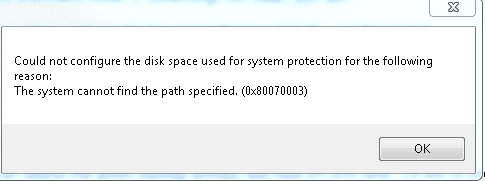
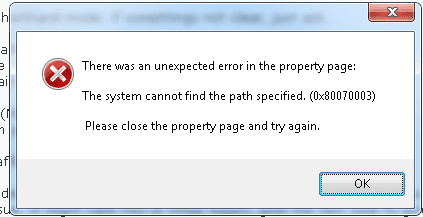
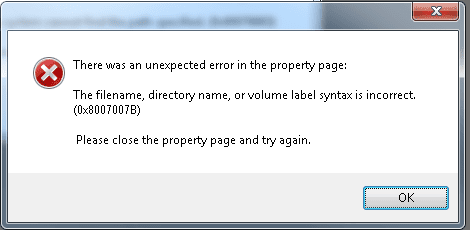
I have tried turning off SP on one of the phantom drives which generated several error messages :-
Capture10.PNG Capture11.PNG Capture12.PNG

After cancelling my attempt to turn SP off for the first phantom C: drive both of the phantom drives have now disappeared from the list of available drives.

I will wait before deleting the ghost entries in DevMgr.

Viv
 

My Computer

Computer type
PC/Desktop
Computer Manufacturer/Model Number
Self built custom
OS
Microsoft Windows 7 Professional 64-bit 7601 Multiprocessor Free Service Pack 1
CPU
AMD FX(tm)-8150 Eight-Core Processor
Motherboard
ASUSTeK COMPUTER INC. SABERTOOTH 990FX R2.0
Memory
16.00 GB
Graphics Card(s)
NVIDIA GeForce GT 610
Sound Card
(1) NVIDIA Virtual Audio Device (Wave Extensible) (WDM) (2
Monitor(s) Displays
iiyama Prolite XB2776QS-B1 & Dell Ultrasharp U2412M 24 inch
Screen Resolution
2560 x 1440 x 32 bits (4294967296 colors) @ 59 Hz
Hard Drives
(1) Corsair Performance Pro SATA Disk Device (2) INTEL SS DSC2MH250A2 SATA Disk Device (3) WDC WD10 01FALS-00J7B1 SATA Disk Device (4) WDC WD10 01FALS-00J7B1 SATA Disk Device
Keyboard
Logitech K740 Illuminated
Mouse
Wacom intuos 3
Internet Speed
38Mbps / 8Mbps
Antivirus
MSE
Browser
IE11, Firefox, Chrome
Phantoms and ghosts... maybe a gremlin or two.

I really like it when Windows heals itself like that. At least that's what it appears to have happened.

Restart your system if you haven't already. It might not be necessary, but it can't hurt.

See what SP is doing - On for C: ... only one C: ... RPs still there?

Now it's wait and see - check SP before and after installing anything - manually verify RP creation.

Hopefully that did it.

Thanks for waiting on the DevMgr ghosts. It will help other members if anyone else has this issue - they'll know it was the Phantom C: defs in SP.

Bill
.
 

My Computer

Computer type
Laptop
Computer Manufacturer/Model Number
HP Pavilion dv6-6c10us
OS
x64 (6.3.9600) Win8.1 Pro & soon dual boot x64 (6.1.7601) Win7_SP1 HomePrem
CPU
AMD A6-3420M APU with Radeon(tm) HD Graphics
Motherboard
Hewlett-Packard 1805
Memory
6.00 GB
Graphics Card(s)
AMD Radeon(TM) HD 6520G
Sound Card
(1) AMD High Definition Audio Device (2) IDT High Definiti
Monitor(s) Displays
HP W2072a 20" LCD (1600 x 900) @ 60 Hz
Screen Resolution
1366 x 768 x 32 bits (4294967296 colors) @ 60 Hz
Hard Drives
ST640LM0 00 HM641JI SATA Disk Device
Keyboard
Logitech k520 wireless KB
Mouse
Logitech m320 wireless mouse (bundled with KB)
Internet Speed
15/5 | 54 MB Wireless 'n'
Antivirus
Realtime: Defender or Avast | On-demand: Malwarebytes, ESET
Browser
IE 11 on Win8, IE 10 on win 7
Other Info
Media: [Gimp, Audacity, VLC] || Comm: [WEmail 2012, Skype] || Productivity: [OpenOffice,| Textpad] || Utils: [Sysinternals, cCleaner, Speccy, Defraggler]
Now, how did it get that way? I suspect that SP just got confused by HD changees... it's odd, but that's my initial disgnosis.

It would be a good idea to run a quick malware scan, just in case it was something else.


Download Malwarebytes Anti-Malware Free (click here to download, select the free version)
"Save as" the install package to your Desktop
Double click the mbam-setup file on your desktop to install and run Malwarebytes (Mbam)

Answer YES to all authorization prompts and then follow the Mbam setup prompts.
Do not make any changes to default settings.
When the install is finished, verify that only the following two options have checkmarks,
change to match if necessary.
[[FONT=Webdings, serif]a[/FONT]] Update Malwarebytes’ Anti-Malware
[a] Launch Malwarebytes’ Anti-Malware

Make sure that there is NOT a checkmark next to:
[ ] Enable free trial of Malwarebytes Anti-Malware PRO

Then click the Finish button.

Allow Mbam to update, then
Select Perform Quick Scan from the options on the Scanner tab, then
Click the Scan button.

After the scan is complete
Click on Show Results
A window displaying any detected malware is shown
Select all malware (make sure all objects are [a] ticked), then
Click on Remove Selected

The Mbam report file pops up in your text editor when Mbam has completed the removal process.

:ar: Select all of the text in the report (Ctrl+A) and paste the text in a new post on this thread.

   Note
If Mbam encounters a file that is difficult to remove, you are asked to restart the computer.
The restart is REQUIRED to allow Mbam to complete the removal of the malware.
Failure to restart means that the malware is still present on your machine.

:info: You want to restart in Normal mode, not in Safe mode.


If Malwarebytes finds anything, using a few more scanners is probably a good idea.

Trying to cover all bases.

Bill
.
 

My Computer

Computer type
Laptop
Computer Manufacturer/Model Number
HP Pavilion dv6-6c10us
OS
x64 (6.3.9600) Win8.1 Pro & soon dual boot x64 (6.1.7601) Win7_SP1 HomePrem
CPU
AMD A6-3420M APU with Radeon(tm) HD Graphics
Motherboard
Hewlett-Packard 1805
Memory
6.00 GB
Graphics Card(s)
AMD Radeon(TM) HD 6520G
Sound Card
(1) AMD High Definition Audio Device (2) IDT High Definiti
Monitor(s) Displays
HP W2072a 20" LCD (1600 x 900) @ 60 Hz
Screen Resolution
1366 x 768 x 32 bits (4294967296 colors) @ 60 Hz
Hard Drives
ST640LM0 00 HM641JI SATA Disk Device
Keyboard
Logitech k520 wireless KB
Mouse
Logitech m320 wireless mouse (bundled with KB)
Internet Speed
15/5 | 54 MB Wireless 'n'
Antivirus
Realtime: Defender or Avast | On-demand: Malwarebytes, ESET
Browser
IE 11 on Win8, IE 10 on win 7
Other Info
Media: [Gimp, Audacity, VLC] || Comm: [WEmail 2012, Skype] || Productivity: [OpenOffice,| Textpad] || Utils: [Sysinternals, cCleaner, Speccy, Defraggler]
Bill,

At least the RP I created yesterday is still there, and the 2 phantom C: drives seem to have disappeared permanently. As well as System Protection turning off a couple of times in the last few months the Autoplay window appeared yesterday for no apparent reason when I plugged my phone into the computer and also switched on my external hard drive, but at least I have now stopped that. Something seems able to make changes to my computer without my permission.

I have deleted a few items from 'Storage volume shadow copies' and 'Storage Volumes' relating to hardware which is not attached to my computer, but will leave it a few days before deleting any more.

I have just run MSE in full scan mode with nothing untoward found, and also Malwarebytes which found 3 items to delete, (and they have been).

The mbam log is as follows :-
Malwarebytes Anti-Malware 1.75.0.1300
www.malwarebytes.org
Database version: v2014.02.04.07
Windows 7 Service Pack 1 x64 NTFS
Internet Explorer 11.0.9600.16476
Viv :: VIV-ASUSPC [administrator]
04/02/2014 13:35:07
mbam-log-2014-02-04 (13-35-07).txt
Scan type: Quick scan
Scan options enabled: Memory | Startup | Registry | File System | Heuristics/Extra | Heuristics/Shuriken | PUP | PUM
Scan options disabled: P2P
Objects scanned: 252988
Time elapsed: 13 minute(s), 24 second(s)
Memory Processes Detected: 0
(No malicious items detected)
Memory Modules Detected: 0
(No malicious items detected)
Registry Keys Detected: 3
HKCR\AppID\{C26644C4-2A12-4CA6-8F2E-0EDE6CF018F3} (PUP.Optional.Delta.A) -> Quarantined and deleted successfully.
HKCR\AppID\{D616A4A2-7B38-4DBC-9093-6FE7A4A21B17} (PUP.Optional.Wajam.A) -> Quarantined and deleted successfully.
HKLM\SOFTWARE\{6791A2F3-FC80-475C-A002-C014AF797E9C} (PUP.Optional.OptimzerPro.A) -> Quarantined and deleted successfully.
Registry Values Detected: 0
(No malicious items detected)
Registry Data Items Detected: 0
(No malicious items detected)
Folders Detected: 0
(No malicious items detected)
Files Detected: 0
(No malicious items detected)
(end)


Viv
 

My Computer

Computer type
PC/Desktop
Computer Manufacturer/Model Number
Self built custom
OS
Microsoft Windows 7 Professional 64-bit 7601 Multiprocessor Free Service Pack 1
CPU
AMD FX(tm)-8150 Eight-Core Processor
Motherboard
ASUSTeK COMPUTER INC. SABERTOOTH 990FX R2.0
Memory
16.00 GB
Graphics Card(s)
NVIDIA GeForce GT 610
Sound Card
(1) NVIDIA Virtual Audio Device (Wave Extensible) (WDM) (2
Monitor(s) Displays
iiyama Prolite XB2776QS-B1 & Dell Ultrasharp U2412M 24 inch
Screen Resolution
2560 x 1440 x 32 bits (4294967296 colors) @ 59 Hz
Hard Drives
(1) Corsair Performance Pro SATA Disk Device (2) INTEL SS DSC2MH250A2 SATA Disk Device (3) WDC WD10 01FALS-00J7B1 SATA Disk Device (4) WDC WD10 01FALS-00J7B1 SATA Disk Device
Keyboard
Logitech K740 Illuminated
Mouse
Wacom intuos 3
Internet Speed
38Mbps / 8Mbps
Antivirus
MSE
Browser
IE11, Firefox, Chrome
Back
Top