
System Restore / Safe Mode

Bare Foot Kid

R.I.P. August 13th 2014
SF Team
Local time
11:21 PM
Messages
22,809
Location
The Lowcountry
Hello everyone,


I had this issue with the Windows 7 RTM (the first time I noticed it) and I still have it after a clean install with an integrated Windows 7 SP 1 and I'm wondering if anyone else has it also, though I'm aware few use system restore, I just 'play' with it for fun myself.

When I do a SR they always complete successfully but after logon I get all black screens with a moveable curser and nothing will correct that.

It took me trial and error to figure out that booting to safe mode after the black-screens I get a chance to accept this dialog box and after that, booting back to 'regular' Windows all is well.

Has anyone seen or heard of this behavior before?

Thanks.

click to enlarge
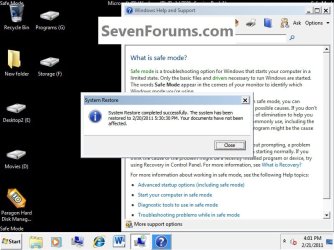
SR.jpg
 

My Computer

Computer Manufacturer/Model Number
* BFK Customs *
OS
W 7 64-bit Ultimate
CPU
Intel Q9550 Yorkfield
Motherboard
ASUS P5Q Pro
Memory
8GB Dominator 8500C5D
Graphics Card(s)
ATI : XFX 5870
Sound Card
Realtek HD Audio 7-1
Monitor(s) Displays
1x 47" LCD HDMI & 3x 26" LCD HDMI
Screen Resolution
1920x1080P & 1920x1200
Hard Drives
1x 80GB Intel X25-M G2 SSD : 1x 500GB & 1x 640GB WD Caviar Black(s)
PSU
Corsair 620HX
Case
Cooler Master RC-690
Cooling
Tuniq Tower 120, 2x 140mm and 3x 120mm case fans
Keyboard
Microsoft 500
Mouse
Razer Diamondback 3G
Internet Speed
14 Mb/s
Other Info
1x Koutech 3Gb/s SATA HDD Hot Swap Rack
Ted, I have heard of it before; but I have not experienced it - and I do use System Restore (as well as imaging). Thanks for the snip.
 

My Computer

Computer Manufacturer/Model Number
Home built
OS
Windows 7 Ultimate 32 bit
CPU
Intel(R) Pentium(R) 4 CPU 3.00GHz
Motherboard
ASUS P4P800-VM Motherboard Chipset: Intel 865G + ICH5
Memory
2.50 GB RAM
Graphics Card(s)
NVIDIA GeForce 7600 GS
Sound Card
SoundMax Integrated Digital Audio (Chip)
Monitor(s) Displays
ViewSonic VX 1962 wm
Screen Resolution
1680 X 1050
Hard Drives
Seagate Barracuda 7200.10 80 GB
ST380215A ATA Device 18.6 GB
Western Digital "My Book" external hard drive 750 GB
Cooling
Fan based
Keyboard
Microsoft Comfort Curve Keyboard 2000 v10 USB
Mouse
Logitec optic USB
Internet Speed
3.01 Mb/s download 0.64 Mb/s upload
Hello Carl, I use imaging as well so it's not a big deal, I'm just curious, thanks!

Any other ideas / comments?
 

My Computer

Computer Manufacturer/Model Number
* BFK Customs *
OS
W 7 64-bit Ultimate
CPU
Intel Q9550 Yorkfield
Motherboard
ASUS P5Q Pro
Memory
8GB Dominator 8500C5D
Graphics Card(s)
ATI : XFX 5870
Sound Card
Realtek HD Audio 7-1
Monitor(s) Displays
1x 47" LCD HDMI & 3x 26" LCD HDMI
Screen Resolution
1920x1080P & 1920x1200
Hard Drives
1x 80GB Intel X25-M G2 SSD : 1x 500GB & 1x 640GB WD Caviar Black(s)
PSU
Corsair 620HX
Case
Cooler Master RC-690
Cooling
Tuniq Tower 120, 2x 140mm and 3x 120mm case fans
Keyboard
Microsoft 500
Mouse
Razer Diamondback 3G
Internet Speed
14 Mb/s
Other Info
1x Koutech 3Gb/s SATA HDD Hot Swap Rack
Ted, some thoughts.

1) Does this happen with only this particular SR point? Try with another.

2) Run a startup repair (even if everything's fine), then create a SR point, then restore to that point.

3) Since the system boots fine into safe mode, there may be a misbehaving driver somewhere.
 

My Computer

Computer Manufacturer/Model Number
Too many to describe...
OS
Windows 7 x64 pro/ Windows 7 x86 Pro/ XP SP3 x86
When I do a SR they always complete successfully but after logon I get all black screens with a moveable curser and nothing will correct that.

This would tend to suggest an issue with some of GFX driver/system files used to process video. Booting into safe mode could be, in essence, setting the GFX back to how it should be (Last known good configuration).


OS
 

My Computer

Computer Manufacturer/Model Number
Compaq Desktop
OS
Windows 7 Ultimate x64
CPU
AMD Sempron Dual Core
Memory
3GB
Graphics Card(s)
NVIDIA GeForce 6150SE nForce 430
Screen Resolution
1024x768
Hard Drives
150GB Sata
I had an issue like this for the first ever time this morning on a (long) cold boot. I had my cursor with a total blacked out screen.
I did Ctrl+Alt+Delete and then at the "options screen" hit cancel and my desktop was back. I don't know why this happened, but I did update Windows Defender last night not long before I shut down. May have a bearing on it.
 

My Computer

OS
windows 7 ultimate
Back
Top