System Support Information

Add and Change System OEM Support Information in Windows 7 and Windows 8

   Information
This tutorial will show you how to customize your System properties window by adding a logo, manufacturer, model, hours, phone, and website support OEM information of your choice in Windows 7 and Windows 8.


EXAMPLE: System Support Information
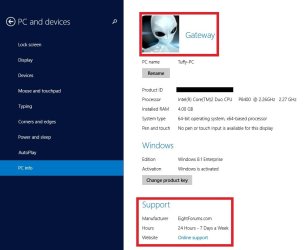
NOTE: This is the default (left screenshot) and custom (right screenshot) System window when you right click on Computer in the Start Menu and click on Properties, or when you open the Control Panel (icons view) and click on the System icon. Custom.jpg
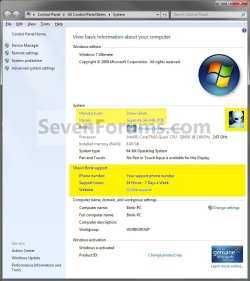
Windows_8.1_OEM_Information.jpg

PC_info.jpg


OPTION ONE

Add and Change System Support Information using "WinBubble"

1. Download and install WinBubble here: WinBubble, "Customization and Tweaks, Not Just for Geek's But For ALL" - UnlockForUs
2. Run WinBubble, and fill out the OEM info, and click/tap on Apply. Image1.jpg
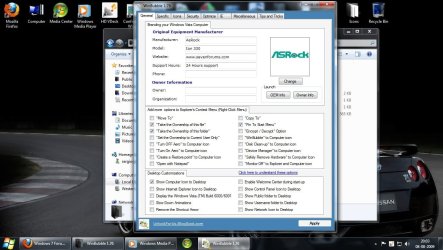
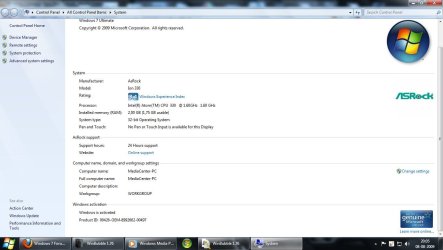
3. The newly added info should be there now. Image2.jpg


OPTION TWO

Add and Change System Support Information in Registry Editor

1. Press the Windows + R keys to open the Run dialog, type regedit, and press Enter. 2. If prompted by UAC, then click/tap on Yes.

3. In regedit, go to: (See screenshot below)

Code:
HKEY_LOCAL_MACHINE\SOFTWARE\Microsoft\Windows\CurrentVersion\OEMInformation
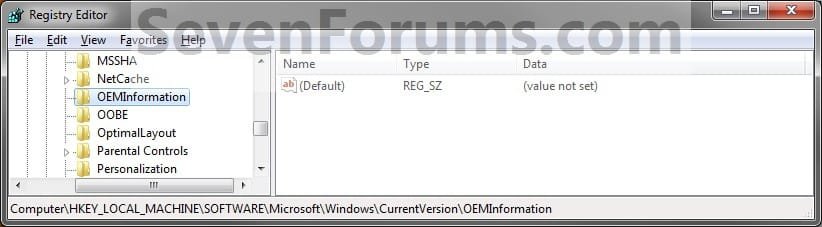
Step1.jpg
4. To Add a Logo Image
NOTE: The logo must be a BMP image file and cannot be larger than 120x120 pixels in size. The logo must stay in the location specified by you in step 4D below for it to continue to be used, so store it somewhere it will not get deleted. A) In the right pane, right click on an empty area, and click on New and String Value. (see screenshot below)

B) Type Logo, and press Enter. (see screenshot above)
NOTE: To undo this, right click on Logo, click on Delete, and on OK to confirm. Step2.jpg
C) Right click on Logo, and click on Modify.

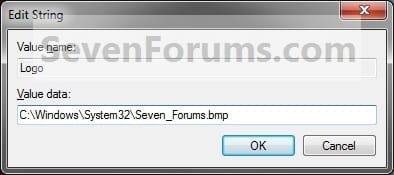
D) Type in the full path of the logo (BMP file) location, and click/tap on OK. (see screenshot below)
EXAMPLE: C:\Windows\System32\Seven_Forums.bmp Step3.jpg
5. To Add a Manufacturer Name A) In the right pane, right click on an empty area, and click on New and String Value. (see screenshot below)

B) Type Manufacturer, and press Enter.
NOTE: To undo this, right click on Manufacturer, and click on Delete and on OK to confirm. Step4.jpg
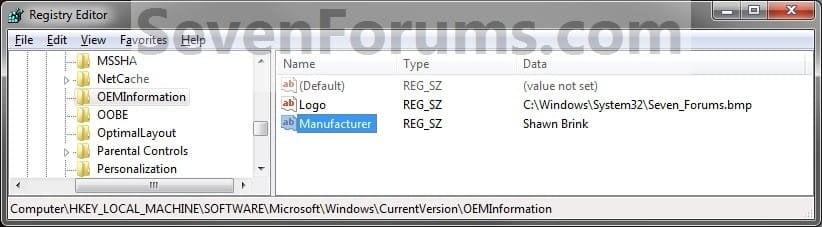
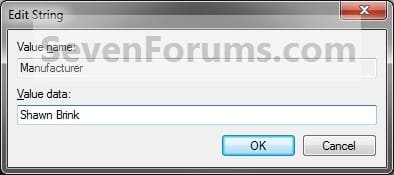
C) Right click on Manufacturer, and click/tap on Modify.

D) Type in a manufacturer name (ex: Shawn Brink), and click/tap on OK. (see screenshot below) Step5.jpg
6. To Add a Model Number A) In the right pane, right click on an empty area, and click on New and String Value. (see screenshot below)

B) Type in Model, and press Enter.
NOTE: To undo this, right click on Model, and click on Delete and on OK to confirm. Step6.jpg
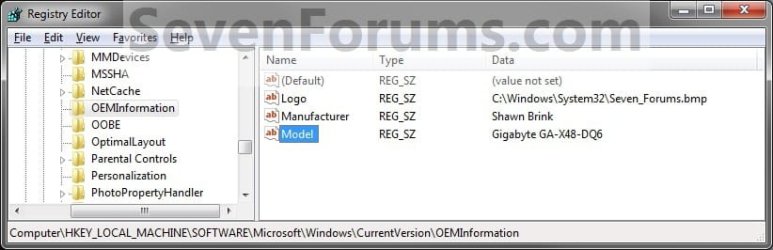
C) Right click on Model, and click on Modify.

D) Type in a your computer's model number, and click on OK. (see screenshot below) Step7.jpg
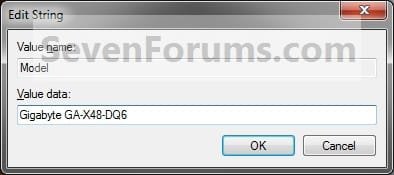
7. To Add Support Hours A) In the right pane, right click on an empty area, and click on New and String Value. (see screenshot below)

B) Type in SupportHours, and press Enter.
NOTE: To undo this, right click on SupportHours and click on Delete. Click on OK to confirm. Step8.jpg
C) Right click on SupportHours, and click on Modify.

D) Type in your support hours, and click on OK. (See screenshot below)
EXAMPLE: 24 Hours - 7 Days a Week Step9.jpg
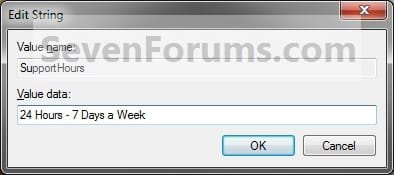
8. To Add a Support Phone Number A) In the right pane, right click on an empty area, and click on New and String Value. (see screenshot below)

B) Type SupportPhone, and press Enter.
NOTE: To undo this, right click on SupportPhone,and click on Delete. Click on OK to confirm. Step10.jpg
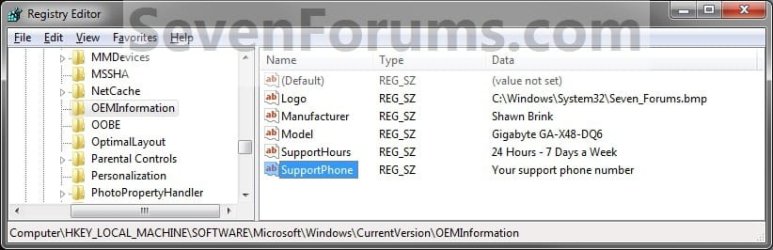
C) Right click on SupportPhone, and click on Modify.

D) Type in a phone number, and click on OK. (see screenshot below) Step11.jpg
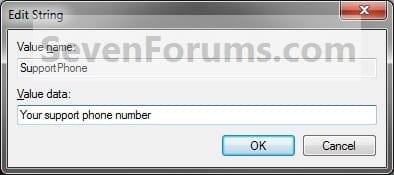
9. To Add a Support Website URL Address A) In the right pane, right click on an empty area, and click on New and String Value. (see screenshot below)

B) Type SupportURL, and press Enter.
NOTE: To undo this, right click on SupportURL,and click on Delete. Click on OK to confirm. Step12.jpg
C) Right click on SupportURL, and click on Modify.

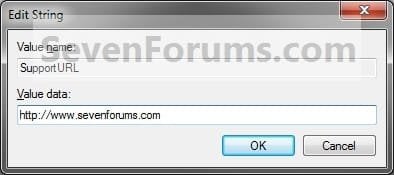
D) Type in your support URL web address, and click on OK. (see screenshot below)
NOTE: In System, it will be a URL link that says Online Support, but will go to the address you typed in. Step13.jpg
10. Close Regedit.

11. Close and reopen the System window to see your changes.
That's it,
Shawn


Attachments
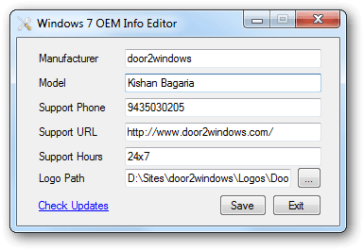
  • oem-info-editor.png
    oem-info-editor.png
    8.8 KB · Views: 1,349
Last edited:
I`m trying to change the Manufacturer and Model in the 1st two screen shots below, not the manufacturer and model in Computer Properties, I`ve already done that, shown in the 3rd shot. Is there a way to do it ? For some reason it won`t change in those 2 areas.

Hello Brian,

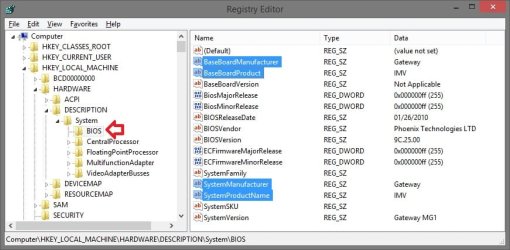
It looks like that would be located here in the registry. You may or may not need to restart the PC to apply. :)

System_Info.jpg
 

My Computer

Computer type
PC/Desktop
Computer Manufacturer/Model Number
Self built custom
OS
64-bit Windows 11 Pro for Workstations
CPU
Intel i7-8700K OC'd to 5 GHz
Motherboard
ASUS ROG Maximus XI Formula Z390
Memory
64 GB (4x16GB) G.SKILL TridentZ RGB DDR4 3600 MHz
Graphics Card(s)
ASUS ROG-STRIX-GTX1080TI-O11G-GAMING
Sound Card
Integrated
Monitor(s) Displays
2 x Samsung Odyssey G7 27"
Screen Resolution
2560x1440
Hard Drives
1TB Samsung 990 PRO M.2,
4TB Samsung 990 PRO PRO M.2,
TerraMaster F8 SSD Plus NAS
PSU
Seasonic Prime Titanium 850W
Case
Thermaltake Core P3
Cooling
Corsair Hydro H115i
Keyboard
Logitech wireless K800
Mouse
Logitech MX Master 4
Internet Speed
2 Gb/s Download and 100 Mb/s Upload
Antivirus
Malwarebyte Anti-Malware Premium
Browser
Google Chrome
Other Info
Logitech Z625 speaker system,
Logitech BRIO 4K Pro webcam,
HP Color LaserJet Pro MFP M477fdn,
APC SMART-UPS RT 1000 XL - SURT1000XLI,
Galaxy S23 Plus phone
After I change and re boot it still comes back to this, it won`t stick :cry:
 
Last edited:

My Computer

Computer type
PC/Desktop
Computer Manufacturer/Model Number
Skylake Special #666
OS
Windows 10 Pro x64
CPU
Intel Core i7 6700K
Motherboard
Asus Sabertooth Z170 Mark 1
Memory
GSkill TridentZ RGB 16GB 3600 16-16-16-36
Graphics Card(s)
EVGA GTX 980 Ti SC x2
Sound Card
Realtek High Definition
Monitor(s) Displays
AOC G2460PG
Screen Resolution
1920 x 1080 144Hz
Hard Drives
Samsung 860 Pro 256GB, Seagate Barracuda 4TB x2
PSU
EVGA 1000 P2, EVGA White Custom Braided Cables
Case
Corsair Vengeance C70 Gunmetal Black
Cooling
Corsair H100i v2, Corsair ML120 x2, Thermal Grizzly Kryonaut
Keyboard
Logitech G910 Orion Spectrum
Mouse
Logitech G700s
Internet Speed
Verizon Fios Quantum Gateway 75/75
Antivirus
Windows Defender, Malwarebytes Free 3.8.3
Browser
Chrome
Other Info
Corsair SP120 x4, LG Blu-ray Drive, Durabrand HT-395 100 Watt Dolby Digital Amp, Corsair H2100 Wireless 7.1 Headset
That's what I was afraid of that it may reset if it read it from your BIOS and updated after a restart. :(
 

My Computer

Computer type
PC/Desktop
Computer Manufacturer/Model Number
Self built custom
OS
64-bit Windows 11 Pro for Workstations
CPU
Intel i7-8700K OC'd to 5 GHz
Motherboard
ASUS ROG Maximus XI Formula Z390
Memory
64 GB (4x16GB) G.SKILL TridentZ RGB DDR4 3600 MHz
Graphics Card(s)
ASUS ROG-STRIX-GTX1080TI-O11G-GAMING
Sound Card
Integrated
Monitor(s) Displays
2 x Samsung Odyssey G7 27"
Screen Resolution
2560x1440
Hard Drives
1TB Samsung 990 PRO M.2,
4TB Samsung 990 PRO PRO M.2,
TerraMaster F8 SSD Plus NAS
PSU
Seasonic Prime Titanium 850W
Case
Thermaltake Core P3
Cooling
Corsair Hydro H115i
Keyboard
Logitech wireless K800
Mouse
Logitech MX Master 4
Internet Speed
2 Gb/s Download and 100 Mb/s Upload
Antivirus
Malwarebyte Anti-Malware Premium
Browser
Google Chrome
Other Info
Logitech Z625 speaker system,
Logitech BRIO 4K Pro webcam,
HP Color LaserJet Pro MFP M477fdn,
APC SMART-UPS RT 1000 XL - SURT1000XLI,
Galaxy S23 Plus phone
Odd it reads it fine on lines 2 and 3 on the right hand side.

There`s just gotta be a way ooooooooooooohhhhhhhhhhhhhhhhhhhhhh :cry:
 

My Computer

Computer type
PC/Desktop
Computer Manufacturer/Model Number
Skylake Special #666
OS
Windows 10 Pro x64
CPU
Intel Core i7 6700K
Motherboard
Asus Sabertooth Z170 Mark 1
Memory
GSkill TridentZ RGB 16GB 3600 16-16-16-36
Graphics Card(s)
EVGA GTX 980 Ti SC x2
Sound Card
Realtek High Definition
Monitor(s) Displays
AOC G2460PG
Screen Resolution
1920 x 1080 144Hz
Hard Drives
Samsung 860 Pro 256GB, Seagate Barracuda 4TB x2
PSU
EVGA 1000 P2, EVGA White Custom Braided Cables
Case
Corsair Vengeance C70 Gunmetal Black
Cooling
Corsair H100i v2, Corsair ML120 x2, Thermal Grizzly Kryonaut
Keyboard
Logitech G910 Orion Spectrum
Mouse
Logitech G700s
Internet Speed
Verizon Fios Quantum Gateway 75/75
Antivirus
Windows Defender, Malwarebytes Free 3.8.3
Browser
Chrome
Other Info
Corsair SP120 x4, LG Blu-ray Drive, Durabrand HT-395 100 Watt Dolby Digital Amp, Corsair H2100 Wireless 7.1 Headset
I'll do some more digging tonight to see if I can find any other registry locations where this may be at, and post back if I find them for you to try. :)
 

My Computer

Computer type
PC/Desktop
Computer Manufacturer/Model Number
Self built custom
OS
64-bit Windows 11 Pro for Workstations
CPU
Intel i7-8700K OC'd to 5 GHz
Motherboard
ASUS ROG Maximus XI Formula Z390
Memory
64 GB (4x16GB) G.SKILL TridentZ RGB DDR4 3600 MHz
Graphics Card(s)
ASUS ROG-STRIX-GTX1080TI-O11G-GAMING
Sound Card
Integrated
Monitor(s) Displays
2 x Samsung Odyssey G7 27"
Screen Resolution
2560x1440
Hard Drives
1TB Samsung 990 PRO M.2,
4TB Samsung 990 PRO PRO M.2,
TerraMaster F8 SSD Plus NAS
PSU
Seasonic Prime Titanium 850W
Case
Thermaltake Core P3
Cooling
Corsair Hydro H115i
Keyboard
Logitech wireless K800
Mouse
Logitech MX Master 4
Internet Speed
2 Gb/s Download and 100 Mb/s Upload
Antivirus
Malwarebyte Anti-Malware Premium
Browser
Google Chrome
Other Info
Logitech Z625 speaker system,
Logitech BRIO 4K Pro webcam,
HP Color LaserJet Pro MFP M477fdn,
APC SMART-UPS RT 1000 XL - SURT1000XLI,
Galaxy S23 Plus phone
Well, I'm at a bust. I searched for "SystemManufacturer" using Find & Find next for all locations in the registry. I found about 3 more locations, but they only get reset after a restart. :(
 

My Computer

Computer type
PC/Desktop
Computer Manufacturer/Model Number
Self built custom
OS
64-bit Windows 11 Pro for Workstations
CPU
Intel i7-8700K OC'd to 5 GHz
Motherboard
ASUS ROG Maximus XI Formula Z390
Memory
64 GB (4x16GB) G.SKILL TridentZ RGB DDR4 3600 MHz
Graphics Card(s)
ASUS ROG-STRIX-GTX1080TI-O11G-GAMING
Sound Card
Integrated
Monitor(s) Displays
2 x Samsung Odyssey G7 27"
Screen Resolution
2560x1440
Hard Drives
1TB Samsung 990 PRO M.2,
4TB Samsung 990 PRO PRO M.2,
TerraMaster F8 SSD Plus NAS
PSU
Seasonic Prime Titanium 850W
Case
Thermaltake Core P3
Cooling
Corsair Hydro H115i
Keyboard
Logitech wireless K800
Mouse
Logitech MX Master 4
Internet Speed
2 Gb/s Download and 100 Mb/s Upload
Antivirus
Malwarebyte Anti-Malware Premium
Browser
Google Chrome
Other Info
Logitech Z625 speaker system,
Logitech BRIO 4K Pro webcam,
HP Color LaserJet Pro MFP M477fdn,
APC SMART-UPS RT 1000 XL - SURT1000XLI,
Galaxy S23 Plus phone
Hello
I've tried this on a Windows 8.1 install and it mostly works.
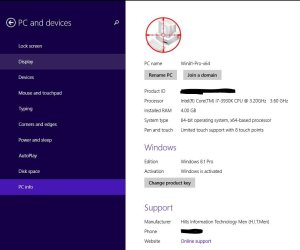
The only thing missing is the logo on the Control Panel. The interesting thing is the logo appears on the "PC Info" section when using the 8.1 Metro interface.
Are there any restrictions on the type of bmp file used other than being 120x120? Possibly the number of bits for the colours or something like that.
 

My Computer

Computer type
PC/Desktop
Computer Manufacturer/Model Number
custom build
OS
Windows 7 Ultimate x64
CPU
Intel Core i7 3930K
Motherboard
Gigabyte GA-X79-UD5
Memory
16GB

My Computer

Computer type
PC/Desktop
Computer Manufacturer/Model Number
Self built custom
OS
64-bit Windows 11 Pro for Workstations
CPU
Intel i7-8700K OC'd to 5 GHz
Motherboard
ASUS ROG Maximus XI Formula Z390
Memory
64 GB (4x16GB) G.SKILL TridentZ RGB DDR4 3600 MHz
Graphics Card(s)
ASUS ROG-STRIX-GTX1080TI-O11G-GAMING
Sound Card
Integrated
Monitor(s) Displays
2 x Samsung Odyssey G7 27"
Screen Resolution
2560x1440
Hard Drives
1TB Samsung 990 PRO M.2,
4TB Samsung 990 PRO PRO M.2,
TerraMaster F8 SSD Plus NAS
PSU
Seasonic Prime Titanium 850W
Case
Thermaltake Core P3
Cooling
Corsair Hydro H115i
Keyboard
Logitech wireless K800
Mouse
Logitech MX Master 4
Internet Speed
2 Gb/s Download and 100 Mb/s Upload
Antivirus
Malwarebyte Anti-Malware Premium
Browser
Google Chrome
Other Info
Logitech Z625 speaker system,
Logitech BRIO 4K Pro webcam,
HP Color LaserJet Pro MFP M477fdn,
APC SMART-UPS RT 1000 XL - SURT1000XLI,
Galaxy S23 Plus phone
Hello,
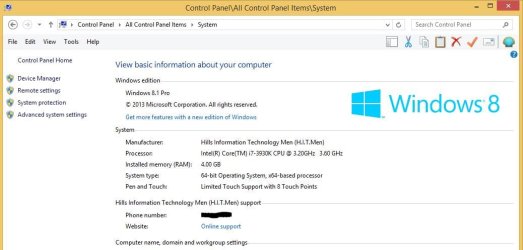
I used the option to use regedit but I didn't put an entry in for all fields. Below is an export of the relevant entries I made. With the exception of the control panel logo the data is displayed correctly. I would like to upload the logo but bmp isn't a valid type for uploading. But I am attaching screen shots of the control panel and the PC Info screen.

Windows Registry Editor Version 5.00

[HKEY_LOCAL_MACHINE\SOFTWARE\Microsoft\Windows\CurrentVersion\OEMInformation]
"Logo"="C:\\Windows\\System32\\Hitmen.bmp"
"Manufacturer"="Hills Information Technology Men (H.I.T.Men)"
"SupportPhone"="xxxx-xxxx"
"SupportURL"="http://xxxx.xxxx.net/"
 

Attachments

  • #CP.jpg
    #CP.jpg
    51.8 KB · Views: 262
  • #PC.jpg
    #PC.jpg
    41.1 KB · Views: 111

My Computer

Computer type
PC/Desktop
Computer Manufacturer/Model Number
custom build
OS
Windows 7 Ultimate x64
CPU
Intel Core i7 3930K
Motherboard
Gigabyte GA-X79-UD5
Memory
16GB
I don't see anything wrong with it. You might test with a smaller .bmp to see how it does.
 

My Computer

Computer type
PC/Desktop
Computer Manufacturer/Model Number
Self built custom
OS
64-bit Windows 11 Pro for Workstations
CPU
Intel i7-8700K OC'd to 5 GHz
Motherboard
ASUS ROG Maximus XI Formula Z390
Memory
64 GB (4x16GB) G.SKILL TridentZ RGB DDR4 3600 MHz
Graphics Card(s)
ASUS ROG-STRIX-GTX1080TI-O11G-GAMING
Sound Card
Integrated
Monitor(s) Displays
2 x Samsung Odyssey G7 27"
Screen Resolution
2560x1440
Hard Drives
1TB Samsung 990 PRO M.2,
4TB Samsung 990 PRO PRO M.2,
TerraMaster F8 SSD Plus NAS
PSU
Seasonic Prime Titanium 850W
Case
Thermaltake Core P3
Cooling
Corsair Hydro H115i
Keyboard
Logitech wireless K800
Mouse
Logitech MX Master 4
Internet Speed
2 Gb/s Download and 100 Mb/s Upload
Antivirus
Malwarebyte Anti-Malware Premium
Browser
Google Chrome
Other Info
Logitech Z625 speaker system,
Logitech BRIO 4K Pro webcam,
HP Color LaserJet Pro MFP M477fdn,
APC SMART-UPS RT 1000 XL - SURT1000XLI,
Galaxy S23 Plus phone
I took a step further

I used the Registry to create this since I am lazy to use AIK and ADK but I also added another registry that isnt mentioned here HKEY_LOCAL_MACHINE\SOFTWARE\Microsoft\Windows\CurrentVersion\OEMInformation\ it is a DWORD32 Value named HelpCustomized and I typed in 1. I also used Windows AIK on 32 bit OS to create a custom H1S script for help support prompt that appears it looks like this now this information seems undocumented tho which is weird nowhere on internet I had to read through the AIK Information
I noticed almost no one knows about this since it doesnt show on google or search engines but also only big manufacturers like HP, Dell and etc only knows it
 

Attachments

  • Capture.PNG
    Capture.PNG
    115.7 KB · Views: 6

My Computer

Computer type
Laptop
Computer Manufacturer/Model Number
HP
OS
64bit Windows 8.1 pro
CPU
AMD E1-2100 APU with Radeon(TM) HD Graphics
Memory
4GB
Graphics Card(s)
AMD Radeon HD 8210
Hard Drives
HGST HTS545050A7E680 SATA Disk Drive 400GB
Antivirus
Avast
Browser
Internet explorer, firefox, google chrome
Back
Top