Task Scheduler : Create Shut Down PC Automatically Task

How to Create a Task that will Shut Down the PC Automatically

This will show a very easy way to create a task in the Task Scheduler that will shut down the PC whenever you like. This will work for Windows 7 and Windows Vista.
Let's get started!
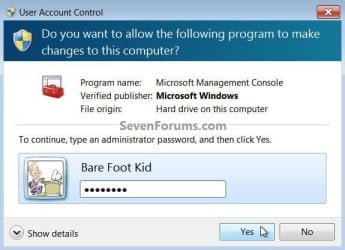
1) In the Windows start menu search box type "Task Scheduler" (without the quotes) right click the entry and select "Run as Administrator" then enter your user credentials for the UAC prompt and click "Yes" to open the Task Scheduler.
click an image to enlarge
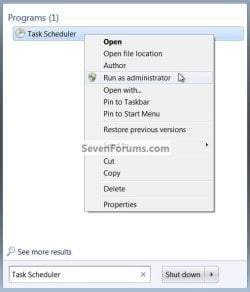
Search.jpg
UAC Task.jpg
2) In the left pane of Task Scheduler, click on Task Scheduler Library, then in the "Actions" menu in the right pane click on Create Task.
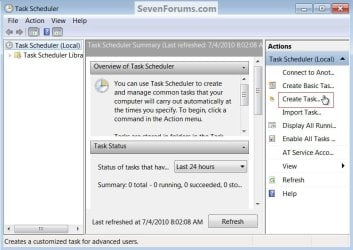
Create.jpg
3) In the Create Task window under the General tab, set a name and description for the task then dot "Run whether user is logged on or not" then put a check/tick at "Run with highest privileges", be sure to set the "Configure for:" for your flavor of Windows, then continue on to #4 below.
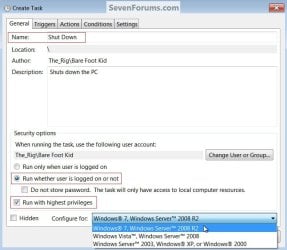
General.jpg
4) Now at the Actions tab at the lower left click "New", in the "New Action" dialog box leave "Action" set at "Start a program" at "Program/script:" type shutdown.exe then at "Add arguments" type /s /f (take note of the space between the /s and /f) then click OK.
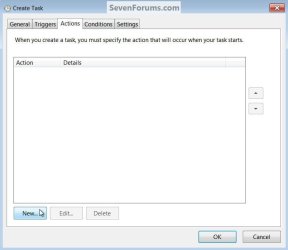
Action New.jpg
New Action.jpg
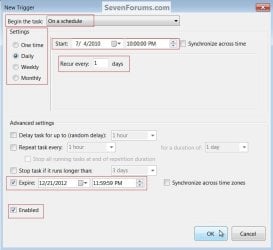
5) Now at the Triggers tab at the lower left click "New" in the "New Trigger" dialog box set the parameters that you want for the task, as everyone's needs will be different, I just highlighted a few of the ones that need to be set to give some ideas.
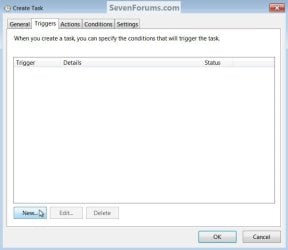
Triggers New.jpg
Set Trigger2.jpg
6) After you have the Triggers set click "OK", you will then be prompted to enter your user credentials one last time and then click "OK" to finish creating the task. That's it the task has been created, at "File" click "Exit" to close the Task Scheduler.
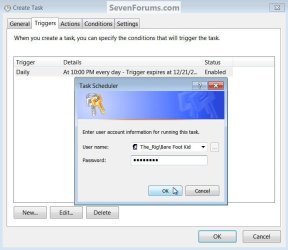
Password.jpg
Exit.jpg
   Note

Be sure to have a look at the "Conditions" tab if you need to add any parameters that must be met before the task is able to run.
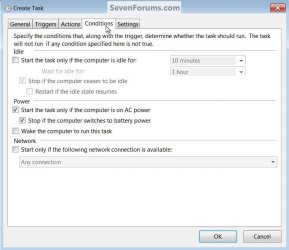
Condidions.jpg
Should the PC be in use at the scheduled shutdown time you will get a dialog box stating that you are about to be logged off.
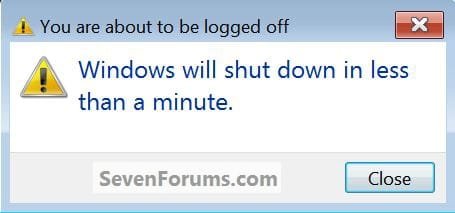
Warning.jpg
Enjoy! :)


Attachments

  • New Shortcut.jpg
    New Shortcut.jpg
    80.4 KB · Views: 57
Last edited by a moderator:
Nice work Ted, easy to follow too! :D
 

My Computer

Computer type
PC/Desktop
Computer Manufacturer/Model Number
Self Built
OS
Win 10 Pro x64
CPU
Intel I5-2500K @3.3GHz
Motherboard
Asrock P67 Extreme4
Memory
16GB G.Skill Ripjaws X (4x4GB)
Graphics Card(s)
EVGA GeForce 750 Ti SC 2GB
Sound Card
ASUS Xonar DG 5.1 Channels 24-bit 96KHz PCI Interface Sound
Monitor(s) Displays
auria eq2367
Screen Resolution
1920 x 1080
Hard Drives
250GB Samsung 850 EVO SSD
1TB WD Blue
1TB Hitachi
PSU
SeaSonic X 650W 80 Plus Gold
Case
Corsair Obsidian 750D
Cooling
Corsair H60, Three 140mm case fans
Keyboard
Logitech Wireless Keyboard K520
Mouse
Logitech Wireless Mouse M310
Internet Speed
Wave Broadband ~ 100 dn 5 up
Antivirus
Windows Defender, Malwarebytes Premium
Browser
Edge, IE11, Chrome
Other Info
Laptop specs: HP g7-1365dx /
CPU: AMD A6-3420M APU with Radeon(tm) HD Graphics /
RAM: Crucial 8Gb (2x4Gb) /
SSD: Crucial M4-CT128M4SSD2 ATA Device/ FW 000F /
GFX: AMD Radeon HD 6520G /
OS: Windows 10 Pro x64
Thanks Derek! :)
 

My Computer

Computer Manufacturer/Model Number
* BFK Customs *
OS
W 7 64-bit Ultimate
CPU
Intel Q9550 Yorkfield
Motherboard
ASUS P5Q Pro
Memory
8GB Dominator 8500C5D
Graphics Card(s)
ATI : XFX 5870
Sound Card
Realtek HD Audio 7-1
Monitor(s) Displays
1x 47" LCD HDMI & 3x 26" LCD HDMI
Screen Resolution
1920x1080P & 1920x1200
Hard Drives
1x 80GB Intel X25-M G2 SSD : 1x 500GB & 1x 640GB WD Caviar Black(s)
PSU
Corsair 620HX
Case
Cooler Master RC-690
Cooling
Tuniq Tower 120, 2x 140mm and 3x 120mm case fans
Keyboard
Microsoft 500
Mouse
Razer Diamondback 3G
Internet Speed
14 Mb/s
Other Info
1x Koutech 3Gb/s SATA HDD Hot Swap Rack
Very nice Ted, you do good work. A Guy
 

My Computer

Computer type
PC/Desktop
OS
Windows 10 Home x64
CPU
INTEL Core i5-750 Quad-Core 3.37GHz
Motherboard
ASUS P7P55D
Memory
HyperX Fury Black Series 8GB (2 x 4GB) 1866Mhz
Graphics Card(s)
EVGA GeForce GTX 750 Superclocked 1GB 128-Bit GDDR5
Monitor(s) Displays
LG 32MA68HY 32" IPS
Screen Resolution
1920 x 1080
Hard Drives
Samsung 840 Evo 120GB, SEAGATE 500GB Barracuda® 7200.12, SATA 3 Gb/s, 7200 RPM, 16MB cache
PSU
ANTEC TruePower New TP-550, 80 PLUS, 550W
Case
ANTEC Three Hundred Illusion
Cooling
COOLER MASTER Hyper 212 Plus, 4 x 120mm 1 x 140mm Noctua's
Internet Speed
85 + Mbps
Antivirus
Avast
Browser
Vivaldi

My Computer

Computer Manufacturer/Model Number
* BFK Customs *
OS
W 7 64-bit Ultimate
CPU
Intel Q9550 Yorkfield
Motherboard
ASUS P5Q Pro
Memory
8GB Dominator 8500C5D
Graphics Card(s)
ATI : XFX 5870
Sound Card
Realtek HD Audio 7-1
Monitor(s) Displays
1x 47" LCD HDMI & 3x 26" LCD HDMI
Screen Resolution
1920x1080P & 1920x1200
Hard Drives
1x 80GB Intel X25-M G2 SSD : 1x 500GB & 1x 640GB WD Caviar Black(s)
PSU
Corsair 620HX
Case
Cooler Master RC-690
Cooling
Tuniq Tower 120, 2x 140mm and 3x 120mm case fans
Keyboard
Microsoft 500
Mouse
Razer Diamondback 3G
Internet Speed
14 Mb/s
Other Info
1x Koutech 3Gb/s SATA HDD Hot Swap Rack
Great work Ted, well done :)
 

My Computer

Computer type
PC/Desktop
Computer Manufacturer/Model Number
76~2.0
OS
Windows 7 Ult x64 - SP1/ Windows 8 Pro x64
CPU
Intel Core i5-3570K 4.6GHz
Motherboard
Gigabyte GA-Z77X UD3H, f18
Memory
8GB (2X4GB) DDR3 1600 Corsair Vengeance CL8 1.5v
Graphics Card(s)
Sapphire HD 7770 Vapor-X OC 1GB DDR5
Sound Card
Onboard VIA VT2021
Monitor(s) Displays
22" LCD Dell
Screen Resolution
1680x1050
Hard Drives
Samsung 840Pro 128GB SSD,
Seagate Barracuda 500GB SATA2 7200rpm 32MB cache, Seagate Barracuda 1TB SATA2 7200rpm 32MB cache,
PSU
Corsair HX650W
Case
Cooler Master Storm Scout
Cooling
Corsair H80 2x12cm Noctua NF P12 , 2x14cm case fans
Keyboard
Logitech Wave
Mouse
CM Sentinel
Internet Speed
Dismal
Antivirus
Avast
Browser
Opera Next
Other Info
Haswell laptop: HP Envy 17t-j, i7-4700MQ, GeForce 740M 2GB DDR3, 17.3" Full HD 1920x1080, 16GB RAM, Samsung 840 Pro 128GB, 1TB Hitachi 7200 HDD,
Desktop: eSATA ports,
External eSATA Seagate 500GB SATA2 7200rpm,
External WD USB 500GB
Thanks Dave, I'm pleased you find it useful. :)
 

My Computer

Computer Manufacturer/Model Number
* BFK Customs *
OS
W 7 64-bit Ultimate
CPU
Intel Q9550 Yorkfield
Motherboard
ASUS P5Q Pro
Memory
8GB Dominator 8500C5D
Graphics Card(s)
ATI : XFX 5870
Sound Card
Realtek HD Audio 7-1
Monitor(s) Displays
1x 47" LCD HDMI & 3x 26" LCD HDMI
Screen Resolution
1920x1080P & 1920x1200
Hard Drives
1x 80GB Intel X25-M G2 SSD : 1x 500GB & 1x 640GB WD Caviar Black(s)
PSU
Corsair 620HX
Case
Cooler Master RC-690
Cooling
Tuniq Tower 120, 2x 140mm and 3x 120mm case fans
Keyboard
Microsoft 500
Mouse
Razer Diamondback 3G
Internet Speed
14 Mb/s
Other Info
1x Koutech 3Gb/s SATA HDD Hot Swap Rack
hi Bare Foot Kid:

Is there a way to make pc auto restart using the same method?
 

My Computer

OS
Windows 7 Pro 64bit SP1
Hello Sonshi, and welcome to Seven Forums.

Yes. You could use the same tutorial, but just substitute the arguments in step 4 with /R instead to restart the computer. :)

Hope this helps,
Shawn
 

My Computer

Computer type
PC/Desktop
Computer Manufacturer/Model Number
Self built custom
OS
64-bit Windows 11 Pro for Workstations
CPU
Intel i7-8700K OC'd to 5 GHz
Motherboard
ASUS ROG Maximus XI Formula Z390
Memory
64 GB (4x16GB) G.SKILL TridentZ RGB DDR4 3600 MHz
Graphics Card(s)
ASUS ROG-STRIX-GTX1080TI-O11G-GAMING
Sound Card
Integrated
Monitor(s) Displays
2 x Samsung Odyssey G7 27"
Screen Resolution
2560x1440
Hard Drives
1TB Samsung 990 PRO M.2,
4TB Samsung 990 PRO PRO M.2,
TerraMaster F8 SSD Plus NAS
PSU
Seasonic Prime Titanium 850W
Case
Thermaltake Core P3
Cooling
Corsair Hydro H115i
Keyboard
Logitech wireless K800
Mouse
Logitech MX Master 4
Internet Speed
2 Gb/s Download and 100 Mb/s Upload
Antivirus
Malwarebyte Anti-Malware Premium
Browser
Google Chrome
Other Info
Logitech Z625 speaker system,
Logitech BRIO 4K Pro webcam,
HP Color LaserJet Pro MFP M477fdn,
APC SMART-UPS RT 1000 XL - SURT1000XLI,
Galaxy S23 Plus phone
Thank you Blink.

I did exactly that. And it work. except that I needed to type my login password to start Windows.

Windows needs user password in order to use run Task Scheduler and password is again needed to login.

How can I solve this?
 

My Computer

OS
Windows 7 Pro 64bit SP1
Thank you Blink.

I did exactly that. And it work. except that I needed to type my login password to start Windows.

Windows needs user password in order to use run Task Scheduler and password is again needed to login.

How can I solve this?

Sonshi,

You're welcome. Unfortunately, it only restarts the computer. By default, you are taken to the log in screen whenever you restart the computer before Windows will start. The only way around this is if you set Windows 7 to log on automatically to a user account of your choice at startup. This of course would be a problem if you have multiple users on the computer. If not, then it may be an option for you.
 
Last edited:

My Computer

Computer type
PC/Desktop
Computer Manufacturer/Model Number
Self built custom
OS
64-bit Windows 11 Pro for Workstations
CPU
Intel i7-8700K OC'd to 5 GHz
Motherboard
ASUS ROG Maximus XI Formula Z390
Memory
64 GB (4x16GB) G.SKILL TridentZ RGB DDR4 3600 MHz
Graphics Card(s)
ASUS ROG-STRIX-GTX1080TI-O11G-GAMING
Sound Card
Integrated
Monitor(s) Displays
2 x Samsung Odyssey G7 27"
Screen Resolution
2560x1440
Hard Drives
1TB Samsung 990 PRO M.2,
4TB Samsung 990 PRO PRO M.2,
TerraMaster F8 SSD Plus NAS
PSU
Seasonic Prime Titanium 850W
Case
Thermaltake Core P3
Cooling
Corsair Hydro H115i
Keyboard
Logitech wireless K800
Mouse
Logitech MX Master 4
Internet Speed
2 Gb/s Download and 100 Mb/s Upload
Antivirus
Malwarebyte Anti-Malware Premium
Browser
Google Chrome
Other Info
Logitech Z625 speaker system,
Logitech BRIO 4K Pro webcam,
HP Color LaserJet Pro MFP M477fdn,
APC SMART-UPS RT 1000 XL - SURT1000XLI,
Galaxy S23 Plus phone
I have created a task in task scheduler but now i wanted to make changes for it .How to do it,cause i can't see the task i created in the task scheduler menu.:picnic:
Help needed .......
 

My Computer

Computer Manufacturer/Model Number
Custom self assembled
OS
Windows 7 Ultimate x64
CPU
Intel Core i7 930
Motherboard
Gigabyte GA X58A UD7
Memory
Gskill 2x3 GB Ram
Graphics Card(s)
Sapphire ATI Radeon HD 5870
Monitor(s) Displays
LG 24MP88 24" LED Monitor
Screen Resolution
1920 X 1080
Hard Drives
Seagate barracuda 1 TB
PSU
Corsair GS 600W
Case
Cooler Master 690 II Plus
Cooling
Cooler Master Hyper 212X
Keyboard
Logitech G15 Gaming keyboard
Mouse
Logitech MX518 Gaming Mouse
Internet Speed
Broadband 50 Mbps speed [Hathway]
Other Info
Xbox 360 Wired Controller (x2)
AverMedia TV tuner Card [Internal]
Logitech HD C110 Web Camera
Netgear WGR614 Wireless-N 150 Router
Razer Goliathus Fragged Alpha Control Edition Mouse Pad
Hello Ali Khan,

Click on the Task Scheduler Library folder in the left pane to see if you see the task's name listed in the middle pane.

Hope this helps, :)
Shawn
 

My Computer

Computer type
PC/Desktop
Computer Manufacturer/Model Number
Self built custom
OS
64-bit Windows 11 Pro for Workstations
CPU
Intel i7-8700K OC'd to 5 GHz
Motherboard
ASUS ROG Maximus XI Formula Z390
Memory
64 GB (4x16GB) G.SKILL TridentZ RGB DDR4 3600 MHz
Graphics Card(s)
ASUS ROG-STRIX-GTX1080TI-O11G-GAMING
Sound Card
Integrated
Monitor(s) Displays
2 x Samsung Odyssey G7 27"
Screen Resolution
2560x1440
Hard Drives
1TB Samsung 990 PRO M.2,
4TB Samsung 990 PRO PRO M.2,
TerraMaster F8 SSD Plus NAS
PSU
Seasonic Prime Titanium 850W
Case
Thermaltake Core P3
Cooling
Corsair Hydro H115i
Keyboard
Logitech wireless K800
Mouse
Logitech MX Master 4
Internet Speed
2 Gb/s Download and 100 Mb/s Upload
Antivirus
Malwarebyte Anti-Malware Premium
Browser
Google Chrome
Other Info
Logitech Z625 speaker system,
Logitech BRIO 4K Pro webcam,
HP Color LaserJet Pro MFP M477fdn,
APC SMART-UPS RT 1000 XL - SURT1000XLI,
Galaxy S23 Plus phone
Thanks shawn i got that working ,
But during shutdown the computer went to the log on screen and was asking for password there.Is there any way i can disable that option ? I have chosen a option to shutdown when the pc is idle for more then an hour.
Because at night sometimes i leave my laptop switch on and i want it to shut down automatically and not ask for the password .:sleep:
 

My Computer

Computer Manufacturer/Model Number
Custom self assembled
OS
Windows 7 Ultimate x64
CPU
Intel Core i7 930
Motherboard
Gigabyte GA X58A UD7
Memory
Gskill 2x3 GB Ram
Graphics Card(s)
Sapphire ATI Radeon HD 5870
Monitor(s) Displays
LG 24MP88 24" LED Monitor
Screen Resolution
1920 X 1080
Hard Drives
Seagate barracuda 1 TB
PSU
Corsair GS 600W
Case
Cooler Master 690 II Plus
Cooling
Cooler Master Hyper 212X
Keyboard
Logitech G15 Gaming keyboard
Mouse
Logitech MX518 Gaming Mouse
Internet Speed
Broadband 50 Mbps speed [Hathway]
Other Info
Xbox 360 Wired Controller (x2)
AverMedia TV tuner Card [Internal]
Logitech HD C110 Web Camera
Netgear WGR614 Wireless-N 150 Router
Razer Goliathus Fragged Alpha Control Edition Mouse Pad
Sounds like a mistake may have been made while creating the task. Did you use your administrator account and password while creating the task? You might delete the task and start over to see how it goes this round. :(
 

My Computer

Computer type
PC/Desktop
Computer Manufacturer/Model Number
Self built custom
OS
64-bit Windows 11 Pro for Workstations
CPU
Intel i7-8700K OC'd to 5 GHz
Motherboard
ASUS ROG Maximus XI Formula Z390
Memory
64 GB (4x16GB) G.SKILL TridentZ RGB DDR4 3600 MHz
Graphics Card(s)
ASUS ROG-STRIX-GTX1080TI-O11G-GAMING
Sound Card
Integrated
Monitor(s) Displays
2 x Samsung Odyssey G7 27"
Screen Resolution
2560x1440
Hard Drives
1TB Samsung 990 PRO M.2,
4TB Samsung 990 PRO PRO M.2,
TerraMaster F8 SSD Plus NAS
PSU
Seasonic Prime Titanium 850W
Case
Thermaltake Core P3
Cooling
Corsair Hydro H115i
Keyboard
Logitech wireless K800
Mouse
Logitech MX Master 4
Internet Speed
2 Gb/s Download and 100 Mb/s Upload
Antivirus
Malwarebyte Anti-Malware Premium
Browser
Google Chrome
Other Info
Logitech Z625 speaker system,
Logitech BRIO 4K Pro webcam,
HP Color LaserJet Pro MFP M477fdn,
APC SMART-UPS RT 1000 XL - SURT1000XLI,
Galaxy S23 Plus phone
Arguments explanation on shut down task

I was looking on the Microsoft website to find out about the arguments entered in the tutorial.

Am a Mac user, but have a Windows 7 computer connected to an imagesetter at a daily newspaper.
I have set the BIOS to start up every day, but need a task to run a shut down on the weekends, when we aren't here to shut it down manually.
I wanted to check out the /s and /f before entering this on the computer in the task manager - I am cautious when entering something I don't understanD

You had entered /s and /f.
But the Microsoft website chart shows -s as shutdown, and I can't find a -f argument explanation on their site at all.

Here is there sampling of their chart
Shut down
shutdown
-s
Restart
shutdown
-r
Log off
shutdown
-l


Can you tell me:

1) Why the you have /s and they have -s?
Does it matter which you use?

2) If -s or /s means shutdown,
What does -f or /f stand for.

Thank you
Bob
 

My Computer

Computer type
PC/Desktop
Computer Manufacturer/Model Number
Touch systems
OS
Windows 7 32 bit
Motherboard
ASUS
Hello Bob, and welcome to Seven Forums. :)

Q1) You could use - or /. It doesn't matter.

Q2) S = shutdown, and F = force
 

My Computer

Computer type
PC/Desktop
Computer Manufacturer/Model Number
Self built custom
OS
64-bit Windows 11 Pro for Workstations
CPU
Intel i7-8700K OC'd to 5 GHz
Motherboard
ASUS ROG Maximus XI Formula Z390
Memory
64 GB (4x16GB) G.SKILL TridentZ RGB DDR4 3600 MHz
Graphics Card(s)
ASUS ROG-STRIX-GTX1080TI-O11G-GAMING
Sound Card
Integrated
Monitor(s) Displays
2 x Samsung Odyssey G7 27"
Screen Resolution
2560x1440
Hard Drives
1TB Samsung 990 PRO M.2,
4TB Samsung 990 PRO PRO M.2,
TerraMaster F8 SSD Plus NAS
PSU
Seasonic Prime Titanium 850W
Case
Thermaltake Core P3
Cooling
Corsair Hydro H115i
Keyboard
Logitech wireless K800
Mouse
Logitech MX Master 4
Internet Speed
2 Gb/s Download and 100 Mb/s Upload
Antivirus
Malwarebyte Anti-Malware Premium
Browser
Google Chrome
Other Info
Logitech Z625 speaker system,
Logitech BRIO 4K Pro webcam,
HP Color LaserJet Pro MFP M477fdn,
APC SMART-UPS RT 1000 XL - SURT1000XLI,
Galaxy S23 Plus phone
So the /s means the shutdown command and the /f is to proceed with shutdown - would this be the equivalent of clicking an option in the resulting dialogue box that would appear - for example clicking OK or proceed with shutdown?

Thanks in advance for your help
Bob
 

My Computer

Computer type
PC/Desktop
Computer Manufacturer/Model Number
Touch systems
OS
Windows 7 32 bit
Motherboard
ASUS
The F would be to force it to shutdown.

If you ever shut down your PC and had it hang for a bit before it shutdown or ask you to force a program to close before it shutdown, then this is what F is for. It forces the shut down without delay. :)
 

My Computer

Computer type
PC/Desktop
Computer Manufacturer/Model Number
Self built custom
OS
64-bit Windows 11 Pro for Workstations
CPU
Intel i7-8700K OC'd to 5 GHz
Motherboard
ASUS ROG Maximus XI Formula Z390
Memory
64 GB (4x16GB) G.SKILL TridentZ RGB DDR4 3600 MHz
Graphics Card(s)
ASUS ROG-STRIX-GTX1080TI-O11G-GAMING
Sound Card
Integrated
Monitor(s) Displays
2 x Samsung Odyssey G7 27"
Screen Resolution
2560x1440
Hard Drives
1TB Samsung 990 PRO M.2,
4TB Samsung 990 PRO PRO M.2,
TerraMaster F8 SSD Plus NAS
PSU
Seasonic Prime Titanium 850W
Case
Thermaltake Core P3
Cooling
Corsair Hydro H115i
Keyboard
Logitech wireless K800
Mouse
Logitech MX Master 4
Internet Speed
2 Gb/s Download and 100 Mb/s Upload
Antivirus
Malwarebyte Anti-Malware Premium
Browser
Google Chrome
Other Info
Logitech Z625 speaker system,
Logitech BRIO 4K Pro webcam,
HP Color LaserJet Pro MFP M477fdn,
APC SMART-UPS RT 1000 XL - SURT1000XLI,
Galaxy S23 Plus phone
How about this scenario? We currently shutdown all computers at 8:00pm with no problem. However, I want to be able to have the computers install any updates, if there are any, and then shutdown. How can I do that?
 

My Computer

OS
Ultimate 64bit
Back
Top