Solved Taskbar icons not showing window

Ineedhelp123

New member
Local time
11:25 PM
Messages
10
Whenever i put my mouse over any of these icons, instead of showing me whats in that window, it says the name of the program. Can some one tell me how to fix this?
 

My Computer

OS
Windows 7 64
You are running in Windows Basics mode. This means that there is a programme running that cannot support the advanced colour scheme Win7 uses. What have you recently installed and what programmes are you running?
 

My Computer

Computer Manufacturer/Model Number
HP Envy H8
OS
Windows 7 Ultimate 64 bit
CPU
Intel Core i7-3770
Motherboard
Intel (Laptop)
Memory
16 GB DDR3
Graphics Card(s)
NVIDIA GeForce GTX 660
Screen Resolution
1920x1080
Hard Drives
SSD 120GB
HDD 3TB
I recently updated my graphics card driver, is there a way to change out of basic?
 

My Computer

OS
Windows 7 64

My Computer

Computer Manufacturer/Model Number
Acer Aspire 7741Z
OS
Windows 7 Home Premium 64-bit, SP1
CPU
Intel Pentium P6200, Cores 2, 2.13 GHz
Memory
4 GB
Graphics Card(s)
Intel HD
Sound Card
unknown
Monitor(s) Displays
17.3 inches
Screen Resolution
1600 x 900
Hard Drives
640 GB, 5400 PRM

My Computer

OS
Windows 7 64
I recently updated my graphics card driver, is there a way to change out of basic?

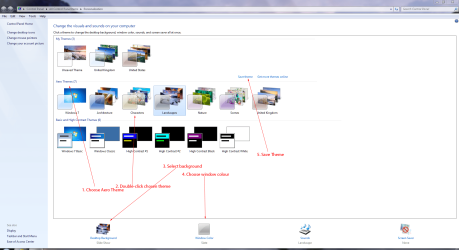
Right-click your desktop and choose Personalisation. Choose Aero Themes. Choose Theme. Choose Background. Choose Window Colour. Save Theme.

Theme.PNG
 
Last edited:

My Computer

Computer Manufacturer/Model Number
HP Pavilion Elite 495UK
OS
Windows 7 Ultimate SP1 64-Bit
CPU
Intel Core i7 870 @ 2.93GHz
Motherboard
MSI 2A9C (CPU1)
Memory
8Gb Dual-Channel DDR3 @ 664MHz
Graphics Card(s)
nVidia GeForce GTX 460 1024MB dedicated RAM
Sound Card
Realtek HD Audio
Monitor(s) Displays
HP2310i
Screen Resolution
1920 x 1080
Hard Drives
1x1954GB Hitachi HDS22020ALA 330 (RAID), 1x1954GB Hitachi External for backup and storage
PSU
460W
Case
HP Elite
Cooling
Air cooled
Keyboard
Logitech K750 solar-powered keyboard
Mouse
Logitech Wireless M180 mouse
Internet Speed
2Mb
Other Info
Pure Avanti Flow Internet Radio with iPod Dock, 64Gb iPod, HP USB Speakers, Sony MDR-V500 Headphones, Sony Vaio F-Series Laptop
Whenever i put my mouse over any of these icons, instead of showing me whats in that window, it says the name of the program. Can some one tell me how to fix this?

If system restore is not possible, try this ........

Press Ctrl + Alt + Delete keys all together > select Task Manager > select Processes tab > find explorer.exe ( NOT iexplorer.exe ) > right click at it > click End Process > click Applications tab > click New task ... > in the Open box, type explorer.exe > click OK

Try your taskbar icons.
 

My Computer

Computer Manufacturer/Model Number
Acer Aspire 7741Z
OS
Windows 7 Home Premium 64-bit, SP1
CPU
Intel Pentium P6200, Cores 2, 2.13 GHz
Memory
4 GB
Graphics Card(s)
Intel HD
Sound Card
unknown
Monitor(s) Displays
17.3 inches
Screen Resolution
1600 x 900
Hard Drives
640 GB, 5400 PRM

My Computer

Computer Manufacturer/Model Number
HP Pavilion Elite 495UK
OS
Windows 7 Ultimate SP1 64-Bit
CPU
Intel Core i7 870 @ 2.93GHz
Motherboard
MSI 2A9C (CPU1)
Memory
8Gb Dual-Channel DDR3 @ 664MHz
Graphics Card(s)
nVidia GeForce GTX 460 1024MB dedicated RAM
Sound Card
Realtek HD Audio
Monitor(s) Displays
HP2310i
Screen Resolution
1920 x 1080
Hard Drives
1x1954GB Hitachi HDS22020ALA 330 (RAID), 1x1954GB Hitachi External for backup and storage
PSU
460W
Case
HP Elite
Cooling
Air cooled
Keyboard
Logitech K750 solar-powered keyboard
Mouse
Logitech Wireless M180 mouse
Internet Speed
2Mb
Other Info
Pure Avanti Flow Internet Radio with iPod Dock, 64Gb iPod, HP USB Speakers, Sony MDR-V500 Headphones, Sony Vaio F-Series Laptop
Whenever i put my mouse over any of these icons, instead of showing me whats in that window, it says the name of the program. Can some one tell me how to fix this?

If system restore is not possible, try this ........

Press Ctrl + Alt + Delete keys all together > select Task Manager > select Processes tab > find explorer.exe ( NOT iexplorer.exe ) > right click at it > click End Process > click Applications tab > click New task ... > in the Open box, type explorer.exe > click OK

Try your taskbar icons.

Already tried that, thanks though.
 

My Computer

OS
Windows 7 64
You have a driver or a programme that is running that is making it do this and it will not change until the driver/programme has stopped.

IMO a restore is your best option. Are you using a graphics card? Some specs would be nice:)
 

My Computer

Computer Manufacturer/Model Number
HP Envy H8
OS
Windows 7 Ultimate 64 bit
CPU
Intel Core i7-3770
Motherboard
Intel (Laptop)
Memory
16 GB DDR3
Graphics Card(s)
NVIDIA GeForce GTX 660
Screen Resolution
1920x1080
Hard Drives
SSD 120GB
HDD 3TB
What graphics card are you using?
 

My Computer

Computer Manufacturer/Model Number
HP Pavilion Elite 495UK
OS
Windows 7 Ultimate SP1 64-Bit
CPU
Intel Core i7 870 @ 2.93GHz
Motherboard
MSI 2A9C (CPU1)
Memory
8Gb Dual-Channel DDR3 @ 664MHz
Graphics Card(s)
nVidia GeForce GTX 460 1024MB dedicated RAM
Sound Card
Realtek HD Audio
Monitor(s) Displays
HP2310i
Screen Resolution
1920 x 1080
Hard Drives
1x1954GB Hitachi HDS22020ALA 330 (RAID), 1x1954GB Hitachi External for backup and storage
PSU
460W
Case
HP Elite
Cooling
Air cooled
Keyboard
Logitech K750 solar-powered keyboard
Mouse
Logitech Wireless M180 mouse
Internet Speed
2Mb
Other Info
Pure Avanti Flow Internet Radio with iPod Dock, 64Gb iPod, HP USB Speakers, Sony MDR-V500 Headphones, Sony Vaio F-Series Laptop

My Computer

OS
Windows 7 64
Graphics card:
z0UX6.png
 

My Computer

OS
Windows 7 64
Whenever i put my mouse over any of these icons, instead of showing me whats in that window, it says the name of the program. Can some one tell me how to fix this?

If you remember the date you did not have this problem, do a system restore.
Pick that date as your restore point.

http://www.sevenforums.com/tutorials/700-system-restore.html


Is there no other way to switch out of basic?

Why won't you try system restore ?
System restore will " roll " back to the date before you installed the graphic card and put you back to Aero mode.
 

My Computer

Computer Manufacturer/Model Number
Acer Aspire 7741Z
OS
Windows 7 Home Premium 64-bit, SP1
CPU
Intel Pentium P6200, Cores 2, 2.13 GHz
Memory
4 GB
Graphics Card(s)
Intel HD
Sound Card
unknown
Monitor(s) Displays
17.3 inches
Screen Resolution
1600 x 900
Hard Drives
640 GB, 5400 PRM
If you remember the date you did not have this problem, do a system restore.
Pick that date as your restore point.

http://www.sevenforums.com/tutorials/700-system-restore.html


Is there no other way to switch out of basic?

Why won't you try system restore ?
System restore will " roll " back to the date before you installed the graphic card and put you back to Aero mode.

Well I would still have to update my graphics driver again, wouldn't I?
 

My Computer

OS
Windows 7 64
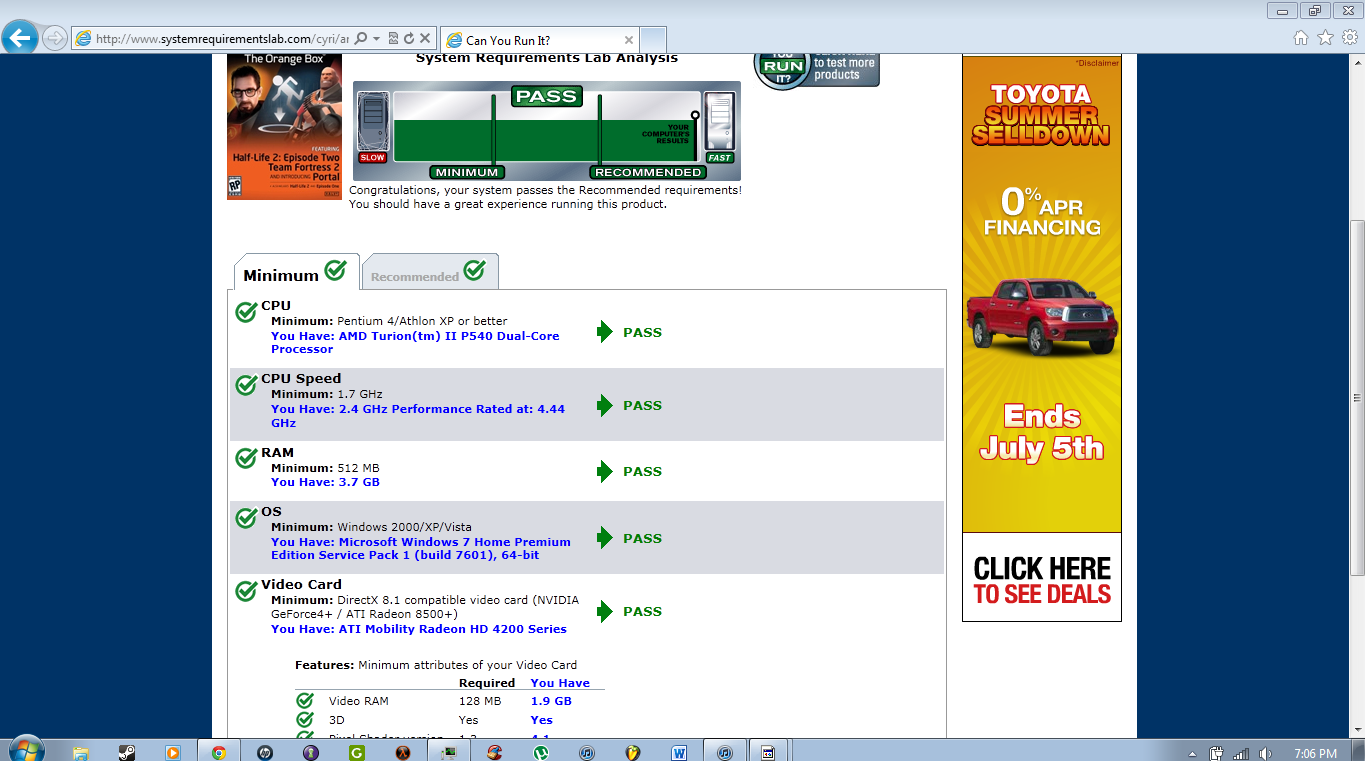
Right, now we know you're using the ATI Radeon HD 4200, can you look in Device Manager under Display Adapters to see if it has a yellow question mark against it?

If not, it could be that you're using the onboard graphics and if that is the case you would need to update your BIOS settings by disabling the onboard graphics and use the ATI card instead.
 

My Computer

Computer Manufacturer/Model Number
HP Pavilion Elite 495UK
OS
Windows 7 Ultimate SP1 64-Bit
CPU
Intel Core i7 870 @ 2.93GHz
Motherboard
MSI 2A9C (CPU1)
Memory
8Gb Dual-Channel DDR3 @ 664MHz
Graphics Card(s)
nVidia GeForce GTX 460 1024MB dedicated RAM
Sound Card
Realtek HD Audio
Monitor(s) Displays
HP2310i
Screen Resolution
1920 x 1080
Hard Drives
1x1954GB Hitachi HDS22020ALA 330 (RAID), 1x1954GB Hitachi External for backup and storage
PSU
460W
Case
HP Elite
Cooling
Air cooled
Keyboard
Logitech K750 solar-powered keyboard
Mouse
Logitech Wireless M180 mouse
Internet Speed
2Mb
Other Info
Pure Avanti Flow Internet Radio with iPod Dock, 64Gb iPod, HP USB Speakers, Sony MDR-V500 Headphones, Sony Vaio F-Series Laptop
Right, now we know you're using the ATI Radeon HD 4200, can you look in Device Manager under Display Adapters to see if it has a yellow question mark against it?

If not, it could be that you're using the onboard graphics and if that is the case you would need to update your BIOS settings by disabling the onboard graphics and use the ATI card instead.

No yellow question mark, should i try to roll back driver?
Or disable the on board graphics "Mirage driver" ?
 

My Computer

OS
Windows 7 64
Disable the onboard graphics.
 

My Computer

Computer Manufacturer/Model Number
HP Pavilion Elite 495UK
OS
Windows 7 Ultimate SP1 64-Bit
CPU
Intel Core i7 870 @ 2.93GHz
Motherboard
MSI 2A9C (CPU1)
Memory
8Gb Dual-Channel DDR3 @ 664MHz
Graphics Card(s)
nVidia GeForce GTX 460 1024MB dedicated RAM
Sound Card
Realtek HD Audio
Monitor(s) Displays
HP2310i
Screen Resolution
1920 x 1080
Hard Drives
1x1954GB Hitachi HDS22020ALA 330 (RAID), 1x1954GB Hitachi External for backup and storage
PSU
460W
Case
HP Elite
Cooling
Air cooled
Keyboard
Logitech K750 solar-powered keyboard
Mouse
Logitech Wireless M180 mouse
Internet Speed
2Mb
Other Info
Pure Avanti Flow Internet Radio with iPod Dock, 64Gb iPod, HP USB Speakers, Sony MDR-V500 Headphones, Sony Vaio F-Series Laptop
Back
Top