Taskbar jumplist does not work

maccamlc

New member
Local time
5:50 PM
Messages
3
I have recently upgraded from Vista to 7 Home Premium (32 bit).

I have noticed that the jump lists, particularly Internet Explorer and Google Chrome do not work. Windows Explorer is actually the only one that does work.

Anyway, I have tried deleting the Automatic and Custom file from AppData .. Recent, to no avail.

I have tried disabling all non-Microsoft services and doing a Clean Boot also to no avail.

I tried creating a new user account to no avail.

I really have no idea what could be causing this problem and I am losing ideas and suggestions to try.

Any help will be greatly appreciated.
 

My Computer My Computer

Computer Manufacturer/Model Number
Acer Aspire 8730G
OS
Windows 7 Home Premium 32 bit
I have recently upgraded from Vista to 7 Home Premium (32 bit).

I have noticed that the jump lists, particularly Internet Explorer and Google Chrome do not work. Windows Explorer is actually the only one that does work.

Anyway, I have tried deleting the Automatic and Custom file from AppData .. Recent, to no avail.

I have tried disabling all non-Microsoft services and doing a Clean Boot also to no avail.

I tried creating a new user account to no avail.

I really have no idea what could be causing this problem and I am losing ideas and suggestions to try.

Any help will be greatly appreciated.

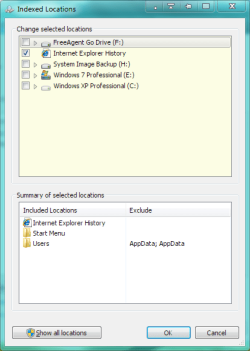
Hi and welcome, do you have Internet Explorer History checked in Indexing options?

Untitled.png
 

My Computer My Computer

Computer Manufacturer/Model Number
Averatec 6130HS-20
OS
Windows 7 Professional 32-bit (6.1, Build 7600)
CPU
Intel(R) Pentium(R) 4 3.00 GHz HT
Memory
2.0 GB
Graphics Card(s)
ATI Mobility Radeon 9600 64MB
Sound Card
Realtek AC'97 Audio
Screen Resolution
1280 x 800
Hard Drives
Seagate 96023A 60GB 7200RPM -
Seagate FreeAgentDesktop 250GB
Cooling
20 Inch Box Fan
Mouse
Targus PAWM10 Wireless Optical Laptop Mouse
type Indexing in start menu search box and click on Indexing result to bring up the indexing option box and click modify to get indexed locations
 

My Computer My Computer

Computer Manufacturer/Model Number
packard bell IXTREME M5722
OS
Operating System : Windows 7 Home Premium Edition 6.01.7600 SP1 (x64)
CPU
Processor : Intel Core 2 Quad Q8300 @ 2500 MHz
Motherboard
Mainboard : Packard Bell (Acer EG43M )
Memory
Physical Memory :8GB Corsair4x 2GB 800MHz C5 DDR2
Graphics Card(s)
Video Card : XFX 6700 AMD
Monitor(s) Displays
Maestro 234DL - BenQ V2220 - BenQ VW2420H
Screen Resolution
Current Display :1920x1080p pixels at 60 Hz in HD LED
Hard Drives
Hard Disks : WDC (1000 GB)
Drive C: (Hard Disk) : 428 GB available on 491 GB
Drive D: (Hard Disk) : 426 GB available on 492 GB
SAMSUNG spinpoint HD103SJ 1000.2 GB
(X 2) KINGSTON SSD NOW V 30GB
PSU
XFX ProSeries 550W PSU
Case
PACKARD BELL IXTREME
Cooling
System Blower Current: 150mA Air Flow16CFM ;Akasa 90mm rear
Keyboard
Gigabyte Aivia K8100
Mouse
TRUST-Wireless Laser Mouse - Carbon edition MI-7770C
Internet Speed
TP-LINK > TL-WN951N / AV500 Gigabit Powerline Adapters
Browser
chrome dev
Other Info
EXTRA COOLING>(FAN CONTROLLER) PC Bay Cooler 3 x 40mm fans; Akasa AK-HD-BL Blue hard drive cooler 2 x 40 mm fan 4500 rpm 29.7 dBA
Bios> American Megatrends Inc.
Version : P01-A1
Date : 08/31/2009
Thanks. I checked the setting and yes it is ticked. Does this mean anything?
 

My Computer My Computer

Computer Manufacturer/Model Number
Acer Aspire 8730G
OS
Windows 7 Home Premium 32 bit

My Computer My Computer

Computer Manufacturer/Model Number
packard bell IXTREME M5722
OS
Operating System : Windows 7 Home Premium Edition 6.01.7600 SP1 (x64)
CPU
Processor : Intel Core 2 Quad Q8300 @ 2500 MHz
Motherboard
Mainboard : Packard Bell (Acer EG43M )
Memory
Physical Memory :8GB Corsair4x 2GB 800MHz C5 DDR2
Graphics Card(s)
Video Card : XFX 6700 AMD
Monitor(s) Displays
Maestro 234DL - BenQ V2220 - BenQ VW2420H
Screen Resolution
Current Display :1920x1080p pixels at 60 Hz in HD LED
Hard Drives
Hard Disks : WDC (1000 GB)
Drive C: (Hard Disk) : 428 GB available on 491 GB
Drive D: (Hard Disk) : 426 GB available on 492 GB
SAMSUNG spinpoint HD103SJ 1000.2 GB
(X 2) KINGSTON SSD NOW V 30GB
PSU
XFX ProSeries 550W PSU
Case
PACKARD BELL IXTREME
Cooling
System Blower Current: 150mA Air Flow16CFM ;Akasa 90mm rear
Keyboard
Gigabyte Aivia K8100
Mouse
TRUST-Wireless Laser Mouse - Carbon edition MI-7770C
Internet Speed
TP-LINK > TL-WN951N / AV500 Gigabit Powerline Adapters
Browser
chrome dev
Other Info
EXTRA COOLING>(FAN CONTROLLER) PC Bay Cooler 3 x 40mm fans; Akasa AK-HD-BL Blue hard drive cooler 2 x 40 mm fan 4500 rpm 29.7 dBA
Bios> American Megatrends Inc.
Version : P01-A1
Date : 08/31/2009
have a read of these and see if this helps :D
  1. Jump list not working correctly in windows 7
  2. http://social.technet.microsoft.com...i/thread/0235dc19-a32c-4173-bd3b-5a1aacf65f63
  3. http://pocketpccentral.net/blog/200...cess-no-internet-connection-problem-resolved/
  4. http://www.sevenforums.com/tutorials/120670-wireless-network-remove.html?filter

ive been going through old forums with this problem and searching on the web thought i would mention some other users experiences now do you have itunes? if so in the services there may be a service called bonjour (look anyhow) disable this service if it exists and reboot.

  1. type services in start menu search box
  2. click on services in result pane
  3. a window will open called local services
  4. look down the list for bonjour
  5. right click on it
  6. go to properties
  7. go down the list in start-up type and choose disabled
  8. click apply
  9. click ok
  10. close window
  11. reboot
 
Last edited:

My Computer My Computer

Computer Manufacturer/Model Number
packard bell IXTREME M5722
OS
Operating System : Windows 7 Home Premium Edition 6.01.7600 SP1 (x64)
CPU
Processor : Intel Core 2 Quad Q8300 @ 2500 MHz
Motherboard
Mainboard : Packard Bell (Acer EG43M )
Memory
Physical Memory :8GB Corsair4x 2GB 800MHz C5 DDR2
Graphics Card(s)
Video Card : XFX 6700 AMD
Monitor(s) Displays
Maestro 234DL - BenQ V2220 - BenQ VW2420H
Screen Resolution
Current Display :1920x1080p pixels at 60 Hz in HD LED
Hard Drives
Hard Disks : WDC (1000 GB)
Drive C: (Hard Disk) : 428 GB available on 491 GB
Drive D: (Hard Disk) : 426 GB available on 492 GB
SAMSUNG spinpoint HD103SJ 1000.2 GB
(X 2) KINGSTON SSD NOW V 30GB
PSU
XFX ProSeries 550W PSU
Case
PACKARD BELL IXTREME
Cooling
System Blower Current: 150mA Air Flow16CFM ;Akasa 90mm rear
Keyboard
Gigabyte Aivia K8100
Mouse
TRUST-Wireless Laser Mouse - Carbon edition MI-7770C
Internet Speed
TP-LINK > TL-WN951N / AV500 Gigabit Powerline Adapters
Browser
chrome dev
Other Info
EXTRA COOLING>(FAN CONTROLLER) PC Bay Cooler 3 x 40mm fans; Akasa AK-HD-BL Blue hard drive cooler 2 x 40 mm fan 4500 rpm 29.7 dBA
Bios> American Megatrends Inc.
Version : P01-A1
Date : 08/31/2009
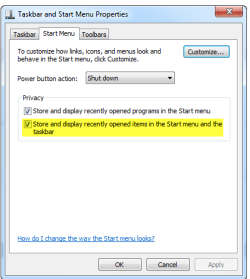
Make sure the Jumplist is enabled or not.
Right click on Taskbar and choose Properties.
Switch to Start Menu tab and make sure the check box "Store and display opened items in Start menu and the taskbar"
 

Attachments

  • jumplist.PNG
    jumplist.PNG
    10.3 KB · Views: 20

My Computer My Computer

Computer Manufacturer/Model Number
packard bell IXTREME M5722
OS
Operating System : Windows 7 Home Premium Edition 6.01.7600 SP1 (x64)
CPU
Processor : Intel Core 2 Quad Q8300 @ 2500 MHz
Motherboard
Mainboard : Packard Bell (Acer EG43M )
Memory
Physical Memory :8GB Corsair4x 2GB 800MHz C5 DDR2
Graphics Card(s)
Video Card : XFX 6700 AMD
Monitor(s) Displays
Maestro 234DL - BenQ V2220 - BenQ VW2420H
Screen Resolution
Current Display :1920x1080p pixels at 60 Hz in HD LED
Hard Drives
Hard Disks : WDC (1000 GB)
Drive C: (Hard Disk) : 428 GB available on 491 GB
Drive D: (Hard Disk) : 426 GB available on 492 GB
SAMSUNG spinpoint HD103SJ 1000.2 GB
(X 2) KINGSTON SSD NOW V 30GB
PSU
XFX ProSeries 550W PSU
Case
PACKARD BELL IXTREME
Cooling
System Blower Current: 150mA Air Flow16CFM ;Akasa 90mm rear
Keyboard
Gigabyte Aivia K8100
Mouse
TRUST-Wireless Laser Mouse - Carbon edition MI-7770C
Internet Speed
TP-LINK > TL-WN951N / AV500 Gigabit Powerline Adapters
Browser
chrome dev
Other Info
EXTRA COOLING>(FAN CONTROLLER) PC Bay Cooler 3 x 40mm fans; Akasa AK-HD-BL Blue hard drive cooler 2 x 40 mm fan 4500 rpm 29.7 dBA
Bios> American Megatrends Inc.
Version : P01-A1
Date : 08/31/2009
found this for you

Jump List...that is corrupted in AutomaticDestinations-hidden system folder is the likely solution.. To resolve and fix the issue, follow these steps:

  1. Open Windows Explorer .
  2. Type or copy and paste the following into the address bar:
  3. %AppData%\Microsoft\Windows\Recent\AutomaticDestinations
  4. Identify files that are comparatively larger in size than the rest of the file, such as files that have file size of 1 MB or more.
  5. Delete the abnormal file.

Tip: If you do not want to retain the Jump Lists’ recent items history on all applications, just delete all the automaticDestinations-ms files in the folder.


The recent items functionality on Jump Lists will be restored. The recent items on the Jump Lists will be re-added as the program is been used. However, do note that the solution does not restore the previously pinned items. So user will have to pin new items again.
 

My Computer My Computer

Computer Manufacturer/Model Number
packard bell IXTREME M5722
OS
Operating System : Windows 7 Home Premium Edition 6.01.7600 SP1 (x64)
CPU
Processor : Intel Core 2 Quad Q8300 @ 2500 MHz
Motherboard
Mainboard : Packard Bell (Acer EG43M )
Memory
Physical Memory :8GB Corsair4x 2GB 800MHz C5 DDR2
Graphics Card(s)
Video Card : XFX 6700 AMD
Monitor(s) Displays
Maestro 234DL - BenQ V2220 - BenQ VW2420H
Screen Resolution
Current Display :1920x1080p pixels at 60 Hz in HD LED
Hard Drives
Hard Disks : WDC (1000 GB)
Drive C: (Hard Disk) : 428 GB available on 491 GB
Drive D: (Hard Disk) : 426 GB available on 492 GB
SAMSUNG spinpoint HD103SJ 1000.2 GB
(X 2) KINGSTON SSD NOW V 30GB
PSU
XFX ProSeries 550W PSU
Case
PACKARD BELL IXTREME
Cooling
System Blower Current: 150mA Air Flow16CFM ;Akasa 90mm rear
Keyboard
Gigabyte Aivia K8100
Mouse
TRUST-Wireless Laser Mouse - Carbon edition MI-7770C
Internet Speed
TP-LINK > TL-WN951N / AV500 Gigabit Powerline Adapters
Browser
chrome dev
Other Info
EXTRA COOLING>(FAN CONTROLLER) PC Bay Cooler 3 x 40mm fans; Akasa AK-HD-BL Blue hard drive cooler 2 x 40 mm fan 4500 rpm 29.7 dBA
Bios> American Megatrends Inc.
Version : P01-A1
Date : 08/31/2009
Thanks for the suggestions. I have read and tried all of the things, but my jump lists are still not working. Not sure why it is happening, but I am starting to lean towards doing the clean install option and changing from 32 bit to 64 bit. Everything should work then, I hope :)
 

My Computer My Computer

Computer Manufacturer/Model Number
Acer Aspire 8730G
OS
Windows 7 Home Premium 32 bit
I've got exactly the same problem, but on W7 Enterprise SP1 x64 - but just with explorer, jumplists work with all my other taskbar items, although I never really use them, I just use explorer's.

I really rely on it for quick access, and it just stopped working last week, as I was using the system normally - nothing out of the ordinary was occurring afaik.

Now it's gone, and deleting the recent items as instructed above doesn't seem to have made a difference.

I've deleted the recent items list, unpinned explorer, switched off recent items, rebooted, switched on recent items, started explorer, pinned it back - nothing there.

This is on my workstation, and I can't really set up another user account without it being impractical - certainly can't do a clean install.

Boo hoo :'( - can anyone help?

(btw - I know this is an old post, but no reason to start a new one)
 
Last edited:

My Computer My Computer

Computer Manufacturer/Model Number
Homebuilt
OS
Windows 7
CPU
Core 2 Duo
Motherboard
Asus P5Q SE Plus
Memory
8Gb
Graphics Card(s)
Nv 9550GT
Sound Card
OnBoard
Monitor(s) Displays
Samsung SM930BF - Acer AL1916
Hard Drives
Samsung500Gb + others
PSU
650W
Case
Alienware
Cooling
Chassis fan set to Q-Fan
Keyboard
Microsoft wireless
Other Info
Wacom Intuos 3
Back
Top