TEST -Update 7 installation media

Thanks SIW2

Just reinstalled. 3 updates plus another 2 drivers under Optional. Bliss. :D

Si, why do I have to enable Hibernate which I have not before on this test machine? Taking away such a modern feature by default is a definite minus.

Thanks for all of the effort you've put into this SIW2. :)

Some people would say, "Why do I always have to disable Hibernate?"

I never use it on my desktop PC, so I disable it, otherwise it's just wasting 8GB of HDD space.
If someone has a small SSD that is a lot of space (all of my installed programs use < 8GB).

I assume the various option/setting choices are because SIW2 built the program to suit the way he builds his machines. :)

That is the standard dilemma when something (like Windows) has lots of option/settings.
Personally I hate the default Windows setting, "Hide extensions for known file types"

Something like this tool would be great for XP, since it is going to lose support soon.
 
Last edited:

My Computer My Computer

Computer type
PC/Desktop
Computer Manufacturer/Model Number
n/a
OS
W7 Ultimate SP1, LM19.2 MATE, W10 Home 1703, W10 Pro 1703 VM, #All 64 bit
CPU
AMD Phenom II x6 1100T, 3.3 GHz
Motherboard
ASUS M4A88T-M/USB3 (AM3)
Memory
12GB DDR3 1333 G-Skill (4GB x 2), G-Skill (2GB x 2)
Graphics Card(s)
NVIDIA GeForce GTX 660
Sound Card
Realtek?
Monitor(s) Displays
Samsung S23B350
Screen Resolution
1920x1080
Hard Drives
WD Green 2TB (SATA), WD Green 3TB (SATA), WD Blue 4TB (SATA), WD Blue 6TB (SATA)
PSU
Cooler Master
Case
Antec GX300 Tower
Cooling
3x Antec TRICOOL 120mm Fans
Mouse
Wired Optical
Internet Speed
DSL
Antivirus
Avast
Browser
Pale Moon (64 bit)
Other Info
2018-12-27 Upgraded HDDs
2015-12-10 Upgraded case, graphics card, storage
2015-08-15 Upgraded motherboard & RAM
2015-07-15 Upgraded LM17.1 to LM17.2
@ Greg,

You can adjust the reg files in the bin folder

look in bin\sys.reg Comment out with ;

or make changes as you wish. Like below


Code:
Windows Registry Editor Version 5.00

[HKEY_LOCAL_MACHINE\WIM_System\ControlSet001\Control\CrashControl]
"AutoReboot"=dword:00000000

[HKEY_LOCAL_MACHINE\WIM_System\ControlSet001\Control\Power]
"HiberFileSizePerfect"=dword:00000000
"HibernateEnabled"=dword:00000000

[HKEY_LOCAL_MACHINE\WIM_System\ControlSet001\Control\SafeBoot\Minimal\MSIServer]
@="Service"

[HKEY_LOCAL_MACHINE\WIM_System\ControlSet001\Control\SafeBoot\Network\MSIServer]
@="Service"

[HKEY_LOCAL_MACHINE\WIM_System\ControlSet002\Control\CrashControl]
"AutoReboot"=dword:00000000

[B][COLOR="Red"];[/COLOR][/B] [HKEY_LOCAL_MACHINE\WIM_System\ControlSet002\Control\Power]
[B][COLOR="Red"];[/COLOR][/B] "HiberFileSizePerfect"=dword:00000000
[B][COLOR="Red"];[/COLOR][/B] "HibernateEnabled"=dword:00000000

[HKEY_LOCAL_MACHINE\WIM_System\ControlSet002\Control\SafeBoot\Minimal\MSIServer]
@="Service"

[HKEY_LOCAL_MACHINE\WIM_System\ControlSet002\Control\SafeBoot\Network\MSIServer]
@="Service"


Just reinstalled. 3 updates plus another 2 drivers under Optional. Bliss. :D

Si, why do I have to enable Hibernate which I have not before on this test machine? Taking away by default such a modern feature which is perfected in Win7 and offers great convenience for the consumer is a definite minus.

Do you know the kb number for those 3 updates?
 

My Computers My Computers

System One System Two

  • Computer type
    PC/Desktop
    OS
    7 X64
    CPU
    i5 8400
    Motherboard
    gigabyte b365m ds3h
    Memory
    2x8gb 3200mhz
    Hard Drives
    various
    PSU
    pure power 11 400w cm
    Case
    Coolermaster
    Cooling
    cryorig m9i
  • Computer type
    PC/Desktop
    OS
    7x64
    CPU
    g5400
    Motherboard
    ga b365m ds3h
    Memory
    8gb ddr4 2400
    PSU
    xfx pro 450w
Thanks Lehnerus - hope it is useful to you.

I don't know anything about XP - so I can't be much help there. Sorry.
 

My Computers My Computers

System One System Two

  • Computer type
    PC/Desktop
    OS
    7 X64
    CPU
    i5 8400
    Motherboard
    gigabyte b365m ds3h
    Memory
    2x8gb 3200mhz
    Hard Drives
    various
    PSU
    pure power 11 400w cm
    Case
    Coolermaster
    Cooling
    cryorig m9i
  • Computer type
    PC/Desktop
    OS
    7x64
    CPU
    g5400
    Motherboard
    ga b365m ds3h
    Memory
    8gb ddr4 2400
    PSU
    xfx pro 450w
Thanks Lehnerus - hope it is useful to you.

I don't know anything about XP - so I can't be much help there. Sorry.

I won't be able to use it, unless I download an install disc with SP1 included.

I haven't been able to create a working W7 SP1 install iso using RT Se7en Lite.
I might play around with it (if I get time) and see if I can work out what went wrong.

How many updates will W7 have by 2020? :eek:
 

My Computer My Computer

Computer type
PC/Desktop
Computer Manufacturer/Model Number
n/a
OS
W7 Ultimate SP1, LM19.2 MATE, W10 Home 1703, W10 Pro 1703 VM, #All 64 bit
CPU
AMD Phenom II x6 1100T, 3.3 GHz
Motherboard
ASUS M4A88T-M/USB3 (AM3)
Memory
12GB DDR3 1333 G-Skill (4GB x 2), G-Skill (2GB x 2)
Graphics Card(s)
NVIDIA GeForce GTX 660
Sound Card
Realtek?
Monitor(s) Displays
Samsung S23B350
Screen Resolution
1920x1080
Hard Drives
WD Green 2TB (SATA), WD Green 3TB (SATA), WD Blue 4TB (SATA), WD Blue 6TB (SATA)
PSU
Cooler Master
Case
Antec GX300 Tower
Cooling
3x Antec TRICOOL 120mm Fans
Mouse
Wired Optical
Internet Speed
DSL
Antivirus
Avast
Browser
Pale Moon (64 bit)
Other Info
2018-12-27 Upgraded HDDs
2015-12-10 Upgraded case, graphics card, storage
2015-08-15 Upgraded motherboard & RAM
2015-07-15 Upgraded LM17.1 to LM17.2
It is very easy to d/l an sp1 iso. No point in mucking about with rt7lite.

The current update situation is not bad. Abot 330mb for x64 and 200mb ish for 32 bit.

That is a lot less than w8 has already.
 

My Computers My Computers

System One System Two

  • Computer type
    PC/Desktop
    OS
    7 X64
    CPU
    i5 8400
    Motherboard
    gigabyte b365m ds3h
    Memory
    2x8gb 3200mhz
    Hard Drives
    various
    PSU
    pure power 11 400w cm
    Case
    Coolermaster
    Cooling
    cryorig m9i
  • Computer type
    PC/Desktop
    OS
    7x64
    CPU
    g5400
    Motherboard
    ga b365m ds3h
    Memory
    8gb ddr4 2400
    PSU
    xfx pro 450w
It is very easy to d/l an sp1 iso. No point in mucking about with rt7lite.

If I could get RT Se7en Lite to work, I could set up the defaults the way I like:

  • Turn off that stupid "Hide extensions for known file types"
  • Set my Windows Explorer templates
  • etc.
The current update situation is not bad. Abot 330mb for x64 and 200mb ish for 32 bit.

That is a lot less than w8 has already.

You have to laugh.
:roflmao:
 

My Computer My Computer

Computer type
PC/Desktop
Computer Manufacturer/Model Number
n/a
OS
W7 Ultimate SP1, LM19.2 MATE, W10 Home 1703, W10 Pro 1703 VM, #All 64 bit
CPU
AMD Phenom II x6 1100T, 3.3 GHz
Motherboard
ASUS M4A88T-M/USB3 (AM3)
Memory
12GB DDR3 1333 G-Skill (4GB x 2), G-Skill (2GB x 2)
Graphics Card(s)
NVIDIA GeForce GTX 660
Sound Card
Realtek?
Monitor(s) Displays
Samsung S23B350
Screen Resolution
1920x1080
Hard Drives
WD Green 2TB (SATA), WD Green 3TB (SATA), WD Blue 4TB (SATA), WD Blue 6TB (SATA)
PSU
Cooler Master
Case
Antec GX300 Tower
Cooling
3x Antec TRICOOL 120mm Fans
Mouse
Wired Optical
Internet Speed
DSL
Antivirus
Avast
Browser
Pale Moon (64 bit)
Other Info
2018-12-27 Upgraded HDDs
2015-12-10 Upgraded case, graphics card, storage
2015-08-15 Upgraded motherboard & RAM
2015-07-15 Upgraded LM17.1 to LM17.2
You can do that with my updater.

It already includes those settings in the .reg files which are added during updates.

Have a look in the BIN folder. There are 4 reg files.

You can put your favourite entries in there.

Some of them are already in , for example:

In ADM.REG ( also in DEF.REG, those are the user hive entries ) already contain :

Code:
[HKEY_LOCAL_MACHINE\WIM_Admin\Software\Microsoft\Windows\CurrentVersion\Explorer\Advanced]

"AlwaysShowMenus"=dword:00000001
"Hidden"=dword:00000001
"HideFileExt"=dword:00000000
"ShowSuperHidden"=dword:00000001
"SuperHidden"=dword:00000001

;start menu HIDE=0 SHOW AS LINK=1 SHOW AS MENU=2 , SOME EXAMPLES

"Start_ShowControlPanel"=dword:00000001
"Start_ShowHelp"=dword:00000000
"Start_ShowMyComputer"=dword:00000002

SYS.REG contains for example :


Code:
; no autoreboot on bsod

[HKEY_LOCAL_MACHINE\WIM_System\ControlSet001\Control\CrashControl]
"AutoReboot"=dword:00000000

;no hiberfile

[HKEY_LOCAL_MACHINE\WIM_System\ControlSet001\Control\Power]
"HiberFileSizePerfect"=dword:00000000
"HibernateEnabled"=dword:00000000

 ; same entries for controlset002

[HKEY_LOCAL_MACHINE\WIM_System\ControlSet002\Control\CrashControl]
"AutoReboot"=dword:00000000

[HKEY_LOCAL_MACHINE\WIM_System\ControlSet002\Control\Power]
"HiberFileSizePerfect"=dword:00000000
"HibernateEnabled"=dword:00000000
 

My Computers My Computers

System One System Two

  • Computer type
    PC/Desktop
    OS
    7 X64
    CPU
    i5 8400
    Motherboard
    gigabyte b365m ds3h
    Memory
    2x8gb 3200mhz
    Hard Drives
    various
    PSU
    pure power 11 400w cm
    Case
    Coolermaster
    Cooling
    cryorig m9i
  • Computer type
    PC/Desktop
    OS
    7x64
    CPU
    g5400
    Motherboard
    ga b365m ds3h
    Memory
    8gb ddr4 2400
    PSU
    xfx pro 450w
So to re-enable Hibernate as default I only need to change these 3 values to 1? How do I mount the image to do this?

;no hiberfile

[HKEY_LOCAL_MACHINE\WIM_System\ControlSet001\Control\Power] "HiberFileSizePerfect"=dword:00000000 "HibernateEnabled"=dword:00000000

[HKEY_LOCAL_MACHINE\WIM_System\ControlSet002\Control\CrashControl] "AutoReboot"=dword:00000000

[HKEY_LOCAL_MACHINE\WIM_System\ControlSet002\Control\Power] "HiberFileSizePerfect"=dword:00000000 "HibernateEnabled"=dword:00000000
 
If you want to change the settings for next time, just Change SYS.REG it is in the BIN folder.

You can comment out the entries by putting a semi colon in front, like this. That is all, nothing else needed

;[HKEY_LOCAL_MACHINE\WIM_System\ControlSet001\Control\Power]

;"HiberFileSizePerfect"=dword:00000000
; "HibernateEnabled"=dword:00000000


;[HKEY_LOCAL_MACHINE\WIM_System\ControlSet002\Control\Power]
; "HiberFileSizePerfect"=dword:00000000
; "HibernateEnabled"=dword:00000000
 

My Computers My Computers

System One System Two

  • Computer type
    PC/Desktop
    OS
    7 X64
    CPU
    i5 8400
    Motherboard
    gigabyte b365m ds3h
    Memory
    2x8gb 3200mhz
    Hard Drives
    various
    PSU
    pure power 11 400w cm
    Case
    Coolermaster
    Cooling
    cryorig m9i
  • Computer type
    PC/Desktop
    OS
    7x64
    CPU
    g5400
    Motherboard
    ga b365m ds3h
    Memory
    8gb ddr4 2400
    PSU
    xfx pro 450w
If you want to change an install.wim you have already updated, it is easy.

Make a mount folder e.g. c:\MOUNT

Mount the install.wim ( Gimagex is easy to use -select the image number you want change before mounting ).

View attachment gimagex.zip

Open regedit, clikc FILE>LOAD HIVE, browse to MOUNT\Windows\System32\Config\SYSTEM, give it a name ( I call it WIM_System ), then make any changes, unmount the hive.

When you have done that, tick the "Commit Changes" box and unmount the wim image.
 

My Computers My Computers

System One System Two

  • Computer type
    PC/Desktop
    OS
    7 X64
    CPU
    i5 8400
    Motherboard
    gigabyte b365m ds3h
    Memory
    2x8gb 3200mhz
    Hard Drives
    various
    PSU
    pure power 11 400w cm
    Case
    Coolermaster
    Cooling
    cryorig m9i
  • Computer type
    PC/Desktop
    OS
    7x64
    CPU
    g5400
    Motherboard
    ga b365m ds3h
    Memory
    8gb ddr4 2400
    PSU
    xfx pro 450w
Thanks SIW2

You can do that with my updater.

It already includes those settings in the .reg files which are added during updates.

Have a look in the BIN folder. There are 4 reg files.

You can put your favourite entries in there.

Thanks for that explanation. :)

I'm afraid my Registry editing skills are only rudimentary.

In XP, I have been able to:

  • Create and delete context menu entries
  • Delete malware and orphaned entries
I haven't had to do many edits in W7:

  • Enable Noontec File Sharing
  • Display W7 build number
  • Disable Auto-Folder Discovery
  • Remove User Folder from Explorer Tree
 
Last edited:

My Computer My Computer

Computer type
PC/Desktop
Computer Manufacturer/Model Number
n/a
OS
W7 Ultimate SP1, LM19.2 MATE, W10 Home 1703, W10 Pro 1703 VM, #All 64 bit
CPU
AMD Phenom II x6 1100T, 3.3 GHz
Motherboard
ASUS M4A88T-M/USB3 (AM3)
Memory
12GB DDR3 1333 G-Skill (4GB x 2), G-Skill (2GB x 2)
Graphics Card(s)
NVIDIA GeForce GTX 660
Sound Card
Realtek?
Monitor(s) Displays
Samsung S23B350
Screen Resolution
1920x1080
Hard Drives
WD Green 2TB (SATA), WD Green 3TB (SATA), WD Blue 4TB (SATA), WD Blue 6TB (SATA)
PSU
Cooler Master
Case
Antec GX300 Tower
Cooling
3x Antec TRICOOL 120mm Fans
Mouse
Wired Optical
Internet Speed
DSL
Antivirus
Avast
Browser
Pale Moon (64 bit)
Other Info
2018-12-27 Upgraded HDDs
2015-12-10 Upgraded case, graphics card, storage
2015-08-15 Upgraded motherboard & RAM
2015-07-15 Upgraded LM17.1 to LM17.2
I included the ones I use.

I think most will like them.
 

My Computers My Computers

System One System Two

  • Computer type
    PC/Desktop
    OS
    7 X64
    CPU
    i5 8400
    Motherboard
    gigabyte b365m ds3h
    Memory
    2x8gb 3200mhz
    Hard Drives
    various
    PSU
    pure power 11 400w cm
    Case
    Coolermaster
    Cooling
    cryorig m9i
  • Computer type
    PC/Desktop
    OS
    7x64
    CPU
    g5400
    Motherboard
    ga b365m ds3h
    Memory
    8gb ddr4 2400
    PSU
    xfx pro 450w
Now for the dumbest query in here I am not that softwarewise as you fellows know so is this just to update a fresh install/s as I understand it to be or is it to update what I have already got?

Sorry just can't work the difference out:o
 

My Computer My Computer

Computer type
PC/Desktop
Computer Manufacturer/Model Number
Own build (new) Desk1 / Asus ROG Win 7 / Desk2 1st build
OS
Desk1 7 Home Prem / Desk2 10 Pro / Main lap Asus ROG 10 Pro 2 laptop Toshiba 7 Pro Asus P2520 7 & 10
CPU
Desk1 i5 3750K / Laptop i7 GTX 860M / Desk2 i5 2500
Motherboard
Desk1 Asus P877-V / Desk2 Gigabyte H67 UD3H / Laptop ?
Memory
Desk1 8GB (1866) / Desk2 16GB (1333) / Laptop 8Gb DDR3
Graphics Card(s)
Desk 1& 2NVidia GTX 650 & Laptops on board Intel
Sound Card
Desk 1 & 2 -XONAR DG Realtek High Def audio Laptop
Monitor(s) Displays
Desk 1 Benq HD 2450 / Desk2 Philips 24" / Laptop 17.5"
Screen Resolution
1920x1080 D1 & D2 & Laptop 1
Hard Drives
Desk1 Samsung 120GB 830 SSD
Asus ROG 256GB 850 Pro SSD
Desk2 Samsung 840 256 SSD
Toshiba 120GB EVO
PSU
Desk 1 Corsair HX 1050/ Laptop ? / Desk 2 Corsair HX 650
Case
Desk 1 Cooler HAF XM ? Toshiba laptop / Desk2 Coolermaster
Cooling
Fans on all Desk1 -2 Desk2 - all Coolermasters 5 Laptop ?
Keyboard
Desk 1 MS Sidewinder X6 Desk 2 MS Sidewinder X 4
Mouse
Desk 1&2 - Gigabyte MS 900 gamer - laptop - Logitec wireless
Internet Speed
ADSL2+
Other Info
One other Desktop (tester) and spare Toshba laptop both with SSD's
Running Kaspersky 2016 ISS on all machines config'd identically
Logitec audio stereo systems on each machine (x3)
Canon MG5250MFC
Router/modem TP-Link running WPA2SK
It updates the Win7 installer (DVD or flash stick) John, so you have all the latest updates included in it as we already should had there been a timely SP2. This saves at least an hour's updating after install. I only had a couple of Updates and some drivers when I did my Important and Optional Updates after installing with this.

To do this it mounts the install.wim image file where most of Win7 is zipped up in the installer, then into this mounted image it injects the Updates released since SP1, then zips them back up again and offers to create and burn an ISO of the latest version.
 
Last edited:
Thanks Greg:)
 

My Computer My Computer

Computer type
PC/Desktop
Computer Manufacturer/Model Number
Own build (new) Desk1 / Asus ROG Win 7 / Desk2 1st build
OS
Desk1 7 Home Prem / Desk2 10 Pro / Main lap Asus ROG 10 Pro 2 laptop Toshiba 7 Pro Asus P2520 7 & 10
CPU
Desk1 i5 3750K / Laptop i7 GTX 860M / Desk2 i5 2500
Motherboard
Desk1 Asus P877-V / Desk2 Gigabyte H67 UD3H / Laptop ?
Memory
Desk1 8GB (1866) / Desk2 16GB (1333) / Laptop 8Gb DDR3
Graphics Card(s)
Desk 1& 2NVidia GTX 650 & Laptops on board Intel
Sound Card
Desk 1 & 2 -XONAR DG Realtek High Def audio Laptop
Monitor(s) Displays
Desk 1 Benq HD 2450 / Desk2 Philips 24" / Laptop 17.5"
Screen Resolution
1920x1080 D1 & D2 & Laptop 1
Hard Drives
Desk1 Samsung 120GB 830 SSD
Asus ROG 256GB 850 Pro SSD
Desk2 Samsung 840 256 SSD
Toshiba 120GB EVO
PSU
Desk 1 Corsair HX 1050/ Laptop ? / Desk 2 Corsair HX 650
Case
Desk 1 Cooler HAF XM ? Toshiba laptop / Desk2 Coolermaster
Cooling
Fans on all Desk1 -2 Desk2 - all Coolermasters 5 Laptop ?
Keyboard
Desk 1 MS Sidewinder X6 Desk 2 MS Sidewinder X 4
Mouse
Desk 1&2 - Gigabyte MS 900 gamer - laptop - Logitec wireless
Internet Speed
ADSL2+
Other Info
One other Desktop (tester) and spare Toshba laptop both with SSD's
Running Kaspersky 2016 ISS on all machines config'd identically
Logitec audio stereo systems on each machine (x3)
Canon MG5250MFC
Router/modem TP-Link running WPA2SK
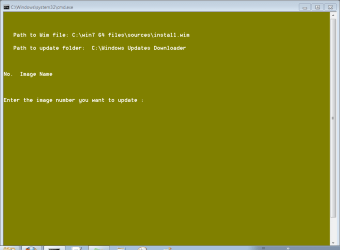
Now I'm running the 64 bit updater and it is not showing any image listings or accepting any image numbers in the CMD script.
 

Attachments

  • Capture.PNG
    Capture.PNG
    8.8 KB · Views: 12
It might help if you don't put lots of spaces in the path to the installation files.
 

My Computers My Computers

System One System Two

  • Computer type
    PC/Desktop
    OS
    7 X64
    CPU
    i5 8400
    Motherboard
    gigabyte b365m ds3h
    Memory
    2x8gb 3200mhz
    Hard Drives
    various
    PSU
    pure power 11 400w cm
    Case
    Coolermaster
    Cooling
    cryorig m9i
  • Computer type
    PC/Desktop
    OS
    7x64
    CPU
    g5400
    Motherboard
    ga b365m ds3h
    Memory
    8gb ddr4 2400
    PSU
    xfx pro 450w
I updated the 32 bit media for my flash stick installer, confirmed the .wim was slipstreamed and looks the right size increase. However now after install I have 107 updates. Is this because I chose Ultimate using the Update7v4 app when I have an unlocked all-versions installer? How to modify?
 
What is wrong with having 107 updates?

I think there are a couple more for one of the bit versions - can't recall which now.

Was that the question?
 

My Computers My Computers

System One System Two

  • Computer type
    PC/Desktop
    OS
    7 X64
    CPU
    i5 8400
    Motherboard
    gigabyte b365m ds3h
    Memory
    2x8gb 3200mhz
    Hard Drives
    various
    PSU
    pure power 11 400w cm
    Case
    Coolermaster
    Cooling
    cryorig m9i
  • Computer type
    PC/Desktop
    OS
    7x64
    CPU
    g5400
    Motherboard
    ga b365m ds3h
    Memory
    8gb ddr4 2400
    PSU
    xfx pro 450w
When I updated the 32 bit a few weeks ago and ran it there were only a few updates, not 107. Is it because I installed Home Premium now, whereas I installed Ultimate then. I have an all-versions stick.
 
Back
Top