TEST -Update 7 installation media

Edition makes no difference.

No idea why you got different numbers, I haven't changed the update lists for a little while.

I will change them towards the end of the month.

No biggie, there are only about 4 more that need to go in.
 

My Computers My Computers

System One System Two

  • Computer type
    PC/Desktop
    OS
    7 X64
    CPU
    i5 8400
    Motherboard
    gigabyte b365m ds3h
    Memory
    2x8gb 3200mhz
    Hard Drives
    various
    PSU
    pure power 11 400w cm
    Case
    Coolermaster
    Cooling
    cryorig m9i
  • Computer type
    PC/Desktop
    OS
    7x64
    CPU
    g5400
    Motherboard
    ga b365m ds3h
    Memory
    8gb ddr4 2400
    PSU
    xfx pro 450w
I have a Ultimate installer I unlocked ei.cfg from, then updated the drivers for Ultimate. Now when I try installing Home Premium it doesn't contain the Updates. I saw in the last line of the How-To that this is to be expected. But how do I update both versions in the same ISO or installation files?

Do I need the WAIK to mount the image with gimagex.exe to edit out he reg hibernate changes? Would it be easier to just do it over and remove them from the .bin and how exactly would I do that. I'd like to redo an all-versions updated flash stick installer.
 
You have to do each image one at a time.

Update Ultimate. Let it finsh and unmount. Say no to making an iso.

Run the cmd again and this time select another image. Let it finish an unmount.

Do that with each image.

When you have done that with all the images you want to update. Then make the iso


It takes a while.

There are no workarounds.


Note:

There have been quite a few updates in the last couple of days.

I will get new update lists in the next few days to include them.
 

My Computers My Computers

System One System Two

  • Computer type
    PC/Desktop
    OS
    7 X64
    CPU
    i5 8400
    Motherboard
    gigabyte b365m ds3h
    Memory
    2x8gb 3200mhz
    Hard Drives
    various
    PSU
    pure power 11 400w cm
    Case
    Coolermaster
    Cooling
    cryorig m9i
  • Computer type
    PC/Desktop
    OS
    7x64
    CPU
    g5400
    Motherboard
    ga b365m ds3h
    Memory
    8gb ddr4 2400
    PSU
    xfx pro 450w
Thanks, Si.

So I'm doing each separate version image with the same installation files folder, i.e. start with Ultimate, then do Premium, Pro, etc.

How do I delete the Hibernate changes out of the bin folder while I'm doing each?

This saved me three hours today on 3 different reinstalls I did for a friend. The installs seem to be more stable when the updates are already in the installer. Is there really something destabilizing about running multiple rounds of Windows Updates during setup?
 
Last edited:
The hibernate changes are in the reg file - I posted about it earlier. You only need to comment those out once. That reg file doesn't change each time you run the .cmd.

comment them out by putting a comma in front of the line.

Posting this from ubuntu.First time I have tried the regular ubuntu rlease.
 

My Computers My Computers

System One System Two

  • Computer type
    PC/Desktop
    OS
    7 X64
    CPU
    i5 8400
    Motherboard
    gigabyte b365m ds3h
    Memory
    2x8gb 3200mhz
    Hard Drives
    various
    PSU
    pure power 11 400w cm
    Case
    Coolermaster
    Cooling
    cryorig m9i
  • Computer type
    PC/Desktop
    OS
    7x64
    CPU
    g5400
    Motherboard
    ga b365m ds3h
    Memory
    8gb ddr4 2400
    PSU
    xfx pro 450w
Thanks. I found the answer to my question if I need the WAIK to mount with gimagex here: WIM File - Extract and Modify - Windows 7 Help Forums

So I'll mount Home Premium which is completed, comment out the Hibernate exclusion then run the Updater on Ultimate and Pro using the same installer files, this time commenting out the hibernate exclusion.
 
You don't need waik for gimagex on win 7.
 

My Computers My Computers

System One System Two

  • Computer type
    PC/Desktop
    OS
    7 X64
    CPU
    i5 8400
    Motherboard
    gigabyte b365m ds3h
    Memory
    2x8gb 3200mhz
    Hard Drives
    various
    PSU
    pure power 11 400w cm
    Case
    Coolermaster
    Cooling
    cryorig m9i
  • Computer type
    PC/Desktop
    OS
    7x64
    CPU
    g5400
    Motherboard
    ga b365m ds3h
    Memory
    8gb ddr4 2400
    PSU
    xfx pro 450w
The gimagex.exe provided earlier only opened a script box briefly. I found the full program here: GImageX - AutoItScript.

I have made a mount folder on C per your steps earlier. Mounting Image 3 (Home Premium as I recall) to it using the program now, will browse to the regedit you specified to comment it out.
 
If you mount it with gimagex - then run the updater - what does that achieve?

The updater will mount into its own folder and apply the updates to that mounted image.
 

My Computers My Computers

System One System Two

  • Computer type
    PC/Desktop
    OS
    7 X64
    CPU
    i5 8400
    Motherboard
    gigabyte b365m ds3h
    Memory
    2x8gb 3200mhz
    Hard Drives
    various
    PSU
    pure power 11 400w cm
    Case
    Coolermaster
    Cooling
    cryorig m9i
  • Computer type
    PC/Desktop
    OS
    7x64
    CPU
    g5400
    Motherboard
    ga b365m ds3h
    Memory
    8gb ddr4 2400
    PSU
    xfx pro 450w
I want to adjust the Home Premium image I already updated, for practice using gimagex.

Then I'll do updates for Ultimate and Pro on the same files separately per your instructions.

Is this not going to work? If not I'll just start over with new files and update each version separately. But I can use the same file set so that the ISO has all versions updated?

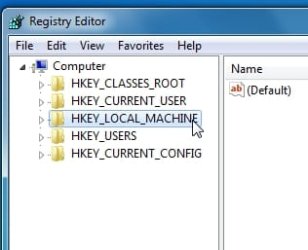
I have mounted the .wim but regedit File>Load Hive is greyed out.
 
Regedit allows you to load a hive under either HKLM ( HKEY_LOCAL_MACHINE) or HKU (HKEY_USERS) so highlight HKLM, then do File >Load Hive

2013-04-13_155109.jpg
 

My Computers My Computers

System One System Two

  • Computer type
    PC/Desktop
    OS
    7 X64
    CPU
    i5 8400
    Motherboard
    gigabyte b365m ds3h
    Memory
    2x8gb 3200mhz
    Hard Drives
    various
    PSU
    pure power 11 400w cm
    Case
    Coolermaster
    Cooling
    cryorig m9i
  • Computer type
    PC/Desktop
    OS
    7x64
    CPU
    g5400
    Motherboard
    ga b365m ds3h
    Memory
    8gb ddr4 2400
    PSU
    xfx pro 450w
I'm in the Registry Editor working on mounted WIM_System. Do I change the values below to 1?

If you want to change the settings for next time, just Change SYS.REG it is in the BIN folder.

You can comment out the entries by putting a semi colon in front, like this. That is all, nothing else needed

;[HKEY_LOCAL_MACHINE\WIM_System\ControlSet001\Control\Power]

;"HiberFileSizePerfect"=dword:00000000
; "HibernateEnabled"=dword:00000000


;[HKEY_LOCAL_MACHINE\WIM_System\ControlSet002\Control\Power]
; "HiberFileSizePerfect"=dword:00000000
; "HibernateEnabled"=dword:00000000
 
Yep. Just set HibernateEnabled to 1. Leave the other as it is.
 

My Computers My Computers

System One System Two

  • Computer type
    PC/Desktop
    OS
    7 X64
    CPU
    i5 8400
    Motherboard
    gigabyte b365m ds3h
    Memory
    2x8gb 3200mhz
    Hard Drives
    various
    PSU
    pure power 11 400w cm
    Case
    Coolermaster
    Cooling
    cryorig m9i
  • Computer type
    PC/Desktop
    OS
    7x64
    CPU
    g5400
    Motherboard
    ga b365m ds3h
    Memory
    8gb ddr4 2400
    PSU
    xfx pro 450w
OK changes made, unloaded from regedit, unmounted from Gimagex. Very cool.

You said that once this is done there's no reason to comment these out in the BIN folder on each of the other version Updates done with these files, correct? I'm working on Home Premium now and want to also Update Ultimate and Pro.

And when I extract 32 bit files to Update those three versions, I only need to comment out the first one done in BIN and it will be good for the other versions too?

Thanks!
 
Yes, you can just do this and it will be fine from then on:

;[HKEY_LOCAL_MACHINE\WIM_System\ControlSet001\Control\Power]

;"HiberFileSizePerfect"=dword:00000000
; "HibernateEnabled"=dword:00000000


;[HKEY_LOCAL_MACHINE\WIM_System\ControlSet002\Control\Power]
; "HiberFileSizePerfect"=dword:00000000
; "HibernateEnabled"=dword:00000000
or to reset one you have already created:


[HKEY_LOCAL_MACHINE\WIM_System\ControlSet001\Control\Power]

"HiberFileSizePerfect"=-
"HibernateEnabled"=dword:00000001


[HKEY_LOCAL_MACHINE\WIM_System\ControlSet002\Control\Power]
"HiberFileSizePerfect"=-
"HibernateEnabled"=dword:00000001
 

My Computers My Computers

System One System Two

  • Computer type
    PC/Desktop
    OS
    7 X64
    CPU
    i5 8400
    Motherboard
    gigabyte b365m ds3h
    Memory
    2x8gb 3200mhz
    Hard Drives
    various
    PSU
    pure power 11 400w cm
    Case
    Coolermaster
    Cooling
    cryorig m9i
  • Computer type
    PC/Desktop
    OS
    7x64
    CPU
    g5400
    Motherboard
    ga b365m ds3h
    Memory
    8gb ddr4 2400
    PSU
    xfx pro 450w
I changed all of the above values from 0 to 1 in the mounted image. Is that ok?
 
You will have to try it and see.

I never use hibernate - so dunno how that will go.
 

My Computers My Computers

System One System Two

  • Computer type
    PC/Desktop
    OS
    7 X64
    CPU
    i5 8400
    Motherboard
    gigabyte b365m ds3h
    Memory
    2x8gb 3200mhz
    Hard Drives
    various
    PSU
    pure power 11 400w cm
    Case
    Coolermaster
    Cooling
    cryorig m9i
  • Computer type
    PC/Desktop
    OS
    7x64
    CPU
    g5400
    Motherboard
    ga b365m ds3h
    Memory
    8gb ddr4 2400
    PSU
    xfx pro 450w
My laptop which is perfectly hibernating has 0 values for both ControlSet's HiberFileSizePerfect. Perhaps I should remount the image to change it back so it doesn't mess with the default size?
 
If it is working - leave it as it is.
 

My Computers My Computers

System One System Two

  • Computer type
    PC/Desktop
    OS
    7 X64
    CPU
    i5 8400
    Motherboard
    gigabyte b365m ds3h
    Memory
    2x8gb 3200mhz
    Hard Drives
    various
    PSU
    pure power 11 400w cm
    Case
    Coolermaster
    Cooling
    cryorig m9i
  • Computer type
    PC/Desktop
    OS
    7x64
    CPU
    g5400
    Motherboard
    ga b365m ds3h
    Memory
    8gb ddr4 2400
    PSU
    xfx pro 450w
No, I'm referring to the installer image I mounted and changed the value on those keys to 1. It wasn't until I was finished that you posted back to leave them at 0. Now I note in my own optimized PC the value remains at 0 for SizePerfect so wonder if I should remount and change the updated installer to that before using it.
 
Back
Top