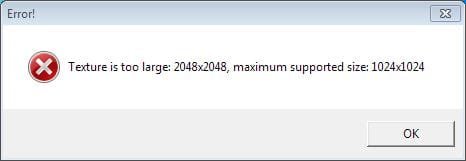
Texture too large

yousaf465

New member
Member
VIP
Local time
9:29 AM
Messages
194
I was trying to run a game but I get this error Texture is too large. I'm recently reinstalled my windows 7, before that this particular game was working fine
 

Attachments

  • texture too large.JPG
    texture too large.JPG
    13.8 KB · Views: 32

My Computer

Computer Manufacturer/Model Number
Dell Inspiron 6000
OS
Windows 7 Ultimate x32bit
Memory
1Gb
Hard Drives
60Gb Internal
Mouse
Dell
Just out of curiosity what game is doing this? Can't say i've ever seen that error. A quick google search shows "Angry Birds" with a lot of hits and it looks like some have some suggestions to fixing the issue.
 

My Computer

Computer type
PC/Desktop
Computer Manufacturer/Model Number
Home Built
OS
Win7 Ultimate x64
CPU
Intel I5 4690k
Motherboard
MSI Z97 Gaming 5
Memory
16gb Corsair DDR3 @1600mhz
Graphics Card(s)
GTX 970
Sound Card
Realtek HD 5.1
Monitor(s) Displays
Acer 23" LCD
Screen Resolution
1920x1080
Hard Drives
Samsung Evo III SSD
WD 1TB Black
PSU
EVGA Supernove 650w
Case
Diabolik
Cooling
Cooler Master
Keyboard
Logitech
Mouse
Logitech
Internet Speed
Fiber
Other Info
Logitech X-540 5.1 Surround Sound/
Logitech Rumblepad2/
Thrustmaster RGT FFB Wheel
Bump
 

My Computer

Computer Manufacturer/Model Number
Dell Inspiron 6000
OS
Windows 7 Ultimate x32bit
Memory
1Gb
Hard Drives
60Gb Internal
Mouse
Dell
I have reinstalled windows 7 two times now, but still it's not working. Also previously I downloaded the graphics card driver from windows update, but I'm unable to find it this time though. :(

 

My Computer

Computer Manufacturer/Model Number
Dell Inspiron 6000
OS
Windows 7 Ultimate x32bit
Memory
1Gb
Hard Drives
60Gb Internal
Mouse
Dell
In game settings change reso settings to match the reso of your display.
 

My Computer

Computer type
PC/Desktop
Computer Manufacturer/Model Number
Self Hand Build
OS
Windows 8.1 Pro
CPU
Core i5 4440
Motherboard
Gigabyte GA H97M-DS3P
Memory
4GB Corsair Vengeance DDR3
Graphics Card(s)
Sapphire Ati Radeon R7 240
Sound Card
ASUS Xonar DX - Fiio E10 - Audio Technica M50
Monitor(s) Displays
Panasonic L42ET60D & Dell 2240L (Dual Display)
Screen Resolution
1920X1080
Hard Drives
Samsung 850 Pro 128 GB
1 TB WD Green.
3 TB WD Green
1 TB WD External
PSU
Corsair VS350
Case
Corsair Carbide 400R
Cooling
Stock
Keyboard
Logitech
Mouse
Logitech Optical/MX518.
Internet Speed
60 KBps (Things are different in India LOL)
Antivirus
AVIRA Free Edition
Browser
Waterfox
Other Info
Previous set-up:
E6300>E2140 @3.6 Ghz>Q6600 @ 3.8 Ghz with Thermaltake Ultima 90.
Nvidia 8600GT>8800 GT>ATI 4850>ATI 3450>ATI 5770>ATI 3100>ATI R7 240.
Intel DG965WH>ASUS P5B>ABIT IP35-E>Gigabyte G31-S2L> Gigabyte GA78LMT-USB3>Gigabyte H97M-DS3P.
Corsair Value Select 2GB>Crucial Ballistix 2GB>GSkill 2GB>Corsair Vengeance 4GB.
Matrix Server Chassis (with 12 Glacialtech Fans)>Coolermaster Elit
In game settings change reso settings to match the reso of your display.

How can I do that.

Angry birds was even running on a windows xp system with spec lower than this.
 

My Computer

Computer Manufacturer/Model Number
Dell Inspiron 6000
OS
Windows 7 Ultimate x32bit
Memory
1Gb
Hard Drives
60Gb Internal
Mouse
Dell
How can I change the setting for OpenGl ?
 

My Computer

Computer Manufacturer/Model Number
Dell Inspiron 6000
OS
Windows 7 Ultimate x32bit
Memory
1Gb
Hard Drives
60Gb Internal
Mouse
Dell
Back
Top