The Sims 2

Everlong

To xor or not to xor
Tried searching for a thread about The Sims 2, but can't seem to find it now, but anyway.

Trying to install The Sims 2 and all exansions on Windows 7 7057 on my other PC with 32 bit.

I've not finished installing all the packs yet, got 4 or 5 of them on, and thought I'd stop and give the game a try. The game launches, and the intro video starts playing, but when I try to skip it, or when it finshes, the game freezes and does nothing. I can get task manager up, and there's an error with just the red circle and X and no message, and the game closes.

Tried running in admin and compatibility mode, but still doesn't work.

The game compatibility list is confirmed as working for build 7000. Any ideas why it's not working now?
 

My Computer

Computer type
PC/Desktop
Computer Manufacturer/Model Number
Custom Built
OS
Windows 8.1 Pro x64
CPU
Intel Core i7 4790k
Motherboard
MSI Z97S Krait Edition
Memory
8GB Corsair Dominator 1600MHz
Graphics Card(s)
MSI TwinFrozr GeForce GTX770
Sound Card
ASUS Xonar DX/XD 7.1
Monitor(s) Displays
Dell 24" S2409W + Dell 20" E207WFP
Screen Resolution
1920x1080 + 1680x1050
Hard Drives
1x 120GB OCZ Agility 3, 1x 750GB Western Digital Caviar Black, 1x 1TB Western Digital Caviar Blue
PSU
Corsair HX850 modular
Case
Fractal Design Define R4
Cooling
Corsair H60 w/ twin Corsair SP120 fans
Keyboard
Logitech G510S Keyboard
Mouse
Logitech G500S Laser Mouse
Internet Speed
40Mbps
Antivirus
Microsoft Security Essentials
Browser
Google Chrome
Other Info
LG Blu-Ray player
Tried searching for a thread about The Sims 2, but can't seem to find it now, but anyway.

Trying to install The Sims 2 and all exansions on Windows 7 7057 on my other PC with 32 bit.

I've not finished installing all the packs yet, got 4 or 5 of them on, and thought I'd stop and give the game a try. The game launches, and the intro video starts playing, but when I try to skip it, or when it finshes, the game freezes and does nothing. I can get task manager up, and there's an error with just the red circle and X and no message, and the game closes.

Tried running in admin and compatibility mode, but still doesn't work.

The game compatibility list is confirmed as working for build 7000. Any ideas why it's not working now?

It currently works for me with no issues on build 7000, I am downloading 7057 at the moment, I'll see if I can get it working once I have, should be able to let you know if I do later tonight after fully downloading 7057, burning it, and installing it.
 

My Computer

Computer Manufacturer/Model Number
ASUS G73JH
OS
Windows 7 Ultimate x64
CPU
1.6 GHZ i7-720QM
Memory
12 GB @ 1333 mhz
Graphics Card(s)
AMD Radeon HD 5870M
Screen Resolution
1600x900
Hard Drives
120 GB SATA II SSD
500 GB HDD @ 7200 RPM
Mouse
Razer Death Adder
Internet Speed
15 mb down, 1 mb up
Major Annoying Problem!

I had just recently installed Windows 7, I used to have Vista, I had The Sims 2, University and Nightlife installed. I some how got a file corruption for the neighbourhood folder Pleasantview (This happened when I had Vista). Once I installed Windows 7 I tried playing the game but if I remember correctly I think it had some type of error, I am not quite sure.

So I thought to reinstall The Sims 2. All the expansion packs are removed, they aren't in my program list when I go to control panel, remove program. All folders of the expansion packs have been removed. So I try to uninstall The Sims 2...but it comes up with a error message saying something along these lines:
''There is one or more expansion packs installed, please uninstall all expansion packs''
Impossible as there is no expansion packs on my computer! So I decided that all well lets just play the normal sims...but then another error message appears when I go to run The Sims 2 (exact message):
''You are running the wrong verison of The Sims 2. Please run instead''
Now I **** stupid when it comes to computers...so I don't have a single clue on what to do...please someone help me! I just want to play The Sims :(
 

My Computer

OS
Windows 7
Your very lucky...but I had previous problems...the game file probably has a huge corruption. Which would surprise me seriously.
 

My Computer

OS
Windows 7
Hi MidnightRocker, welcome to the forums.

If you run regedit from the start menu, have a look @
HKEY_CURRENT_USER\Software\Microsoft\Windows\CurrentVersion\Uninstall
HKEY_LOCAL_MACHINE\SOFTWARE\Microsoft\Windows\CurrentVersion\Uninstall
and look for anything relating to the Sims, then delete them.

Also, a search of the registry for Sims may get some more results too. You can then delete them, then the directories & try a new install.

Did you upgrade or clean install? Sometimes an upgrade can cause a few issues with software. The latest build 7127 had more game compatability too.


Jeff
 

My Computer

Computer Manufacturer/Model Number
Compaq Desktop
OS
Windows 7 Ultimate x64
CPU
AMD Sempron Dual Core
Memory
3GB
Graphics Card(s)
NVIDIA GeForce 6150SE nForce 430
Screen Resolution
1024x768
Hard Drives
150GB Sata
I really don't know anything about my laptop lol. I have a friend who is a real wizz at computers. I shall definitely try your method and pray and hope it works. But I must ask this, it's a bit unrelated. Do you get the ''This Copy Of Windows is Not Genuine'' message in your bottom right hand side of your screen? If not you must share with me on how you did that. My computer wizz friend would definitely be interested in how you got rid of it.

P.s I just remembered actually...It was an upgrade from Vista Home Preuim to Windows 7...also how do you search the registry. You have to be really straight forward with me because seriously I don't know **** about computers. But I did manage to do the regedit thing.
 

My Computer

OS
Windows 7
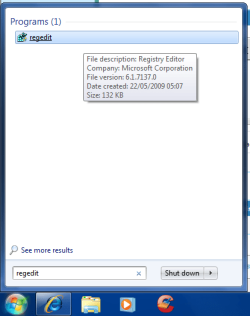
Firstly, open up regedit by typing it into the search bar
Regedit.png

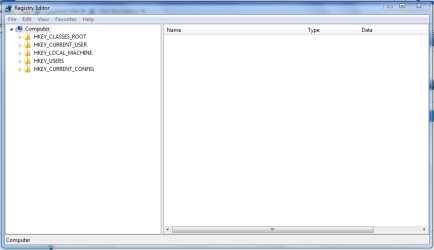
This will open the Registry Editor
Regedit (Open).PNG

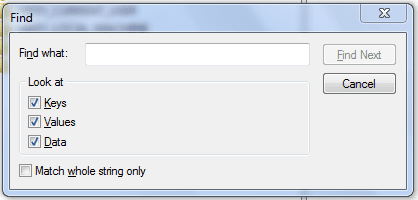
You can either find
Regedit (Find).PNG

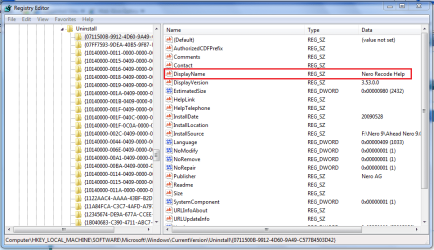
or navigate to the Uninstall key
Regedit (Uninstall).PNG

Either way, once you find anything that has a Key (yellow folder) named Sims or a String detailing any information about Sims then you can delete the whole Key (folder).

Hope thie helps :)

If your friend is a comp wizz then he/she'll know what i'm talking about in more detail.

   Warning
Always backup your registry in case of failure, read This to show you how


Jeff
 

My Computer

Computer Manufacturer/Model Number
Compaq Desktop
OS
Windows 7 Ultimate x64
CPU
AMD Sempron Dual Core
Memory
3GB
Graphics Card(s)
NVIDIA GeForce 6150SE nForce 430
Screen Resolution
1024x768
Hard Drives
150GB Sata
eh? if you wanna know where the registry keys exact location here you go!

HKEY_LOCAL_MACHINE\SOFTWARE\EA GAMES,

[HKEY_LOCAL_MACHINE\SOFTWARE\Electronic Arts\EA Games\

and

HKEY_LOCAL_MACHINE\SOFTWARE\Microsoft\Windows\CurrentVersion\App Paths

delete all entries that has something to od with the sims and try to reinstall it as administrator and compatibility mode xp sp3
 

My Computer

OS
Windows 7 32bit RTM
Good call Mercurial :D
 

My Computer

Computer Manufacturer/Model Number
Compaq Desktop
OS
Windows 7 Ultimate x64
CPU
AMD Sempron Dual Core
Memory
3GB
Graphics Card(s)
NVIDIA GeForce 6150SE nForce 430
Screen Resolution
1024x768
Hard Drives
150GB Sata
Thank you all for your help, I have just put the CD in after following those instructions, and it had come up with the installing window. Thank you all very much! You just made this girl very happy *kisses for all*
 

My Computer

OS
Windows 7
Sims 2 Install on Windows 7

I can't get Sims 2 to install on Windows 7 build 7000. The autorun starts and then just stops. Nothing happens. It doesn't even ask for the license number. Can anyone give me any ideas or things to try?
 

My Computer

OS
Windows 7
Motherboard
Gigabyte GA-M55plus-S3G
Memory
2GB
Hard Drives
500 GB SATA
Why don't you buy The Sims 3? ;) TS2 is obsolete already. I have every single TS1 EP and the same goes for TS2 (all EP's and SP's). i deleted all of them so as to let free space for TS3 EP's! :p By the way , I tested both TS1 and TS2 on 7 and they work perfectly!
 

My Computer

OS
Windows 7 Home Premium x64
CPU
Intel Core i5 750 2.67GHz
Memory
4 GB DDR3
Graphics Card(s)
Nvidia Geforce 9800 GT 512 MB
Screen Resolution
1920x1080
Internet Speed
24 Mbps - 16 Mbps available
I have a different problem with w7 and sims2, and that is it does NOT save anything. Whenever I restart the game there is nothing but the basic buildings. There are no families not to mention that there is nothing left from what I had created during previous session. It's completely crazy. Had anyone a similar problem? Amy idea of solution?
 

My Computer

OS
windows 7
Hi, my problem is kinda different, I upgraded from vista and before it my sims games played smoothly, now after reinstalling, they load fine, i can create families, but, when I try to get into a lot it loads and loads for ten minutes or so, when that happens I close sims 2 via task manager, then try to play again when i finally get into the lot, sims stay static, they don't move, just like statues, i tried unistalling and reintalling the games, patching etc, I don't know what else to do, please help.

Thanks in advance
 

My Computer

OS
windows 7
I just got a brand new laptop with the newest version of Windows 7 and I put my Sims 2 CD into the drive and it doesn't run at all to install! I've tried everything I know to try and get it to do the Auto-run and to get it to install, but I'm not having any luck!!!
 

My Computer

Computer Manufacturer/Model Number
Satellite L455D-S5976
OS
Laptop
sims2 not working on laptop

i just bought a new laptop. its a dell and it has windows 7 on it. i have been trying to play sims2 on it and i have successfully installed it and have played it. but it has been recently freezing on me after about 5 to 10 minutes of play on it. i have tried uninstalling it and reinstalling it and it still freezes. Can anyone help?
 

My Computer

OS
windows 7
HELP PLEASE!!!
Hi, i have Windows 7 on my laptop and i have borrowed The Sims 2 from a friend to install it.
The Sims 2 installed fine but when i double click on the icon to play it, a message saying "This program has known compatibility issues" pops up. i can either Check for solutions online (which takes me to the sims 2 website to download a patch. i dont know what that is) or i can Run Program. if i click run program, then it goes into the sims 2 but its not full screen :(
if anyone knows how to make the game play with a full screen, or how to fix the compatibility issue, please let me know. it would be much appreciated
 

My Computer

OS
Windows 7
i can either Check for solutions online (which takes me to the sims 2 website to download a patch. i dont know what that is)
Patches are released to fix problems and/or add features the program. With that said, I highly recommend you install the latest patch available for the game. I would also suggest you update your Direct X files.

From my Tips on Troubleshooting Game Issues ....

5 - Update your Direct X files - Contrary to popular belief, just because Windows 7 is DX11 capable doesn’t mean it has the latest DX9 files!!! Most game issues can be fixed by simply updating the DX files.

Let me know.
 

My Computer

Computer type
PC/Desktop
Computer Manufacturer/Model Number
Custom built by me.
OS
Windows 10 Pro
CPU
Intel Core i7-4770K (3.5Ghz)
Motherboard
Gigabyte G1 Sniper 5 (F10 Bios)
Memory
32 gig Corsair Dominator Platinum (4x8Gig)
Graphics Card(s)
Sapphire Tri-X R9 Fury
Sound Card
Soundblaster ZXR
Monitor(s) Displays
NEC PA242W 24" LCD Monitor
Screen Resolution
1920 x 1200
Hard Drives
Primary - Samsung 850 Pro (512gig), Samsung 840 Pro (256gig), 2TB WD Caviar Black.
PSU
EVGA Supernova 1000 G2
Case
Cooler Master HAF X
Cooling
Corsair H100i with Corsair Air Series SP120 Quiet Fans
Keyboard
Logitech Wireless Wave
Mouse
Logitech Performance MX
Internet Speed
High Speed Cable
Antivirus
Norton Security
Browser
IE11
Other Info
Memory Timings - 1866MHz @ 9-9-9-27-1T @ 1.5 volts
i can either Check for solutions online (which takes me to the sims 2 website to download a patch. i dont know what that is)
Patches are released to fix problems and/or add features the program. With that said, I highly recommend you install the latest patch available for the game. I would also suggest you update your Direct X files.

From my Tips on Troubleshooting Game Issues ....

5 - Update your Direct X files - Contrary to popular belief, just because Windows 7 is DX11 capable doesn’t mean it has the latest DX9 files!!! Most game issues can be fixed by simply updating the DX files.

Let me know.
thanks for telling me i should install a patch. i installed one called the sims 2 DVD patch, from the sims 2 website and it doesnt have compatibility issues anymore.
i suggest this for anyone with compatibility issues also

as for the screen issue, i changed the resolution in the game (under game settings) to match the resolution i had set for my laptop and now the game is fullscreen.
 

My Computer

OS
Windows 7
Back
Top