Theme - Change or Save

How to Change or Save a Windows 7 Theme

   Information
This will show you how to choose a theme to change the pictures (desktop background), colors, and sounds on your computer all at once in Windows 7.

You will also see how to save and delete your custom theme. Saving or deleting a theme is not available in Windows 7 Starter and Home Basic.


   Note

  • My Themes is your current theme. These .theme files are located in the hidden C:\Users\User-Name\AppData\Local\Microsoft\Windows\Themes folder.
  • Aero Themes are the Windows Aero themes. They are located in the C:\Windows\Resources\Themes folder.
  • Basic and High Contrast Themes are the Windows 7 Basic, Windows Classic, High Contrast #1, High Contrast #2, High Contrast Black, and High Contrast White themes. They are located in the C:\Windows\Resources\Ease of Access Themes folder.
  • Regional Themes - See: http://www.sevenforums.com/tutorials/1176-themes-regional.html
   Tip


OPTION ONE

To Change the Theme in Windows 7 Starter and Home Basic


1. Open the Control Panel (icons view), and click on the Display icon.

2. In the left blue pane, click on the Change color scheme link. (see screenshot below)
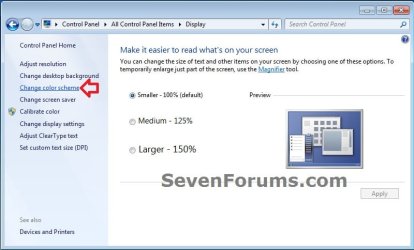
Starter_Basic-1.jpg
3. Select the color scheme (theme) that you would like, and click on Apply to test to see how you like it. (see screenshot below)
NOTE: Aero themes are not available in the Windows 7 Starter and Home Basic editions.
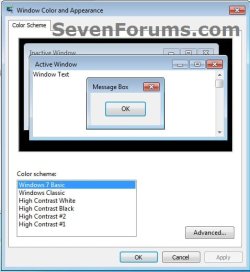
Starter_Basic-2.jpg
4. When finished, click on OK. (see screenshot below step 3)

5. Close the Display window. (see screenshot below step 1)


OPTION TWO

To Change the Theme in Windows 7 Home Premium, Professional, Ultimate, and Enterprise


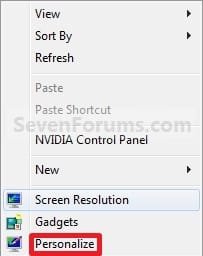
1. Right click on a empty space on the desktop and click on Personalize. (See screenshot below)
170d1230590495-theme-change-save-right_click.jpg

2. To Change the Theme
A) Click on one of the available themes. (See screenshot below)
NOTE: See the NOTE box at the top of the tutorial for more about these. To have the regional themes added, see: http://www.sevenforums.com/tutorials/1176-themes-regional.html.
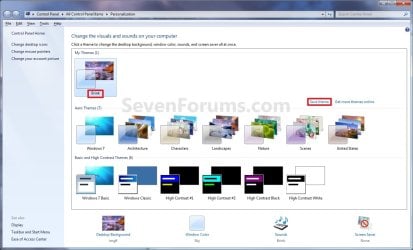
Personalization.jpg
B) Go to step 4.
3. To Create a Custom Theme
NOTE: Any changes that you make to a theme that you have already saved will automatically be updated and saved to it. There will be no need to save it as a new theme again in step 4 below unless you want a new theme.
A) Change the Desktop Background picture and settings.

B) Change the Window Color and Appearance settings.

C) Change the Sounds for the Windows 7 sound events to any sound file that you would like instead.

D) Change the Screen Saver and settings to be used for this theme pack.

E) Change, add, or remove any Desktop Icons that you want to with.

F) Change the Mouse Pointers to use pointers of your choice.

G) Proceed to OPTION TWO below to save your customized theme as a theme pack.
4. To Save the Current Theme to a File
NOTE: This will be your custom theme with a picture (desktop background), colors, sounds, and screen saver that you have selected and put together for the theme.
A) Under My Themes, click on the Save theme link towards the right. (See screenshot above)
NOTE: This will save your theme as .theme file for use on your computer only. If you want to share the theme with family and friends, then see: http://www.sevenforums.com/tutorials/2026-theme-pack-create-save-install-delete.html.

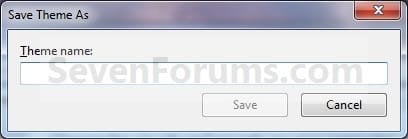
B) Type in a name you want for this theme, and click on the Save button. (See screenshot below)
Name.jpg
5. To Delete a Selected Theme
NOTE: You cannot delete the current theme. If you want to delete the current theme, then you must select another theme in step 2 first.
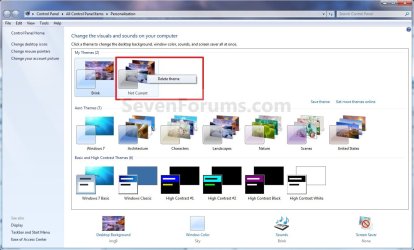
A) Under My Themes, right click on the saved theme you want to delete and click on Delete theme. (See screenshot below)
Delete.jpg
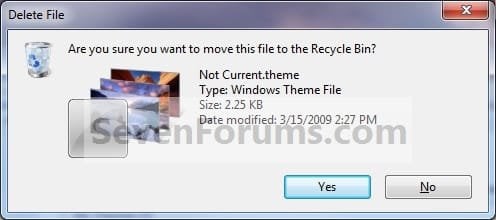
B) Click on Yes to confirm the deletion. (See screenshot below)
Confirm.jpg
That's it,
Shawn


Attachments

  • Right_Click.jpg
    Right_Click.jpg
    7.6 KB · Views: 500,696
Last edited:
Themes in Windows 7 directory

Can you please tell me where the themes directory in Windows 7 is? Is it C:\Windows\Resources\Themes?

Thanks,
Michael Higham
 

My Computer

OS
Windows Vista Home Premium
Hello Michael, and welcome to Windows 7 Forums.

Yes, there and at C:\Windows\Resources\Ease of Access Themes.

Shawn
 

My Computer

Computer type
PC/Desktop
Computer Manufacturer/Model Number
Self built custom
OS
64-bit Windows 11 Pro for Workstations
CPU
Intel i7-8700K OC'd to 5 GHz
Motherboard
ASUS ROG Maximus XI Formula Z390
Memory
64 GB (4x16GB) G.SKILL TridentZ RGB DDR4 3600 MHz
Graphics Card(s)
ASUS ROG-STRIX-GTX1080TI-O11G-GAMING
Sound Card
Integrated
Monitor(s) Displays
2 x Samsung Odyssey G7 27"
Screen Resolution
2560x1440
Hard Drives
1TB Samsung 990 PRO M.2,
4TB Samsung 990 PRO PRO M.2,
TerraMaster F8 SSD Plus NAS
PSU
Seasonic Prime Titanium 850W
Case
Thermaltake Core P3
Cooling
Corsair Hydro H115i
Keyboard
Logitech wireless K800
Mouse
Logitech MX Master 4
Internet Speed
2 Gb/s Download and 100 Mb/s Upload
Antivirus
Malwarebyte Anti-Malware Premium
Browser
Google Chrome
Other Info
Logitech Z625 speaker system,
Logitech BRIO 4K Pro webcam,
HP Color LaserJet Pro MFP M477fdn,
APC SMART-UPS RT 1000 XL - SURT1000XLI,
Galaxy S23 Plus phone
Getting additional themes from a website

Hi Shawn,

From the Themes Website (which have Classic themes), where do I place these downloaded Windows Classic themes to? And also, where do I place these downloaded Windows Aero type themes to?

Thanks,
Michael
 

My Computer

OS
Windows Vista Home Premium
Hi Michael,

I would save the .theme files at: :)

Aero: C:\Windows\Resources\Themes

and

Classic: C:\Windows\Resources\Ease of Access Themes
 

My Computer

Computer type
PC/Desktop
Computer Manufacturer/Model Number
Self built custom
OS
64-bit Windows 11 Pro for Workstations
CPU
Intel i7-8700K OC'd to 5 GHz
Motherboard
ASUS ROG Maximus XI Formula Z390
Memory
64 GB (4x16GB) G.SKILL TridentZ RGB DDR4 3600 MHz
Graphics Card(s)
ASUS ROG-STRIX-GTX1080TI-O11G-GAMING
Sound Card
Integrated
Monitor(s) Displays
2 x Samsung Odyssey G7 27"
Screen Resolution
2560x1440
Hard Drives
1TB Samsung 990 PRO M.2,
4TB Samsung 990 PRO PRO M.2,
TerraMaster F8 SSD Plus NAS
PSU
Seasonic Prime Titanium 850W
Case
Thermaltake Core P3
Cooling
Corsair Hydro H115i
Keyboard
Logitech wireless K800
Mouse
Logitech MX Master 4
Internet Speed
2 Gb/s Download and 100 Mb/s Upload
Antivirus
Malwarebyte Anti-Malware Premium
Browser
Google Chrome
Other Info
Logitech Z625 speaker system,
Logitech BRIO 4K Pro webcam,
HP Color LaserJet Pro MFP M477fdn,
APC SMART-UPS RT 1000 XL - SURT1000XLI,
Galaxy S23 Plus phone
Getting Windows Vista themes to work in Windows 7...

Hello,Will Windows Vista themes work on Windows 7 or will only Windows 7 themes work on Windows 7?Thanks,Michael
 

My Computer

OS
Windows Vista Home Premium
Good question Michael.

I have not tried that yet. Vista only comes with the aero.theme and Windows Classic.theme files and Windows 7 already includes these.

I would image that as long as it was a .theme file it may work, but I cannot confirm that.
 

My Computer

Computer type
PC/Desktop
Computer Manufacturer/Model Number
Self built custom
OS
64-bit Windows 11 Pro for Workstations
CPU
Intel i7-8700K OC'd to 5 GHz
Motherboard
ASUS ROG Maximus XI Formula Z390
Memory
64 GB (4x16GB) G.SKILL TridentZ RGB DDR4 3600 MHz
Graphics Card(s)
ASUS ROG-STRIX-GTX1080TI-O11G-GAMING
Sound Card
Integrated
Monitor(s) Displays
2 x Samsung Odyssey G7 27"
Screen Resolution
2560x1440
Hard Drives
1TB Samsung 990 PRO M.2,
4TB Samsung 990 PRO PRO M.2,
TerraMaster F8 SSD Plus NAS
PSU
Seasonic Prime Titanium 850W
Case
Thermaltake Core P3
Cooling
Corsair Hydro H115i
Keyboard
Logitech wireless K800
Mouse
Logitech MX Master 4
Internet Speed
2 Gb/s Download and 100 Mb/s Upload
Antivirus
Malwarebyte Anti-Malware Premium
Browser
Google Chrome
Other Info
Logitech Z625 speaker system,
Logitech BRIO 4K Pro webcam,
HP Color LaserJet Pro MFP M477fdn,
APC SMART-UPS RT 1000 XL - SURT1000XLI,
Galaxy S23 Plus phone
Hello,Will Windows Vista themes work on Windows 7 or will only Windows 7 themes work on Windows 7?Thanks,Michael

I have a suspicion they wont work because of the new taskbar. Just my unconfirmed thought though.
 

My Computer

Computer Manufacturer/Model Number
self built
OS
Windows 7 Professional 64-bit
CPU
Intel E8400 3GHz
Motherboard
Intel DX48BT2
Memory
Kingston PC3-10700H 4Gb
Graphics Card(s)
XFX Radeon HD 5850 BlackEd.
Sound Card
Asus Xonar DG
Monitor(s) Displays
2x Samsung SM-T220HD 22"
Screen Resolution
1680x1050 on two monitors
Hard Drives
OCZ Vertex 2 120gb 3.5" (OS)
Seagate Momentus XT 500gb
Samsung F3 1Tb (games)
2x Samsung F1 1Tb
PSU
Thermaltake ToughPower 850w
Case
Thermaltake Armor
Cooling
Scythe Mugen II
Keyboard
Microsoft Comfort Curve USB
Mouse
Razer Diamondback 3G
Internet Speed
8128/443
This tutorial has been updated due to changes made in the 7057 build. :)

Shawn
 

My Computer

Computer type
PC/Desktop
Computer Manufacturer/Model Number
Self built custom
OS
64-bit Windows 11 Pro for Workstations
CPU
Intel i7-8700K OC'd to 5 GHz
Motherboard
ASUS ROG Maximus XI Formula Z390
Memory
64 GB (4x16GB) G.SKILL TridentZ RGB DDR4 3600 MHz
Graphics Card(s)
ASUS ROG-STRIX-GTX1080TI-O11G-GAMING
Sound Card
Integrated
Monitor(s) Displays
2 x Samsung Odyssey G7 27"
Screen Resolution
2560x1440
Hard Drives
1TB Samsung 990 PRO M.2,
4TB Samsung 990 PRO PRO M.2,
TerraMaster F8 SSD Plus NAS
PSU
Seasonic Prime Titanium 850W
Case
Thermaltake Core P3
Cooling
Corsair Hydro H115i
Keyboard
Logitech wireless K800
Mouse
Logitech MX Master 4
Internet Speed
2 Gb/s Download and 100 Mb/s Upload
Antivirus
Malwarebyte Anti-Malware Premium
Browser
Google Chrome
Other Info
Logitech Z625 speaker system,
Logitech BRIO 4K Pro webcam,
HP Color LaserJet Pro MFP M477fdn,
APC SMART-UPS RT 1000 XL - SURT1000XLI,
Galaxy S23 Plus phone
Theme does not keep as Default

Hello, and thanks for reading this.

My problem is this: Ive already set my background pictures (presentation), colors, sounds and screensaver as I wished, I saved it and set it as default, but, once I reboot, I found that the theme has changed and the current one appears (in Personalize window) as "Not saved Theme" and actually keeps the last picture used on the theme I created (wich appears right next to this new one) as its ONLY pic.

I can re-set mine again, but everytime I turn on my pc, that will happen over n over again, in fact, I just reinstalled W7 2 nights ago, but the problem remains. I think could b something related to my config or so (I wish).

By the way, Im using Kaspersky I S -2010, Google Desktop and a couple little programs starting with Windows.
Thougth that might help.


Please help me, the cool appearance and presentation features is one of the things I like the most about Seven (among a lot of other great stuff).


Again, please help me.


Thankful


Juan Sebastian Jiménez
 

My Computer

OS
Windows 7 (RC 7100)
CPU
AMD Athlon 64 X2 2,19 GHz
Motherboard
MSI K9VGM
Memory
RAM: 2 GBs
Graphics Card(s)
nVidia GeForce 7300 GT
Monitor(s) Displays
Samsung SyncMaster 2243- 22"
Hard Drives
80 GBs - IDE
Hello Juan, and welcome to Seven Forums.

Delete the theme that you do not want at the top to leave only the one you want to use. Any changes that you make to a theme that you have already saved will automatically be updated and saved to it. There will be no need to save it as a new theme again unless you just wanted to.

You can also use the tutorial below to be able to save the theme as a themepack as a backup that can be used to restore your theme after a reinstall.

http://www.sevenforums.com/tutorials/2026-theme-pack-create-save-install-delete.html

Hope this helps,
Shawn
 

My Computer

Computer type
PC/Desktop
Computer Manufacturer/Model Number
Self built custom
OS
64-bit Windows 11 Pro for Workstations
CPU
Intel i7-8700K OC'd to 5 GHz
Motherboard
ASUS ROG Maximus XI Formula Z390
Memory
64 GB (4x16GB) G.SKILL TridentZ RGB DDR4 3600 MHz
Graphics Card(s)
ASUS ROG-STRIX-GTX1080TI-O11G-GAMING
Sound Card
Integrated
Monitor(s) Displays
2 x Samsung Odyssey G7 27"
Screen Resolution
2560x1440
Hard Drives
1TB Samsung 990 PRO M.2,
4TB Samsung 990 PRO PRO M.2,
TerraMaster F8 SSD Plus NAS
PSU
Seasonic Prime Titanium 850W
Case
Thermaltake Core P3
Cooling
Corsair Hydro H115i
Keyboard
Logitech wireless K800
Mouse
Logitech MX Master 4
Internet Speed
2 Gb/s Download and 100 Mb/s Upload
Antivirus
Malwarebyte Anti-Malware Premium
Browser
Google Chrome
Other Info
Logitech Z625 speaker system,
Logitech BRIO 4K Pro webcam,
HP Color LaserJet Pro MFP M477fdn,
APC SMART-UPS RT 1000 XL - SURT1000XLI,
Galaxy S23 Plus phone
Got it fixed !!

SHAWN...

Thank you so very much for reading and replying my post.

Now, I already did several times everything you said, but, once I reboot, W7 seems to automatically "create" a new Theme called "Not saved Theme" out of the last picture shown by MY theme before shutdown, but as ONLY PICTURE instead of Slideshow.

That will happen everytime I reboot, no matter how many times I save my theme and delete the unwanted ones. BUT !!!

Reading from post to post on the web, I found what looks like an incompatibility issue of W7 with some kind of pics and directories when talkin about background effects. I first tried by setting my Pictures Library on it, but after reboot didnt do, then I tried the Windows Backgrounds Folder and IT DID WORK OUT !! so I noticed there was something about directories making it happen, so I stored all the pics I wanted to show in my Desktop BG, on a new folder in different location and it worked like magic!!!! so my problem is solved now.....

Although, I wonder what made it happen, 'cause at first (just when RC version got public for download) it worked just fine but a few weeks ago it started to give me trouble. I personally dont think that has something to do with my files or programs running what so ever, but with some Windows updates made automatically.

I hope you guys keep aware of this kind of "minor but anoying" problems.

Again thanks alot for your attention and your time.

Yours

Juan Sebastian Jiménez
Psychologist (P)
 

My Computer

OS
Windows 7 (RC 7100)
CPU
AMD Athlon 64 X2 2,19 GHz
Motherboard
MSI K9VGM
Memory
RAM: 2 GBs
Graphics Card(s)
nVidia GeForce 7300 GT
Monitor(s) Displays
Samsung SyncMaster 2243- 22"
Hard Drives
80 GBs - IDE
Juan,

I'm happy to hear that you got it sorted out. Thank you for posting back what you found to be the problem causing this. :)
 

My Computer

Computer type
PC/Desktop
Computer Manufacturer/Model Number
Self built custom
OS
64-bit Windows 11 Pro for Workstations
CPU
Intel i7-8700K OC'd to 5 GHz
Motherboard
ASUS ROG Maximus XI Formula Z390
Memory
64 GB (4x16GB) G.SKILL TridentZ RGB DDR4 3600 MHz
Graphics Card(s)
ASUS ROG-STRIX-GTX1080TI-O11G-GAMING
Sound Card
Integrated
Monitor(s) Displays
2 x Samsung Odyssey G7 27"
Screen Resolution
2560x1440
Hard Drives
1TB Samsung 990 PRO M.2,
4TB Samsung 990 PRO PRO M.2,
TerraMaster F8 SSD Plus NAS
PSU
Seasonic Prime Titanium 850W
Case
Thermaltake Core P3
Cooling
Corsair Hydro H115i
Keyboard
Logitech wireless K800
Mouse
Logitech MX Master 4
Internet Speed
2 Gb/s Download and 100 Mb/s Upload
Antivirus
Malwarebyte Anti-Malware Premium
Browser
Google Chrome
Other Info
Logitech Z625 speaker system,
Logitech BRIO 4K Pro webcam,
HP Color LaserJet Pro MFP M477fdn,
APC SMART-UPS RT 1000 XL - SURT1000XLI,
Galaxy S23 Plus phone
Shawn

Great tutorial.

I see many of the themes have either a white background or black background.
What I mean is when I use Windows Explorer to move between folders, I get the white background for most themes or black background if I chose the High Contrast #1/#2/Black.

Is it possible to have other colors like grey or brown which is easier on the eye than the glaring white or black.

I know you can go to Windows Classic theme and get the grey background but that means you lose the overall feel of Windows 7.
 
Last edited:

My Computer

OS
Windows XP MCE & 7 Ultimate x64
Hello Ysabel, and welcome to Seven Forums.

The only other way than the Windows Classic theme that I know of is to use a 3rd party program like Windows Blinds for Vista.

Hope this helps some,
Shawn
 

My Computer

Computer type
PC/Desktop
Computer Manufacturer/Model Number
Self built custom
OS
64-bit Windows 11 Pro for Workstations
CPU
Intel i7-8700K OC'd to 5 GHz
Motherboard
ASUS ROG Maximus XI Formula Z390
Memory
64 GB (4x16GB) G.SKILL TridentZ RGB DDR4 3600 MHz
Graphics Card(s)
ASUS ROG-STRIX-GTX1080TI-O11G-GAMING
Sound Card
Integrated
Monitor(s) Displays
2 x Samsung Odyssey G7 27"
Screen Resolution
2560x1440
Hard Drives
1TB Samsung 990 PRO M.2,
4TB Samsung 990 PRO PRO M.2,
TerraMaster F8 SSD Plus NAS
PSU
Seasonic Prime Titanium 850W
Case
Thermaltake Core P3
Cooling
Corsair Hydro H115i
Keyboard
Logitech wireless K800
Mouse
Logitech MX Master 4
Internet Speed
2 Gb/s Download and 100 Mb/s Upload
Antivirus
Malwarebyte Anti-Malware Premium
Browser
Google Chrome
Other Info
Logitech Z625 speaker system,
Logitech BRIO 4K Pro webcam,
HP Color LaserJet Pro MFP M477fdn,
APC SMART-UPS RT 1000 XL - SURT1000XLI,
Galaxy S23 Plus phone
You're welcome Vegas, and welcome to Seven Forums.
 

My Computer

Computer type
PC/Desktop
Computer Manufacturer/Model Number
Self built custom
OS
64-bit Windows 11 Pro for Workstations
CPU
Intel i7-8700K OC'd to 5 GHz
Motherboard
ASUS ROG Maximus XI Formula Z390
Memory
64 GB (4x16GB) G.SKILL TridentZ RGB DDR4 3600 MHz
Graphics Card(s)
ASUS ROG-STRIX-GTX1080TI-O11G-GAMING
Sound Card
Integrated
Monitor(s) Displays
2 x Samsung Odyssey G7 27"
Screen Resolution
2560x1440
Hard Drives
1TB Samsung 990 PRO M.2,
4TB Samsung 990 PRO PRO M.2,
TerraMaster F8 SSD Plus NAS
PSU
Seasonic Prime Titanium 850W
Case
Thermaltake Core P3
Cooling
Corsair Hydro H115i
Keyboard
Logitech wireless K800
Mouse
Logitech MX Master 4
Internet Speed
2 Gb/s Download and 100 Mb/s Upload
Antivirus
Malwarebyte Anti-Malware Premium
Browser
Google Chrome
Other Info
Logitech Z625 speaker system,
Logitech BRIO 4K Pro webcam,
HP Color LaserJet Pro MFP M477fdn,
APC SMART-UPS RT 1000 XL - SURT1000XLI,
Galaxy S23 Plus phone
Having a similar issue to Juan's. Changing the theme creates a new theme called "Unsaved Theme". What is the directory for the Windows Background folder? I can't seem to find it.
 

My Computer

Computer Manufacturer/Model Number
Home Built
OS
Windows 7 Ultimate 64-bit
CPU
Athlon 64 6000+
Motherboard
Asus M2V-MX
Memory
2x2048MB DDR2 Kingston
Graphics Card(s)
Integrated
Sound Card
Integrated
Monitor(s) Displays
17" Hewlett Packard CRT
Hard Drives
1x80GB Maxtor IDE Master
1x250GB Seagate IDE Slave
1x160GB Seagate SATA
Cooling
Thermaltake MaxOrb
Hello Liptochron,

This is normal since making any changes to the current saved theme makes it a new theme, and it will have to be save again to keep it.

You can see the different default locations for the default background folders in the NOTE and TIP box at the top of the tutorial below.

http://www.sevenforums.com/tutorials/281-desktop-background-change.html

Hope this helps,
Shawn
 

My Computer

Computer type
PC/Desktop
Computer Manufacturer/Model Number
Self built custom
OS
64-bit Windows 11 Pro for Workstations
CPU
Intel i7-8700K OC'd to 5 GHz
Motherboard
ASUS ROG Maximus XI Formula Z390
Memory
64 GB (4x16GB) G.SKILL TridentZ RGB DDR4 3600 MHz
Graphics Card(s)
ASUS ROG-STRIX-GTX1080TI-O11G-GAMING
Sound Card
Integrated
Monitor(s) Displays
2 x Samsung Odyssey G7 27"
Screen Resolution
2560x1440
Hard Drives
1TB Samsung 990 PRO M.2,
4TB Samsung 990 PRO PRO M.2,
TerraMaster F8 SSD Plus NAS
PSU
Seasonic Prime Titanium 850W
Case
Thermaltake Core P3
Cooling
Corsair Hydro H115i
Keyboard
Logitech wireless K800
Mouse
Logitech MX Master 4
Internet Speed
2 Gb/s Download and 100 Mb/s Upload
Antivirus
Malwarebyte Anti-Malware Premium
Browser
Google Chrome
Other Info
Logitech Z625 speaker system,
Logitech BRIO 4K Pro webcam,
HP Color LaserJet Pro MFP M477fdn,
APC SMART-UPS RT 1000 XL - SURT1000XLI,
Galaxy S23 Plus phone
Why didnt MS give us the ability to modify a theme?

I agree that it is amazing that we cannot make changes to an existing theme, unless we save as a new theme.
I was even more amazed when I tried to save as the same name... it didnt overwrite the existing theme but created a 2nd theme with the same name... that's not normal MS behavior!
 

My Computer

Computer Manufacturer/Model Number
Homebrew PC - "Alpha_Dawg"
OS
Windows 7 Ultimate 64 bit Steve Ballmer Signature Edition
CPU
Intel Core 2 Quad - Q9550 - 2.83GHz stock - OC'd to 3.6GHz
Motherboard
Gigabyte EP45-UD3P
Memory
4GB DDR2 800MHz (PC6400) OCZ Reaper
Graphics Card(s)
Nvidia GE Force 8800 GTS
Sound Card
Asus Xonar DX
Monitor(s) Displays
Samsung SyncMaster 2333HD
Screen Resolution
1920 x 1080
Hard Drives
WD Caviar Black 750GB - 7200RPM - 32MB cache
WD Caviar Green 1.5TB - 5400RPM - 64MB cache
WD Caviar Green 2.0TB - 5400RPM - 64MB cache
PSU
PC Power & Cooling Silencer 750
Case
Gigabyte 3D Aurora
Cooling
Case is Air - 5ea. 120mm fans (mix of Arctic and Xigmatec)
Keyboard
MS Natural Wireless KB
Mouse
MS Wireless Mouse
Internet Speed
50 mbps down/5 mbps up
Other Info
AVerMedia - AVerTVHD G2 Dual Tuner Card
Back
Top