Theme - Change or Save

How to Change or Save a Windows 7 Theme

   Information
This will show you how to choose a theme to change the pictures (desktop background), colors, and sounds on your computer all at once in Windows 7.

You will also see how to save and delete your custom theme. Saving or deleting a theme is not available in Windows 7 Starter and Home Basic.


   Note

  • My Themes is your current theme. These .theme files are located in the hidden C:\Users\User-Name\AppData\Local\Microsoft\Windows\Themes folder.
  • Aero Themes are the Windows Aero themes. They are located in the C:\Windows\Resources\Themes folder.
  • Basic and High Contrast Themes are the Windows 7 Basic, Windows Classic, High Contrast #1, High Contrast #2, High Contrast Black, and High Contrast White themes. They are located in the C:\Windows\Resources\Ease of Access Themes folder.
  • Regional Themes - See: http://www.sevenforums.com/tutorials/1176-themes-regional.html
   Tip


OPTION ONE

To Change the Theme in Windows 7 Starter and Home Basic


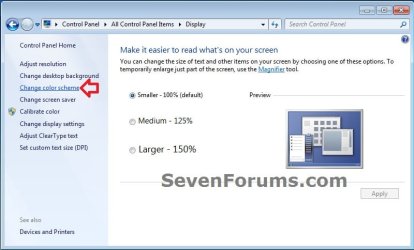
1. Open the Control Panel (icons view), and click on the Display icon.

2. In the left blue pane, click on the Change color scheme link. (see screenshot below)
Starter_Basic-1.jpg
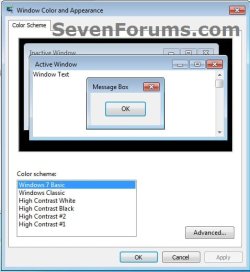
3. Select the color scheme (theme) that you would like, and click on Apply to test to see how you like it. (see screenshot below)
NOTE: Aero themes are not available in the Windows 7 Starter and Home Basic editions.
Starter_Basic-2.jpg
4. When finished, click on OK. (see screenshot below step 3)

5. Close the Display window. (see screenshot below step 1)


OPTION TWO

To Change the Theme in Windows 7 Home Premium, Professional, Ultimate, and Enterprise


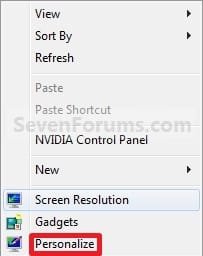
1. Right click on a empty space on the desktop and click on Personalize. (See screenshot below)
170d1230590495-theme-change-save-right_click.jpg

2. To Change the Theme
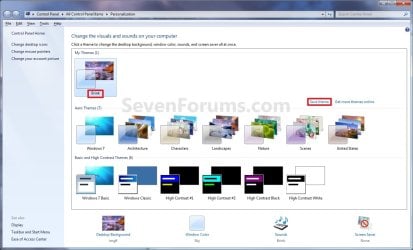
A) Click on one of the available themes. (See screenshot below)
NOTE: See the NOTE box at the top of the tutorial for more about these. To have the regional themes added, see: http://www.sevenforums.com/tutorials/1176-themes-regional.html.
Personalization.jpg
B) Go to step 4.
3. To Create a Custom Theme
NOTE: Any changes that you make to a theme that you have already saved will automatically be updated and saved to it. There will be no need to save it as a new theme again in step 4 below unless you want a new theme.
A) Change the Desktop Background picture and settings.

B) Change the Window Color and Appearance settings.

C) Change the Sounds for the Windows 7 sound events to any sound file that you would like instead.

D) Change the Screen Saver and settings to be used for this theme pack.

E) Change, add, or remove any Desktop Icons that you want to with.

F) Change the Mouse Pointers to use pointers of your choice.

G) Proceed to OPTION TWO below to save your customized theme as a theme pack.
4. To Save the Current Theme to a File
NOTE: This will be your custom theme with a picture (desktop background), colors, sounds, and screen saver that you have selected and put together for the theme.
A) Under My Themes, click on the Save theme link towards the right. (See screenshot above)
NOTE: This will save your theme as .theme file for use on your computer only. If you want to share the theme with family and friends, then see: http://www.sevenforums.com/tutorials/2026-theme-pack-create-save-install-delete.html.

B) Type in a name you want for this theme, and click on the Save button. (See screenshot below)
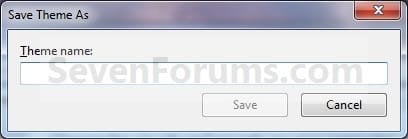
Name.jpg
5. To Delete a Selected Theme
NOTE: You cannot delete the current theme. If you want to delete the current theme, then you must select another theme in step 2 first.
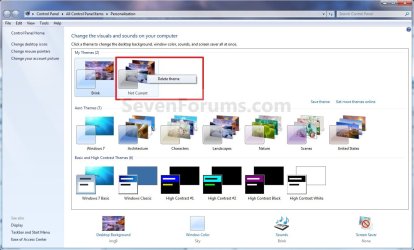
A) Under My Themes, right click on the saved theme you want to delete and click on Delete theme. (See screenshot below)
Delete.jpg
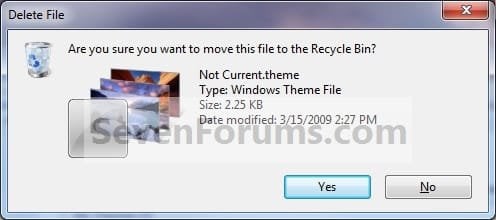
B) Click on Yes to confirm the deletion. (See screenshot below)
Confirm.jpg
That's it,
Shawn


Attachments

  • Right_Click.jpg
    Right_Click.jpg
    7.6 KB · Views: 500,696
Last edited:
how do i get the save theme box to appear? it is not there for me
themepage.png
 

My Computer

Computer Manufacturer/Model Number
self built
OS
windows 7 ultimate x64
CPU
intel core 2 quad 9450
Motherboard
gigabyte EP45-DQ6
Memory
4X2GB Gskill pc6400
Graphics Card(s)
visiontek radeon 4870x2 2gb
Sound Card
X-Fi Fatal1ty FPS 7.1
Monitor(s) Displays
dell 2408 WFP
Screen Resolution
1920X1200
Hard Drives
Intel X-25M G2 80GB, WD velociraptor 150gb, wd black 750gb internal. seagate 1tb Esata external storage, wd elements 750gb USB 2.0 external
PSU
Antec TruePower New TP-750 watt
Case
cooler master HAF932
Cooling
XIGMATEK HDT-S1283 120mm Rifle CPU Cooler
Keyboard
microsoft digital media pro
Mouse
microsoft trackball explorer
Internet Speed
16mb\sec comcast
Other Info
Samsung SH-S243N 24X DVD-RW
Hello Harry, and welcome to Seven Forums.

It looks like you have a custom "Red Fusion" theme installed that may be why. What options do you have when you right click on it?
 

My Computer

Computer type
PC/Desktop
Computer Manufacturer/Model Number
Self built custom
OS
64-bit Windows 11 Pro for Workstations
CPU
Intel i7-8700K OC'd to 5 GHz
Motherboard
ASUS ROG Maximus XI Formula Z390
Memory
64 GB (4x16GB) G.SKILL TridentZ RGB DDR4 3600 MHz
Graphics Card(s)
ASUS ROG-STRIX-GTX1080TI-O11G-GAMING
Sound Card
Integrated
Monitor(s) Displays
2 x Samsung Odyssey G7 27"
Screen Resolution
2560x1440
Hard Drives
1TB Samsung 990 PRO M.2,
4TB Samsung 990 PRO PRO M.2,
TerraMaster F8 SSD Plus NAS
PSU
Seasonic Prime Titanium 850W
Case
Thermaltake Core P3
Cooling
Corsair Hydro H115i
Keyboard
Logitech wireless K800
Mouse
Logitech MX Master 4
Internet Speed
2 Gb/s Download and 100 Mb/s Upload
Antivirus
Malwarebyte Anti-Malware Premium
Browser
Google Chrome
Other Info
Logitech Z625 speaker system,
Logitech BRIO 4K Pro webcam,
HP Color LaserJet Pro MFP M477fdn,
APC SMART-UPS RT 1000 XL - SURT1000XLI,
Galaxy S23 Plus phone
nothing happens at all when i right click
 

My Computer

Computer Manufacturer/Model Number
self built
OS
windows 7 ultimate x64
CPU
intel core 2 quad 9450
Motherboard
gigabyte EP45-DQ6
Memory
4X2GB Gskill pc6400
Graphics Card(s)
visiontek radeon 4870x2 2gb
Sound Card
X-Fi Fatal1ty FPS 7.1
Monitor(s) Displays
dell 2408 WFP
Screen Resolution
1920X1200
Hard Drives
Intel X-25M G2 80GB, WD velociraptor 150gb, wd black 750gb internal. seagate 1tb Esata external storage, wd elements 750gb USB 2.0 external
PSU
Antec TruePower New TP-750 watt
Case
cooler master HAF932
Cooling
XIGMATEK HDT-S1283 120mm Rifle CPU Cooler
Keyboard
microsoft digital media pro
Mouse
microsoft trackball explorer
Internet Speed
16mb\sec comcast
Other Info
Samsung SH-S243N 24X DVD-RW
Strange. Are you able to select another theme, and/or change the desktop background to see if it will allow you to save a theme then?
 

My Computer

Computer type
PC/Desktop
Computer Manufacturer/Model Number
Self built custom
OS
64-bit Windows 11 Pro for Workstations
CPU
Intel i7-8700K OC'd to 5 GHz
Motherboard
ASUS ROG Maximus XI Formula Z390
Memory
64 GB (4x16GB) G.SKILL TridentZ RGB DDR4 3600 MHz
Graphics Card(s)
ASUS ROG-STRIX-GTX1080TI-O11G-GAMING
Sound Card
Integrated
Monitor(s) Displays
2 x Samsung Odyssey G7 27"
Screen Resolution
2560x1440
Hard Drives
1TB Samsung 990 PRO M.2,
4TB Samsung 990 PRO PRO M.2,
TerraMaster F8 SSD Plus NAS
PSU
Seasonic Prime Titanium 850W
Case
Thermaltake Core P3
Cooling
Corsair Hydro H115i
Keyboard
Logitech wireless K800
Mouse
Logitech MX Master 4
Internet Speed
2 Gb/s Download and 100 Mb/s Upload
Antivirus
Malwarebyte Anti-Malware Premium
Browser
Google Chrome
Other Info
Logitech Z625 speaker system,
Logitech BRIO 4K Pro webcam,
HP Color LaserJet Pro MFP M477fdn,
APC SMART-UPS RT 1000 XL - SURT1000XLI,
Galaxy S23 Plus phone
the red fusion folder disappeared just now and the save option come back, i clicked the red fusion theme and it disappeared again. weird

as soon as i delete the red fusion folder the save theme button comes back as well as right click. how do i get that theme which is the purpose of this post

i did patch the 3 files with universal patcher too
 

My Computer

Computer Manufacturer/Model Number
self built
OS
windows 7 ultimate x64
CPU
intel core 2 quad 9450
Motherboard
gigabyte EP45-DQ6
Memory
4X2GB Gskill pc6400
Graphics Card(s)
visiontek radeon 4870x2 2gb
Sound Card
X-Fi Fatal1ty FPS 7.1
Monitor(s) Displays
dell 2408 WFP
Screen Resolution
1920X1200
Hard Drives
Intel X-25M G2 80GB, WD velociraptor 150gb, wd black 750gb internal. seagate 1tb Esata external storage, wd elements 750gb USB 2.0 external
PSU
Antec TruePower New TP-750 watt
Case
cooler master HAF932
Cooling
XIGMATEK HDT-S1283 120mm Rifle CPU Cooler
Keyboard
microsoft digital media pro
Mouse
microsoft trackball explorer
Internet Speed
16mb\sec comcast
Other Info
Samsung SH-S243N 24X DVD-RW
Yep, that's it then. I guess that with a custom theme that there are no save options since it's custom and can't be modified in itself without creating a new theme. If you save a theme, then select the "Red Fusion" theme, do you still have the saved theme in your "My themes" area, or does it disappear as well?
 

My Computer

Computer type
PC/Desktop
Computer Manufacturer/Model Number
Self built custom
OS
64-bit Windows 11 Pro for Workstations
CPU
Intel i7-8700K OC'd to 5 GHz
Motherboard
ASUS ROG Maximus XI Formula Z390
Memory
64 GB (4x16GB) G.SKILL TridentZ RGB DDR4 3600 MHz
Graphics Card(s)
ASUS ROG-STRIX-GTX1080TI-O11G-GAMING
Sound Card
Integrated
Monitor(s) Displays
2 x Samsung Odyssey G7 27"
Screen Resolution
2560x1440
Hard Drives
1TB Samsung 990 PRO M.2,
4TB Samsung 990 PRO PRO M.2,
TerraMaster F8 SSD Plus NAS
PSU
Seasonic Prime Titanium 850W
Case
Thermaltake Core P3
Cooling
Corsair Hydro H115i
Keyboard
Logitech wireless K800
Mouse
Logitech MX Master 4
Internet Speed
2 Gb/s Download and 100 Mb/s Upload
Antivirus
Malwarebyte Anti-Malware Premium
Browser
Google Chrome
Other Info
Logitech Z625 speaker system,
Logitech BRIO 4K Pro webcam,
HP Color LaserJet Pro MFP M477fdn,
APC SMART-UPS RT 1000 XL - SURT1000XLI,
Galaxy S23 Plus phone
it disappears as well
 

My Computer

Computer Manufacturer/Model Number
self built
OS
windows 7 ultimate x64
CPU
intel core 2 quad 9450
Motherboard
gigabyte EP45-DQ6
Memory
4X2GB Gskill pc6400
Graphics Card(s)
visiontek radeon 4870x2 2gb
Sound Card
X-Fi Fatal1ty FPS 7.1
Monitor(s) Displays
dell 2408 WFP
Screen Resolution
1920X1200
Hard Drives
Intel X-25M G2 80GB, WD velociraptor 150gb, wd black 750gb internal. seagate 1tb Esata external storage, wd elements 750gb USB 2.0 external
PSU
Antec TruePower New TP-750 watt
Case
cooler master HAF932
Cooling
XIGMATEK HDT-S1283 120mm Rifle CPU Cooler
Keyboard
microsoft digital media pro
Mouse
microsoft trackball explorer
Internet Speed
16mb\sec comcast
Other Info
Samsung SH-S243N 24X DVD-RW
You should be able to use the "Red Fusion" theme as is without being able to make any modifications to it if that is the one you are wanting to use. It's should be fine this way.
 

My Computer

Computer type
PC/Desktop
Computer Manufacturer/Model Number
Self built custom
OS
64-bit Windows 11 Pro for Workstations
CPU
Intel i7-8700K OC'd to 5 GHz
Motherboard
ASUS ROG Maximus XI Formula Z390
Memory
64 GB (4x16GB) G.SKILL TridentZ RGB DDR4 3600 MHz
Graphics Card(s)
ASUS ROG-STRIX-GTX1080TI-O11G-GAMING
Sound Card
Integrated
Monitor(s) Displays
2 x Samsung Odyssey G7 27"
Screen Resolution
2560x1440
Hard Drives
1TB Samsung 990 PRO M.2,
4TB Samsung 990 PRO PRO M.2,
TerraMaster F8 SSD Plus NAS
PSU
Seasonic Prime Titanium 850W
Case
Thermaltake Core P3
Cooling
Corsair Hydro H115i
Keyboard
Logitech wireless K800
Mouse
Logitech MX Master 4
Internet Speed
2 Gb/s Download and 100 Mb/s Upload
Antivirus
Malwarebyte Anti-Malware Premium
Browser
Google Chrome
Other Info
Logitech Z625 speaker system,
Logitech BRIO 4K Pro webcam,
HP Color LaserJet Pro MFP M477fdn,
APC SMART-UPS RT 1000 XL - SURT1000XLI,
Galaxy S23 Plus phone
it does not apply though. the color stays the same from the last theme.
 

My Computer

Computer Manufacturer/Model Number
self built
OS
windows 7 ultimate x64
CPU
intel core 2 quad 9450
Motherboard
gigabyte EP45-DQ6
Memory
4X2GB Gskill pc6400
Graphics Card(s)
visiontek radeon 4870x2 2gb
Sound Card
X-Fi Fatal1ty FPS 7.1
Monitor(s) Displays
dell 2408 WFP
Screen Resolution
1920X1200
Hard Drives
Intel X-25M G2 80GB, WD velociraptor 150gb, wd black 750gb internal. seagate 1tb Esata external storage, wd elements 750gb USB 2.0 external
PSU
Antec TruePower New TP-750 watt
Case
cooler master HAF932
Cooling
XIGMATEK HDT-S1283 120mm Rifle CPU Cooler
Keyboard
microsoft digital media pro
Mouse
microsoft trackball explorer
Internet Speed
16mb\sec comcast
Other Info
Samsung SH-S243N 24X DVD-RW

My Computer

Computer type
PC/Desktop
Computer Manufacturer/Model Number
Self built custom
OS
64-bit Windows 11 Pro for Workstations
CPU
Intel i7-8700K OC'd to 5 GHz
Motherboard
ASUS ROG Maximus XI Formula Z390
Memory
64 GB (4x16GB) G.SKILL TridentZ RGB DDR4 3600 MHz
Graphics Card(s)
ASUS ROG-STRIX-GTX1080TI-O11G-GAMING
Sound Card
Integrated
Monitor(s) Displays
2 x Samsung Odyssey G7 27"
Screen Resolution
2560x1440
Hard Drives
1TB Samsung 990 PRO M.2,
4TB Samsung 990 PRO PRO M.2,
TerraMaster F8 SSD Plus NAS
PSU
Seasonic Prime Titanium 850W
Case
Thermaltake Core P3
Cooling
Corsair Hydro H115i
Keyboard
Logitech wireless K800
Mouse
Logitech MX Master 4
Internet Speed
2 Gb/s Download and 100 Mb/s Upload
Antivirus
Malwarebyte Anti-Malware Premium
Browser
Google Chrome
Other Info
Logitech Z625 speaker system,
Logitech BRIO 4K Pro webcam,
HP Color LaserJet Pro MFP M477fdn,
APC SMART-UPS RT 1000 XL - SURT1000XLI,
Galaxy S23 Plus phone
Hi, I reinstalled windows 7 home premium and downloaded all of the themes from the personalization > themes - get more themes and they do not appear for other users on my system. I even cut and pasted them into C:\windows\resources\ease of access themes.
They were in C:\users\me\appdata\local\microsoft\windows\themes after I downloaded them and before I cut and pasted them to the above location.


They still do not show up for other users. Is there a way to do this and is this not the correct way? I would hate to think that each user of this system (3) would have to download them each individually.
Thanks in advance!
 

My Computer

OS
Windows 7 Home Premium x64, Ubuntu 10.04 x64
CPU
Intel Core 2 Quad Q9550(2.83GHz)
Motherboard
MSI G31M3-L V2
Memory
4MB Kingston DDR2
Graphics Card(s)
NVIDIA GeForce 9800 GT 512MB PCI Express
Sound Card
Sound card - Integrated
Monitor(s) Displays
Hanns·G HG-281DPB Black 28" 3ms 1080P LCD HDMI Monitor
Screen Resolution
1920 X 1200
Hard Drives
1) 500GB SATA-II 7200RPM
2) Fantom GreenDrive 1TB External HD - eSATA, USB 2.0
Cooling
Masscool 8W553 CPU Cooling Fan
Other Info
7 fans - 2400-2800 RPM cooling fans: (5 case fans, CPU and GPU)
Hello Cavsfan,

I have not tried this, but if it's a .theme file, then you might also try copying it into the other user accounts' C:\users\(user-name)\appdata\local\microsoft\windows\themes folder since it was there in your user account, or in the C:\Windows\Resources\Themes folder to see if it may be available for them afterwards.
 

My Computer

Computer type
PC/Desktop
Computer Manufacturer/Model Number
Self built custom
OS
64-bit Windows 11 Pro for Workstations
CPU
Intel i7-8700K OC'd to 5 GHz
Motherboard
ASUS ROG Maximus XI Formula Z390
Memory
64 GB (4x16GB) G.SKILL TridentZ RGB DDR4 3600 MHz
Graphics Card(s)
ASUS ROG-STRIX-GTX1080TI-O11G-GAMING
Sound Card
Integrated
Monitor(s) Displays
2 x Samsung Odyssey G7 27"
Screen Resolution
2560x1440
Hard Drives
1TB Samsung 990 PRO M.2,
4TB Samsung 990 PRO PRO M.2,
TerraMaster F8 SSD Plus NAS
PSU
Seasonic Prime Titanium 850W
Case
Thermaltake Core P3
Cooling
Corsair Hydro H115i
Keyboard
Logitech wireless K800
Mouse
Logitech MX Master 4
Internet Speed
2 Gb/s Download and 100 Mb/s Upload
Antivirus
Malwarebyte Anti-Malware Premium
Browser
Google Chrome
Other Info
Logitech Z625 speaker system,
Logitech BRIO 4K Pro webcam,
HP Color LaserJet Pro MFP M477fdn,
APC SMART-UPS RT 1000 XL - SURT1000XLI,
Galaxy S23 Plus phone
Hello Cavsfan,

I have not tried this, but if it's a .theme file, then you might also try copying it into the other user accounts' C:\users\(user-name)\appdata\local\microsoft\windows\themes folder since it was there in your user account, or in the C:\Windows\Resources\Themes folder to see if it may be available for them afterwards.

Thanks for the reply!
They are .themepack files and I was hoping to avoid them being duplicated 3 times on the disk.
These are all adminstrator accounts. So, I was hoping to be able to put them somewhere that all users would see in their logins.
(I tried the C:\windows\Resources\Themes folder first but thought that was for aero only and it did not work either)
Thanks
 

My Computer

OS
Windows 7 Home Premium x64, Ubuntu 10.04 x64
CPU
Intel Core 2 Quad Q9550(2.83GHz)
Motherboard
MSI G31M3-L V2
Memory
4MB Kingston DDR2
Graphics Card(s)
NVIDIA GeForce 9800 GT 512MB PCI Express
Sound Card
Sound card - Integrated
Monitor(s) Displays
Hanns·G HG-281DPB Black 28" 3ms 1080P LCD HDMI Monitor
Screen Resolution
1920 X 1200
Hard Drives
1) 500GB SATA-II 7200RPM
2) Fantom GreenDrive 1TB External HD - eSATA, USB 2.0
Cooling
Masscool 8W553 CPU Cooling Fan
Other Info
7 fans - 2400-2800 RPM cooling fans: (5 case fans, CPU and GPU)
Have you already tried copying the .theme file that the .thempack installed in your account into their user accounts' C:\users\(user-name)\appdata\local\microsoft\windows\themes folder yet?
 

My Computer

Computer type
PC/Desktop
Computer Manufacturer/Model Number
Self built custom
OS
64-bit Windows 11 Pro for Workstations
CPU
Intel i7-8700K OC'd to 5 GHz
Motherboard
ASUS ROG Maximus XI Formula Z390
Memory
64 GB (4x16GB) G.SKILL TridentZ RGB DDR4 3600 MHz
Graphics Card(s)
ASUS ROG-STRIX-GTX1080TI-O11G-GAMING
Sound Card
Integrated
Monitor(s) Displays
2 x Samsung Odyssey G7 27"
Screen Resolution
2560x1440
Hard Drives
1TB Samsung 990 PRO M.2,
4TB Samsung 990 PRO PRO M.2,
TerraMaster F8 SSD Plus NAS
PSU
Seasonic Prime Titanium 850W
Case
Thermaltake Core P3
Cooling
Corsair Hydro H115i
Keyboard
Logitech wireless K800
Mouse
Logitech MX Master 4
Internet Speed
2 Gb/s Download and 100 Mb/s Upload
Antivirus
Malwarebyte Anti-Malware Premium
Browser
Google Chrome
Other Info
Logitech Z625 speaker system,
Logitech BRIO 4K Pro webcam,
HP Color LaserJet Pro MFP M477fdn,
APC SMART-UPS RT 1000 XL - SURT1000XLI,
Galaxy S23 Plus phone
Have you already tried copying the .theme file that the .thempack installed in your account into their user accounts' C:\users\(user-name)\appdata\local\microsoft\windows\themes folder yet?

No, I don't think the other 2 users are that interested in the extra themes.
But, I just thought there was a way that once downloaded, they would appear for all users.
But, it's no big deal. Thanks!
 

My Computer

OS
Windows 7 Home Premium x64, Ubuntu 10.04 x64
CPU
Intel Core 2 Quad Q9550(2.83GHz)
Motherboard
MSI G31M3-L V2
Memory
4MB Kingston DDR2
Graphics Card(s)
NVIDIA GeForce 9800 GT 512MB PCI Express
Sound Card
Sound card - Integrated
Monitor(s) Displays
Hanns·G HG-281DPB Black 28" 3ms 1080P LCD HDMI Monitor
Screen Resolution
1920 X 1200
Hard Drives
1) 500GB SATA-II 7200RPM
2) Fantom GreenDrive 1TB External HD - eSATA, USB 2.0
Cooling
Masscool 8W553 CPU Cooling Fan
Other Info
7 fans - 2400-2800 RPM cooling fans: (5 case fans, CPU and GPU)
how to change a them without showing any UI to the user
 

My Computer

OS
vista

My Computer

Computer type
PC/Desktop
Computer Manufacturer/Model Number
Self built custom
OS
64-bit Windows 11 Pro for Workstations
CPU
Intel i7-8700K OC'd to 5 GHz
Motherboard
ASUS ROG Maximus XI Formula Z390
Memory
64 GB (4x16GB) G.SKILL TridentZ RGB DDR4 3600 MHz
Graphics Card(s)
ASUS ROG-STRIX-GTX1080TI-O11G-GAMING
Sound Card
Integrated
Monitor(s) Displays
2 x Samsung Odyssey G7 27"
Screen Resolution
2560x1440
Hard Drives
1TB Samsung 990 PRO M.2,
4TB Samsung 990 PRO PRO M.2,
TerraMaster F8 SSD Plus NAS
PSU
Seasonic Prime Titanium 850W
Case
Thermaltake Core P3
Cooling
Corsair Hydro H115i
Keyboard
Logitech wireless K800
Mouse
Logitech MX Master 4
Internet Speed
2 Gb/s Download and 100 Mb/s Upload
Antivirus
Malwarebyte Anti-Malware Premium
Browser
Google Chrome
Other Info
Logitech Z625 speaker system,
Logitech BRIO 4K Pro webcam,
HP Color LaserJet Pro MFP M477fdn,
APC SMART-UPS RT 1000 XL - SURT1000XLI,
Galaxy S23 Plus phone
These are excellent instructions for creating a new theme.

How can I set my new theme as the default theme for a new user?

Thank you,

ERCO61
 

My Computer

OS
Windows
Hello Erco, and welcome to Seven Forums.

I'll create a separate tutorial on this tonight with more details. For now, you can do it through Group Policy at the location below. The saved .theme files of a user are located in the hidden C:\Users\User-Name\AppData\Local\Microsoft\Windows\Themes folder, and these: http://www.sevenforums.com/tutorials/1176-themes-regional.html

GPEDIT.jpg

Hope this helps for now, :)
Shawn

UPDATE for New Tutorial:
http://www.sevenforums.com/tutorials/80384-theme-specify-default-theme-load-new-users.html
 
Last edited:

My Computer

Computer type
PC/Desktop
Computer Manufacturer/Model Number
Self built custom
OS
64-bit Windows 11 Pro for Workstations
CPU
Intel i7-8700K OC'd to 5 GHz
Motherboard
ASUS ROG Maximus XI Formula Z390
Memory
64 GB (4x16GB) G.SKILL TridentZ RGB DDR4 3600 MHz
Graphics Card(s)
ASUS ROG-STRIX-GTX1080TI-O11G-GAMING
Sound Card
Integrated
Monitor(s) Displays
2 x Samsung Odyssey G7 27"
Screen Resolution
2560x1440
Hard Drives
1TB Samsung 990 PRO M.2,
4TB Samsung 990 PRO PRO M.2,
TerraMaster F8 SSD Plus NAS
PSU
Seasonic Prime Titanium 850W
Case
Thermaltake Core P3
Cooling
Corsair Hydro H115i
Keyboard
Logitech wireless K800
Mouse
Logitech MX Master 4
Internet Speed
2 Gb/s Download and 100 Mb/s Upload
Antivirus
Malwarebyte Anti-Malware Premium
Browser
Google Chrome
Other Info
Logitech Z625 speaker system,
Logitech BRIO 4K Pro webcam,
HP Color LaserJet Pro MFP M477fdn,
APC SMART-UPS RT 1000 XL - SURT1000XLI,
Galaxy S23 Plus phone
Thanks Shawn:

I enabled the "load a specific theme" policy and set the path as "c:\Users\Public\myTheme.theme"

I then restarted and created a new Admin user and a new standard user. If I log in as either new user, the theme is set to classic by defaut.

As the new admin user, I checked that the policy is enabled and I can browse to the myTheme.theme file. I can double click the file and the theme now changes to the desired theme.

Why is the theme not automatically set for the new user upon login? Can you see what I did wrong?

Thank you for your help,

ERCO61
 

My Computer

OS
Windows
Back
Top