Thumbnails not working...

michmarz24

New member
Local time
4:33 AM
Messages
11
I know there are other threads with this title, however I cannot find a solution.

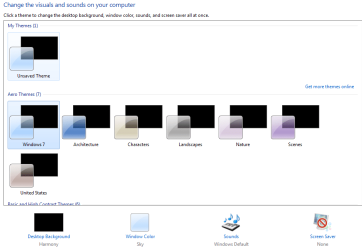
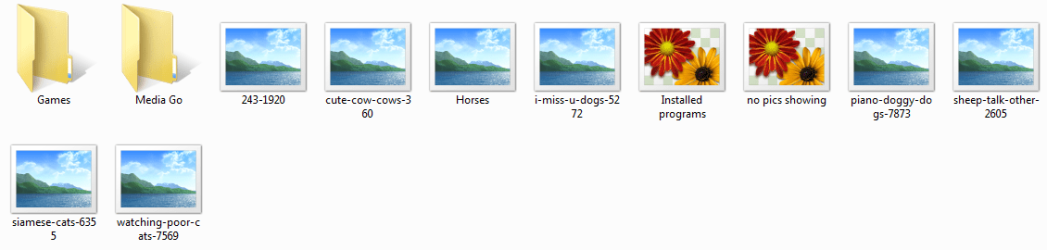
I have done the check the enable thumbnail view and unchecked the always show icons never thumbnails option. However this does not fix the issue. It's not just pictures in folders I am having issues with. When I right click the desktop and select personalize all the preview options are black (no pics or icons).

I don't want to have to re-install the OS so any help would be greatly appreciated.
 

My Computer My Computer

Computer Manufacturer/Model Number
Me
OS
Windows 7
CPU
Core i7 920
Motherboard
EVGA x58 SLI LE
Memory
12gb Corsair
Graphics Card(s)
EVGA Geforce 260 superclocked x3
Sound Card
n/a
Monitor(s) Displays
Samsung SyncMaster T240HD
Hard Drives
WD 300gb Velociraptor and 500gb WDC WD5000AAKS
PSU
HX1000W Corsair PS
Case
Antec 900
Cooling
Various Fans
Try using one of Windows 7 pre-installed themes (specifically Aero Themes) and work backwards from there.
 

My Computer My Computer

Computer Manufacturer/Model Number
HP G60-125NR Notebook PC
OS
Windows 7 Professional
CPU
2.00 GHz AMD Turion X2 RM-70 Dual-Core Mobile Processor
Motherboard
Integrated NVIDIA nForce Chipset
Memory
3072 MB
Graphics Card(s)
NVIDIA GeForce 8200M
Monitor(s) Displays
15.6" Diagonal High Definition HP Brightview Display
Screen Resolution
1366x768
Hard Drives
250 GB (5400 rpm)
Keyboard
Full size keyboard with integrated numeric keypad
Mouse
Touch Pad with dedicated vertical scroll Up/Down pad
I have changed the themes with one from the windows selections, everything is blacked out, i can't get a thumbnail or preview from any type of pic in any option I see.

I have reverted back to the windows 7 aero theme...
 

My Computer My Computer

Computer Manufacturer/Model Number
Me
OS
Windows 7
CPU
Core i7 920
Motherboard
EVGA x58 SLI LE
Memory
12gb Corsair
Graphics Card(s)
EVGA Geforce 260 superclocked x3
Sound Card
n/a
Monitor(s) Displays
Samsung SyncMaster T240HD
Hard Drives
WD 300gb Velociraptor and 500gb WDC WD5000AAKS
PSU
HX1000W Corsair PS
Case
Antec 900
Cooling
Various Fans
Try opening up a command line and type in "sfc /scannow" to look for errors
 

My Computer My Computer

Computer Manufacturer/Model Number
HP G60-125NR Notebook PC
OS
Windows 7 Professional
CPU
2.00 GHz AMD Turion X2 RM-70 Dual-Core Mobile Processor
Motherboard
Integrated NVIDIA nForce Chipset
Memory
3072 MB
Graphics Card(s)
NVIDIA GeForce 8200M
Monitor(s) Displays
15.6" Diagonal High Definition HP Brightview Display
Screen Resolution
1366x768
Hard Drives
250 GB (5400 rpm)
Keyboard
Full size keyboard with integrated numeric keypad
Mouse
Touch Pad with dedicated vertical scroll Up/Down pad
attached is the pic of my screen when trying to change themes...
Notice all the pic previews are black.
 

Attachments

  • no pics showing.PNG
    no pics showing.PNG
    21.5 KB · Views: 11

My Computer My Computer

Computer Manufacturer/Model Number
Me
OS
Windows 7
CPU
Core i7 920
Motherboard
EVGA x58 SLI LE
Memory
12gb Corsair
Graphics Card(s)
EVGA Geforce 260 superclocked x3
Sound Card
n/a
Monitor(s) Displays
Samsung SyncMaster T240HD
Hard Drives
WD 300gb Velociraptor and 500gb WDC WD5000AAKS
PSU
HX1000W Corsair PS
Case
Antec 900
Cooling
Various Fans
sfc /scannow would look for corrupt system files on your computer and it would then automatically try to resolve the issue by looking for the appropriate files
 

My Computer My Computer

Computer Manufacturer/Model Number
HP G60-125NR Notebook PC
OS
Windows 7 Professional
CPU
2.00 GHz AMD Turion X2 RM-70 Dual-Core Mobile Processor
Motherboard
Integrated NVIDIA nForce Chipset
Memory
3072 MB
Graphics Card(s)
NVIDIA GeForce 8200M
Monitor(s) Displays
15.6" Diagonal High Definition HP Brightview Display
Screen Resolution
1366x768
Hard Drives
250 GB (5400 rpm)
Keyboard
Full size keyboard with integrated numeric keypad
Mouse
Touch Pad with dedicated vertical scroll Up/Down pad
Thanks running it now, will let you know what i find :D
 

My Computer My Computer

Computer Manufacturer/Model Number
Me
OS
Windows 7
CPU
Core i7 920
Motherboard
EVGA x58 SLI LE
Memory
12gb Corsair
Graphics Card(s)
EVGA Geforce 260 superclocked x3
Sound Card
n/a
Monitor(s) Displays
Samsung SyncMaster T240HD
Hard Drives
WD 300gb Velociraptor and 500gb WDC WD5000AAKS
PSU
HX1000W Corsair PS
Case
Antec 900
Cooling
Various Fans
ill be here
 

My Computer My Computer

Computer Manufacturer/Model Number
HP G60-125NR Notebook PC
OS
Windows 7 Professional
CPU
2.00 GHz AMD Turion X2 RM-70 Dual-Core Mobile Processor
Motherboard
Integrated NVIDIA nForce Chipset
Memory
3072 MB
Graphics Card(s)
NVIDIA GeForce 8200M
Monitor(s) Displays
15.6" Diagonal High Definition HP Brightview Display
Screen Resolution
1366x768
Hard Drives
250 GB (5400 rpm)
Keyboard
Full size keyboard with integrated numeric keypad
Mouse
Touch Pad with dedicated vertical scroll Up/Down pad
Also, are you running the 64bit or 32bit windows 7?
 

My Computer My Computer

Computer Manufacturer/Model Number
HP G60-125NR Notebook PC
OS
Windows 7 Professional
CPU
2.00 GHz AMD Turion X2 RM-70 Dual-Core Mobile Processor
Motherboard
Integrated NVIDIA nForce Chipset
Memory
3072 MB
Graphics Card(s)
NVIDIA GeForce 8200M
Monitor(s) Displays
15.6" Diagonal High Definition HP Brightview Display
Screen Resolution
1366x768
Hard Drives
250 GB (5400 rpm)
Keyboard
Full size keyboard with integrated numeric keypad
Mouse
Touch Pad with dedicated vertical scroll Up/Down pad
I am running 64bit...also the scan is done, says it found corrupt files but unable to fix. Shows me where to go to see the details in the file, but when i go to the file and try to open it, it tells me access is denied...:mad:
 

My Computer My Computer

Computer Manufacturer/Model Number
Me
OS
Windows 7
CPU
Core i7 920
Motherboard
EVGA x58 SLI LE
Memory
12gb Corsair
Graphics Card(s)
EVGA Geforce 260 superclocked x3
Sound Card
n/a
Monitor(s) Displays
Samsung SyncMaster T240HD
Hard Drives
WD 300gb Velociraptor and 500gb WDC WD5000AAKS
PSU
HX1000W Corsair PS
Case
Antec 900
Cooling
Various Fans
Ok, I kind of assumed you were running 64bit because this seems to be where these problems are. Try to restart your computer. Sometimes the scan cant fix the files while the computer is in use. Restart, then come back
 

My Computer My Computer

Computer Manufacturer/Model Number
HP G60-125NR Notebook PC
OS
Windows 7 Professional
CPU
2.00 GHz AMD Turion X2 RM-70 Dual-Core Mobile Processor
Motherboard
Integrated NVIDIA nForce Chipset
Memory
3072 MB
Graphics Card(s)
NVIDIA GeForce 8200M
Monitor(s) Displays
15.6" Diagonal High Definition HP Brightview Display
Screen Resolution
1366x768
Hard Drives
250 GB (5400 rpm)
Keyboard
Full size keyboard with integrated numeric keypad
Mouse
Touch Pad with dedicated vertical scroll Up/Down pad
Did a restart and still the same....its not something that renders the OS or other programs non-operable...just a pesky annoyance...

Running another scan now and going to do a restart right on completion...will let you know.
 

My Computer My Computer

Computer Manufacturer/Model Number
Me
OS
Windows 7
CPU
Core i7 920
Motherboard
EVGA x58 SLI LE
Memory
12gb Corsair
Graphics Card(s)
EVGA Geforce 260 superclocked x3
Sound Card
n/a
Monitor(s) Displays
Samsung SyncMaster T240HD
Hard Drives
WD 300gb Velociraptor and 500gb WDC WD5000AAKS
PSU
HX1000W Corsair PS
Case
Antec 900
Cooling
Various Fans
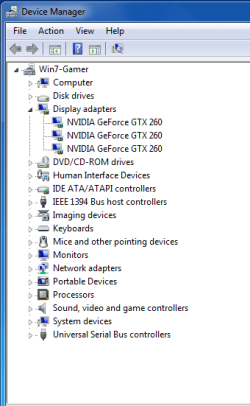
Are your graphics drivers compatable? Look in device manager for any drivers that aren't compatable.
 

My Computer My Computer

Computer Manufacturer/Model Number
HP G60-125NR Notebook PC
OS
Windows 7 Professional
CPU
2.00 GHz AMD Turion X2 RM-70 Dual-Core Mobile Processor
Motherboard
Integrated NVIDIA nForce Chipset
Memory
3072 MB
Graphics Card(s)
NVIDIA GeForce 8200M
Monitor(s) Displays
15.6" Diagonal High Definition HP Brightview Display
Screen Resolution
1366x768
Hard Drives
250 GB (5400 rpm)
Keyboard
Full size keyboard with integrated numeric keypad
Mouse
Touch Pad with dedicated vertical scroll Up/Down pad
device manager doesn't show any issues, and my video drivers are up to date for win7 from nvidia...
 

My Computer My Computer

Computer Manufacturer/Model Number
Me
OS
Windows 7
CPU
Core i7 920
Motherboard
EVGA x58 SLI LE
Memory
12gb Corsair
Graphics Card(s)
EVGA Geforce 260 superclocked x3
Sound Card
n/a
Monitor(s) Displays
Samsung SyncMaster T240HD
Hard Drives
WD 300gb Velociraptor and 500gb WDC WD5000AAKS
PSU
HX1000W Corsair PS
Case
Antec 900
Cooling
Various Fans
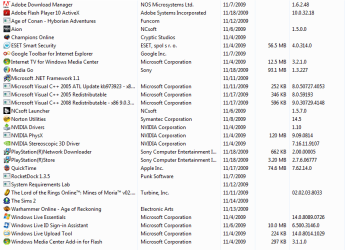
I have uninstalled MS Office because I came across someone else who found that was causing this similar issue (didn't work for me). Attached are pics of things i have on my pc...any other suggestions are welcome, I am almost to a point where I am going to reinstall the OS...thanks for your help:D
 

Attachments

  • device mgr.PNG
    device mgr.PNG
    12.8 KB · Views: 6
  • Installed programs.PNG
    Installed programs.PNG
    25.3 KB · Views: 10
  • pic icons.PNG
    pic icons.PNG
    18.7 KB · Views: 6

My Computer My Computer

Computer Manufacturer/Model Number
Me
OS
Windows 7
CPU
Core i7 920
Motherboard
EVGA x58 SLI LE
Memory
12gb Corsair
Graphics Card(s)
EVGA Geforce 260 superclocked x3
Sound Card
n/a
Monitor(s) Displays
Samsung SyncMaster T240HD
Hard Drives
WD 300gb Velociraptor and 500gb WDC WD5000AAKS
PSU
HX1000W Corsair PS
Case
Antec 900
Cooling
Various Fans
Okay, not sure what happened, but I did a disk cleanup of my C drive (for the who knows how many times now) and all of a sudden it works...:confused:

Maybe I will slowly reinstall programs I took out and see if any caused this issue.

Thanks again for you suggestions.
 

My Computer My Computer

Computer Manufacturer/Model Number
Me
OS
Windows 7
CPU
Core i7 920
Motherboard
EVGA x58 SLI LE
Memory
12gb Corsair
Graphics Card(s)
EVGA Geforce 260 superclocked x3
Sound Card
n/a
Monitor(s) Displays
Samsung SyncMaster T240HD
Hard Drives
WD 300gb Velociraptor and 500gb WDC WD5000AAKS
PSU
HX1000W Corsair PS
Case
Antec 900
Cooling
Various Fans
hope the issue is resolved
 

My Computer My Computer

Computer Manufacturer/Model Number
HP G60-125NR Notebook PC
OS
Windows 7 Professional
CPU
2.00 GHz AMD Turion X2 RM-70 Dual-Core Mobile Processor
Motherboard
Integrated NVIDIA nForce Chipset
Memory
3072 MB
Graphics Card(s)
NVIDIA GeForce 8200M
Monitor(s) Displays
15.6" Diagonal High Definition HP Brightview Display
Screen Resolution
1366x768
Hard Drives
250 GB (5400 rpm)
Keyboard
Full size keyboard with integrated numeric keypad
Mouse
Touch Pad with dedicated vertical scroll Up/Down pad
Back
Top