Solved To much BSOD Help me

AceDuk

New member
Local time
2:48 AM
Messages
56
I have to much BSOD can anybody help me
i have test everything hardwere
the last bsod that i have it was 0x0000007f
 

My Computer

Computer type
PC/Desktop
Computer Manufacturer/Model Number
Asus
OS
Windows 7 Ultimate 32bit
CPU
Pentium 4 3.20 GHz
Motherboard
P5VDC-X
Memory
2GB DDR2
Graphics Card(s)
Nvidia GeForce G210 Asus
Hard Drives
Western Digital 1TB Blue
Keyboard
X7
Mouse
X6
Browser
Google Chrome
Welcome, please follow the http://www.sevenforums.com/bsod-help-support/96879-blue-screen-death-bsod-posting-instructions.html :) .


From a quick glance (with not much info) I suggest the following:

A "stop 0x124" is fundamentally different to many other types of bluescreens because it stems from a hardware complaint. Stop 0x124 minidumps contain very little practical information, and it is therefore necessary to approach the problem as a case of hardware in an unknown state of distress. - H2SO4
The generic nature of the 0x124 (Arg1=0) stop code means we would have to take
the trail & error approach.

Do you have any spare parts (or another PC) to test with?
The usual suspect of this kind of BCCode is the CPU but it's often not the the case which is why we need
to test other components to rule them out as the cause.
How old are your components?


What is the make, model and age of your PSU?
Fill out this form and post back the result:

Good practice, open up the case and re-seat all types of connection.

  • SATA Cables (HDD/SSD/ODD).
  • SATA-Power.
  • Motherboard 24-pin.
  • Motherboard 4/8-pin (CPU).
  • Re-seat the RAM.
  • Re-seat the GPU.
Make sure that every slot / cable head is free of dust or other obstruction.
Make sure that every connection is seating properly and firmly in-place.

Also have a look at the motherboard and the GPU, search for any "bad caps", bulky, leaking bloated capacitors.

i.e


:ar: Test for thermals and stability:

  • Download HWinfo and post a Screenshot of the sensors window, one at idle and another while putting load on the PC using Prime95 for the CPU side and Furmark for the GPU.
    • Before running Prime95 make sure to enable Round-off checking (see 1st post under the tutorial).
       Note
    It is not mandatory to run both tests simultaneously, although possible as long as the temperatures are under constant monitoring.
:ar: Reset the BIOS back to default:
   Note
Write down the current value of the SATA Mode!
Its either AHCI or IDE.
After resetting the CMOS go back and verify the value for SATA Mode is what it was
when the OS was installed.

If any component is overclocked reset it back to stock speeds!


Good places to read more:


My Computer

Computer type
PC/Desktop
OS
Windows 10
CPU
Intel Core i5 3570K
Motherboard
Asus P8Z77V-PRO
Memory
16GB 1600Mhz G.Skill
Graphics Card(s)
Gigabyte GTX 970 G1-Gaming
PSU
Seasonic 1000W Platinum
Case
Fractal Design Define R4
Cooling
Noctua NH-D14
Welcome, please follow the http://www.sevenforums.com/bsod-help-support/96879-blue-screen-death-bsod-posting-instructions.html :) .


From a quick glance (with not much info) I suggest the following:

A "stop 0x124" is fundamentally different to many other types of bluescreens because it stems from a hardware complaint. Stop 0x124 minidumps contain very little practical information, and it is therefore necessary to approach the problem as a case of hardware in an unknown state of distress. - H2SO4
The generic nature of the 0x124 (Arg1=0) stop code means we would have to take
the trail & error approach.

Do you have any spare parts (or another PC) to test with?
The usual suspect of this kind of BCCode is the CPU but it's often not the the case which is why we need
to test other components to rule them out as the cause.
How old are your components?


What is the make, model and age of your PSU?
Fill out this form and post back the result:

Good practice, open up the case and re-seat all types of connection.

  • SATA Cables (HDD/SSD/ODD).
  • SATA-Power.
  • Motherboard 24-pin.
  • Motherboard 4/8-pin (CPU).
  • Re-seat the RAM.
  • Re-seat the GPU.
Make sure that every slot / cable head is free of dust or other obstruction.
Make sure that every connection is seating properly and firmly in-place.

Also have a look at the motherboard and the GPU, search for any "bad caps", bulky, leaking bloated capacitors.

i.e


:ar: Test for thermals and stability:

  • Download HWinfo and post a Screenshot of the sensors window, one at idle and another while putting load on the PC using Prime95 for the CPU side and Furmark for the GPU.
    • Before running Prime95 make sure to enable Round-off checking (see 1st post under the tutorial).
       Note
    It is not mandatory to run both tests simultaneously, although possible as long as the temperatures are under constant monitoring.
:ar: Reset the BIOS back to default:
   Note
Write down the current value of the SATA Mode!
Its either AHCI or IDE.
After resetting the CMOS go back and verify the value for SATA Mode is what it was
when the OS was installed.

If any component is overclocked reset it back to stock speeds!



Good places to read more:


Yes i have test all hardwares
my model of PSU is CODEGEN 350x 2 years old is.
all capacitors is good
 

My Computer

Computer type
PC/Desktop
Computer Manufacturer/Model Number
Asus
OS
Windows 7 Ultimate 32bit
CPU
Pentium 4 3.20 GHz
Motherboard
P5VDC-X
Memory
2GB DDR2
Graphics Card(s)
Nvidia GeForce G210 Asus
Hard Drives
Western Digital 1TB Blue
Keyboard
X7
Mouse
X6
Browser
Google Chrome

My Computer

Computer type
PC/Desktop
OS
Windows 10
CPU
Intel Core i5 3570K
Motherboard
Asus P8Z77V-PRO
Memory
16GB 1600Mhz G.Skill
Graphics Card(s)
Gigabyte GTX 970 G1-Gaming
PSU
Seasonic 1000W Platinum
Case
Fractal Design Define R4
Cooling
Noctua NH-D14
...
 

My Computer

Computer type
PC/Desktop
Computer Manufacturer/Model Number
Asus
OS
Windows 7 Ultimate 32bit
CPU
Pentium 4 3.20 GHz
Motherboard
P5VDC-X
Memory
2GB DDR2
Graphics Card(s)
Nvidia GeForce G210 Asus
Hard Drives
Western Digital 1TB Blue
Keyboard
X7
Mouse
X6
Browser
Google Chrome
This is the same as before, I already have your dumps I need the rest of the information generated by the collector.
Please try and run it as an Administrator (Right click, Run as Administrator).
 

My Computer

Computer type
PC/Desktop
OS
Windows 10
CPU
Intel Core i5 3570K
Motherboard
Asus P8Z77V-PRO
Memory
16GB 1600Mhz G.Skill
Graphics Card(s)
Gigabyte GTX 970 G1-Gaming
PSU
Seasonic 1000W Platinum
Case
Fractal Design Define R4
Cooling
Noctua NH-D14
But is the same
 

My Computer

Computer type
PC/Desktop
Computer Manufacturer/Model Number
Asus
OS
Windows 7 Ultimate 32bit
CPU
Pentium 4 3.20 GHz
Motherboard
P5VDC-X
Memory
2GB DDR2
Graphics Card(s)
Nvidia GeForce G210 Asus
Hard Drives
Western Digital 1TB Blue
Keyboard
X7
Mouse
X6
Browser
Google Chrome
If you want i will give you teamviewer ..
 

My Computer

Computer type
PC/Desktop
Computer Manufacturer/Model Number
Asus
OS
Windows 7 Ultimate 32bit
CPU
Pentium 4 3.20 GHz
Motherboard
P5VDC-X
Memory
2GB DDR2
Graphics Card(s)
Nvidia GeForce G210 Asus
Hard Drives
Western Digital 1TB Blue
Keyboard
X7
Mouse
X6
Browser
Google Chrome
Can the HDD be the problem?? because is old 6 years and half..
 

My Computer

Computer type
PC/Desktop
Computer Manufacturer/Model Number
Asus
OS
Windows 7 Ultimate 32bit
CPU
Pentium 4 3.20 GHz
Motherboard
P5VDC-X
Memory
2GB DDR2
Graphics Card(s)
Nvidia GeForce G210 Asus
Hard Drives
Western Digital 1TB Blue
Keyboard
X7
Mouse
X6
Browser
Google Chrome
Yes it might very well be as the issue is hardware oriented.
What type of HDD is it?
 

My Computer

Computer type
PC/Desktop
OS
Windows 10
CPU
Intel Core i5 3570K
Motherboard
Asus P8Z77V-PRO
Memory
16GB 1600Mhz G.Skill
Graphics Card(s)
Gigabyte GTX 970 G1-Gaming
PSU
Seasonic 1000W Platinum
Case
Fractal Design Define R4
Cooling
Noctua NH-D14
hitachi hdp725050gla360
500GB
 

My Computer

Computer type
PC/Desktop
Computer Manufacturer/Model Number
Asus
OS
Windows 7 Ultimate 32bit
CPU
Pentium 4 3.20 GHz
Motherboard
P5VDC-X
Memory
2GB DDR2
Graphics Card(s)
Nvidia GeForce G210 Asus
Hard Drives
Western Digital 1TB Blue
Keyboard
X7
Mouse
X6
Browser
Google Chrome
Sometimes i work on pc and suddenly freeze screen and i must restart and when the pc start it's show bsod info and desktop icons is not like the before (it's like auto arrange) this happen only when show bsod or when screen freezes
 

My Computer

Computer type
PC/Desktop
Computer Manufacturer/Model Number
Asus
OS
Windows 7 Ultimate 32bit
CPU
Pentium 4 3.20 GHz
Motherboard
P5VDC-X
Memory
2GB DDR2
Graphics Card(s)
Nvidia GeForce G210 Asus
Hard Drives
Western Digital 1TB Blue
Keyboard
X7
Mouse
X6
Browser
Google Chrome
   Warning
The Following Method Should NOT Be Performed On An SSD!


Testing the HDD:


  1. Perform a Disk Check | Disk Check- Scroll down to OPTION TWO of the tutorial and use the /R switch in the CHKDSK command | chkdsk C: /R.
  2. Then Post the Disk Check results following | This Tutorial.
  3. Once back in Windows, download Crystal Disk Info and post a screenshot (multiple shots if you have more than one drive).
  4. Download SeaTools for DOS if you don't want to use a CD to test the HDD you can use YUMI – Multiboot USB Creator to create a bootable USB (instructions are found at the bottom of both pages).
  5. If SeaTools for DOS is unable to recognize your HDD:
  6. Visit HDDdiag and follow the instructions | Or follow the instructions below.
If SeaTools For DOS does not recognize the drive;
Boot into the BIOS using the *Fx key.
Look for an entry called SATA Mode (or something similar), it should be set to IDE / AHCI.
It's probably set to AHCI which is why SeaTools doesn't recognize them in the DOS environment.
Set it to IDE then save and exit usually by pressing the F10 key.
Now boot into SeaTools and it should detect the drives.
Start the Long Test and let it run.
Upon completion don't try to boot into Windows as it will only result in a BSOD, go back into the BIOS
and change the SATA setting back to what it was in the first place.


Re-seat the sata and power.

72974453_zps85c47d93.jpg

Let us know the results.
 

My Computer

Computer type
PC/Desktop
OS
Windows 10
CPU
Intel Core i5 3570K
Motherboard
Asus P8Z77V-PRO
Memory
16GB 1600Mhz G.Skill
Graphics Card(s)
Gigabyte GTX 970 G1-Gaming
PSU
Seasonic 1000W Platinum
Case
Fractal Design Define R4
Cooling
Noctua NH-D14
The first steps i finish this is results:

And the latest step (Testing with SeaTools for DOS) the download link doesn't work
 

My Computer

Computer type
PC/Desktop
Computer Manufacturer/Model Number
Asus
OS
Windows 7 Ultimate 32bit
CPU
Pentium 4 3.20 GHz
Motherboard
P5VDC-X
Memory
2GB DDR2
Graphics Card(s)
Nvidia GeForce G210 Asus
Hard Drives
Western Digital 1TB Blue
Keyboard
X7
Mouse
X6
Browser
Google Chrome
Okay, CHKDSK has found errors and says to have corrected them (although from experience it's never that easy).
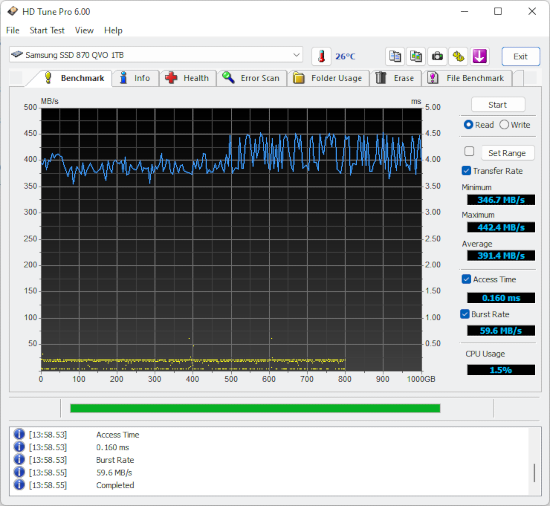
Please download HDTune, run the benchmark and upload a screenshot of the result.


i.e.

screenshot.png
 

My Computer

Computer type
PC/Desktop
OS
Windows 10
CPU
Intel Core i5 3570K
Motherboard
Asus P8Z77V-PRO
Memory
16GB 1600Mhz G.Skill
Graphics Card(s)
Gigabyte GTX 970 G1-Gaming
PSU
Seasonic 1000W Platinum
Case
Fractal Design Define R4
Cooling
Noctua NH-D14
....
 

My Computer

Computer type
PC/Desktop
Computer Manufacturer/Model Number
Asus
OS
Windows 7 Ultimate 32bit
CPU
Pentium 4 3.20 GHz
Motherboard
P5VDC-X
Memory
2GB DDR2
Graphics Card(s)
Nvidia GeForce G210 Asus
Hard Drives
Western Digital 1TB Blue
Keyboard
X7
Mouse
X6
Browser
Google Chrome
I'm afraid I have bad news.
That HDD is on his way out, backup everything you need and replace it.
A healthy HDD would show something similar to the image I've linked in my previous post.
 

My Computer

Computer type
PC/Desktop
OS
Windows 10
CPU
Intel Core i5 3570K
Motherboard
Asus P8Z77V-PRO
Memory
16GB 1600Mhz G.Skill
Graphics Card(s)
Gigabyte GTX 970 G1-Gaming
PSU
Seasonic 1000W Platinum
Case
Fractal Design Define R4
Cooling
Noctua NH-D14
Now you say me to buy new HDD and replace
and now hdd cause BSOD? and other problems like freezing screen?
 

My Computer

Computer type
PC/Desktop
Computer Manufacturer/Model Number
Asus
OS
Windows 7 Ultimate 32bit
CPU
Pentium 4 3.20 GHz
Motherboard
P5VDC-X
Memory
2GB DDR2
Graphics Card(s)
Nvidia GeForce G210 Asus
Hard Drives
Western Digital 1TB Blue
Keyboard
X7
Mouse
X6
Browser
Google Chrome
A malfunctioning HDD a the most common cause of freeze and lock-ups, yes.
That is my suggestion based upon my knowledge and experience,
you may choose to take it or leave it I will not be offended nor will I feel any thing else should
you choose the latter.

I will say that there's no reason to continue discussing this subject any more
until a hardware change is made. You may seek other's opinions but I've gave you my own.
 

My Computer

Computer type
PC/Desktop
OS
Windows 10
CPU
Intel Core i5 3570K
Motherboard
Asus P8Z77V-PRO
Memory
16GB 1600Mhz G.Skill
Graphics Card(s)
Gigabyte GTX 970 G1-Gaming
PSU
Seasonic 1000W Platinum
Case
Fractal Design Define R4
Cooling
Noctua NH-D14
Okey i will replace with new one and if had again problems i will come back here and ask for help
Thank you very much!!!!!!!!!!!!!!
 

My Computer

Computer type
PC/Desktop
Computer Manufacturer/Model Number
Asus
OS
Windows 7 Ultimate 32bit
CPU
Pentium 4 3.20 GHz
Motherboard
P5VDC-X
Memory
2GB DDR2
Graphics Card(s)
Nvidia GeForce G210 Asus
Hard Drives
Western Digital 1TB Blue
Keyboard
X7
Mouse
X6
Browser
Google Chrome
Back
Top