Too much power on USB?

greatfoxmusic

New member
Local time
1:56 AM
Messages
3
Hi there

I recently hooked up a USB wireless card, one from Rosewill. When the Rosewill is plugged in, my iPods won't show up in windows.

This is the thing though: when they are both plugged into the back of the mobo, the pods won't work, but if I plug the pod into the front bezel usb ports, then they work. I see that the Rosewill is drawing a full 500 mA of current. Is it possible that plugging both devices up to the same USB hubs draws too much power, and then they don't work right?

I've never encountered this before.

Thanks

--Todd
 

My Computer

OS
Windows 7 Home Premium
You only have so much power dedicated to the onboard USB ports based on the circuitry for them on your mobo, each is different. If you have some devices that are power hungry or on the verge of needing supported power then I suggest a power supply backed hub. Not only will you get more USB connections you'll put less drain on the power from the mobo.
 

My Computer

Computer Manufacturer/Model Number
DELL XPS Studio 435T
OS
Vista 64 Ultimate, Windows 7 64 Ultimate, Ubuntu 9.10
CPU
i7 975 3.3 GHz Extreme (Factory OC'd to 3.6 GHz)
Motherboard
DELL provided
Memory
18 Gb Tri-Channel 1066
Graphics Card(s)
ATI 5970 2048 Mb
Sound Card
X-Fi Extreme Gamer
Monitor(s) Displays
Vizio 37" HD-TV
Screen Resolution
1920 x 1080
Hard Drives
1.5 Tb HDD
1.5 Tb HDD
2.0 Tb Network Drive
512 Gb Crucial SSD
PSU
DELL Provided 475 watts
Case
DELL
Cooling
3 fans
Keyboard
Logitech Performance K350 Wireless
Mouse
Logitech Performance MX Wireless
Internet Speed
3 Mb up 750 Kb down
Other Info
Bamboo Fun Tablet, Belkin N+ Wireless router, Pioneer Dolby System Wireless Headphones, Bose 5.1 Dolby Surround Sound System, LifeCam VX 3000 Webcam, Blu-Ray/Hi Def DVD +RW combo and Blu-ray +RW,l 15 in 1 media card reader, Logitech Rumblepad 2, Hauppauge 2250 DTV Tuner with MS Media Center Remote

Laptop:Alienware M17x, Q9100 CPU, 8Gb RAM, 1920x1200 WUXGA LCD driven by 4870's in CrossFireX, Bl
fishnbanjo is right. Also, some USB ports supply more current than others. Also, if you have any USB 1.1 ports, that could be an issue, although I doubt you do. The solution is to keep them plugged into different hubs.
 

My Computer

OS
Windows 7 Enterprise 64-bit
CPU
AMD Phenom II X4 3.0GHz
Motherboard
ASUS M5A97
Memory
8GB G-Skill Ripjaws DDR3 1333
Graphics Card(s)
PNY GeForce 460 GTX 1GB OC - Enthusiast Edition
Sound Card
VIA High Definition Audio
Monitor(s) Displays
Dell 19"
Screen Resolution
1280x1024
Hard Drives
1TB - Primary
160GB - Secondary
250GB - External backup for important files
PSU
OCZ Fata1ty 700W Modular PSU
Case
ASUS
Keyboard
Microsoft Wireless Keyboard 2000
Mouse
Microsoft Wireless Mouse 2000
Internet Speed
3 Mbps/768 kbps
Hi,

I had the same problems with the hugh USB ports I need for my sounds devices setup. That was september last year, and I was really forgotten to ask a self powered USB-Hub. Later a more hardware-minded freak as me took one look en told me to buy a self powered Hub. Took a few seconds before I get the reel point indeed.

With the self powered Hub is much easier to work. It's USB 3.0 Compatible :D
 

My Computer

Computer Manufacturer/Model Number
Compaq Notebook CQ61
OS
Microsoft Windows 7 Premium (OEM)
CPU
AMD Sempron(tm) M100 2.00 GHZ
Motherboard
HP
Memory
2048
Graphics Card(s)
Embedded
Sound Card
Embedded but with Altec Lansing Speakers
Monitor(s) Displays
15,4" Wide screen with build in Mic - Webcam with spotlight
Screen Resolution
1366x768
Hard Drives
1 SATA 320GB
1 Optical combo CD/DVD
PSU
HP 100~260 to 18,5 Volts
Case
Shiny Black
Cooling
Embedded
Keyboard
HP Full Size
Mouse
Logitech M305
Internet Speed
20 Mbits
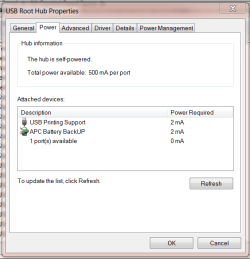
You can pull up Device Manager and look at each hub and see what is available and what each unit is drawing.

USb.PNG

Jim :geek:
 

My Computer

Computer type
PC/Desktop
Computer Manufacturer/Model Number
Home Built
OS
Windows 8.1 Pro w/Media Center 64bit, Windows 7 HP 64bit
CPU
Phenom II X6 1100T
Motherboard
ASUS M5A99X EVO
Memory
Crucial Balistic 8gb DDR3-1866 CL9
Graphics Card(s)
MSI R6850 Cyclone IGD5 PE
Sound Card
On Board
Monitor(s) Displays
ASUS VE258Q 25" LED with DVI-HDMI-DisplayPort
Screen Resolution
1920 x 1080
Hard Drives
Two WD Cavier Black 2TB Sata III, WD My Book Essential 2TB USB 3.0
PSU
Seasonic X650 80 Plus GOLD Modular
Case
Corsair 400R
Cooling
Antec Kuhler H2O 620, Two 120mm and four 140mm
Keyboard
Logitech K120
Mouse
Logitech Marble Mouse USB, Logitech Precision Game Pad
Internet Speed
15MB
Antivirus
Norton IS 2013, Malwarebytes Pro Beta 2
Browser
IE-11, FF-27
Other Info
APC UPS ES 750, Netgear WNR3500L Gigabit & Wireless N Router with SamKnows Test Program, Motorola SB6120 Gigabit Cable Modem. Brother HL-2170W Laser Printer, Epson V300 Scanner
Ok, got it. Thanks.
My USB-HSDPA Internet Dongle is taking a lot off current. When I sent a SMS it's taking 430 mA.

Now I also know, why my battery is giving it up after about 30 minutes instead of almost a hour when I'm mobile connected to my server @home.
 

My Computer

Computer Manufacturer/Model Number
Compaq Notebook CQ61
OS
Microsoft Windows 7 Premium (OEM)
CPU
AMD Sempron(tm) M100 2.00 GHZ
Motherboard
HP
Memory
2048
Graphics Card(s)
Embedded
Sound Card
Embedded but with Altec Lansing Speakers
Monitor(s) Displays
15,4" Wide screen with build in Mic - Webcam with spotlight
Screen Resolution
1366x768
Hard Drives
1 SATA 320GB
1 Optical combo CD/DVD
PSU
HP 100~260 to 18,5 Volts
Case
Shiny Black
Cooling
Embedded
Keyboard
HP Full Size
Mouse
Logitech M305
Internet Speed
20 Mbits
Thanks for the replies everyone. I will just keep them plugged into different hubs.
 

My Computer

OS
Windows 7 Home Premium
Back
Top