Solved Torrent writes and SSD

M18XR2

New member
Member
Local time
7:50 AM
Messages
71
I wanted to confirm just how much more writes torrents do.

my options are these
-torrent directly onto a SSD
-torrent onto a 8-20gb of ramdisk, and then move the file onto SSD upon completing the file

imho both have same amount of writes because of file size so for both options it should not matter which one I choose, thus former is better cause easier to set up and less work required. however I can't help to think torrenting actually writes more than just direct file transfer, and quite more at that too. I do not understand how torrent works and even if torrent writes more, how much more and why does it write more?

thanks for your help!
 

My Computer

OS
window 7 64 bit
Normally, I would expect the client to just write the size of the download file only, and hardly anything else. It just download the pieces in any order it wants and builds the file from there, but overall I don't think it does much more than that. After finished downloading, it will still be reading for seeding until the torrent is no longer valid or you stop it. Clients also keep statistics of how much you upload and download and writes those to disk (this is negligible however, comparable to the cost of keeping history of a web browser).

Some clients does what is known as "preallocation", that is create a dummy file large enough to hold the whole file, but filled with garbage, just to speed up and reserve the space for the incoming data. I'm not sure (and maybe it's client specific), but those techniques may zero the file before saving it, effectively writing all the data twice (one for the initial allocation, the second for the real data when it arrives).

Technically, torrents work by connecting you and all people that want to download a file and people that already have that file. By connecting to all those at the same time instead of a central server that gives everything, a lot of bandwidth is saved and generally greater speeds and availability is achieved. After you finished downloading, you begin to upload and share to others what you have. More here: BitTorrent - Wikipedia, the free encyclopedia

Anyway, why are you concerned about how much does it write to disk?
 

My Computer

Computer type
Laptop
Computer Manufacturer/Model Number
Toshiba Sattelite A665-S6092
OS
Windows 7 Ultimate x64
CPU
Intel Core i7-740QM
Memory
8 GB DDR3
Graphics Card(s)
NVIDIA GeForce 330GT
Screen Resolution
1366x768
Hard Drives
Samsung 840 SSD 500GB
1TB USB3 external HD
Cooling
Coolermaster Notepal U3 notebook cooling pad
Internet Speed
3mbps ASDL
Antivirus
ClamWin 0.98.7
Browser
Opera 12.17 x86 (main), Firefox 38 (sec), IE11 (last resort)
Normally, I would expect the client to just write the size of the download file only, and hardly anything else. It just download the pieces in any order it wants and builds the file from there, but overall I don't think it does much more than that. After finished downloading, it will still be reading for seeding until the torrent is no longer valid or you stop it. Clients also keep statistics of how much you upload and download and writes those to disk (this is negligible however, comparable to the cost of keeping history of a web browser).

Some clients does what is known as "preallocation", that is create a dummy file large enough to hold the whole file, but filled with garbage, just to speed up and reserve the space for the incoming data. I'm not sure (and maybe it's client specific), but those techniques may zero the file before saving it, effectively writing all the data twice (one for the initial allocation, the second for the real data when it arrives).

Technically, torrents work by connecting you and all people that want to download a file and people that already have that file. By connecting to all those at the same time instead of a central server that gives everything, a lot of bandwidth is saved and generally greater speeds and availability is achieved. After you finished downloading, you begin to upload and share to others what you have. More here: BitTorrent - Wikipedia, the free encyclopedia

Anyway, why are you concerned about how much does it write to disk?

thanks for the detail info and I think the biggest impact here is preallocation and I have thought of that before. I use both Vuze and bittorrent to download most things nowadays, sometimes browser direct download, ffox and rarely IE.

reason is SSD gets killed with mass downloads, especially with newer SSD with lower 2*nm size when compared to 3* size doesn't last as long even with better SSD controller. currently I have two SSD in raid0 for my laptop as boot drive, storage is two blackscorpio HDD in raid 0 for speed/storage but I'd like to move those two HDD to SSD for solely performance sake. instead of having transferring file to external backup at 100-150MB/s I would like to see 250-500MB/s since my externals are all raid setups. it certainly is a waste of money lol

that aside, a 32/34? nm crucial 256gb SSD known for its durability died after 1 year of straight torrent nearly at 24/7, I won't do as much as 24/7 but something along the line. I'm looking at intel's latest HET-MLC SSD which is said to have at least 14 petabyte of endurance from just a 800gb drive and if thats the case it'll last me a good while but torrent always gets me worried though.

edit: i do about at least 2.5-3TB of downloads and file sorting and bunch of other work in less than half a year..
 

My Computer

OS
window 7 64 bit
I would then worry about what disk you buy then. If it can't support a simple download without dying I think it's a very bad disk to begin with. What's more problematic, the OS itself writes far more than any download regularly to disk, due to swap file, temporals, hibernation, logs and a few other things, so any unreliable unit as yours would die anyway.

But back to the point, the torrent isn't different in what it writes to disk as a regular HTTP or FTP download. It just writes the data as it becomes available (difference is that it's in a random order) but no much more than a normal download. Then after it begins seeding, which can produce a very high number of reads (not writes) which aren't present in normal downloads of course.
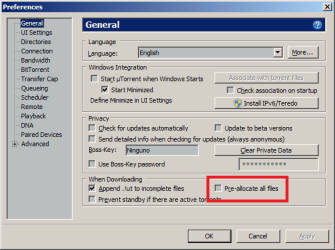
If preallocation worries you, look at the options of your torrent client, it should have an option to disable it and only create a file as it becomes available. No idea how to do that exactly in Vuze or Bittrorrent, as I use uTorrent myself (which has that option).

With so crappy disks, why not simply download the files to a normal HD instead? It should not have any performance difference in the download itself, as local hard disks are much faster than internet connections, and then move to SSD if you want thereafter.
 

My Computer

Computer type
Laptop
Computer Manufacturer/Model Number
Toshiba Sattelite A665-S6092
OS
Windows 7 Ultimate x64
CPU
Intel Core i7-740QM
Memory
8 GB DDR3
Graphics Card(s)
NVIDIA GeForce 330GT
Screen Resolution
1366x768
Hard Drives
Samsung 840 SSD 500GB
1TB USB3 external HD
Cooling
Coolermaster Notepal U3 notebook cooling pad
Internet Speed
3mbps ASDL
Antivirus
ClamWin 0.98.7
Browser
Opera 12.17 x86 (main), Firefox 38 (sec), IE11 (last resort)
I would then worry about what disk you buy then. If it can't support a simple download without dying I think it's a very bad disk to begin with. What's more problematic, the OS itself writes far more than any download regularly to disk, due to swap file, temporals, hibernation, logs and a few other things, so any unreliable unit as yours would die anyway.

But back to the point, the torrent isn't different in what it writes to disk as a regular HTTP or FTP download. It just writes the data as it becomes available (difference is that it's in a random order) but no much more than a normal download. Then after it begins seeding, which can produce a very high number of reads (not writes) which aren't present in normal downloads of course.
If preallocation worries you, look at the options of your torrent client, it should have an option to disable it and only create a file as it becomes available. No idea how to do that exactly in Vuze or Bittrorrent, as I use uTorrent myself (which has that option).

With so crappy disks, why not simply download the files to a normal HD instead? It should not have any performance difference in the download itself, as local hard disks are much faster than internet connections, and then move to SSD if you want thereafter.


I have most of my writes disabled as much as possible includes log files, temp files, hibernation and bunch of others. whats left are bunch of other background writes which I probably have no control of, or disabling them would means not using OS, this includes Appdata since I still want to benefit from fast snappy storage I leave Appdata on my SSD.

bolded text is what I needed to know and confirm it so I dont fear SSD dying on me. also I got confused and thought bittorrent is utorrent. I use utorrent so how do I turn off preallocation? as for downloading to HD thing, which is what I am using right now and trying to change it, so not an option lol
 

My Computer

OS
window 7 64 bit
In uTorrent you disable preallocation by going to Options menu => Preferences => General => untick Pre-allocate files. This should not create anything on disk until the data actually arrives from another peer.

Aren't you putting your downloads in the SSD directly? Or are you using a normal spinner disk for that? With the normal HD, the bulk of activity will go to that disk of course and no torrent client (or any other download type) would ever touch the SSD for anything. I always tough that you throw your downloads to the SSD directly.

Particularly, uTorrent writes to any folder you download to (on that particular disk only) but also a little on AppData to keep its statistics about upload/download, torrent list, activity and ratio. This should be negligible even for the most unreliable disks.
 

Attachments

  • Preallocation.png
    Preallocation.png
    12.7 KB · Views: 24
Last edited:

My Computer

Computer type
Laptop
Computer Manufacturer/Model Number
Toshiba Sattelite A665-S6092
OS
Windows 7 Ultimate x64
CPU
Intel Core i7-740QM
Memory
8 GB DDR3
Graphics Card(s)
NVIDIA GeForce 330GT
Screen Resolution
1366x768
Hard Drives
Samsung 840 SSD 500GB
1TB USB3 external HD
Cooling
Coolermaster Notepal U3 notebook cooling pad
Internet Speed
3mbps ASDL
Antivirus
ClamWin 0.98.7
Browser
Opera 12.17 x86 (main), Firefox 38 (sec), IE11 (last resort)
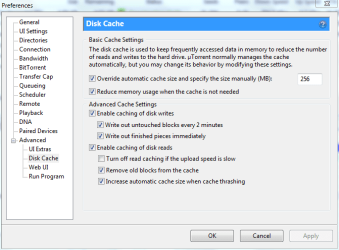
Here's another screen shot from Utorrent's options that may benefit this discussion. Vuze and other client's may have similar options.
UtorrentDiskCache.PNG
 

My Computer

Computer Manufacturer/Model Number
Self built
OS
Windows 7 Ultimate x64
CPU
Intel Pentium Dual Core E5200 2.5GHz (3.77GHz OC)
Motherboard
Asus P5Q-E
Memory
Corsair 4GB DDR2 (4x1GB CM2X1024-6400C4)
Graphics Card(s)
Palit GeForce GTS 250 (1024MB)
Sound Card
On Board (ADI AD2000B 8ch HD)
Monitor(s) Displays
Samsung 32in LCD TV
Screen Resolution
1360x768
Hard Drives
2 x 1TB Samsung 103SJ (Raid0)
2 x External 500GB Samsung 502IJ (NexStar 3 HD Enclosures)
PSU
550W Antec Neo HE 550
Case
Antec P180
Cooling
Xigmatex Red Scorpion CPU Cooler. 3x120mm Fans
Keyboard
Logitech MX5000 Laser (Combo)
Mouse
Logitech MX5000 Laser (Combo)
Internet Speed
ADSL2+ (avg 10 Mbps Down, 0.80 Mbps up)
Other Info
Gigabyte GN-WP01GS 54g Wireless Lan Card
Torrents aren't going to kill your SSD :)

The guys already have you covered on the pre-allocation side of things.

The only reason I don't use SSD's for torrenting is that of space.
 

My Computer

Computer type
PC/Desktop
Computer Manufacturer/Model Number
Systems by SmartEyeball
OS
8 Pro x64
CPU
i7 3770K 4.6GHz
Motherboard
ASUS P8Z77 WS
Memory
16GB G.Skill Trident X 2666mhz
Graphics Card(s)
x2 EVGA 780 Ti Superclocked SLI
Sound Card
SB X-FI Surround 5.1 PRO USB / ATH-AD900 Headphones
Monitor(s) Displays
x3 Dell U2410 / 58" Samsung
Screen Resolution
5760*1200/ 1920*1200
Hard Drives
2x Intel 520 240GB (RAID 0) * 2x WD Caviar Blacks 2TB (RAID 0) * 2TB WD Caviar Black * Sony Optirac DVD
PSU
Silverstone Strider Evolution 1200W
Case
Thermaltake Level 10 GT Snow Edition
Cooling
Noctua NH-D14
Keyboard
Topre Realforce // Ducky Shine MX Black // Filco Ninja TKL
Mouse
Thermaltake Theron (Highly Recommended) + Razer Imperator
Antivirus
MSE
Browser
IE, FF, WaterFox
Other Info
GT Extreme V2 Sim Racing Cockpit + 40" LCD and K/B Mouse stand ▼
Fanatec CSR Elite Wheel + Clubsport V1 Pedals + CSR shifter/7G-H ▼Saitek X52 Pro ▼ TrackIR 5 Pro
Buttkicker v2 Seat Rumbler with Dedicated 5.1 and Sub Woofer attached to frame ▼
=
Bloody Big Grin
@Alejandro & Duzzy, thanks for screenshot those really help. my current setup is two SSD as OS, two HDD where torrent downloads to and would like to change those two HDD to two SSD. My OS drives are both SLC SSD but its only 256gb togther and not enough, so I have to have eMLC or HET-MLC SSD for storage which s3700 comes in in about couple of months.

just a question though in Duzzy's screenshot I left it on default cause I was told it's best to let the client manage itself. default was at 4MB iirc and I see yours as 256MB, is it better? or how does it work?


@Smarteyball torrent may not kill SSD but "killing it" isn't really correct. as I mentioned earlier SSD may not die after 2 years of straight torrent, but as it gets closer to being dead, it slows down considerably. average transfer rate could go from 300-350MB/s for a high end SSD to 150 when it's nearly dead. so to get real good performance even after couple of years I'd need real durable SSD with enterprise flash, ie 32nm+ size or at least 10k P/E cycle, ontop of that bigger the better.
 

My Computer

OS
window 7 64 bit
Many torture tests have shown some higher end SSD's to outlive their specifications 10x over. If you set the directory to one of the HDD's, the SSD will never see any of the torrent.....there is no reason why movies, music, pictures should be on an SSD because they don't benefit from the performance increase over a HDD. Also, when you talk about average transfer rate, if you are referring to those "awesome" Sequential read/write speeds, just remember you can only transfer as fast as your slowest component, which will be your HDD. To utilize those fast sequential read/write speeds, you need to transfer from SSD to SSD. Quite a few people don't realize that.
 

My Computer

Computer type
PC/Desktop
Computer Manufacturer/Model Number
Custom Built
OS
Windows 7 Professional 64bit SP1
CPU
Intel Core i5-3570K @ 4.5GHz
Motherboard
Asus Sabertooth Z77
Memory
Corsair Vengeance 16GB (4x4) @1866MHz CL 9-9-9-24 1T
Graphics Card(s)
EVGA GTX 750 Ti FTW
Sound Card
Onboard Audio
Monitor(s) Displays
Dell S2309W
Screen Resolution
1920x1080
Hard Drives
Samsung 830 128GB SSD - OS
(4) Seagate 5TB HDD
(1) Seagate 2TB HDD
PSU
Seasonic X750 80+ Gold Full Modular
Case
Antec Eleven Hundred Super Mid Tower
Cooling
Intel Liquid Cooler
Keyboard
Max Nighthawk X8 Mechanical keyboard
Mouse
Mionix Naos 7000
Internet Speed
50 Mbps Down / 10 Mbps Up
Antivirus
Microsoft Security Essentials/Malwarebytes Anti-Malware
Browser
Chrome/Firefox
Other Info
Klipsch ProMedia 2.1's
Asus RT-N66R Wireless Router
@Smarteyball torrent may not kill SSD but "killing it" isn't really correct. as I mentioned earlier SSD may not die after 2 years of straight torrent, but as it gets closer to being dead, it slows down considerably. average transfer rate could go from 300-350MB/s for a high end SSD to 150 when it's nearly dead. so to get real good performance even after couple of years I'd need real durable SSD with enterprise flash, ie 32nm+ size or at least 10k P/E cycle, ontop of that bigger the better.

Of course the SSD will slow down, but TRIM and GC have been improving each gen and the performance degradation not as rapid. The drive will still outperform mech drives. As for life span, it's component lotto. 24/7 HDD use is equally as prone to failure as

Otherwise, if you have the room (assuming it's not a laptop) - Set up a mech RAID volume.


Transfers, unzipping etc is still pretty damn quick.
 

My Computer

Computer type
PC/Desktop
Computer Manufacturer/Model Number
Systems by SmartEyeball
OS
8 Pro x64
CPU
i7 3770K 4.6GHz
Motherboard
ASUS P8Z77 WS
Memory
16GB G.Skill Trident X 2666mhz
Graphics Card(s)
x2 EVGA 780 Ti Superclocked SLI
Sound Card
SB X-FI Surround 5.1 PRO USB / ATH-AD900 Headphones
Monitor(s) Displays
x3 Dell U2410 / 58" Samsung
Screen Resolution
5760*1200/ 1920*1200
Hard Drives
2x Intel 520 240GB (RAID 0) * 2x WD Caviar Blacks 2TB (RAID 0) * 2TB WD Caviar Black * Sony Optirac DVD
PSU
Silverstone Strider Evolution 1200W
Case
Thermaltake Level 10 GT Snow Edition
Cooling
Noctua NH-D14
Keyboard
Topre Realforce // Ducky Shine MX Black // Filco Ninja TKL
Mouse
Thermaltake Theron (Highly Recommended) + Razer Imperator
Antivirus
MSE
Browser
IE, FF, WaterFox
Other Info
GT Extreme V2 Sim Racing Cockpit + 40" LCD and K/B Mouse stand ▼
Fanatec CSR Elite Wheel + Clubsport V1 Pedals + CSR shifter/7G-H ▼Saitek X52 Pro ▼ TrackIR 5 Pro
Buttkicker v2 Seat Rumbler with Dedicated 5.1 and Sub Woofer attached to frame ▼
=
Bloody Big Grin
Many torture tests have shown some higher end SSD's to outlive their specifications 10x over. If you set the directory to one of the HDD's, the SSD will never see any of the torrent.....there is no reason why movies, music, pictures should be on an SSD because they don't benefit from the performance increase over a HDD. Also, when you talk about average transfer rate, if you are referring to those "awesome" Sequential read/write speeds, just remember you can only transfer as fast as your slowest component, which will be your HDD. To utilize those fast sequential read/write speeds, you need to transfer from SSD to SSD. Quite a few people don't realize that.

As my first few post indicates, I have external raid HDDs, to be exact, three barracuda 3TB in raid 0 each one capable of 200-90MB/s read and write, thus giving me 600-250MB/s, and slowest thing would be my raid0 HDD inside my laptop, which is at 240-100MB/s via esata.


Of course the SSD will slow down, but TRIM and GC have been improving each gen and the performance degradation not as rapid. The drive will still outperform mech drives. As for life span, it's component lotto. 24/7 HDD use is equally as prone to failure as

Otherwise, if you have the room (assuming it's not a laptop) - Set up a mech RAID volume.

yes SSD tends to last longer than its actual life. the 3k-10k P/E cycle is likely for 1% of the cells to first start to die while rest are all still fine, however, dying flash loses speed.. and not a Trim/GC issue.

for 2nd part, I do have laptop :D m18x R2 holds four 2.5" drive bay and a msata, total of 5 storage bays lol, lappy GOOO!
 

My Computer

OS
window 7 64 bit
Hi there
In Torrents remember you are also concurrently UPLOADING parts of the file to other peers while downloading so the torrent client (usually) but not always Utorrent will probably do quite a few WRITES to store things like index / address markers to show what pieces of the file it's got, who's connected in the swarm etc etc apart from the actual retrieval of the data itself.

If you specify a target drive other than the SSD for the torrent you won't use the SSD for downloading the torrent - and in any case unless you have a really fast internet connection and zillions of seeders in the torrent the I/O would be slow anyway even if it is on the SSD.

Given the drop in price of SSD's and the vast improvement in their design - I wouldn't worry to much about their longevity --these days they seem just as good if not better than HDD's and this will continue to improve.

Cheers
jimbo
 

My Computer

Computer type
PC/Desktop
Computer Manufacturer/Model Number
Custom built, several laptops HP/ASUS
OS
Linux CENTOS 7 / various Windows OS'es and servers
CPU
Intel i7 Intel i5
Memory
8GB, 16GB
Graphics Card(s)
On Motherboard
Sound Card
Realtek HD audio
Monitor(s) Displays
Apple Cinema display, Samsung LCD
Screen Resolution
1920 X 1080
Hard Drives
4 X 1TB SATA
Mouse
Toshiba wireless laser
Internet Speed
> 20MB up
Hi there
In Torrents remember you are also concurrently UPLOADING parts of the file to other peers while downloading so the torrent client (usually) but not always Utorrent will probably do quite a few WRITES to store things like index / address markers to show what pieces of the file it's got, who's connected in the swarm etc etc apart from the actual retrieval of the data itself.o

so removing the complete torrent also help reduce reads/writes ummm well seeding isnt my thing but good to know :D
 

My Computer

OS
window 7 64 bit
just a question though in Duzzy's screenshot I left it on default cause I was told it's best to let the client manage itself. default was at 4MB iirc and I see yours as 256MB, is it better? or how does it work?
uTorrent has a default of 32MB but is 256MB better, I really don't know. For speed I'm 99.9% sure it makes no difference. If you check my screen shot below you can see uTorrent makes a lot more read/writes to the cache than it does to the hard drive but then the size of the chunks are different and the amount of data is similar. Also I don't think I've seen it use more than 50MB of the write cache not that I look very often, so I just figured give it more than it needs if you have memory to spare but I really don't know if 256MB makes any difference.

Then there are those other setting in my previous screenshot which could also affect how many read/writes are made to the hard drive but I havn't played with them. The main thing is if you read the first sentence it makes you think bigger the cache the better although too big may be a waste and just the size may not make much difference.

I just basically put up the image so you and others could see there is a little control over the read/writes to the drive not really knowing how much difference the setting make.

When I took this screenshot uTorrent had been running for around 1 and half hours to 2hrs downloading at 100kB\s - 500kB\s, uploading at 50kB\s - 90kB\s and I had downloaded roughly 1.2GB and upload 140MB.
UtorrentCacheStats.png
 

My Computer

Computer Manufacturer/Model Number
Self built
OS
Windows 7 Ultimate x64
CPU
Intel Pentium Dual Core E5200 2.5GHz (3.77GHz OC)
Motherboard
Asus P5Q-E
Memory
Corsair 4GB DDR2 (4x1GB CM2X1024-6400C4)
Graphics Card(s)
Palit GeForce GTS 250 (1024MB)
Sound Card
On Board (ADI AD2000B 8ch HD)
Monitor(s) Displays
Samsung 32in LCD TV
Screen Resolution
1360x768
Hard Drives
2 x 1TB Samsung 103SJ (Raid0)
2 x External 500GB Samsung 502IJ (NexStar 3 HD Enclosures)
PSU
550W Antec Neo HE 550
Case
Antec P180
Cooling
Xigmatex Red Scorpion CPU Cooler. 3x120mm Fans
Keyboard
Logitech MX5000 Laser (Combo)
Mouse
Logitech MX5000 Laser (Combo)
Internet Speed
ADSL2+ (avg 10 Mbps Down, 0.80 Mbps up)
Other Info
Gigabyte GN-WP01GS 54g Wireless Lan Card
alright sorry guys, thread will still be marked as solved by I have gotten couple more info from a few SSD reviewers. in general holds true for all storage devices not just SSD or HDD but random writes are much harsher on storage devices than sequential, as to why I'm not sure yet and will find out tomorrow, or the day after tomorrow when I get my answer from them.

this somewhat make sense because even when writing to drive 4k or w/e block size, random QD1 speed is much slower than QD1 sequential for a reason and this maybe it. as for preallocation it COULD be a method used by torrent software to prevent poor space management on users/ small storage devices or to make it sequential instead of random, then again I don't write the program and I dont design the storage drives so I do not know.

in the end, best way to torrent to a SSD and save its life span would be using ramdisk. have like 4 to 20gb of ramdisk drive for large amount of torrents at once then transfer the file to SSD with sequential write instead of random writes thus saving SSD life.


with that in mind, there are only 2 major issues/ disadvantage using ramdisk instead of directly torrenting onto SSD.

- Ram is expensive, uses up RAM, 32gb would work nicely have 20 for RAMDisk size and 12 for VMWARE/ media editing.
- powerloss, will kill off your torrent files instantly so if you're at 99%, good luck LOL. I don't really have to worry about this because I use laptop and has battery..!!!!
 

My Computer

OS
window 7 64 bit
storage in pages on the NAND. 8K blocks make a page, new 19nm and 20nm flash uses 16K blocks to make a page. So when you write a 4K size bit the data has to be held somewhere else (read), then that 4K added to the data and written to the page. Then it does it again to fill an 8K block. Data can be read at the block level but must be written to at the page level. So if writing single 128K data piece (sequential data) each block is only updated once (and you use more of them at the same time). So you are writing the whole page once instead of twice with an 8K page, four times with a 16K page.

my thanks to a friend whom is very knowledgeable in regards to solid state drives on why sequential writes does prolong life rather than random write, which in this case torrenting, browsing net and other stuff.. anyway that is to say with under 30nm size SSD and above 21nm have 8K page, sequential does it once to the drive, pre alloaction makes it twice while rest are all random which is twice more, total of 4 writes instead of once. if Ramdisk is used here I can save random writes and pre allocation, making it writing only once to the drive in sequential transfer.
 

My Computer

OS
window 7 64 bit
Back
Top