Solved Toshiba Laptop With Blinking Underscore With Unknown Cause

Quartet

New member
Local time
9:50 PM
Messages
9
Hello Everyone,

Over the past few weeks I have been having trouble with my Toshiba laptop. Before this problem occurred, my brother was using it most of the time, using it to watch videos and do schoolwork. Then suddenly the laptop started having problems. First, it had a black screen with a cursor, which could be moved. After some work I had managed to get it to where it is now, with the same black screen, except with an underscore.

So far, the only thing that has gotten me progress was using a Windows 7 ISO image from Digital River. Using this I am able to get to the Install Now window and System Recovery Options window. System Recovery adds nothing, saying that the operating system has booted successfully. I also tried formatting the hard drive and then reinstalling Windows 7, although that also does not work, because when it has finished doing the preliminary work and restarts the computer the computer stills brings up the screen with the underscore. With that I also have to mention that I took the USB I am booting off of out.

After many attempts, I was then finally got some progress. While in the command prompt, I was using the bootrec commands, bootrec /fixmbr and the like. Soon I got to where the command prompt asks if I would like to add an installation to the boot list. I typed yes and hit enter, then exited the command prompt. I restarted to computer with the USB taken out to only get the same screen again.

Please help me with this problem, as it is the only way my brother is able to do schoolwork, other than going to a friend's house or the library, which are both relatively far away. We also do not want to purchase another laptop, considering the cost. Considering the hardware problems, the only problem which I can think of is the hard drive, although it is listed in the BIOS.

In closing, here is a tutorial I used to help me: https://www.youtube.com/watch?v=o_BN5PPald8
 

My Computer My Computer

Computer type
Laptop
Computer Manufacturer/Model Number
Toshiba
OS
Windows 7 Home Premium x64
Antivirus
Norton
Browser
Google Chrome
Hello and welcome Quartet now I know you have done a reinstall but the only legit ISO that can be downloaded is contained in this tutorial.
http://www.sevenforums.com/tutorials/219487-clean-reinstall-factory-oem-windows-7-a.html it is the most efficient and reliable way of reinstalling using an ISO that w know of and will save you quite a bit of updating afterwards.

Another tutorial that is also very useful in your situation is this by the same author who is an authority on the subject http://www.sevenforums.com/tutorials/219533-troubleshooting-windows-7-failure-boot.html

Feel free to post back to the tutorials as Greg is the best person to ask in relation to his instructions we can all help too but please have a read of those tutorials before you go any further because I am suspecting the download you have may not be absolutely wholesome.

Just a matter of interest what did you do with the drive before reinstalling ?
 

My Computer My Computer

Computer type
PC/Desktop
Computer Manufacturer/Model Number
Own build (new) Desk1 / Asus ROG Win 7 / Desk2 1st build
OS
Desk1 7 Home Prem / Desk2 10 Pro / Main lap Asus ROG 10 Pro 2 laptop Toshiba 7 Pro Asus P2520 7 & 10
CPU
Desk1 i5 3750K / Laptop i7 GTX 860M / Desk2 i5 2500
Motherboard
Desk1 Asus P877-V / Desk2 Gigabyte H67 UD3H / Laptop ?
Memory
Desk1 8GB (1866) / Desk2 16GB (1333) / Laptop 8Gb DDR3
Graphics Card(s)
Desk 1& 2NVidia GTX 650 & Laptops on board Intel
Sound Card
Desk 1 & 2 -XONAR DG Realtek High Def audio Laptop
Monitor(s) Displays
Desk 1 Benq HD 2450 / Desk2 Philips 24" / Laptop 17.5"
Screen Resolution
1920x1080 D1 & D2 & Laptop 1
Hard Drives
Desk1 Samsung 120GB 830 SSD
Asus ROG 256GB 850 Pro SSD
Desk2 Samsung 840 256 SSD
Toshiba 120GB EVO
PSU
Desk 1 Corsair HX 1050/ Laptop ? / Desk 2 Corsair HX 650
Case
Desk 1 Cooler HAF XM ? Toshiba laptop / Desk2 Coolermaster
Cooling
Fans on all Desk1 -2 Desk2 - all Coolermasters 5 Laptop ?
Keyboard
Desk 1 MS Sidewinder X6 Desk 2 MS Sidewinder X 4
Mouse
Desk 1&2 - Gigabyte MS 900 gamer - laptop - Logitec wireless
Internet Speed
ADSL2+
Other Info
One other Desktop (tester) and spare Toshba laptop both with SSD's
Running Kaspersky 2016 ISS on all machines config'd identically
Logitec audio stereo systems on each machine (x3)
Canon MG5250MFC
Router/modem TP-Link running WPA2SK
We were both using the laptop to use the word processing program (Microsoft Word), using the internet, and playing Steam games occasionally. Also, while attempting to find out what was wrong, I found out that the last time the computer booted successfully was January 5, 2015.
 

My Computer My Computer

Computer type
Laptop
Computer Manufacturer/Model Number
Toshiba
OS
Windows 7 Home Premium x64
Antivirus
Norton
Browser
Google Chrome
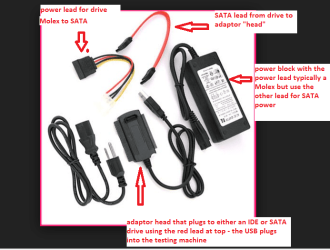
Ok mate now try running these as I am not a fan of using anything but installed programs for Word etc and the gaming if you have done this online may have picked up some really crap stuff. In any case maybe attest on that drive might be in order too so you can use this SeaTools for Windows | Seagate and if necessary you can do this by taking out the drive and hooking it up to another machine using a USB to SATA adaptor -see pic.

Just make sure you select the correct drive as listed in Disk Management or just Computer.
 

Attachments

  • USB SATA ADAPTOR.PNG
    USB SATA ADAPTOR.PNG
    65.9 KB · Views: 20

My Computer My Computer

Computer type
PC/Desktop
Computer Manufacturer/Model Number
Own build (new) Desk1 / Asus ROG Win 7 / Desk2 1st build
OS
Desk1 7 Home Prem / Desk2 10 Pro / Main lap Asus ROG 10 Pro 2 laptop Toshiba 7 Pro Asus P2520 7 & 10
CPU
Desk1 i5 3750K / Laptop i7 GTX 860M / Desk2 i5 2500
Motherboard
Desk1 Asus P877-V / Desk2 Gigabyte H67 UD3H / Laptop ?
Memory
Desk1 8GB (1866) / Desk2 16GB (1333) / Laptop 8Gb DDR3
Graphics Card(s)
Desk 1& 2NVidia GTX 650 & Laptops on board Intel
Sound Card
Desk 1 & 2 -XONAR DG Realtek High Def audio Laptop
Monitor(s) Displays
Desk 1 Benq HD 2450 / Desk2 Philips 24" / Laptop 17.5"
Screen Resolution
1920x1080 D1 & D2 & Laptop 1
Hard Drives
Desk1 Samsung 120GB 830 SSD
Asus ROG 256GB 850 Pro SSD
Desk2 Samsung 840 256 SSD
Toshiba 120GB EVO
PSU
Desk 1 Corsair HX 1050/ Laptop ? / Desk 2 Corsair HX 650
Case
Desk 1 Cooler HAF XM ? Toshiba laptop / Desk2 Coolermaster
Cooling
Fans on all Desk1 -2 Desk2 - all Coolermasters 5 Laptop ?
Keyboard
Desk 1 MS Sidewinder X6 Desk 2 MS Sidewinder X 4
Mouse
Desk 1&2 - Gigabyte MS 900 gamer - laptop - Logitec wireless
Internet Speed
ADSL2+
Other Info
One other Desktop (tester) and spare Toshba laptop both with SSD's
Running Kaspersky 2016 ISS on all machines config'd identically
Logitec audio stereo systems on each machine (x3)
Canon MG5250MFC
Router/modem TP-Link running WPA2SK
Your option may be the one for me, but does my formatting the drive and wiping all of the data off of it affect it? Also, I may have trouble finding one of those adapters.

The drive does seem in order, as it seems to be having the regular sound when it starts up. A main problem here is determining whether this is a hardware or software problem.

I will try taking out a RAM stick to see of that is it, or resetting the CMOS battery, although I have not had much experience with either of them.
 

My Computer My Computer

Computer type
Laptop
Computer Manufacturer/Model Number
Toshiba
OS
Windows 7 Home Premium x64
Antivirus
Norton
Browser
Google Chrome
Hello my friend they are quite easy to get - Computer Parts, Laptops, Electronics, and More - Newegg.com if you look down this page there is one for $10 plus shipping I guess and I didn't look at the full listing They are very easy to set up and use.
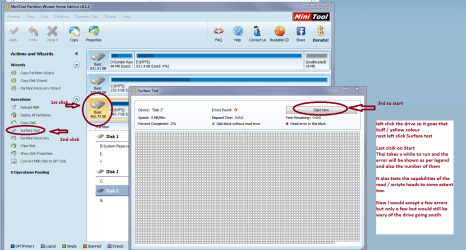
The wiping and formatting of the drive is not really necessary but you can if you so wish. Now just because it sounds ok on power up doesn't mean there is something wrong with the device and another test you could do is a surface scan which physically checks the platters and to some extent the read write heads and actuating arms. For that you need the Partition Wizard Free Partition Manager for Window PC | MiniTool Partition Wizard Free Edition and see my pic to see what to do - the program is fre and is very useful for a lot of disk related functions especially with partitions.

Now before you take out a RAM stick run a memtest MemTest86 - Offical Site of the x86 Memory Testing Tool it does takes some time and you will need to make the bootable disk . Insert the disk into the optical drive and make sure the BIOS is set to the optical as the first boot option. It then will run itself and if you have any problems with it they will show up as errors see my pics. Now of course if you have two sticks installed and get errors then you will need to test each one separately to find the bad one. One very important thing with memtest - you MUST run it for at LEAST 8 PASSES any less is not going to provide you with any reliable results if any. Because it takes a long time most people leave it running overnight - having said that if errors come up straight away then you can stop it.

If you have any problems understanding what I have posted or getting things to work please post back
 

Attachments

  • MINI TOOL SURFACE 2.PNG
    MINI TOOL SURFACE 2.PNG
    62.3 KB · Views: 0
  • MEM2.PNG
    MEM2.PNG
    193.9 KB · Views: 0

My Computer My Computer

Computer type
PC/Desktop
Computer Manufacturer/Model Number
Own build (new) Desk1 / Asus ROG Win 7 / Desk2 1st build
OS
Desk1 7 Home Prem / Desk2 10 Pro / Main lap Asus ROG 10 Pro 2 laptop Toshiba 7 Pro Asus P2520 7 & 10
CPU
Desk1 i5 3750K / Laptop i7 GTX 860M / Desk2 i5 2500
Motherboard
Desk1 Asus P877-V / Desk2 Gigabyte H67 UD3H / Laptop ?
Memory
Desk1 8GB (1866) / Desk2 16GB (1333) / Laptop 8Gb DDR3
Graphics Card(s)
Desk 1& 2NVidia GTX 650 & Laptops on board Intel
Sound Card
Desk 1 & 2 -XONAR DG Realtek High Def audio Laptop
Monitor(s) Displays
Desk 1 Benq HD 2450 / Desk2 Philips 24" / Laptop 17.5"
Screen Resolution
1920x1080 D1 & D2 & Laptop 1
Hard Drives
Desk1 Samsung 120GB 830 SSD
Asus ROG 256GB 850 Pro SSD
Desk2 Samsung 840 256 SSD
Toshiba 120GB EVO
PSU
Desk 1 Corsair HX 1050/ Laptop ? / Desk 2 Corsair HX 650
Case
Desk 1 Cooler HAF XM ? Toshiba laptop / Desk2 Coolermaster
Cooling
Fans on all Desk1 -2 Desk2 - all Coolermasters 5 Laptop ?
Keyboard
Desk 1 MS Sidewinder X6 Desk 2 MS Sidewinder X 4
Mouse
Desk 1&2 - Gigabyte MS 900 gamer - laptop - Logitec wireless
Internet Speed
ADSL2+
Other Info
One other Desktop (tester) and spare Toshba laptop both with SSD's
Running Kaspersky 2016 ISS on all machines config'd identically
Logitec audio stereo systems on each machine (x3)
Canon MG5250MFC
Router/modem TP-Link running WPA2SK
Sorry for not replying in a while.

As for the programs you mentioned, how will they work upon start-up? I cannot access safe mode, and the ISO on the USB is the chosen program to boot. Will these programs start without my needing to choose?
 

My Computer My Computer

Computer type
Laptop
Computer Manufacturer/Model Number
Toshiba
OS
Windows 7 Home Premium x64
Antivirus
Norton
Browser
Google Chrome
Yes mate the memtest just boots off that disk or stick - I prefer a disk but a stick will do. The Partition Wizard will also boot from a stick see this Boot partition manager from USB Flash disk directly to manage disk partition - Partition Wizard Bootable Flash Drive.
Neither involve Windows in any way so forget about safe mode.

Now after you have checked out the RAM and drive let us know what the go is. Just keep in mind both tests take a while to do and the memtest as to be run for at LEAST 8 PASSES anything less is no good.
 

My Computer My Computer

Computer type
PC/Desktop
Computer Manufacturer/Model Number
Own build (new) Desk1 / Asus ROG Win 7 / Desk2 1st build
OS
Desk1 7 Home Prem / Desk2 10 Pro / Main lap Asus ROG 10 Pro 2 laptop Toshiba 7 Pro Asus P2520 7 & 10
CPU
Desk1 i5 3750K / Laptop i7 GTX 860M / Desk2 i5 2500
Motherboard
Desk1 Asus P877-V / Desk2 Gigabyte H67 UD3H / Laptop ?
Memory
Desk1 8GB (1866) / Desk2 16GB (1333) / Laptop 8Gb DDR3
Graphics Card(s)
Desk 1& 2NVidia GTX 650 & Laptops on board Intel
Sound Card
Desk 1 & 2 -XONAR DG Realtek High Def audio Laptop
Monitor(s) Displays
Desk 1 Benq HD 2450 / Desk2 Philips 24" / Laptop 17.5"
Screen Resolution
1920x1080 D1 & D2 & Laptop 1
Hard Drives
Desk1 Samsung 120GB 830 SSD
Asus ROG 256GB 850 Pro SSD
Desk2 Samsung 840 256 SSD
Toshiba 120GB EVO
PSU
Desk 1 Corsair HX 1050/ Laptop ? / Desk 2 Corsair HX 650
Case
Desk 1 Cooler HAF XM ? Toshiba laptop / Desk2 Coolermaster
Cooling
Fans on all Desk1 -2 Desk2 - all Coolermasters 5 Laptop ?
Keyboard
Desk 1 MS Sidewinder X6 Desk 2 MS Sidewinder X 4
Mouse
Desk 1&2 - Gigabyte MS 900 gamer - laptop - Logitec wireless
Internet Speed
ADSL2+
Other Info
One other Desktop (tester) and spare Toshba laptop both with SSD's
Running Kaspersky 2016 ISS on all machines config'd identically
Logitec audio stereo systems on each machine (x3)
Canon MG5250MFC
Router/modem TP-Link running WPA2SK
Hello,

I have since given the laptop to my cousin, who is a programmer. He has said that the problem is not the hard drive, but the operating system, and has asked for the Windows 7 disk that came with the laptop, although there was none. I will be giving him the ISO on the stick instead. While doing that I might also tell him about running a MemTest and using the Partition Wizard.
 

My Computer My Computer

Computer type
Laptop
Computer Manufacturer/Model Number
Toshiba
OS
Windows 7 Home Premium x64
Antivirus
Norton
Browser
Google Chrome
Hello,

I have since given the laptop to my cousin, who is a programmer. He has said that the problem is not the hard drive, but the operating system, and has asked for the Windows 7 disk that came with the laptop, although there was none. I will be giving him the ISO on the stick instead. While doing that I might also tell him about running a MemTest and using the Partition Wizard.
Yes well all you need then is the code on the sticker to activate the ISO version. Anyway your cousin seems capable of doing whatever so we shall just see what happens. My suggestion to test the had drive was purely one for elimination purposes and perhaps we should have run these first
http://www.sevenforums.com/tutorials/1538-sfc-scannow-command-system-file-checker.html
http://www.sevenforums.com/tutorials/433-disk-check.html < if necessary include the /f and /r in the command line as per Option2
in safe mode is best as only the essential files are loaded but again your cousin will know that. Perhaps I had better leave the problem to him but incase things do not get fixed we are always here.
 

My Computer My Computer

Computer type
PC/Desktop
Computer Manufacturer/Model Number
Own build (new) Desk1 / Asus ROG Win 7 / Desk2 1st build
OS
Desk1 7 Home Prem / Desk2 10 Pro / Main lap Asus ROG 10 Pro 2 laptop Toshiba 7 Pro Asus P2520 7 & 10
CPU
Desk1 i5 3750K / Laptop i7 GTX 860M / Desk2 i5 2500
Motherboard
Desk1 Asus P877-V / Desk2 Gigabyte H67 UD3H / Laptop ?
Memory
Desk1 8GB (1866) / Desk2 16GB (1333) / Laptop 8Gb DDR3
Graphics Card(s)
Desk 1& 2NVidia GTX 650 & Laptops on board Intel
Sound Card
Desk 1 & 2 -XONAR DG Realtek High Def audio Laptop
Monitor(s) Displays
Desk 1 Benq HD 2450 / Desk2 Philips 24" / Laptop 17.5"
Screen Resolution
1920x1080 D1 & D2 & Laptop 1
Hard Drives
Desk1 Samsung 120GB 830 SSD
Asus ROG 256GB 850 Pro SSD
Desk2 Samsung 840 256 SSD
Toshiba 120GB EVO
PSU
Desk 1 Corsair HX 1050/ Laptop ? / Desk 2 Corsair HX 650
Case
Desk 1 Cooler HAF XM ? Toshiba laptop / Desk2 Coolermaster
Cooling
Fans on all Desk1 -2 Desk2 - all Coolermasters 5 Laptop ?
Keyboard
Desk 1 MS Sidewinder X6 Desk 2 MS Sidewinder X 4
Mouse
Desk 1&2 - Gigabyte MS 900 gamer - laptop - Logitec wireless
Internet Speed
ADSL2+
Other Info
One other Desktop (tester) and spare Toshba laptop both with SSD's
Running Kaspersky 2016 ISS on all machines config'd identically
Logitec audio stereo systems on each machine (x3)
Canon MG5250MFC
Router/modem TP-Link running WPA2SK
Hello, and as always, sorry for not replying.

He figured that the problem was that there really was no operating system on the computer. He then installed Ubuntu to test the computer to find out if there was anything major that was wrong with the computer. Then he uninstalled Ubuntu and told us that we should order a disk to reinstall Windows 7. We got the disk, and attempted to install the operating system. When the install was finishing, the computer turned off all of the sudden. Now every time the install is close to finishing, it does that. That is the only real problem now.

Please Help!
 

My Computer My Computer

Computer type
Laptop
Computer Manufacturer/Model Number
Toshiba
OS
Windows 7 Home Premium x64
Antivirus
Norton
Browser
Google Chrome
Also, the Ubuntu install was successful and went very smoothly. But for some reason the Windows 7 install does this. Perhaps the problem is overheating, because that may cause the computer to turn off. The Ubuntu install did not seem make as much noise or increase temperatures during the install.
 

My Computer My Computer

Computer type
Laptop
Computer Manufacturer/Model Number
Toshiba
OS
Windows 7 Home Premium x64
Antivirus
Norton
Browser
Google Chrome
Ok well if you reckon it is the temps and it could possibly be just that if the machine is off any age and by that I mean over say three years old because the thermal compound on the CPU / graphics chip can dry out.
Run this while you can and post back the temps https://www.piriform.com/speccy

Now if the compound is at fault it is able to be reapplied as long as you are confident enough to do that.
 

My Computer My Computer

Computer type
PC/Desktop
Computer Manufacturer/Model Number
Own build (new) Desk1 / Asus ROG Win 7 / Desk2 1st build
OS
Desk1 7 Home Prem / Desk2 10 Pro / Main lap Asus ROG 10 Pro 2 laptop Toshiba 7 Pro Asus P2520 7 & 10
CPU
Desk1 i5 3750K / Laptop i7 GTX 860M / Desk2 i5 2500
Motherboard
Desk1 Asus P877-V / Desk2 Gigabyte H67 UD3H / Laptop ?
Memory
Desk1 8GB (1866) / Desk2 16GB (1333) / Laptop 8Gb DDR3
Graphics Card(s)
Desk 1& 2NVidia GTX 650 & Laptops on board Intel
Sound Card
Desk 1 & 2 -XONAR DG Realtek High Def audio Laptop
Monitor(s) Displays
Desk 1 Benq HD 2450 / Desk2 Philips 24" / Laptop 17.5"
Screen Resolution
1920x1080 D1 & D2 & Laptop 1
Hard Drives
Desk1 Samsung 120GB 830 SSD
Asus ROG 256GB 850 Pro SSD
Desk2 Samsung 840 256 SSD
Toshiba 120GB EVO
PSU
Desk 1 Corsair HX 1050/ Laptop ? / Desk 2 Corsair HX 650
Case
Desk 1 Cooler HAF XM ? Toshiba laptop / Desk2 Coolermaster
Cooling
Fans on all Desk1 -2 Desk2 - all Coolermasters 5 Laptop ?
Keyboard
Desk 1 MS Sidewinder X6 Desk 2 MS Sidewinder X 4
Mouse
Desk 1&2 - Gigabyte MS 900 gamer - laptop - Logitec wireless
Internet Speed
ADSL2+
Other Info
One other Desktop (tester) and spare Toshba laptop both with SSD's
Running Kaspersky 2016 ISS on all machines config'd identically
Logitec audio stereo systems on each machine (x3)
Canon MG5250MFC
Router/modem TP-Link running WPA2SK
Well, I installed Windows by being in a cold area and having the computer sit near a cold object, so that works.

The temperature and CPU are the two main problems now. When I open Task Manager the CPU usage is at 100%. That is odd considering I just installed Windows. I am also trying to configure the Norton Antivirus protection, but while everything is updating, the computer turns off, most likely due to overheating and the CPU. It could be a virus, but I cannot know until Norton is setup.
 

My Computer My Computer

Computer type
Laptop
Computer Manufacturer/Model Number
Toshiba
OS
Windows 7 Home Premium x64
Antivirus
Norton
Browser
Google Chrome
Thank You

I would like to thank you for all you have done. You have been a great help in my endeavors. I know I haven't replied in a very long time, but that is only due to the fact that the problem has been fixed. I left this experience more knowledgeable.
 

My Computer My Computer

Computer type
Laptop
Computer Manufacturer/Model Number
Toshiba
OS
Windows 7 Home Premium x64
Antivirus
Norton
Browser
Google Chrome
That's no problem mate late replying we all get tied up but just what was the problem then am curious?
 

My Computer My Computer

Computer type
PC/Desktop
Computer Manufacturer/Model Number
Own build (new) Desk1 / Asus ROG Win 7 / Desk2 1st build
OS
Desk1 7 Home Prem / Desk2 10 Pro / Main lap Asus ROG 10 Pro 2 laptop Toshiba 7 Pro Asus P2520 7 & 10
CPU
Desk1 i5 3750K / Laptop i7 GTX 860M / Desk2 i5 2500
Motherboard
Desk1 Asus P877-V / Desk2 Gigabyte H67 UD3H / Laptop ?
Memory
Desk1 8GB (1866) / Desk2 16GB (1333) / Laptop 8Gb DDR3
Graphics Card(s)
Desk 1& 2NVidia GTX 650 & Laptops on board Intel
Sound Card
Desk 1 & 2 -XONAR DG Realtek High Def audio Laptop
Monitor(s) Displays
Desk 1 Benq HD 2450 / Desk2 Philips 24" / Laptop 17.5"
Screen Resolution
1920x1080 D1 & D2 & Laptop 1
Hard Drives
Desk1 Samsung 120GB 830 SSD
Asus ROG 256GB 850 Pro SSD
Desk2 Samsung 840 256 SSD
Toshiba 120GB EVO
PSU
Desk 1 Corsair HX 1050/ Laptop ? / Desk 2 Corsair HX 650
Case
Desk 1 Cooler HAF XM ? Toshiba laptop / Desk2 Coolermaster
Cooling
Fans on all Desk1 -2 Desk2 - all Coolermasters 5 Laptop ?
Keyboard
Desk 1 MS Sidewinder X6 Desk 2 MS Sidewinder X 4
Mouse
Desk 1&2 - Gigabyte MS 900 gamer - laptop - Logitec wireless
Internet Speed
ADSL2+
Other Info
One other Desktop (tester) and spare Toshba laptop both with SSD's
Running Kaspersky 2016 ISS on all machines config'd identically
Logitec audio stereo systems on each machine (x3)
Canon MG5250MFC
Router/modem TP-Link running WPA2SK
Back
Top