Touchpad and USB does not work after fresh install

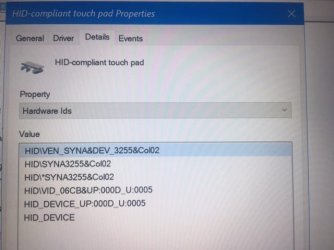
ok, understood , I will try, but how to find device id?
 

My Computer My Computer

Computer type
Laptop
Computer Manufacturer/Model Number
lenovo 330s 14
OS
windows 7
CPU
i5 8250u (real quadcore 8 threads)
Memory
8 gb
Screen Resolution
1920 x 1080
Hard Drives
crucial 1 tb nvme qlc

My Computer My Computer

Computer type
Laptop
Computer Manufacturer/Model Number
Lenovo Ideapad 330S-14IKB
OS
Windows 7 Home Premium x64
CPU
Intel Core i3-8130U
Motherboard
Lenovo IdeaPad 330S-14IKB 81F4018RGE
Memory
8GB
Graphics Card(s)
Intel-UHD 620
Hard Drives
500GB WD, 120GB SSD (M.2 PCIE 2242)
ok, understood , I will try, but how to find device id?


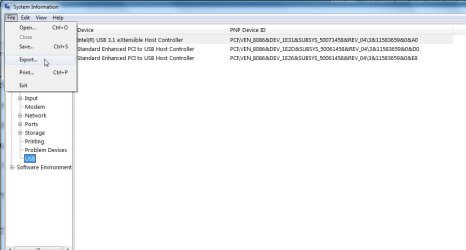
type msinfo32 into start search

click it when it pops up

look under components>problem devices

then click file>export and save as .txt


No problem devices in this screenshot, so showing usb devices as an example of what it looks like

msinfo32.jpg


Or if it isn't showing under problem devices, highlight components and export as .txt

Or you can get it from device manager
 

My Computers My Computers

System One System Two

  • Computer type
    PC/Desktop
    OS
    7 X64
    CPU
    i5 8400
    Motherboard
    gigabyte b365m ds3h
    Memory
    2x8gb 3200mhz
    Hard Drives
    various
    PSU
    pure power 11 400w cm
    Case
    Coolermaster
    Cooling
    cryorig m9i
  • Computer type
    PC/Desktop
    OS
    7x64
    CPU
    g5400
    Motherboard
    ga b365m ds3h
    Memory
    8gb ddr4 2400
    PSU
    xfx pro 450w
msinfo32 does not exist in that iso...
is this enough ?
 

Attachments

  • IMG_7305.JPG
    IMG_7305.JPG
    31.6 KB · Views: 15

My Computer My Computer

Computer type
Laptop
Computer Manufacturer/Model Number
lenovo 330s 14
OS
windows 7
CPU
i5 8250u (real quadcore 8 threads)
Memory
8 gb
Screen Resolution
1920 x 1080
Hard Drives
crucial 1 tb nvme qlc

My Computers My Computers

System One System Two

  • Computer type
    PC/Desktop
    OS
    7 X64
    CPU
    i5 8400
    Motherboard
    gigabyte b365m ds3h
    Memory
    2x8gb 3200mhz
    Hard Drives
    various
    PSU
    pure power 11 400w cm
    Case
    Coolermaster
    Cooling
    cryorig m9i
  • Computer type
    PC/Desktop
    OS
    7x64
    CPU
    g5400
    Motherboard
    ga b365m ds3h
    Memory
    8gb ddr4 2400
    PSU
    xfx pro 450w
@davelon

1. Lenovo usually have a key ( often F6 ) which toggles the touchpad on and off. It has a little white square with a line throught it.

2. I have adjusted the win7 synaptics drivers by adding the line SYNA3255 next to every instance of SYNA2B2C in the original inf and ini files.

for example

Code:
[SynHidI2c.NTamd64.6.1]
%SynHidI2c.DeviceDesc% = SynHidI2c, ACPI\PNP0C50, PNP0C50
[B]
%SynHidI2c.DeviceDesc% = SynHidI2c, ACPI\SYNA3255[/B]
%SynHidI2c.DeviceDesc% = SynHidI2c, ACPI\SYNA2B2C
  %SynHidI2c.DeviceDesc% = SynHidI2c, ACPI\SYNA2B33
synaptics-3255

Unzip it and use dism++ to install. Then reboot and see the result.
View attachment Dism++10.1.1000.100.zip
 

My Computers My Computers

System One System Two

  • Computer type
    PC/Desktop
    OS
    7 X64
    CPU
    i5 8400
    Motherboard
    gigabyte b365m ds3h
    Memory
    2x8gb 3200mhz
    Hard Drives
    various
    PSU
    pure power 11 400w cm
    Case
    Coolermaster
    Cooling
    cryorig m9i
  • Computer type
    PC/Desktop
    OS
    7x64
    CPU
    g5400
    Motherboard
    ga b365m ds3h
    Memory
    8gb ddr4 2400
    PSU
    xfx pro 450w
Amazing, but ho to use Dism++, to install drivers?
 

My Computer My Computer

Computer type
Laptop
Computer Manufacturer/Model Number
lenovo 330s 14
OS
windows 7
CPU
i5 8250u (real quadcore 8 threads)
Memory
8 gb
Screen Resolution
1920 x 1080
Hard Drives
crucial 1 tb nvme qlc
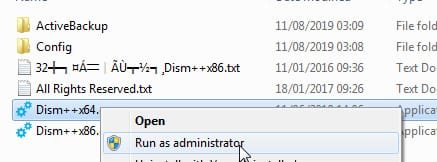
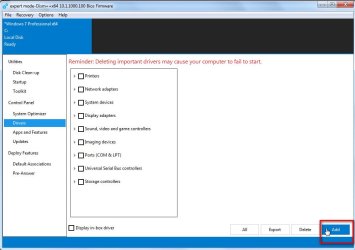
Extract the zip file.

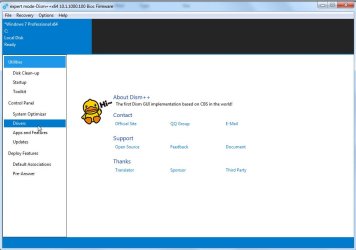
run dism++ it and it says DRIVERS in the left pane.

Obviously click DRIVERS.

Then it says ADD

Obviously, click ADD

A browse window opens so you can browse to the folder of drivers.


1.
rundism++.jpg


2.
dism++1.jpg


3.
dism++2.jpg


That's it.
 

My Computers My Computers

System One System Two

  • Computer type
    PC/Desktop
    OS
    7 X64
    CPU
    i5 8400
    Motherboard
    gigabyte b365m ds3h
    Memory
    2x8gb 3200mhz
    Hard Drives
    various
    PSU
    pure power 11 400w cm
    Case
    Coolermaster
    Cooling
    cryorig m9i
  • Computer type
    PC/Desktop
    OS
    7x64
    CPU
    g5400
    Motherboard
    ga b365m ds3h
    Memory
    8gb ddr4 2400
    PSU
    xfx pro 450w
Adding the id's often works, but not always. The only way to find out is to try.
 

My Computers My Computers

System One System Two

  • Computer type
    PC/Desktop
    OS
    7 X64
    CPU
    i5 8400
    Motherboard
    gigabyte b365m ds3h
    Memory
    2x8gb 3200mhz
    Hard Drives
    various
    PSU
    pure power 11 400w cm
    Case
    Coolermaster
    Cooling
    cryorig m9i
  • Computer type
    PC/Desktop
    OS
    7x64
    CPU
    g5400
    Motherboard
    ga b365m ds3h
    Memory
    8gb ddr4 2400
    PSU
    xfx pro 450w

My Computer My Computer

Computer type
Laptop
Computer Manufacturer/Model Number
Fujitsu LIFEBOOK
OS
Win 7 HP SP1 64-bit Vista HB SP2 32-bit Linux Mint 18.3
CPU
Intel(R) Pentium(R) CPU P6200 @ 2.13GHz
Motherboard
FUJITSU FJNBB06
Memory
4.00 GB
Graphics Card(s)
Intel(R) Graphics Media Accelerator HD
Sound Card
[1] Realtek High Definition Audio [2] Intel(R) Display Audio
Screen Resolution
1366 x 768 x 32 bits (4294967296 colors) @ 59 Hz
Hard Drives
TOSHIBA MK5076GSX
Antivirus
AVG FREE
amazing forum, amazing community and amazing help

is with great sadness that i can say it didn't work

tank you for everything, we tried
Dave
 

My Computer My Computer

Computer type
Laptop
Computer Manufacturer/Model Number
lenovo 330s 14
OS
windows 7
CPU
i5 8250u (real quadcore 8 threads)
Memory
8 gb
Screen Resolution
1920 x 1080
Hard Drives
crucial 1 tb nvme qlc
Hi Paul Black
you bat file is not working onto the iso that has been suggested, it keep asking for administrator privileges, even when given, even when it start from a cmd with administrator privileges
 

My Computer My Computer

Computer type
Laptop
Computer Manufacturer/Model Number
lenovo 330s 14
OS
windows 7
CPU
i5 8250u (real quadcore 8 threads)
Memory
8 gb
Screen Resolution
1920 x 1080
Hard Drives
crucial 1 tb nvme qlc
Hi davelon,

Your bat file is not working onto the iso that has been suggested, it keep asking for administrator privileges, even when given, even when it start from a cmd with administrator privileges.

Not quite sure what you mean by onto the iso!

Very strange, right-click the .bat file and select Run as administrator. This is only to produce the description of the problem device and the error code with the reason why it is a problem.

I hope this helps!
 

My Computer My Computer

Computer type
Laptop
Computer Manufacturer/Model Number
Fujitsu LIFEBOOK
OS
Win 7 HP SP1 64-bit Vista HB SP2 32-bit Linux Mint 18.3
CPU
Intel(R) Pentium(R) CPU P6200 @ 2.13GHz
Motherboard
FUJITSU FJNBB06
Memory
4.00 GB
Graphics Card(s)
Intel(R) Graphics Media Accelerator HD
Sound Card
[1] Realtek High Definition Audio [2] Intel(R) Display Audio
Screen Resolution
1366 x 768 x 32 bits (4294967296 colors) @ 59 Hz
Hard Drives
TOSHIBA MK5076GSX
Antivirus
AVG FREE
i'm referring to the win 10 iso that SIW2 gave to me to boot up, for checking the device id it's very light and is not capable to run your bat file
 

My Computer My Computer

Computer type
Laptop
Computer Manufacturer/Model Number
lenovo 330s 14
OS
windows 7
CPU
i5 8250u (real quadcore 8 threads)
Memory
8 gb
Screen Resolution
1920 x 1080
Hard Drives
crucial 1 tb nvme qlc
Hi davelon,

Not quite sure what you mean by onto the iso!

Very strange, right-click the .bat file and select Run as administrator. This is only to produce the description of the problem device and the error code with the reason why it is a problem.

I hope this helps!


I think he is trying to run it from booted PE. Possibly you have a privileges check in your batch? PE runs as system account therefore no administrator token.
 

My Computers My Computers

System One System Two

  • Computer type
    PC/Desktop
    OS
    7 X64
    CPU
    i5 8400
    Motherboard
    gigabyte b365m ds3h
    Memory
    2x8gb 3200mhz
    Hard Drives
    various
    PSU
    pure power 11 400w cm
    Case
    Coolermaster
    Cooling
    cryorig m9i
  • Computer type
    PC/Desktop
    OS
    7x64
    CPU
    g5400
    Motherboard
    ga b365m ds3h
    Memory
    8gb ddr4 2400
    PSU
    xfx pro 450w
Hi SIW2,

I think he is trying to run it from booted PE. Possibly you have a privileges check in your batch? PE runs as system account therefore no administrator token.

I have the following [at the top of the code] as a Run as administrator [elevated command prompt] check . . .

Code:
OpenFiles > NUL 2>&1 
If NOT %ERRORLEVEL% EQU 0 Goto :Not_Admin
 

My Computer My Computer

Computer type
Laptop
Computer Manufacturer/Model Number
Fujitsu LIFEBOOK
OS
Win 7 HP SP1 64-bit Vista HB SP2 32-bit Linux Mint 18.3
CPU
Intel(R) Pentium(R) CPU P6200 @ 2.13GHz
Motherboard
FUJITSU FJNBB06
Memory
4.00 GB
Graphics Card(s)
Intel(R) Graphics Media Accelerator HD
Sound Card
[1] Realtek High Definition Audio [2] Intel(R) Display Audio
Screen Resolution
1366 x 768 x 32 bits (4294967296 colors) @ 59 Hz
Hard Drives
TOSHIBA MK5076GSX
Antivirus
AVG FREE
That will be the reason for the error message in PE. Also, I can't recall if I included msinfo32.exe in that 16299 pe build.
 

My Computers My Computers

System One System Two

  • Computer type
    PC/Desktop
    OS
    7 X64
    CPU
    i5 8400
    Motherboard
    gigabyte b365m ds3h
    Memory
    2x8gb 3200mhz
    Hard Drives
    various
    PSU
    pure power 11 400w cm
    Case
    Coolermaster
    Cooling
    cryorig m9i
  • Computer type
    PC/Desktop
    OS
    7x64
    CPU
    g5400
    Motherboard
    ga b365m ds3h
    Memory
    8gb ddr4 2400
    PSU
    xfx pro 450w
there isn't

if you create another build with msinfo32.exe please let me know and i will do the test
 

My Computer My Computer

Computer type
Laptop
Computer Manufacturer/Model Number
lenovo 330s 14
OS
windows 7
CPU
i5 8250u (real quadcore 8 threads)
Memory
8 gb
Screen Resolution
1920 x 1080
Hard Drives
crucial 1 tb nvme qlc
And..., some news about it?
 

My Computer My Computer

Computer type
Laptop
Computer Manufacturer/Model Number
Asus
OS
Windows 10 Pro x64
CPU
i3 Kaby Lake-R
Motherboard
Asustek
Memory
4 GB + 16 Optane
Graphics Card(s)
Intal UHD 620 + Geforce MX130
Hard Drives
1 TB
Antivirus
ESET
Browser
Firefox
Back
Top