Touchpad and USB does not work after fresh install

I've seen on the Lenovo Ideapad 330S specs that it can have AMD or Intel internal graphics?
Are you sure yours doesn't have AMD graphics?

On post #27 it says it has an Xeon CPU that I believe it's not true.

hardware ID string shows it's intel graphics... "PCI\VEN_8086&DEV_5917&SUBSYS_396B17AA&REV_07"
 

My Computer My Computer

At a glance

Windows 7 Home Premium x64Intel Core i3-8130U8GBIntel-UHD 620
Computer type
Laptop
Computer Manufacturer/Model Number
Lenovo Ideapad 330S-14IKB
OS
Windows 7 Home Premium x64
CPU
Intel Core i3-8130U
Motherboard
Lenovo IdeaPad 330S-14IKB 81F4018RGE
Memory
8GB
Graphics Card(s)
Intel-UHD 620
Hard Drives
500GB WD, 120GB SSD (M.2 PCIE 2242)
Maybe I did something wrong when patching the info file.
Have a look YouTube
 

My Computers My Computers

  • At a glance

    Windows 7 HP 64i5 6600K - 800MHz to 4200MHz4+4G GSkill DDR4 3000IG - Intel 530
    Computer type
    PC/Desktop
    Computer Manufacturer/Model Number
    custom build
    OS
    Windows 7 HP 64
    CPU
    i5 6600K - 800MHz to 4200MHz
    Motherboard
    GA-Z170-HD3P
    Memory
    4+4G GSkill DDR4 3000
    Graphics Card(s)
    IG - Intel 530
    Monitor(s) Displays
    Samsung 226BW
    Screen Resolution
    1680x1050
    Hard Drives
    (1) -1 SM951 – 128GB M.2 AHCI PCIe SSD drive for Windows 7 and Lubuntu
    (2) -1 WD SATA 3 - 1T for Data
    (3) -1 WD SATA 3 - 1T for backup
    PSU
    Thermaltake 450W TR2 gold
    Keyboard
    Old and good Chicony mechanical keyboard
    Mouse
    Logitech mX performance - 9 buttons (had to disable some)
    Internet Speed
    500Mb/s
    Browser
    Firefox 64
    Other Info
    TinyWall firewall
  • At a glance

    Windows 7 Proi7-4500U 800MHz to 3.0GHz(4+4)G DDR3 1600IG intel 4400 + NVIDIA GeForce GT 745M
    Computer type
    Laptop
    System Manufacturer/Model Number
    Asus Q550LF
    OS
    Windows 7 Pro
    CPU
    i7-4500U 800MHz to 3.0GHz
    Motherboard
    Asus Q550LF
    Memory
    (4+4)G DDR3 1600
    Graphics Card(s)
    IG intel 4400 + NVIDIA GeForce GT 745M
    Sound Card
    Realtek
    Monitor(s) Displays
    LG Display LP156WF4-SPH1
    Screen Resolution
    1920 x 1080
    Hard Drives
    BX500 120G SSD for Windows and programs +
    1T HDD for data
    Internet Speed
    500 Mb/s
    Browser
    Firefox
    Other Info
    TinyWall firewall
DxDiag config output:

------------------
System Information
------------------
Time of this report: 6/17/2019, 18:17:19
Machine name: 330S
Operating System: Windows 7 Home Premium 64-bit (6.1, Build 7601) Service Pack 1 (7601.win7sp1_ldr.190516-0600)
Language: English (Regional Setting: English)
System Manufacturer: LENOVO
System Model: 81F4
BIOS: InsydeH2O Version 05.12.097SCN26WW
Processor: Intel(R) Core(TM) i3-8130U CPU @ 2.20GHz (4 CPUs), ~2.2GHz
Memory: 8192MB RAM
Available OS Memory: 8102MB RAM
Page File: 2939MB used, 13261MB available
Windows Dir: C:\Windows
DirectX Version: DirectX 11
DX Setup Parameters: Not found
User DPI Setting: Using System DPI
System DPI Setting: 96 DPI (100 percent)
DWM DPI Scaling: Disabled
DxDiag Version: 6.01.7601.17514 64bit Unicode

------------
DxDiag Notes
------------
Display Tab 1: No problems found.
Sound Tab 1: No problems found.
Input Tab: No problems found.

--------------------
DirectX Debug Levels
--------------------
Direct3D: 0/4 (retail)
DirectDraw: 0/4 (retail)
DirectInput: 0/5 (retail)
DirectMusic: 0/5 (retail)
DirectPlay: 0/9 (retail)
DirectSound: 0/5 (retail)
DirectShow: 0/6 (retail)

---------------
Display Devices
---------------
Card name: Standard VGA Graphics Adapter
Manufacturer: (Standard display types)
Chip type: Intel(R) SKL/KBL Mobile/Desktop Graphics Chipset Accelerated VGA BIOS
DAC type: 8 bit
Device Key: Enum\PCI\VEN_8086&DEV_5917&SUBSYS_396B17AA&REV_07
Display Memory: n/a
Dedicated Memory: n/a
Shared Memory: n/a
Current Mode: 1920 x 1080 (32 bit) (1Hz)
Monitor Name: Generic PnP Monitor
Monitor Model:
Monitor Id:
Native Mode:
Output Type:
Driver Name: vga
Driver File Version: 6.01.7600.16385 (English)
Driver Version: 6.1.7600.16385
DDI Version: unknown
Driver Model: unknown
Driver Attributes: Final Retail
Driver Date/Size: 7/13/2009 16:38:47, 15360 bytes
WHQL Logo'd: Yes
WHQL Date Stamp:
Device Identifier: {D7B78E66-1A57-11CF-1B34-DB04A9C2CB35}
Vendor ID: 0x8086
Device ID: 0x5917
SubSys ID: 0x396B17AA
Revision ID: 0x0007
Driver Strong Name: Unknown
Rank Of Driver: Unknown
Video Accel:
Deinterlace Caps: n/a
D3D9 Overlay: n/a
DXVA-HD: n/a
DDraw Status: Not Available
D3D Status: Not Available
AGP Status: Not Available
 

My Computer My Computer

At a glance

Windows 7 Home Premium x64Intel Core i3-8130U8GBIntel-UHD 620
Computer type
Laptop
Computer Manufacturer/Model Number
Lenovo Ideapad 330S-14IKB
OS
Windows 7 Home Premium x64
CPU
Intel Core i3-8130U
Motherboard
Lenovo IdeaPad 330S-14IKB 81F4018RGE
Memory
8GB
Graphics Card(s)
Intel-UHD 620
Hard Drives
500GB WD, 120GB SSD (M.2 PCIE 2242)
Maybe I did something wrong when patching the info file.
Have a look YouTube

Yeah, I saw that vid. It won't work because his device id is 5916 and mine is 5917 which is not in the .inf file. I think the solution might be here: How-to patch Windows 7 driver for Intel graphics 620 8th-gen Kaby Lake (DEV_5917) - Tech|Inferno Forums

from that thread here is a igdlh64.inf file which includes the 5917 device (attached)
This guy performed the driver patch and gave links to download it Here in TechInferno forum post 169853. I might try it to see if it works before attempting the patch myself:
I think he patched the Intel HD Graphics Drivers Version 21.20.16.4839 WHQL. Not sure if that's the best choice or not at this point in time. Looks like there is Version 21.20.16.5064 which is newer.
 

Attachments

Last edited:

My Computer My Computer

At a glance

Windows 7 Home Premium x64Intel Core i3-8130U8GBIntel-UHD 620
Computer type
Laptop
Computer Manufacturer/Model Number
Lenovo Ideapad 330S-14IKB
OS
Windows 7 Home Premium x64
CPU
Intel Core i3-8130U
Motherboard
Lenovo IdeaPad 330S-14IKB 81F4018RGE
Memory
8GB
Graphics Card(s)
Intel-UHD 620
Hard Drives
500GB WD, 120GB SSD (M.2 PCIE 2242)
I now have most of the drivers installed *except* the Elan touchpad and the Intel UHD 620 graphics driver.
In theory the touchpad should be easy to fix since it works during installation (Win PE ?). It's on the USB flash drive somewhere. But where?
 

Attachments

  • drivers.png
    drivers.png
    26.4 KB · Views: 3

My Computer My Computer

At a glance

Windows 7 Home Premium x64Intel Core i3-8130U8GBIntel-UHD 620
Computer type
Laptop
Computer Manufacturer/Model Number
Lenovo Ideapad 330S-14IKB
OS
Windows 7 Home Premium x64
CPU
Intel Core i3-8130U
Motherboard
Lenovo IdeaPad 330S-14IKB 81F4018RGE
Memory
8GB
Graphics Card(s)
Intel-UHD 620
Hard Drives
500GB WD, 120GB SSD (M.2 PCIE 2242)
What is the touchpad ID?
 

My Computers My Computers

  • At a glance

    Windows 7 HP 64i5 6600K - 800MHz to 4200MHz4+4G GSkill DDR4 3000IG - Intel 530
    Computer type
    PC/Desktop
    Computer Manufacturer/Model Number
    custom build
    OS
    Windows 7 HP 64
    CPU
    i5 6600K - 800MHz to 4200MHz
    Motherboard
    GA-Z170-HD3P
    Memory
    4+4G GSkill DDR4 3000
    Graphics Card(s)
    IG - Intel 530
    Monitor(s) Displays
    Samsung 226BW
    Screen Resolution
    1680x1050
    Hard Drives
    (1) -1 SM951 – 128GB M.2 AHCI PCIe SSD drive for Windows 7 and Lubuntu
    (2) -1 WD SATA 3 - 1T for Data
    (3) -1 WD SATA 3 - 1T for backup
    PSU
    Thermaltake 450W TR2 gold
    Keyboard
    Old and good Chicony mechanical keyboard
    Mouse
    Logitech mX performance - 9 buttons (had to disable some)
    Internet Speed
    500Mb/s
    Browser
    Firefox 64
    Other Info
    TinyWall firewall
  • At a glance

    Windows 7 Proi7-4500U 800MHz to 3.0GHz(4+4)G DDR3 1600IG intel 4400 + NVIDIA GeForce GT 745M
    Computer type
    Laptop
    System Manufacturer/Model Number
    Asus Q550LF
    OS
    Windows 7 Pro
    CPU
    i7-4500U 800MHz to 3.0GHz
    Motherboard
    Asus Q550LF
    Memory
    (4+4)G DDR3 1600
    Graphics Card(s)
    IG intel 4400 + NVIDIA GeForce GT 745M
    Sound Card
    Realtek
    Monitor(s) Displays
    LG Display LP156WF4-SPH1
    Screen Resolution
    1920 x 1080
    Hard Drives
    BX500 120G SSD for Windows and programs +
    1T HDD for data
    Internet Speed
    500 Mb/s
    Browser
    Firefox
    Other Info
    TinyWall firewall
What is the touchpad ID?

I think but not sure it's the ELAN 469d
This is from Linux...
/devices/pci0000:00/0000:00:15.0/i2c_designware.0/i2c-4/i2c-ELAN469D:00/0018:04F3:304B

do you know how to show it while running the install winpe?
 
Last edited:

My Computer My Computer

At a glance

Windows 7 Home Premium x64Intel Core i3-8130U8GBIntel-UHD 620
Computer type
Laptop
Computer Manufacturer/Model Number
Lenovo Ideapad 330S-14IKB
OS
Windows 7 Home Premium x64
CPU
Intel Core i3-8130U
Motherboard
Lenovo IdeaPad 330S-14IKB 81F4018RGE
Memory
8GB
Graphics Card(s)
Intel-UHD 620
Hard Drives
500GB WD, 120GB SSD (M.2 PCIE 2242)
Here is a driver scan of my system: LENOVO Lenovo Ideapad 330S (81F4) drivers - Scan Result ANONYMOUS -
If you mouse-over the icons it shows the device ID's and vendor ID's

Details from the Linux world (where the touchpad is working):

fh@330S:~$ xinput
⎡ Virtual core pointer id=2 [master pointer (3)]
⎜ ↳ Virtual core XTEST pointer id=4 [slave pointer (2)]
⎜ ↳ Compx 2.4G Receiver id=9 [slave pointer (2)]
⎜ ↳ ELAN469D:00 04F3:304B Touchpad id=11 [slave pointer (2)]
⎣ Virtual core keyboard id=3 [master keyboard (2)]
↳ Virtual core XTEST keyboard id=5 [slave keyboard (3)]
↳ Power Button id=6 [slave keyboard (3)]
↳ Video Bus id=7 [slave keyboard (3)]
↳ Compx 2.4G Receiver id=8 [slave keyboard (3)]
↳ Integrated Camera: Integrated C id=10 [slave keyboard (3)]
↳ Ideapad extra buttons id=12 [slave keyboard (3)]
↳ AT Translated Set 2 keyboard id=13 [slave keyboard (3)]
↳ Compx 2.4G Receiver id=14 [slave keyboard (3)]
fh@330S:~$ xinput list-props 11
Device 'ELAN469D:00 04F3:304B Touchpad':
Device Enabled (143): 1
Coordinate Transformation Matrix (145): 1.000000, 0.000000, 0.000000, 0.000000, 1.000000, 0.000000, 0.000000, 0.000000, 1.000000
libinput Tapping Enabled (296): 1
libinput Tapping Enabled Default (297): 0
libinput Tapping Drag Enabled (298): 1
libinput Tapping Drag Enabled Default (299): 1
libinput Tapping Drag Lock Enabled (300): 0
libinput Tapping Drag Lock Enabled Default (301): 0
libinput Tapping Button Mapping Enabled (302): 1, 0
libinput Tapping Button Mapping Default (303): 1, 0
libinput Natural Scrolling Enabled (278): 1
libinput Natural Scrolling Enabled Default (279): 0
libinput Disable While Typing Enabled (304): 0
libinput Disable While Typing Enabled Default (305): 1
libinput Scroll Methods Available (280): 1, 1, 0
libinput Scroll Method Enabled (281): 1, 0, 0
libinput Scroll Method Enabled Default (282): 1, 0, 0
libinput Click Methods Available (306): 1, 1
libinput Click Method Enabled (307): 1, 0
libinput Click Method Enabled Default (308): 1, 0
libinput Middle Emulation Enabled (285): 0
libinput Middle Emulation Enabled Default (286): 0
libinput Accel Speed (287): 0.000000
libinput Accel Speed Default (288): 0.000000
libinput Left Handed Enabled (292): 0
libinput Left Handed Enabled Default (293): 0
libinput Send Events Modes Available (263): 1, 1
libinput Send Events Mode Enabled (264): 0, 0
libinput Send Events Mode Enabled Default (265): 0, 0
Device Node (266): "/dev/input/event8"
Device Product ID (267): 1267, 12363
libinput Drag Lock Buttons (294): <no items>
libinput Horizontal Scroll Enabled (295): 0

 
Last edited:

My Computer My Computer

At a glance

Windows 7 Home Premium x64Intel Core i3-8130U8GBIntel-UHD 620
Computer type
Laptop
Computer Manufacturer/Model Number
Lenovo Ideapad 330S-14IKB
OS
Windows 7 Home Premium x64
CPU
Intel Core i3-8130U
Motherboard
Lenovo IdeaPad 330S-14IKB 81F4018RGE
Memory
8GB
Graphics Card(s)
Intel-UHD 620
Hard Drives
500GB WD, 120GB SSD (M.2 PCIE 2242)
The strange thing is that touchpad doesn't show on device manager.
Normally near or over the touchpad you have a switch to turn the touchpad on and off. Are you sure it's on?
 

My Computers My Computers

  • At a glance

    Windows 7 HP 64i5 6600K - 800MHz to 4200MHz4+4G GSkill DDR4 3000IG - Intel 530
    Computer type
    PC/Desktop
    Computer Manufacturer/Model Number
    custom build
    OS
    Windows 7 HP 64
    CPU
    i5 6600K - 800MHz to 4200MHz
    Motherboard
    GA-Z170-HD3P
    Memory
    4+4G GSkill DDR4 3000
    Graphics Card(s)
    IG - Intel 530
    Monitor(s) Displays
    Samsung 226BW
    Screen Resolution
    1680x1050
    Hard Drives
    (1) -1 SM951 – 128GB M.2 AHCI PCIe SSD drive for Windows 7 and Lubuntu
    (2) -1 WD SATA 3 - 1T for Data
    (3) -1 WD SATA 3 - 1T for backup
    PSU
    Thermaltake 450W TR2 gold
    Keyboard
    Old and good Chicony mechanical keyboard
    Mouse
    Logitech mX performance - 9 buttons (had to disable some)
    Internet Speed
    500Mb/s
    Browser
    Firefox 64
    Other Info
    TinyWall firewall
  • At a glance

    Windows 7 Proi7-4500U 800MHz to 3.0GHz(4+4)G DDR3 1600IG intel 4400 + NVIDIA GeForce GT 745M
    Computer type
    Laptop
    System Manufacturer/Model Number
    Asus Q550LF
    OS
    Windows 7 Pro
    CPU
    i7-4500U 800MHz to 3.0GHz
    Motherboard
    Asus Q550LF
    Memory
    (4+4)G DDR3 1600
    Graphics Card(s)
    IG intel 4400 + NVIDIA GeForce GT 745M
    Sound Card
    Realtek
    Monitor(s) Displays
    LG Display LP156WF4-SPH1
    Screen Resolution
    1920 x 1080
    Hard Drives
    BX500 120G SSD for Windows and programs +
    1T HDD for data
    Internet Speed
    500 Mb/s
    Browser
    Firefox
    Other Info
    TinyWall firewall
The strange thing is that touchpad doesn't show on device manager.
Normally near or over the touchpad you have a switch to turn the touchpad on and off. Are you sure it's on?

There is just a touchpad on/off icon stamped on top of the function F6 button but I tried that with and without pushing the Fn button as well. Anyway a physical switch or even BIOS setting does not explain why it works during live-USB install.

when booted into the Windows 7 live-USB install drive (winPE environment) I was able to see this driver loaded which is possibly the working touchpad driver. Dunno yet:
system32\DRIVERS\ETDSMBus.sys "ELAN SMBus Driver"
Service Name: ETDSMBus

A virus scanner web page showed:
ETDSMBus.sys is usually located in the 'c:\Windows\System32\DriverStore\FileRepository\etdsmbus.inf_amd64_0591cf9dae9e320e\' folder.
Internal name ETD_SMBus.sys
Original filename ETD_SMBus.sys
Legal copyright ELAN Microelectronic Corp. Copyright(C) 2003-2015
Product version 15.7.2.5


Files installed by ELAN Pointing Driver
Program executable: etdctrl.exe
Name: ELAN Smart-Pad
ETD Control Center
Path: C:\Program Files\elantech\etdctrl.exe

Additional files:
ETDDeviceInformation.exe - ELAN Smart-Pad Tool (Device Information Catcher)
ETDSMBus.sys - ELAN SMBus Driver
ETDAniConf.exe - Elan Smart-Pad (ETD Ware Control Panel Extensions)
ETDApi.dll - ELAN Smart-Pad (ETD API)
ETDApi32.dll
ETDApix.dll - ETD Driver Function Dll
ETDCmds.dll - ETD Driver Command
ETDCtrlHelper.exe - ETD Control Center Helper
ETDFavorite.dll - ETD My Favorite Library
ETDIntelligent.exe - ETDIntelligent
ETDMag.exe - ELAN Microelectronics Corp.
ETDMcpl.dll
ETDService.exe - Elan Service
ETDUn_inst.exe - ETD Ware Un_inst Application
ETDUninst.dll - ETD Ware Uninstall Application
LenovoAPI.dll - ELAN API
TouchpadEnableDisable.exe - TouchpadEnableDisable
ETDTouch.exe - ETDTouch
ETD_DLL.dll - ETD_DLL
Lenovo.exe - Lenovo
Lenovo_Win8.exe
 
Last edited:

My Computer My Computer

At a glance

Windows 7 Home Premium x64Intel Core i3-8130U8GBIntel-UHD 620
Computer type
Laptop
Computer Manufacturer/Model Number
Lenovo Ideapad 330S-14IKB
OS
Windows 7 Home Premium x64
CPU
Intel Core i3-8130U
Motherboard
Lenovo IdeaPad 330S-14IKB 81F4018RGE
Memory
8GB
Graphics Card(s)
Intel-UHD 620
Hard Drives
500GB WD, 120GB SSD (M.2 PCIE 2242)

My Computers My Computers

  • At a glance

    7 X64i5 84002x8gb 3200mhz
    Computer type
    PC/Desktop
    OS
    7 X64
    CPU
    i5 8400
    Motherboard
    gigabyte b365m ds3h
    Memory
    2x8gb 3200mhz
    Hard Drives
    various
    PSU
    pure power 11 400w cm
    Case
    Coolermaster
    Cooling
    cryorig m9i
  • At a glance

    7x64g54008gb ddr4 2400
    Computer type
    PC/Desktop
    OS
    7x64
    CPU
    g5400
    Motherboard
    ga b365m ds3h
    Memory
    8gb ddr4 2400
    PSU
    xfx pro 450w

My Computers My Computers

  • At a glance

    7 X64i5 84002x8gb 3200mhz
    Computer type
    PC/Desktop
    OS
    7 X64
    CPU
    i5 8400
    Motherboard
    gigabyte b365m ds3h
    Memory
    2x8gb 3200mhz
    Hard Drives
    various
    PSU
    pure power 11 400w cm
    Case
    Coolermaster
    Cooling
    cryorig m9i
  • At a glance

    7x64g54008gb ddr4 2400
    Computer type
    PC/Desktop
    OS
    7x64
    CPU
    g5400
    Motherboard
    ga b365m ds3h
    Memory
    8gb ddr4 2400
    PSU
    xfx pro 450w

My Computer My Computer

At a glance

Windows 7 Home Premium x64Intel Core i3-8130U8GBIntel-UHD 620
Computer type
Laptop
Computer Manufacturer/Model Number
Lenovo Ideapad 330S-14IKB
OS
Windows 7 Home Premium x64
CPU
Intel Core i3-8130U
Motherboard
Lenovo IdeaPad 330S-14IKB 81F4018RGE
Memory
8GB
Graphics Card(s)
Intel-UHD 620
Hard Drives
500GB WD, 120GB SSD (M.2 PCIE 2242)

My Computer My Computer

At a glance

Windows 7 Home Premium x64Intel Core i3-8130U8GBIntel-UHD 620
Computer type
Laptop
Computer Manufacturer/Model Number
Lenovo Ideapad 330S-14IKB
OS
Windows 7 Home Premium x64
CPU
Intel Core i3-8130U
Motherboard
Lenovo IdeaPad 330S-14IKB 81F4018RGE
Memory
8GB
Graphics Card(s)
Intel-UHD 620
Hard Drives
500GB WD, 120GB SSD (M.2 PCIE 2242)
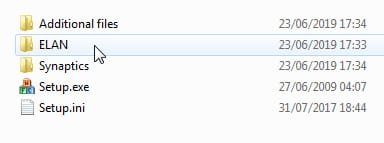
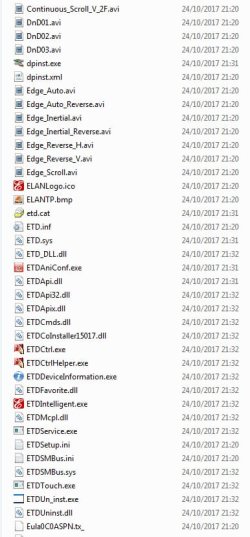
various "ETD???" .sys and .dll files.

yes, of course they are in there as well

2019-06-23_173443.jpg

2019-06-23_173543.jpg
 

My Computers My Computers

  • At a glance

    7 X64i5 84002x8gb 3200mhz
    Computer type
    PC/Desktop
    OS
    7 X64
    CPU
    i5 8400
    Motherboard
    gigabyte b365m ds3h
    Memory
    2x8gb 3200mhz
    Hard Drives
    various
    PSU
    pure power 11 400w cm
    Case
    Coolermaster
    Cooling
    cryorig m9i
  • At a glance

    7x64g54008gb ddr4 2400
    Computer type
    PC/Desktop
    OS
    7x64
    CPU
    g5400
    Motherboard
    ga b365m ds3h
    Memory
    8gb ddr4 2400
    PSU
    xfx pro 450w
Boot this and check for the device id in device manager

16299_x64-v2.iso

Device description: HID-compliant mouse
Device instance path: HID\ELAN469D&COL01\5&69C3712&0&0000

Hardware Ids:
HID\VEN_ELAN&DEV_469D&Col01
HID\ELAN469D&Col01
HID\*ELAN469D&Col01
HID\VID_04F3&UP:0001_U:0002
HID_DEVICE_SYSTEM_MOUSE
HID_DEVICE_UP:0001_U:0002

Class: mouse
Class Guid: {4d36e96f-e325-11ce-bfc1-08002be10318}
Inf name: msmouse.inf
Inf section: HID_Mouse_Inst.NT
Driver date: 6/21/2006
Driver version: 10.0.16299.15
Provider: Microsoft
Matching device Id: HID_DEVICE_SYSTEM_MOUSE
Service: mouhid
Configuration Id: msmouse.inf:HID_DEVICE_SYSTEM_MOUSE,HID_Mouse_Inst.NT
Driver key: {4d36e96f-e325-11ce-bfc1-08002be10318}\0001
Parent: ACPI\ELAN469D\3
Siblings:
HID\ELAN469D&Col02\5&69c3712&0&0001
HID\ELAN469D&Col03\5&69c3712&0&0002
No install class: <true>

Device stack:
\Driver\mouclass
\Driver\mouhid
\Driver\mshidkmdf

Capabilities:
000000A0
CM_DEVCAP_SILENTINSTALL
CM_DEVCAP_SURPRISEREMOVALOK

Status:
0180200A
DN_DRIVER_LOADED
DN_STARTED
DN_DISABLEABLE
DN_NT_ENUMERATOR
DN_NT_DRIVER
 

My Computer My Computer

At a glance

Windows 7 Home Premium x64Intel Core i3-8130U8GBIntel-UHD 620
Computer type
Laptop
Computer Manufacturer/Model Number
Lenovo Ideapad 330S-14IKB
OS
Windows 7 Home Premium x64
CPU
Intel Core i3-8130U
Motherboard
Lenovo IdeaPad 330S-14IKB 81F4018RGE
Memory
8GB
Graphics Card(s)
Intel-UHD 620
Hard Drives
500GB WD, 120GB SSD (M.2 PCIE 2242)
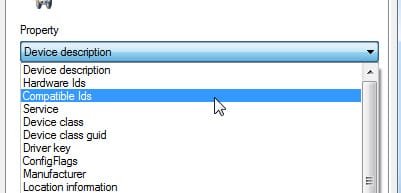
Is there anything showing under Details> Compatible IDs
 

My Computers My Computers

  • At a glance

    7 X64i5 84002x8gb 3200mhz
    Computer type
    PC/Desktop
    OS
    7 X64
    CPU
    i5 8400
    Motherboard
    gigabyte b365m ds3h
    Memory
    2x8gb 3200mhz
    Hard Drives
    various
    PSU
    pure power 11 400w cm
    Case
    Coolermaster
    Cooling
    cryorig m9i
  • At a glance

    7x64g54008gb ddr4 2400
    Computer type
    PC/Desktop
    OS
    7x64
    CPU
    g5400
    Motherboard
    ga b365m ds3h
    Memory
    8gb ddr4 2400
    PSU
    xfx pro 450w
Is there anything showing under Details> Compatible IDs

I think it's the bolded one below but I'll have to boot it again and check.

Hardware Ids:
HID\VEN_ELAN&DEV_469D&Col01
HID\ELAN469D&Col01
HID\*ELAN469D&Col01
HID\VID_04F3&UP:0001_U:0002
HID_DEVICE_SYSTEM_MOUSE
HID_DEVICE_UP:0001_U:0002
 

My Computer My Computer

At a glance

Windows 7 Home Premium x64Intel Core i3-8130U8GBIntel-UHD 620
Computer type
Laptop
Computer Manufacturer/Model Number
Lenovo Ideapad 330S-14IKB
OS
Windows 7 Home Premium x64
CPU
Intel Core i3-8130U
Motherboard
Lenovo IdeaPad 330S-14IKB 81F4018RGE
Memory
8GB
Graphics Card(s)
Intel-UHD 620
Hard Drives
500GB WD, 120GB SSD (M.2 PCIE 2242)
Hardware id and Compatible id are different headings in the device manager dropdown.

2019-06-23_220051.jpg
 

My Computers My Computers

  • At a glance

    7 X64i5 84002x8gb 3200mhz
    Computer type
    PC/Desktop
    OS
    7 X64
    CPU
    i5 8400
    Motherboard
    gigabyte b365m ds3h
    Memory
    2x8gb 3200mhz
    Hard Drives
    various
    PSU
    pure power 11 400w cm
    Case
    Coolermaster
    Cooling
    cryorig m9i
  • At a glance

    7x64g54008gb ddr4 2400
    Computer type
    PC/Desktop
    OS
    7x64
    CPU
    g5400
    Motherboard
    ga b365m ds3h
    Memory
    8gb ddr4 2400
    PSU
    xfx pro 450w
Hardware id and Compatible id are different headings in the device manager dropdown.

Yeah, I know but often the same entry is in both drop down positions. I will check but am in the middle of backing up process :) n have to wait to reboot.
Btw, I noticed in the ETD.inf file of that Lenovo download you posted these entries in the Windows 7 section. It's interesting to see how the different notebooks' (shown after the ; char) devices are identified, the "Kaby Lake" ones closer to mine. It could be these are only to disallow the installer to run on a "unsupported" notebook. Dunno if the ETD#### ID's are used for anything more than a notebook ID. Some of them like the Lenovo 310-IKB and 510-IKB that are in all the sections (win7, win8.1, win10) of the inf file.

%LenovoDeviceDesc% = ETD_LENOVO_Inst, *ETD0666 ; BIUS4 Babel 4A-K (510s-14IKB) Kaby Lake
%LenovoDeviceDesc% = ETD_LENOVO_Inst, *ETD0667 ; BIUS5 Babel 5A-K (510s-15IKB) Kaby Lake
%LenovoDeviceDesc% = ETD_LENOVO_Inst, *ETD0668 ; Ex2(LV8-14、LV9-15)
%LenovoDeviceDesc% = ETD_LENOVO_Inst, *ETD0669 ; 510S-12ISK
%LenovoDeviceDesc% = ETD_LENOVO_Inst, *ETD066A ; Gloria 710 14 Intel Kabylake
%LenovoDeviceDesc% = ETD_LENOVO_Inst, *ETD066B ; Gloria 710 15 Intel Kabylake
%LenovoDeviceDesc% = ETD_LENOVO_Inst, *ETD066C ; 720s(Intel Skylake U)
%LenovoDeviceDesc% = ETD_LENOVO_Inst, *ETD066D ; 310-IKB (Intel Kabylake)
%LenovoDeviceDesc% = ETD_LENOVO_Inst, *ETD066E ; 510-IKB (Intel Kabylake)
%LenovoDeviceDesc% = ETD_LENOVO_Inst, *ETD066F ; 710S-13IKB (Intel Kabylake)
 

My Computer My Computer

At a glance

Windows 7 Home Premium x64Intel Core i3-8130U8GBIntel-UHD 620
Computer type
Laptop
Computer Manufacturer/Model Number
Lenovo Ideapad 330S-14IKB
OS
Windows 7 Home Premium x64
CPU
Intel Core i3-8130U
Motherboard
Lenovo IdeaPad 330S-14IKB 81F4018RGE
Memory
8GB
Graphics Card(s)
Intel-UHD 620
Hard Drives
500GB WD, 120GB SSD (M.2 PCIE 2242)
Back
Top