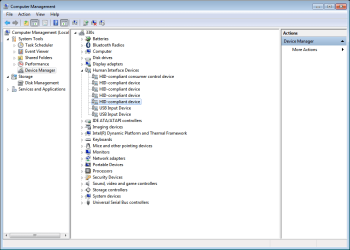
Touchpad and USB does not work after fresh install

Is there anything showing under Details> Compatible IDs

found Compatible ID's under a different section.
I2C HID Device: "ACPI\ELAN469D" Compatible Id: "ACPI\PNP0C50"


[Human Interface Devices]

[HID-compliant touch pad]
[Details: Hardware Ids]
HID\VEN_ELAN&DEV_469D&Col02
HID\ELAN469D&Col02
HID\*ELAN469D&Col02
HID\VID_04F3&UP:000D_U:0005
HID_DEVICE_UP:000D_U:0005
HID_DEVICE
[Details: Compatible Ids:]
<none>

[Matching device Id]
HID_DEVICE_UP:000D_U:0005
[Configuration Id]
input.inf:HID_DEVICE_UP:000D_U:0005,HID_Raw_Inst.NT


[I2C HID Device]
[Details: Hardware Ids:]
ACPI\VEN_ELAN&DEV_469D
ACPI\ELAN469D
*ELAN469D
[Details: Compatible Ids:]
ACPI\PNP0C50
PNP0C50

[Inf name]
hidi2c.inf
[Driver version]
10.0.16299.15
[Configuration Id]
hidi2c.inf:ACPI\PNP0C50,hidi2c_Device.NT
[Driver stack]
\Driver\mshidkmdf
\Driver\hidi2c
\Driver\ACPI


[Microsoft Input Configuration Device]
[Details: Hardware Ids:]
HID\VEN_ELAN&DEV_469D&Col03
HID\ELAN469D&Col03
HID\*ELAN469D&Col03
HID\VID_04F3&UP:000D_U:000E
HID_DEVICE_UP:000D_U:000E
HID_DEVICE
[Details: Compatible Ids:]
<none>


[Mice and other pointing devices]

[HID-compliant-mouse]
[
Details: Hardware Ids:]
<same as the Microsoft Input Configuration Device>
 

My Computer My Computer

Computer type
Laptop
Computer Manufacturer/Model Number
Lenovo Ideapad 330S-14IKB
OS
Windows 7 Home Premium x64
CPU
Intel Core i3-8130U
Motherboard
Lenovo IdeaPad 330S-14IKB 81F4018RGE
Memory
8GB
Graphics Card(s)
Intel-UHD 620
Hard Drives
500GB WD, 120GB SSD (M.2 PCIE 2242)
Attachments

  • Capture.PNG
    Capture.PNG
    24 KB · Views: 1

My Computer My Computer

Computer type
Laptop
Computer Manufacturer/Model Number
Lenovo Ideapad 330S-14IKB
OS
Windows 7 Home Premium x64
CPU
Intel Core i3-8130U
Motherboard
Lenovo IdeaPad 330S-14IKB 81F4018RGE
Memory
8GB
Graphics Card(s)
Intel-UHD 620
Hard Drives
500GB WD, 120GB SSD (M.2 PCIE 2242)

I ran the dpinst.exe as administrator and rebooted but nothing is different.
Is there something special I need to do? disable the existing HID devices first?


Btw, found an older Lenovo Yoga Win8 downgrading to Win7 with the same problem with touchpad with same (Compatible ID see red below): Downgrading from Win 8 and making I2C touchpad work with Windows 7 - Lenovo Community

01-21-2015 10:17 AM

Lenovo Yoga 3 Pro-1370, Intel Core M (CPU: 5Y70)

I have downgraded Lenovo Yoga 3 Pro-1370 to Windows 7-64 and its touchpad (Synaptics) is not detected by Windows at all (and not shown in Device Manager). As far as I understand, the touchpad is connected via I2C interface (not USB or PS2). I2C is handled by Windows 8 at a systemic level and very differently from Windows 7.

Lenovo does not support Windows 7 on Yoga 3 and does not provide Windows 7 drivers.

I tried different Win7 Synaptics drivers from other Lenovo models as well as generic drivers from Synaptics. No success.

What is the likelihood of making the touchpad to work with Windows 7? Will OEM drivers from other manufactures possibly work?

For Windows 8, the Yoga 3 chipset includes ‘Intel Serial I/O Driver’ which (I guess) takes care of I2C.

In Windows 8 Device Manager, there are 3 devices related to the touchpad

Touchpad itself
HID\VEN_SYNA&DEV_2B22&Col01

HID\SYNA2B22&Col01
HID\*SYNA2B22&Col01
HID_DEVICE_SYSTEM_MOUSE
HID_DEVICE_UP:0001_U:0002
HID_DEVICE
Driver: Synaptics


Intel(R) Serial IO I2C Host Controller - 9CE1
Location: on PCI Express Root Complex
Driver: 'iaLPSS_I2C.sys' (Intel)
ACPI\VEN_INT&DEV_3432&REV_0003

ACPI\VEN_INT&DEV_3432
ACPI\INT3432
*INT3432
Enumerator: ACPI
oem7.inf


I2C HID Device (on Intel(R) Serial IO I2C Host Controller - 9CE1)
ACPI\VEN_SYNA&DEV_2B22

ACPI\SYNA2B22
*SYNA2B22
Compatible Ids: ACPI\PNP0C50
HID\SYNA2B22&Col01\5&f4a3470&0&0000
HID\SYNA2B22&Col02\5&f4a3470&0&0001
Parent: ACPI\INT3432\3&11583659&0
Driver: Microsoft
Enumerator: ACPI
hidi2c.inf
 
Last edited:

My Computer My Computer

Computer type
Laptop
Computer Manufacturer/Model Number
Lenovo Ideapad 330S-14IKB
OS
Windows 7 Home Premium x64
CPU
Intel Core i3-8130U
Motherboard
Lenovo IdeaPad 330S-14IKB 81F4018RGE
Memory
8GB
Graphics Card(s)
Intel-UHD 620
Hard Drives
500GB WD, 120GB SSD (M.2 PCIE 2242)
My Computer My Computer

Computer type
Laptop
Computer Manufacturer/Model Number
Lenovo Ideapad 330S-14IKB
OS
Windows 7 Home Premium x64
CPU
Intel Core i3-8130U
Motherboard
Lenovo IdeaPad 330S-14IKB 81F4018RGE
Memory
8GB
Graphics Card(s)
Intel-UHD 620
Hard Drives
500GB WD, 120GB SSD (M.2 PCIE 2242)
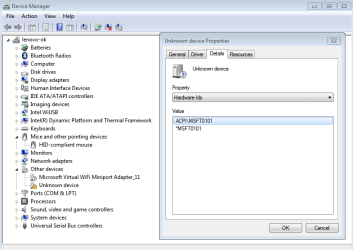
Where'd it come from? Know how I can put my WiFi drivers on it (in it)?


Yes.
1.Copy boot.wim from your usb stick sources folder to your hard drive.
2.Mount boot.wim using dism++.
3.Add the drivers.
4.Save the image.
5.Unmount the image.
Copy the updated boot.wim into the sources folder on your usb stick.

You are best using the win10 wifi drivers from your manufacturers website.

screenshots for using dism++


In addition, before saving the image ( step 4 above) I suggest:

Copy the pecmd.ini file from this zip View attachment SYSTEM32-new-pecmd-ini.zip into the mounted boot.wim Windows\System32 to replace the existing one.

Then place the two files from this zip View attachment Root-of-USB-stick.zip on the root of the usb stick.

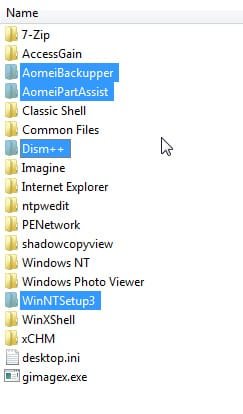
Create a folder on the root of your usb stick called Uprograms.

MOVE these folders from your mounted boot.wim Program Files to Uprograms folder on the usb stick.

move-to-uprograms1.jpg

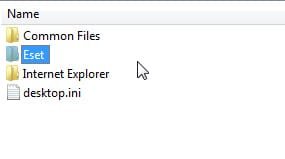
MOVE this folder from the mounted boot.wim Program Files (x86) to Uprograms folder on your usb stick

move-to-uprograms-from-pfx86.jpg

Now save the Image, then unmount the image.
 

My Computers My Computers

System One System Two

  • Computer type
    PC/Desktop
    OS
    7 X64
    CPU
    i5 8400
    Motherboard
    gigabyte b365m ds3h
    Memory
    2x8gb 3200mhz
    Hard Drives
    various
    PSU
    pure power 11 400w cm
    Case
    Coolermaster
    Cooling
    cryorig m9i
  • Computer type
    PC/Desktop
    OS
    7x64
    CPU
    g5400
    Motherboard
    ga b365m ds3h
    Memory
    8gb ddr4 2400
    PSU
    xfx pro 450w
I ran the dpinst.exe as administrator and rebooted but nothing is different.
Is there something special I need to do? disable the existing HID devices first?
SIW2 any idea about the touchpad driver I commented on above?
 

My Computer My Computer

Computer type
Laptop
Computer Manufacturer/Model Number
Lenovo Ideapad 330S-14IKB
OS
Windows 7 Home Premium x64
CPU
Intel Core i3-8130U
Motherboard
Lenovo IdeaPad 330S-14IKB 81F4018RGE
Memory
8GB
Graphics Card(s)
Intel-UHD 620
Hard Drives
500GB WD, 120GB SSD (M.2 PCIE 2242)
Your usb stick layout will look something like this:

usb-stick-layout.jpg


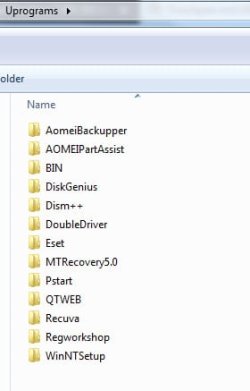
Inside the Uprograms folder will be the folders you just moved ( similar to this)

USB-=stick-Uprograms.jpg
 

My Computers My Computers

System One System Two

  • Computer type
    PC/Desktop
    OS
    7 X64
    CPU
    i5 8400
    Motherboard
    gigabyte b365m ds3h
    Memory
    2x8gb 3200mhz
    Hard Drives
    various
    PSU
    pure power 11 400w cm
    Case
    Coolermaster
    Cooling
    cryorig m9i
  • Computer type
    PC/Desktop
    OS
    7x64
    CPU
    g5400
    Motherboard
    ga b365m ds3h
    Memory
    8gb ddr4 2400
    PSU
    xfx pro 450w
SIW2 any idea about the touchpad driver I commented on above?

You could try running the setup.exe instead of dpinst. And/or you could try uninstalling the current drivers from device manager before running setup.exe. And/or you can try installing the drivers using dism++.
 

My Computers My Computers

System One System Two

  • Computer type
    PC/Desktop
    OS
    7 X64
    CPU
    i5 8400
    Motherboard
    gigabyte b365m ds3h
    Memory
    2x8gb 3200mhz
    Hard Drives
    various
    PSU
    pure power 11 400w cm
    Case
    Coolermaster
    Cooling
    cryorig m9i
  • Computer type
    PC/Desktop
    OS
    7x64
    CPU
    g5400
    Motherboard
    ga b365m ds3h
    Memory
    8gb ddr4 2400
    PSU
    xfx pro 450w
Yes.
1.Copy boot.wim...
...Now save the Image, then unmount the image.

Thanks for that. I did it all and the WiFi driver loads without error in the device manager.
And it sees my router but when I type in my password and click connect it doesn't do anything.
Is some part of the WLAN sofware missing from this live-USB?
 

My Computer My Computer

Computer type
Laptop
Computer Manufacturer/Model Number
Lenovo Ideapad 330S-14IKB
OS
Windows 7 Home Premium x64
CPU
Intel Core i3-8130U
Motherboard
Lenovo IdeaPad 330S-14IKB 81F4018RGE
Memory
8GB
Graphics Card(s)
Intel-UHD 620
Hard Drives
500GB WD, 120GB SSD (M.2 PCIE 2242)
I have a lenovo 330s, 14.. with windows 7, I have installed every driver missing with the help of snappy driver installer origin, but I'm unable to have the touch-pad working, I have tried and read everything without success.

I have only one driver that is missing because it's not recognized ans seem ties to the lack of support of tpm 2.0

any help ?

Dave
 

Attachments

  • screenshot_20.png
    screenshot_20.png
    19.8 KB · Views: 0

My Computer My Computer

Computer type
Laptop
Computer Manufacturer/Model Number
lenovo 330s 14
OS
windows 7
CPU
i5 8250u (real quadcore 8 threads)
Memory
8 gb
Screen Resolution
1920 x 1080
Hard Drives
crucial 1 tb nvme qlc

My Computers My Computers

System One System Two

  • Computer type
    PC/Desktop
    OS
    7 X64
    CPU
    i5 8400
    Motherboard
    gigabyte b365m ds3h
    Memory
    2x8gb 3200mhz
    Hard Drives
    various
    PSU
    pure power 11 400w cm
    Case
    Coolermaster
    Cooling
    cryorig m9i
  • Computer type
    PC/Desktop
    OS
    7x64
    CPU
    g5400
    Motherboard
    ga b365m ds3h
    Memory
    8gb ddr4 2400
    PSU
    xfx pro 450w
Or disable tpm in bios. It is for bitlocker, which most people don't use.
 

My Computers My Computers

System One System Two

  • Computer type
    PC/Desktop
    OS
    7 X64
    CPU
    i5 8400
    Motherboard
    gigabyte b365m ds3h
    Memory
    2x8gb 3200mhz
    Hard Drives
    various
    PSU
    pure power 11 400w cm
    Case
    Coolermaster
    Cooling
    cryorig m9i
  • Computer type
    PC/Desktop
    OS
    7x64
    CPU
    g5400
    Motherboard
    ga b365m ds3h
    Memory
    8gb ddr4 2400
    PSU
    xfx pro 450w
TPM fixed with the hot fix, but touchpad still dead, and no set up into the bios whatsoever

mmmhhh...
 
Last edited:

My Computer My Computer

Computer type
Laptop
Computer Manufacturer/Model Number
lenovo 330s 14
OS
windows 7
CPU
i5 8250u (real quadcore 8 threads)
Memory
8 gb
Screen Resolution
1920 x 1080
Hard Drives
crucial 1 tb nvme qlc

My Computers My Computers

System One System Two

  • Computer type
    PC/Desktop
    OS
    7 X64
    CPU
    i5 8400
    Motherboard
    gigabyte b365m ds3h
    Memory
    2x8gb 3200mhz
    Hard Drives
    various
    PSU
    pure power 11 400w cm
    Case
    Coolermaster
    Cooling
    cryorig m9i
  • Computer type
    PC/Desktop
    OS
    7x64
    CPU
    g5400
    Motherboard
    ga b365m ds3h
    Memory
    8gb ddr4 2400
    PSU
    xfx pro 450w
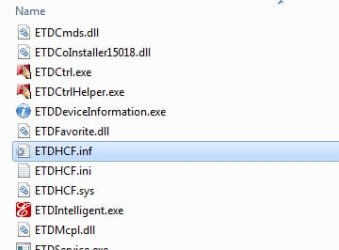
If it doesn't work, get your device id and add it into the ETD.inf and the ETDHCF.inf under the

[ELANMfg.NTamd64] sections


elan.jpg

elan1.jpg
 

My Computers My Computers

System One System Two

  • Computer type
    PC/Desktop
    OS
    7 X64
    CPU
    i5 8400
    Motherboard
    gigabyte b365m ds3h
    Memory
    2x8gb 3200mhz
    Hard Drives
    various
    PSU
    pure power 11 400w cm
    Case
    Coolermaster
    Cooling
    cryorig m9i
  • Computer type
    PC/Desktop
    OS
    7x64
    CPU
    g5400
    Motherboard
    ga b365m ds3h
    Memory
    8gb ddr4 2400
    PSU
    xfx pro 450w

My Computer My Computer

Computer type
Laptop
Computer Manufacturer/Model Number
lenovo 330s 14
OS
windows 7
CPU
i5 8250u (real quadcore 8 threads)
Memory
8 gb
Screen Resolution
1920 x 1080
Hard Drives
crucial 1 tb nvme qlc
i mean, they aren't windows 7 drivers , lenovo never made them
 

My Computer My Computer

Computer type
Laptop
Computer Manufacturer/Model Number
lenovo 330s 14
OS
windows 7
CPU
i5 8250u (real quadcore 8 threads)
Memory
8 gb
Screen Resolution
1920 x 1080
Hard Drives
crucial 1 tb nvme qlc
i mean, they aren't windows 7 drivers , lenovo never made them
I think he's explaining how you can try to make the V330 Win7 driver work on your 330S notebook.
Make sure you're running the latest Lenovo BIOS release.
 

My Computer My Computer

Computer type
Laptop
Computer Manufacturer/Model Number
Lenovo Ideapad 330S-14IKB
OS
Windows 7 Home Premium x64
CPU
Intel Core i3-8130U
Motherboard
Lenovo IdeaPad 330S-14IKB 81F4018RGE
Memory
8GB
Graphics Card(s)
Intel-UHD 620
Hard Drives
500GB WD, 120GB SSD (M.2 PCIE 2242)
I think he's explaining how you can try to make the V330 Win7 driver work on your 330S notebook.
Make sure you're running the latest Lenovo BIOS release.


Correct. Officially there are no win7 drivers for HD630, but the modified inf files work, officially there are no win 7 usb3 drivers for x570 mobo/amd3000 cpu, but the modded inf files work, etc, etc.


no guarantees, but it is worth a try.
 

My Computers My Computers

System One System Two

  • Computer type
    PC/Desktop
    OS
    7 X64
    CPU
    i5 8400
    Motherboard
    gigabyte b365m ds3h
    Memory
    2x8gb 3200mhz
    Hard Drives
    various
    PSU
    pure power 11 400w cm
    Case
    Coolermaster
    Cooling
    cryorig m9i
  • Computer type
    PC/Desktop
    OS
    7x64
    CPU
    g5400
    Motherboard
    ga b365m ds3h
    Memory
    8gb ddr4 2400
    PSU
    xfx pro 450w
Back
Top