Touchpad problem

ivodivo

New member
Local time
2:32 AM
Messages
10
Location
Bulgaria
Toshiba Satellite Pro A200, Windows 7, 32 bit - touchpad driver installed does not work! I installed the original driver of Synaptics for Windows 7 but did not work ... Anybody know what's going on with my touchpad, and below its Windows Vista works properly??:shock:
 

My Computer

Computer Manufacturer/Model Number
Toshiba Satellite Pro A200
OS
Windows 7
CPU
Intel Core 2 Duo CPU ,T7100
What is the complete model number? Toshiba lists three A200s.
 

My Computer

Computer Manufacturer/Model Number
Dell XPS 15 L502x
OS
Windows 7 Ultimate x64 SP1
CPU
Core i7-2670QM
Memory
8GB DDR3 PC3-10600
Graphics Card(s)
Intel HD Graphics 3000 + GeForce GT 540M
Screen Resolution
1920x1080
Hard Drives
1TB 5400RPM Seagate

My Computer

Computer Manufacturer/Model Number
Toshiba Satellite Pro A200
OS
Windows 7
CPU
Intel Core 2 Duo CPU ,T7100
Is this a US bought computer? Toshiba lists A200-EZ2204X and -EX2205X. (Looked at the Satellite first, not the Satellite Pro - that's why my first post said three computers.)
 

My Computer

Computer Manufacturer/Model Number
Dell XPS 15 L502x
OS
Windows 7 Ultimate x64 SP1
CPU
Core i7-2670QM
Memory
8GB DDR3 PC3-10600
Graphics Card(s)
Intel HD Graphics 3000 + GeForce GT 540M
Screen Resolution
1920x1080
Hard Drives
1TB 5400RPM Seagate
Is this a US bought computer? Toshiba lists A200-EZ2204X and -EX2205X. (Looked at the Satellite first, not the Satellite Pro - that's why my first post said three computers.)

No, I live in Europe. Sticker on the bottom has the following inscription: TOSHIBA EUROPIE GMBH ... Model No: PSAE7E-00J00CG3, SERIAL No: 97196236K
 

My Computer

Computer Manufacturer/Model Number
Toshiba Satellite Pro A200
OS
Windows 7
CPU
Intel Core 2 Duo CPU ,T7100
Maybe you have the Alps touchpad and not the Synaptics. Have you tried using the Vista Alps driver from the Toshiba website?
 

My Computer

Computer Manufacturer/Model Number
Dell XPS 15 L502x
OS
Windows 7 Ultimate x64 SP1
CPU
Core i7-2670QM
Memory
8GB DDR3 PC3-10600
Graphics Card(s)
Intel HD Graphics 3000 + GeForce GT 540M
Screen Resolution
1920x1080
Hard Drives
1TB 5400RPM Seagate
Sample driver for the Alps touchpad does not want to install and strained itself after I managed to install it but then refused to work both touchpad and external mouse! Then uninstall the Alps touchpad driver successfully and external mouse worked properly again! Before I migrate to Windows 7, I had installed Windows Vista and there my touchpad worked properly and I was with the Synaptics driver. Sample driver for Vista from the Toshiba website for my model - failed! I downloaded the latest driver from Synaptics site for Windows 7, which scans and installs the appropriate driver for my hardware, but the result is again - does not work the touchpad ... Device Manager in Windows 7 found no problem and shows that the touchpad is installed and working correctly ... What joke since I can not use the touchpad:)))
 

My Computer

Computer Manufacturer/Model Number
Toshiba Satellite Pro A200
OS
Windows 7
CPU
Intel Core 2 Duo CPU ,T7100
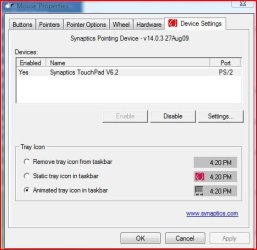
In mouse properties highlight the Synaptics and disable it, reboot and enable it, I am not sure whether this will work but worth a try.
 

Attachments

  • Capture50.jpg
    Capture50.jpg
    34.4 KB · Views: 64

My Computer

Computer Manufacturer/Model Number
Acer Aspire 5750
OS
Windows 7 Home Premium 64bit
CPU
Intel Core i3-2310M
Motherboard
Acer OEM
Memory
8GB
Graphics Card(s)
Intel HD3000
Screen Resolution
1366x768
Hard Drives
320GB Toshiba
In mouse properties highlight the Synaptics and disable it, reboot and enable it, I am not sure whether this will work but worth a try.


I tried so, but after the restart and enable it - still does not work: (
 

My Computer

Computer Manufacturer/Model Number
Toshiba Satellite Pro A200
OS
Windows 7
CPU
Intel Core 2 Duo CPU ,T7100
Solution

Hy,

I had the same problem, I have a A200-1CR, euro built also. Every time I made a driver update on toshiba site they tried to install the synaptics driver but the laptop works only with Alps driver. My advice:

- Download the Alps driver for toshiba from download center
- Go to Control Panel->Add remove programs and uninstall anything with synaptics.
- restart
- install the alps driver
- restart
- if stii doesn't work, go to mouse properties and on Advanced tab, enter Advanced touchpad settings and enable vertical scrooling!

Hope it helps solve the problem!

Cheers mate.
 

My Computer

OS
Windows 7 32Bits
Memory
2GB DDR2
Hy,

I had the same problem, I have a A200-1CR, euro built also. Every time I made a driver update on toshiba site they tried to install the synaptics driver but the laptop works only with Alps driver. My advice:

- Download the Alps driver for toshiba from download center
- Go to Control Panel->Add remove programs and uninstall anything with synaptics.
- restart
- install the alps driver
- restart
- if stii doesn't work, go to mouse properties and on Advanced tab, enter Advanced touchpad settings and enable vertical scrooling!

Hope it helps solve the problem!

Cheers mate.

can you upload this driver please ? cause I can't find it anywhere !
 

My Computer

OS
Windows 7 64 bit

My Computer

Computer Manufacturer/Model Number
Self Built
OS
Windows 7 ultimate 64 bit / XP Home sp3
CPU
intel Core 2 Duo E8400 3.0ghz
Motherboard
Asus P5ND bios 1401
Memory
8 gigs 1066 OCZ Fata1ty
Graphics Card(s)
EVGA GTX 580 Call of Duty Black Ops Edition
Sound Card
Creative Soundblaster Audigy 2zs
Monitor(s) Displays
Asus 24in LCD's 2MS X2
Screen Resolution
1920x1080p @60Hz
Hard Drives
WD Caviar 500 Black/ WD Caviar 200 Blue
PSU
OCZ 700W GameXtreme
Case
NZXT Apollo
Cooling
Corsair H50 CPU/120mm x3 /60mm x2 /Corsair Dominator Ram
Keyboard
Logitech Bluetooth Wireless MX5000
Mouse
Logitech Bluetooth Wireless MX1000
Internet Speed
Download 19.83 Upload 0.97
Other Info
Logitech Z2300 Speakers/ Bose Noise Cancelling Headphones/Avermedia PCI-e Hybrid TV Bravo/Epson NX415 all in one/ 4 Port Powered USB Hub/ LG 10x Bluray Burner /TSST Corp DVDRW External
Did that solution finally work? Because I have got a very similar problem, which I could not solve that way. :cry:
 

My Computer

Computer Manufacturer/Model Number
Toshiba Satellite A210-11T (PSAEGE)
OS
Windows 7 Ultimate 32bit
Back
Top