
Troubleshooting with System Update Readiness Tool
Symptoms
Sometimes while using Readiness Tool,the tool stuck or it return following errors
-Readiness Tool is already installed
-error 0x8024800C
and other errors
Sometimes Readiness Tool require about 30 minutes to finish it's job,so please wait patiently before you apply below advices
STEP I
1.Open task manager (Start>>Search>>taskmgr) and kill CheckSur.exe process.
2.Delete any hexadecimal folder on your partition
examples:
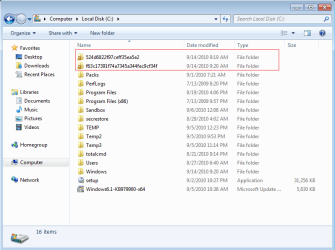
Fig 1.Circled red line you can see some hexadecimal folders.Such kind of folders are remains from updates -not only from Readiness Tool
You may have hexadecimal folders on other partition not necessarily on C:
and these folders:
C:\Windows\CheckSur
C:\Windows\Temp\CheckSur
3.Open regedit (Start>>Search>>regedit) and delete these keys:
HKLM\Software\Microsoft\Windows\CurrentVersion\CheckSur
and
HKLM\Software\Microsoft\Windows\CurrentVersion\
Component Based Servicing\ApplicabilityEvaluationCache\
Package_for_KB947821~31bf3856ad364e35~xxx~~x.x.x.x

Fig 2.Dependce of system architecture and tool version the Package_for_KB947821 key have slightly different form
When everything is done,try again run Readiness Tool to diagnose your main problem with your OS.
STEP II -IF STEP I DOESN'T HELP....
1.Make sure you have enough free space on your disk.
2.Defrag your registry by using any good tool,I recommend registry defrag tool from Tune Up Utilities (unfortunately this soft is commrcial),from freeware tools I recommend QuickSys regDefrag
3.Uninstall all 3p security software
STEP III - IF NOTHING HELP...
Make sure you don't have any other system or hardware issues.If you have not empty C:\Windows\Minidump or C:\Windows\Memory.dmp then please analyze these files.Issues with RAM,hdd may also cause problem with running Readiness Tool and with installing normal updates.
Troubleshooting with System Update Readiness Tool
Information
Symptoms
Sometimes while using Readiness Tool,the tool stuck or it return following errors
-Readiness Tool is already installed
-error 0x8024800C
and other errors
Note
Sometimes Readiness Tool require about 30 minutes to finish it's job,so please wait patiently before you apply below advices
STEP I
1.Open task manager (Start>>Search>>taskmgr) and kill CheckSur.exe process.
2.Delete any hexadecimal folder on your partition
examples:
Fig 1.Circled red line you can see some hexadecimal folders.Such kind of folders are remains from updates -not only from Readiness Tool
You may have hexadecimal folders on other partition not necessarily on C:
and these folders:
C:\Windows\CheckSur
C:\Windows\Temp\CheckSur
3.Open regedit (Start>>Search>>regedit) and delete these keys:
HKLM\Software\Microsoft\Windows\CurrentVersion\CheckSur
and
HKLM\Software\Microsoft\Windows\CurrentVersion\
Component Based Servicing\ApplicabilityEvaluationCache\
Package_for_KB947821~31bf3856ad364e35~xxx~~x.x.x.x
Fig 2.Dependce of system architecture and tool version the Package_for_KB947821 key have slightly different form
Warning
- HKLM=HKEY_LOCALE_MACHINE
- to delete Package_for_KB947821... first you have takewnership this -useful lecture CLICK
When everything is done,try again run Readiness Tool to diagnose your main problem with your OS.
STEP II -IF STEP I DOESN'T HELP....
1.Make sure you have enough free space on your disk.
2.Defrag your registry by using any good tool,I recommend registry defrag tool from Tune Up Utilities (unfortunately this soft is commrcial),from freeware tools I recommend QuickSys regDefrag
3.Uninstall all 3p security software
STEP III - IF NOTHING HELP...
Make sure you don't have any other system or hardware issues.If you have not empty C:\Windows\Minidump or C:\Windows\Memory.dmp then please analyze these files.Issues with RAM,hdd may also cause problem with running Readiness Tool and with installing normal updates.
Last edited:

