The simplest way to put my problem is that in DOS, I could solve it with "sys C:\" then FDisk to make sure the drive I want is Boot, Active and System.
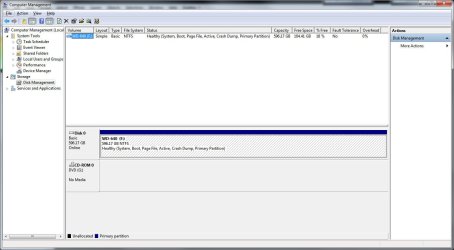
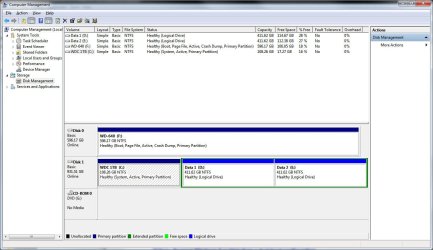
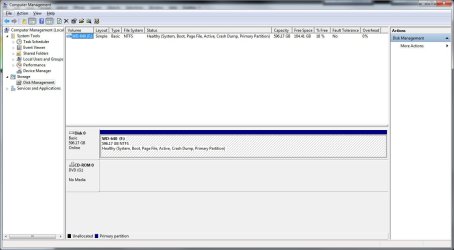
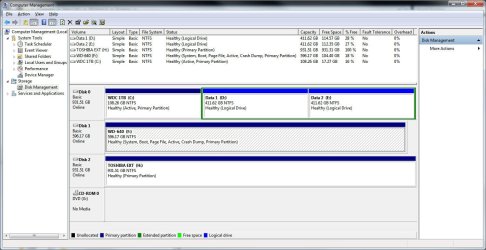
Some years ago, I set up a 1 TB SATA drive to dual boot XP Pro 32 bit and 64 bit. Lots of things changed since then but drives C:, D: and E: are still there. I bought Win7 Pro the day M$ made it available, installed it on a new 640 gig SATA drive and somehow set up dual boot with 'older OS' (XP Pro 64, no longer runs), Win 7 Pro RC and the full retail Win 7 Pro 64. Right, the only functioning OS in the boot menu is Win 7 Pro 64 retail. I discovered yesterday morning that the new 640 gig Win 7 drive is NOT the system drive. The old 1 TB drive did not spin up and the boot menu returned the error "ntldr not found, press CTRL+ALT+DELETE to reboot." DUH.
Back in DOS days gaming, I had to know how to do all this stuff manually. You sure didn't get any help from Windows! But I haven't had to even install an OS often enough to remember much about the process in years.
So, is there a simple, easy way to make my Win 7 installation drive the System drive? Then can I do away with the multi boot menu and just boot straight into Win 7 Pro like I want to?
Thanks all!
Some years ago, I set up a 1 TB SATA drive to dual boot XP Pro 32 bit and 64 bit. Lots of things changed since then but drives C:, D: and E: are still there. I bought Win7 Pro the day M$ made it available, installed it on a new 640 gig SATA drive and somehow set up dual boot with 'older OS' (XP Pro 64, no longer runs), Win 7 Pro RC and the full retail Win 7 Pro 64. Right, the only functioning OS in the boot menu is Win 7 Pro 64 retail. I discovered yesterday morning that the new 640 gig Win 7 drive is NOT the system drive. The old 1 TB drive did not spin up and the boot menu returned the error "ntldr not found, press CTRL+ALT+DELETE to reboot." DUH.
Back in DOS days gaming, I had to know how to do all this stuff manually. You sure didn't get any help from Windows! But I haven't had to even install an OS often enough to remember much about the process in years.
So, is there a simple, easy way to make my Win 7 installation drive the System drive? Then can I do away with the multi boot menu and just boot straight into Win 7 Pro like I want to?
Thanks all!
My Computer
At a glance
Win 7 Pro 64 bitIntel Quadcore Q95508 GB DDR2BFG 8800GTX OC 768
- Computer Manufacturer/Model Number
- Self Build
- OS
- Win 7 Pro 64 bit
- CPU
- Intel Quadcore Q9550
- Motherboard
- Gigabyte EP45-DS3L
- Memory
- 8 GB DDR2
- Graphics Card(s)
- BFG 8800GTX OC 768
- Sound Card
- onboard RealTek HD
- Monitor(s) Displays
- Samsung 245T and Samsung 930B
- Hard Drives
- WD Caviar Black 640G (Win 7 installed, single partition)
WD Green 1 TB (XP Pro x64 non functioning, SYSTEM)
- PSU
- Cooler Master eXtreme Poser Plus 600W
- Case
- Cheap No-Name
- Cooling
- Air only