I have 2 Win7 computers, newly built, and a vista maching that is about 2 years old. I retired a couple of XP computers and I moved many of my files into a folder I placed on a partition on the vista computer.
I am trying to access a folder on the vista computer that has some of these files in it, it is a partition on a seperate drive from the /:C drive. Here is what has me pulling my hair out. I can access the folder I want on one win7 computer, but not the other. Of course the one I cannot get access with is the one I want to use to access the folder. I get a message:
Windows cannot access \\computername\foldername
You do not have permission to access \\computername\foldername. Contact your administrator to request access.
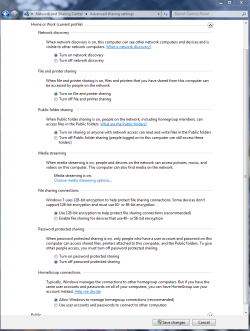
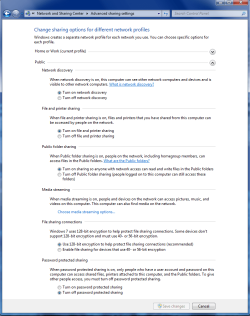
I have turned on file sharing, printer sharing, remote access, I have ensured that win7 rig is part of MSHOME workgroup (I dont think it was a problem on the other win7 computer, or I set it up correctly when I installed it the first time) I have turned off guest user account, I am the only user, I made sure user names and passwords were the same for all three computers. As far as I can tell, I am logged in as Dave with an administrator user account on all three computers.
Here is the dig though, in computer management console on vista computer, under system tools/ shared folders/sessions the computer I cannot get access with has guest listed as the user, not Dave.

I have gone through all three computers, and cannot locate anything except that issue with the guest user being different, and I cannot seem to figure out how to fix it. I have rebooted all of them several times after making some changes to no avail.
About the only thing I have not tried is moving the network cable to a different jack on my router.
I am at a loss as to how my second win7 build ended up with different settings then my first one. Can anyone offer me any suggestions?
I am trying to access a folder on the vista computer that has some of these files in it, it is a partition on a seperate drive from the /:C drive. Here is what has me pulling my hair out. I can access the folder I want on one win7 computer, but not the other. Of course the one I cannot get access with is the one I want to use to access the folder. I get a message:
Windows cannot access \\computername\foldername
You do not have permission to access \\computername\foldername. Contact your administrator to request access.
I have turned on file sharing, printer sharing, remote access, I have ensured that win7 rig is part of MSHOME workgroup (I dont think it was a problem on the other win7 computer, or I set it up correctly when I installed it the first time) I have turned off guest user account, I am the only user, I made sure user names and passwords were the same for all three computers. As far as I can tell, I am logged in as Dave with an administrator user account on all three computers.
Here is the dig though, in computer management console on vista computer, under system tools/ shared folders/sessions the computer I cannot get access with has guest listed as the user, not Dave.
I have gone through all three computers, and cannot locate anything except that issue with the guest user being different, and I cannot seem to figure out how to fix it. I have rebooted all of them several times after making some changes to no avail.
About the only thing I have not tried is moving the network cable to a different jack on my router.
I am at a loss as to how my second win7 build ended up with different settings then my first one. Can anyone offer me any suggestions?
My Computer
- OS
- Win7 64 bit X2, Vista 32bit X1
- CPU
- AMD Phenom II X4 965BE
- Motherboard
- ASUS M4A79XTD EVO
- Memory
- 4gb OCZ DDR1600
- Graphics Card(s)
- ATI HD5770 in crossfire
- Sound Card
- onboard
- Monitor(s) Displays
- Samsung Syncmaster2693
- Hard Drives
- WD Caviar 500gb SATA
- PSU
- Corsair 650W
- Case
- Antec nine hundred two
- Cooling
- Stock AMD cooler