Ultimate Windows Tweaker

youllbelost

Goofy Goosebumped
Power User
Local time
10:21 PM
Messages
389
Location
India
Ultimate Windows Tweaker is a freeware Tweak UI Utility for tweaking and optimizing Windows Vista, 32-bit & 64-bit. It can simply be downloaded and used as a portable application to customize your Windows Vista to meet your requirements. With judicious tweaking, It can make your system faster, more stable, and more secure with just a few mouse clicks. The tweaker detects whether you have IE 7 or IE 8 installed and accordingly offers you the relevant tweaks only. This Tweaker was released at the Microsoft South Asia MVP Meet 2008.

Download it Here
 

My Computer

Computer Manufacturer/Model Number
AMD _(Assembled)_
OS
Dual Booting Windows 7 64-Bit Ultimate Edition and Fedora 16.
CPU
AMD Phenom X4 925
Motherboard
MSI 785g-E53
Memory
4gb DDR3 G.skill RipJaws
Graphics Card(s)
ATI Radeon HD 6770
Sound Card
Realtek
Monitor(s) Displays
Dell IN2020M LED
Screen Resolution
1600*900 20"
Hard Drives
Seagate 500 Gibs
External 320 Gb Western Digital(Got Glitchy)
PSU
Cooler Master
Case
Cooler Master
Cooling
Cooler Master
Keyboard
Logitech K100
Mouse
Razor Death Adder v2 3500 dPi (Razer Goliathus Pad)
Internet Speed
Back to college Internet with Cyberroam X|
Ultimate Windows Tweaker is a freeware Tweak UI Utility for tweaking and optimizing Windows Vista, 32-bit & 64-bit. It can simply be downloaded and used as a portable application to customize your Windows Vista to meet your requirements. With judicious tweaking, It can make your system faster, more stable, and more secure with just a few mouse clicks. The tweaker detects whether you have IE 7 or IE 8 installed and accordingly offers you the relevant tweaks only. This Tweaker was released at the Microsoft South Asia MVP Meet 2008.

Download it Here

somebody knows if when u lauch this program,you notice taht there are some options allready selected,taht options are the default settings taht the prograamm suggest u to use or are the settings that the program detected of your computer/os?
That is importamt to know if i just selct one new option i will get just that option activated/deactivated or all options selected (not by me)?
Thank's
Helen
 

My Computer

Computer type
PC/Desktop
OS
windos 7 ultimate 32 bit
When you start the program it shows the state of the options as they currently exist in your computer. Some of these options already exist in the standard control panel but are shown in different form.

I am not particularly impressed by this program. On the plus side it does provide useful options that are not available in the control panel. But I really must take exception to some items in the "System Performance" settings and some others. They expose to novices settings that have serious system wide implications with virtually no explanation. Some of these are not easily understood and have been misrepresented in Internet articles for years. These settings are hidden away in the registry to protect them from modification by people who have no understanding of the implications of setting them.

One setting, "Forcibly unload DLLs from memory" is almost universally misrepresented. Fortunately this setting has not been supported since the early days of Windows 2000. That kind of thing gives a bad impression of this program.
 

My Computer

Computer type
PC/Desktop
Computer Manufacturer/Model Number
HP
OS
Windows 7 Pro 64 bit
CPU
Xeon W3520
Memory
8 GB
Graphics Card(s)
Nvidia Geforce 210
Thank's for your reply and sorry for my English but is not my mother Language.Ok i agree with you but just neade a few thing and maybe olso a stupid thing (i what to put the pic of my persian cat dead (sig) and maybe i will be able to sort out about trouble i have on displaying the file "big" olso if i set to view details files it b does not keep in memory the settings ,maybe usend the tweak i will be able to do that.
Thank' s again
Take care
Helen
:cool:
 

My Computer

Computer type
PC/Desktop
OS
windos 7 ultimate 32 bit
Personally I'm not a fan of these types of programs. For the reasons helen2 enunciated and the fact that they have the potential to seriously screw up your machine. I recommend learning a little about your machine and Windows itself and do the "tweeks" you need/want yourself. You'll end up with a more responsive machine AND the knowledge gained from experience.

We have many fine tutorials here at the forums, written by some very knowledgeable people, if "tweeking" is what you want to do follow these steps and you'll gain both knowledge AND experience! Just click on the link :

http://www.sevenforums.com/tutorials/11728-optimize-windows-7-a.html
 

My Computer

Computer type
Laptop
Computer Manufacturer/Model Number
MSI GE72VR Apache Pro-416
OS
Windows 10x64 Build 1709
CPU
Intel i7 7700HQ Kaby Lake
Motherboard
Micro-Star Intl. MS-179B (U3C1)
Memory
16 GB DDR4 @2400
Graphics Card(s)
Nvidia Geforce GTX 1060
Screen Resolution
1920x1080 120Hz
Hard Drives
256 GB Nvme M.2 SSD

1TB HDD@7200
Cooling
Cooler Blast 4
Keyboard
Steel Series
Antivirus
Bit Defender Free
Browser
Edge
Personally I'm not a fan of these types of programs. For the reasons helen2 enunciated and the fact that they have the potential to seriously screw up your machine. I recommend learning a little about your machine and Windows itself and do the "tweeks" you need/want yourself. You'll end up with a more responsive machine AND the knowledge gained from experience.

We have many fine tutorials here at the forums, written by some very knowledgeable people, if "tweeking" is what you want to do follow these steps and you'll gain both knowledge AND experience! Just click on the link :

http://www.sevenforums.com/tutorials/11728-optimize-windows-7-a.html

Thank's fr the link i have allready seen something similar but as i wrote before there are only two things that i'm loocking forward. nd they are not listed.
Take care
Helen
:cool:
 

My Computer

Computer type
PC/Desktop
OS
windos 7 ultimate 32 bit
What things are you looking for?
Easy question but...i will try to explaain me.By default Windows 7 (and not only win 7) let u see folder and big icons files,I have any times changed the way to see the files on view dwtails files but...after a short time i see back the big icons as if widnows 7 is not ble to keep in memory this setting.I found may help request ariund the net and many solutin taht was good for somebody but wrong fir Others.Have u got any clue?
Danke
Helen
:cool:
 

My Computer

Computer type
PC/Desktop
OS
windos 7 ultimate 32 bit
Example.jpg

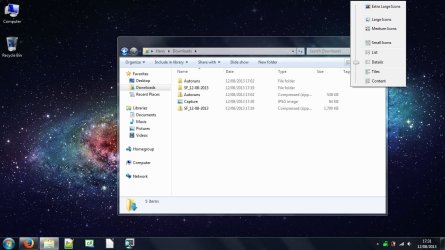
You want to change the folder and file view for Windows Explorer?
 

My Computer

Computer type
Laptop
[
You want to change the folder and file view for Windows Explorer?[/QUOTE]
Yes exately.I have as i have done with Windows xp nd Vista but on Windows 7 nothing i'm not ablke to set anyhthing.
Danke
Helen
:cool:
 

My Computer

Computer type
PC/Desktop
OS
windos 7 ultimate 32 bit
Just change it to what view you want, using the screenshot to help you :)
 

My Computer

Computer type
Laptop
Just change it to what view you want, using the screenshot to help you :)
I know it :p but that dosent work :cry:In some post they say taht there is a limit of files on other web site no
Take care
Helen
:cool:
 

My Computer

Computer type
PC/Desktop
OS
windos 7 ultimate 32 bit
Back
Top