Unable to Boot to Windows or Safe Mode Following Chkdsk

heldmacm

New member
Local time
2:13 PM
Messages
8
Hello,


I have a custom built PC (about five years old) that I intended to upgrade from Windows 7 to Windows 10 over the holidays when I have some time off work. This PC has been running extremely sluggish the past couple months to the point it was unusable at times, and my daily virus scans (with Avast) and on demand malware scans (Malwarebytes) didn't report anything that would account for the slowness. My plan was to install Windows 10 fresh on my HDD next month when time permitted after I backed up all files to my external drive. However, since the PC performance had been so bad recently, I scheduled a disk check (within My Computer) to run at the next boot. This disk check took literally four days to complete, and while I knew that wasn't normal, I didn't want to end it early. I never saw it complete, but the last time I saw it, it was approximately 95% complete, so I'm assuming it finished.


Anyway, ever since I ran the disk check, the PC won't boot to Windows. It hangs for an extremely long time on the Windows logo / Starting Windows screen most of the time, though one time it did progress to a black screen with the Windows cursor, though nothing else loaded. Usually, it ends in the PC restarting. Afterwards, the Startup Repair utility will attempt a repair, though it hasn't solved anything as if yet (it's still running right now).


The things I've tried include booting to Safe Mode, which results in a reboot loop, and starting in Safe Mode with networking. The ends up hanging while loading files with the most recent file shown being one belonging to Avast. Unfortunately, while I have the Windows 10 files downloaded to the HDD, I hadn't yet burned them to a disk or thumb drive, so I couldn't install Windows 10 right now even if I wanted to. Additionally, while I did periodic backups to an external hard drive, there are definitely some files I'd like to back up before clearing the HDD, if at all possible. Assuming the root issue is a hardware issue, I suspect it's most likely the hard drive, though I haven't run any tests to confirm that. This is the only PC I have, so I don't have a way to burn any DVDs or thumb drives without access to a friend or family member's computer. The two CDs I have that could possibly help are my Windows 7 Home Premium OEM System Builder Pack and a Hirens CD boot disk I burned several years ago.


In light of these issues, I could really use some assistance getting to a point I can back up files from my HDD (assuming it's still possible) and then, determine if one or more hardware parts are failing. If so, and the HDD is part of it, I'll then be in the market for a new one (I'd be fine with a SSD this time), as well as any other defective hardware parts, such as memory. Can anyone please offer some advice on how I can back up any salvagable files from this HDD (preferably without having to burn files from someone else's PC, if possible), offer any suggestions as to how I can get and suggest how I can determine if I have a hardware problem? Figuring out a way to boot to Windows 7 to both back up the files and burn the Windows 10 ISO would obviously be ideal, but if that's not possible, I then need some advice on where to go from here. Thanks in advance.
 

My Computer My Computer

At a glance

Windows 7 Home Premium 64bitRadeon HD 7700
Computer type
PC/Desktop
Computer Manufacturer/Model Number
custom build
OS
Windows 7 Home Premium 64bit
Graphics Card(s)
Radeon HD 7700
Antivirus
Avast
Have you got a win7 install disk that you can boot and choose repair
 

My Computer My Computer

At a glance

win 8 32 bit
Computer type
PC/Desktop
OS
win 8 32 bit
Yes, I have the Windows 7 Home Premium OEM Systems Builder disk that I purchased. It's what I used to install the OS on this PC. Is that what you'd suggest doing first, or would that jeopardize recovery of the files I need to back up, if possible?
 

My Computer My Computer

At a glance

Windows 7 Home Premium 64bitRadeon HD 7700
Computer type
PC/Desktop
Computer Manufacturer/Model Number
custom build
OS
Windows 7 Home Premium 64bit
Graphics Card(s)
Radeon HD 7700
Antivirus
Avast
I would say that your disk is dying, if not already dead.

First thing to do is to try to save your data to an external disk.

On another computer download Windows Bootable Rescue Disk. Burn a DVD or make a boot able USB flash drive. If you don't know how to make a boot able USB flash drive, please ask.

Boot from the rescue disk and copy all your data to an external disk.
After saving your data, do another check disk. Open a CMD window and type:
chkdsk x: /f (replace x: with the disk letter of your HDD)
If it finds bad clusters. bad blocks, bad sectors.... you must replace the drive.
Replace with a SSD.
I've been using Crucial-bx500. They are fast and cheap.
 

My Computers My Computers

  • At a glance

    Windows 7 HP 64i5 6600K - 800MHz to 4200MHz4+4G GSkill DDR4 3000IG - Intel 530
    Computer type
    PC/Desktop
    Computer Manufacturer/Model Number
    custom build
    OS
    Windows 7 HP 64
    CPU
    i5 6600K - 800MHz to 4200MHz
    Motherboard
    GA-Z170-HD3P
    Memory
    4+4G GSkill DDR4 3000
    Graphics Card(s)
    IG - Intel 530
    Monitor(s) Displays
    Samsung 226BW
    Screen Resolution
    1680x1050
    Hard Drives
    (1) -1 SM951 – 128GB M.2 AHCI PCIe SSD drive for Windows 7 and Lubuntu
    (2) -1 WD SATA 3 - 1T for Data
    (3) -1 WD SATA 3 - 1T for backup
    PSU
    Thermaltake 450W TR2 gold
    Keyboard
    Old and good Chicony mechanical keyboard
    Mouse
    Logitech mX performance - 9 buttons (had to disable some)
    Internet Speed
    500Mb/s
    Browser
    Firefox 64
    Other Info
    TinyWall firewall
  • At a glance

    Windows 7 Proi7-4500U 800MHz to 3.0GHz(4+4)G DDR3 1600IG intel 4400 + NVIDIA GeForce GT 745M
    Computer type
    Laptop
    System Manufacturer/Model Number
    Asus Q550LF
    OS
    Windows 7 Pro
    CPU
    i7-4500U 800MHz to 3.0GHz
    Motherboard
    Asus Q550LF
    Memory
    (4+4)G DDR3 1600
    Graphics Card(s)
    IG intel 4400 + NVIDIA GeForce GT 745M
    Sound Card
    Realtek
    Monitor(s) Displays
    LG Display LP156WF4-SPH1
    Screen Resolution
    1920 x 1080
    Hard Drives
    BX500 120G SSD for Windows and programs +
    1T HDD for data
    Internet Speed
    500 Mb/s
    Browser
    Firefox
    Other Info
    TinyWall firewall
Thanks for the feedback, everyone. I was able to find a utility on the Hirens Boot CD that allows files to be copied, so I'm copying files from my HDD to my external drive now. It's extremely slow but otherwise appears to be working. Also, I found a utility on the CD that allows an ISO file to be burned to a DVD. Since I had the Windows 10 ISO already downloaded, I should be able to burn it to a DVD once the HDD is backed up.

Assuming those activities both complete, does it make sense to test the HDD, and if it's not bad, install Windows 10 from the DVD? I suspect it is bad, and if that's the case, I could order a new SSD, install it and then use the DVD to install to the new SSD. The latter would also give me access to copy over anything from my current HDD in the (likely) event I miss something. Let me know if you see any problem with that approach or if there's an easier way. Thanks again.
 
Last edited:

My Computer My Computer

At a glance

Windows 7 Home Premium 64bitRadeon HD 7700
Computer type
PC/Desktop
Computer Manufacturer/Model Number
custom build
OS
Windows 7 Home Premium 64bit
Graphics Card(s)
Radeon HD 7700
Antivirus
Avast
It makes sense to test the HD - something like the wd tool WinDlg which can be run from winpe - it might already be on your hiren thing.

If you haven't got it already: View attachment WinDlg.zip

Possibly the HD is ok, and the problem was a lot of filesystem errors, but I wouldn't bet on it. Check it first.
 

My Computers My Computers

  • At a glance

    7 X64i5 84002x8gb 3200mhz
    Computer type
    PC/Desktop
    OS
    7 X64
    CPU
    i5 8400
    Motherboard
    gigabyte b365m ds3h
    Memory
    2x8gb 3200mhz
    Hard Drives
    various
    PSU
    pure power 11 400w cm
    Case
    Coolermaster
    Cooling
    cryorig m9i
  • At a glance

    7x64g54008gb ddr4 2400
    Computer type
    PC/Desktop
    OS
    7x64
    CPU
    g5400
    Motherboard
    ga b365m ds3h
    Memory
    8gb ddr4 2400
    PSU
    xfx pro 450w
Every 6 months you have a new version of Win 10 so the DVD will have a short life.
If Windows 10 ISO already downloaded is on the problematic disk, DON'T use it as some files may have been corrupted. Download it again on another computer.
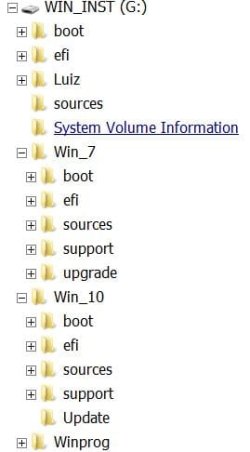
If you make the Rescue Drive on a 8G USB flash drive you don't need to burn a DVD. You can mount the Win 10 iso then copy all files and folders to a folder on the USB flash drive.
You boot from the Rescue Drive then run setup.exe
Mine has Win 7 and Win 10 installations files.

Why do you want to downgrade to Win 10? In my opinion, Win 7 is still a better OS (more stable)
 

Attachments

  • Win_Install.JPG
    Win_Install.JPG
    21.4 KB · Views: 8

My Computers My Computers

  • At a glance

    Windows 7 HP 64i5 6600K - 800MHz to 4200MHz4+4G GSkill DDR4 3000IG - Intel 530
    Computer type
    PC/Desktop
    Computer Manufacturer/Model Number
    custom build
    OS
    Windows 7 HP 64
    CPU
    i5 6600K - 800MHz to 4200MHz
    Motherboard
    GA-Z170-HD3P
    Memory
    4+4G GSkill DDR4 3000
    Graphics Card(s)
    IG - Intel 530
    Monitor(s) Displays
    Samsung 226BW
    Screen Resolution
    1680x1050
    Hard Drives
    (1) -1 SM951 – 128GB M.2 AHCI PCIe SSD drive for Windows 7 and Lubuntu
    (2) -1 WD SATA 3 - 1T for Data
    (3) -1 WD SATA 3 - 1T for backup
    PSU
    Thermaltake 450W TR2 gold
    Keyboard
    Old and good Chicony mechanical keyboard
    Mouse
    Logitech mX performance - 9 buttons (had to disable some)
    Internet Speed
    500Mb/s
    Browser
    Firefox 64
    Other Info
    TinyWall firewall
  • At a glance

    Windows 7 Proi7-4500U 800MHz to 3.0GHz(4+4)G DDR3 1600IG intel 4400 + NVIDIA GeForce GT 745M
    Computer type
    Laptop
    System Manufacturer/Model Number
    Asus Q550LF
    OS
    Windows 7 Pro
    CPU
    i7-4500U 800MHz to 3.0GHz
    Motherboard
    Asus Q550LF
    Memory
    (4+4)G DDR3 1600
    Graphics Card(s)
    IG intel 4400 + NVIDIA GeForce GT 745M
    Sound Card
    Realtek
    Monitor(s) Displays
    LG Display LP156WF4-SPH1
    Screen Resolution
    1920 x 1080
    Hard Drives
    BX500 120G SSD for Windows and programs +
    1T HDD for data
    Internet Speed
    500 Mb/s
    Browser
    Firefox
    Other Info
    TinyWall firewall
Every 6 months you have a new version of Win 10 so the DVD will have a short life.
If Windows 10 ISO already downloaded is on the problematic disk, DON'T use it as some files may have been corrupted. Download it again on another computer.
If you make the Rescue Drive on a 8G USB flash drive you don't need to burn a DVD. You can mount the Win 10 iso then copy all files and folders to a folder on the USB flash drive.
You boot from the Rescue Drive then run setup.exe
Mine has Win 7 and Win 10 installations files.

Why do you want to downgrade to Win 10? In my opinion, Win 7 is still a better OS (more stable)


That's good advice. To answer your question, I don't want to upgrade, but I believe MS is stopping Windows 7 updates in January 2020.
 

My Computer My Computer

At a glance

Windows 7 Home Premium 64bitRadeon HD 7700
Computer type
PC/Desktop
Computer Manufacturer/Model Number
custom build
OS
Windows 7 Home Premium 64bit
Graphics Card(s)
Radeon HD 7700
Antivirus
Avast
There has been so many threads about M$ end of Win 7 support.
Nothing will change. You will be able to use Win 7 the way you do it today for many years.

You wrote: "I could order a new SSD, install it and then use the DVD to install to the new SSD. The latter would also give me access to copy over anything from my current HDD in the (likely) event I miss something".

Is the problematic drive a SSD? How big is the current drive?
 

My Computers My Computers

  • At a glance

    Windows 7 HP 64i5 6600K - 800MHz to 4200MHz4+4G GSkill DDR4 3000IG - Intel 530
    Computer type
    PC/Desktop
    Computer Manufacturer/Model Number
    custom build
    OS
    Windows 7 HP 64
    CPU
    i5 6600K - 800MHz to 4200MHz
    Motherboard
    GA-Z170-HD3P
    Memory
    4+4G GSkill DDR4 3000
    Graphics Card(s)
    IG - Intel 530
    Monitor(s) Displays
    Samsung 226BW
    Screen Resolution
    1680x1050
    Hard Drives
    (1) -1 SM951 – 128GB M.2 AHCI PCIe SSD drive for Windows 7 and Lubuntu
    (2) -1 WD SATA 3 - 1T for Data
    (3) -1 WD SATA 3 - 1T for backup
    PSU
    Thermaltake 450W TR2 gold
    Keyboard
    Old and good Chicony mechanical keyboard
    Mouse
    Logitech mX performance - 9 buttons (had to disable some)
    Internet Speed
    500Mb/s
    Browser
    Firefox 64
    Other Info
    TinyWall firewall
  • At a glance

    Windows 7 Proi7-4500U 800MHz to 3.0GHz(4+4)G DDR3 1600IG intel 4400 + NVIDIA GeForce GT 745M
    Computer type
    Laptop
    System Manufacturer/Model Number
    Asus Q550LF
    OS
    Windows 7 Pro
    CPU
    i7-4500U 800MHz to 3.0GHz
    Motherboard
    Asus Q550LF
    Memory
    (4+4)G DDR3 1600
    Graphics Card(s)
    IG intel 4400 + NVIDIA GeForce GT 745M
    Sound Card
    Realtek
    Monitor(s) Displays
    LG Display LP156WF4-SPH1
    Screen Resolution
    1920 x 1080
    Hard Drives
    BX500 120G SSD for Windows and programs +
    1T HDD for data
    Internet Speed
    500 Mb/s
    Browser
    Firefox
    Other Info
    TinyWall firewall
As long as there is continued support from antivirus and browsers - two or three years at least, I expect. In addition Win7 pos ready will still get MS updates for at least another year after January.
 

My Computers My Computers

  • At a glance

    7 X64i5 84002x8gb 3200mhz
    Computer type
    PC/Desktop
    OS
    7 X64
    CPU
    i5 8400
    Motherboard
    gigabyte b365m ds3h
    Memory
    2x8gb 3200mhz
    Hard Drives
    various
    PSU
    pure power 11 400w cm
    Case
    Coolermaster
    Cooling
    cryorig m9i
  • At a glance

    7x64g54008gb ddr4 2400
    Computer type
    PC/Desktop
    OS
    7x64
    CPU
    g5400
    Motherboard
    ga b365m ds3h
    Memory
    8gb ddr4 2400
    PSU
    xfx pro 450w
There has been so many threads about M$ end of Win 7 support.
Nothing will change. You will be able to use Win 7 the way you do it today for many years.

You wrote: "I could order a new SSD, install it and then use the DVD to install to the new SSD. The latter would also give me access to copy over anything from my current HDD in the (likely) event I miss something".

Is the problematic drive a SSD? How big is the current drive?


No, the (suspected) problematic drive isn't an SSD. I believe it's 1 TB and is roughly half full. I wasn't aware of the suspicion about continued Windows 7 support, so that is interesting.
 

My Computer My Computer

At a glance

Windows 7 Home Premium 64bitRadeon HD 7700
Computer type
PC/Desktop
Computer Manufacturer/Model Number
custom build
OS
Windows 7 Home Premium 64bit
Graphics Card(s)
Radeon HD 7700
Antivirus
Avast
Back
Top