Unable to play back and front jacks at the same time.

Audronius

New member
Local time
6:34 AM
Messages
1
Hello,

My problem is that I can't seem to make my speakers (plugged into back panel) and my headphones (plugged into front panel) play normally at the same time.

I'm using the latest Realtek HD Audio manager on Win 7.

I managed to do this thing on Vista before, but no I somehow can't. The reason I want this is to simply be able to mute the device I don't use and switch between speakers and headphones without any plugging.

I hope somebody can help.
 

My Computer My Computer

At a glance

Windows 7
OS
Windows 7
I also would like an answer to this.

I have dual monitors each with an audio input for their speakers.
The obvious solution is to get a Y cable and hook them both to the rear output but if you don't have one, then we should be allowed to use the front output at the same time as the rear.

How do you enable this, I've fiddled inside Realteks manager but nothing helps.
 

My Computer My Computer

At a glance

32bit(Windows 7 & Ubuntu 10.10 , Windows 7 & ...2.8GHz Intel Xeon W3530 , 2.40GHz Intel Core2...3GB EEC , 4 GBNVIDIA QuadroFX 380 , Radeon X1650
Computer Manufacturer/Model Number
HP Z400 Workstation , Acer Aspire E700
OS
32bit(Windows 7 & Ubuntu 10.10 , Windows 7 & Windows XP)
CPU
2.8GHz Intel Xeon W3530 , 2.40GHz Intel Core2 Quad
Motherboard
Acer FG965M, HP 0B4C D
Memory
3GB EEC , 4 GB
Graphics Card(s)
NVIDIA QuadroFX 380 , Radeon X1650
Sound Card
Realtek High Definition Audio
Monitor(s) Displays
HP 2009m x2
Screen Resolution
1600x900
Hard Drives
HDS728080PLA380 [Hard drive] (82.35 GB) -- drive 1, s/n PFDB20S5T56VTJ, rev PF2OA60A, SMART Status: Healthy

SAMSUNG HD160JJ/P [Hard drive] (160.00 GB) -- drive 3, s/n S0DFJ1NLB53172, rev ZM100-34, SMART Status: Healthy

ST3500320AS [Hard drive]
Case
IBM EServer XSeries 205
Hello,

My problem is that I can't seem to make my speakers (plugged into back panel) and my headphones (plugged into front panel) play normally at the same time.

I hope somebody can help.

I'm only guessing so bear with me.

Make sure both front and rear jacks have headphones/speakers plugged into them.
Right click on the Microsoft speaker icon in the task bar, select playback devices.

Right click anywhere inside the playback devices window, "show disabled and show disconnected devices" should be selected.

What is your default playback device, Speakers?

If the headphones show up, try making them the default device and see if that changes anything, if not, change it back.

Also:
There are some other options in the Realtek control panel, try right clicking over the front panel jacks and see if you get a "Connector Retasking" dialog.

Try clicking on the small folder icon in the upper right quadrant.

Ap
 

My Computer My Computer

At a glance

Windows 7 Home PremiumIntel Core 2 Duo @ 3.00gHz4 GBATI Radeon HD 2600 XT
Computer Manufacturer/Model Number
Assembled in my workshop
OS
Windows 7 Home Premium
CPU
Intel Core 2 Duo @ 3.00gHz
Motherboard
Gigabyte GA-P35-S3G
Memory
4 GB
Graphics Card(s)
ATI Radeon HD 2600 XT
Sound Card
RME 24/96 Card, Realtek Internal Audio PreSonus FireStudio
Monitor(s) Displays
Acer 1917 (x2)
Screen Resolution
1280 x 1024 on both monitors
Hard Drives
Three 250GB Seagate SATA Barracuda 7200rpm
PSU
Rosewill 500-watt
Case
Rosewill mid-tower
Cooling
Noctua NH-U9B (CPU), PwrSupply fan + single large case Fan
Keyboard
Macally w/2/USB ports.
Mouse
Trackman Wheel
Other Info
Event 20/20 bas studio monitors, Yamaha sub.
Rackmount Korg/Roland/Yamaha synthesizers,
Cubase MIDI/audio recording. Sony Soundforge audio/mastering software. CD Architect Mastering. RME & Presonus audio interfaces.
I can't seem to make my speakers (plugged into back panel) and my headphones (plugged into front panel) play normally at the same time.
I hope somebody can help.

I solved the problem with different output to the front panel
on my ASUS P5P43TD.

All you need to do is to go to Onboard Devices Configuration in BIOS
settings and change Front Panel Type from HD Audio to AC97

After restarting you have now Tab called HD Audio 2nd output
in Realtek Audio Manager (but keep Speakers tab as default output).

If you can't see that Tab, go to Device Advanced Settings and change it to
Make Front and Rear output devices playback two different
audio streams simultaneously
.

If you choose the other option in Advanced, you will have only
one stream but from both outputs - front and rear (Yes! It's possible!)

And now you have multiple choice for output in popular applications
such as audio- and video-players, where you can change output to
Speakers or to HD Audio 2nd output.
As a result my Foobar2000 (audio) and MPC (video) are playing
onto different outputs as I'm typing this post.

For some games you can choose the output too (Black Ops) in game
Sound options but in some of them you cannot (MW II)
BTW if you don't set anything as Default in Realtek Audio Manager
you won't have any sound in MW II and some other games.
 

My Computer My Computer

At a glance

Windows 7DualCore Intel Core 2 Duo, 2933 MHz4GB DDR3 PC3-12800 1600MHz (Patriot)ATI Radeon HD 4870 512MB GDDR5
OS
Windows 7
CPU
DualCore Intel Core 2 Duo, 2933 MHz
Motherboard
Asus P5P43TD
Memory
4GB DDR3 PC3-12800 1600MHz (Patriot)
Graphics Card(s)
ATI Radeon HD 4870 512MB GDDR5
Sound Card
Intel 82801JB ICH10, ATI RV770/790
Monitor(s) Displays
ViewSonic VX2240w
Hard Drives
ST3320613AS (320 GB, 7200 RPM, SATA-II)
PIONEER DVD-RW DVR-108
PSU
Antec Truepower New 750W
Case
Lian-Li PC-K8
Thx au22ru it helped. I'm now able to hear simultaneous in rear speakers and front headphones.
Some details: I have GIBABYTE P67A-UD4 motherboard, and in my case I have no option to switch HD Audio to AC97 in BIOS but in software by clicking the yellow folder icon under Realteck HD Audio Manager under "Device Advanced Settings" (tooltip "Connector settings") and then select "Disable front panel jack detection".
And then as strange as it sounds you need to choose "Device Advanced Settings"->"Mute the rear output device, when..."
Speakers is the default device.
 

My Computer My Computer

At a glance

Windows 7 Ultimate x64
OS
Windows 7 Ultimate x64
I solved the problem with different output to the front panel
on my ASUS P5P43TD.

All you need to do is to go to Onboard Devices Configuration in BIOS
settings and change Front Panel Type from HD Audio to AC97

After restarting you have now Tab called HD Audio 2nd output
in Realtek Audio Manager (but keep Speakers tab as default output).

If you can't see that Tab, go to Device Advanced Settings and change it to
Make Front and Rear output devices playback two different
audio streams simultaneously
.

If you choose the other option in Advanced, you will have only
one stream but from both outputs - front and rear (Yes! It's possible!)

And now you have multiple choice for output in popular applications
such as audio- and video-players, where you can change output to
Speakers or to HD Audio 2nd output.
As a result my Foobar2000 (audio) and MPC (video) are playing
onto different outputs as I'm typing this post.

For some games you can choose the output too (Black Ops) in game
Sound options but in some of them you cannot (MW II)
BTW if you don't set anything as Default in Realtek Audio Manager
you won't have any sound in MW II and some other games.

Ok

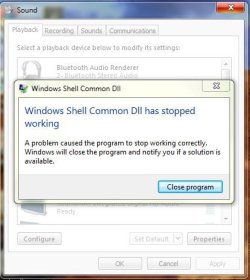
So I tryed this with me Asus P5QE and with the Windows 7 drivers that Asus had for me, Installed Drivers only and let windows 7 Do what it wanted, Now I get sound out of the front socket (yay) but the sound control panel now crashed and closes. So I rolled back thinking that was fun. (NOT)

ASUS P5Q3 Deluxe/WiFi-AP @n... This ls the link.

It would be great to have 2 sounds coming out of 2 places so I can use the PC while the little one is watching Charlie and Lola (kids).

Not essential but would be nice. Its not a bother if it cant be diddid.
 

Attachments

  • Capture.JPG
    Capture.JPG
    36.1 KB · Views: 55

My Computer My Computer

At a glance

Windows 7 Home PreQ8200 Intell 2.333DDR3 1333 4gigAti HD4870
Computer Manufacturer/Model Number
Home Build.
OS
Windows 7 Home Pre
CPU
Q8200 Intell 2.333
Motherboard
Asus P5Q3 Delux
Memory
DDR3 1333 4gig
Graphics Card(s)
Ati HD4870
Sound Card
Onboard Soundmax. 7.1
Monitor(s) Displays
1, 20" Samsung
Screen Resolution
1600/900
PSU
Good enough
Case
Le Shark
Cooling
FAN FAN FAN FAN, Thermaltake Minitype 90 with speed fan 4.
Keyboard
Standard, Gaming Wolfking
Mouse
Cm-storm-inferno-wired-gaming-mouse
Internet Speed
Sky Crappy upto 20meg I get a whapping 5.8mbs.
Hi sorry to resurrect very old thread but this thread had the most useful information to my problem, but alas mine has a new twist.

I have an EVGA x79 Classified with the ALC898 codec that I upgraded to sometime back.
With the latest Realtek drivers 7378 and serveral of the latest drivers before it I no longer have the Option" "Make Front and Rear output devices playback two different audio streams simultaneously."
nor the other option that is typically in the same menu box: mute rear
I only have the options:
Tie up input jacks
Separate input jacks
under Advanced Device Settings

The solution in this thread to switch the Bios option does not exist to switch from HD to AC97 the EVGA classified and or the ALC898 does not allow this option(I'm thinking its EVGA bios because its the first time I've run into this). I noticed when I click Advanced Devices Settings after a reboot the menu pops up to the size of 4 menu options that I'm accustomed too listed above but then quickly resizes itself to display only the 2 options I'm left with. I would very much like the Front Panel Headphone out and Rear Green Jack to appear as 2 different Devices in Playback Devices in Windows Audio. I realize if you click disable front panel jack detection you can get the Front and Rear to output the same audio but I would like to use the "Make Front and Rear output devices playback two different audio streams simultaneously." I have used in the past. If anyone has more info on this subject it comes up in google searches and is the best/closes answer to this problem so it seems like a fitting place to have the new answer and or resurrect this pertinent thread.
 

My Computer My Computer

At a glance

Florida
Computer type
PC/Desktop
OS
Florida
Realtek does not allow you to playback with speakers plugged on front and back simultaneously.
 

My Computer My Computer

At a glance

Windows 7 Home Premium 64-BITAMD A8 7200P8GB 1600mhzRadeon R5 (APU) + Radeon R5 M230 2GB Dual Gra...
Computer type
PC/Desktop
Computer Manufacturer/Model Number
ASUS X550ZE
OS
Windows 7 Home Premium 64-BIT
CPU
AMD A8 7200P
Motherboard
N/A
Memory
8GB 1600mhz
Graphics Card(s)
Radeon R5 (APU) + Radeon R5 M230 2GB Dual Graphics
Sound Card
Realtek ALC269 with SonicMaster
Monitor(s) Displays
Laptop Display
Screen Resolution
1920 x 1080 @60hz
Hard Drives
WDC WD50 00LPVX-80V0TT0 (500GB)
PSU
Laptop Charger
Mouse
ARMAGGEDON TEXTRON SCORPION 7
Internet Speed
100 mbps DOWN / 50 mbps UP
Antivirus
Windows Defender
Browser
Mozzila FireFox, Valve Steam in-game internet browser
I'm sure it does because I've done it for years and this thread shows the options and if you understand what they are saying they are telling u it is possible and showing you the various options to set it up. Thank you for a response but I don't think u are familiar with this..... like I said I have a new wrinkle not covered above.
 

My Computer My Computer

At a glance

Florida
Computer type
PC/Desktop
OS
Florida
CloldFlo if you have a new wrinkle and problem I suggest starting a new thread so others will see the thread.
 

My Computer My Computer

At a glance

Windows 10 Pro. 64/ version 1709 Windows 7 Pr...Intel i7-6800K @ 4.3Corsair Platinum 16 gig @2400EVGA GTX 1070 OC
Computer type
PC/Desktop
Computer Manufacturer/Model Number
Home made Desktop
OS
Windows 10 Pro. 64/ version 1709 Windows 7 Pro/64
CPU
Intel i7-6800K @ 4.3
Motherboard
ASUS X-99 Deluxe II
Memory
Corsair Platinum 16 gig @2400
Graphics Card(s)
EVGA GTX 1070 OC
Monitor(s) Displays
Asus 27" LED LCD/VE278Q
Screen Resolution
1920-1080 or 1280-720 HDMI
Hard Drives
INTEL SSD 730-240 Gb Sata 3.0/
PSU
EVGA Platium 1200W
Case
Phanteks Luxe Tempered Glass 8 fans/ one radiator
Cooling
XSPC/ Water Cooled CPU
Keyboard
Das 4 Professional
Mouse
Logitech M705/MX Anywhere 2-S
Internet Speed
100 mbits
Antivirus
Microsoft Security Essentials/ Malwarebytes Premium 3.0/ SAS
Browser
I.E. 11 default/Firefox/ ISP Time Warner Cable/Spectrum
Other Info
LG BluRay Burner/
Sound system-KLipsch-THX/
Icy Dock ssd Hot Swap bays.
Seems like allot of time spent re explaining things. I am not an internet noob and I also understand forum regs hate resurrected threads and tend to kill them until they are locked but at least I tried. Really it belongs here. I have searched many pages on google and this is the most accurate one I have found over months. Really the answer is best placed on this thread because this is where the search engines will steer others. I know this is counter to the forum reg unwritten law that resurrecting threads is a sin but I fully disagree with it. Really if you don't understand the problem(because you didnt even take the time to read the thread or understand it) or you don't have a solution. I don't see why you are posting(or we know what else this is called I'm trying to remain pleasant).
 

My Computer My Computer

At a glance

Florida
Computer type
PC/Desktop
OS
Florida
I have no idea where you are getting your thoughts.
You can post in old threads as much as you want as far as I know.

If you have a problem with your computer you will get better attention if a new thread is started.
Many members won't bother looking in old threads.

No I don't know what it's called other than trying to get you to start a new thread if you need help.
Please let me know what it is called.
 

My Computer My Computer

At a glance

Windows 10 Pro. 64/ version 1709 Windows 7 Pr...Intel i7-6800K @ 4.3Corsair Platinum 16 gig @2400EVGA GTX 1070 OC
Computer type
PC/Desktop
Computer Manufacturer/Model Number
Home made Desktop
OS
Windows 10 Pro. 64/ version 1709 Windows 7 Pro/64
CPU
Intel i7-6800K @ 4.3
Motherboard
ASUS X-99 Deluxe II
Memory
Corsair Platinum 16 gig @2400
Graphics Card(s)
EVGA GTX 1070 OC
Monitor(s) Displays
Asus 27" LED LCD/VE278Q
Screen Resolution
1920-1080 or 1280-720 HDMI
Hard Drives
INTEL SSD 730-240 Gb Sata 3.0/
PSU
EVGA Platium 1200W
Case
Phanteks Luxe Tempered Glass 8 fans/ one radiator
Cooling
XSPC/ Water Cooled CPU
Keyboard
Das 4 Professional
Mouse
Logitech M705/MX Anywhere 2-S
Internet Speed
100 mbits
Antivirus
Microsoft Security Essentials/ Malwarebytes Premium 3.0/ SAS
Browser
I.E. 11 default/Firefox/ ISP Time Warner Cable/Spectrum
Other Info
LG BluRay Burner/
Sound system-KLipsch-THX/
Icy Dock ssd Hot Swap bays.
Back
Top