I see the screen shots. Looks like your posts made it. Maybe it took the web site a bit to update.
The first huge problem I see is that all your folders have been created off the ROOT of C huge no-no. You should move all those folders to your "Documents" folder. If you need them to be off a ROOT drive, consider adding another hard drive or partitioning yours so you can move all those folders to that drive. You will need to set the correct permissions on that drive BEFORE you move the data. I would set the permissions first and then do a COPY and PASTE.
It is very possible that you are having problems with that folder because it is off the ROOT of C.
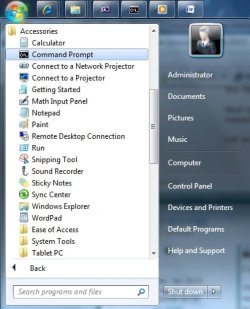
I would open a CMD Prompt (us Run as Administrator) and exit all programs. Then use the Task Manager to end "explorer.exe". If you see more than one end them all. Then end any winword.exe, outlook.exe, notepad.exe, photoshop.exe etc. Make sure you DO NOT end cmd.exe.
In the CMD prompt window on the C drive type ren "Temporary Photos - new" TempPhotos
and press the enter key. Type dir TempP* and press the enter key. You should see your renamed folder.
If do not see the new folder then something other then your software and the windows shell is keeping the folder locked. If it worked hopefully the folder is not locked.
Next type explorer.exe and press the enter key to restart the shell. In Windows Explorer look for the newly named folder. Now see if you can copy, move or rename it.
Let us know.