Unable to uninstall Internet Explorer 11

TaraLo

New member
Local time
12:10 AM
Messages
3
Hi,

I was hoping someone knowledgeable would be able to help me with a problem i am experiencing. I work in a IT department looking after a rather large enterprise environment. I have a particular user that has managed to upgrade his browser to IE11.

Whilst IE11 functions fine it is not compatible with a number or applications we use in the company, and i therefore need to get the browser back down to IE9.

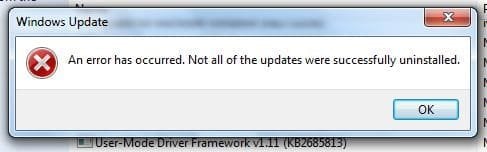
I have tried all manor of things from manual uninstall, uninstall from the command line, removing IE11 security updates from the command line, i have also been logged in as local admin and domain admin and for the life of me cannot get is uninstalled, when uninstalling manually all that happens is " An error has occured. Not all of the updates were successfully installed"

When using the command line i don't get errors but equally it also doesn't uninstall the application.

Any help would be greatly appreciated :)

Thanks in advance
 

My Computer My Computer

Computer type
PC/Desktop
OS
Windows 7 x64 Enterprise
You can run IE11 in compatibility mode. Have you tried that?

Also, I don't know if what you have done already has modified the normal rollback process for Internet Explorer because it is a "feature" that is updated through Windows Update.

To rollback to a previous version, you simply unchecked IE11 on the Feature window from the Programs and Features control panel. (The features are accessed in the left pane.)
 

Attachments

  • IE11 - Feature.JPG
    IE11 - Feature.JPG
    53.3 KB · Views: 54

My Computer My Computer

Computer type
PC/Desktop
Computer Manufacturer/Model Number
Built 2/11/2011
OS
Windows 7 Pro-x64
CPU
i7-2600 3.4GHz - 3.8GHz Turbo
Motherboard
Intel DH67BL-B3
Memory
8Gb - 2x4GB, Muskin 991770 PC3-1333
Graphics Card(s)
Integrated Intel HD 2000
Sound Card
Integrated Intel 10.1 HD, RealTek ALC892
Monitor(s) Displays
Asus LCD VH222H, Haier HL24XSL2a
Screen Resolution
1920x1080, 1920x1080
Hard Drives
Crucial SSD C300-128Gb,
Western Digital WD5002AALX - 500Gb,
Western Digital WD7501AALS - 750Gb
PSU
Seasonic 650W 80+ Gold Modular
Case
Rosewill Defender
Cooling
Stock CPU, Four 120mm case fans, PCH fan added
Keyboard
Logitech EX100 Y-RBH94 Wireless
Mouse
Logitech EX100 M-RCE95 Wireless
Internet Speed
3.0/1.5 Mbs
Antivirus
Microsoft Security Essentials
Browser
Microsoft Internet Explorer 11
Other Info
Antec Veris Premier-Multimedia IR Station,
Cyber Accoustics-3602 Speakers,
AFT XM-5U Card Reader,
Hauppauge TV-HVR-2250,
Sony LX300 USB Turntable
unfortunately running in compatibility mode is not an option, as they are finance applications.

with regards to the rollback feature im not entirely sure what you are referring to?

if you mean turning windows features on or off then i have attempted the uninstallation with windows 11 turned off to no avail...
 

My Computer My Computer

Computer type
PC/Desktop
OS
Windows 7 x64 Enterprise
Does IE-11 show up in Installed Updates?
 

My Computer My Computer

Computer type
PC/Desktop
Computer Manufacturer/Model Number
Built 2/11/2011
OS
Windows 7 Pro-x64
CPU
i7-2600 3.4GHz - 3.8GHz Turbo
Motherboard
Intel DH67BL-B3
Memory
8Gb - 2x4GB, Muskin 991770 PC3-1333
Graphics Card(s)
Integrated Intel HD 2000
Sound Card
Integrated Intel 10.1 HD, RealTek ALC892
Monitor(s) Displays
Asus LCD VH222H, Haier HL24XSL2a
Screen Resolution
1920x1080, 1920x1080
Hard Drives
Crucial SSD C300-128Gb,
Western Digital WD5002AALX - 500Gb,
Western Digital WD7501AALS - 750Gb
PSU
Seasonic 650W 80+ Gold Modular
Case
Rosewill Defender
Cooling
Stock CPU, Four 120mm case fans, PCH fan added
Keyboard
Logitech EX100 Y-RBH94 Wireless
Mouse
Logitech EX100 M-RCE95 Wireless
Internet Speed
3.0/1.5 Mbs
Antivirus
Microsoft Security Essentials
Browser
Microsoft Internet Explorer 11
Other Info
Antec Veris Premier-Multimedia IR Station,
Cyber Accoustics-3602 Speakers,
AFT XM-5U Card Reader,
Hauppauge TV-HVR-2250,
Sony LX300 USB Turntable
unfortunately running in compatibility mode is not an option, as they are finance applications.

with regards to the rollback feature im not entirely sure what you are referring to?

if you mean turning windows features on or off then i have attempted the uninstallation with windows 11 turned off to no avail...

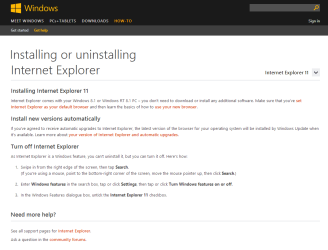
Don't complicate matters it's very easy once you realize IE is part of the Operating System & getting rid of it is different to uninstalling a normal program.
A simple search on Google " uninstall IE 11 " would have shown you how , remember problem Google it
Installing or uninstalling Internet Explorer - Windows Help
 

Attachments

  • Very easy IE11 removal.PNG
    Very easy IE11 removal.PNG
    21.7 KB · Views: 2

My Computer My Computer

Computer type
PC/Desktop
Computer Manufacturer/Model Number
self build
OS
Windows 7 Ultimate 64 bit
CPU
Intel Core i7 4770K overclocked to 4.7GHz Quad Core Haswell
Motherboard
Asus Z87 Pro (Socket 1150) ATX Motherboard
Memory
16GB Team Group Vulcan Gold 2133MHz
Graphics Card(s)
ATI Radeon HD 7880 Series Display adapter
Monitor(s) Displays
NEC LCD2690WUXi2
Screen Resolution
26" 1920 x 1200
Hard Drives
Samsung 500GB SSD 840 EVO SATA 6Gb/s
Samsung 250GB SSD 840 EVO SATA 6Gb/s
PSU
Corsair AX760 Platinum
Case
Cooler Master HAF X Gaming Tower
Cooling
XSPC RayStorm 750 RS360 Water cooling
Mouse
Razer Death Adder left handed
Internet Speed
126Mb download 11.5Mb up
Antivirus
Avast free
Browser
Opera
Other Info
Main Browser is Opera
Favorite software Adobe Lightroom & Photoshop
best plugins Nik software
Firewall : Private firewall 7
simply go to programs and features in control panel from there you click on installed update, then scroll or search for Internet Explorer 11 and then click uninstall and let it uninstall, restart your computer and you will be back to IE10
 

My Computer My Computer

Computer type
Laptop
Computer Manufacturer/Model Number
Toshiba Satellite C655-S5547
OS
Windows 7 Pro 64bit
CPU
Intel(R) Core(TM) i3-2350M CPU @ 2.30 GHZ
Memory
4.00 GB
Graphics Card(s)
Intel HD Graphiics
Sound Card
Conexant HD Audio
Monitor(s) Displays
Generic PnP Monitor
Screen Resolution
1366 x 768 x 32 bits (4294967296 colors) @ 60 Hz
Hard Drives
TI106321W0B(C:) 450GB
Keyboard
Standard PS/2 Keyboard
Mouse
Synaptics Pointing Device
Internet Speed
51.68 mb/s download and 12.08 mb/s upload as of 6/24/15
Antivirus
Webroot Secure Anywhere
Browser
IE11, Mozilla Firefox 41.1.01, and Google Chrome if I must
Hi,

I have not been over complicating the issue, i have already tried all of the above to no avail. Every time i try uninstalling using the 'installed updates' within programs and features i get this message:

IE11.JPG

I have also run this command:

"FORFILES /P %WINDIR%\servicing\Packages /M Microsoft-Windows-InternetExplorer-*11.*.mum /c "cmd /c echo Uninstalling package @fname && start /w pkgmgr /up:@fname /quiet /norestart"

Which completes with no errors but still does not rectify the issue.

I am rather stuck.

Thanks
Tara
 

My Computer My Computer

Computer type
PC/Desktop
OS
Windows 7 x64 Enterprise
Administrative rights

Please make sure that you have administrative rights, and logged in under the local admin, If you don't it can cause the same exact error
 

My Computer My Computer

Computer type
PC/Desktop
Computer Manufacturer/Model Number
Custom built
OS
WIN 7 ULT
CPU
AMD 8350
Motherboard
ASUS Sabertooth
Memory
GSkill Tritan 2666
Graphics Card(s)
(2x) 280x XFX
Hard Drives
Samsung 830 and 840
Hitachi 1TB
Seagate 1TB

My Computer My Computer

Computer type
Laptop
Computer Manufacturer/Model Number
HP Pavilion dv6-6c10us
OS
x64 (6.3.9600) Win8.1 Pro & soon dual boot x64 (6.1.7601) Win7_SP1 HomePrem
CPU
AMD A6-3420M APU with Radeon(tm) HD Graphics
Motherboard
Hewlett-Packard 1805
Memory
6.00 GB
Graphics Card(s)
AMD Radeon(TM) HD 6520G
Sound Card
(1) AMD High Definition Audio Device (2) IDT High Definiti
Monitor(s) Displays
HP W2072a 20" LCD (1600 x 900) @ 60 Hz
Screen Resolution
1366 x 768 x 32 bits (4294967296 colors) @ 60 Hz
Hard Drives
ST640LM0 00 HM641JI SATA Disk Device
Keyboard
Logitech k520 wireless KB
Mouse
Logitech m320 wireless mouse (bundled with KB)
Internet Speed
15/5 | 54 MB Wireless 'n'
Antivirus
Realtime: Defender or Avast | On-demand: Malwarebytes, ESET
Browser
IE 11 on Win8, IE 10 on win 7
Other Info
Media: [Gimp, Audacity, VLC] || Comm: [WEmail 2012, Skype] || Productivity: [OpenOffice,| Textpad] || Utils: [Sysinternals, cCleaner, Speccy, Defraggler]
Back
Top