
Unallocated Space?

FredeGail

It's full of stars
Guru
Gold Member
Local time
5:42 PM
Messages
2,360
Location
Denmark
Hello Sevenforums! Your help is always appreciated.

Somewhat a little problem I noticed.
Here we go.

I was going to format my D: disk with the Windows 7 DVD, went all successful, but I noticed in the Disk Management where you were going to choose which one to install Windows 7 on or format as I was supported to- I saw 2 disks saying "Unallocated Space", just two of them. Is this some serious stuff? The disks was like on 0MB. I was thinking it could be my backups, like the images you choose for backup-ing, but the 0MB made me feel weird.

Can I put all this together to one disk? I have a feeling that the partitions are connected with the D:, eventually, the format went all fine.

Should I worry?

FredeGail
 
Last edited:

My Computer

Computer Manufacturer/Model Number
Brewed
OS
Microsoft Windows 7 Ultimate: x64 (SP1)
CPU
Intel® Core™ i5-2500K Processor
Motherboard
ASUS P8Z68-V PRO
Memory
Kingston DDR3 HyperX 1600MHz 8GB
Graphics Card(s)
ASUS GTX 560 TI DirectCU II 900MHz
Sound Card
Realtek® ALC892 8-Channel High Definition Audio CODEC
Monitor(s) Displays
ACER LCD P246HBD 1920x1080 (24") - Dell 1280x800
Screen Resolution
ACER LCD P246HBD ~ [1920X1080] - DELL ~ [1280x800]
Hard Drives
500 GB WD Caviar SE116 7200rpm SATA2
PSU
Corsair 750W Power Supply
Case
Coolermaster CM Scout
Cooling
Zalman FS-C77 Fatal1ty CPU Cooler
Keyboard
Logitech G15
Mouse
Coolermaster Sentinel Advanced
Internet Speed
[↓ 10 MB/s DL] [↑ 1 MB/s UL]
Other Info
- ROCCAT™ Kave – Solid 5.1 Surround Sound Gaming Headset
- Not overclocking
Frede,

Can you show me what you are seeing? I don't think I am able to visualize it properly to help you out.

It's greatly appreciated. :D

Thanks!
 

My Computer

OS
Windows 7 Ultimate 64-bit
CPU
AMD Phenom II X6 1090T 3.2GHZ
Motherboard
MSI 890FXA-GD70
Memory
G.SKILL RipJaw 3x2GB DDR3-1066
Graphics Card(s)
2x HIS Radeon HD 6850 1 GB
Sound Card
VIA 8-channel
Monitor(s) Displays
2x 20 inch Acer LCDs, 1x 32" Sony LCD TV
Screen Resolution
4480x900
Hard Drives
1x Crucial 64GB SSD
3x 1TB HDDs (WD, Seagate, Hitatchi)
1x 500GB Seagate External
PSU
Kingwin 1000W Modular
Case
Coolermaster HAF 932
Cooling
1x 120mm, 3x 200mm, CoolerMaster Hyper 212+
Keyboard
Microsoft Wireless Keyboard 1000
Mouse
Microsoft Wiresless Mouse 5000
Internet Speed
20mbps
Other Info
Samsung BD-ROM/DVD-RW
Sure! Can you hang out till tomorrow? It's because I'm outside my home right now :)

Please! Let's keep it touch!

Thanks!
 

My Computer

Computer Manufacturer/Model Number
Brewed
OS
Microsoft Windows 7 Ultimate: x64 (SP1)
CPU
Intel® Core™ i5-2500K Processor
Motherboard
ASUS P8Z68-V PRO
Memory
Kingston DDR3 HyperX 1600MHz 8GB
Graphics Card(s)
ASUS GTX 560 TI DirectCU II 900MHz
Sound Card
Realtek® ALC892 8-Channel High Definition Audio CODEC
Monitor(s) Displays
ACER LCD P246HBD 1920x1080 (24") - Dell 1280x800
Screen Resolution
ACER LCD P246HBD ~ [1920X1080] - DELL ~ [1280x800]
Hard Drives
500 GB WD Caviar SE116 7200rpm SATA2
PSU
Corsair 750W Power Supply
Case
Coolermaster CM Scout
Cooling
Zalman FS-C77 Fatal1ty CPU Cooler
Keyboard
Logitech G15
Mouse
Coolermaster Sentinel Advanced
Internet Speed
[↓ 10 MB/s DL] [↑ 1 MB/s UL]
Other Info
- ROCCAT™ Kave – Solid 5.1 Surround Sound Gaming Headset
- Not overclocking
Sure! Can you hang out till tomorrow? It's because I'm outside my home right now :)

Please! Let's keep it touch!

Thanks!

You know where to find us!
 

My Computer

OS
Windows 7 Ultimate 64-bit
CPU
AMD Phenom II X6 1090T 3.2GHZ
Motherboard
MSI 890FXA-GD70
Memory
G.SKILL RipJaw 3x2GB DDR3-1066
Graphics Card(s)
2x HIS Radeon HD 6850 1 GB
Sound Card
VIA 8-channel
Monitor(s) Displays
2x 20 inch Acer LCDs, 1x 32" Sony LCD TV
Screen Resolution
4480x900
Hard Drives
1x Crucial 64GB SSD
3x 1TB HDDs (WD, Seagate, Hitatchi)
1x 500GB Seagate External
PSU
Kingwin 1000W Modular
Case
Coolermaster HAF 932
Cooling
1x 120mm, 3x 200mm, CoolerMaster Hyper 212+
Keyboard
Microsoft Wireless Keyboard 1000
Mouse
Microsoft Wiresless Mouse 5000
Internet Speed
20mbps
Other Info
Samsung BD-ROM/DVD-RW

My Computer

Computer Manufacturer/Model Number
Brewed
OS
Microsoft Windows 7 Ultimate: x64 (SP1)
CPU
Intel® Core™ i5-2500K Processor
Motherboard
ASUS P8Z68-V PRO
Memory
Kingston DDR3 HyperX 1600MHz 8GB
Graphics Card(s)
ASUS GTX 560 TI DirectCU II 900MHz
Sound Card
Realtek® ALC892 8-Channel High Definition Audio CODEC
Monitor(s) Displays
ACER LCD P246HBD 1920x1080 (24") - Dell 1280x800
Screen Resolution
ACER LCD P246HBD ~ [1920X1080] - DELL ~ [1280x800]
Hard Drives
500 GB WD Caviar SE116 7200rpm SATA2
PSU
Corsair 750W Power Supply
Case
Coolermaster CM Scout
Cooling
Zalman FS-C77 Fatal1ty CPU Cooler
Keyboard
Logitech G15
Mouse
Coolermaster Sentinel Advanced
Internet Speed
[↓ 10 MB/s DL] [↑ 1 MB/s UL]
Other Info
- ROCCAT™ Kave – Solid 5.1 Surround Sound Gaming Headset
- Not overclocking
Until we see your disk management screenie, we don't want to give you wrong information.

However, if the unallocated space is to the right of your C drive then you can either extend your C drive to take up the slack or you could create a new partition where this space is.

You can carry out both tasks from Disk Management.
 

My Computer

Computer Manufacturer/Model Number
HP Pavilion Elite 495UK
OS
Windows 7 Ultimate SP1 64-Bit
CPU
Intel Core i7 870 @ 2.93GHz
Motherboard
MSI 2A9C (CPU1)
Memory
8Gb Dual-Channel DDR3 @ 664MHz
Graphics Card(s)
nVidia GeForce GTX 460 1024MB dedicated RAM
Sound Card
Realtek HD Audio
Monitor(s) Displays
HP2310i
Screen Resolution
1920 x 1080
Hard Drives
1x1954GB Hitachi HDS22020ALA 330 (RAID), 1x1954GB Hitachi External for backup and storage
PSU
460W
Case
HP Elite
Cooling
Air cooled
Keyboard
Logitech K750 solar-powered keyboard
Mouse
Logitech Wireless M180 mouse
Internet Speed
2Mb
Other Info
Pure Avanti Flow Internet Radio with iPod Dock, 64Gb iPod, HP USB Speakers, Sony MDR-V500 Headphones, Sony Vaio F-Series Laptop
Alright. However, you cant see these Unallocated Space in Diskmanagement. They are on the Windows 7 installation DVD when you choose to Install, format, create partitions and so on. In Disk Management, they ain't there.

Picture in-coming
 

My Computer

Computer Manufacturer/Model Number
Brewed
OS
Microsoft Windows 7 Ultimate: x64 (SP1)
CPU
Intel® Core™ i5-2500K Processor
Motherboard
ASUS P8Z68-V PRO
Memory
Kingston DDR3 HyperX 1600MHz 8GB
Graphics Card(s)
ASUS GTX 560 TI DirectCU II 900MHz
Sound Card
Realtek® ALC892 8-Channel High Definition Audio CODEC
Monitor(s) Displays
ACER LCD P246HBD 1920x1080 (24") - Dell 1280x800
Screen Resolution
ACER LCD P246HBD ~ [1920X1080] - DELL ~ [1280x800]
Hard Drives
500 GB WD Caviar SE116 7200rpm SATA2
PSU
Corsair 750W Power Supply
Case
Coolermaster CM Scout
Cooling
Zalman FS-C77 Fatal1ty CPU Cooler
Keyboard
Logitech G15
Mouse
Coolermaster Sentinel Advanced
Internet Speed
[↓ 10 MB/s DL] [↑ 1 MB/s UL]
Other Info
- ROCCAT™ Kave – Solid 5.1 Surround Sound Gaming Headset
- Not overclocking
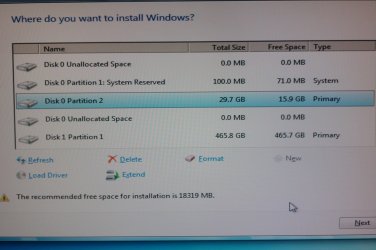
First picture shows the Unallocated Disk (Windows DVD)

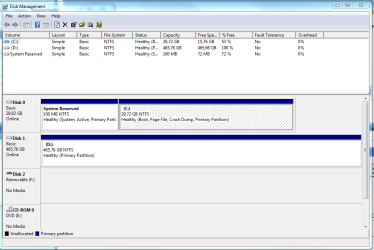
The second is my Disk Management (In-Windows)

Sorry for dead pixels!
 

Attachments

  • IMAG0003.jpg
    IMAG0003.jpg
    236.5 KB · Views: 177
  • Capture.PNG
    Capture.PNG
    26.9 KB · Views: 228

My Computer

Computer Manufacturer/Model Number
Brewed
OS
Microsoft Windows 7 Ultimate: x64 (SP1)
CPU
Intel® Core™ i5-2500K Processor
Motherboard
ASUS P8Z68-V PRO
Memory
Kingston DDR3 HyperX 1600MHz 8GB
Graphics Card(s)
ASUS GTX 560 TI DirectCU II 900MHz
Sound Card
Realtek® ALC892 8-Channel High Definition Audio CODEC
Monitor(s) Displays
ACER LCD P246HBD 1920x1080 (24") - Dell 1280x800
Screen Resolution
ACER LCD P246HBD ~ [1920X1080] - DELL ~ [1280x800]
Hard Drives
500 GB WD Caviar SE116 7200rpm SATA2
PSU
Corsair 750W Power Supply
Case
Coolermaster CM Scout
Cooling
Zalman FS-C77 Fatal1ty CPU Cooler
Keyboard
Logitech G15
Mouse
Coolermaster Sentinel Advanced
Internet Speed
[↓ 10 MB/s DL] [↑ 1 MB/s UL]
Other Info
- ROCCAT™ Kave – Solid 5.1 Surround Sound Gaming Headset
- Not overclocking
First picture shows the Unallocated Disk (Windows DVD)

The second is my Disk Management (In-Windows)

Sorry for dead pixels!

Disk Management will only show two partitions because you have two partitions and two chunks of unallocated space on Disk 0.

Boot from your Windows DVD and delete the two existing partitions so that the whole drive is clean.

Next, select New to create a new partition. Windows will inform you that it needs to create a 100 MB partition for the boot record. Let it do that and it will then create another new partition for the Windows installation.

Select the new Partition 2 on Disk O and click Next. Windows should then install.

The whole drive and its size should then appear in Disk Management.
 

My Computer

Computer Manufacturer/Model Number
HP Pavilion Elite 495UK
OS
Windows 7 Ultimate SP1 64-Bit
CPU
Intel Core i7 870 @ 2.93GHz
Motherboard
MSI 2A9C (CPU1)
Memory
8Gb Dual-Channel DDR3 @ 664MHz
Graphics Card(s)
nVidia GeForce GTX 460 1024MB dedicated RAM
Sound Card
Realtek HD Audio
Monitor(s) Displays
HP2310i
Screen Resolution
1920 x 1080
Hard Drives
1x1954GB Hitachi HDS22020ALA 330 (RAID), 1x1954GB Hitachi External for backup and storage
PSU
460W
Case
HP Elite
Cooling
Air cooled
Keyboard
Logitech K750 solar-powered keyboard
Mouse
Logitech Wireless M180 mouse
Internet Speed
2Mb
Other Info
Pure Avanti Flow Internet Radio with iPod Dock, 64Gb iPod, HP USB Speakers, Sony MDR-V500 Headphones, Sony Vaio F-Series Laptop
Thanks for your reply! Basically I'm just wondering what this is all about. I haven't created 2 partitions or anything. Should they be there? .. and most importantly, what is it?
 

My Computer

Computer Manufacturer/Model Number
Brewed
OS
Microsoft Windows 7 Ultimate: x64 (SP1)
CPU
Intel® Core™ i5-2500K Processor
Motherboard
ASUS P8Z68-V PRO
Memory
Kingston DDR3 HyperX 1600MHz 8GB
Graphics Card(s)
ASUS GTX 560 TI DirectCU II 900MHz
Sound Card
Realtek® ALC892 8-Channel High Definition Audio CODEC
Monitor(s) Displays
ACER LCD P246HBD 1920x1080 (24") - Dell 1280x800
Screen Resolution
ACER LCD P246HBD ~ [1920X1080] - DELL ~ [1280x800]
Hard Drives
500 GB WD Caviar SE116 7200rpm SATA2
PSU
Corsair 750W Power Supply
Case
Coolermaster CM Scout
Cooling
Zalman FS-C77 Fatal1ty CPU Cooler
Keyboard
Logitech G15
Mouse
Coolermaster Sentinel Advanced
Internet Speed
[↓ 10 MB/s DL] [↑ 1 MB/s UL]
Other Info
- ROCCAT™ Kave – Solid 5.1 Surround Sound Gaming Headset
- Not overclocking
Are you using a Windows DVD or a Recovery DVD supplied by your computer seller?

Looking at your current setup I would hazard a guess that Windows was installed on Disk 0 Partition 2 with the master boot record on Disk 0 Partition 1.

If you have a Windows DVD just boot from it, delete what's on the drive and re-install as I explained previously.
 

My Computer

Computer Manufacturer/Model Number
HP Pavilion Elite 495UK
OS
Windows 7 Ultimate SP1 64-Bit
CPU
Intel Core i7 870 @ 2.93GHz
Motherboard
MSI 2A9C (CPU1)
Memory
8Gb Dual-Channel DDR3 @ 664MHz
Graphics Card(s)
nVidia GeForce GTX 460 1024MB dedicated RAM
Sound Card
Realtek HD Audio
Monitor(s) Displays
HP2310i
Screen Resolution
1920 x 1080
Hard Drives
1x1954GB Hitachi HDS22020ALA 330 (RAID), 1x1954GB Hitachi External for backup and storage
PSU
460W
Case
HP Elite
Cooling
Air cooled
Keyboard
Logitech K750 solar-powered keyboard
Mouse
Logitech Wireless M180 mouse
Internet Speed
2Mb
Other Info
Pure Avanti Flow Internet Radio with iPod Dock, 64Gb iPod, HP USB Speakers, Sony MDR-V500 Headphones, Sony Vaio F-Series Laptop
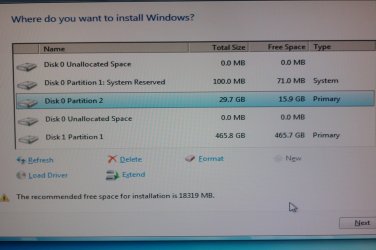
Thanks for your reply. I really don't want to install Windows, I just wanted to format D:/ as it went successful. This screen-shot as you saw earlier was taking from my Windows 7 DVD (Not recovery). Let me explain what we have on the picture below:


  1. Disk 0 Unallocated Disk - Nothing in there, I don't know where it came from
  2. Disk 0 Partition 1: System Reserved - Is the bootable files of course, or said with other words, the 100MB partition
  3. Disk 0 Partition 2 - Is my OCZ Sdd, with Windows 7
  4. Disk 0 Unallocated Disk - Nothing in there, I don't know where it came from
  5. Disk 1 Partition 1 - Is my 500GB WD Harddisk - No OS, (the one I formatted)
I noticed those Unallocated Disks is Disk 0, which is the OCZ SDD.

But what are they?
 

Attachments

  • IMAG0003.jpg
    IMAG0003.jpg
    236.5 KB · Views: 43

My Computer

Computer Manufacturer/Model Number
Brewed
OS
Microsoft Windows 7 Ultimate: x64 (SP1)
CPU
Intel® Core™ i5-2500K Processor
Motherboard
ASUS P8Z68-V PRO
Memory
Kingston DDR3 HyperX 1600MHz 8GB
Graphics Card(s)
ASUS GTX 560 TI DirectCU II 900MHz
Sound Card
Realtek® ALC892 8-Channel High Definition Audio CODEC
Monitor(s) Displays
ACER LCD P246HBD 1920x1080 (24") - Dell 1280x800
Screen Resolution
ACER LCD P246HBD ~ [1920X1080] - DELL ~ [1280x800]
Hard Drives
500 GB WD Caviar SE116 7200rpm SATA2
PSU
Corsair 750W Power Supply
Case
Coolermaster CM Scout
Cooling
Zalman FS-C77 Fatal1ty CPU Cooler
Keyboard
Logitech G15
Mouse
Coolermaster Sentinel Advanced
Internet Speed
[↓ 10 MB/s DL] [↑ 1 MB/s UL]
Other Info
- ROCCAT™ Kave – Solid 5.1 Surround Sound Gaming Headset
- Not overclocking
I should have realised you were using a SSD, I can only assume what you're seeing is how Windows 7 set up the drive when the OS was installed.

I found this on Google, perhaps it may help?

"When you install Windows you'll come to a screen that gives you a choice between "Upgrade" and "Custom (advanced)" install options. If you select the "Custom (advanced)" option then the very next screen will present you with a list of drives to install on.

If the entire SSD shows as "unallocated space", then simply selecting that drive and clicking the "Next" button will cause Windows to partition the entire drive and format it as NTFS before installing.

If the SSD already has partitions and you want to delete them so you can start from scratch, then click the "Drive options (advanced)" link in that window and additional options will appear that let you delete the existing partitions.

The installer and other disk tools in Windows 7 understand SSDs and will issue the appropriate commands. But make sure that your motherboard SATA controller is in "AHCI" mode and not "IDE emulation" mode before you start the install, since the new SSD commands such as "TRIM" are only supported in AHCI mode.

Suggestion: Disconnect all of your other drives before installing Windows on the SSD. Windows creates a small "System Reserved" partition that contains recovery tools - this is the actual boot partition. If Windows can find space on some other drive it will place the reserved partition there instead of on the SSD. Most people prefer that the drive that holds the OS is the boot drive, and disconnecting the other drives will ensure this is the case."
 

My Computer

Computer Manufacturer/Model Number
HP Pavilion Elite 495UK
OS
Windows 7 Ultimate SP1 64-Bit
CPU
Intel Core i7 870 @ 2.93GHz
Motherboard
MSI 2A9C (CPU1)
Memory
8Gb Dual-Channel DDR3 @ 664MHz
Graphics Card(s)
nVidia GeForce GTX 460 1024MB dedicated RAM
Sound Card
Realtek HD Audio
Monitor(s) Displays
HP2310i
Screen Resolution
1920 x 1080
Hard Drives
1x1954GB Hitachi HDS22020ALA 330 (RAID), 1x1954GB Hitachi External for backup and storage
PSU
460W
Case
HP Elite
Cooling
Air cooled
Keyboard
Logitech K750 solar-powered keyboard
Mouse
Logitech Wireless M180 mouse
Internet Speed
2Mb
Other Info
Pure Avanti Flow Internet Radio with iPod Dock, 64Gb iPod, HP USB Speakers, Sony MDR-V500 Headphones, Sony Vaio F-Series Laptop
Yeah, the thing is just that it's not "The Entire SDD showing as Unallocated Space".. It's just some partitions there I really didn't ask for. I had a whole clean install I believe. I really don't know if I just should ignore this, or maybe delete them. Is my SDD (DISK 0) going to format if I delete the Unallocated partitions?
 
Last edited:

My Computer

Computer Manufacturer/Model Number
Brewed
OS
Microsoft Windows 7 Ultimate: x64 (SP1)
CPU
Intel® Core™ i5-2500K Processor
Motherboard
ASUS P8Z68-V PRO
Memory
Kingston DDR3 HyperX 1600MHz 8GB
Graphics Card(s)
ASUS GTX 560 TI DirectCU II 900MHz
Sound Card
Realtek® ALC892 8-Channel High Definition Audio CODEC
Monitor(s) Displays
ACER LCD P246HBD 1920x1080 (24") - Dell 1280x800
Screen Resolution
ACER LCD P246HBD ~ [1920X1080] - DELL ~ [1280x800]
Hard Drives
500 GB WD Caviar SE116 7200rpm SATA2
PSU
Corsair 750W Power Supply
Case
Coolermaster CM Scout
Cooling
Zalman FS-C77 Fatal1ty CPU Cooler
Keyboard
Logitech G15
Mouse
Coolermaster Sentinel Advanced
Internet Speed
[↓ 10 MB/s DL] [↑ 1 MB/s UL]
Other Info
- ROCCAT™ Kave – Solid 5.1 Surround Sound Gaming Headset
- Not overclocking
Yeah, the thing is just that it's not "The Entire SDD showing as Unallocated Space".. It's just some partitions there I really didn't ask for. I had a whole clean install I believe. I really don't know if I just should ignore this, or maybe delete them. Is my SDD (DISK 0) going to format if I delete the Unallocated partitions?

"If the entire SSD shows as "unallocated space", then simply selecting that drive and clicking the "Next" button will cause Windows to partition the entire drive and format it as NTFS before installing."

I belive that answers your question.
 

My Computer

Computer Manufacturer/Model Number
HP Pavilion Elite 495UK
OS
Windows 7 Ultimate SP1 64-Bit
CPU
Intel Core i7 870 @ 2.93GHz
Motherboard
MSI 2A9C (CPU1)
Memory
8Gb Dual-Channel DDR3 @ 664MHz
Graphics Card(s)
nVidia GeForce GTX 460 1024MB dedicated RAM
Sound Card
Realtek HD Audio
Monitor(s) Displays
HP2310i
Screen Resolution
1920 x 1080
Hard Drives
1x1954GB Hitachi HDS22020ALA 330 (RAID), 1x1954GB Hitachi External for backup and storage
PSU
460W
Case
HP Elite
Cooling
Air cooled
Keyboard
Logitech K750 solar-powered keyboard
Mouse
Logitech Wireless M180 mouse
Internet Speed
2Mb
Other Info
Pure Avanti Flow Internet Radio with iPod Dock, 64Gb iPod, HP USB Speakers, Sony MDR-V500 Headphones, Sony Vaio F-Series Laptop
But that link refers to that if your SSD show as it. In my case it's my partitions :geek:

Or am I wrong about something?

I forgot to mention, when I installed another Windows 7, before the one I have now, it said the same thing.
 
Last edited:

My Computer

Computer Manufacturer/Model Number
Brewed
OS
Microsoft Windows 7 Ultimate: x64 (SP1)
CPU
Intel® Core™ i5-2500K Processor
Motherboard
ASUS P8Z68-V PRO
Memory
Kingston DDR3 HyperX 1600MHz 8GB
Graphics Card(s)
ASUS GTX 560 TI DirectCU II 900MHz
Sound Card
Realtek® ALC892 8-Channel High Definition Audio CODEC
Monitor(s) Displays
ACER LCD P246HBD 1920x1080 (24") - Dell 1280x800
Screen Resolution
ACER LCD P246HBD ~ [1920X1080] - DELL ~ [1280x800]
Hard Drives
500 GB WD Caviar SE116 7200rpm SATA2
PSU
Corsair 750W Power Supply
Case
Coolermaster CM Scout
Cooling
Zalman FS-C77 Fatal1ty CPU Cooler
Keyboard
Logitech G15
Mouse
Coolermaster Sentinel Advanced
Internet Speed
[↓ 10 MB/s DL] [↑ 1 MB/s UL]
Other Info
- ROCCAT™ Kave – Solid 5.1 Surround Sound Gaming Headset
- Not overclocking
Oh! And one thing, I think my SDD is set as IDE in the SATA type.
 

My Computer

Computer Manufacturer/Model Number
Brewed
OS
Microsoft Windows 7 Ultimate: x64 (SP1)
CPU
Intel® Core™ i5-2500K Processor
Motherboard
ASUS P8Z68-V PRO
Memory
Kingston DDR3 HyperX 1600MHz 8GB
Graphics Card(s)
ASUS GTX 560 TI DirectCU II 900MHz
Sound Card
Realtek® ALC892 8-Channel High Definition Audio CODEC
Monitor(s) Displays
ACER LCD P246HBD 1920x1080 (24") - Dell 1280x800
Screen Resolution
ACER LCD P246HBD ~ [1920X1080] - DELL ~ [1280x800]
Hard Drives
500 GB WD Caviar SE116 7200rpm SATA2
PSU
Corsair 750W Power Supply
Case
Coolermaster CM Scout
Cooling
Zalman FS-C77 Fatal1ty CPU Cooler
Keyboard
Logitech G15
Mouse
Coolermaster Sentinel Advanced
Internet Speed
[↓ 10 MB/s DL] [↑ 1 MB/s UL]
Other Info
- ROCCAT™ Kave – Solid 5.1 Surround Sound Gaming Headset
- Not overclocking

My Computer

Computer Manufacturer/Model Number
HP Pavilion Elite 495UK
OS
Windows 7 Ultimate SP1 64-Bit
CPU
Intel Core i7 870 @ 2.93GHz
Motherboard
MSI 2A9C (CPU1)
Memory
8Gb Dual-Channel DDR3 @ 664MHz
Graphics Card(s)
nVidia GeForce GTX 460 1024MB dedicated RAM
Sound Card
Realtek HD Audio
Monitor(s) Displays
HP2310i
Screen Resolution
1920 x 1080
Hard Drives
1x1954GB Hitachi HDS22020ALA 330 (RAID), 1x1954GB Hitachi External for backup and storage
PSU
460W
Case
HP Elite
Cooling
Air cooled
Keyboard
Logitech K750 solar-powered keyboard
Mouse
Logitech Wireless M180 mouse
Internet Speed
2Mb
Other Info
Pure Avanti Flow Internet Radio with iPod Dock, 64Gb iPod, HP USB Speakers, Sony MDR-V500 Headphones, Sony Vaio F-Series Laptop
Oh! And one thing, I think my SDD is set as IDE in the SATA type.

I think the SATA controller needs to be set to AHCI.

My computer is working fine, but is there any chance for crashes etc.?

UPDATE;
I fell over this thread:
http://www.sevenforums.com/hardware-devices/81167-questions-about-ahci-ssd.html


So maybe I should, I don't care if it doesn't fix it,
Jonathan_King wrote that it would maybe run faster!
Do I change this in BIOS?
Do I need drivers?
 

My Computer

Computer Manufacturer/Model Number
Brewed
OS
Microsoft Windows 7 Ultimate: x64 (SP1)
CPU
Intel® Core™ i5-2500K Processor
Motherboard
ASUS P8Z68-V PRO
Memory
Kingston DDR3 HyperX 1600MHz 8GB
Graphics Card(s)
ASUS GTX 560 TI DirectCU II 900MHz
Sound Card
Realtek® ALC892 8-Channel High Definition Audio CODEC
Monitor(s) Displays
ACER LCD P246HBD 1920x1080 (24") - Dell 1280x800
Screen Resolution
ACER LCD P246HBD ~ [1920X1080] - DELL ~ [1280x800]
Hard Drives
500 GB WD Caviar SE116 7200rpm SATA2
PSU
Corsair 750W Power Supply
Case
Coolermaster CM Scout
Cooling
Zalman FS-C77 Fatal1ty CPU Cooler
Keyboard
Logitech G15
Mouse
Coolermaster Sentinel Advanced
Internet Speed
[↓ 10 MB/s DL] [↑ 1 MB/s UL]
Other Info
- ROCCAT™ Kave – Solid 5.1 Surround Sound Gaming Headset
- Not overclocking
Help mePlease

I was going through my disk management and i found that under disk 0 i have system reserve which is healthy then c drive then d drive then e drive and last there is then i have a black one which says unallocated
does this mean that i can use that un allocated space and if i can how do i do it please help
 

My Computer

OS
windows 7 professional 32 bit
Back
Top