Unexpected Shutdown

pain55

New member
Member
Local time
7:10 AM
Messages
60
Hi,

I was using my laptop for general browsing, when all of a sudden, it turned off. At first, I tried turning it back on, but it wouldn't, so I plugged in the charger and it turned on. It then reported that windows hadn't shutdown safely etc.

The thing is though, I checked the battery levels after re-starting, and it was at 25%. I have set my power options so that the laptop goes into hibernate when the battery is at 10% and at Do Nothing when it is at 25%.

So please can someone explain what happened?
 

My Computer

Computer type
Laptop
Computer Manufacturer/Model Number
HP Mini 2133
OS
windows 7 ultimate 32-bit
Memory
2GB
Antivirus
Avira
Browser
Firefox
No one can tell you what happened, but we can offer educated guesses.
The first cause would be overheating. Do you know what the temps of your computer are during load.
Did you have a BSOD, did the screen turn blue?
http://www.almico.com/speedfan.php
 

My Computer

Computer type
PC/Desktop
Computer Manufacturer/Model Number
Dell XPS 420
OS
Windows 10, Home Clean Install
CPU
Intel Core2 processsor Q8200(2.33Ghz 1333FSB) Quad Core Tech
Motherboard
Dell
Memory
6 gb
Graphics Card(s)
ATI Radeon 256MB HD3650
Sound Card
Intergrated 7.1 Channel Audio
Monitor(s) Displays
Dell SP2009W 20"
Hard Drives
640 GB Serial ATA Hard drive
Cooling
Fan
Keyboard
Dell USB Keyboard
Mouse
Dell Premium Optical USB
Internet Speed
DSL 2.85
No one can tell you what happened, but we can offer educated guesses.
The first cause would be overheating. Do you know what the temps of your computer are during load.
Did you have a BSOD, did the screen turn blue?
SpeedFan - Access temperature sensor in your computer

No, there was no BSOD.

Just now I just let my laptop battery drain, until it hit critical level so that it would hibernate. But instead of hibernating, it just shut down as if the battery had fully gone. So I plugged in and re-started and the 'Windows did not shut down properly screen...' came up. I think this is what happened before. Can anyone tell me what the problem could be?
 

My Computer

Computer type
Laptop
Computer Manufacturer/Model Number
HP Mini 2133
OS
windows 7 ultimate 32-bit
Memory
2GB
Antivirus
Avira
Browser
Firefox
Hi,

The 2 most probable reasons could be:
  • CPU overheating
  • Power supply is going bad
To a lesser degree:

A failing memory or video card.

Do you notice the unit running hot to very hot?

According to this cnet review,
HP 2133 Mini-Note PC user ratings and Laptop user reviews and reviews - CNET Reviews two users have measured their units at 107, and 110° F.
This has led to motherboard failures.

The reviews also mention poor performance from the battery pack, can you obtain a known good one to see if it will re-create your situation?

Do you have an Ohm meter to take a reading of the battery voltage when this situation occurs? I would not trust the on board battery life indicator.

Batteries are known to show a resonable life, but once a certain point is reached they will drop out to zero voltage, and will not give enough power to shutdown properly.

Heat is also an enemy of batteries.

The 2133 is equiped with what is called DriveGuard if the unit is bumped or moved unexpectedly it will shutdown to save the HDD, but I do not think that is happening here.
 

My Computer

Computer type
PC/Desktop
Computer Manufacturer/Model Number
Gateway DX4831-01e (Mid-Tower Desktop)
OS
Originally Win 7 Hm Prem x64 Ver 6.1.7600 Build 7601-SP1 | Upgraded to Windows 10 December 14, 2019
CPU
Intel i3 530 2.93GHz, 2933MHz 2 Cores 4 Logical Processors
Motherboard
Gateway H57M01 133 megahertz
Memory
6GB of 1,333MHz DDR3 SDRAM
Graphics Card(s)
32MB Intel Graphics Media Accelerator HD IGChip
Sound Card
Realtek High Definition Audio
Monitor(s) Displays
Gateway HX2000 20inch TFT active matrix TN
Screen Resolution
1600 x 900 x 59 hertz
Hard Drives
WDC WD10EADS-00M2B0 [HDD] (1000.20 GB) -- drive 0,
HL-DT-ST DVDRAM GH41N [CD-ROM dr]
Four card readers, and Four USB 2.0
PSU
300watts.
Case
Mid-Tower Desktop
Cooling
Stock from Gateway
Keyboard
Natural Ergonomic Keyboard 4000, see Other Info
Mouse
Orig. Gateway wore out now using Insignia USB wired optical
Internet Speed
Vz FIOS 10ms png 57.64Mbps down 65.53Mbps up Speedtest.org
Antivirus
Zamana Anti-logger with Anti-malware, MSE, Windows Firewall,
Browser
IE11.0.9600.19399-Upd ver11.0.135, Firefox 68.0.1 x64
Other Info
System Specs by Belarc.

BIOS: American Megatrends Inc. P01-A0 11/17/2009

Replaced the MS 'Natural' Standard PS/2 Enhanced 101-102 Keyboard with a new Natural Ergonomic Keyboard 4000 on August 1st 2014.

Canon Pixma MG3222 Printer.

Updated to IE11 on 12102015 | Fios Quantum Router g1100

Additional AV: SpywareBlaster, manual Mbam, SAS
No one can tell you what happened, but we can offer educated guesses.
The first cause would be overheating. Do you know what the temps of your computer are during load.
Did you have a BSOD, did the screen turn blue?
SpeedFan - Access temperature sensor in your computer

No, there was no BSOD.

Just now I just let my laptop battery drain, until it hit critical level so that it would hibernate. But instead of hibernating, it just shut down as if the battery had fully gone. So I plugged in and re-started and the 'Windows did not shut down properly screen...' came up. I think this is what happened before. Can anyone tell me what the problem could be?

When there is overheating, there is not a BSOD. It just turns off. Get the temperature program listed above and give it a try to find out if the problem is overheating.
 

My Computer

Computer type
PC/Desktop
Computer Manufacturer/Model Number
Custom Build
OS
Windows 7 Home Premium 32-Bit - Build 7600 SP1
CPU
Intel Core i3-2120 3.30Ghz
Motherboard
Asus P8Z68-V LX Intel Z68 Socket H2 ATX
Memory
Kingston 4 GB DDR3 1333 mhz
Graphics Card(s)
AMD Radeon HD6670
Sound Card
Sound Blaster Audigy SE 24-Bit
Monitor(s) Displays
Asus VE228
Screen Resolution
1440 X 900
Hard Drives
OCZ Vertex 3 120 GB Sata 3 SSD ==
Kingston SH103/S3 120 G Hyper X 120 GB SSD ==
Western Digital 500 GB Caviar Green 7200 RPM ==
PSU
Corsair CX600M == 600 Watt
Case
NZXT Apollo - Silver with Clear Side Panel
Cooling
Three 120 mm Fans
Keyboard
Microsoft Natural 4000
Mouse
Microsoft Custom Optical 3000
Internet Speed
AT&T Fiber Optic Wireless Network
Antivirus
Microsoft Security Essentials
Browser
Chrome
Other Info
120 mm Blue LED Fan -- Three Blue LED Lazer Light Sticks
Hi,

The 2 most probable reasons could be:
  • CPU overheating
  • Power supply is going bad
To a lesser degree:

A failing memory or video card.

Do you notice the unit running hot to very hot?

According to this cnet review,
HP 2133 Mini-Note PC user ratings and Laptop user reviews and reviews - CNET Reviews two users have measured their units at 107, and 110° F.
This has led to motherboard failures.

The reviews also mention poor performance from the battery pack, can you obtain a known good one to see if it will re-create your situation?

Do you have an Ohm meter to take a reading of the battery voltage when this situation occurs? I would not trust the on board battery life indicator.

Batteries are known to show a resonable life, but once a certain point is reached they will drop out to zero voltage, and will not give enough power to shutdown properly.

Heat is also an enemy of batteries.

The 2133 is equiped with what is called DriveGuard if the unit is bumped or moved unexpectedly it will shutdown to save the HDD, but I do not think that is happening here.

Firstly, mate, I recently updated my graphics card driver, just to let you know.

Secondly, the laptop does get hot quite quick, after all it is a mini laptop.

Last year, the motherboard blew due to overheat, so HP replaced it whilst I was under warranty.

The DriveGuard only temporarily disables the HDD to prevent it from shock. So that can't be the reason.

Finally, running a HP Health Check shows that my battery has a 'good' status.

(A couple of months ago I remember letting my battery drain to critical level to see if it would hibernate, and it did. Don't know what is going on now.)
 

My Computer

Computer type
Laptop
Computer Manufacturer/Model Number
HP Mini 2133
OS
windows 7 ultimate 32-bit
Memory
2GB
Antivirus
Avira
Browser
Firefox
No one can tell you what happened, but we can offer educated guesses.
The first cause would be overheating. Do you know what the temps of your computer are during load.
Did you have a BSOD, did the screen turn blue?
SpeedFan - Access temperature sensor in your computer

No, there was no BSOD.

Just now I just let my laptop battery drain, until it hit critical level so that it would hibernate. But instead of hibernating, it just shut down as if the battery had fully gone. So I plugged in and re-started and the 'Windows did not shut down properly screen...' came up. I think this is what happened before. Can anyone tell me what the problem could be?

When there is overheating, there is not a BSOD. It just turns off. Get the temperature program listed above and give it a try to find out if the problem is overheating.

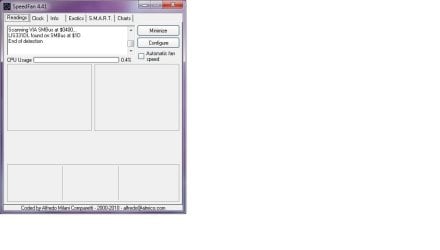
Well, I tried the SpeedFan and it only shoes CPU usage, nothing else. Here is a screenshot:
 

Attachments

  • Untitled.jpg
    Untitled.jpg
    23.9 KB · Views: 44

My Computer

Computer type
Laptop
Computer Manufacturer/Model Number
HP Mini 2133
OS
windows 7 ultimate 32-bit
Memory
2GB
Antivirus
Avira
Browser
Firefox
Do a search in Google for CPUID Hardware Monitor. It will show everything.
 

My Computer

Computer type
PC/Desktop
Computer Manufacturer/Model Number
Custom Build
OS
Windows 7 Home Premium 32-Bit - Build 7600 SP1
CPU
Intel Core i3-2120 3.30Ghz
Motherboard
Asus P8Z68-V LX Intel Z68 Socket H2 ATX
Memory
Kingston 4 GB DDR3 1333 mhz
Graphics Card(s)
AMD Radeon HD6670
Sound Card
Sound Blaster Audigy SE 24-Bit
Monitor(s) Displays
Asus VE228
Screen Resolution
1440 X 900
Hard Drives
OCZ Vertex 3 120 GB Sata 3 SSD ==
Kingston SH103/S3 120 G Hyper X 120 GB SSD ==
Western Digital 500 GB Caviar Green 7200 RPM ==
PSU
Corsair CX600M == 600 Watt
Case
NZXT Apollo - Silver with Clear Side Panel
Cooling
Three 120 mm Fans
Keyboard
Microsoft Natural 4000
Mouse
Microsoft Custom Optical 3000
Internet Speed
AT&T Fiber Optic Wireless Network
Antivirus
Microsoft Security Essentials
Browser
Chrome
Other Info
120 mm Blue LED Fan -- Three Blue LED Lazer Light Sticks
Do a search in Google for CPUID Hardware Monitor. It will show everything.

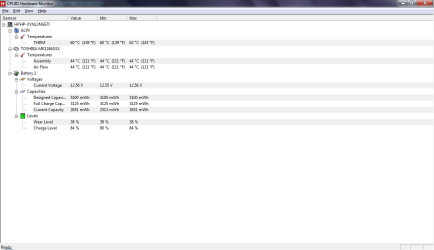
I ran the program and here is the screenshot:
 

Attachments

  • Untitled.png
    Untitled.png
    18.4 KB · Views: 86

My Computer

Computer type
Laptop
Computer Manufacturer/Model Number
HP Mini 2133
OS
windows 7 ultimate 32-bit
Memory
2GB
Antivirus
Avira
Browser
Firefox
They seem fine to me. 60 upper limits of acceptable.
 

My Computer

Computer type
PC/Desktop
Computer Manufacturer/Model Number
Dell XPS 420
OS
Windows 10, Home Clean Install
CPU
Intel Core2 processsor Q8200(2.33Ghz 1333FSB) Quad Core Tech
Motherboard
Dell
Memory
6 gb
Graphics Card(s)
ATI Radeon 256MB HD3650
Sound Card
Intergrated 7.1 Channel Audio
Monitor(s) Displays
Dell SP2009W 20"
Hard Drives
640 GB Serial ATA Hard drive
Cooling
Fan
Keyboard
Dell USB Keyboard
Mouse
Dell Premium Optical USB
Internet Speed
DSL 2.85
Firstly, mate, I recently updated my graphics card driver, just to let you know.

Secondly, the laptop does get hot quite quick, after all it is a mini laptop.

Last year, the motherboard blew due to overheat, so HP replaced it whilst I was under warranty.

The DriveGuard only temporarily disables the HDD to prevent it from shock. So that can't be the reason.

Finally, running a HP Health Check shows that my battery has a 'good' status.

(A couple of months ago I remember letting my battery drain to critical level to see if it would hibernate, and it did. Don't know what is going on now.)
[FONT=Verdana, sans-serif]For whatever reason this line showed in the instant notification that was sent to my email, but it does not show here in your post......[/FONT]
What is an Ohm meter and where can I obtain one?
An ohmmeter is an electronic device which measures resistance in an electronic component or circuit.
How to Use an Ohmmeter - wikiHow

I was in error when I referred to it for your case because I am accustomed to the device having a volt meter incorporated into the device, and forgetting that you do not live in my part of the world.​

You can find them made separately or together, but a volt meter is really what you need.

A VOM; multimeter, mutitester.


As far as obtaining one? Check:
Music stores
Auto supply​
Electronic shops
Wal-mart
Kmart
Sears
Lowes
HomeDepot
Radio Shack
 

My Computer

Computer type
PC/Desktop
Computer Manufacturer/Model Number
Gateway DX4831-01e (Mid-Tower Desktop)
OS
Originally Win 7 Hm Prem x64 Ver 6.1.7600 Build 7601-SP1 | Upgraded to Windows 10 December 14, 2019
CPU
Intel i3 530 2.93GHz, 2933MHz 2 Cores 4 Logical Processors
Motherboard
Gateway H57M01 133 megahertz
Memory
6GB of 1,333MHz DDR3 SDRAM
Graphics Card(s)
32MB Intel Graphics Media Accelerator HD IGChip
Sound Card
Realtek High Definition Audio
Monitor(s) Displays
Gateway HX2000 20inch TFT active matrix TN
Screen Resolution
1600 x 900 x 59 hertz
Hard Drives
WDC WD10EADS-00M2B0 [HDD] (1000.20 GB) -- drive 0,
HL-DT-ST DVDRAM GH41N [CD-ROM dr]
Four card readers, and Four USB 2.0
PSU
300watts.
Case
Mid-Tower Desktop
Cooling
Stock from Gateway
Keyboard
Natural Ergonomic Keyboard 4000, see Other Info
Mouse
Orig. Gateway wore out now using Insignia USB wired optical
Internet Speed
Vz FIOS 10ms png 57.64Mbps down 65.53Mbps up Speedtest.org
Antivirus
Zamana Anti-logger with Anti-malware, MSE, Windows Firewall,
Browser
IE11.0.9600.19399-Upd ver11.0.135, Firefox 68.0.1 x64
Other Info
System Specs by Belarc.

BIOS: American Megatrends Inc. P01-A0 11/17/2009

Replaced the MS 'Natural' Standard PS/2 Enhanced 101-102 Keyboard with a new Natural Ergonomic Keyboard 4000 on August 1st 2014.

Canon Pixma MG3222 Printer.

Updated to IE11 on 12102015 | Fios Quantum Router g1100

Additional AV: SpywareBlaster, manual Mbam, SAS
Guys, do you think the problem could be with hibernation, because that's what my laptop is supposed to do when the battery reaches critical level.

Anyway, I changed the critical level to 15% for now, and set it so that the laptop goes into sleep mode instead.
 

My Computer

Computer type
Laptop
Computer Manufacturer/Model Number
HP Mini 2133
OS
windows 7 ultimate 32-bit
Memory
2GB
Antivirus
Avira
Browser
Firefox
Just tried hibernation on its own, and it works. Must be some kind of power problem... = /
 

My Computer

Computer type
Laptop
Computer Manufacturer/Model Number
HP Mini 2133
OS
windows 7 ultimate 32-bit
Memory
2GB
Antivirus
Avira
Browser
Firefox
Does the problem only appear when on battery or does it also appear on AC?
 

My Computer

Computer type
PC/Desktop
Computer Manufacturer/Model Number
Gateway DX4831-01e (Mid-Tower Desktop)
OS
Originally Win 7 Hm Prem x64 Ver 6.1.7600 Build 7601-SP1 | Upgraded to Windows 10 December 14, 2019
CPU
Intel i3 530 2.93GHz, 2933MHz 2 Cores 4 Logical Processors
Motherboard
Gateway H57M01 133 megahertz
Memory
6GB of 1,333MHz DDR3 SDRAM
Graphics Card(s)
32MB Intel Graphics Media Accelerator HD IGChip
Sound Card
Realtek High Definition Audio
Monitor(s) Displays
Gateway HX2000 20inch TFT active matrix TN
Screen Resolution
1600 x 900 x 59 hertz
Hard Drives
WDC WD10EADS-00M2B0 [HDD] (1000.20 GB) -- drive 0,
HL-DT-ST DVDRAM GH41N [CD-ROM dr]
Four card readers, and Four USB 2.0
PSU
300watts.
Case
Mid-Tower Desktop
Cooling
Stock from Gateway
Keyboard
Natural Ergonomic Keyboard 4000, see Other Info
Mouse
Orig. Gateway wore out now using Insignia USB wired optical
Internet Speed
Vz FIOS 10ms png 57.64Mbps down 65.53Mbps up Speedtest.org
Antivirus
Zamana Anti-logger with Anti-malware, MSE, Windows Firewall,
Browser
IE11.0.9600.19399-Upd ver11.0.135, Firefox 68.0.1 x64
Other Info
System Specs by Belarc.

BIOS: American Megatrends Inc. P01-A0 11/17/2009

Replaced the MS 'Natural' Standard PS/2 Enhanced 101-102 Keyboard with a new Natural Ergonomic Keyboard 4000 on August 1st 2014.

Canon Pixma MG3222 Printer.

Updated to IE11 on 12102015 | Fios Quantum Router g1100

Additional AV: SpywareBlaster, manual Mbam, SAS
They seem fine to me. 60 upper limits of acceptable.
It's kind of high to me ....
Anyway...try to run Hibernate program by itself ..see if it works first..
on battery and ac charger ..

zvods.jpg
 

My Computer

Computer type
Laptop
Computer Manufacturer/Model Number
Sony Vaio VPC-SE23FXS
OS
WDS 7 Home Pre.x64
CPU
Intel Core i5 2450M @ 2.50GHz
Memory
8GB Kingston[2x4] Dual-Channel DDR3 @ 1333MHz
Graphics Card(s)
AMD Radeon(TM) HD 6470M + Intel(R) HD Graph 3000
Hard Drives
TOSHIBA MK6459GSXP 600GB x 5400RPM (SATA)
Guys, I ran hibernate on its own and it works.

About 5 minutes ago, the laptop just spontaneously turned off again and then re-started. So, nothing to do with the critical battery stuff that I was on about before.

I can only guess now that its a overheating problem or maybe a driver problem.
 

My Computer

Computer type
Laptop
Computer Manufacturer/Model Number
HP Mini 2133
OS
windows 7 ultimate 32-bit
Memory
2GB
Antivirus
Avira
Browser
Firefox
I'm watching this thread because my Dell Precision M4300 does not shut down properly when the battery is exhausted. This is a new thing with Windows 7; under XP Pro it hibernated properly.

Now, on restart, I get the "Windows did not shut down properly" screen. I wonder if there is something mis-coded in the shutdown sequence (which could well be vendor-specific I suppose) that causes this problem.

Anyway, since it may be related to this thread, here it is.
 

My Computer

Computer type
PC/Desktop
Computer Manufacturer/Model Number
Custom Build
OS
Windows 7 Pro 64 bit SP1 updated current
CPU
Intel Core i7-2600K @ 4.1 GHz
Motherboard
Asus P8-P67-M Pro
Memory
16GB
Graphics Card(s)
EGA Nvidia GeForce 580
Sound Card
Realtek on board
Monitor(s) Displays
Samsung SA550H
Screen Resolution
1920 x 1080 x 32 @60 Hz
Hard Drives
Corsair 250 GB sata3 SSD
WD 600 GB Velociraptor
Well, what I have noticed with Win 7 on some of its shutdown procedures, it sometimes doesn't talk to programs properly about shutting down.

On my main system, I have noticed that it does pop up with "Should I force quit..." for some programs, then eventually it goes down.

On one Dell laptop, I saw something truly bizzare... I could not get it to shut down at all, or log off or restart short of manually doing it, and it seems that a program just simply would not let go and win7 didn't even try a force quit.

Now from what i am reading here in this thread, I am wondering if the minibook is having thermal issues and isn't processing the hibernate/shutdown as nicely as it should. You might also have to put the tolerances a little higher, depending on how fast the minibook's power is draining, as I think while it is 'checking' something else is kicking in to try and save itself in the process.
 

My Computer

Computer Manufacturer/Model Number
Alienware Area 51 Desktop and Dell Inspirion 17R (N7010)
OS
Windows 7 Ultimate x64 and Home Premium x64
CPU
Intel i7 960 (3.2 GHz Quad Core)
Motherboard
Alienware Intel based X58
Memory
12 Gigs (Triple Channel)
Graphics Card(s)
Alienware OEM nVidia GTX 560 Ti (1.25 Gig)
Sound Card
Creative Labs X-Fi Titanium
Monitor(s) Displays
Samsung PX2370 LED 23" Monitor
Screen Resolution
1920x1080
Hard Drives
2 320 Gig SATA in Raid 1 Configuration (System/App)
1 1 Tera SATA (Games)
1 1 Tera SATA (Data/Music/Videos)
PSU
750 Watt Power Supply
Case
Alienware Area 51 Desktop
Cooling
Liquid Cooled
Keyboard
Logitech G510
Mouse
Microsoft Trackball Explorer
Internet Speed
Cable
Guys, I ran hibernate on its own and it works.

About 5 minutes ago, the laptop just spontaneously turned off again and then re-started. So, nothing to do with the critical battery stuff that I was on about before.

I can only guess now that its a overheating problem or maybe a driver problem.
From: HP 2133 Mini-Note PC - Guided Troubleshooting
STATE:
The computer restarts unexpectedly or restarts while shutdown.
GUIDANCE:
If 'Automatically restart' option is enabled, the PC will reboot automatically in the event of a very serious system error. This reboot happens too fast to record the error message for use in troubleshooting.
Disable "Automatically restart" option by performing the steps mentioned below:


  1. Log on to the computer as either an administrator or the owner.
  2. Click Start menu, and then click Control Panel.
  3. Double click System icon.
  4. Select Advanced tab, and then click Settings under ' Start up and Recovery'.
  5. Uncheck the ' Automatically Restart' option under ' System failure'.
This is the HP troubleshooting link:
HP 2133 Mini-Note PC - Guided Troubleshooting

As Keiichi25 says:
Now from what i am reading here in this thread, I am wondering if the minibook is having thermal issues and isn't processing the hibernate/shutdown as nicely as it should.
As the CPU kicks in to shutdown it will create extra heat
You might also have to put the tolerances a little higher, depending on how fast the minibook's power is draining, as I think while it is 'checking' something else is kicking in to try and save itself in the process.
Here is a HP link to calibrate the 2133 battery:
HP Notebook PCs - Calibrating the Notebook Battery - c00817650 - HP Business Support Center

This link covers a wide assortment of areas to check including how the lid switch could be deffective, and shutdown the unit:
HP 2133 Mini-Note PC*-* HP Notebook PCs - Troubleshooting No LED Lights Glow During Startup or Boot - c00372748 - HP Business Support Center
 

My Computer

Computer type
PC/Desktop
Computer Manufacturer/Model Number
Gateway DX4831-01e (Mid-Tower Desktop)
OS
Originally Win 7 Hm Prem x64 Ver 6.1.7600 Build 7601-SP1 | Upgraded to Windows 10 December 14, 2019
CPU
Intel i3 530 2.93GHz, 2933MHz 2 Cores 4 Logical Processors
Motherboard
Gateway H57M01 133 megahertz
Memory
6GB of 1,333MHz DDR3 SDRAM
Graphics Card(s)
32MB Intel Graphics Media Accelerator HD IGChip
Sound Card
Realtek High Definition Audio
Monitor(s) Displays
Gateway HX2000 20inch TFT active matrix TN
Screen Resolution
1600 x 900 x 59 hertz
Hard Drives
WDC WD10EADS-00M2B0 [HDD] (1000.20 GB) -- drive 0,
HL-DT-ST DVDRAM GH41N [CD-ROM dr]
Four card readers, and Four USB 2.0
PSU
300watts.
Case
Mid-Tower Desktop
Cooling
Stock from Gateway
Keyboard
Natural Ergonomic Keyboard 4000, see Other Info
Mouse
Orig. Gateway wore out now using Insignia USB wired optical
Internet Speed
Vz FIOS 10ms png 57.64Mbps down 65.53Mbps up Speedtest.org
Antivirus
Zamana Anti-logger with Anti-malware, MSE, Windows Firewall,
Browser
IE11.0.9600.19399-Upd ver11.0.135, Firefox 68.0.1 x64
Other Info
System Specs by Belarc.

BIOS: American Megatrends Inc. P01-A0 11/17/2009

Replaced the MS 'Natural' Standard PS/2 Enhanced 101-102 Keyboard with a new Natural Ergonomic Keyboard 4000 on August 1st 2014.

Canon Pixma MG3222 Printer.

Updated to IE11 on 12102015 | Fios Quantum Router g1100

Additional AV: SpywareBlaster, manual Mbam, SAS
Guys, I ran hibernate on its own and it works.

About 5 minutes ago, the laptop just spontaneously turned off again and then re-started. So, nothing to do with the critical battery stuff that I was on about before.

I can only guess now that its a overheating problem or maybe a driver problem.
From: HP 2133 Mini-Note PC - Guided Troubleshooting
STATE:
The computer restarts unexpectedly or restarts while shutdown.
GUIDANCE:
If 'Automatically restart' option is enabled, the PC will reboot automatically in the event of a very serious system error. This reboot happens too fast to record the error message for use in troubleshooting.
Disable "Automatically restart" option by performing the steps mentioned below:


  1. Log on to the computer as either an administrator or the owner.
  2. Click Start menu, and then click Control Panel.
  3. Double click System icon.
  4. Select Advanced tab, and then click Settings under ' Start up and Recovery'.
  5. Uncheck the ' Automatically Restart' option under ' System failure'.
This is the HP troubleshooting link:
HP 2133 Mini-Note PC - Guided Troubleshooting

As Keiichi25 says:
Now from what i am reading here in this thread, I am wondering if the minibook is having thermal issues and isn't processing the hibernate/shutdown as nicely as it should.
As the CPU kicks in to shutdown it will create extra heat
You might also have to put the tolerances a little higher, depending on how fast the minibook's power is draining, as I think while it is 'checking' something else is kicking in to try and save itself in the process.
Here is a HP link to calibrate the 2133 battery:
HP Notebook PCs - Calibrating the Notebook Battery - c00817650 - HP Business Support Center

This link covers a wide assortment of areas to check including how the lid switch could be deffective, and shutdown the unit:
HP 2133 Mini-Note PC*-* HP Notebook PCs - Troubleshooting No LED Lights Glow During Startup or Boot - c00372748 - HP Business Support Center

Thanks for helping guys, but as I mentioned above, now it has nothing to do with the hibernation problem that I started the thread with.

I tried hibernation, and it works.

Before, I was using my laptop, it was quite hot, and it just spontaneously powered off. I think this is what happened yesterday too. So far, the problem has occured 3 times.

Any ideas guys?
 

My Computer

Computer type
Laptop
Computer Manufacturer/Model Number
HP Mini 2133
OS
windows 7 ultimate 32-bit
Memory
2GB
Antivirus
Avira
Browser
Firefox
Back
Top