Uninstall Didn't Complete

uletek

New member
Local time
12:26 AM
Messages
4
I uninstalled an AverMedia card and software, but it didn't completely clean out the registry entries. Now I get errors on system startup in the event logs. There is no uninstaller program any longer, and all freeware uninstallers don't even see AverMedia. Registry entries still exist, as I've searched for them, but I don't know how to rid of them. Below are the event failures:

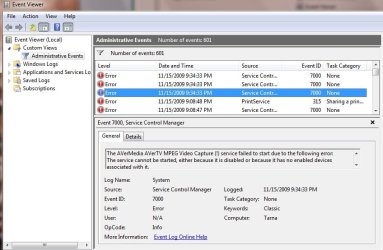
The AVerMedia AVerTV Tuner service failed to start due to the following error: The service cannot be started, either because it is disabled or because it has no enabled devices associated with it.

The AVerMedia AVerTV MPEG Crossbar (Dual-Input) service failed to start due to the following error: The service cannot be started, either because it is disabled or because it has no enabled devices associated with it.

The AVerMedia AVerTV MPEG Encoder service failed to start due to the following error: The service cannot be started, either because it is disabled or because it has no enabled devices associated with it.

The AVerMedia AVerTV MPEG Video Capture (!) service failed to start due to the following error: The service cannot be started, either because it is disabled or because it has no enabled devices associated with it.

At least I would like to disable Windows even attempting to start these.

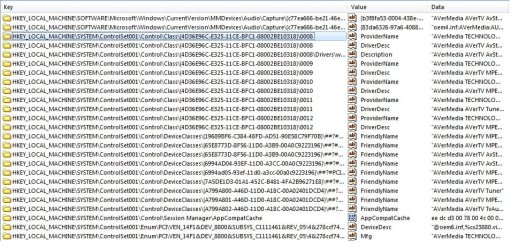
Attached are some of the reg entries:
 

Attachments
  • avermedia reg.jpg
    avermedia reg.jpg
    148.1 KB · Views: 65

My Computer

Computer Manufacturer/Model Number
Home built
OS
Windows 7
CPU
Core Duo
Motherboard
Gigabyte
Memory
4gig
Sound Card
on board
Monitor(s) Displays
Dell
Not sure if you have checked this HKEY_Local_Machine>Software>Microsoft>Windows>CurrentVersion>Uninstall. My bad if you have.

There is a tool called Windows Install Clean Up. That's pretty good. Try it.
 

My Computer

Computer Manufacturer/Model Number
Lenovo ThinkPad T60
OS
Windows 7 Ultimate 64Bit
CPU
GenuineIntel Intel(R) Core(TM) DuoCore T2400 @ 1.83GHz
Motherboard
Intel(R) 82801G (ICH7 Family)
Memory
2.00 GB
Graphics Card(s)
Mobile Intel(R) 945 Express Chipset
Sound Card
SoundMAX Integrated Digital HD Audio
Monitor(s) Displays
ThinkPad Display
Screen Resolution
1400x1050
Hard Drives
100Gb SATA
Keyboard
Standard Keyboard
Mouse
HID-compliant Mouse
Internet Speed
Cable Broadband - 54Mbps
Other Info
Intel(R) PRO/1000 PL Network Connection
11a/b/g Wireless LAN Mini PCI Express Adapter
aem - Thanks for the response. I think this is actually part of the problem. There is no entry in HKEY_Local_Machine>Software>Microsoft>Windows>CurrentVersion>Uninstall so any UnInstall program doesn't find an report it.

I tried the Windows Clean Up, and just like all the freeware applets, none find AverMedia installed. Also, as the AverMedia directories are now gone, the uninstall program is as well. All that's left behind are Reg entires, and somewhere in the reg Windows 7 at startup tries to load the drivers.

Even all the reg cleaners don't find and remove these entries.. like TuneUp, Reg Defrag, etc..

It looks like they would have to be removed manually..... ouch... I think I could live with orphaned reg entries as long as I can find a way to keep Windows 7 from trying to load the drivers (for a board no longer in the machine!).
 

My Computer

Computer Manufacturer/Model Number
Home built
OS
Windows 7
CPU
Core Duo
Motherboard
Gigabyte
Memory
4gig
Sound Card
on board
Monitor(s) Displays
Dell

My Computers

System One System Two

  • Computer type
    PC/Desktop
    OS
    7 X64
    CPU
    i5 8400
    Motherboard
    gigabyte b365m ds3h
    Memory
    2x8gb 3200mhz
    Hard Drives
    various
    PSU
    pure power 11 400w cm
    Case
    Coolermaster
    Cooling
    cryorig m9i
  • Computer type
    PC/Desktop
    OS
    7x64
    CPU
    g5400
    Motherboard
    ga b365m ds3h
    Memory
    8gb ddr4 2400
    PSU
    xfx pro 450w

My Computer

Computer Manufacturer/Model Number
HP, Dell, Gateway, Toshiba - 4 laptops and 2 desktops
OS
Vista, Windows7, Mint Mate, Zorin, Windows 8
CPU
from 1.6GHz Duo to i7
Monitor(s) Displays
2x HP w2207
Hard Drives
5x HDD, 7x SSD, 12x Externals
Keyboard
with trackball - no mices
Mouse
Trackball mice
Internet Speed
DSL 6000
Sadly, it's looking like the drivers might have come from either a MS update, or from a Driver Update package; like PCPITSTOP. The divers openly available are v.1.0.6.12 (& .14), but the ones in my registry are v.1.0.6.24, dated 11-8-2006. (see: AVerMedia AVerTV AvStream Audio Capture - Driver Download - PC Pitstop Libraries)

So, I can't get drivers for this version to try to re Install. I've tried the ones I have (v.1.0.6.12), but it doesn't uninstall all the new version reg entries.

I'm hosed if I can't find the updated drivers....

I would still like to have Windows 7 stop trying to load the drivers and throw event log errors (as in my original post). Does anyone know what reg entry has the drivers loaded, and how to comment out the lines in that entry?
 

My Computer

Computer Manufacturer/Model Number
Home built
OS
Windows 7
CPU
Core Duo
Motherboard
Gigabyte
Memory
4gig
Sound Card
on board
Monitor(s) Displays
Dell
Here's an example of the driver failing to load event:
 

Attachments

  • avermedia event.jpg
    avermedia event.jpg
    63.9 KB · Views: 60

My Computer

Computer Manufacturer/Model Number
Home built
OS
Windows 7
CPU
Core Duo
Motherboard
Gigabyte
Memory
4gig
Sound Card
on board
Monitor(s) Displays
Dell
If all fails you can do a system restore?
 

My Computer

Computer Manufacturer/Model Number
Lenovo ThinkPad T60
OS
Windows 7 Ultimate 64Bit
CPU
GenuineIntel Intel(R) Core(TM) DuoCore T2400 @ 1.83GHz
Motherboard
Intel(R) 82801G (ICH7 Family)
Memory
2.00 GB
Graphics Card(s)
Mobile Intel(R) 945 Express Chipset
Sound Card
SoundMAX Integrated Digital HD Audio
Monitor(s) Displays
ThinkPad Display
Screen Resolution
1400x1050
Hard Drives
100Gb SATA
Keyboard
Standard Keyboard
Mouse
HID-compliant Mouse
Internet Speed
Cable Broadband - 54Mbps
Other Info
Intel(R) PRO/1000 PL Network Connection
11a/b/g Wireless LAN Mini PCI Express Adapter
Back
Top