
Hi, i'm new on this forum. I was searching for an answer to this issue in a lot of threads but i didn't find something to fix it.
I built an external hd using the hard disk of my old laptop (Fujitsu MHV2120AH PL) and a Woxter i-Case 240.
When i connected it via USB i went to the Disk Manager and saw the unit as "Disk 1 Unknown Not Initialized". But there was something else, the disk has a size of 120GB but the Disk Manager shows only 700MB.
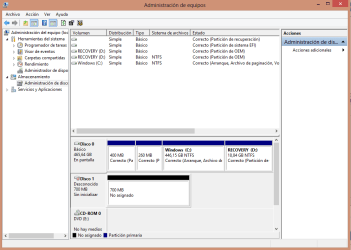
The Disk Manager didn't allowed me to format this partition and when I press on "Initialize disk" it didn't do anything.
I used a Linux Live CD and I had the same issue, i tried to create a new partition table but it didn't create it and GParted didn't allow me to create a new partition answering that i need a partition table first.
I tried with Diskpart without any result too.
This HD had an Windows XP installed on the old laptop and before dissamble it i made a quick format with the Bootable CD of my laptop. The quick format was interrupted when the program was copying the files necesary to install Windows XP.
Do you have any idea?
I built an external hd using the hard disk of my old laptop (Fujitsu MHV2120AH PL) and a Woxter i-Case 240.
When i connected it via USB i went to the Disk Manager and saw the unit as "Disk 1 Unknown Not Initialized". But there was something else, the disk has a size of 120GB but the Disk Manager shows only 700MB.
The Disk Manager didn't allowed me to format this partition and when I press on "Initialize disk" it didn't do anything.
I used a Linux Live CD and I had the same issue, i tried to create a new partition table but it didn't create it and GParted didn't allow me to create a new partition answering that i need a partition table first.
I tried with Diskpart without any result too.
This HD had an Windows XP installed on the old laptop and before dissamble it i made a quick format with the Bootable CD of my laptop. The quick format was interrupted when the program was copying the files necesary to install Windows XP.
Do you have any idea?
My Computer
- Computer type
- PC/Desktop
- OS
- Windows 8


