
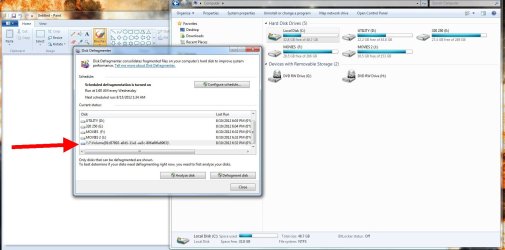
unknown partition appeared!!!

mobius101

New member
Local time
9:07 PM
Messages
43
Hi I was trying to defragment my HDD's when I noticed new unknown partition.Since I can't access it from explorer could you tell me how to check it?Thanks in advance.
 

Attachments

  • Untitled 1.jpg
    Untitled 1.jpg
    125.2 KB · Views: 59

My Computer

OS
Microsoft Windows 7 Ultimate 32-bit 7601 Multiprocessor Free Service Pack 1
CPU
Pentium(R) Dual-Core CPU E5300 @ 2.60GHz
Motherboard
ASRock G41M-S
Memory
3.00 GB
Graphics Card(s)
ATI Radeon HD 4300/4500 Series
Sound Card
(1) AMD High Definition Audio Device (2) Realtek High Defi
Monitor(s) Displays
philips 23ie HD
Screen Resolution
1920 x 1080 x 32 bits (4294967296 colors) @ 60 Hz
Hard Drives
(1) WDC WD3200AAJS-00L7A0 ATA Device (2) WDC WD5000AADS-00S9B0 ATA Device
Perhaps you've been infected, does all seem normal?
 

My Computer

Computer Manufacturer/Model Number
* BFK Customs *
OS
W 7 64-bit Ultimate
CPU
Intel Q9550 Yorkfield
Motherboard
ASUS P5Q Pro
Memory
8GB Dominator 8500C5D
Graphics Card(s)
ATI : XFX 5870
Sound Card
Realtek HD Audio 7-1
Monitor(s) Displays
1x 47" LCD HDMI & 3x 26" LCD HDMI
Screen Resolution
1920x1080P & 1920x1200
Hard Drives
1x 80GB Intel X25-M G2 SSD : 1x 500GB & 1x 640GB WD Caviar Black(s)
PSU
Corsair 620HX
Case
Cooler Master RC-690
Cooling
Tuniq Tower 120, 2x 140mm and 3x 120mm case fans
Keyboard
Microsoft 500
Mouse
Razer Diamondback 3G
Internet Speed
14 Mb/s
Other Info
1x Koutech 3Gb/s SATA HDD Hot Swap Rack
No its not.How can I find this partition?
 

My Computer

OS
Microsoft Windows 7 Ultimate 32-bit 7601 Multiprocessor Free Service Pack 1
CPU
Pentium(R) Dual-Core CPU E5300 @ 2.60GHz
Motherboard
ASRock G41M-S
Memory
3.00 GB
Graphics Card(s)
ATI Radeon HD 4300/4500 Series
Sound Card
(1) AMD High Definition Audio Device (2) Realtek High Defi
Monitor(s) Displays
philips 23ie HD
Screen Resolution
1920 x 1080 x 32 bits (4294967296 colors) @ 60 Hz
Hard Drives
(1) WDC WD3200AAJS-00L7A0 ATA Device (2) WDC WD5000AADS-00S9B0 ATA Device
Have a look in Disk Management and maybe post a picture of that.
 

My Computer

Computer Manufacturer/Model Number
HP, Dell, Gateway, Toshiba - 4 laptops and 2 desktops
OS
Vista, Windows7, Mint Mate, Zorin, Windows 8
CPU
from 1.6GHz Duo to i7
Monitor(s) Displays
2x HP w2207
Hard Drives
5x HDD, 7x SSD, 12x Externals
Keyboard
with trackball - no mices
Mouse
Trackball mice
Internet Speed
DSL 6000
Everything looks normal here!
 

Attachments

  • Untitled 2.jpg
    Untitled 2.jpg
    67.1 KB · Views: 46

My Computer

OS
Microsoft Windows 7 Ultimate 32-bit 7601 Multiprocessor Free Service Pack 1
CPU
Pentium(R) Dual-Core CPU E5300 @ 2.60GHz
Motherboard
ASRock G41M-S
Memory
3.00 GB
Graphics Card(s)
ATI Radeon HD 4300/4500 Series
Sound Card
(1) AMD High Definition Audio Device (2) Realtek High Defi
Monitor(s) Displays
philips 23ie HD
Screen Resolution
1920 x 1080 x 32 bits (4294967296 colors) @ 60 Hz
Hard Drives
(1) WDC WD3200AAJS-00L7A0 ATA Device (2) WDC WD5000AADS-00S9B0 ATA Device
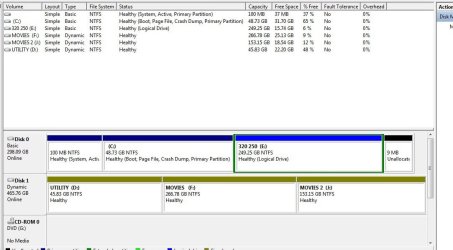
Your Disk0 looks normal. On Disk1 your partitions are dynamic - how come.
 

My Computer

Computer Manufacturer/Model Number
HP, Dell, Gateway, Toshiba - 4 laptops and 2 desktops
OS
Vista, Windows7, Mint Mate, Zorin, Windows 8
CPU
from 1.6GHz Duo to i7
Monitor(s) Displays
2x HP w2207
Hard Drives
5x HDD, 7x SSD, 12x Externals
Keyboard
with trackball - no mices
Mouse
Trackball mice
Internet Speed
DSL 6000
Have no idea whats the difference?
 

My Computer

OS
Microsoft Windows 7 Ultimate 32-bit 7601 Multiprocessor Free Service Pack 1
CPU
Pentium(R) Dual-Core CPU E5300 @ 2.60GHz
Motherboard
ASRock G41M-S
Memory
3.00 GB
Graphics Card(s)
ATI Radeon HD 4300/4500 Series
Sound Card
(1) AMD High Definition Audio Device (2) Realtek High Defi
Monitor(s) Displays
philips 23ie HD
Screen Resolution
1920 x 1080 x 32 bits (4294967296 colors) @ 60 Hz
Hard Drives
(1) WDC WD3200AAJS-00L7A0 ATA Device (2) WDC WD5000AADS-00S9B0 ATA Device
You could search the registry for that number with the \\?\Volume in front and probably find what it was. Since your C: partition is not showing, maybe it is related to that.
 

My Computer

Computer Manufacturer/Model Number
Homebuilt
OS
Windows 7 x64
CPU
i7-2600K
Motherboard
Asus P8Z77-v Pro
Memory
8 G
Graphics Card(s)
GTX 480
Sound Card
Onboard
Monitor(s) Displays
LG W2753V
Screen Resolution
1920x1080
Hard Drives
Crucial M4 128 G SSD
Have a look at diskpart to see if that partition is listed there, click here to see how to get to diskpart, once in diskpart you will have to check both HDDs independently ...

diskpart

select disk 0 or select disk 1

list partition

exit

exit
 

My Computer

Computer Manufacturer/Model Number
* BFK Customs *
OS
W 7 64-bit Ultimate
CPU
Intel Q9550 Yorkfield
Motherboard
ASUS P5Q Pro
Memory
8GB Dominator 8500C5D
Graphics Card(s)
ATI : XFX 5870
Sound Card
Realtek HD Audio 7-1
Monitor(s) Displays
1x 47" LCD HDMI & 3x 26" LCD HDMI
Screen Resolution
1920x1080P & 1920x1200
Hard Drives
1x 80GB Intel X25-M G2 SSD : 1x 500GB & 1x 640GB WD Caviar Black(s)
PSU
Corsair 620HX
Case
Cooler Master RC-690
Cooling
Tuniq Tower 120, 2x 140mm and 3x 120mm case fans
Keyboard
Microsoft 500
Mouse
Razer Diamondback 3G
Internet Speed
14 Mb/s
Other Info
1x Koutech 3Gb/s SATA HDD Hot Swap Rack
Actually my C is visible, its just the way I took PrtSc.
I was wondering if this is one of those two system partitions, one that is 100MB and the other 9MB, they are usually not visible, all though, on my previous windows(I did a format couple of days ago) I could see that 100MB partition?...I have problems with pests and it would seem that format worked for half an hour and than everything started again.BTW can you explain me what does it mean if my disc is dynamic (not by my choice I think) does that has to do with this?
 

My Computer

OS
Microsoft Windows 7 Ultimate 32-bit 7601 Multiprocessor Free Service Pack 1
CPU
Pentium(R) Dual-Core CPU E5300 @ 2.60GHz
Motherboard
ASRock G41M-S
Memory
3.00 GB
Graphics Card(s)
ATI Radeon HD 4300/4500 Series
Sound Card
(1) AMD High Definition Audio Device (2) Realtek High Defi
Monitor(s) Displays
philips 23ie HD
Screen Resolution
1920 x 1080 x 32 bits (4294967296 colors) @ 60 Hz
Hard Drives
(1) WDC WD3200AAJS-00L7A0 ATA Device (2) WDC WD5000AADS-00S9B0 ATA Device
Have a look at diskpart to see if that partition is listed there, click here to see how to get to diskpart, once in diskpart you will have to check both HDDs independently ...

diskpart

select disk 0 or select disk 1

list partition

exit

exit


Did you have a go at this?
 

My Computer

Computer Manufacturer/Model Number
* BFK Customs *
OS
W 7 64-bit Ultimate
CPU
Intel Q9550 Yorkfield
Motherboard
ASUS P5Q Pro
Memory
8GB Dominator 8500C5D
Graphics Card(s)
ATI : XFX 5870
Sound Card
Realtek HD Audio 7-1
Monitor(s) Displays
1x 47" LCD HDMI & 3x 26" LCD HDMI
Screen Resolution
1920x1080P & 1920x1200
Hard Drives
1x 80GB Intel X25-M G2 SSD : 1x 500GB & 1x 640GB WD Caviar Black(s)
PSU
Corsair 620HX
Case
Cooler Master RC-690
Cooling
Tuniq Tower 120, 2x 140mm and 3x 120mm case fans
Keyboard
Microsoft 500
Mouse
Razer Diamondback 3G
Internet Speed
14 Mb/s
Other Info
1x Koutech 3Gb/s SATA HDD Hot Swap Rack
Hi I was trying to defragment my HDD's when I noticed new unknown partition.Since I can't access it from explorer could you tell me how to check it?Thanks in advance.
Is C is that list? Press "configure disks". Looks normal?
 

My Computer

Computer type
Laptop
Computer Manufacturer/Model Number
ACER ASPIRE 5742G
OS
Microsoft Windows 7 Home Premium 64-bits 7601 Multiprocessor Free Service Pack 1
CPU
Intel(R) Core(TM) i3 CPU M 370 @ 2.40GHz
Motherboard
Acer Aspire 5742G
Memory
4,00 GB
Graphics Card(s)
ATI Mobility Radeon HD 5400 Series
Sound Card
(1) AMD High Definition Audio Device (2) Realtek High Defi
Screen Resolution
1366 x 768 x 32 bits (4294967296 colors) @ 60 Hz
Hard Drives
WDC WD5000BEVT-22ZAT0
My Disc management doesn't show anything(second PRTSc) nor D. partition thingy and my registry search didn't come up with nothing.

I don't want to sound ungrateful or rude but I would suggest to those that add a new comment to read previous ones :) please...

Could you tell me (VHS) about Dynamic partition-What does it mean?, do I need to do something about that?
 

My Computer

OS
Microsoft Windows 7 Ultimate 32-bit 7601 Multiprocessor Free Service Pack 1
CPU
Pentium(R) Dual-Core CPU E5300 @ 2.60GHz
Motherboard
ASRock G41M-S
Memory
3.00 GB
Graphics Card(s)
ATI Radeon HD 4300/4500 Series
Sound Card
(1) AMD High Definition Audio Device (2) Realtek High Defi
Monitor(s) Displays
philips 23ie HD
Screen Resolution
1920 x 1080 x 32 bits (4294967296 colors) @ 60 Hz
Hard Drives
(1) WDC WD3200AAJS-00L7A0 ATA Device (2) WDC WD5000AADS-00S9B0 ATA Device
I suppose we are still left with the dynamic drive problem. That is normally the way a drive in a RAID array is configured. I will try putting a dynamic drive on my system to see if it shows anything similar.

I have really never looked at the defrag dialog window, so not that familiar with what it might show?
 

My Computer

Computer Manufacturer/Model Number
Homebuilt
OS
Windows 7 x64
CPU
i7-2600K
Motherboard
Asus P8Z77-v Pro
Memory
8 G
Graphics Card(s)
GTX 480
Sound Card
Onboard
Monitor(s) Displays
LG W2753V
Screen Resolution
1920x1080
Hard Drives
Crucial M4 128 G SSD
Read the Notes and Warnings here, that will give you an idea of dynamics. In my book, dynamics are to be avoided like the plague.
 

My Computer

Computer Manufacturer/Model Number
HP, Dell, Gateway, Toshiba - 4 laptops and 2 desktops
OS
Vista, Windows7, Mint Mate, Zorin, Windows 8
CPU
from 1.6GHz Duo to i7
Monitor(s) Displays
2x HP w2207
Hard Drives
5x HDD, 7x SSD, 12x Externals
Keyboard
with trackball - no mices
Mouse
Trackball mice
Internet Speed
DSL 6000
My Disc management doesn't show anything(second PRTSc) nor D. partition thingy and my registry search didn't come up with nothing.

I don't want to sound ungrateful or rude but I would suggest to those that add a new comment to read previous ones :) please...

Could you tell me (VHS) about Dynamic partition-What does it mean?, do I need to do something about that?


Have a look at this info below.


There is a non-destructive option using an older version of Partition Wizard, in the newer versions this is a paid-for feature; download the pw422 zip file from this link below, burn the Partition Wizard ISO file to CD to convert the HDD back to a Basic disk.
The Partition Wizard boot CD requires no input from the user to startup, just boot the disk and let it load; here's the steps once Partition Wizard v4.2.2 boots / opens and be sure to post back with any further questions you may have and to keep us informed.

click to enlarge


My Computer

Computer Manufacturer/Model Number
* BFK Customs *
OS
W 7 64-bit Ultimate
CPU
Intel Q9550 Yorkfield
Motherboard
ASUS P5Q Pro
Memory
8GB Dominator 8500C5D
Graphics Card(s)
ATI : XFX 5870
Sound Card
Realtek HD Audio 7-1
Monitor(s) Displays
1x 47" LCD HDMI & 3x 26" LCD HDMI
Screen Resolution
1920x1080P & 1920x1200
Hard Drives
1x 80GB Intel X25-M G2 SSD : 1x 500GB & 1x 640GB WD Caviar Black(s)
PSU
Corsair 620HX
Case
Cooler Master RC-690
Cooling
Tuniq Tower 120, 2x 140mm and 3x 120mm case fans
Keyboard
Microsoft 500
Mouse
Razer Diamondback 3G
Internet Speed
14 Mb/s
Other Info
1x Koutech 3Gb/s SATA HDD Hot Swap Rack
Well, it is not the Dynamic partitions, not a hidden partition or a vhd, or at least normal ones. I don't have any encrypted volumes. Also, an unallocated partition does not show up, so I am at a loss. I did find the following thread you might check. Maybe yours will show up in the registry under the key mentioned.

hard drive - Unknown volume listed under Windows defragmenter - Super User

Also, if you want to check which drive it is on, you might disconnect the second drive for testing.

If you try to analyze the partition, what happens?
 

My Computer

Computer Manufacturer/Model Number
Homebuilt
OS
Windows 7 x64
CPU
i7-2600K
Motherboard
Asus P8Z77-v Pro
Memory
8 G
Graphics Card(s)
GTX 480
Sound Card
Onboard
Monitor(s) Displays
LG W2753V
Screen Resolution
1920x1080
Hard Drives
Crucial M4 128 G SSD
This is to complicated for me... I'll see what will I do today and post as soon is possible..Very complicated.:confused:
How are they converted to dynamic I don't understand.
 

My Computer

OS
Microsoft Windows 7 Ultimate 32-bit 7601 Multiprocessor Free Service Pack 1
CPU
Pentium(R) Dual-Core CPU E5300 @ 2.60GHz
Motherboard
ASRock G41M-S
Memory
3.00 GB
Graphics Card(s)
ATI Radeon HD 4300/4500 Series
Sound Card
(1) AMD High Definition Audio Device (2) Realtek High Defi
Monitor(s) Displays
philips 23ie HD
Screen Resolution
1920 x 1080 x 32 bits (4294967296 colors) @ 60 Hz
Hard Drives
(1) WDC WD3200AAJS-00L7A0 ATA Device (2) WDC WD5000AADS-00S9B0 ATA Device
This is to complicated for me... I'll see what will I do today and post as soon is possible..Very complicated.:confused:
How are they converted to dynamic I don't understand.


The only way was you have to have done it at some point in time, I don't feel converting back to Basic is really necessary, you just kept asking about it so I answered you. ;)
 

My Computer

Computer Manufacturer/Model Number
* BFK Customs *
OS
W 7 64-bit Ultimate
CPU
Intel Q9550 Yorkfield
Motherboard
ASUS P5Q Pro
Memory
8GB Dominator 8500C5D
Graphics Card(s)
ATI : XFX 5870
Sound Card
Realtek HD Audio 7-1
Monitor(s) Displays
1x 47" LCD HDMI & 3x 26" LCD HDMI
Screen Resolution
1920x1080P & 1920x1200
Hard Drives
1x 80GB Intel X25-M G2 SSD : 1x 500GB & 1x 640GB WD Caviar Black(s)
PSU
Corsair 620HX
Case
Cooler Master RC-690
Cooling
Tuniq Tower 120, 2x 140mm and 3x 120mm case fans
Keyboard
Microsoft 500
Mouse
Razer Diamondback 3G
Internet Speed
14 Mb/s
Other Info
1x Koutech 3Gb/s SATA HDD Hot Swap Rack
And I'm very grateful, thanks, if you think that I don't have to convert them then I wont, its just that Vhs's post says, that he avoids them like a plague, that concerned me for a vile...Now about finding this unknown volume ...how do I proceed?:)
 

My Computer

OS
Microsoft Windows 7 Ultimate 32-bit 7601 Multiprocessor Free Service Pack 1
CPU
Pentium(R) Dual-Core CPU E5300 @ 2.60GHz
Motherboard
ASRock G41M-S
Memory
3.00 GB
Graphics Card(s)
ATI Radeon HD 4300/4500 Series
Sound Card
(1) AMD High Definition Audio Device (2) Realtek High Defi
Monitor(s) Displays
philips 23ie HD
Screen Resolution
1920 x 1080 x 32 bits (4294967296 colors) @ 60 Hz
Hard Drives
(1) WDC WD3200AAJS-00L7A0 ATA Device (2) WDC WD5000AADS-00S9B0 ATA Device
Back
Top