'Unspecified Error' with Backup and Restore

Rlauntz

New member
Local time
4:47 AM
Messages
8
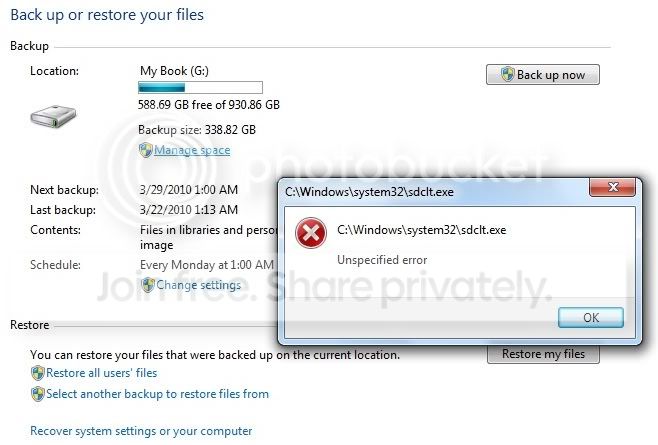
When attempting to use Backup and Restore in Windows 7 I get an 'unspecified error' in reference to the executable file 'sdclt.exe' which is the Backup application located in the System32 folder. The error occurs when you click on 'Manage Space' or 'Change Settings.' Running the System File Checker on 'sdclt.exe' results in no file integrity issues. I have attached a Problem Step Recorder and a screenshot of the results of the System File Checker. If anyone knows how to resolve this issue I would greatly appreciate your input. Thank you.

p.s. - I am able to successfully backup my computer due to creating a workaround shortcut but the errors I am getting are still present.
 

Attachments

My Computer

Computer Manufacturer/Model Number
Toshiba Satellite A505-S6965
OS
Windows 7 Home Premium 64-bit
CPU
Intel® Core™2 Duo Processor P7350 (2Ghz/Dual Core)
Memory
4GB DDR2 800MHz memory
Graphics Card(s)
ATI® Mobility Radeon™ HD 4570 (512MB DDR3; 2302MB total)
Sound Card
Laptop sound card
Monitor(s) Displays
HD TruBrite® LED Backlit display;16" Widescreen 1366x768(HD)
Hard Drives
Storage Controller: Serial ATA-150
500GB HDD (5400rpm)
External Western Digital My Book Essential (1TB)
PSU
90W (19V x 4.74A) 100-240V AC Adapter;Li-Ion-4000mAh,6-Cell
Case
Fusion® Finish with Sonic Pattern in Black Onyx
Cooling
Standard laptop fan
Run CMD as Admin. At the command prompt, type the following line, then press ENTER:
sfc /scannow
Check whether the problem is resolved.
 
Last edited:

My Computer

Computer Manufacturer/Model Number
Too many to describe...
OS
Windows 7 x64 pro/ Windows 7 x86 Pro/ XP SP3 x86
Run CMD as Admin. At the command prompt, type the following line, then press ENTER:
sfc /scannow
Check whether the problem is resolved.

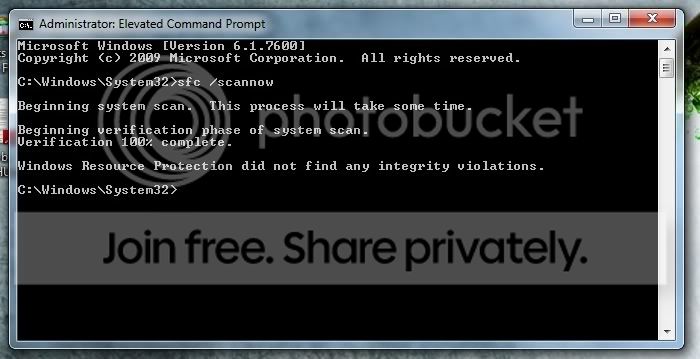
Thank you for the suggestions. No integrity violations found:
Scannowresults.jpg


Here is a screenshot of the error I get If I click on Manage Space or Change Settings:
BackupandRestoreErrorzoomedin.jpg
 

My Computer

Computer Manufacturer/Model Number
Toshiba Satellite A505-S6965
OS
Windows 7 Home Premium 64-bit
CPU
Intel® Core™2 Duo Processor P7350 (2Ghz/Dual Core)
Memory
4GB DDR2 800MHz memory
Graphics Card(s)
ATI® Mobility Radeon™ HD 4570 (512MB DDR3; 2302MB total)
Sound Card
Laptop sound card
Monitor(s) Displays
HD TruBrite® LED Backlit display;16" Widescreen 1366x768(HD)
Hard Drives
Storage Controller: Serial ATA-150
500GB HDD (5400rpm)
External Western Digital My Book Essential (1TB)
PSU
90W (19V x 4.74A) 100-240V AC Adapter;Li-Ion-4000mAh,6-Cell
Case
Fusion® Finish with Sonic Pattern in Black Onyx
Cooling
Standard laptop fan

My Computer

Computer Manufacturer/Model Number
Toshiba Satellite A505-S6965
OS
Windows 7 Home Premium 64-bit
CPU
Intel® Core™2 Duo Processor P7350 (2Ghz/Dual Core)
Memory
4GB DDR2 800MHz memory
Graphics Card(s)
ATI® Mobility Radeon™ HD 4570 (512MB DDR3; 2302MB total)
Sound Card
Laptop sound card
Monitor(s) Displays
HD TruBrite® LED Backlit display;16" Widescreen 1366x768(HD)
Hard Drives
Storage Controller: Serial ATA-150
500GB HDD (5400rpm)
External Western Digital My Book Essential (1TB)
PSU
90W (19V x 4.74A) 100-240V AC Adapter;Li-Ion-4000mAh,6-Cell
Case
Fusion® Finish with Sonic Pattern in Black Onyx
Cooling
Standard laptop fan
That is a very helpful link for resetting the backup. However, after multiple attempts to repair backup as instructed in the link I still get the same message about an 'Unspecified Error.' This happens after I click on 'Set up backup.' I don't understand what could be causing the backup program (sdclt.exe) from working properly. System File Checker evidently doesn't think there is anything wrong with it but clearly something is awry. I would try doing an OS repair but it seems I don't have the right discs. All I have are the 4 DVD's I made as backup for Vista and since the laptop did not come with an install disc for Vista. Also, I qualified for the free upgrade to Windows 7 and I'm not certain if I can use that to repair Windows.
 

My Computer

Computer Manufacturer/Model Number
Toshiba Satellite A505-S6965
OS
Windows 7 Home Premium 64-bit
CPU
Intel® Core™2 Duo Processor P7350 (2Ghz/Dual Core)
Memory
4GB DDR2 800MHz memory
Graphics Card(s)
ATI® Mobility Radeon™ HD 4570 (512MB DDR3; 2302MB total)
Sound Card
Laptop sound card
Monitor(s) Displays
HD TruBrite® LED Backlit display;16" Widescreen 1366x768(HD)
Hard Drives
Storage Controller: Serial ATA-150
500GB HDD (5400rpm)
External Western Digital My Book Essential (1TB)
PSU
90W (19V x 4.74A) 100-240V AC Adapter;Li-Ion-4000mAh,6-Cell
Case
Fusion® Finish with Sonic Pattern in Black Onyx
Cooling
Standard laptop fan
AFAIK, you should be able to do a repair install from the upgrade dvd. Try it, if it doesnt work, there are 2 options.

1) You can create a repair disk yourself. Click Start, All Programs, Maintenance, Create a System Repair Disk.
2) Download the Repair disk from the following link.

Download Windows 7 System Recovery Discs — The NeoSmart Files
 

My Computer

Computer Manufacturer/Model Number
Too many to describe...
OS
Windows 7 x64 pro/ Windows 7 x86 Pro/ XP SP3 x86
AFAIK, you should be able to do a repair install from the upgrade dvd. Try it, if it doesnt work, there are 2 options.

1) You can create a repair disk yourself. Click Start, All Programs, Maintenance, Create a System Repair Disk.
2) Download the Repair disk from the following link.

Download Windows 7 System Recovery Discs — The NeoSmart Files

Thanks! Those options are excellent. If I was having a problem that caused me to not be able to use my computer I would certainly go those routes. I attempted both the Toshiba Windows 7 upgrade disc and I made a copy of the Recovery Disc you linked to. Both options would involve having to backup all of my user data and after completing the system image replacement or fresh upgrade install I would have to replace all of the programs I manually installed. Granted, there is an option to back up user files and system files however that likely won't work as the problem is with one of my system files. The only four issues I'm dealing with right now are:
1. This problem with backup and recovery, although I am able to physically backup the computer via a workaround.
2. Toshiba HDD/SSD Alert feature wont reinstall properly and is not working.
3. Unless I have my new 1TB Western Digital external hard drive connected and have Windows running the included Western digital SmartWare process, I get a startup message saying something like 'WDDM Could not start.' My issue is just that the WD SmartWare, when running, gobs up way too much memory.
4. I'm getting a system error log almost every day which is connected to my touchpad on my Toshiba laptop. I have the touchpad turned off (via a button on the keyboard) and I'm using a mouse instead. Still, this shouldn't necessarily generate a system error.

I would like to just be able to fix these four issues and I would be a happy camper.

But what I really want to do is simply replace the system file that is evidently causing the problem. The file is C:\Windows\System32\sdclt.exe. Normally this would be automatic with the 'sfc /scannow' command but it claims that sdclt.exe is fine. It is the backup and recovery system file. Is there a way to just do that? I have tried doing a search for this file on my recovery discs, and online, and I have not had luck. How would one go about doing that? If I can do this then the repair would take a matter of minutes as opposed to hours and hours that it would take to reinstall all of my programs one by one and customize my computer how I want it.
 

My Computer

Computer Manufacturer/Model Number
Toshiba Satellite A505-S6965
OS
Windows 7 Home Premium 64-bit
CPU
Intel® Core™2 Duo Processor P7350 (2Ghz/Dual Core)
Memory
4GB DDR2 800MHz memory
Graphics Card(s)
ATI® Mobility Radeon™ HD 4570 (512MB DDR3; 2302MB total)
Sound Card
Laptop sound card
Monitor(s) Displays
HD TruBrite® LED Backlit display;16" Widescreen 1366x768(HD)
Hard Drives
Storage Controller: Serial ATA-150
500GB HDD (5400rpm)
External Western Digital My Book Essential (1TB)
PSU
90W (19V x 4.74A) 100-240V AC Adapter;Li-Ion-4000mAh,6-Cell
Case
Fusion® Finish with Sonic Pattern in Black Onyx
Cooling
Standard laptop fan
1) Try Chkdsk. Heres a tutorial on how to do it in seven.

How to use CHKDSK (Check Disk) - Windows 7

Thanks for the suggestions; I should have thought to try this. I did the full-blown Chkdsk including the restart scan and when I came back to my computer it had restarted with no indication of pass or fail or anything for that matter; it just restarted like it normally would. I then opened backup and clicked on Set up backup and the error occurred again. It is quite unfortunate that Microsoft seems to have not provided a method for simply replacing 1 system file regardless of whether or not it appears to have its integrity violated.
 

My Computer

Computer Manufacturer/Model Number
Toshiba Satellite A505-S6965
OS
Windows 7 Home Premium 64-bit
CPU
Intel® Core™2 Duo Processor P7350 (2Ghz/Dual Core)
Memory
4GB DDR2 800MHz memory
Graphics Card(s)
ATI® Mobility Radeon™ HD 4570 (512MB DDR3; 2302MB total)
Sound Card
Laptop sound card
Monitor(s) Displays
HD TruBrite® LED Backlit display;16" Widescreen 1366x768(HD)
Hard Drives
Storage Controller: Serial ATA-150
500GB HDD (5400rpm)
External Western Digital My Book Essential (1TB)
PSU
90W (19V x 4.74A) 100-240V AC Adapter;Li-Ion-4000mAh,6-Cell
Case
Fusion® Finish with Sonic Pattern in Black Onyx
Cooling
Standard laptop fan

My Computers

System One System Two

  • Computer type
    PC/Desktop
    OS
    7 X64
    CPU
    i5 8400
    Motherboard
    gigabyte b365m ds3h
    Memory
    2x8gb 3200mhz
    Hard Drives
    various
    PSU
    pure power 11 400w cm
    Case
    Coolermaster
    Cooling
    cryorig m9i
  • Computer type
    PC/Desktop
    OS
    7x64
    CPU
    g5400
    Motherboard
    ga b365m ds3h
    Memory
    8gb ddr4 2400
    PSU
    xfx pro 450w
%systemdrive%\Windows\winsxs\amd64_microsoft-windows-safedocs-main_31bf3856ad364e35_6.1.7600.16385_none_80feadf380799a73

d/l this zip:

View attachment 63106

It should be here as well - copy it in from the above .zip:

"%systemdrive%\Windows\System32\sdclt.exe"

:doh:
Didn't work...

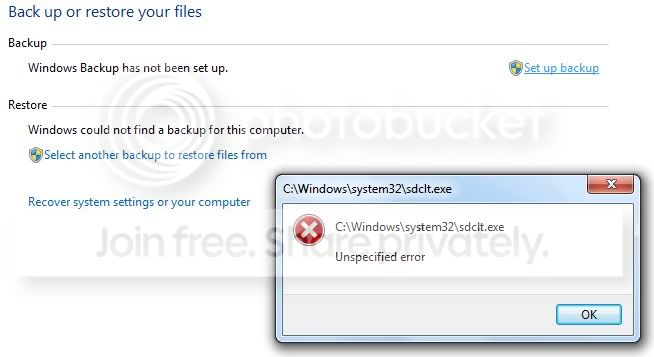
Your post was extremely helpful in my attempts to resolve this matter. However, after deleting the existing sdclt.exe file, copy/pasting the file in the .zip into the System32 folder, and resetting the configuration settings of backup and restore, and then restarting the computer, I opened backup and restore and clicked on 'Set up backup' and got the same error as before, seen here:
ErrorafterclickingSetupbackup.jpg


Unless anyone else is dead set on solving this I think now is a good time to put this to rest. It seems the only solution is to do either a fresh reinstall of my Toshiba Windows 7 upgrade disc or do a saved image restore. Either way I'll have to start from scratch with regard to installing programs, getting the settings just right, and moving my user files back onto the computer. Thank you for all the help on this, my first sevenforums posting :)
 

My Computer

Computer Manufacturer/Model Number
Toshiba Satellite A505-S6965
OS
Windows 7 Home Premium 64-bit
CPU
Intel® Core™2 Duo Processor P7350 (2Ghz/Dual Core)
Memory
4GB DDR2 800MHz memory
Graphics Card(s)
ATI® Mobility Radeon™ HD 4570 (512MB DDR3; 2302MB total)
Sound Card
Laptop sound card
Monitor(s) Displays
HD TruBrite® LED Backlit display;16" Widescreen 1366x768(HD)
Hard Drives
Storage Controller: Serial ATA-150
500GB HDD (5400rpm)
External Western Digital My Book Essential (1TB)
PSU
90W (19V x 4.74A) 100-240V AC Adapter;Li-Ion-4000mAh,6-Cell
Case
Fusion® Finish with Sonic Pattern in Black Onyx
Cooling
Standard laptop fan
Boot into 7, put the upgrade dvd in the drive , run setup and select Upgrade - that should be the same as a "Repair Install".

With luck, all your installed apps. and docs will be fine.

You have a backup image , just in case, so you have nothing to lose by trying the Repair/Upgrade install.

You will need to re enter the product key.
 

My Computers

System One System Two

  • Computer type
    PC/Desktop
    OS
    7 X64
    CPU
    i5 8400
    Motherboard
    gigabyte b365m ds3h
    Memory
    2x8gb 3200mhz
    Hard Drives
    various
    PSU
    pure power 11 400w cm
    Case
    Coolermaster
    Cooling
    cryorig m9i
  • Computer type
    PC/Desktop
    OS
    7x64
    CPU
    g5400
    Motherboard
    ga b365m ds3h
    Memory
    8gb ddr4 2400
    PSU
    xfx pro 450w
The problem is fixed and, in hindsight, it would have been much easier to just start over with a fresh install of Windows (which is how I ended up fixing it); I would have saved myself a lot of time and effort. I ended up getting a full retail version of Windows 7 Home Premium and I used the product key from my Windows Vista to 7 upgrade disc to complete the install. After reinstalling all of my Toshiba laptop drivers, from their website, I was back up and running without any errors. The lessons I learned here are:

1) Avoid using any kind of 'registry cleaner' or 'registry defrag' software
2) Always try to have a full version of your OS with a valid product key in case you have to reinstall everything
3) Make sure to do regular backups and set system restore points
4) Know when to throw in the towel and start from scratch (reinstall the OS)

Thanks again for all of the help.
 

My Computer

Computer Manufacturer/Model Number
Toshiba Satellite A505-S6965
OS
Windows 7 Home Premium 64-bit
CPU
Intel® Core™2 Duo Processor P7350 (2Ghz/Dual Core)
Memory
4GB DDR2 800MHz memory
Graphics Card(s)
ATI® Mobility Radeon™ HD 4570 (512MB DDR3; 2302MB total)
Sound Card
Laptop sound card
Monitor(s) Displays
HD TruBrite® LED Backlit display;16" Widescreen 1366x768(HD)
Hard Drives
Storage Controller: Serial ATA-150
500GB HDD (5400rpm)
External Western Digital My Book Essential (1TB)
PSU
90W (19V x 4.74A) 100-240V AC Adapter;Li-Ion-4000mAh,6-Cell
Case
Fusion® Finish with Sonic Pattern in Black Onyx
Cooling
Standard laptop fan
I apologize for necroing this thread, but I had the same problem and this was the first result I came across on Google. After reinstalling my OS to fix this the first time, I proceeded to reinstall all my programs, checking after each to ensure that backup was still working. It was not until I began applying OS tweaks with Auslogics BoostSpeed that it stopped working. I narrowed it down to one specific option, and this may or may not be the cause for you (or anyone who comes across this thread).

BoostSpeed > Advanced Tools tab > System tweaks > Windows Explorer > Context menu > Show "Run as administrator" being unchecked was what was causing the issue. Re-checking it and applying the setting immediately stopped the unspecified error with sdclt.exe from occurring.

Hope this helped.
 

My Computer

Computer Manufacturer/Model Number
Dell E521
OS
Windows 7 32bit
CPU
AMD Athlon X2 6000+
Graphics Card(s)
ATI Radeon HD 5670
Oddly enough, that worked for me too! I use AVG PC Tuneup 2011 and going into system tweaks fixed the sdclt.exe unspecified error issue. Thanks a lot :)
 

My Computer

OS
Windows 7 32bit
Back
Top