Solved update problem after doing recovery

bigbobh

New member
Member
Local time
10:54 AM
Messages
16
I recently had to do a total recovery using my backup disks I made years ago. The recovery took windows 7 64bit back to a time before service pack 1 came out. Specifically 2010 when I bought my Asus laptop. When I click on updates I get error message saying service is not turned on but it is tried resetting and turning on again still no luck tried many cures I find on line none of them work. tried using both google chrome and ie explorer browser no luck. Anyone got a quick cure I can try. I assume problem is because I do not have sevice pack 1 running but I dont know how to get it other than going through windows update which does not work.
Thanks for any help offered
Bob Hennessey
 

My Computer

Computer type
Laptop
Computer Manufacturer/Model Number
Asus
OS
Windows 7 home premium 64 bit
CPU
pentium dual core
Motherboard
unknown
Memory
3 gb
Graphics Card(s)
unknown
Hard Drives
1 TB
Antivirus
AVG
Browser
Google Chrome
Hello bigbobh,

The computer needs service pack 1 before many other updates are made available.
You can download the stand alone installer from Microsoft Update Catalog.
Then, you need to update the Servicing Stack for Windows Update.
This can also be downloaded from Microsoft Update Catalog.

Download from these links, in this order:
KB976932 (SP1) Microsoft Update Catalog
KB4490628 (SSU) Microsoft Update Catalog

Hope that helps
 

My Computer

Computer type
PC/Desktop
OS
Windows 7 x64, Vista x64, 8.1 smartphone
CPU
Intel E8400 65W 64-bit
Motherboard
Gigabyte EP45-UD3LR
Memory
DDR2 2 x 2GB, 1GB x 2
Graphics Card(s)
XFX Radeon HD5750
Sound Card
AMD High Definition Audio; Realtek High Definition Audio
Monitor(s) Displays
iiyama prolite X2377HDS
Screen Resolution
1920 x 1080
Hard Drives
500GB 7200 rpm Seagate ST3500413AS 16MB, 500GB 5400 rpm Toshiba MQ02ABF050H 32MB, 200GB 7200 rpm Seagate ST3200820AS 8MB, 2TB 7200 rpm Western Digital WD20EZRX 64MB
PSU
Enermax Liberty Modular
Case
Antec P193 Midi Tower
Keyboard
Mionix ZIBAL 60
Mouse
Razer USB 2.0 Diamondback Mouse or Huion Graphics Tablet
Browser
Internet Explorer, Lunascape, Firefox, Opera, Avast Safezone
Update problem after doing recovery

Thank you for the response. I have run into a snag. I downloaded those two files in the order you said and went to install the first one sp1 however almost immediately into the installation i got Catastrophic Failure Error E_uexpected(0x8000ffff) and when I go to get the details I cant get them because it states my browser is outdated . My recovery loaded Ie8 but I guess that is too old. Tried to download ie11 but requires sp1 . Bit of a cunundrum do you have any suggestion? Thanks again.
Bob H
 

My Computer

Computer type
Laptop
Computer Manufacturer/Model Number
Asus
OS
Windows 7 home premium 64 bit
CPU
pentium dual core
Motherboard
unknown
Memory
3 gb
Graphics Card(s)
unknown
Hard Drives
1 TB
Antivirus
AVG
Browser
Google Chrome
Catastrophic Failure Error E_uexpected(0x8000ffff)

Sorry, I forgot to add - had you downloaded the correct "bitness" (32 bit/64 bit) installer(s), for your machine? That might be some problem.

Otherwise, assuming that you have the correct installer, try this: Manually turn off automatic updating the WU (Windows Update). Then reset the Windows Update Components, and afterwards, try re-install Service Pack 1 for Windows 7. See if that resolves the error message.


Tutorials


Windows Update Settings - Change


Windows Update - Reset
 

My Computer

Computer type
PC/Desktop
OS
Windows 7 x64, Vista x64, 8.1 smartphone
CPU
Intel E8400 65W 64-bit
Motherboard
Gigabyte EP45-UD3LR
Memory
DDR2 2 x 2GB, 1GB x 2
Graphics Card(s)
XFX Radeon HD5750
Sound Card
AMD High Definition Audio; Realtek High Definition Audio
Monitor(s) Displays
iiyama prolite X2377HDS
Screen Resolution
1920 x 1080
Hard Drives
500GB 7200 rpm Seagate ST3500413AS 16MB, 500GB 5400 rpm Toshiba MQ02ABF050H 32MB, 200GB 7200 rpm Seagate ST3200820AS 8MB, 2TB 7200 rpm Western Digital WD20EZRX 64MB
PSU
Enermax Liberty Modular
Case
Antec P193 Midi Tower
Keyboard
Mionix ZIBAL 60
Mouse
Razer USB 2.0 Diamondback Mouse or Huion Graphics Tablet
Browser
Internet Explorer, Lunascape, Firefox, Opera, Avast Safezone
Hi Bob,

Please download the following, W7 SP1 file to your DESKTOP, save it
(depending upon your install choice, dvd/usb, then create the media, usb will require Rufus/MsTool)

Change the boot option to dvd/cd- reboot select choice dvd/usb install.
(AND reset windows update to never)

update via this link (current to April 2019)


links
Update your Win 7 installation media.
Rufus
Microsoft Windows and Office ISO Download Tool
https://software-download.microsoft...1555471473&h=ba1528c8acba5658a886cf769d686cb8

NOTE W7 SP1 link only valid for 24 hrs

YOU WILL NEED the COA sticker product key
Roy
 

My Computer

Computer type
PC/Desktop
Computer Manufacturer/Model Number
medionl/Aspire 6930G/acer x55a
OS
W7 home premium 32bit/W7HP 64bit/w10 tp insider ring
CPU
E5300 dual core
Motherboard
medion MS7366
Memory
3gb
Graphics Card(s)
Nvidia Geforce 7100 Nforce 630i
Monitor(s) Displays
avixc
Internet Speed
n (isp resticted to 72)
Antivirus
mse/pands
Browser
palemoon
Other Info
Belkin Fd7050 n USB using Railink RT2870 drivers, more upto date
Hi Friends,
Greets,
I think it will not be a straight one way. Multiple links, things & efforts have to be considered & integrated well.

1) Installing a servicing stack update after SP 1 is not the solution meant for installing SP 1. it is actually for updates which are to be followed after SP 1. Can we have a good servicing stack update which can be made prior to SP 1 installation so that the installation of SP 1 is made successfully thereafter ? I think we don't. So, we should think about servicing stack update only after SP 1 installation.

2) Sir iko 22's this post can come handy : update problem after doing recovery ( no. 4 post of this thread )

3) This MS link can be useful : Access Denied

Thanks & Regards. ...

EDIT :
1. I forgot to mention that KB4490628 (SSU) is a SSU = Servicing Stack Update
2. These instructions should be followed : Windows Update Posting Instructions
Some seniors may want to have a look on that information, etc.
 
Last edited:

My Computer

Computer type
Laptop
Computer Manufacturer/Model Number
hp compaq presario c795VU notebook pc
OS
Windows 7 Ultimate x32 With Sp1 + Vista Ultimate x32 with Sp1 & Sp2 !!
CPU
Intel Mobile Core 2 Duo T5750 @ 2.00GHz Merom 65nm Technolog
Motherboard
Hewlett-Packard 30D9 (CPU)
Memory
2.00GB Dual-Channel DDR2 @ 332MHz (5-5-5-15)
Graphics Card(s)
Mobile Intel(R) 965 Express Chipset Family
Sound Card
High Definition Audio Device
Monitor(s) Displays
LP154WX4-TLCB on Mobile Intel 965 Express Chipset Family
Screen Resolution
1280x800 @ 60Hz
Hard Drives
149GB Western Digital WDC WD1600BEVS-60VAT0 ATA Device (SATA)
Keyboard
Standard 101/102-Key or Microsoft Natural PS/2 Key + HP QLB
Mouse
ALPS pointing device
Antivirus
Kaspersky AV 2017(Win 7) & AVG AntiVirus Free 2016 (VISTA)
Browser
google chrome
windows update poblem after doing recovery

To those of you who have responded I thank you very much . I have tried what suggestions to fix my problem that I was able to but some of the links would not work perhaps I waited too long on the sp1 download I notice it said 24 hours but didnt get to it in time I guess. I am still not able to get the windows updates I did download a copy of sp1 but I cannot get it to install. Some of this stuff is above my pay grade I guess as I cant seem to grasp it with this 78 year old brain of mine. But I do thank you for offering suggestions. Appears I will have to once again pay for my windows 7 home premium just to get a copy with sp1 and later updates.
Bob H
 

My Computer

Computer type
Laptop
Computer Manufacturer/Model Number
Asus
OS
Windows 7 home premium 64 bit
CPU
pentium dual core
Motherboard
unknown
Memory
3 gb
Graphics Card(s)
unknown
Hard Drives
1 TB
Antivirus
AVG
Browser
Google Chrome
Hi bigbobh,
Sir,
1.I think we can't go with advanced troubleshooting steps but we can try the basic ones. I assure you of making the things easier if you are interested ?
2.To make the things clearer : Sir torchwood was briefing you for a clean install of windows 7 with SP 1 & other updates already integrated/made into the installation ISO/Media itself.

Thanks & Regards. ...
 

My Computer

Computer type
Laptop
Computer Manufacturer/Model Number
hp compaq presario c795VU notebook pc
OS
Windows 7 Ultimate x32 With Sp1 + Vista Ultimate x32 with Sp1 & Sp2 !!
CPU
Intel Mobile Core 2 Duo T5750 @ 2.00GHz Merom 65nm Technolog
Motherboard
Hewlett-Packard 30D9 (CPU)
Memory
2.00GB Dual-Channel DDR2 @ 332MHz (5-5-5-15)
Graphics Card(s)
Mobile Intel(R) 965 Express Chipset Family
Sound Card
High Definition Audio Device
Monitor(s) Displays
LP154WX4-TLCB on Mobile Intel 965 Express Chipset Family
Screen Resolution
1280x800 @ 60Hz
Hard Drives
149GB Western Digital WDC WD1600BEVS-60VAT0 ATA Device (SATA)
Keyboard
Standard 101/102-Key or Microsoft Natural PS/2 Key + HP QLB
Mouse
ALPS pointing device
Antivirus
Kaspersky AV 2017(Win 7) & AVG AntiVirus Free 2016 (VISTA)
Browser
google chrome
windows update problem after recovery

Vineet Thanks for your response I definitely would like to get this problem fixed. Making the bootable dvd with sp1 etc all on it is where I get a bit confused. I think I am going to need a step by step instruction on how to accomplish this and can I perform that task on a separate computer then use it in the laptop that has the problem. Thanks
Bob H.
 

My Computer

Computer type
Laptop
Computer Manufacturer/Model Number
Asus
OS
Windows 7 home premium 64 bit
CPU
pentium dual core
Motherboard
unknown
Memory
3 gb
Graphics Card(s)
unknown
Hard Drives
1 TB
Antivirus
AVG
Browser
Google Chrome
1. You could use DISM++ to back up current activation.

Then use Dism++ to backup your current 3rd party drivers into a folder on a usb stick.

Then you copy the entire Dism++ folder onto your usb stick - so it is there safe for after you have installed windows.

2. Then do a clean install using official MS installation media that already includes SP1.

3. Then use Dism++ to:
Restore activation from your backup, install drivers from your backup, and install updates.

Two things you need for that

1. Dism++

View attachment Dism++.zip

2. Windows 7 installation media which includes SP1.
 
Last edited:

My Computers

System One System Two

  • Computer type
    PC/Desktop
    OS
    7 X64
    CPU
    i5 8400
    Motherboard
    gigabyte b365m ds3h
    Memory
    2x8gb 3200mhz
    Hard Drives
    various
    PSU
    pure power 11 400w cm
    Case
    Coolermaster
    Cooling
    cryorig m9i
  • Computer type
    PC/Desktop
    OS
    7x64
    CPU
    g5400
    Motherboard
    ga b365m ds3h
    Memory
    8gb ddr4 2400
    PSU
    xfx pro 450w
Hi All,
Greets,
SIW 2 : Sir, I did not know DISM++ can do so many things. Thanks for pointing me to that. You have come to his rescue in good time!
bigbobh : Sir, What better it could be : A very senior person is himself on guide. Now you are in safe hands. I would have helped you through the way A to Z as shown by Senior Sir but unfortunately, my mother has broken & dislocated her leg bone today. I don't know when i will be back on SevenForums next. I hope you understand.

All the best! :thumbsup:

Thanks & Regards. ...
 

My Computer

Computer type
Laptop
Computer Manufacturer/Model Number
hp compaq presario c795VU notebook pc
OS
Windows 7 Ultimate x32 With Sp1 + Vista Ultimate x32 with Sp1 & Sp2 !!
CPU
Intel Mobile Core 2 Duo T5750 @ 2.00GHz Merom 65nm Technolog
Motherboard
Hewlett-Packard 30D9 (CPU)
Memory
2.00GB Dual-Channel DDR2 @ 332MHz (5-5-5-15)
Graphics Card(s)
Mobile Intel(R) 965 Express Chipset Family
Sound Card
High Definition Audio Device
Monitor(s) Displays
LP154WX4-TLCB on Mobile Intel 965 Express Chipset Family
Screen Resolution
1280x800 @ 60Hz
Hard Drives
149GB Western Digital WDC WD1600BEVS-60VAT0 ATA Device (SATA)
Keyboard
Standard 101/102-Key or Microsoft Natural PS/2 Key + HP QLB
Mouse
ALPS pointing device
Antivirus
Kaspersky AV 2017(Win 7) & AVG AntiVirus Free 2016 (VISTA)
Browser
google chrome
problem with updates after recovery

Once I have backed up the activation code etc using DISM not sure I know how to do it but will try but after that how do I run the iso file that I already downloaded during the 24 hour period it was available I have it on a dvd non bootable. Do I have to make that a bootable or do I simply click on the file iso file to run it? Sorry if I am not getting this very quickly and thank you for your patience.
Bob H
 

My Computer

Computer type
Laptop
Computer Manufacturer/Model Number
Asus
OS
Windows 7 home premium 64 bit
CPU
pentium dual core
Motherboard
unknown
Memory
3 gb
Graphics Card(s)
unknown
Hard Drives
1 TB
Antivirus
AVG
Browser
Google Chrome
Last edited:

My Computer

Computer type
PC/Desktop
Computer Manufacturer/Model Number
HP Desktop & Compaq Laptop
OS
Win 10 x64, Linux Lite, Win 7 x64, BlackArch, & Kali
Hard Drives
Samsung 850 Pro 256Gb,
Hitachi HDD 1Tb,
Crucial MX SSD 250Gb
Segate 3Tb USB 3.0 Ext. Backup HDD
Internet Speed
150Mbps dn, 20Mbps up
Antivirus
Avast Free, Malwarebytes Anti-Exploit & Anti-Ransomware
Browser
Firefox, Chrome, Opera, & VPN
Snick
Thank you for the burning dvd advice I have used the img burn to burn the image on to a DVD and it says it completed successfully when I look in my computer the dvd is titled "DVD RW Drive(E:)
GSP1RMCHPXFRER_EN_DVD"
is that what it is supposed to look like before before I attempt to boot to it I want to be sure ? Thank you
Bob H
 

My Computer

Computer type
Laptop
Computer Manufacturer/Model Number
Asus
OS
Windows 7 home premium 64 bit
CPU
pentium dual core
Motherboard
unknown
Memory
3 gb
Graphics Card(s)
unknown
Hard Drives
1 TB
Antivirus
AVG
Browser
Google Chrome
That is the default title as presented through Heidoc. And yes to the question.
Important part now is to make sure you have your activation key (25 character key)
You can title the DVD in ImgBurn what you wish before you burn it, what you have is fine or you can burn another
To do so:
insert a blank DVD
open ImgBurn
click img to disk
right click the name after Label:
click change
make it what you want
apply
ok
 

My Computer

Computer type
PC/Desktop
Computer Manufacturer/Model Number
HP Desktop & Compaq Laptop
OS
Win 10 x64, Linux Lite, Win 7 x64, BlackArch, & Kali
Hard Drives
Samsung 850 Pro 256Gb,
Hitachi HDD 1Tb,
Crucial MX SSD 250Gb
Segate 3Tb USB 3.0 Ext. Backup HDD
Internet Speed
150Mbps dn, 20Mbps up
Antivirus
Avast Free, Malwarebytes Anti-Exploit & Anti-Ransomware
Browser
Firefox, Chrome, Opera, & VPN
Once I have backed up the activation code etc using DISM not sure I know how to do it

just fire up dism++.

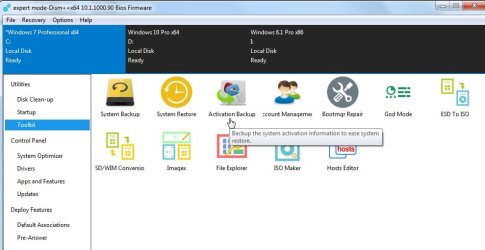
Click Toolkit in left pane. Then you see Active backup in main window. Click It.


dism++-actbkup.jpg


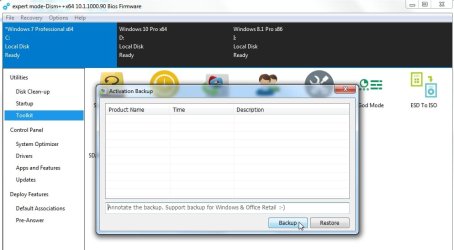
Click Backup.

It is stored in the Dism++\ActiveBackup folder . That is why you must then copy the entire dism++ folder somewhere safe before reinstalling

dism++-actbkup2.jpg


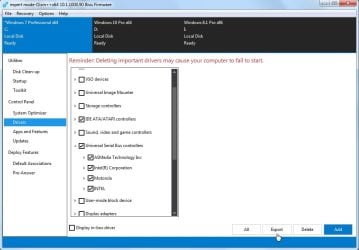
To backup drivers Click drivers in the left pane. Then tick any you want to backup . Then click Export - and browse to folder to export then to. Export into a folder somewhere safe - an external drive/usb stick, because you will need them later.

dism++-export-drivers.jpg
 

My Computers

System One System Two

  • Computer type
    PC/Desktop
    OS
    7 X64
    CPU
    i5 8400
    Motherboard
    gigabyte b365m ds3h
    Memory
    2x8gb 3200mhz
    Hard Drives
    various
    PSU
    pure power 11 400w cm
    Case
    Coolermaster
    Cooling
    cryorig m9i
  • Computer type
    PC/Desktop
    OS
    7x64
    CPU
    g5400
    Motherboard
    ga b365m ds3h
    Memory
    8gb ddr4 2400
    PSU
    xfx pro 450w
problem with updates after recovery

I have successfully installed windows 7 home premium sp1 along and am currently finishing updates. Thank you all so very much I had given up and without your kind patience and help I never would have been able to accomplish this. Again thank you all very much
Bob H
 

My Computer

Computer type
Laptop
Computer Manufacturer/Model Number
Asus
OS
Windows 7 home premium 64 bit
CPU
pentium dual core
Motherboard
unknown
Memory
3 gb
Graphics Card(s)
unknown
Hard Drives
1 TB
Antivirus
AVG
Browser
Google Chrome
You make it easy for us by following instructions well. ;)
 

My Computer

Computer type
PC/Desktop
Computer Manufacturer/Model Number
HP Desktop & Compaq Laptop
OS
Win 10 x64, Linux Lite, Win 7 x64, BlackArch, & Kali
Hard Drives
Samsung 850 Pro 256Gb,
Hitachi HDD 1Tb,
Crucial MX SSD 250Gb
Segate 3Tb USB 3.0 Ext. Backup HDD
Internet Speed
150Mbps dn, 20Mbps up
Antivirus
Avast Free, Malwarebytes Anti-Exploit & Anti-Ransomware
Browser
Firefox, Chrome, Opera, & VPN
Back
Top