Update your Win 7 installation media

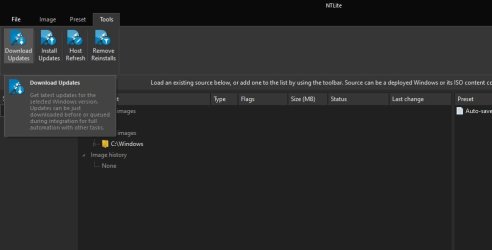
Generic? You wanna clarify that statement so that I can make a better response?Read here: Download Windows Updates – NTLite
In fact you confirmed what I said "generic" suggestion like billions already available that you need to test one by one.
And you didn't even read my post, NTLite can download the latest "official" updates which are very very old while I specifically mentioned the updated package up to 01/2020 (this time in bold so you don't miss it) and if NTLite can add those updates (again in bold so you don't miss it) so I hope now is everything clear.
 

My Computer My Computer

Computer type
PC/Desktop
Computer Manufacturer/Model Number
Custom build
OS
Windows 7 Ultimate x64
CPU
Intel i5-6600K 3.50GHz
Motherboard
Asus Pro Z170 Gaming
Memory
Corsair DDR4 2x8GB
Graphics Card(s)
MSI GeForce GTX1070 Gaming X
Sound Card
On board Realtek
Monitor(s) Displays
Dell SP2309W
Screen Resolution
1920x1080
Hard Drives
OS Samsung 850 EVO 500GB SATA III SSD
2x Hitachi Deskstar 1GB SATA data drives
1x Western Digital Caviar Black 1TB SATA data drive
PSU
Corsair HX650W
Case
CoolerMaster CM 690 III
Cooling
Coolermaster Hyper 212 EVO 1x200mm 1x140mm 2x120mm case fan
Keyboard
Logitech usb keyboard
Mouse
Logitech G500 $27 bargain :)
Internet Speed
ADSL2
Antivirus
Microsoft Security Essential, MalwareBytes
Browser
SRWare Iron, Internet Explorer
Other Info
Very happy with this buid.
I struggled a lot to find all compatible parts since I wanted an Intel 1151 based motherboard so to be able to install Windows 7.
I chose this case because it has amazing air flow, it's sturdy and looks good.
The case included 1x 200mm front and 1x 120mm back fans, I added 1x 200mm on the top and 1x120 bottom fans and modded the panels with black stockings for women s
F22 Simpilot,

Thank you for your post.

I used everything to find the msnvme.sys file. It found 3 in 7UPv47 and I deleted them.

I then reran 7UPv47 (with the now deleted files) and followed all the screenshots until the end.

I inserted the flash drive and installed windows 7 but on reboot I still received the "cannot verify the digital signature..." message for the msnvme.sys driver.

Very few people seem to be having this issue but all suggestions welcomed!

It sounds like msnvme.sys is in the install.wim...


As I said, I just used the two updates to get my NVMe drive working with Windows 7.

- - - Updated - - -

In fact you confirmed what I said "generic" suggestion like billions already available that you need to test one by one.
And you didn't even read my post, NTLite can download the latest "official" updates which are very very old while I specifically mentioned the updated package up to 01/2020 (this time in bold so you don't miss it) and if NTLite can add those updates (again in bold so you don't miss it) so I hope now is everything clear.


I did read your post. Why assume I didn't based on your lack of understanding of what I wrote?


The problem is where to find the latest update package for Windows 7.

NTLite can download the latest "official" updates which are very very old while I specifically mentioned the updated package up to 01/2020 (this time in bold so you don't miss it)


It seems to me you are implying Microsoft has updates beyond the "official" updates that are in your words, "very very old". Updates beyond what even NTLite can even grab from Microsoft's servers. If this is true then how does one update a product namely Windows 7 with "official" updates that are not old but somehow "new" and not from what NTLite can grab from Microsoft's website? Are these some secret updates or something?

It says right here at NTLite's website the following:
Windows 7 (SP1), including Windows Server 2008 R2 (Microsoft Support End Date 01/12/2021, extended support optional)

Currently not supporting Windows 7 .NET 4.x Framework and Defender updates.

Furthermore, there's no mention of the date you so elegantly put in bold as 1/2020 mentioned anywhere on that webpage. The word "official" doesn't even exist on that webpage. Also note the NTLite webpage says,
extended support optional

So this has me curious. When I get time I'll deploy a Windows 7 image and use NTLite to download the updates and see what I get. But I'm willing to bet the Mad Hatter's bong there's nothing "generic" with the updates I'll download and slipstream into the Windows 7 image...


The problem is where to find the latest update package for Windows 7.

Microsoft's servers that NTLite will download from. Is that not considered "the latest?" It's why I mentioned NTLite from the get-go in hopes it would be useful to someone. It has been for me.

- - - Updated - - -

Take your advice and read - read what I postd. From NTlite's webpage:


Features
– downloads the latest updates
– verifies downloaded update file hashes
– resumes interrupted downloads
– organizes downloaded updates per Windows version
– labels the updates, helps with pre-selection of the recommended updates
– multi-threaded download and hashing


Update lists are manually curated, usually updated within a few hours from an update’s release.
While lists are downloaded from our server, the actual updates are downloaded only from Microsoft’s servers and the tool internally does not allow any other way.


And get this? They provided a screenshot on that very webpage I linked to: https://www.ntlite.com/wp-content/uploads/downloadupdates.png
 

My Computer My Computer

Computer type
PC/Desktop
OS
Windows 7 Ultimate x64

My Computer My Computer

Computer type
PC/Desktop
Computer Manufacturer/Model Number
Custom build
OS
Windows 7 Ultimate x64
CPU
Intel i5-6600K 3.50GHz
Motherboard
Asus Pro Z170 Gaming
Memory
Corsair DDR4 2x8GB
Graphics Card(s)
MSI GeForce GTX1070 Gaming X
Sound Card
On board Realtek
Monitor(s) Displays
Dell SP2309W
Screen Resolution
1920x1080
Hard Drives
OS Samsung 850 EVO 500GB SATA III SSD
2x Hitachi Deskstar 1GB SATA data drives
1x Western Digital Caviar Black 1TB SATA data drive
PSU
Corsair HX650W
Case
CoolerMaster CM 690 III
Cooling
Coolermaster Hyper 212 EVO 1x200mm 1x140mm 2x120mm case fan
Keyboard
Logitech usb keyboard
Mouse
Logitech G500 $27 bargain :)
Internet Speed
ADSL2
Antivirus
Microsoft Security Essential, MalwareBytes
Browser
SRWare Iron, Internet Explorer
Other Info
Very happy with this buid.
I struggled a lot to find all compatible parts since I wanted an Intel 1151 based motherboard so to be able to install Windows 7.
I chose this case because it has amazing air flow, it's sturdy and looks good.
The case included 1x 200mm front and 1x 120mm back fans, I added 1x 200mm on the top and 1x120 bottom fans and modded the panels with black stockings for women s
That's an alternative and what appears to be an older way of doing things where he (Raymond) slipstreams the updates the manual way with the old classic update tool thing I remember from long ago. Today, the update facility is built-in. You shouldn't have to integrate an update manually like before. But the option exists.

Here's a screenshot of what I see in my version of NTLite.


yhmkjg.jpg
 

My Computer My Computer

Computer type
PC/Desktop
OS
Windows 7 Ultimate x64
I then reran 7UPv47 (with the now deleted files) and followed all the screenshots until the end.

I inserted the flash drive and installed windows 7 but on reboot I still received the "cannot verify the digital signature..." message for the msnvme.sys driver.

Very few people seem to be having this issue but all suggestions welcomed!

strange error, presumably specific to your system.

you could see if using Dism++10.1.1000.100.zip to remove it

- - - Updated - - -

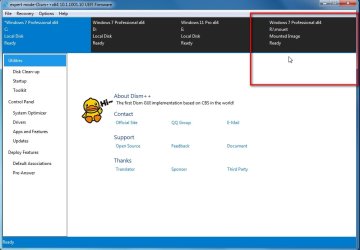
click the os you want to work on to highlight it in blue.

it can be an installed os or a mounted image or you can add a path by clicking File > add path and browse to an extracted image

dism++-remove-driver1.jpg

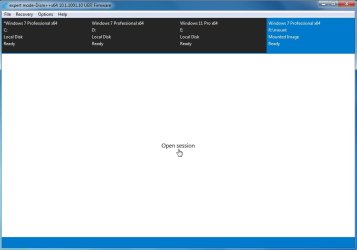
click open session

dism++-remove-driver2.jpg


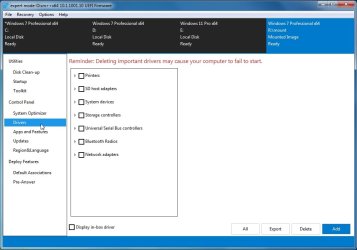
click drivers in the left pane

dism++-remove-driver3.jpg


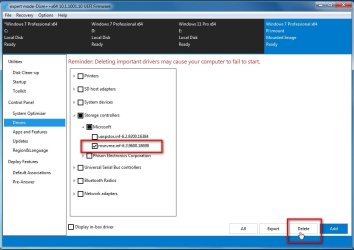
tick driver to remove then click delete

dism++-remove-driver4.jpg

- - - Updated - - -

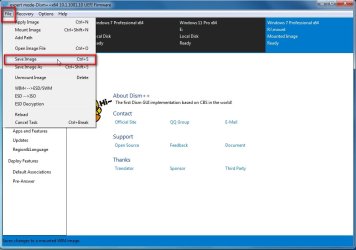
if you are working on a mounted image after you have finished, click File>Save Image

dism++-remove-driver-save-image.jpg

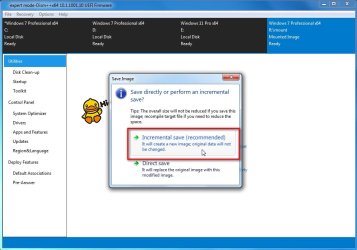
Incremental Save

dism++-remove-driver-save-image-incremental.jpg

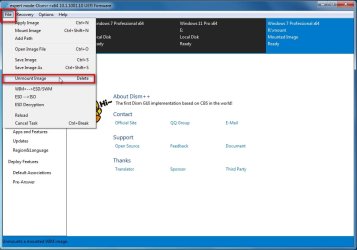
then File >Unmount Image

dism++-remove-driver-unmount-image.jpg
 

My Computers My Computers

System One System Two

  • Computer type
    PC/Desktop
    OS
    7 X64
    CPU
    i5 8400
    Motherboard
    gigabyte b365m ds3h
    Memory
    2x8gb 3200mhz
    Hard Drives
    various
    PSU
    pure power 11 400w cm
    Case
    Coolermaster
    Cooling
    cryorig m9i
  • Computer type
    PC/Desktop
    OS
    7x64
    CPU
    g5400
    Motherboard
    ga b365m ds3h
    Memory
    8gb ddr4 2400
    PSU
    xfx pro 450w
S1W2,

Thank you for your reply.

I am changing accommodations this week which will occupy most of my time but thank you for the suggestions and screenshots. I will give them a try as soon as I can.
 

My Computer My Computer

Computer type
PC/Desktop
OS
W 7 Ultimate x64
That's an alternative and what appears to be an older way of doing things where he (Raymond) slipstreams the updates the manual way with the old classic update tool thing I remember from long ago. Today, the update facility is built-in. You shouldn't have to integrate an update manually like before. But the option exists.

Regarding Raymond's solutions I believe that they would disagree with your opinion.
NTLite is an interesting program and it's just another way for doing the same job but you still need to do your homework, research and troubleshooting because for example it can't integrate some important updates because it needs the ESU, then you need to find out what is that and you go here and there, install this and that so NTLite is not a one click easy solution, it does the same things but you still need to do your homework and research.
However, I feel like we're hijacking this seveforums thread plus I'm getting lost with too much information and options so I decided to stick to this thread firstly because the support is "great" and the instructions are great too.
I know clearly what I need to download and how to integrate which is supported by very clear instructions.
 

My Computer My Computer

Computer type
PC/Desktop
Computer Manufacturer/Model Number
Custom build
OS
Windows 7 Ultimate x64
CPU
Intel i5-6600K 3.50GHz
Motherboard
Asus Pro Z170 Gaming
Memory
Corsair DDR4 2x8GB
Graphics Card(s)
MSI GeForce GTX1070 Gaming X
Sound Card
On board Realtek
Monitor(s) Displays
Dell SP2309W
Screen Resolution
1920x1080
Hard Drives
OS Samsung 850 EVO 500GB SATA III SSD
2x Hitachi Deskstar 1GB SATA data drives
1x Western Digital Caviar Black 1TB SATA data drive
PSU
Corsair HX650W
Case
CoolerMaster CM 690 III
Cooling
Coolermaster Hyper 212 EVO 1x200mm 1x140mm 2x120mm case fan
Keyboard
Logitech usb keyboard
Mouse
Logitech G500 $27 bargain :)
Internet Speed
ADSL2
Antivirus
Microsoft Security Essential, MalwareBytes
Browser
SRWare Iron, Internet Explorer
Other Info
Very happy with this buid.
I struggled a lot to find all compatible parts since I wanted an Intel 1151 based motherboard so to be able to install Windows 7.
I chose this case because it has amazing air flow, it's sturdy and looks good.
The case included 1x 200mm front and 1x 120mm back fans, I added 1x 200mm on the top and 1x120 bottom fans and modded the panels with black stockings for women s
S1W2,

Thank you for your reply.

I am changing accommodations this week which will occupy most of my time but thank you for the suggestions and screenshots. I will give them a try as soon as I can.

S1W2,

I have had a pleasant surprise!

Before moving home I had some spare time. Having successfully installed W7, I decided to install all the Dell W7 drivers for my XPS 13 9350. I had to sit in front of the laptop and hit F8 every time it rebooted in order to disable driver signature. I then started the 167 W7 updates again hitting F8 each time it rebooted.

On one occasion I was distracted by a telephone call and did not hit F8 and, much to my amazement, the laptop booted straight into W7. At the next reboot I did nothing and it rebooted all by itself. Problem now solved!

Thank you very much again not only for the great programme but also for taking the time to provide advice and screenshots.
 

My Computer My Computer

Computer type
PC/Desktop
OS
W 7 Ultimate x64
Regarding Raymond's solutions I believe that they would disagree with your opinion.
NTLite is an interesting program and it's just another way for doing the same job but you still need to do your homework, research and troubleshooting because for example it can't integrate some important updates because it needs the ESU, then you need to find out what is that and you go here and there, install this and that so NTLite is not a one click easy solution, it does the same things but you still need to do your homework and research.
However, I feel like we're hijacking this seveforums thread plus I'm getting lost with too much information and options so I decided to stick to this thread firstly because the support is "great" and the instructions are great too.
I know clearly what I need to download and how to integrate which is supported by very clear instructions.

This sounds like a very "generic" response...
 

My Computer My Computer

Computer type
PC/Desktop
OS
Windows 7 Ultimate x64

My Computer My Computer

Computer type
PC/Desktop
Computer Manufacturer/Model Number
Custom build
OS
Windows 7 Ultimate x64
CPU
Intel i5-6600K 3.50GHz
Motherboard
Asus Pro Z170 Gaming
Memory
Corsair DDR4 2x8GB
Graphics Card(s)
MSI GeForce GTX1070 Gaming X
Sound Card
On board Realtek
Monitor(s) Displays
Dell SP2309W
Screen Resolution
1920x1080
Hard Drives
OS Samsung 850 EVO 500GB SATA III SSD
2x Hitachi Deskstar 1GB SATA data drives
1x Western Digital Caviar Black 1TB SATA data drive
PSU
Corsair HX650W
Case
CoolerMaster CM 690 III
Cooling
Coolermaster Hyper 212 EVO 1x200mm 1x140mm 2x120mm case fan
Keyboard
Logitech usb keyboard
Mouse
Logitech G500 $27 bargain :)
Internet Speed
ADSL2
Antivirus
Microsoft Security Essential, MalwareBytes
Browser
SRWare Iron, Internet Explorer
Other Info
Very happy with this buid.
I struggled a lot to find all compatible parts since I wanted an Intel 1151 based motherboard so to be able to install Windows 7.
I chose this case because it has amazing air flow, it's sturdy and looks good.
The case included 1x 200mm front and 1x 120mm back fans, I added 1x 200mm on the top and 1x120 bottom fans and modded the panels with black stockings for women s
well-bye-bye.gif
 

My Computer My Computer

Computer type
PC/Desktop
OS
Windows 7 Ultimate x64
I would do it from within your win10.
Run winntsetup. View attachment 421336
browse to the win7 install.wim
select the edition you want to install in the dropdown
browse to the partition you want to install win 7 onto.
yes. you can do it from booted win10 media using wbadmin command.
OR you can load the .vhdx file in diskgenius and clone it to the target partition.
Free Download DiskGenius Online
Then Fix the os letter and then add a boot menu entry using nt6repair View attachment 421337
Select the target Windows partition in the dropdown, then click FIX

View attachment 421338
S1W2

Re your post 1238 on page 124. Like DSLgirl, I would like to install W7 on a second partition as a dual boot. I wonder if you can help with what I am trying to do because I am doing something wrong.

I have a new Dell Latitude 5430 with W10. There is no legacy boot option so I cannot boot from a flash drive.

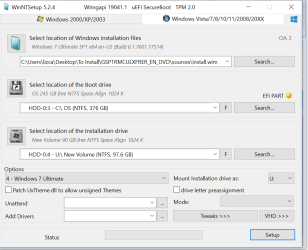
I have used WinNTSetup_v524 followed by nt6repair9x86 but I must be doing something wrong.

W10 is on my c drive and I want to install W7 on my U drive. I had successfully copied your instructions on how to install W7 from a bootable flash drive and the file is still on my C drive.


These are selections I made – in the “mount installation drive” dropdown menu I have selected U:

clip_image002.gif


As a starter, am I making the correct selections so far?Capture 1.PNG
 

My Computers My Computers

System One System Two

  • OS
    W10
  • Computer type
    PC/Desktop
1. win7 doesnt support secure boot. Turn off secure boot in bios and enable CSM

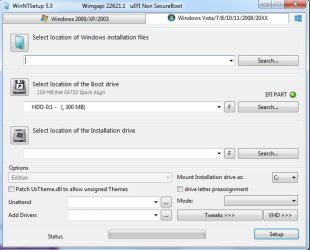
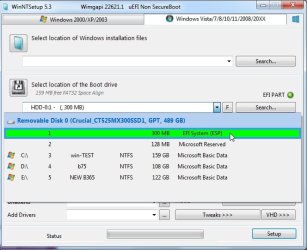
2. The boot drive should be the EFI system partition. The light should be green.

older versions of winntsetup mounted the boot drive ( aka ms system partition ) with letter Z and auto selected it.

the newest version 530 does not assign a letter, it autoselects the boot drive ( aka ms system partition ).

winntsetup-efi-part.jpg

There is also a drop down selection if needed.

winntsetup-efi-part2.jpg

download winntsetup


I have a new Dell Latitude 5430 with W10

dell-latitude-e5430-and-e5530-windows-7-driver-installation-guide

Deploy Latitude E5430 Windows 7 Driver Pack

if it is the recent 5430 ( no E ). I expect it has class 3 uefi and is not compatible with win7. It is possible a very advanced user has done it with a lot of effort.

https://www.dell.com/en-uk/shop/laptops-2-in-1-pcs/latitude-5430-laptop/spd/latitude-5430-laptop

latitude-5430-service-manual
 
Last edited:

My Computers My Computers

System One System Two

  • Computer type
    PC/Desktop
    OS
    7 X64
    CPU
    i5 8400
    Motherboard
    gigabyte b365m ds3h
    Memory
    2x8gb 3200mhz
    Hard Drives
    various
    PSU
    pure power 11 400w cm
    Case
    Coolermaster
    Cooling
    cryorig m9i
  • Computer type
    PC/Desktop
    OS
    7x64
    CPU
    g5400
    Motherboard
    ga b365m ds3h
    Memory
    8gb ddr4 2400
    PSU
    xfx pro 450w
S1W1

Thank you again. I am now one step further forward.

Secure Boot is OFF and the EFI part light is green.

I rebooted the laptop and W7 started to boot then stopped. I rebooted into W10 and then noticed your comment: download winntsetup which I have done. I used the WinNTSetup_x64 but the result was the same.

I have the 5430 and not the E5430

Have we come to the end of the road or is there anything you can think of?
 

My Computers My Computers

System One System Two

  • OS
    W10
  • Computer type
    PC/Desktop
I dont think it is feasible on your laptop. :( People with desktops and consumer motherboards have done it with 12th gen intel, because consumer desktop mobos are more flexible.
 

My Computers My Computers

System One System Two

  • Computer type
    PC/Desktop
    OS
    7 X64
    CPU
    i5 8400
    Motherboard
    gigabyte b365m ds3h
    Memory
    2x8gb 3200mhz
    Hard Drives
    various
    PSU
    pure power 11 400w cm
    Case
    Coolermaster
    Cooling
    cryorig m9i
  • Computer type
    PC/Desktop
    OS
    7x64
    CPU
    g5400
    Motherboard
    ga b365m ds3h
    Memory
    8gb ddr4 2400
    PSU
    xfx pro 450w
I dont think it is feasible on your laptop. :( People with desktops and consumer motherboards have done it with 12th gen intel, because consumer desktop mobos are more flexible.
Thank you very much for all your advice - it has been really appreciated. On another (oldish) computer I have been able to install W7 thanks to you and all your screenshots.
 

My Computers My Computers

System One System Two

  • OS
    W10
  • Computer type
    PC/Desktop
Hello,
Thanks to everyone that has contributed to this thread. With the information I found here I have been able to get Win7 installed on the NVME drive in the PC listed in my profile.
However, I have hit a roadblock in trying to get the SATA ports working. I have tried every driver I can find at it and none of them would install.
I'd appreciate any suggestions or links that would help solve this problem. I am even thinking about getting a PCI card with SATA ports and abandoning the ports on the motherboard if that would work. Although I wonder how much of a performance hit that would cause.
 

My Computers My Computers

System One System Two

  • Computer type
    PC/Desktop
    Computer Manufacturer/Model Number
    Asus
    OS
    Win7 Pro x64
    CPU
    I7-12700F
    Motherboard
    Asus Prime Z690-P WiFi
    Memory
    64 GB DDR5 G.Skill Ripjaws
    Graphics Card(s)
    Zotac Twin Edge GeForce RTX 3060 Ti
    Hard Drives
    Boot: WD Black SN770 1 TB M.2-2280 NVME
    RAID: WD Blue 1 TB x 2 setup as RAID 1
    Data Storage: Seagate 500 GB
    Browser
    Firefox, Chrome, IE, Edge
  • Computer type
    PC/Desktop
Check the manual for your motherboard.
When a M.2 PCIe NVMe solid state drive is used, it may disable one or more of the SATA ports.
You may need to switch to different SATA ports.
 

My Computer My Computer

Computer type
PC/Desktop
Computer Manufacturer/Model Number
Dell OptiPlex 9020
OS
Windows 7 Professional SP1 64-bit
CPU
Intel Core i7-4790 3.60 GHz
Memory
32 GB DDR3-1600 MHz
Graphics Card(s)
Integrated Intel HD Graphics 4600
Monitor(s) Displays
Viewsonic 32" LCD
Hard Drives
Kingston SATA 3 240 GB SSD
Internet Speed
Spectrum Internet 1000 Mbps
I have this PC dual-booting Win10 and Win7. Under Win10 everything works as expected. The NVMe drive is the boot device, SATA ports 1 and 2 are setup as RAID 1 (mirror) using 2 WD blue 1 TB drives. Port 3 is connected to a Seagate 500 GB and port 4 is connected to a Blu-Ray burner. This all works fine under WIN10. Device manager in Win7 shows a number of items not working because there are no drivers.
devicemgr.jpg
 

My Computers My Computers

System One System Two

  • Computer type
    PC/Desktop
    Computer Manufacturer/Model Number
    Asus
    OS
    Win7 Pro x64
    CPU
    I7-12700F
    Motherboard
    Asus Prime Z690-P WiFi
    Memory
    64 GB DDR5 G.Skill Ripjaws
    Graphics Card(s)
    Zotac Twin Edge GeForce RTX 3060 Ti
    Hard Drives
    Boot: WD Black SN770 1 TB M.2-2280 NVME
    RAID: WD Blue 1 TB x 2 setup as RAID 1
    Data Storage: Seagate 500 GB
    Browser
    Firefox, Chrome, IE, Edge
  • Computer type
    PC/Desktop
I apparently misunderstood what you said in your previous post.
I was assuming you had installed a M.2 PCIe NVMe solid state drive and then couldn't get one or more of the SATA ports to work.

I was going to ask you if you had installed the Intel chipset drivers for Windows 7 64-bit.
However, I discovered your motherboard doesn't have drivers for that operating system.

I'll leave you with the others here to hopefully resolve your issue.
Good luck.
 

My Computer My Computer

Computer type
PC/Desktop
Computer Manufacturer/Model Number
Dell OptiPlex 9020
OS
Windows 7 Professional SP1 64-bit
CPU
Intel Core i7-4790 3.60 GHz
Memory
32 GB DDR3-1600 MHz
Graphics Card(s)
Integrated Intel HD Graphics 4600
Monitor(s) Displays
Viewsonic 32" LCD
Hard Drives
Kingston SATA 3 240 GB SSD
Internet Speed
Spectrum Internet 1000 Mbps
Back
Top