- Local time
- 8:04 PM
- Messages
- 16,797
Here is a way to get your installation media up to date: Includes "universal" usb3 , sata drivers, nvme drivers and MS nvme updates
7Updater: ( approx 130mb)
7UPv64R.zip
NOTE: It is not required to use the simplix update pack.
If you only want to integrate usb3, nvme, irst, sha2 support and windows update support, Run 7updater.cmd without simplix update pack present.
If you want to include the simplix pack:
Small downloader which you can run to download the latest Simplix updatepack ( about 850mb).
https://update7.simplix.info/UpdatePack7R2.exe
UpdatePack7R2+.exe is the downloader
UpdatePack7R2-date.exe is the update pack it downloads
If you are using simplix updatepack, recommend including the latest Net framework 4.8 add-on (see next post)
1. Extract the 7UPv64.zip directly to the root of the drive, so you have C:\7UPv64 folder.
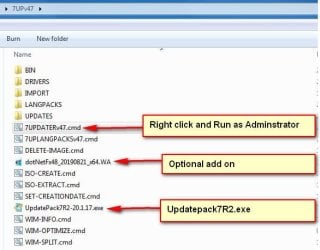
2. If you want to include simplix update pack, put the UpdatePack7R2-date.exe in the C:\7UPv64 folder.
3. Copy and paste your windows 7 SP1 installation media to a hard disk or ssd - not to a usb stick.
(Or use ISO-EXTRACT.cmd to extract your windows 7 SP1 iso file to a hard disk or ssd - not to a usb stick.)
4. Right click and Run as administrator on the the 7UPDATERv64.cmd
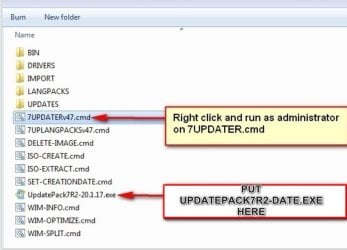
Note: it is recommended to turn off your antivirus real time protection during the process, because it will slow it down.
:ar: SCREENSHOTS HERE
7Updater: ( approx 130mb)
7UPv64R.zip
NOTE: It is not required to use the simplix update pack.
If you only want to integrate usb3, nvme, irst, sha2 support and windows update support, Run 7updater.cmd without simplix update pack present.
If you want to include the simplix pack:
Small downloader which you can run to download the latest Simplix updatepack ( about 850mb).
https://update7.simplix.info/UpdatePack7R2.exe
UpdatePack7R2+.exe is the downloader
UpdatePack7R2-date.exe is the update pack it downloads
If you are using simplix updatepack, recommend including the latest Net framework 4.8 add-on (see next post)
1. Extract the 7UPv64.zip directly to the root of the drive, so you have C:\7UPv64 folder.
2. If you want to include simplix update pack, put the UpdatePack7R2-date.exe in the C:\7UPv64 folder.
3. Copy and paste your windows 7 SP1 installation media to a hard disk or ssd - not to a usb stick.
(Or use ISO-EXTRACT.cmd to extract your windows 7 SP1 iso file to a hard disk or ssd - not to a usb stick.)
4. Right click and Run as administrator on the the 7UPDATERv64.cmd
Note: it is recommended to turn off your antivirus real time protection during the process, because it will slow it down.
:ar: SCREENSHOTS HERE
Last edited:
My Computers
-
At a glance
7 X64i5 84002x8gb 3200mhz- Computer type
- PC/Desktop
- OS
- 7 X64
- CPU
- i5 8400
- Motherboard
- gigabyte b365m ds3h
- Memory
- 2x8gb 3200mhz
- Hard Drives
- various
- PSU
- pure power 11 400w cm
- Case
- Coolermaster
- Cooling
- cryorig m9i
-
At a glance
7x64g54008gb ddr4 2400- Computer type
- PC/Desktop
- OS
- 7x64
- CPU
- g5400
- Motherboard
- ga b365m ds3h
- Memory
- 8gb ddr4 2400
- PSU
- xfx pro 450w

 .
.