Update your Win 7 installation media

My Computers My Computers

System One System Two

  • Computer type
    PC/Desktop
    OS
    7 X64
    CPU
    i5 8400
    Motherboard
    gigabyte b365m ds3h
    Memory
    2x8gb 3200mhz
    Hard Drives
    various
    PSU
    pure power 11 400w cm
    Case
    Coolermaster
    Cooling
    cryorig m9i
  • Computer type
    PC/Desktop
    OS
    7x64
    CPU
    g5400
    Motherboard
    ga b365m ds3h
    Memory
    8gb ddr4 2400
    PSU
    xfx pro 450w
I looked at his. Unfortunately he starts with the convenience rollup from 2016 which includes the KB3108669. Thanks anyhow.
 

My Computer My Computer

Computer type
PC/Desktop
OS
Windows 7 Pro 64bit
Dism++ is your best bet.
You select which updates you want from the list it shows after it has done a quick scan of the mounted image.
It will pop up a window if you accidentally select something with telemetry - click cancel and it won't be integrated.

View attachment Dism++.zip


Screenshot instructions HERE
 

My Computers My Computers

System One System Two

  • Computer type
    PC/Desktop
    OS
    7 X64
    CPU
    i5 8400
    Motherboard
    gigabyte b365m ds3h
    Memory
    2x8gb 3200mhz
    Hard Drives
    various
    PSU
    pure power 11 400w cm
    Case
    Coolermaster
    Cooling
    cryorig m9i
  • Computer type
    PC/Desktop
    OS
    7x64
    CPU
    g5400
    Motherboard
    ga b365m ds3h
    Memory
    8gb ddr4 2400
    PSU
    xfx pro 450w
Siw2,
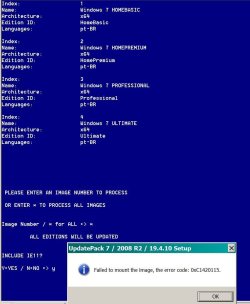
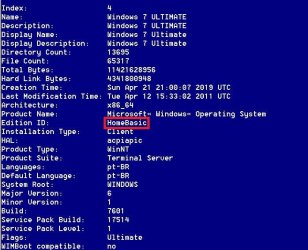
I ran my version of 7UPDATER it seemed to run without errors but wimlib info of the final install.wim gave me for professional and ultimate Idition ID = HomeBasic.

So I ran 7UPDATERV22D with same drivers and same UpdatePack7R2-19.4.10.exe.
I choose d to install UpdatePack with IE11 option and it gave me an error that it coudan't mount the install.wim file (see attached image).
The updates drivers slipstream without error, but after it finished, wimlib info of the final install.wim gave me for ultimate Idition ID = HomeBasic.
I have no idea how did the ultimate Idition ID became HomeBasic and I don't know how to work with "for" cmd.
Can you please help.
 

Attachments

  • Error_V22D.JPG
    Error_V22D.JPG
    66.7 KB · Views: 1
  • ID_Error.JPG
    ID_Error.JPG
    60.4 KB · Views: 65

My Computers My Computers

System One System Two

  • Computer type
    PC/Desktop
    Computer Manufacturer/Model Number
    custom build
    OS
    Windows 7 HP 64
    CPU
    i5 6600K - 800MHz to 4200MHz
    Motherboard
    GA-Z170-HD3P
    Memory
    4+4G GSkill DDR4 3000
    Graphics Card(s)
    IG - Intel 530
    Monitor(s) Displays
    Samsung 226BW
    Screen Resolution
    1680x1050
    Hard Drives
    (1) -1 SM951 – 128GB M.2 AHCI PCIe SSD drive for Windows 7 and Lubuntu
    (2) -1 WD SATA 3 - 1T for Data
    (3) -1 WD SATA 3 - 1T for backup
    PSU
    Thermaltake 450W TR2 gold
    Keyboard
    Old and good Chicony mechanical keyboard
    Mouse
    Logitech mX performance - 9 buttons (had to disable some)
    Internet Speed
    500Mb/s
    Browser
    Firefox 64
    Other Info
    TinyWall firewall
  • Computer type
    Laptop
    System Manufacturer/Model Number
    Asus Q550LF
    OS
    Windows 7 Pro
    CPU
    i7-4500U 800MHz to 3.0GHz
    Motherboard
    Asus Q550LF
    Memory
    (4+4)G DDR3 1600
    Graphics Card(s)
    IG intel 4400 + NVIDIA GeForce GT 745M
    Sound Card
    Realtek
    Monitor(s) Displays
    LG Display LP156WF4-SPH1
    Screen Resolution
    1920 x 1080
    Hard Drives
    BX500 120G SSD for Windows and programs +
    1T HDD for data
    Internet Speed
    500 Mb/s
    Browser
    Firefox
    Other Info
    TinyWall firewall
I choose d to install UpdatePack with IE11 option and it gave me an error that it coudan't mount the install.wim file (see attached image).

I can't reproduce your error.:confused:

Don't worry about the Edition ID. That is normal when you use dism to change editions. Some of the changes are pending. They complete during setup.
 

My Computers My Computers

System One System Two

  • Computer type
    PC/Desktop
    OS
    7 X64
    CPU
    i5 8400
    Motherboard
    gigabyte b365m ds3h
    Memory
    2x8gb 3200mhz
    Hard Drives
    various
    PSU
    pure power 11 400w cm
    Case
    Coolermaster
    Cooling
    cryorig m9i
  • Computer type
    PC/Desktop
    OS
    7x64
    CPU
    g5400
    Motherboard
    ga b365m ds3h
    Memory
    8gb ddr4 2400
    PSU
    xfx pro 450w
On the
:CreateWinre
CLS & ECHO. & ECHO CREATING WinRE.WIM... & ECHO.
BIN\wimlib-imagex.exe export "%WIMDir%\sources\boot.wim" 2 "%TP%\WinRE.wim" --boot
Rem add winpeshl.ini to new winre wim
IF EXIST "%TP%\BIN\wim-update.txt" DEL /Q "%TP%\BIN\wim-update.txt"
echo add '%TP%\BIN\peshl%wimarch%\Windows' '\Windows' >> "%TP%\BIN\wim-update.txt"
ECHO.
cd "bin"
wimlib-imagex.exe update "%TP%\WinRE.wim" 1 < "wim-update.txt" >nul
set newre=1
cd /d "%TP%"

It creates WinRE.Win but when it runs
wimlib-imagex.exe update "%TP%\WinRE.wim" 1 < "wim-update.txt" >nul
set newre=1

It gives a message: The system cannot find the path specified.
It doesn't add peshl%wimarch%\Windows to WimRE.wim

Can you help?
 

My Computers My Computers

System One System Two

  • Computer type
    PC/Desktop
    Computer Manufacturer/Model Number
    custom build
    OS
    Windows 7 HP 64
    CPU
    i5 6600K - 800MHz to 4200MHz
    Motherboard
    GA-Z170-HD3P
    Memory
    4+4G GSkill DDR4 3000
    Graphics Card(s)
    IG - Intel 530
    Monitor(s) Displays
    Samsung 226BW
    Screen Resolution
    1680x1050
    Hard Drives
    (1) -1 SM951 – 128GB M.2 AHCI PCIe SSD drive for Windows 7 and Lubuntu
    (2) -1 WD SATA 3 - 1T for Data
    (3) -1 WD SATA 3 - 1T for backup
    PSU
    Thermaltake 450W TR2 gold
    Keyboard
    Old and good Chicony mechanical keyboard
    Mouse
    Logitech mX performance - 9 buttons (had to disable some)
    Internet Speed
    500Mb/s
    Browser
    Firefox 64
    Other Info
    TinyWall firewall
  • Computer type
    Laptop
    System Manufacturer/Model Number
    Asus Q550LF
    OS
    Windows 7 Pro
    CPU
    i7-4500U 800MHz to 3.0GHz
    Motherboard
    Asus Q550LF
    Memory
    (4+4)G DDR3 1600
    Graphics Card(s)
    IG intel 4400 + NVIDIA GeForce GT 745M
    Sound Card
    Realtek
    Monitor(s) Displays
    LG Display LP156WF4-SPH1
    Screen Resolution
    1920 x 1080
    Hard Drives
    BX500 120G SSD for Windows and programs +
    1T HDD for data
    Internet Speed
    500 Mb/s
    Browser
    Firefox
    Other Info
    TinyWall firewall
Dism++ is your best bet.
You select which updates you want from the list it shows after it has done a quick scan of the mounted image.

Okay I checked out DISM++. Nice tool but unfortunately the particular KB I need does not show up :mad: I am guessing MS must have rolled it into a cumulative update somewhere. I may have to install the update and then see if I can uninstall that particular KB.
A quick question on cumulative updates: Can you just install the latest one (i.e. will it include all the old ones?) or do you have to install one after the other? If they are truly cumulative then how can you prevent things like meltdown that are part of the monthly quality roll up (e.g. Security Monthly quality Roll-up for Windows 7 for x64-based Systems (KB4056894)) from being installed by a later update?

Thank you for all of your help!
 

My Computer My Computer

Computer type
PC/Desktop
OS
Windows 7 Pro 64bit
mega,

This line changes directory to bin

Code:
cd /d "BIN"

This line assumes that wimlib-imagex.exe and wimupdate.txt are both in the bin directory

Code:
wimlib-imagex.exe update "%TP%\WinRE.wim" 1 < "wim-update.txt"


This is how I do it when using different arches of wimlib:

There is no need to cd/d bin when using %wimlib% variable. Also need to tell %wimlib% where wimupdate.txt is.

Code:
IF EXIST "%TP%\bin\wim-update.txt" DEL /Q "%TP%\bin\wim-update.txt"
echo.
echo add '%TP%\BIN\peshl%wimarch%\Windows' '\Windows' >> "%TP%\bin\wim-update.txt"
echo.
%WimLib% update "%TP%\Temp\WinRE.wim" 1 < "%TP%\bin\wim-update.txt"
 

My Computers My Computers

System One System Two

  • Computer type
    PC/Desktop
    OS
    7 X64
    CPU
    i5 8400
    Motherboard
    gigabyte b365m ds3h
    Memory
    2x8gb 3200mhz
    Hard Drives
    various
    PSU
    pure power 11 400w cm
    Case
    Coolermaster
    Cooling
    cryorig m9i
  • Computer type
    PC/Desktop
    OS
    7x64
    CPU
    g5400
    Motherboard
    ga b365m ds3h
    Memory
    8gb ddr4 2400
    PSU
    xfx pro 450w
Shadow Lord,

I may have to install the update and then see if I can uninstall that particular KB.

Dism++ can uninstall it afterwards. Then hide it in windows update so wu doesn't keep nagging you.

cumulative updates: Can you just install the latest one

Just install what monthly updates dism++ has already ticked for you.

how can you prevent things like meltdown that are part of the monthly quality roll up (e.g. Security Monthly quality Roll-up for Windows 7 for x64-based Systems (KB4056894)) from being installed by a later update?

Set WU to notify only. When WU notifies you there are new updates, fire up dism++ and it will list them - if you tick one to install with telemetry or other junk - dism++ will pop up a window, click cancel and dism++ installs the rest.

Then go to WU and hide the thing you cancelled in dism++, to stop WU nagging you.

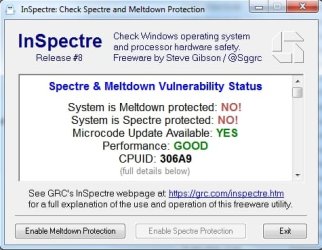
If you make a mistake, you can always uninstall an update, and you can use Steve Gibson's Inspectre to make sure:
GRC | InSpectre

To disable/enable it.

cute little thing written in machine code, which is why it is so tiny.

Inspectre.jpg
 

My Computers My Computers

System One System Two

  • Computer type
    PC/Desktop
    OS
    7 X64
    CPU
    i5 8400
    Motherboard
    gigabyte b365m ds3h
    Memory
    2x8gb 3200mhz
    Hard Drives
    various
    PSU
    pure power 11 400w cm
    Case
    Coolermaster
    Cooling
    cryorig m9i
  • Computer type
    PC/Desktop
    OS
    7x64
    CPU
    g5400
    Motherboard
    ga b365m ds3h
    Memory
    8gb ddr4 2400
    PSU
    xfx pro 450w
mega,

This line changes directory to bin

Code:
cd /d "BIN"

This line assumes that wimlib-imagex.exe and wimupdate.txt are both in the bin directory

Code:
wimlib-imagex.exe update "%TP%\WinRE.wim" 1 < "wim-update.txt"


This is how I do it when using different arches of wimlib:

There is no need to cd/d bin when using %wimlib% variable. Also need to tell %wimlib% where wimupdate.txt is.

Code:
IF EXIST "%TP%\bin\wim-update.txt" DEL /Q "%TP%\bin\wim-update.txt"
echo.
echo add '%TP%\BIN\peshl%wimarch%\Windows' '\Windows' >> "%TP%\bin\wim-update.txt"
echo.
%WimLib% update "%TP%\Temp\WinRE.wim" 1 < "%TP%\bin\wim-update.txt"

Worked!!!
Thanks
 

My Computers My Computers

System One System Two

  • Computer type
    PC/Desktop
    Computer Manufacturer/Model Number
    custom build
    OS
    Windows 7 HP 64
    CPU
    i5 6600K - 800MHz to 4200MHz
    Motherboard
    GA-Z170-HD3P
    Memory
    4+4G GSkill DDR4 3000
    Graphics Card(s)
    IG - Intel 530
    Monitor(s) Displays
    Samsung 226BW
    Screen Resolution
    1680x1050
    Hard Drives
    (1) -1 SM951 – 128GB M.2 AHCI PCIe SSD drive for Windows 7 and Lubuntu
    (2) -1 WD SATA 3 - 1T for Data
    (3) -1 WD SATA 3 - 1T for backup
    PSU
    Thermaltake 450W TR2 gold
    Keyboard
    Old and good Chicony mechanical keyboard
    Mouse
    Logitech mX performance - 9 buttons (had to disable some)
    Internet Speed
    500Mb/s
    Browser
    Firefox 64
    Other Info
    TinyWall firewall
  • Computer type
    Laptop
    System Manufacturer/Model Number
    Asus Q550LF
    OS
    Windows 7 Pro
    CPU
    i7-4500U 800MHz to 3.0GHz
    Motherboard
    Asus Q550LF
    Memory
    (4+4)G DDR3 1600
    Graphics Card(s)
    IG intel 4400 + NVIDIA GeForce GT 745M
    Sound Card
    Realtek
    Monitor(s) Displays
    LG Display LP156WF4-SPH1
    Screen Resolution
    1920 x 1080
    Hard Drives
    BX500 120G SSD for Windows and programs +
    1T HDD for data
    Internet Speed
    500 Mb/s
    Browser
    Firefox
    Other Info
    TinyWall firewall
Worked!!!
Thanks

:-)

There is a simpler way to change the pack date into dd.mm.yyyy format:

Code:
for /f "tokens=1-2 delims=-" %%a in ('dir /b /a-d "%TP%\UpdatePack7R2-*.exe"') do set "dat=%%~nb" & set PACKNAM="%TP%\%%a-%%b"
echo.
FOR /F "Tokens=1-3 Delims=." %%A IN ("%dat%") DO SET ndat=%%C.%%B.20%%A
echo.

for UpdatePack7R2-19.4.10.exe

%ndat% comes out as 10.04.2019


Convertdatehex.exe should in theory accept that.

Code:
Example of use:

    ConvertDateHex.exe /d18.04.2019 /t20:30:09

It doesn't seem to. Whatever date I feed to convertdatehex.exe:

Code:
for /f "tokens=1,2 delims=- skip=1" %%a in ('bin\ConvertDateHex.exe /d%ndat% /t22:26:11') do set "HP=%%a"& set "LP=%%b"


it always spits out the current date in hex format. :confused:

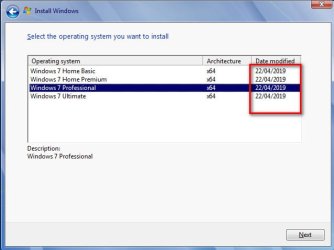
Not a big issue, it just puts the date the wim was updated, instead of the pack date. That is ok - much better than leaving the original date on there.

update-date.jpg
 
Last edited:

My Computers My Computers

System One System Two

  • Computer type
    PC/Desktop
    OS
    7 X64
    CPU
    i5 8400
    Motherboard
    gigabyte b365m ds3h
    Memory
    2x8gb 3200mhz
    Hard Drives
    various
    PSU
    pure power 11 400w cm
    Case
    Coolermaster
    Cooling
    cryorig m9i
  • Computer type
    PC/Desktop
    OS
    7x64
    CPU
    g5400
    Motherboard
    ga b365m ds3h
    Memory
    8gb ddr4 2400
    PSU
    xfx pro 450w
SIW2,
Sorry for the low level questions.
- Under Create commands you create UpdatePack7R2Finish.cmd.
- UpdatePack7R2Finish.cmd has instructions to Add-Driver and ADD-PACKAGE to \mount\UpdatePack7Wim and copy WINRE.WIM to mount\UpdatePack7Wim\Windows\System32\Recovery

Questions:
- Does UpdatePack7R2*.exe also add Drivers and PACKAGE to install.wim? If yes, if you update install.wim with UpdatePack7R2*.exe there is no need to previous run :MountInstallWim that also add Drivers and PACKAGES to install.wim, correct?
- Who uses UpdatePack7R2Wim.cmd, UpdatePack7R2*.exe?
- Does UpdatePack7R2Finish.cmd and UpdatePack7R2Wim.cmd must be in same folder of UpdatePack7R2*.exe? (I suppose yes)
 

My Computers My Computers

System One System Two

  • Computer type
    PC/Desktop
    Computer Manufacturer/Model Number
    custom build
    OS
    Windows 7 HP 64
    CPU
    i5 6600K - 800MHz to 4200MHz
    Motherboard
    GA-Z170-HD3P
    Memory
    4+4G GSkill DDR4 3000
    Graphics Card(s)
    IG - Intel 530
    Monitor(s) Displays
    Samsung 226BW
    Screen Resolution
    1680x1050
    Hard Drives
    (1) -1 SM951 – 128GB M.2 AHCI PCIe SSD drive for Windows 7 and Lubuntu
    (2) -1 WD SATA 3 - 1T for Data
    (3) -1 WD SATA 3 - 1T for backup
    PSU
    Thermaltake 450W TR2 gold
    Keyboard
    Old and good Chicony mechanical keyboard
    Mouse
    Logitech mX performance - 9 buttons (had to disable some)
    Internet Speed
    500Mb/s
    Browser
    Firefox 64
    Other Info
    TinyWall firewall
  • Computer type
    Laptop
    System Manufacturer/Model Number
    Asus Q550LF
    OS
    Windows 7 Pro
    CPU
    i7-4500U 800MHz to 3.0GHz
    Motherboard
    Asus Q550LF
    Memory
    (4+4)G DDR3 1600
    Graphics Card(s)
    IG intel 4400 + NVIDIA GeForce GT 745M
    Sound Card
    Realtek
    Monitor(s) Displays
    LG Display LP156WF4-SPH1
    Screen Resolution
    1920 x 1080
    Hard Drives
    BX500 120G SSD for Windows and programs +
    1T HDD for data
    Internet Speed
    500 Mb/s
    Browser
    Firefox
    Other Info
    TinyWall firewall
Shadow Lord,


Dism++ can uninstall it afterwards. Then hide it in windows update so wu doesn't keep nagging you.

If you make a mistake, you can always uninstall an update, and you can use Steve Gibson's Inspectre to make surehttps://www.grc.com/inspectre.htm
https://www.grc.com/inspectre.htm

Thanks. Unfortunately, InSpectre won't work for what I need. Simply disabling in registry still keeps "Total Media Theater" from running. I think I would have to uninstall/revert back to the original files for it to work. I will give DISM++ a try and see if that helps. If not on that particular system I may just need to leave things at Windows 7 SP1 and not do any updates (or at least updates past 12/15). Which shouldn't be a big deal as that system is only used as an HTPC and not for full work/online. However, it would have been nice to have an a completely up to date system sans the three problematic security updates.
 

My Computer My Computer

Computer type
PC/Desktop
OS
Windows 7 Pro 64bit
- Does UpdatePack7R2*.exe also add Drivers and PACKAGE to install.wim?


1. Drivers:

The updatepack automatically adds usb3 to install.wim, but not to the bootable wims.

Therefore there is no advantage adding usb 3 drivers to DRIVERS\install%wimarch% folder - no harm if you do.

But you will want to add usb3 drivers to DRIVERS\boot%wimarch%

Any other drivers you want included e.g for your network card, or maybe SD card, or oem nvme drivers - you need to add into the folders.

[Note: As far as I can tell, oem nvme drivers will only work if you also include the MS nvme updates]


2. Updates

MS nvme updates are not automatically included by the updatepack.

Therefore - if you want to include the MS nvme updates - put them in UPDATES\boot%wimarch% and UPDATES\install%wimarch%
 

My Computers My Computers

System One System Two

  • Computer type
    PC/Desktop
    OS
    7 X64
    CPU
    i5 8400
    Motherboard
    gigabyte b365m ds3h
    Memory
    2x8gb 3200mhz
    Hard Drives
    various
    PSU
    pure power 11 400w cm
    Case
    Coolermaster
    Cooling
    cryorig m9i
  • Computer type
    PC/Desktop
    OS
    7x64
    CPU
    g5400
    Motherboard
    ga b365m ds3h
    Memory
    8gb ddr4 2400
    PSU
    xfx pro 450w
1.
- Who uses UpdatePack7R2Wim.cmd, UpdatePack7R2*.exe?

Yes

2.
- Does UpdatePack7R2Finish.cmd and UpdatePack7R2Wim.cmd must be in same folder of UpdatePack7R2*.exe? (I suppose yes)

Yes


3. You can also place any addons in the same folder ( next to the updatepack) and they will be included.

The add ons have a .WA extension. Net Frame 4.8 and VC redists etc can be included that way.

NF4.8
Release v2019.04.14 . abbodi1406/dotNetFx4xW7A . GitHub

Lang packs for NF4.8
Release v2019.04.13 . abbodi1406/dotNetFx4xW7A . GitHub

VC redistx64 2005-2008
https://gitlab.com/stdout12/adns/uploads/49d9b9e10ed34128efe830c475c7d027/vcredist_x64_SxS_Win7.WA

VC redistx64 2019
https://gitlab.com/stdout12/adns/up...ccb41/vcredist_x64_2019_WinAll_14.20.27508.WA

VCRedistx86 2005-2008
https://gitlab.com/stdout12/adns/uploads/83176b0c8790463fb4824d85cf0d8ecf/vcredist_x86_SxS_Win7.WA

VCRedistx86 2019
https://gitlab.com/stdout12/adns/up...e06cc/vcredist_x86_2019_WinAll_14.20.27508.WA


4. Surprisingly, you can also put the SP1 exe in the same folder and it will be integrated if the target image is SP0. I think integrating SP1 only when updating a live install, not for installation media.

Windows6.1-KB976932-X86.exe

https://download.microsoft.com/down...AB78-7FB0D4461357/windows6.1-KB976932-X86.exe

Windows6.1-KB976932-X64.exe

https://download.microsoft.com/down...AB78-7FB0D4461357/windows6.1-KB976932-X64.exe
 
Last edited:

My Computers My Computers

System One System Two

  • Computer type
    PC/Desktop
    OS
    7 X64
    CPU
    i5 8400
    Motherboard
    gigabyte b365m ds3h
    Memory
    2x8gb 3200mhz
    Hard Drives
    various
    PSU
    pure power 11 400w cm
    Case
    Coolermaster
    Cooling
    cryorig m9i
  • Computer type
    PC/Desktop
    OS
    7x64
    CPU
    g5400
    Motherboard
    ga b365m ds3h
    Memory
    8gb ddr4 2400
    PSU
    xfx pro 450w
Thanks, SIW2

As UpdatePack7R2Finish.cmd has instructions to Add-Driver and ADD-PACKAGE to \mount\UpdatePack7Wim and copy WINRE.WIM to mount\UpdatePack7Wim\Windows\System32\Recovery to install.wim

Question:
- if you update install.wim with UpdatePack7R2*.exe + UpdatePack7R2Finish.cmd there is no need to call :MountInstallWim that will also add Drivers and PACKAGES to install.wim, correct?
 

My Computers My Computers

System One System Two

  • Computer type
    PC/Desktop
    Computer Manufacturer/Model Number
    custom build
    OS
    Windows 7 HP 64
    CPU
    i5 6600K - 800MHz to 4200MHz
    Motherboard
    GA-Z170-HD3P
    Memory
    4+4G GSkill DDR4 3000
    Graphics Card(s)
    IG - Intel 530
    Monitor(s) Displays
    Samsung 226BW
    Screen Resolution
    1680x1050
    Hard Drives
    (1) -1 SM951 – 128GB M.2 AHCI PCIe SSD drive for Windows 7 and Lubuntu
    (2) -1 WD SATA 3 - 1T for Data
    (3) -1 WD SATA 3 - 1T for backup
    PSU
    Thermaltake 450W TR2 gold
    Keyboard
    Old and good Chicony mechanical keyboard
    Mouse
    Logitech mX performance - 9 buttons (had to disable some)
    Internet Speed
    500Mb/s
    Browser
    Firefox 64
    Other Info
    TinyWall firewall
  • Computer type
    Laptop
    System Manufacturer/Model Number
    Asus Q550LF
    OS
    Windows 7 Pro
    CPU
    i7-4500U 800MHz to 3.0GHz
    Motherboard
    Asus Q550LF
    Memory
    (4+4)G DDR3 1600
    Graphics Card(s)
    IG intel 4400 + NVIDIA GeForce GT 745M
    Sound Card
    Realtek
    Monitor(s) Displays
    LG Display LP156WF4-SPH1
    Screen Resolution
    1920 x 1080
    Hard Drives
    BX500 120G SSD for Windows and programs +
    1T HDD for data
    Internet Speed
    500 Mb/s
    Browser
    Firefox
    Other Info
    TinyWall firewall
Question:
- if you update install.wim with UpdatePack7R2*.exe + UpdatePack7R2Finish.cmd there is no need to call :MountInstallWim that will also add Drivers and PACKAGES to install.wim, correct?

Correct.

It is only if not using UpdatePack7R2*.exe:

check if the user has put drivers or updates in the folders - if yes, then mount install.wim and get dism to install the stuff in the folders - and also copy in the new winre.wim if there is one.
 
Last edited:

My Computers My Computers

System One System Two

  • Computer type
    PC/Desktop
    OS
    7 X64
    CPU
    i5 8400
    Motherboard
    gigabyte b365m ds3h
    Memory
    2x8gb 3200mhz
    Hard Drives
    various
    PSU
    pure power 11 400w cm
    Case
    Coolermaster
    Cooling
    cryorig m9i
  • Computer type
    PC/Desktop
    OS
    7x64
    CPU
    g5400
    Motherboard
    ga b365m ds3h
    Memory
    8gb ddr4 2400
    PSU
    xfx pro 450w
Correct.

If not using UpdatePack7R2*.exe:

check if the user has put drivers or updates in the folders - if yes, then you need to mount install.wim and get dism to install the stuff in the folders - and also copy in the new winre.wim if there is one.

If not using UpdatePack7R2*.exe I run :Single or :All images updates that call :MountInstallWim
that install the stuff in the Drivers / Update folders - and also copy in the new winre.wim, if there is one.
 

My Computers My Computers

System One System Two

  • Computer type
    PC/Desktop
    Computer Manufacturer/Model Number
    custom build
    OS
    Windows 7 HP 64
    CPU
    i5 6600K - 800MHz to 4200MHz
    Motherboard
    GA-Z170-HD3P
    Memory
    4+4G GSkill DDR4 3000
    Graphics Card(s)
    IG - Intel 530
    Monitor(s) Displays
    Samsung 226BW
    Screen Resolution
    1680x1050
    Hard Drives
    (1) -1 SM951 – 128GB M.2 AHCI PCIe SSD drive for Windows 7 and Lubuntu
    (2) -1 WD SATA 3 - 1T for Data
    (3) -1 WD SATA 3 - 1T for backup
    PSU
    Thermaltake 450W TR2 gold
    Keyboard
    Old and good Chicony mechanical keyboard
    Mouse
    Logitech mX performance - 9 buttons (had to disable some)
    Internet Speed
    500Mb/s
    Browser
    Firefox 64
    Other Info
    TinyWall firewall
  • Computer type
    Laptop
    System Manufacturer/Model Number
    Asus Q550LF
    OS
    Windows 7 Pro
    CPU
    i7-4500U 800MHz to 3.0GHz
    Motherboard
    Asus Q550LF
    Memory
    (4+4)G DDR3 1600
    Graphics Card(s)
    IG intel 4400 + NVIDIA GeForce GT 745M
    Sound Card
    Realtek
    Monitor(s) Displays
    LG Display LP156WF4-SPH1
    Screen Resolution
    1920 x 1080
    Hard Drives
    BX500 120G SSD for Windows and programs +
    1T HDD for data
    Internet Speed
    500 Mb/s
    Browser
    Firefox
    Other Info
    TinyWall firewall
SEW2, here is the problem:
- Some install.wim doesn't have all four images and Win7 x86 installation disk also has a starter image.

- On :Chooseimage you have the options to select all (*) or single (1 to 4)
- How do I do a "for" to only allow the user to select one of the listed images refusing others not listed
(IF /I NOT '%CHOI%'=='1' IF /I NOT '%CHOI%'=='2' IF /I NOT '%CHOI%'=='3' IF /I NOT '%CHOI%'=='4' IF /I NOT '%CHOI%'=='*' goto :Chooseimage)?
- Does UpdatePack7R2* can deal with images with less or more than 4 images to update when all (*) is selected?
- Does your :All script deal with images with less or more than 4 images to update when all (*) is selected?
 

My Computers My Computers

System One System Two

  • Computer type
    PC/Desktop
    Computer Manufacturer/Model Number
    custom build
    OS
    Windows 7 HP 64
    CPU
    i5 6600K - 800MHz to 4200MHz
    Motherboard
    GA-Z170-HD3P
    Memory
    4+4G GSkill DDR4 3000
    Graphics Card(s)
    IG - Intel 530
    Monitor(s) Displays
    Samsung 226BW
    Screen Resolution
    1680x1050
    Hard Drives
    (1) -1 SM951 – 128GB M.2 AHCI PCIe SSD drive for Windows 7 and Lubuntu
    (2) -1 WD SATA 3 - 1T for Data
    (3) -1 WD SATA 3 - 1T for backup
    PSU
    Thermaltake 450W TR2 gold
    Keyboard
    Old and good Chicony mechanical keyboard
    Mouse
    Logitech mX performance - 9 buttons (had to disable some)
    Internet Speed
    500Mb/s
    Browser
    Firefox 64
    Other Info
    TinyWall firewall
  • Computer type
    Laptop
    System Manufacturer/Model Number
    Asus Q550LF
    OS
    Windows 7 Pro
    CPU
    i7-4500U 800MHz to 3.0GHz
    Motherboard
    Asus Q550LF
    Memory
    (4+4)G DDR3 1600
    Graphics Card(s)
    IG intel 4400 + NVIDIA GeForce GT 745M
    Sound Card
    Realtek
    Monitor(s) Displays
    LG Display LP156WF4-SPH1
    Screen Resolution
    1920 x 1080
    Hard Drives
    BX500 120G SSD for Windows and programs +
    1T HDD for data
    Internet Speed
    500 Mb/s
    Browser
    Firefox
    Other Info
    TinyWall firewall
Back
Top