- Local time
- 11:59 PM
- Messages
- 16,786
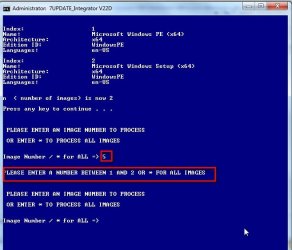
Does your :All script deal with images with less or more than 4 images to update when all (*) is selected?
Yes.
BY default it only looks for a maximum of 5 images.
Code:
for /l %%a in (1,1,[COLOR="Red"]5[/COLOR]) do set idx_%%a=& set nred_%%a=& set ned_%%a=It doesn't matter if there are less than 5, it will list them, and you can select a single or ALL.
If single image is selected than only that selected image is updated.
If ALL is selected then only image 1 is updated. It is then exported n times into a temporary $install.wim.
The xml file from the original install.wim is read to get the correct description and name for each image.
Images 2, 3, 4, 5 ( if there are that many) from $install.wim are mounted one at a time and the edition is changed to the next higher - found by reading the xml file from the original install.wim.
When done, install.wim is deleted, then $install.wim is renamed to install.wim
[ Note:if selecting ALL IMAGES
i) it doesn't work if you have mixed x64 and x86 images into the same wim.
ii) consumer editions can only have editions changed up to Ultimate - not Enterprise.
So there is no reason to have more than 5 images
]
Last edited:
My Computers
System One System Two
-
- Computer type
- PC/Desktop
- OS
- 7 X64
- CPU
- i5 8400
- Motherboard
- gigabyte b365m ds3h
- Memory
- 2x8gb 3200mhz
- Hard Drives
- various
- PSU
- pure power 11 400w cm
- Case
- Coolermaster
- Cooling
- cryorig m9i
-
- Computer type
- PC/Desktop
- OS
- 7x64
- CPU
- g5400
- Motherboard
- ga b365m ds3h
- Memory
- 8gb ddr4 2400
- PSU
- xfx pro 450w


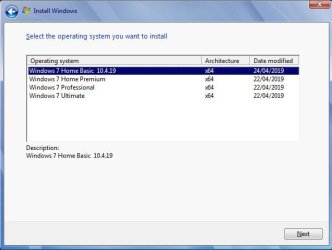
 according to how many images there are in the wim, like this: