
Update your Win 7 installation media

Does your :All script deal with images with less or more than 4 images to update when all (*) is selected?

Yes.

BY default it only looks for a maximum of 5 images.

Code:
for /l %%a in (1,1,[COLOR="Red"]5[/COLOR]) do set idx_%%a=& set nred_%%a=& set ned_%%a=

It doesn't matter if there are less than 5, it will list them, and you can select a single or ALL.

If single image is selected than only that selected image is updated.


If ALL is selected then only image 1 is updated. It is then exported n times into a temporary $install.wim.

The xml file from the original install.wim is read to get the correct description and name for each image.

Images 2, 3, 4, 5 ( if there are that many) from $install.wim are mounted one at a time and the edition is changed to the next higher - found by reading the xml file from the original install.wim.

When done, install.wim is deleted, then $install.wim is renamed to install.wim


[ Note:if selecting ALL IMAGES

i) it doesn't work if you have mixed x64 and x86 images into the same wim.
ii) consumer editions can only have editions changed up to Ultimate - not Enterprise.
So there is no reason to have more than 5 images

]
 
Last edited:

My Computers My Computers

System One System Two

  • Computer type
    PC/Desktop
    OS
    7 X64
    CPU
    i5 8400
    Motherboard
    gigabyte b365m ds3h
    Memory
    2x8gb 3200mhz
    Hard Drives
    various
    PSU
    pure power 11 400w cm
    Case
    Coolermaster
    Cooling
    cryorig m9i
  • Computer type
    PC/Desktop
    OS
    7x64
    CPU
    g5400
    Motherboard
    ga b365m ds3h
    Memory
    8gb ddr4 2400
    PSU
    xfx pro 450w
Ok, understood.

But how to avoid the user to select a image not listed?

For example:
Install.wim has only two images - 1 and 2
or
Install.wim has 5

But the choi check
(IF /I NOT '%CHOI%'=='1' IF /I NOT '%CHOI%'=='2' IF /I NOT '%CHOI%'=='3' IF /I NOT '%CHOI%'=='4' IF /I NOT '%CHOI%'=='*' goto :Chooseimage)
- Doesn't accept 5
- If Install.wim has only two images - 1 and 2 it will accept numbers 3 or 4.

How to correct this?
 

My Computers My Computers

System One System Two

  • Computer type
    PC/Desktop
    Computer Manufacturer/Model Number
    custom build
    OS
    Windows 7 HP 64
    CPU
    i5 6600K - 800MHz to 4200MHz
    Motherboard
    GA-Z170-HD3P
    Memory
    4+4G GSkill DDR4 3000
    Graphics Card(s)
    IG - Intel 530
    Monitor(s) Displays
    Samsung 226BW
    Screen Resolution
    1680x1050
    Hard Drives
    (1) -1 SM951 – 128GB M.2 AHCI PCIe SSD drive for Windows 7 and Lubuntu
    (2) -1 WD SATA 3 - 1T for Data
    (3) -1 WD SATA 3 - 1T for backup
    PSU
    Thermaltake 450W TR2 gold
    Keyboard
    Old and good Chicony mechanical keyboard
    Mouse
    Logitech mX performance - 9 buttons (had to disable some)
    Internet Speed
    500Mb/s
    Browser
    Firefox 64
    Other Info
    TinyWall firewall
  • Computer type
    Laptop
    System Manufacturer/Model Number
    Asus Q550LF
    OS
    Windows 7 Pro
    CPU
    i7-4500U 800MHz to 3.0GHz
    Motherboard
    Asus Q550LF
    Memory
    (4+4)G DDR3 1600
    Graphics Card(s)
    IG intel 4400 + NVIDIA GeForce GT 745M
    Sound Card
    Realtek
    Monitor(s) Displays
    LG Display LP156WF4-SPH1
    Screen Resolution
    1920 x 1080
    Hard Drives
    BX500 120G SSD for Windows and programs +
    1T HDD for data
    Internet Speed
    500 Mb/s
    Browser
    Firefox
    Other Info
    TinyWall firewall
To test may script I choose Simplix to update HomePremium (2) but the UpdatePack7R2-19.4.10 log says that Home Basic and Windows 7 Home Premium has been updated (same Integration files).
Why?
 

My Computers My Computers

System One System Two

  • Computer type
    PC/Desktop
    Computer Manufacturer/Model Number
    custom build
    OS
    Windows 7 HP 64
    CPU
    i5 6600K - 800MHz to 4200MHz
    Motherboard
    GA-Z170-HD3P
    Memory
    4+4G GSkill DDR4 3000
    Graphics Card(s)
    IG - Intel 530
    Monitor(s) Displays
    Samsung 226BW
    Screen Resolution
    1680x1050
    Hard Drives
    (1) -1 SM951 – 128GB M.2 AHCI PCIe SSD drive for Windows 7 and Lubuntu
    (2) -1 WD SATA 3 - 1T for Data
    (3) -1 WD SATA 3 - 1T for backup
    PSU
    Thermaltake 450W TR2 gold
    Keyboard
    Old and good Chicony mechanical keyboard
    Mouse
    Logitech mX performance - 9 buttons (had to disable some)
    Internet Speed
    500Mb/s
    Browser
    Firefox 64
    Other Info
    TinyWall firewall
  • Computer type
    Laptop
    System Manufacturer/Model Number
    Asus Q550LF
    OS
    Windows 7 Pro
    CPU
    i7-4500U 800MHz to 3.0GHz
    Motherboard
    Asus Q550LF
    Memory
    (4+4)G DDR3 1600
    Graphics Card(s)
    IG intel 4400 + NVIDIA GeForce GT 745M
    Sound Card
    Realtek
    Monitor(s) Displays
    LG Display LP156WF4-SPH1
    Screen Resolution
    1920 x 1080
    Hard Drives
    BX500 120G SSD for Windows and programs +
    1T HDD for data
    Internet Speed
    500 Mb/s
    Browser
    Firefox
    Other Info
    TinyWall firewall
- If Install.wim has only two images - 1 and 2 it will accept numbers 3 or 4.

Mine doesn't. If you select 1 or 2 it proceeds.

If you press any other key, it askes again, please enter an image numer to process.

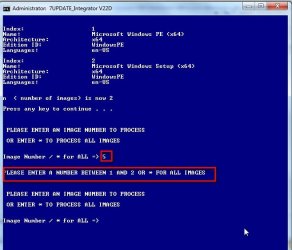
See this pic - there are only 2 images.

First time I entered 3 - so it asks again.

Second time I entered 5 - so it asks again.

It will keep asking until you enter 1 or 2.


image-selection.jpg
 

My Computers My Computers

System One System Two

  • Computer type
    PC/Desktop
    OS
    7 X64
    CPU
    i5 8400
    Motherboard
    gigabyte b365m ds3h
    Memory
    2x8gb 3200mhz
    Hard Drives
    various
    PSU
    pure power 11 400w cm
    Case
    Coolermaster
    Cooling
    cryorig m9i
  • Computer type
    PC/Desktop
    OS
    7x64
    CPU
    g5400
    Motherboard
    ga b365m ds3h
    Memory
    8gb ddr4 2400
    PSU
    xfx pro 450w
To test may script I choose Simplix to update HomePremium (2) but the UpdatePack7R2-19.4.10 log says that Home Basic and Windows 7 Home Premium has been updated (same Integration files).
Why?

I don't know - maybe they have already been updated when you tested earlier? Try with a fresh install.wim

Otherwise, you will have to ask Simplix.
 

My Computers My Computers

System One System Two

  • Computer type
    PC/Desktop
    OS
    7 X64
    CPU
    i5 8400
    Motherboard
    gigabyte b365m ds3h
    Memory
    2x8gb 3200mhz
    Hard Drives
    various
    PSU
    pure power 11 400w cm
    Case
    Coolermaster
    Cooling
    cryorig m9i
  • Computer type
    PC/Desktop
    OS
    7x64
    CPU
    g5400
    Motherboard
    ga b365m ds3h
    Memory
    8gb ddr4 2400
    PSU
    xfx pro 450w
But the choi check
(IF /I NOT '%CHOI%'=='1' IF /I NOT '%CHOI%'=='2' IF /I NOT '%CHOI%'=='3' IF /I NOT '%CHOI%'=='4' IF /I NOT '%CHOI%'=='*' goto :Chooseimage)
- Doesn't accept 5
- If Install.wim has only two images - 1 and 2 it will accept numbers 3 or 4.

How to correct this?


Better to increment the number (n) according to how many images there are in the wim, like this:
Code:
[COLOR="Red"]set n=[/COLOR]
for /l %%a in (1,1,5) do set idx_%%a=& set nred_%%a=& set ned_%%a=
for /f "tokens=2 delims=: " %%i in ('%wimlib% info "%wimdir%\sources\boot.wim"^| find /i "Architecture"') do set wimarch=%%i
If %wimarch% equ x86_64 SET wimarch=x64
echo.
FOR /F "tokens=1-2 Delims=:" %%A IN ('%wimlib% info "%wimdir%\sources\boot.wim" ^| FINDSTR "^Index: ^Name: ^Architecture: ^Edition ^Languages:"') DO (
if /i "%%A"=="index" [COLOR="Red"]set /a n+=1[/COLOR]& set /a idx_!n!=%%B
if /i "%%A"=="name" set nr=%%B& set nred_!n!=!nr:~19!
if /i "%%A"=="Edition ID" set ed=%%B& set ned_!n!=!ed:~13!
if /i not "%%B"=="           x86_64" (echo %%A: %%B) else (echo %%A:            x64)
if /i "%%A"=="Languages" echo.
)
echo.
echo n  ( number of images) is now %[COLOR="Red"]n[/COLOR]%

Then when selecting only a number between 1 and n will be accepted


Code:
:CHOOSEIMAGE
echo.
echo.
echo.
echo  PLEASE ENTER AN IMAGE NUMBER TO PROCESS
echo.  
echo  OR ENTER * TO PROCESS ALL IMAGES
echo.
echo.
set CHOI=
set /p CHOI="Image Number / * for ALL => "
ECHO.
if not defined CHOI (echo         Please enter * to update ALL or select Image number*& echo.&>nul TIMEOUT /T 3& goto :CHOOSEIMAGE)
if "%CHOI%"=="*" echo          ALL EDITIONS WILL BE UPDATED&SET INDNO=1& GOTO :ALLIMAGES
[COLOR="Red"]for /l %%a in (1,1,%n%) [/COLOR]do if "%choi%"=="%%a" (SET INDNO=%CHOI%& GOTO :SINGLEIMAGE)
GOTO :CHOOSEIMAGE

So if you enter * it goes to :ALLIMAGES

If you enter anything between 1 and %N% it goes to :SINGLEIMAGE

If you enter anything else, it goes back to :CHOOSEIMAGE
 

My Computers My Computers

System One System Two

  • Computer type
    PC/Desktop
    OS
    7 X64
    CPU
    i5 8400
    Motherboard
    gigabyte b365m ds3h
    Memory
    2x8gb 3200mhz
    Hard Drives
    various
    PSU
    pure power 11 400w cm
    Case
    Coolermaster
    Cooling
    cryorig m9i
  • Computer type
    PC/Desktop
    OS
    7x64
    CPU
    g5400
    Motherboard
    ga b365m ds3h
    Memory
    8gb ddr4 2400
    PSU
    xfx pro 450w
OK, going back to work on my script.

I did on a fresh install.wim from a MS iso.

Thank you so much for your patience.
 

My Computers My Computers

System One System Two

  • Computer type
    PC/Desktop
    Computer Manufacturer/Model Number
    custom build
    OS
    Windows 7 HP 64
    CPU
    i5 6600K - 800MHz to 4200MHz
    Motherboard
    GA-Z170-HD3P
    Memory
    4+4G GSkill DDR4 3000
    Graphics Card(s)
    IG - Intel 530
    Monitor(s) Displays
    Samsung 226BW
    Screen Resolution
    1680x1050
    Hard Drives
    (1) -1 SM951 – 128GB M.2 AHCI PCIe SSD drive for Windows 7 and Lubuntu
    (2) -1 WD SATA 3 - 1T for Data
    (3) -1 WD SATA 3 - 1T for backup
    PSU
    Thermaltake 450W TR2 gold
    Keyboard
    Old and good Chicony mechanical keyboard
    Mouse
    Logitech mX performance - 9 buttons (had to disable some)
    Internet Speed
    500Mb/s
    Browser
    Firefox 64
    Other Info
    TinyWall firewall
  • Computer type
    Laptop
    System Manufacturer/Model Number
    Asus Q550LF
    OS
    Windows 7 Pro
    CPU
    i7-4500U 800MHz to 3.0GHz
    Motherboard
    Asus Q550LF
    Memory
    (4+4)G DDR3 1600
    Graphics Card(s)
    IG intel 4400 + NVIDIA GeForce GT 745M
    Sound Card
    Realtek
    Monitor(s) Displays
    LG Display LP156WF4-SPH1
    Screen Resolution
    1920 x 1080
    Hard Drives
    BX500 120G SSD for Windows and programs +
    1T HDD for data
    Internet Speed
    500 Mb/s
    Browser
    Firefox
    Other Info
    TinyWall firewall
In my next version, I will probably echo a message if the user hits the wrong key.

Code:
if not defined CHOI (echo         Please enter * to update ALL or select Image number& echo.&>nul TIMEOUT /T 3& goto :CHOOSEIMAGE)
if "%CHOI%"=="*" echo          ALL EDITIONS WILL BE UPDATED&SET INDNO=1& GOTO :ALLIMAGES
for /l %%a in (1,1,%n%) do if "%choi%"=="%%a" (SET INDNO=%CHOI%& GOTO :SINGLEIMAGE)
[COLOR="Blue"]GOTO :CHOOSEIMAGE[/COLOR]
Instead of GOTO :CHOOSEIMAGE

I could put

ECHO.& ECHO PLEASE ENTER A NUMBER BETWEEN 1 AND %n% OR * FOR ALL IMAGES& GOTO :CHOOSEIMAGE


So if I enter anything not * or between 1 and %n%, it echoes that message and goes back to :CHOOSEIMAGE

WRONG-INPUT-MESSAGE.jpg
 

My Computers My Computers

System One System Two

  • Computer type
    PC/Desktop
    OS
    7 X64
    CPU
    i5 8400
    Motherboard
    gigabyte b365m ds3h
    Memory
    2x8gb 3200mhz
    Hard Drives
    various
    PSU
    pure power 11 400w cm
    Case
    Coolermaster
    Cooling
    cryorig m9i
  • Computer type
    PC/Desktop
    OS
    7x64
    CPU
    g5400
    Motherboard
    ga b365m ds3h
    Memory
    8gb ddr4 2400
    PSU
    xfx pro 450w
If not using UpdatePack7R2*.exe I run :Single or :All images updates that call :MountInstallWim
that install the stuff in the Drivers / Update folders - and also copy in the new winre.wim, if there is one.

Correct.
 

My Computers My Computers

System One System Two

  • Computer type
    PC/Desktop
    OS
    7 X64
    CPU
    i5 8400
    Motherboard
    gigabyte b365m ds3h
    Memory
    2x8gb 3200mhz
    Hard Drives
    various
    PSU
    pure power 11 400w cm
    Case
    Coolermaster
    Cooling
    cryorig m9i
  • Computer type
    PC/Desktop
    OS
    7x64
    CPU
    g5400
    Motherboard
    ga b365m ds3h
    Memory
    8gb ddr4 2400
    PSU
    xfx pro 450w
SEW2, another help.

If i do a cmd
%wimlib% info %TP%\Wim_Files\install.wim
it will list all info of install.wim

If i do a cmd
%wimlib% info %TP%\Wim_Files\install.wim 3
it will list info of image 3 of install.wim

OK, now the question:
I want to do a loop with "for"cmd
- %n% now has the number of images on install.wim
- How do I do a "for"cmd to do %wimlib% info %TP%\Wim_Files\install.wim x
where x is 1, 2, ..n

Thanks
 

My Computers My Computers

System One System Two

  • Computer type
    PC/Desktop
    Computer Manufacturer/Model Number
    custom build
    OS
    Windows 7 HP 64
    CPU
    i5 6600K - 800MHz to 4200MHz
    Motherboard
    GA-Z170-HD3P
    Memory
    4+4G GSkill DDR4 3000
    Graphics Card(s)
    IG - Intel 530
    Monitor(s) Displays
    Samsung 226BW
    Screen Resolution
    1680x1050
    Hard Drives
    (1) -1 SM951 – 128GB M.2 AHCI PCIe SSD drive for Windows 7 and Lubuntu
    (2) -1 WD SATA 3 - 1T for Data
    (3) -1 WD SATA 3 - 1T for backup
    PSU
    Thermaltake 450W TR2 gold
    Keyboard
    Old and good Chicony mechanical keyboard
    Mouse
    Logitech mX performance - 9 buttons (had to disable some)
    Internet Speed
    500Mb/s
    Browser
    Firefox 64
    Other Info
    TinyWall firewall
  • Computer type
    Laptop
    System Manufacturer/Model Number
    Asus Q550LF
    OS
    Windows 7 Pro
    CPU
    i7-4500U 800MHz to 3.0GHz
    Motherboard
    Asus Q550LF
    Memory
    (4+4)G DDR3 1600
    Graphics Card(s)
    IG intel 4400 + NVIDIA GeForce GT 745M
    Sound Card
    Realtek
    Monitor(s) Displays
    LG Display LP156WF4-SPH1
    Screen Resolution
    1920 x 1080
    Hard Drives
    BX500 120G SSD for Windows and programs +
    1T HDD for data
    Internet Speed
    500 Mb/s
    Browser
    Firefox
    Other Info
    TinyWall firewall
OK, now the question:
I want to do a loop with "for"cmd
- %n% now has the number of images on install.wim
- How do I do a "for"cmd to do %wimlib% info %TP%\Wim_Files\install.wim x
where x is 1, 2, ..n


Code:
::output wimlib info for all images to screen

for /l %%a in (1,1,[COLOR="Red"]%n%[/COLOR]) do %WimLib% info "%TP%\Wim_Files\install.wim" %%a

pause

::output wimlib info for all images to a text file:

for /l %%a in (1,1,[COLOR="Red"]%n%[/COLOR]) do %WimLib% info "%TP%\Wim_Files\install.wim" %%a >>wiminfo.txt

::read it

notepad wiminfo.txt
 
Last edited:

My Computers My Computers

System One System Two

  • Computer type
    PC/Desktop
    OS
    7 X64
    CPU
    i5 8400
    Motherboard
    gigabyte b365m ds3h
    Memory
    2x8gb 3200mhz
    Hard Drives
    various
    PSU
    pure power 11 400w cm
    Case
    Coolermaster
    Cooling
    cryorig m9i
  • Computer type
    PC/Desktop
    OS
    7x64
    CPU
    g5400
    Motherboard
    ga b365m ds3h
    Memory
    8gb ddr4 2400
    PSU
    xfx pro 450w
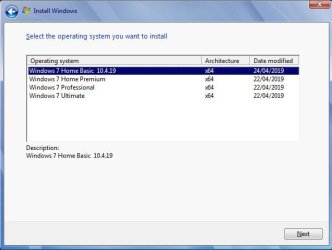
A way round that is to put the pack date in the displayname

%wimlib% info "V:\ISOx64\sources\install.wim" 1 --image-property "DISPLAYNAME=Windows 7 Home Basic %packdate%"


DISPLAYNAME-PACKDATE.jpg
 
Last edited:

My Computers My Computers

System One System Two

  • Computer type
    PC/Desktop
    OS
    7 X64
    CPU
    i5 8400
    Motherboard
    gigabyte b365m ds3h
    Memory
    2x8gb 3200mhz
    Hard Drives
    various
    PSU
    pure power 11 400w cm
    Case
    Coolermaster
    Cooling
    cryorig m9i
  • Computer type
    PC/Desktop
    OS
    7x64
    CPU
    g5400
    Motherboard
    ga b365m ds3h
    Memory
    8gb ddr4 2400
    PSU
    xfx pro 450w
SEW2, another help.

If i do a cmd
%wimlib% info %TP%\Wim_Files\install.wim
it will list all info of install.wim

If i do a cmd
%wimlib% info %TP%\Wim_Files\install.wim 3
it will list info of image 3 of install.wim

OK, now the question:
I want to do a loop with "for"cmd
- %n% now has the number of images on install.wim
- How do I do a "for"cmd to do %wimlib% info %TP%\Wim_Files\install.wim x
where x is 1, 2, ..n

Thanks

Thanks
Rem (1,1,%n%) = start, increment, end
for /L %%A in (1,1,%n%) do (
REM --Code goes here--
)

So it would be
for /L %%A in (1,1,%n%) do (
%wimlib% info %TP%\Wim_Files\install.wim %%A
)
 

My Computers My Computers

System One System Two

  • Computer type
    PC/Desktop
    Computer Manufacturer/Model Number
    custom build
    OS
    Windows 7 HP 64
    CPU
    i5 6600K - 800MHz to 4200MHz
    Motherboard
    GA-Z170-HD3P
    Memory
    4+4G GSkill DDR4 3000
    Graphics Card(s)
    IG - Intel 530
    Monitor(s) Displays
    Samsung 226BW
    Screen Resolution
    1680x1050
    Hard Drives
    (1) -1 SM951 – 128GB M.2 AHCI PCIe SSD drive for Windows 7 and Lubuntu
    (2) -1 WD SATA 3 - 1T for Data
    (3) -1 WD SATA 3 - 1T for backup
    PSU
    Thermaltake 450W TR2 gold
    Keyboard
    Old and good Chicony mechanical keyboard
    Mouse
    Logitech mX performance - 9 buttons (had to disable some)
    Internet Speed
    500Mb/s
    Browser
    Firefox 64
    Other Info
    TinyWall firewall
  • Computer type
    Laptop
    System Manufacturer/Model Number
    Asus Q550LF
    OS
    Windows 7 Pro
    CPU
    i7-4500U 800MHz to 3.0GHz
    Motherboard
    Asus Q550LF
    Memory
    (4+4)G DDR3 1600
    Graphics Card(s)
    IG intel 4400 + NVIDIA GeForce GT 745M
    Sound Card
    Realtek
    Monitor(s) Displays
    LG Display LP156WF4-SPH1
    Screen Resolution
    1920 x 1080
    Hard Drives
    BX500 120G SSD for Windows and programs +
    1T HDD for data
    Internet Speed
    500 Mb/s
    Browser
    Firefox
    Other Info
    TinyWall firewall
You can do it on one line:

for /l %%a in (1,1,%n%) do %WimLib% info "%TP%\Wim_Files\install.wim" %%a
 

My Computers My Computers

System One System Two

  • Computer type
    PC/Desktop
    OS
    7 X64
    CPU
    i5 8400
    Motherboard
    gigabyte b365m ds3h
    Memory
    2x8gb 3200mhz
    Hard Drives
    various
    PSU
    pure power 11 400w cm
    Case
    Coolermaster
    Cooling
    cryorig m9i
  • Computer type
    PC/Desktop
    OS
    7x64
    CPU
    g5400
    Motherboard
    ga b365m ds3h
    Memory
    8gb ddr4 2400
    PSU
    xfx pro 450w
Mega is back again.
I'm having problems with :setedn
- It does the job for HP(2) but when it comes to Pro(3) and Ultimate(4) it says that there is already a mounted image on NTempdir.
I remember this issue when I made my drivers integration on 2016. Even when you un mount an image it may say that there is still something unmounted.

- Can I do the following (I don't like &) ?
:setedn
ECHO.
setlocal DisableDelayedExpansion
start "Setting Editions Windows" /wait cmd.exe /v/c "@echo off & (for /l %%a in (2,1,%n%) do (
%DISM% /Mount-Wim /WimFile:"%TP%\Wim_Files\$install.wim" /Index:"%%a" /MountDir:"%NTempdir%"
%DISM% /Image:"%NTempdir%" /Set-Edition:!ned_%%a!
call "bin\clean7.cmd"
%DISM% /Unmount-Wim /MountDir:"%NTempdir%" /Commit
RD /S /Q %TP%\Temp 2>nul
2>nul md "Temp\Temp"
2>nul md "Temp\Temp_N"
)
)"
endlocal
 

My Computers My Computers

System One System Two

  • Computer type
    PC/Desktop
    Computer Manufacturer/Model Number
    custom build
    OS
    Windows 7 HP 64
    CPU
    i5 6600K - 800MHz to 4200MHz
    Motherboard
    GA-Z170-HD3P
    Memory
    4+4G GSkill DDR4 3000
    Graphics Card(s)
    IG - Intel 530
    Monitor(s) Displays
    Samsung 226BW
    Screen Resolution
    1680x1050
    Hard Drives
    (1) -1 SM951 – 128GB M.2 AHCI PCIe SSD drive for Windows 7 and Lubuntu
    (2) -1 WD SATA 3 - 1T for Data
    (3) -1 WD SATA 3 - 1T for backup
    PSU
    Thermaltake 450W TR2 gold
    Keyboard
    Old and good Chicony mechanical keyboard
    Mouse
    Logitech mX performance - 9 buttons (had to disable some)
    Internet Speed
    500Mb/s
    Browser
    Firefox 64
    Other Info
    TinyWall firewall
  • Computer type
    Laptop
    System Manufacturer/Model Number
    Asus Q550LF
    OS
    Windows 7 Pro
    CPU
    i7-4500U 800MHz to 3.0GHz
    Motherboard
    Asus Q550LF
    Memory
    (4+4)G DDR3 1600
    Graphics Card(s)
    IG intel 4400 + NVIDIA GeForce GT 745M
    Sound Card
    Realtek
    Monitor(s) Displays
    LG Display LP156WF4-SPH1
    Screen Resolution
    1920 x 1080
    Hard Drives
    BX500 120G SSD for Windows and programs +
    1T HDD for data
    Internet Speed
    500 Mb/s
    Browser
    Firefox
    Other Info
    TinyWall firewall
Or you can check for mounted images and try and cleanup beforehand.

Code:
(set ismounted=)
for /f "usebackq tokens=1,2,3 delims=:" %%G in (`%dism% /get-mountedwiminfo ^| find /i "mount"`) do set ismounted=%%I
IF NOT "%ismounted%"=="" (
	echo  Image mounted Trying cleanup
        %dism% /unmount-Wim /MountDir:"mount" /discard
	rd /s /q "mount" > nul
	%dism% /cleanup-wim 
)

Replace "mount" with "uptemp" or whatever your mount folder is.
Even when you un mount an image it may say that there is still something unmounted.

That can happen if you have something open on the mount folder - an explorer window maybe.
 

My Computers My Computers

System One System Two

  • Computer type
    PC/Desktop
    OS
    7 X64
    CPU
    i5 8400
    Motherboard
    gigabyte b365m ds3h
    Memory
    2x8gb 3200mhz
    Hard Drives
    various
    PSU
    pure power 11 400w cm
    Case
    Coolermaster
    Cooling
    cryorig m9i
  • Computer type
    PC/Desktop
    OS
    7x64
    CPU
    g5400
    Motherboard
    ga b365m ds3h
    Memory
    8gb ddr4 2400
    PSU
    xfx pro 450w
- It does the job for HP(2) but when it comes to Pro(3) and Ultimate(4) it says that there is already a mounted image on NTempdir.

It explain why I was having Edition ID = HOMEBASIC on PRO and Ultimate (post 264).

I will create a CleanMount.cmd and call it every time I un mount an image.

Is there any reason why you mount boot.wim and install.wim on mount folder and mount $install.wim in NTempdir folder?

Thanks.
 
Last edited:

My Computers My Computers

System One System Two

  • Computer type
    PC/Desktop
    Computer Manufacturer/Model Number
    custom build
    OS
    Windows 7 HP 64
    CPU
    i5 6600K - 800MHz to 4200MHz
    Motherboard
    GA-Z170-HD3P
    Memory
    4+4G GSkill DDR4 3000
    Graphics Card(s)
    IG - Intel 530
    Monitor(s) Displays
    Samsung 226BW
    Screen Resolution
    1680x1050
    Hard Drives
    (1) -1 SM951 – 128GB M.2 AHCI PCIe SSD drive for Windows 7 and Lubuntu
    (2) -1 WD SATA 3 - 1T for Data
    (3) -1 WD SATA 3 - 1T for backup
    PSU
    Thermaltake 450W TR2 gold
    Keyboard
    Old and good Chicony mechanical keyboard
    Mouse
    Logitech mX performance - 9 buttons (had to disable some)
    Internet Speed
    500Mb/s
    Browser
    Firefox 64
    Other Info
    TinyWall firewall
  • Computer type
    Laptop
    System Manufacturer/Model Number
    Asus Q550LF
    OS
    Windows 7 Pro
    CPU
    i7-4500U 800MHz to 3.0GHz
    Motherboard
    Asus Q550LF
    Memory
    (4+4)G DDR3 1600
    Graphics Card(s)
    IG intel 4400 + NVIDIA GeForce GT 745M
    Sound Card
    Realtek
    Monitor(s) Displays
    LG Display LP156WF4-SPH1
    Screen Resolution
    1920 x 1080
    Hard Drives
    BX500 120G SSD for Windows and programs +
    1T HDD for data
    Internet Speed
    500 Mb/s
    Browser
    Firefox
    Other Info
    TinyWall firewall
Is there any reason why you mount boot.wim and install.wim on mount folder and mount $install.wim in NTempdir folder?

You can use whatever mount folders you like.
 

My Computers My Computers

System One System Two

  • Computer type
    PC/Desktop
    OS
    7 X64
    CPU
    i5 8400
    Motherboard
    gigabyte b365m ds3h
    Memory
    2x8gb 3200mhz
    Hard Drives
    various
    PSU
    pure power 11 400w cm
    Case
    Coolermaster
    Cooling
    cryorig m9i
  • Computer type
    PC/Desktop
    OS
    7x64
    CPU
    g5400
    Motherboard
    ga b365m ds3h
    Memory
    8gb ddr4 2400
    PSU
    xfx pro 450w
v22F on first post.
 

My Computers My Computers

System One System Two

  • Computer type
    PC/Desktop
    OS
    7 X64
    CPU
    i5 8400
    Motherboard
    gigabyte b365m ds3h
    Memory
    2x8gb 3200mhz
    Hard Drives
    various
    PSU
    pure power 11 400w cm
    Case
    Coolermaster
    Cooling
    cryorig m9i
  • Computer type
    PC/Desktop
    OS
    7x64
    CPU
    g5400
    Motherboard
    ga b365m ds3h
    Memory
    8gb ddr4 2400
    PSU
    xfx pro 450w
SIW2, don't know how to thank you for your patience to teach me.

At the beginning of :MountBootWim and :MountInstallWim I added this cmd line:
IF not exist %MountDir% MD %MountDir% 2>nul
and
after un mounting I added this cmd line:
If Not exist "%TP%\Temp\CleanMount.cmd" IF EXIST "bin\CleanMount.cmd" COPY /Y "bin\CleanMount.cmd" "%tp%\Temp\"
If exist "%TP%\Temp\CleanMount.cmd" CALL "%TP%\Temp\CleanMount.cmd"

CleanMount.cmd is
cd /d "%TP/Temp%"
%Dism% /unmount-Wim /MountDir:%MountDir% /discard
%DISM% /cleanup-wim
rd /s /q %MountDir% > nul
cd /d "%TP%"

:setedn
ECHO.
If Not exist "%TP%\Temp\CleanWim.cmd" IF EXIST "bin\CleanWim.cmd" COPY /Y "bin\CleanWim.cmd" "%tp%\Temp\"
If Not exist "%TP%\Temp\CleanMount.cmd" IF EXIST "bin\CleanMount.cmd" COPY /Y "bin\CleanMount.cmd" "%tp%\Temp\"

setlocal DisableDelayedExpansion
start "Setting Editions Windows" /wait cmd.exe /v/c "@echo off & (for /l %%a in (2,1,%n%) do IF not exist %MountDir% MD %MountDir% & %DISM% /Mount-Wim /WimFile:"%TP%\Wim_Files\$install.wim" /Index:"%%a" /MountDir:"%MountDir%" & %DISM% /Image:"%MountDir%" /Set-Edition:!ned_%%a! & call "Temp\CleanWim.cmd" & %DISM% /Unmount-Wim /MountDir:"%MountDir%" /Commit & Call %TP%\Temp\CleanMount)"
endlocal

Temp\CleanWim.cmd is the Clean7.cmd with SET MOUNT=%MountDir% and I use on :MountBootWim and :MountInstallWim and %MountDir%=%TP%\Temp

It's working without errors for the first time.
Thanks again.
 

My Computers My Computers

System One System Two

  • Computer type
    PC/Desktop
    Computer Manufacturer/Model Number
    custom build
    OS
    Windows 7 HP 64
    CPU
    i5 6600K - 800MHz to 4200MHz
    Motherboard
    GA-Z170-HD3P
    Memory
    4+4G GSkill DDR4 3000
    Graphics Card(s)
    IG - Intel 530
    Monitor(s) Displays
    Samsung 226BW
    Screen Resolution
    1680x1050
    Hard Drives
    (1) -1 SM951 – 128GB M.2 AHCI PCIe SSD drive for Windows 7 and Lubuntu
    (2) -1 WD SATA 3 - 1T for Data
    (3) -1 WD SATA 3 - 1T for backup
    PSU
    Thermaltake 450W TR2 gold
    Keyboard
    Old and good Chicony mechanical keyboard
    Mouse
    Logitech mX performance - 9 buttons (had to disable some)
    Internet Speed
    500Mb/s
    Browser
    Firefox 64
    Other Info
    TinyWall firewall
  • Computer type
    Laptop
    System Manufacturer/Model Number
    Asus Q550LF
    OS
    Windows 7 Pro
    CPU
    i7-4500U 800MHz to 3.0GHz
    Motherboard
    Asus Q550LF
    Memory
    (4+4)G DDR3 1600
    Graphics Card(s)
    IG intel 4400 + NVIDIA GeForce GT 745M
    Sound Card
    Realtek
    Monitor(s) Displays
    LG Display LP156WF4-SPH1
    Screen Resolution
    1920 x 1080
    Hard Drives
    BX500 120G SSD for Windows and programs +
    1T HDD for data
    Internet Speed
    500 Mb/s
    Browser
    Firefox
    Other Info
    TinyWall firewall
Back
Top