Update your Win 7 installation media

Thanks Patrik. It is done automatically by the 7updater script.


The poster Marley10 is either doing something wrong - or there is something on his system that is interfering.
 

My Computers My Computers

System One System Two

  • Computer type
    PC/Desktop
    OS
    7 X64
    CPU
    i5 8400
    Motherboard
    gigabyte b365m ds3h
    Memory
    2x8gb 3200mhz
    Hard Drives
    various
    PSU
    pure power 11 400w cm
    Case
    Coolermaster
    Cooling
    cryorig m9i
  • Computer type
    PC/Desktop
    OS
    7x64
    CPU
    g5400
    Motherboard
    ga b365m ds3h
    Memory
    8gb ddr4 2400
    PSU
    xfx pro 450w
You are welcome and thank you back for your great work.
We shall see what's the issue in this case.
 

My Computer My Computer

Computer type
PC/Desktop
OS
Windows 7 Professional x64
CPU
9900KS
Motherboard
ASRock Z390M Pro4
Memory
32GB DDR4
Graphics Card(s)
GeForce GT 640
Sound Card
Renkforce MX 0103USB
Hard Drives
Samsung 850 EVO Basic 250GB
Cooling
Be Quiet! shadow rock lp and one case fan.
Mouse
Logitech MX Anywhere 2S
Internet Speed
~80mb/s down, 15mb/s up
Browser
mostly Chrome
Tried repeating process 2 above but without the Samsung NVMe drivers. Same result. "A required CD/DVD driver device driver is missing...".

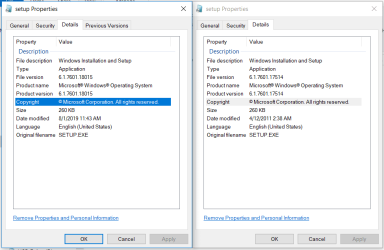
hm. Not sure what the following means. On the right are the Properties of setup.exe extracted from my sources\boot.wim file. On the left are the Properties of setup.exe in my sources\ directory. {Those are the correct two to be comparing?) Both after running v30. They don't match, as you expected.

boot.wim sources vs sources setup.PNG

Not necessarily related:
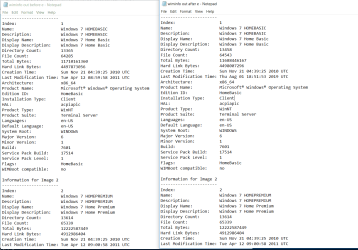
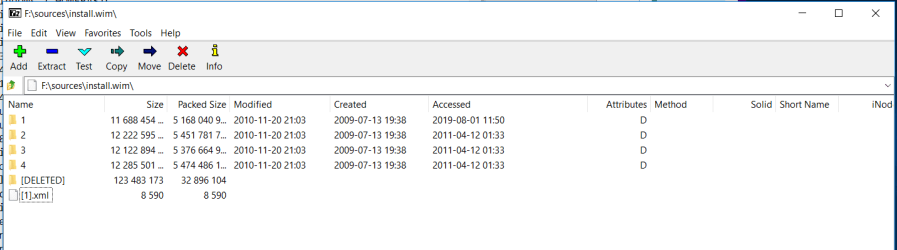
I am concerned that the 7UPDATERvXX is only modifying Image 1 during processing install.wim. Evidence? First, while running the script at one point it says "Deleting as;ldfkh\Windows7HomeBasic\askljfa;gh;lkj..." (not sure of the exact file name) but it never says this for any of the other Windows versions. Second, when you look at the wiminfo after processing, it appears that only the first image has been processed. (I mentioned this before but you have to look for it in the wiminfo because, as noted before, for some reason wiminfo has multiple entries for each image.)

wiminfo before e vs after e capture.PNG

7zip install.wim after e capture.PNG
 
Last edited:

My Computer My Computer

Computer type
Laptop
Computer Manufacturer/Model Number
Lenovo T460s
OS
nothing yet...trying to install Windows 7 Pro 64
CPU
i5 6300U
Hard Drives
256GB M.2 OPAL2
Patrikk, I'm sorry I don't understand enough of your suggestion to have any comment. SIW2's posts I have to read and reread and try several things each time to understand, and (thankfully) his are very jargon-free. I just don't know enough.

But I want to thank everyone who is still replying to these %$*&^%#)@-ing posts. I've spent countless hours on this--most of the day on at least 8 different days since January, plus an hour here and there when I can---so your 6 hours looks very attractive to me at this point. I would've thrown this f---ing machine out a window and driven over the remains with my car at least 20 hours ago for sure.

It's taken so long and pissed me off so much now that I can't stand to cut my losses. That, and I can't stand to resign myself to using Windows 10.
 

My Computer My Computer

Computer type
Laptop
Computer Manufacturer/Model Number
Lenovo T460s
OS
nothing yet...trying to install Windows 7 Pro 64
CPU
i5 6300U
Hard Drives
256GB M.2 OPAL2
You know, I was assuming this was a weird Windows thing (from a Linux perspective) since no one on this forum seems concerned by it, but why DOESN'T the modification date change after the 7UPDATER script runs?? Okay, it shows it was accessed when I ran the script... good...but at least in Linux, it SHOULD'VE had a new modification date whenever anything had been written to the file.

(Talking about the install.wim images here...)
 

My Computer My Computer

Computer type
Laptop
Computer Manufacturer/Model Number
Lenovo T460s
OS
nothing yet...trying to install Windows 7 Pro 64
CPU
i5 6300U
Hard Drives
256GB M.2 OPAL2
Hy maerley10.
Looks like you are really giving some effort - I like this. And I appreciate it if you value what I am doing.
To be 'fair' I have to say that I had some practice and knowledge in slipstreaming already as soon as i had this issue.
What I do with my lines is to integrate drivers and updates into the boot.wim and install.wim with batch files. When I began I mostly used WinToolkit to do my images but with the time I switched more and more to batch files, because they do all the work for you which is easier if you do the same thing over and over again - if they are written correctly of course.
Usually you mount an image, integrate drivers and/or updates and unmount it and after this you create an ISO out of your directory with this file. But in the case with this two NVMe-fixes, you need to copy the mounted files to your source directory BEFORE you unmount it later, which, for me, is unusual, but it works.
What I can do is to create an ISO and/or post a link here to my images what I will do anyways on win-unattended de, but I don't know if that is what you want to do - just use an image that someone else created without understanding how creating the image works.
 

My Computer My Computer

Computer type
PC/Desktop
OS
Windows 7 Professional x64
CPU
9900KS
Motherboard
ASRock Z390M Pro4
Memory
32GB DDR4
Graphics Card(s)
GeForce GT 640
Sound Card
Renkforce MX 0103USB
Hard Drives
Samsung 850 EVO Basic 250GB
Cooling
Be Quiet! shadow rock lp and one case fan.
Mouse
Logitech MX Anywhere 2S
Internet Speed
~80mb/s down, 15mb/s up
Browser
mostly Chrome
No browser folder choice when i run it

When i run the v30 version of the file as administrator i get the blue cmd window but no option to browse to the folder containing the install files
 

My Computer My Computer

Computer type
PC/Desktop
OS
win7x64
What operating system are you running it on?
Have you turned off your antivirus?

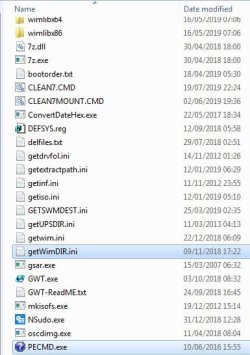
are pecmd.exe and getwimdir.ini in the bin folder?


pecmd-getwimdir.jpg
 

My Computers My Computers

System One System Two

  • Computer type
    PC/Desktop
    OS
    7 X64
    CPU
    i5 8400
    Motherboard
    gigabyte b365m ds3h
    Memory
    2x8gb 3200mhz
    Hard Drives
    various
    PSU
    pure power 11 400w cm
    Case
    Coolermaster
    Cooling
    cryorig m9i
  • Computer type
    PC/Desktop
    OS
    7x64
    CPU
    g5400
    Motherboard
    ga b365m ds3h
    Memory
    8gb ddr4 2400
    PSU
    xfx pro 450w
marley10.


It is possible there is something about your system interfering - a weird program like rx rollback, or perhaps permissions problems. What operating system are you trying to run this on?
 

My Computers My Computers

System One System Two

  • Computer type
    PC/Desktop
    OS
    7 X64
    CPU
    i5 8400
    Motherboard
    gigabyte b365m ds3h
    Memory
    2x8gb 3200mhz
    Hard Drives
    various
    PSU
    pure power 11 400w cm
    Case
    Coolermaster
    Cooling
    cryorig m9i
  • Computer type
    PC/Desktop
    OS
    7x64
    CPU
    g5400
    Motherboard
    ga b365m ds3h
    Memory
    8gb ddr4 2400
    PSU
    xfx pro 450w
The machine I'm building on is running Windows 10 Pro.
 

My Computer My Computer

Computer type
Laptop
Computer Manufacturer/Model Number
Lenovo T460s
OS
nothing yet...trying to install Windows 7 Pro 64
CPU
i5 6300U
Hard Drives
256GB M.2 OPAL2
SIW2, How can I capture all the standard out from the 7UPDATER script? Is there an easy way to make it take a txt file as standard in so I can then run it command line and just pipe its output to another file? I'm betting if I sent you all the output you'd see the problem immediately.

Don't want you to think I'm being lazy. I'm looking online too how to do this, but no love yet. This is easy to do in shell. But I've found things I expect to be easy sometimes don't exist in cmd. (Like how isn't there an easy way to 'ls -l' a file?? And what about chmod?) I can't help but think that easy ways *do* exist in cmd, and that I just haven't managed to discover them yet...

Also, please ignore this part of my earlier message. I'm just shooting in the dark in all of this. Turns out the message I was talking about doesn't look like an error, and it does in fact occur for each Windows version. But I'm still poking at this idea that only HomeBasic is being modified by 7UPDATER, and maybe not correctly...
First, while running the script at one point it says "Deleting as;ldfkh\Windows7HomeBasic\askljfa;gh;lkj..." (not sure of the exact file name) but it never says this for any of the other Windows versions.
 

My Computer My Computer

Computer type
Laptop
Computer Manufacturer/Model Number
Lenovo T460s
OS
nothing yet...trying to install Windows 7 Pro 64
CPU
i5 6300U
Hard Drives
256GB M.2 OPAL2
You know, I was assuming this was a weird Windows thing (from a Linux perspective) since no one on this forum seems concerned by it, but why DOESN'T the modification date change after the 7UPDATER script runs?? Okay, it shows it was accessed when I ran the script... good...but at least in Linux, it SHOULD'VE had a new modification date whenever anything had been written to the file.

(Talking about the install.wim images here...)

SIW2, am I totally barking up the wrong tree here?
 

My Computer My Computer

Computer type
Laptop
Computer Manufacturer/Model Number
Lenovo T460s
OS
nothing yet...trying to install Windows 7 Pro 64
CPU
i5 6300U
Hard Drives
256GB M.2 OPAL2
Hi marley10,

SIW2, How can I capture all the standard out from the 7UPDATER script? Is there an easy way to make it take a txt file as standard in so I can then run it command line and just pipe its output to another file?

Are you talking about something like DISM?
You can put things like WU [Windows Update] etc in a folder and run a script [batch] to integrate them.
There is also DISM++ which can be used to integrate drivers etc on a mounted image.
 

My Computer My Computer

Computer type
Laptop
Computer Manufacturer/Model Number
Fujitsu LIFEBOOK
OS
Win 7 HP SP1 64-bit Vista HB SP2 32-bit Linux Mint 18.3
CPU
Intel(R) Pentium(R) CPU P6200 @ 2.13GHz
Motherboard
FUJITSU FJNBB06
Memory
4.00 GB
Graphics Card(s)
Intel(R) Graphics Media Accelerator HD
Sound Card
[1] Realtek High Definition Audio [2] Intel(R) Display Audio
Screen Resolution
1366 x 768 x 32 bits (4294967296 colors) @ 59 Hz
Hard Drives
TOSHIBA MK5076GSX
Antivirus
AVG FREE
HOLY SH-T!!!! I think I have progress!!!

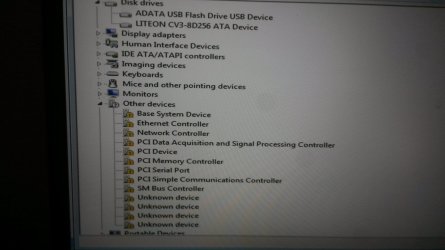
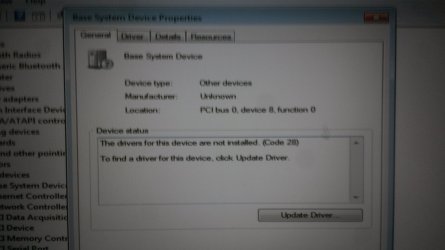
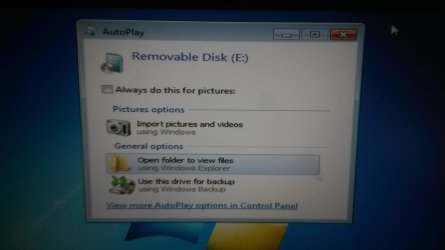
So, going on the assumption that only HomeBasic was being modified by 7UPDATER, I went ahead and installed HomeBasic. Everything proceeds as before, except now I have functioning USBs in Windows 7! Unfortunately, all the other drivers and devices that were missing before are still missing, including ethernet. Please tell me this is consistent with not having the NVMe drivers working??

Actual "screen shots" of the Lenovo after Home Basic install. First are shots of the Device Manager showing some of the missing drivers and hardware ids:

20190802_121439 b.jpg
20190802_121942 b.jpg

Holy crap! A working USB 3!!! So beautiful...

20190802_121541 b.jpg
 

My Computer My Computer

Computer type
Laptop
Computer Manufacturer/Model Number
Lenovo T460s
OS
nothing yet...trying to install Windows 7 Pro 64
CPU
i5 6300U
Hard Drives
256GB M.2 OPAL2
My conclusions:

1) 7UPDATER for some reason isn't successfully rewriting the Windows 7 images 2-4.
2) When I try to include the NVMe update (either MS's or Samsung's) it somehow breaks the USB3 functionality during Setup. Very probably something I'm doing wrong?

Any seconds out there on these opinions? SIW2? Thanks.
 

My Computer My Computer

Computer type
Laptop
Computer Manufacturer/Model Number
Lenovo T460s
OS
nothing yet...trying to install Windows 7 Pro 64
CPU
i5 6300U
Hard Drives
256GB M.2 OPAL2
Hi marley10,

Are you talking about something like DISM?
You can put things like WU [Windows Update] etc in a folder and run a script [batch] to integrate them.
There is also DISM++ which can be used to integrate drivers etc on a mounted image.

.... Not sure. My understanding is that 7UPDATER is calling various .cmd files, and these are calling the DISM program--among other things--many, many times. Right? So, on my machine 7UPDATER opens a cmd window and writes all standard out to it, including prompts for key presses. I'm hoping I can redirect all the output of all of its calls to a txt file via
Code:
C:\blahblah\7UPDATERv30>.\7UPDATER.cmd >> .\out.txt
run from an admin cmd window. But I would still need to give it the key presses it's expecting.

I guess I could do it the brute force way: Run it normally. Write down all the key presses in the order they're asked. Run it again and just input the right key presses in order. I guess I could probably "tail" (don't know the Windows-equiv command) the out.txt in order to tell when it's waiting for input?

Edit: Oh, rereading your question, I think the answer is no. I just want to run your 7UPDATER script and capture everything it's spewing to my screen. I'm pretty sure it's given me things I'm not recognizing as errors. Whether these are generated by its calls to DISM or trying to perform other operations, could be both.
 

My Computer My Computer

Computer type
Laptop
Computer Manufacturer/Model Number
Lenovo T460s
OS
nothing yet...trying to install Windows 7 Pro 64
CPU
i5 6300U
Hard Drives
256GB M.2 OPAL2
Addendum: Aside from wanting to send you the output from 7UPDATER, I'd like to be able to study it myself. It flashes by too quickly in places, and overwrites the window contents (or closes and opens a new cmd window, I'm not sure which) for me to catch everything that it reports as it runs.
 

My Computer My Computer

Computer type
Laptop
Computer Manufacturer/Model Number
Lenovo T460s
OS
nothing yet...trying to install Windows 7 Pro 64
CPU
i5 6300U
Hard Drives
256GB M.2 OPAL2
Great thing, marley10!
Long live Windows 7.
In my script I add the two NVMe-Hotfixes first an the USB3-Drivers second.
Maybe this helps you to get even more success.
 

My Computer My Computer

Computer type
PC/Desktop
OS
Windows 7 Professional x64
CPU
9900KS
Motherboard
ASRock Z390M Pro4
Memory
32GB DDR4
Graphics Card(s)
GeForce GT 640
Sound Card
Renkforce MX 0103USB
Hard Drives
Samsung 850 EVO Basic 250GB
Cooling
Be Quiet! shadow rock lp and one case fan.
Mouse
Logitech MX Anywhere 2S
Internet Speed
~80mb/s down, 15mb/s up
Browser
mostly Chrome
Hi marley10,

Addendum: Aside from wanting to send you the output from 7UPDATER, I'd like to be able to study it myself. It flashes by too quickly in places, and overwrites the window contents (or closes and opens a new cmd window, I'm not sure which) for me to catch everything that it reports as it runs.

You could put pauses in the code at relevant places or print out the code and look at it!
 

My Computer My Computer

Computer type
Laptop
Computer Manufacturer/Model Number
Fujitsu LIFEBOOK
OS
Win 7 HP SP1 64-bit Vista HB SP2 32-bit Linux Mint 18.3
CPU
Intel(R) Pentium(R) CPU P6200 @ 2.13GHz
Motherboard
FUJITSU FJNBB06
Memory
4.00 GB
Graphics Card(s)
Intel(R) Graphics Media Accelerator HD
Sound Card
[1] Realtek High Definition Audio [2] Intel(R) Display Audio
Screen Resolution
1366 x 768 x 32 bits (4294967296 colors) @ 59 Hz
Hard Drives
TOSHIBA MK5076GSX
Antivirus
AVG FREE
Thanks! I also just discovered that the Windows equivalent to Linux's "tail" is... "tail". Just need to install a Windows Resource Kit.

By the way PAtrikK, you may have something there with the order of the NVMe and USB3 updates. I believe 7UPDATER does it in the other order.

I've been avoiding trying to alter SIW2's 7UPDATER script, because I think I have about a 98% chance of breaking it.
 

My Computer My Computer

Computer type
Laptop
Computer Manufacturer/Model Number
Lenovo T460s
OS
nothing yet...trying to install Windows 7 Pro 64
CPU
i5 6300U
Hard Drives
256GB M.2 OPAL2
Back
Top