Update your Win 7 installation media

They might be needed for nvme disks. If you get one of those in the future, you could always just install those two updates into your running system.

Nvme disks are not the same as sata ssd. Nvme disks are quite new and still very expensive. Unlikely you would get one.

It is not necessary to integrate those two updates into the installation media.

I suggest you use the new 7UPv42.zip which is now on the first post of this thread
 

My Computers My Computers

System One System Two

  • Computer type
    PC/Desktop
    OS
    7 X64
    CPU
    i5 8400
    Motherboard
    gigabyte b365m ds3h
    Memory
    2x8gb 3200mhz
    Hard Drives
    various
    PSU
    pure power 11 400w cm
    Case
    Coolermaster
    Cooling
    cryorig m9i
  • Computer type
    PC/Desktop
    OS
    7x64
    CPU
    g5400
    Motherboard
    ga b365m ds3h
    Memory
    8gb ddr4 2400
    PSU
    xfx pro 450w
Thanks for that info. I'll delete both zips and download the v42.
 

My Computer My Computer

Computer type
PC/Desktop
Computer Manufacturer/Model Number
Home built Asus
OS
Windows 7 Pro 64bit
CPU
Intel® Core™ i3 Processor 3.7ghz
Motherboard
Asus Intel Prime H270-Pro LGA 1151 ATX
Memory
Crucial (2x8GB) DDR4-2400
Graphics Card(s)
on board
Monitor(s) Displays
BENQ GL2450HE (24 inch)
Screen Resolution
1980 x 1080
Hard Drives
C drive is SSD Crucial 500gb mostly for the OS
PSU
Corsair CX750
Case
A big black one
Cooling
Cooler Master Hyper TX3i on the processor
Keyboard
Logitech k2700 wireless
Mouse
Logitech M575 wireless trackball
Internet Speed
Just under about 7mb/s on a good day
Antivirus
Avira Free
Browser
Opera, Firefox, Chrome, and Supermium

My Computers My Computers

System One System Two

  • Computer type
    PC/Desktop
    OS
    7 X64
    CPU
    i5 8400
    Motherboard
    gigabyte b365m ds3h
    Memory
    2x8gb 3200mhz
    Hard Drives
    various
    PSU
    pure power 11 400w cm
    Case
    Coolermaster
    Cooling
    cryorig m9i
  • Computer type
    PC/Desktop
    OS
    7x64
    CPU
    g5400
    Motherboard
    ga b365m ds3h
    Memory
    8gb ddr4 2400
    PSU
    xfx pro 450w
Thanks for that info. I'll delete both zips and download the v42.

I now have the 7upv42 and trying to work out what more I need. I have read dozens of pages of stuff and seen mention of Simplix Update Pack. Looking for a source it seems to only come from Majorgeeks and a couple of other malware loaded sites. The Integrate7 script looks interesting but it includes all updates up to November 2019. I read on one of the many links that W7 runs better without any updates after about mid 2017. In any case, it seems that Integrate7 can be downloaded from this site and I assume it would be safe.? Such a shame I can't get some knowledgeable soul to put something together. Or at least a step by step tutorial using plain English on how to do it. From what I have been told, Linux is even worse.

My new Double Layer DVD drive has arrived. I'm only waiting on a double layer blank disk to arrive so I can get started. I have a feeling I should have ordered more than one but the expense is crazy here.
 

My Computer My Computer

Computer type
PC/Desktop
Computer Manufacturer/Model Number
Home built Asus
OS
Windows 7 Pro 64bit
CPU
Intel® Core™ i3 Processor 3.7ghz
Motherboard
Asus Intel Prime H270-Pro LGA 1151 ATX
Memory
Crucial (2x8GB) DDR4-2400
Graphics Card(s)
on board
Monitor(s) Displays
BENQ GL2450HE (24 inch)
Screen Resolution
1980 x 1080
Hard Drives
C drive is SSD Crucial 500gb mostly for the OS
PSU
Corsair CX750
Case
A big black one
Cooling
Cooler Master Hyper TX3i on the processor
Keyboard
Logitech k2700 wireless
Mouse
Logitech M575 wireless trackball
Internet Speed
Just under about 7mb/s on a good day
Antivirus
Avira Free
Browser
Opera, Firefox, Chrome, and Supermium
You don't need to hunt around for anything.


Run the 7updaterv42.cmd

It will ask you to browse to installation media

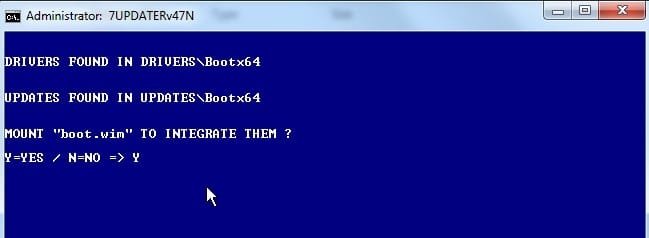
It will offer to add the drivers that are already in Drivers folder to boot.wim. Type Y and then press enter

When it has done that ( very quick a minute or so) I will ask if you want to unmount the image, Type Y and then press enter

Then it will ask if you want to download Simplix. Say Yes and it will download it for you.
Might take several minutes to download as it depends on your internet connection.

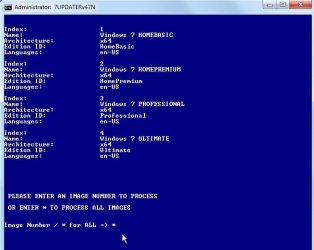
It will tell which images are in the installation media.

Then it will ask which image you want to update . You can select one of the images or * for ALL images.

Then it proceeds.

I can take a while to integrate the simplix updates - perhaps an hour - depends on your machine.
 

My Computers My Computers

System One System Two

  • Computer type
    PC/Desktop
    OS
    7 X64
    CPU
    i5 8400
    Motherboard
    gigabyte b365m ds3h
    Memory
    2x8gb 3200mhz
    Hard Drives
    various
    PSU
    pure power 11 400w cm
    Case
    Coolermaster
    Cooling
    cryorig m9i
  • Computer type
    PC/Desktop
    OS
    7x64
    CPU
    g5400
    Motherboard
    ga b365m ds3h
    Memory
    8gb ddr4 2400
    PSU
    xfx pro 450w
Whole-hearted thanks for the clear and concise instructions. Just one wee question.
"You can select one of the images....." What are the images I must choose from. Do you mean which version of W7, or some other choices?
 

My Computer My Computer

Computer type
PC/Desktop
Computer Manufacturer/Model Number
Home built Asus
OS
Windows 7 Pro 64bit
CPU
Intel® Core™ i3 Processor 3.7ghz
Motherboard
Asus Intel Prime H270-Pro LGA 1151 ATX
Memory
Crucial (2x8GB) DDR4-2400
Graphics Card(s)
on board
Monitor(s) Displays
BENQ GL2450HE (24 inch)
Screen Resolution
1980 x 1080
Hard Drives
C drive is SSD Crucial 500gb mostly for the OS
PSU
Corsair CX750
Case
A big black one
Cooling
Cooler Master Hyper TX3i on the processor
Keyboard
Logitech k2700 wireless
Mouse
Logitech M575 wireless trackball
Internet Speed
Just under about 7mb/s on a good day
Antivirus
Avira Free
Browser
Opera, Firefox, Chrome, and Supermium
1. Run the 7updater.cmd

runasadmin.jpg


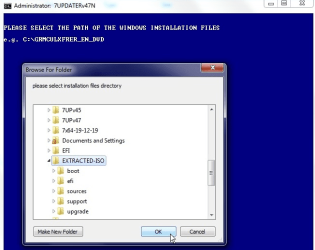
2. It will ask you to browse to installation media


brow.png


3. It will offer to add the drivers that are already in Drivers\Bootx64 folder to boot.wim.
If there are updates in the UPDATES\Bootx64 folder it will also offer to integrate those.
Type Y and then press enter


bootwijm.jpg


4. When it has done that ( very quick a minute or so) I will ask if you want to unmount the image, press any key to unmount
 
Last edited:

My Computers My Computers

System One System Two

  • Computer type
    PC/Desktop
    OS
    7 X64
    CPU
    i5 8400
    Motherboard
    gigabyte b365m ds3h
    Memory
    2x8gb 3200mhz
    Hard Drives
    various
    PSU
    pure power 11 400w cm
    Case
    Coolermaster
    Cooling
    cryorig m9i
  • Computer type
    PC/Desktop
    OS
    7x64
    CPU
    g5400
    Motherboard
    ga b365m ds3h
    Memory
    8gb ddr4 2400
    PSU
    xfx pro 450w
5. If the simplix updatepack is in the 7UP folder, it will ask if you want to use it

pack.jpg

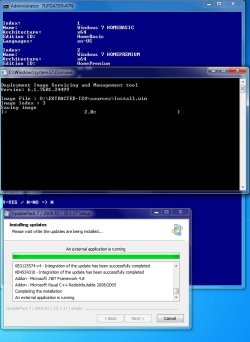
6. Select which image you want process

chooseimg.jpg

7. It mounts your selected image

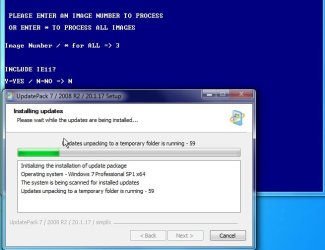
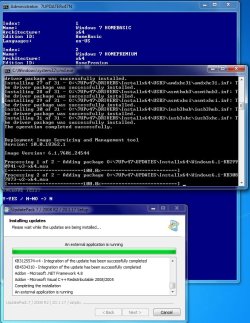
8. It integrates updates

integupdates.jpg
 
Last edited:

My Computers My Computers

System One System Two

  • Computer type
    PC/Desktop
    OS
    7 X64
    CPU
    i5 8400
    Motherboard
    gigabyte b365m ds3h
    Memory
    2x8gb 3200mhz
    Hard Drives
    various
    PSU
    pure power 11 400w cm
    Case
    Coolermaster
    Cooling
    cryorig m9i
  • Computer type
    PC/Desktop
    OS
    7x64
    CPU
    g5400
    Motherboard
    ga b365m ds3h
    Memory
    8gb ddr4 2400
    PSU
    xfx pro 450w
9. It integrates any Drivers that are in the DRIVERS\Installx64 folder.

4-2020-01-27_154619.jpg


10. It saves the image

5-2020-01-27_154649.jpg


11. Finished

6-2020-01-27_155229.jpg
 
Last edited:

My Computers My Computers

System One System Two

  • Computer type
    PC/Desktop
    OS
    7 X64
    CPU
    i5 8400
    Motherboard
    gigabyte b365m ds3h
    Memory
    2x8gb 3200mhz
    Hard Drives
    various
    PSU
    pure power 11 400w cm
    Case
    Coolermaster
    Cooling
    cryorig m9i
  • Computer type
    PC/Desktop
    OS
    7x64
    CPU
    g5400
    Motherboard
    ga b365m ds3h
    Memory
    8gb ddr4 2400
    PSU
    xfx pro 450w
Thanks for the illustrations. So in my case I would select image 3, W7 Pro.
So do I now burn this lot to the DVD+RW disk? And then use this for the first boot set up in the newly assembled tower?
 

My Computer My Computer

Computer type
PC/Desktop
Computer Manufacturer/Model Number
Home built Asus
OS
Windows 7 Pro 64bit
CPU
Intel® Core™ i3 Processor 3.7ghz
Motherboard
Asus Intel Prime H270-Pro LGA 1151 ATX
Memory
Crucial (2x8GB) DDR4-2400
Graphics Card(s)
on board
Monitor(s) Displays
BENQ GL2450HE (24 inch)
Screen Resolution
1980 x 1080
Hard Drives
C drive is SSD Crucial 500gb mostly for the OS
PSU
Corsair CX750
Case
A big black one
Cooling
Cooler Master Hyper TX3i on the processor
Keyboard
Logitech k2700 wireless
Mouse
Logitech M575 wireless trackball
Internet Speed
Just under about 7mb/s on a good day
Antivirus
Avira Free
Browser
Opera, Firefox, Chrome, and Supermium
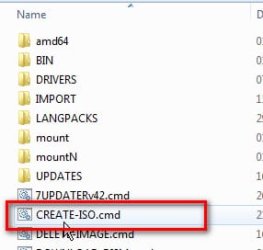
After it has finshed the updating, you can create an iso.


Shockingly, that is what this is for:

create-iso.jpg

It has been very cunningly disguised by naming it CREATE-ISO.
 

My Computers My Computers

System One System Two

  • Computer type
    PC/Desktop
    OS
    7 X64
    CPU
    i5 8400
    Motherboard
    gigabyte b365m ds3h
    Memory
    2x8gb 3200mhz
    Hard Drives
    various
    PSU
    pure power 11 400w cm
    Case
    Coolermaster
    Cooling
    cryorig m9i
  • Computer type
    PC/Desktop
    OS
    7x64
    CPU
    g5400
    Motherboard
    ga b365m ds3h
    Memory
    8gb ddr4 2400
    PSU
    xfx pro 450w
If you don't know how to burn an iso, or extract it to bootable usb,, anybody here can explain it.
 

My Computers My Computers

System One System Two

  • Computer type
    PC/Desktop
    OS
    7 X64
    CPU
    i5 8400
    Motherboard
    gigabyte b365m ds3h
    Memory
    2x8gb 3200mhz
    Hard Drives
    various
    PSU
    pure power 11 400w cm
    Case
    Coolermaster
    Cooling
    cryorig m9i
  • Computer type
    PC/Desktop
    OS
    7x64
    CPU
    g5400
    Motherboard
    ga b365m ds3h
    Memory
    8gb ddr4 2400
    PSU
    xfx pro 450w
Got it. That's the last stage. I can do an ISO using "Easy Burner".
I'm now set to go. :D
 

My Computer My Computer

Computer type
PC/Desktop
Computer Manufacturer/Model Number
Home built Asus
OS
Windows 7 Pro 64bit
CPU
Intel® Core™ i3 Processor 3.7ghz
Motherboard
Asus Intel Prime H270-Pro LGA 1151 ATX
Memory
Crucial (2x8GB) DDR4-2400
Graphics Card(s)
on board
Monitor(s) Displays
BENQ GL2450HE (24 inch)
Screen Resolution
1980 x 1080
Hard Drives
C drive is SSD Crucial 500gb mostly for the OS
PSU
Corsair CX750
Case
A big black one
Cooling
Cooler Master Hyper TX3i on the processor
Keyboard
Logitech k2700 wireless
Mouse
Logitech M575 wireless trackball
Internet Speed
Just under about 7mb/s on a good day
Antivirus
Avira Free
Browser
Opera, Firefox, Chrome, and Supermium
:-)
 

My Computers My Computers

System One System Two

  • Computer type
    PC/Desktop
    OS
    7 X64
    CPU
    i5 8400
    Motherboard
    gigabyte b365m ds3h
    Memory
    2x8gb 3200mhz
    Hard Drives
    various
    PSU
    pure power 11 400w cm
    Case
    Coolermaster
    Cooling
    cryorig m9i
  • Computer type
    PC/Desktop
    OS
    7x64
    CPU
    g5400
    Motherboard
    ga b365m ds3h
    Memory
    8gb ddr4 2400
    PSU
    xfx pro 450w
Hello.

Can someone upload new screenshots, especially for step 2. (2. It will ask you to browse to installation media

Update your Win 7 installation media.-2.jpg) The links are dead for the screenshots

I think I am missing something.

Things that I've done that has not worked:

a) Tried to choose as path for windows installation files a USB drive with my windows 7 iso "burned" into it.
b) Tried to choose as path for windows installation files a USB drive with the provided iso 17514x64-v9.iso "burned" into it.
c) Tried to choose as path for windows installation files a DVD with my windows 7 iso "burned" into it.
d) Tried to choose as path for windows installation files an extract from my windows 7 iso a folder in drive C:

In all 4 cases, nothing happens EXCEPT the browse for folder selection pop up coming up again and again and again.

Please help
 

My Computer My Computer

Computer type
PC/Desktop
OS
Windows 7 Ultimate x64
I extracted the contents from the iso with 7-zipnamed the folder Windows7 or whatever
placed folder in C:
that is what you want to select the folder that contains the contents of the iso you extracted.
you can create an ISO with the ISO creator in the folder
or any ISO creator, my favorite is ImgBurn
 

My Computer My Computer

Computer type
PC/Desktop
Computer Manufacturer/Model Number
HP Desktop & Compaq Laptop
OS
Win 10 x64, Linux Lite, Win 7 x64, BlackArch, & Kali
Hard Drives
Samsung 850 Pro 256Gb,
Hitachi HDD 1Tb,
Crucial MX SSD 250Gb
Segate 3Tb USB 3.0 Ext. Backup HDD
Internet Speed
150Mbps dn, 20Mbps up
Antivirus
Avast Free, Malwarebytes Anti-Exploit & Anti-Ransomware
Browser
Firefox, Chrome, Opera, & VPN
jjj999214

Hello.
nothing happens EXCEPT the browse for folder selection pop up coming up again and again and again.

Please help


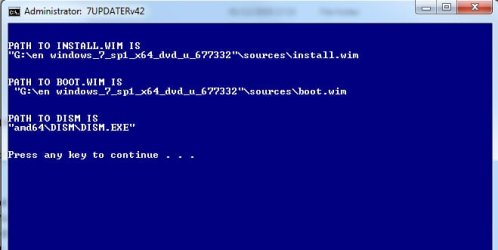
It is expecting:

installation media directory\sources\boot.wim

and

installation media directory\sources\install.wim

correct-paths-7up.jpg


If either of those is absent the browse window stays until you select a valid installation media directory.


I could include an error message to alert people who select invalid directory.

You can replace 7UPDATERv42.cmd with this 7UPDATERv42A.cmd
View attachment 7UPDATERv42A.zip which will tell you what you are doing wrong.

(In addition a dvd is not suitable because it not writeable.)
 
Last edited:

My Computers My Computers

System One System Two

  • Computer type
    PC/Desktop
    OS
    7 X64
    CPU
    i5 8400
    Motherboard
    gigabyte b365m ds3h
    Memory
    2x8gb 3200mhz
    Hard Drives
    various
    PSU
    pure power 11 400w cm
    Case
    Coolermaster
    Cooling
    cryorig m9i
  • Computer type
    PC/Desktop
    OS
    7x64
    CPU
    g5400
    Motherboard
    ga b365m ds3h
    Memory
    8gb ddr4 2400
    PSU
    xfx pro 450w
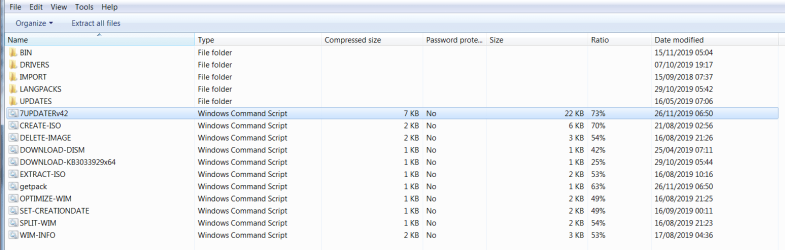
Sorry, but I'm back. After copying and saving your sequence of screenshots I thought I would get on with it. I unzip the Updater. Then I get a list of the things that are in it, (scripts?). So I randomly clicked on the sixth one in the list "7UPDATERv42".

first.PNG

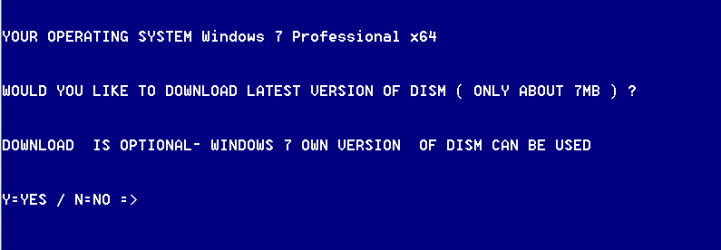
Then I get this:
second.PNG

Which isn't in the images you posted above. When I get this window what do I do next, or have I gone wrong at the very start?
 

My Computer My Computer

Computer type
PC/Desktop
Computer Manufacturer/Model Number
Home built Asus
OS
Windows 7 Pro 64bit
CPU
Intel® Core™ i3 Processor 3.7ghz
Motherboard
Asus Intel Prime H270-Pro LGA 1151 ATX
Memory
Crucial (2x8GB) DDR4-2400
Graphics Card(s)
on board
Monitor(s) Displays
BENQ GL2450HE (24 inch)
Screen Resolution
1980 x 1080
Hard Drives
C drive is SSD Crucial 500gb mostly for the OS
PSU
Corsair CX750
Case
A big black one
Cooling
Cooler Master Hyper TX3i on the processor
Keyboard
Logitech k2700 wireless
Mouse
Logitech M575 wireless trackball
Internet Speed
Just under about 7mb/s on a good day
Antivirus
Avira Free
Browser
Opera, Firefox, Chrome, and Supermium
Back
Top