Update your Win 7 installation media

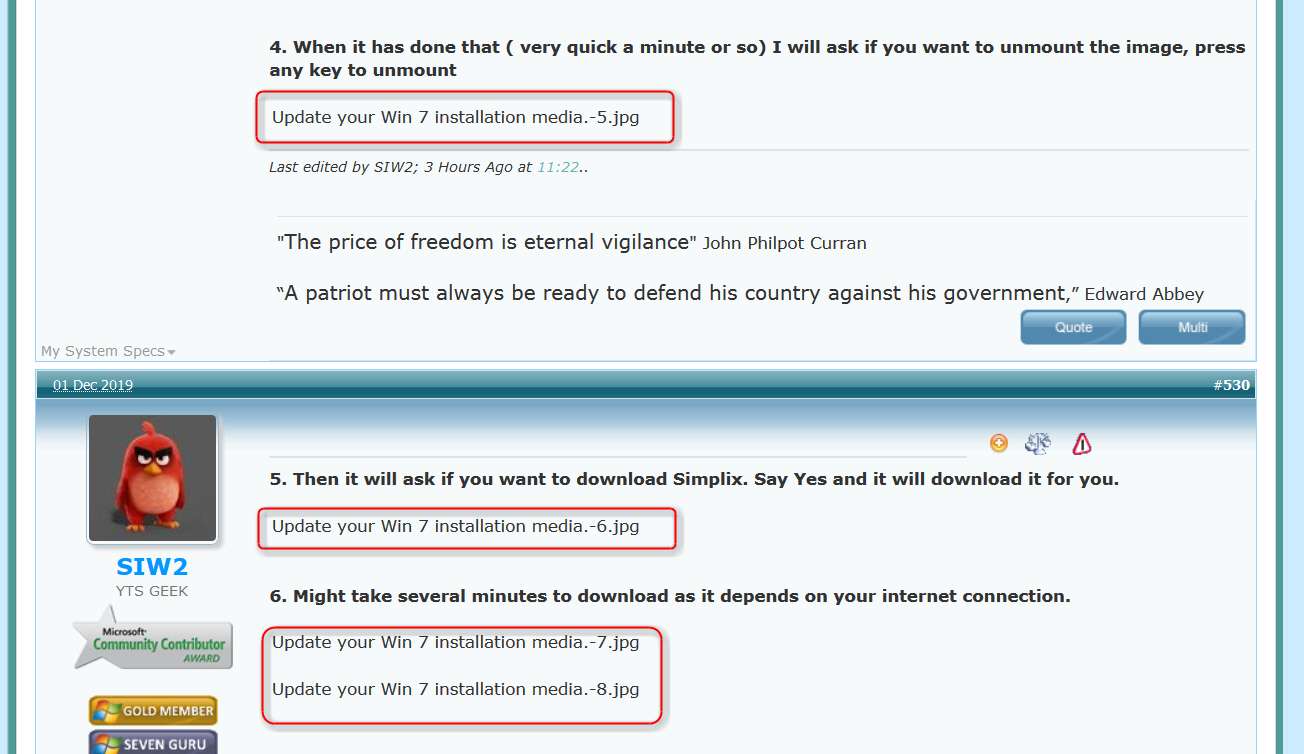
Well, there's something wrong with how the forum is accepting and serving images uploaded as attachments I guess.

I post my pictures on ImageShack, which is an external image hosting site. I then imbed my pictures in-line using "start image" and "end image" delimiters, with the external URL from the hosting site in between. That works perfectly.

Your pictures appear to have been uploaded to the SevenForums attach database. I don't do that so I don't know how you then request them to be displayed in-line in your posts. But it's not working for me. We should probably get Brink to look at this, and investigage.

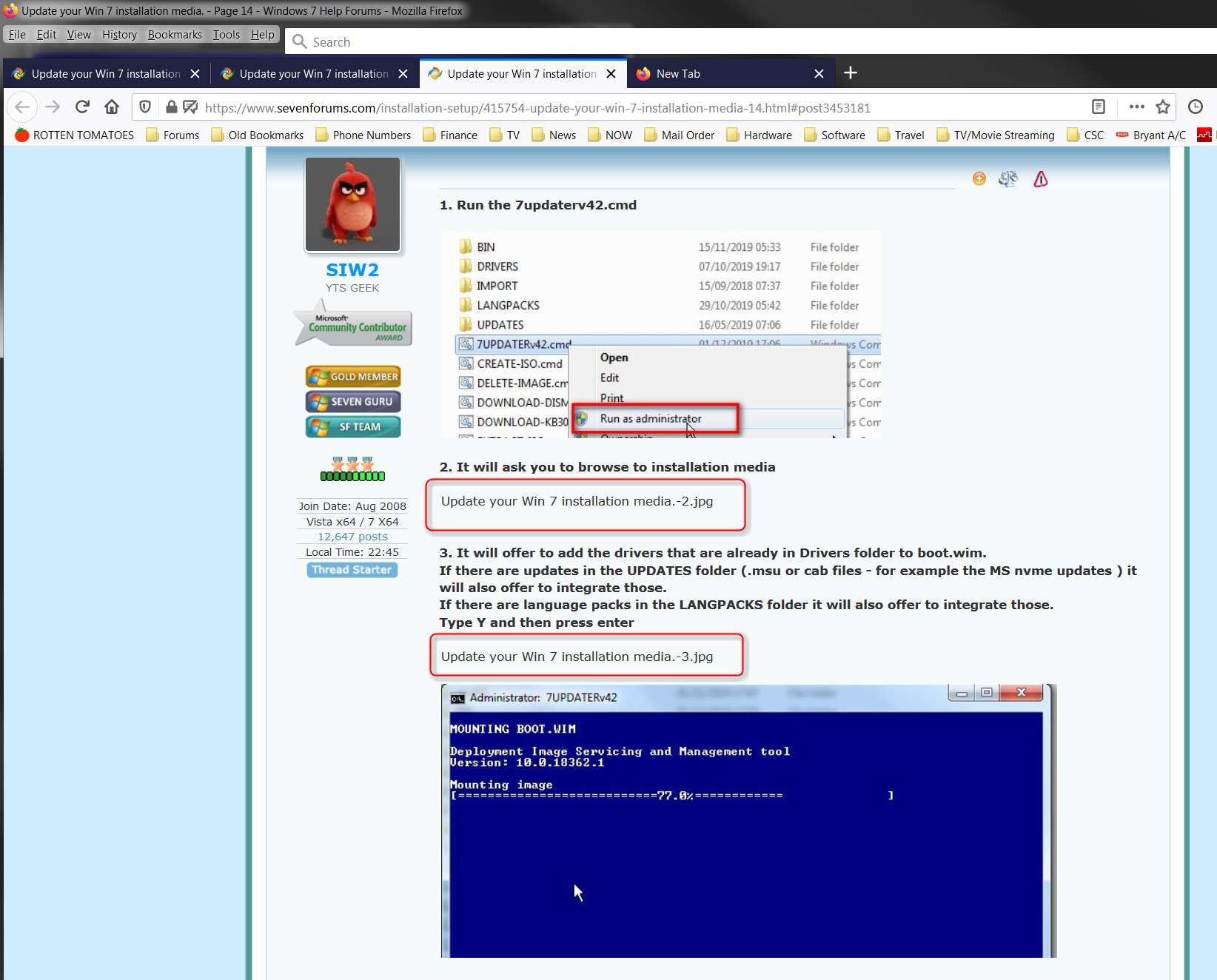
I'm using Firefox. What browser are you using? Note that the rendering of those pictures in your browser as documented by your latest screenshots is NOT HOW IT LOOKS FOR ME. Note that only the first image you posted (in the sequence of the "recipe" instructions) displayed properly, in-line and with no extra text. But all the rest of your pictures either (a) displayed your file name followed by the image, or (b) only displayed your file name with no image.

For example:
yCgkfS.jpg


siDAVU.jpg


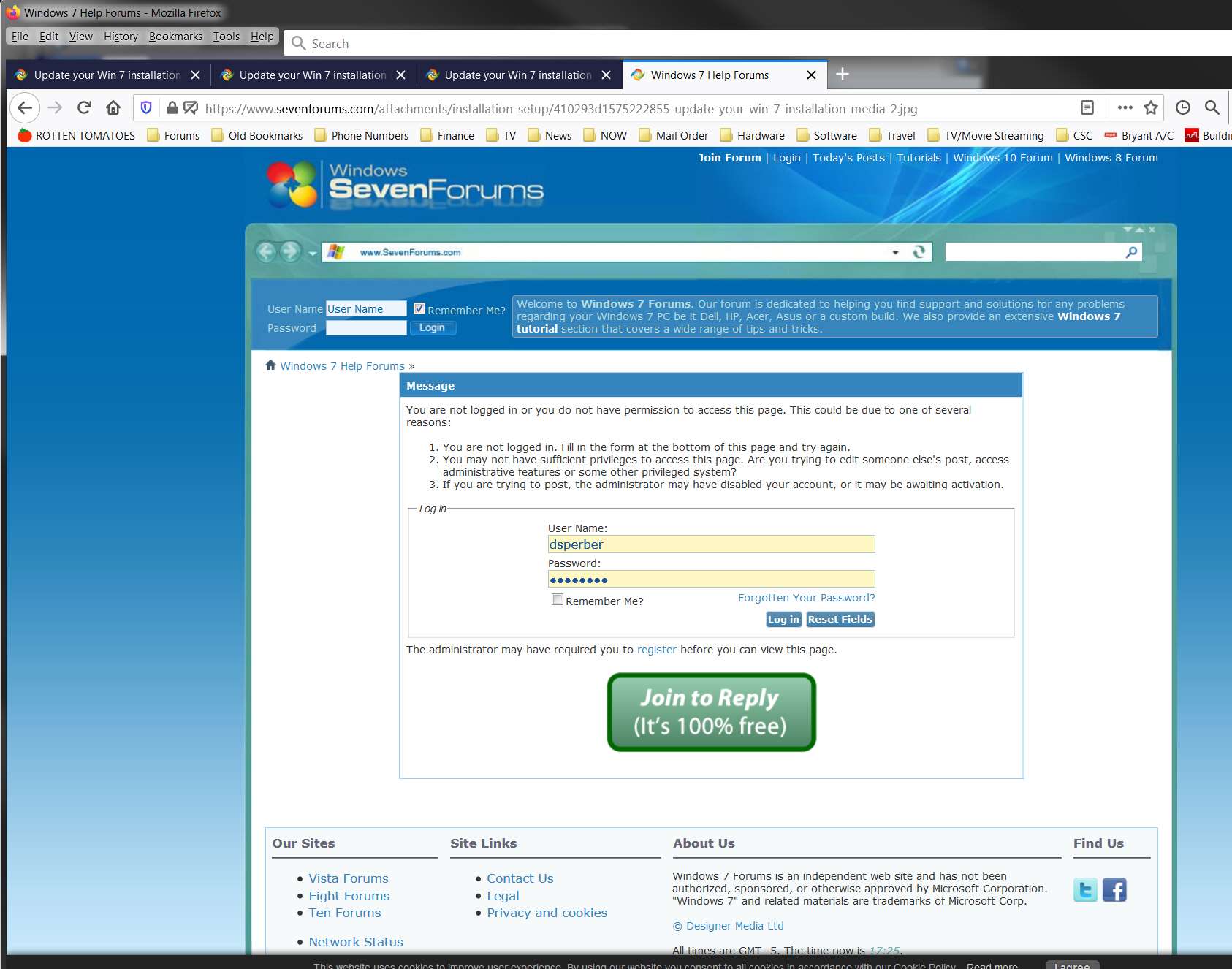
If I right-click on the "file name" text I get a popup from Firefox that allows me to "copy image location", and if I click on that the SevenForums attach database URL is copied to the clipboard. If I then open a new tab and paste in the URL and press ENTER, I am presented with a forum login screen!! Note the URL address in the following screenshot, which is correctly the URL of your picture's file name in the SevenForums attachment database.
lSwAMQ.jpg


So for some reason attempting to display the picture in a separate tab fails, and instead presents the login screen. And if I then push the log in button that works, and I'm re-logged in(?) (although of course I'm already obviously logged in so this shouldn't be necessary), but the image doesn't ever get presented. Instead I am re-presented with this same login screen yet again. And this loop is perpetual.

So, there is obviously something incompatible with how you've posted and imbedded your pictures through the forum attachments process which is not working properly... at least not with Firefox. I have no such issue posting many many pictures using the external URL method.

I will report this to Brink.
 

My Computer My Computer

Computer type
PC/Desktop
Computer Manufacturer/Model Number
Home-built, two systems (1) and (2)
OS
Windows 7 Pro x64 (1), Win7 Pro X64 (2)
CPU
i5-3350p 3.1Ghz/6MB-cache (1); E8400 3.0Ghz/6MB-cache (2)
Motherboard
ASUS P8Z77-V Pro (1); ASUS P5Q3 (2)
Memory
8GB PC3-12800 DDR3 (1); 4GB PC3-10600 DDR3 (2)
Graphics Card(s)
ATI HD7750 (1), (see TV cards); ATI R7 250 (2)
Sound Card
Realtek ALC892 HD Audio (1); Realtek ALC1200 HD Audio (2)
Monitor(s) Displays
Eizo HD2441W LCD, Eizo S2433W (1); Eizo 24" S2433W (2)
Screen Resolution
1920x1200, 1920x1200 (1); 1920x1200 (2)
Hard Drives
(1) 1TB SATA-II (7200RPM), 2x2TB SATA-III (7200RPM), 250GB SATA-III (10000RPM) for OS; 2x2TB external USB 3.0

(2) 320GB SATA-II (7200RPM), 750GB SATA-II (7200RPM), 150GB SATA-II (10000RPM) for OS; 2TB external USB 3.0
PSU
Nesteq ECS-6001 600W (1); Nesteq ECS-5001 500W (2)
Case
Acousti-Case 360 (1) and (2)
Cooling
Noctua NH-U12P SE2 for CPU, 2x120mm case fans (1) and (2)
Keyboard
IBM PS/2 (1) and (2)
Mouse
Logitech MX Revolution wireless (1); Microsoft wired (2)
Internet Speed
100mbps down / 10mbps up
Antivirus
Microsoft Security Essentials; Malwarebyte Anti-Malware Pro
Browser
Firefox
Other Info
Ceton InfiniTV 4-tuner cablecard-enabled TV card as well as Hauppauge HVR-2250 OTA/ATSC 2-tuner TV card in (1), running under Win7 WMC
But now back to on-topic.

I have now run your command, but INSTALL.WIM ended up being about 4.8GB which is larger than the max FAT32 file size. I used an ISO to start from MS which had all four versions of Windows x64 SP1. I assumed that because I'd requested "*" to the index number that INSTALL.WIM was thus too large after applying all the SIMPLIX updates (their downloaded file is from 1/17/2020, which presumably includes the very final Windows Updates provided by MS, aside from MSE updates which continue to be pushed out at least as of today).

NOTE: the Windows Update server is still functioning, as just yesterday I did a Win7 Ultimate install using an old ISO and then a few more hours completing all Windows Updates. So they haven't really shut it down yet.

Anyway, not really needing the HomeBasic version I re-ran your command this time only specifying index 2, expecting either to be prompted after it finished if I wanted to do any additional versions, or perhaps just stopping with one version. Whichever, the INSTALL.WIM was now 4.4GB, which was still too big for FAT32.

I assume the FAT32 max size affects things only if you want to create a bootable FAT32 USB drive, but not if you use the ISO itself to install from (e.g. inside a Win7-VM).

But the command advises of the size problem, and suggests running the SPLIT-WIM command, which I did. That results in two smaller files with a SWM extension. What am I supposed to do with them, in order to make them usable?

If I have to split things under any choice of 1 or 4 versions, I'd like to split the original 4-version INSTALL.WIM. But I still have no idea how to make use of this on a bootable USB? Where are instructions on how to deal with this ultra-large WIM by slipstreaming all Windows Updates?
 

My Computer My Computer

Computer type
PC/Desktop
Computer Manufacturer/Model Number
Home-built, two systems (1) and (2)
OS
Windows 7 Pro x64 (1), Win7 Pro X64 (2)
CPU
i5-3350p 3.1Ghz/6MB-cache (1); E8400 3.0Ghz/6MB-cache (2)
Motherboard
ASUS P8Z77-V Pro (1); ASUS P5Q3 (2)
Memory
8GB PC3-12800 DDR3 (1); 4GB PC3-10600 DDR3 (2)
Graphics Card(s)
ATI HD7750 (1), (see TV cards); ATI R7 250 (2)
Sound Card
Realtek ALC892 HD Audio (1); Realtek ALC1200 HD Audio (2)
Monitor(s) Displays
Eizo HD2441W LCD, Eizo S2433W (1); Eizo 24" S2433W (2)
Screen Resolution
1920x1200, 1920x1200 (1); 1920x1200 (2)
Hard Drives
(1) 1TB SATA-II (7200RPM), 2x2TB SATA-III (7200RPM), 250GB SATA-III (10000RPM) for OS; 2x2TB external USB 3.0

(2) 320GB SATA-II (7200RPM), 750GB SATA-II (7200RPM), 150GB SATA-II (10000RPM) for OS; 2TB external USB 3.0
PSU
Nesteq ECS-6001 600W (1); Nesteq ECS-5001 500W (2)
Case
Acousti-Case 360 (1) and (2)
Cooling
Noctua NH-U12P SE2 for CPU, 2x120mm case fans (1) and (2)
Keyboard
IBM PS/2 (1) and (2)
Mouse
Logitech MX Revolution wireless (1); Microsoft wired (2)
Internet Speed
100mbps down / 10mbps up
Antivirus
Microsoft Security Essentials; Malwarebyte Anti-Malware Pro
Browser
Firefox
Other Info
Ceton InfiniTV 4-tuner cablecard-enabled TV card as well as Hauppauge HVR-2250 OTA/ATSC 2-tuner TV card in (1), running under Win7 WMC
Well, thanks to an earlier post on this thread by Megaherz07:

When you split the install.wim it will give you Install.swm and install1.swm
Then you delete install.wim and keep Install.swm and install1.swm


So that's what I shall do. I will delete the too-large original install.wim and replace it by the two fractional .swm files.
 

My Computer My Computer

Computer type
PC/Desktop
Computer Manufacturer/Model Number
Home-built, two systems (1) and (2)
OS
Windows 7 Pro x64 (1), Win7 Pro X64 (2)
CPU
i5-3350p 3.1Ghz/6MB-cache (1); E8400 3.0Ghz/6MB-cache (2)
Motherboard
ASUS P8Z77-V Pro (1); ASUS P5Q3 (2)
Memory
8GB PC3-12800 DDR3 (1); 4GB PC3-10600 DDR3 (2)
Graphics Card(s)
ATI HD7750 (1), (see TV cards); ATI R7 250 (2)
Sound Card
Realtek ALC892 HD Audio (1); Realtek ALC1200 HD Audio (2)
Monitor(s) Displays
Eizo HD2441W LCD, Eizo S2433W (1); Eizo 24" S2433W (2)
Screen Resolution
1920x1200, 1920x1200 (1); 1920x1200 (2)
Hard Drives
(1) 1TB SATA-II (7200RPM), 2x2TB SATA-III (7200RPM), 250GB SATA-III (10000RPM) for OS; 2x2TB external USB 3.0

(2) 320GB SATA-II (7200RPM), 750GB SATA-II (7200RPM), 150GB SATA-II (10000RPM) for OS; 2TB external USB 3.0
PSU
Nesteq ECS-6001 600W (1); Nesteq ECS-5001 500W (2)
Case
Acousti-Case 360 (1) and (2)
Cooling
Noctua NH-U12P SE2 for CPU, 2x120mm case fans (1) and (2)
Keyboard
IBM PS/2 (1) and (2)
Mouse
Logitech MX Revolution wireless (1); Microsoft wired (2)
Internet Speed
100mbps down / 10mbps up
Antivirus
Microsoft Security Essentials; Malwarebyte Anti-Malware Pro
Browser
Firefox
Other Info
Ceton InfiniTV 4-tuner cablecard-enabled TV card as well as Hauppauge HVR-2250 OTA/ATSC 2-tuner TV card in (1), running under Win7 WMC
split-wim.jpg
 

My Computers My Computers

System One System Two

  • Computer type
    PC/Desktop
    OS
    7 X64
    CPU
    i5 8400
    Motherboard
    gigabyte b365m ds3h
    Memory
    2x8gb 3200mhz
    Hard Drives
    various
    PSU
    pure power 11 400w cm
    Case
    Coolermaster
    Cooling
    cryorig m9i
  • Computer type
    PC/Desktop
    OS
    7x64
    CPU
    g5400
    Motherboard
    ga b365m ds3h
    Memory
    8gb ddr4 2400
    PSU
    xfx pro 450w
I saw the command there (and was pointed to it by the advisory message at the end of the process). And I executed it. And I got two fractional pieces.

But I didn't know what to do next since you'd made no mention of that possibility in your recipe instructions. Perhaps you should?

Anyway, when this re-run finishes I will delete the original install.wim and replace it with the two fractional .swm pieces out of the split-wim command. I am operating under the belief that this is what I should do.

I've now gone back and am re-running the original 4-version update, since the split of that 4-version install.wim solves the problem and still lets me have a 4-version FAT32 usable installer.

P.S. - I have PM'd Brink with info about this imbedded picture attachment problem, at least using Firefox.
 

My Computer My Computer

Computer type
PC/Desktop
Computer Manufacturer/Model Number
Home-built, two systems (1) and (2)
OS
Windows 7 Pro x64 (1), Win7 Pro X64 (2)
CPU
i5-3350p 3.1Ghz/6MB-cache (1); E8400 3.0Ghz/6MB-cache (2)
Motherboard
ASUS P8Z77-V Pro (1); ASUS P5Q3 (2)
Memory
8GB PC3-12800 DDR3 (1); 4GB PC3-10600 DDR3 (2)
Graphics Card(s)
ATI HD7750 (1), (see TV cards); ATI R7 250 (2)
Sound Card
Realtek ALC892 HD Audio (1); Realtek ALC1200 HD Audio (2)
Monitor(s) Displays
Eizo HD2441W LCD, Eizo S2433W (1); Eizo 24" S2433W (2)
Screen Resolution
1920x1200, 1920x1200 (1); 1920x1200 (2)
Hard Drives
(1) 1TB SATA-II (7200RPM), 2x2TB SATA-III (7200RPM), 250GB SATA-III (10000RPM) for OS; 2x2TB external USB 3.0

(2) 320GB SATA-II (7200RPM), 750GB SATA-II (7200RPM), 150GB SATA-II (10000RPM) for OS; 2TB external USB 3.0
PSU
Nesteq ECS-6001 600W (1); Nesteq ECS-5001 500W (2)
Case
Acousti-Case 360 (1) and (2)
Cooling
Noctua NH-U12P SE2 for CPU, 2x120mm case fans (1) and (2)
Keyboard
IBM PS/2 (1) and (2)
Mouse
Logitech MX Revolution wireless (1); Microsoft wired (2)
Internet Speed
100mbps down / 10mbps up
Antivirus
Microsoft Security Essentials; Malwarebyte Anti-Malware Pro
Browser
Firefox
Other Info
Ceton InfiniTV 4-tuner cablecard-enabled TV card as well as Hauppauge HVR-2250 OTA/ATSC 2-tuner TV card in (1), running under Win7 WMC
when this re-run finishes I will delete the original install.wim and replace it with the two fractional .swm pieces out of the split-wim command

Yes. You could select the installation media\sources folder as the destination for the split wims and when finished, delete the sources\install.wim file. Or move install.wim somewhere in case you want to keep it.
 

My Computers My Computers

System One System Two

  • Computer type
    PC/Desktop
    OS
    7 X64
    CPU
    i5 8400
    Motherboard
    gigabyte b365m ds3h
    Memory
    2x8gb 3200mhz
    Hard Drives
    various
    PSU
    pure power 11 400w cm
    Case
    Coolermaster
    Cooling
    cryorig m9i
  • Computer type
    PC/Desktop
    OS
    7x64
    CPU
    g5400
    Motherboard
    ga b365m ds3h
    Memory
    8gb ddr4 2400
    PSU
    xfx pro 450w
Hi SIW2

not used it myself, but does it hold superceeded updates, im after KB3022345

Roy
 

My Computer My Computer

Computer type
PC/Desktop
Computer Manufacturer/Model Number
medionl/Aspire 6930G/acer x55a
OS
W7 home premium 32bit/W7HP 64bit/w10 tp insider ring
CPU
E5300 dual core
Motherboard
medion MS7366
Memory
3gb
Graphics Card(s)
Nvidia Geforce 7100 Nforce 630i
Monitor(s) Displays
avixc
Internet Speed
n (isp resticted to 72)
Antivirus
mse/pands
Browser
palemoon
Other Info
Belkin Fd7050 n USB using Railink RT2870 drivers, more upto date
I don't know where you could get KB3022345 now. It isn't in the current updatepack.
 

My Computers My Computers

System One System Two

  • Computer type
    PC/Desktop
    OS
    7 X64
    CPU
    i5 8400
    Motherboard
    gigabyte b365m ds3h
    Memory
    2x8gb 3200mhz
    Hard Drives
    various
    PSU
    pure power 11 400w cm
    Case
    Coolermaster
    Cooling
    cryorig m9i
  • Computer type
    PC/Desktop
    OS
    7x64
    CPU
    g5400
    Motherboard
    ga b365m ds3h
    Memory
    8gb ddr4 2400
    PSU
    xfx pro 450w
I have been unsuccessful in getting a new ISO file created from the resulting folder that I end up with at the end of the process, which then is usable as an ISO file attached to a Win7-VM as CD/DVD in VMWare Workstation Player. The complaint seems to be "no operating system", like there is no MBR to start the boot process from. Probably due to how I've been trying to generate a "bootable ISO" from the finished folder.

In contrast, the original MS Win7 all-versions ISO that I expanded to produce the starting folder going into the command works perfectly just as-is when attached as an ISO file as CD/DVD in VMWare. So obviously this is a "bootable ISO" whereas the ones I've tried to create for the updated folder is not.

The ISO from MS is the CD/DVD one, so that theoretically you could burn a CD/DVD from the ISO and it would produce a bootable CD/DVD. And I have done that years ago, and it certainly works. I've also used RUFUS to produce a bootable USB from this ISO, and again it works. And again it boots perfectly when the ISO file is attached as CD/DVD for VMWare.

So that's what I'm looking for, namely the technique to recreate a perfectly usable bootable CD/DVD ISO from the finished product folder out of the SIMPLIX update process. I just want to now create a new ISO from this fully updated folder, identical in usability to the original non-updated ISO from MS. I want to be able to burn a bootable CD/DVD, or create a bootable USB, or use the ISO directly into VMWare and have it boot properly... all as done problem-free when using the original non-updated MS ISO.

So... what tool(s) or technique(s) do you use to "re-package" the now fully updated folder back into a bootable usable ISO file? I've tried combinations of IMGBurn and RUFUS but so far the ISO file I end up with cannot be booted to by VMWare when attached as CD/DVD.

I have tried with both a 4-version update process, as well as just a 1-version (Win7 Pro) version. Doesn't make any difference, and I still fail. Obviously I'm doing something wrong, or not doing what I should be doing.

How do I do this correctly?
 

My Computer My Computer

Computer type
PC/Desktop
Computer Manufacturer/Model Number
Home-built, two systems (1) and (2)
OS
Windows 7 Pro x64 (1), Win7 Pro X64 (2)
CPU
i5-3350p 3.1Ghz/6MB-cache (1); E8400 3.0Ghz/6MB-cache (2)
Motherboard
ASUS P8Z77-V Pro (1); ASUS P5Q3 (2)
Memory
8GB PC3-12800 DDR3 (1); 4GB PC3-10600 DDR3 (2)
Graphics Card(s)
ATI HD7750 (1), (see TV cards); ATI R7 250 (2)
Sound Card
Realtek ALC892 HD Audio (1); Realtek ALC1200 HD Audio (2)
Monitor(s) Displays
Eizo HD2441W LCD, Eizo S2433W (1); Eizo 24" S2433W (2)
Screen Resolution
1920x1200, 1920x1200 (1); 1920x1200 (2)
Hard Drives
(1) 1TB SATA-II (7200RPM), 2x2TB SATA-III (7200RPM), 250GB SATA-III (10000RPM) for OS; 2x2TB external USB 3.0

(2) 320GB SATA-II (7200RPM), 750GB SATA-II (7200RPM), 150GB SATA-II (10000RPM) for OS; 2TB external USB 3.0
PSU
Nesteq ECS-6001 600W (1); Nesteq ECS-5001 500W (2)
Case
Acousti-Case 360 (1) and (2)
Cooling
Noctua NH-U12P SE2 for CPU, 2x120mm case fans (1) and (2)
Keyboard
IBM PS/2 (1) and (2)
Mouse
Logitech MX Revolution wireless (1); Microsoft wired (2)
Internet Speed
100mbps down / 10mbps up
Antivirus
Microsoft Security Essentials; Malwarebyte Anti-Malware Pro
Browser
Firefox
Other Info
Ceton InfiniTV 4-tuner cablecard-enabled TV card as well as Hauppauge HVR-2250 OTA/ATSC 2-tuner TV card in (1), running under Win7 WMC
Did you try the CREATE-ISO.cmd ?

The bootsector binaries are expected to be installation_media\boot\etfsboot.com and installation_media\efi\Microsoft\boot\efisys.bin

Otherwise, you could use gburner ( fully functional free trial for 30 days) and add the boot file
On second thought the bifx is probably more widely useful ( for efi and bios boot win7)
View attachment win7x64-bifx.zip


The .bifx file might also work with imgburn, not sure because I don't use imgburn.

gBurner - A powerful CD, DVD and BD burning software
 
Last edited:

My Computers My Computers

System One System Two

  • Computer type
    PC/Desktop
    OS
    7 X64
    CPU
    i5 8400
    Motherboard
    gigabyte b365m ds3h
    Memory
    2x8gb 3200mhz
    Hard Drives
    various
    PSU
    pure power 11 400w cm
    Case
    Coolermaster
    Cooling
    cryorig m9i
  • Computer type
    PC/Desktop
    OS
    7x64
    CPU
    g5400
    Motherboard
    ga b365m ds3h
    Memory
    8gb ddr4 2400
    PSU
    xfx pro 450w
Did you try the CREATE-ISO.cmd ?
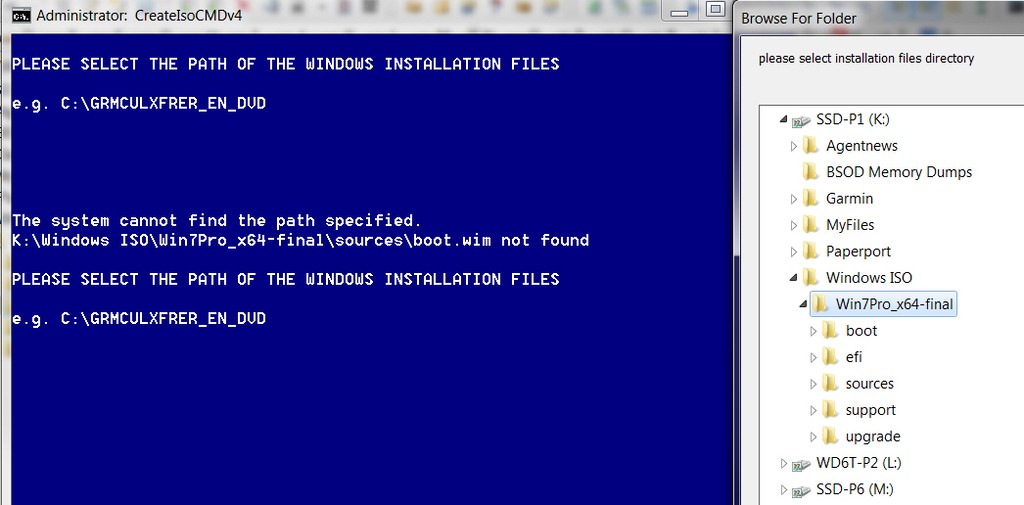
Doesn't work.

LJV4FC.jpg


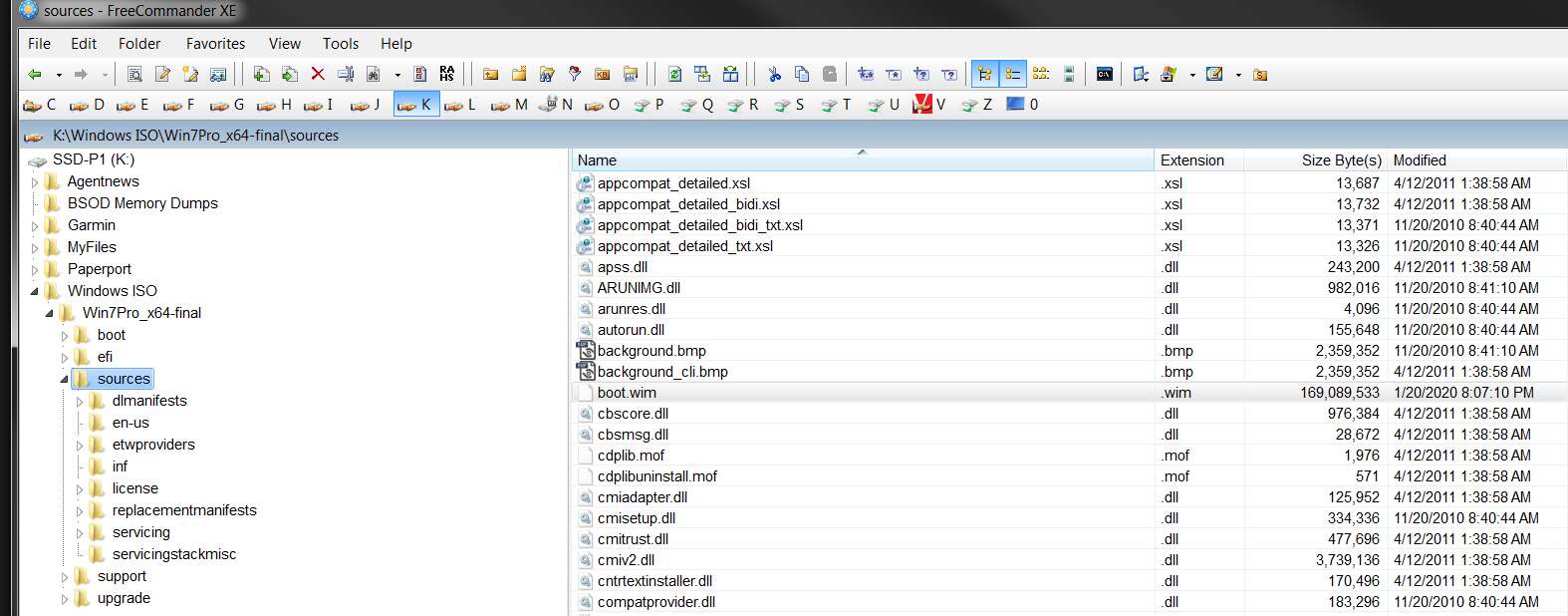
As you can see below, \Sources\boot.wim absolutely DOES exist in the path shown in the error message.

4a1D6U.jpg


Must the folder be on C? Must it only be one folder-level and not deeper?

The file is certainly present.
 

My Computer My Computer

Computer type
PC/Desktop
Computer Manufacturer/Model Number
Home-built, two systems (1) and (2)
OS
Windows 7 Pro x64 (1), Win7 Pro X64 (2)
CPU
i5-3350p 3.1Ghz/6MB-cache (1); E8400 3.0Ghz/6MB-cache (2)
Motherboard
ASUS P8Z77-V Pro (1); ASUS P5Q3 (2)
Memory
8GB PC3-12800 DDR3 (1); 4GB PC3-10600 DDR3 (2)
Graphics Card(s)
ATI HD7750 (1), (see TV cards); ATI R7 250 (2)
Sound Card
Realtek ALC892 HD Audio (1); Realtek ALC1200 HD Audio (2)
Monitor(s) Displays
Eizo HD2441W LCD, Eizo S2433W (1); Eizo 24" S2433W (2)
Screen Resolution
1920x1200, 1920x1200 (1); 1920x1200 (2)
Hard Drives
(1) 1TB SATA-II (7200RPM), 2x2TB SATA-III (7200RPM), 250GB SATA-III (10000RPM) for OS; 2x2TB external USB 3.0

(2) 320GB SATA-II (7200RPM), 750GB SATA-II (7200RPM), 150GB SATA-II (10000RPM) for OS; 2TB external USB 3.0
PSU
Nesteq ECS-6001 600W (1); Nesteq ECS-5001 500W (2)
Case
Acousti-Case 360 (1) and (2)
Cooling
Noctua NH-U12P SE2 for CPU, 2x120mm case fans (1) and (2)
Keyboard
IBM PS/2 (1) and (2)
Mouse
Logitech MX Revolution wireless (1); Microsoft wired (2)
Internet Speed
100mbps down / 10mbps up
Antivirus
Microsoft Security Essentials; Malwarebyte Anti-Malware Pro
Browser
Firefox
Other Info
Ceton InfiniTV 4-tuner cablecard-enabled TV card as well as Hauppauge HVR-2250 OTA/ATSC 2-tuner TV card in (1), running under Win7 WMC
You have a space in the path. Change it to K:\Windows-Iso
 

My Computers My Computers

System One System Two

  • Computer type
    PC/Desktop
    OS
    7 X64
    CPU
    i5 8400
    Motherboard
    gigabyte b365m ds3h
    Memory
    2x8gb 3200mhz
    Hard Drives
    various
    PSU
    pure power 11 400w cm
    Case
    Coolermaster
    Cooling
    cryorig m9i
  • Computer type
    PC/Desktop
    OS
    7x64
    CPU
    g5400
    Motherboard
    ga b365m ds3h
    Memory
    8gb ddr4 2400
    PSU
    xfx pro 450w
You have a space in the path. Change it to K:\Windows-Iso
You want me to rename that high-level folder to eliminate the space? There's technically nothing wrong with having a space in a folder/file name.

I don't know what your script looks like, but what if you surround that variable in the key line(s) with quotes ("), which is one way that commonly works to support imbedded blanks. Certainly you're not going to put out a disclaimer that your command only works if your folders don't have imbedded blanks, right?

I can certainly do this, just to get past the issue. But it seems there should/could be a tweak to your script code that would accept any folder name.
 

My Computer My Computer

Computer type
PC/Desktop
Computer Manufacturer/Model Number
Home-built, two systems (1) and (2)
OS
Windows 7 Pro x64 (1), Win7 Pro X64 (2)
CPU
i5-3350p 3.1Ghz/6MB-cache (1); E8400 3.0Ghz/6MB-cache (2)
Motherboard
ASUS P8Z77-V Pro (1); ASUS P5Q3 (2)
Memory
8GB PC3-12800 DDR3 (1); 4GB PC3-10600 DDR3 (2)
Graphics Card(s)
ATI HD7750 (1), (see TV cards); ATI R7 250 (2)
Sound Card
Realtek ALC892 HD Audio (1); Realtek ALC1200 HD Audio (2)
Monitor(s) Displays
Eizo HD2441W LCD, Eizo S2433W (1); Eizo 24" S2433W (2)
Screen Resolution
1920x1200, 1920x1200 (1); 1920x1200 (2)
Hard Drives
(1) 1TB SATA-II (7200RPM), 2x2TB SATA-III (7200RPM), 250GB SATA-III (10000RPM) for OS; 2x2TB external USB 3.0

(2) 320GB SATA-II (7200RPM), 750GB SATA-II (7200RPM), 150GB SATA-II (10000RPM) for OS; 2TB external USB 3.0
PSU
Nesteq ECS-6001 600W (1); Nesteq ECS-5001 500W (2)
Case
Acousti-Case 360 (1) and (2)
Cooling
Noctua NH-U12P SE2 for CPU, 2x120mm case fans (1) and (2)
Keyboard
IBM PS/2 (1) and (2)
Mouse
Logitech MX Revolution wireless (1); Microsoft wired (2)
Internet Speed
100mbps down / 10mbps up
Antivirus
Microsoft Security Essentials; Malwarebyte Anti-Malware Pro
Browser
Firefox
Other Info
Ceton InfiniTV 4-tuner cablecard-enabled TV card as well as Hauppauge HVR-2250 OTA/ATSC 2-tuner TV card in (1), running under Win7 WMC
Ok. Some good progress, but also some issues.

(1) After renaming that high-level folder to eliminate the blank, sure enough CREATE-ISO completed successfully.

(2) I then used RUFUS to create a bootable USB from the resulting ISO out of CREATE-ISO. Because this was Win7 I could not use the "GPT, UEFI (non-CSM)" setup since I know that is a non-starter. Win7 requires CSM if UEFI. So that forced me to use the "MBR, BIOS (or UEFI+CSM)". This forces Win7 to be installed to an MBR drive, but I'm fine with that.

The creation of the ISO file by RUFUS completed successfully.

(3) I then booted to the USB drive built by RUFUS in my Lenovo P70 laptop which currently is running Win10 and has its BIOS set to UEFI-only and non-CSM. I changed the BIOS to CSM (leaving UEFI-only) and tried to boot from the USB drive. Since the USB drive was, itself, formatted MBR and thus didn't have an EFI System partition on it, the P70 would not boot to the USB drive. The P70 is a Skylake machine and requires USB 3.0 drivers in order to control mouse and keyboard.

I then changed the BIOS of the P70 to now say BOTH (i.e. Legacy and UEFI, Legacy first) and CSM=YES. And now I was finally able to boot to the MBR USB drive. The Win7 installer launched.

(4) When I arrived at the first page of the Win7 install (which deals with language English, etc.) the mouse and keyboard of the P70 were both inoperative. Experience explains this by missing USB 3.0 drivers in the Win7 install ISO.

I thought the post #1 update said that the 1/17 version of the SIMPLIX package or 7UPV45.CMD (unclear what 1/17 refers to, but coincidentally is the date of the current SIMPLIX package) includes USB 3.0 drivers as well as NVMe drivers. I am using this latest 1/17 SIMPLIX package.

Clearly something's not right. There are definitely no USB 3.0 drivers in the resulting Win7 WIM.

(5) I then proceeded to my VMWare environment running on a Win10 desktop host machine, created a new Win7 VM, attached the ISO file as CD/DVD, and booted. Sure enough it worked! Off and running with the Win7 install.

This time when it got to that first "language" screen the mouse and keyboard functioned normally, but that was clearly because the Win7-VM hardware was obivously not requiring USB 3.0 drivers for mouse and keyboard.

(6) The Win7 install completed successfully. I then proceeded to "look around" at the environment.

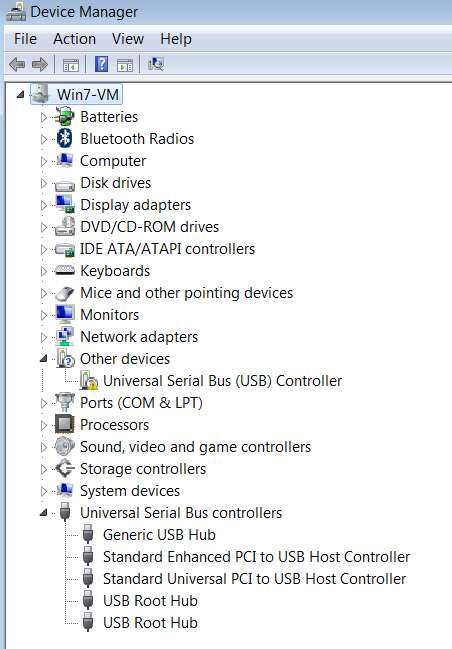
First, I examined Device Manager and confirmed that THERE IS NO USB 3.0 DRIVER BEING INSERTED. I also looked at Storage Controllers and there is no NVMe driver either.

IXrsf9.jpg


(7) I then decided to see if (a) the Windows Update function from MS was actually turned off or still operating, and (b) if it was still operating what updates would be retrieved. The result of (b) would confirm that the SIMPLIX package truly provided 100% of all previously available Windows Updates since SP1 was released.

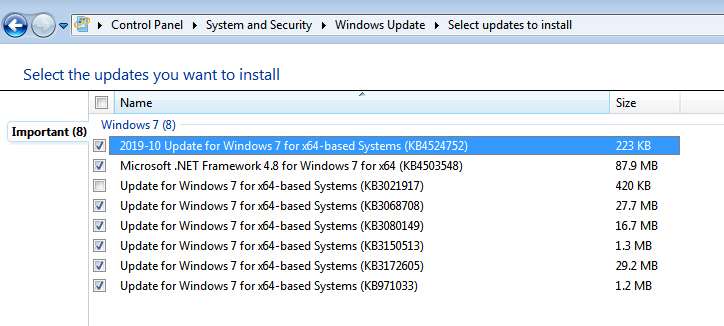
Well, it turns out that the answer to (b) is that it's pretty close to 100% in that 1/17 package. And since the answer to (a) is that the MS Windows 7 Updates server seems to still be operating, my check for Windows Updates produced the following new updates (clearly very recent, probably since 1/17).

NodvC6.jpg


I think I saw some mention here about the update for .Net 4.8, and perhaps the others as well. Can you provide instructions as to how/where/what I must do to if I want to get them in the updated ISO as well? Or should we just wait for SIMPLIX to incorporate those very recent updates which will presumbably be in the next package from them?

Anyway, it looked pretty good from a Windows Updates perspective.


So: main problem is missing USB 3.0 drivers and NVMe drivers.Where are these available from, and where do they get placed in the expanded ISO folder in order to be incorporated in the finished product?
 

My Computer My Computer

Computer type
PC/Desktop
Computer Manufacturer/Model Number
Home-built, two systems (1) and (2)
OS
Windows 7 Pro x64 (1), Win7 Pro X64 (2)
CPU
i5-3350p 3.1Ghz/6MB-cache (1); E8400 3.0Ghz/6MB-cache (2)
Motherboard
ASUS P8Z77-V Pro (1); ASUS P5Q3 (2)
Memory
8GB PC3-12800 DDR3 (1); 4GB PC3-10600 DDR3 (2)
Graphics Card(s)
ATI HD7750 (1), (see TV cards); ATI R7 250 (2)
Sound Card
Realtek ALC892 HD Audio (1); Realtek ALC1200 HD Audio (2)
Monitor(s) Displays
Eizo HD2441W LCD, Eizo S2433W (1); Eizo 24" S2433W (2)
Screen Resolution
1920x1200, 1920x1200 (1); 1920x1200 (2)
Hard Drives
(1) 1TB SATA-II (7200RPM), 2x2TB SATA-III (7200RPM), 250GB SATA-III (10000RPM) for OS; 2x2TB external USB 3.0

(2) 320GB SATA-II (7200RPM), 750GB SATA-II (7200RPM), 150GB SATA-II (10000RPM) for OS; 2TB external USB 3.0
PSU
Nesteq ECS-6001 600W (1); Nesteq ECS-5001 500W (2)
Case
Acousti-Case 360 (1) and (2)
Cooling
Noctua NH-U12P SE2 for CPU, 2x120mm case fans (1) and (2)
Keyboard
IBM PS/2 (1) and (2)
Mouse
Logitech MX Revolution wireless (1); Microsoft wired (2)
Internet Speed
100mbps down / 10mbps up
Antivirus
Microsoft Security Essentials; Malwarebyte Anti-Malware Pro
Browser
Firefox
Other Info
Ceton InfiniTV 4-tuner cablecard-enabled TV card as well as Hauppauge HVR-2250 OTA/ATSC 2-tuner TV card in (1), running under Win7 WMC
First post on this thread:

There are a number of critical drivers already there - if you wish to add others - see next post


Second post on this thread:

If you want to include drivers or specific updates, please put them in the relevant folder beforehand.


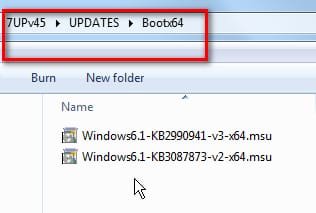
MS Nvme updates for 64 bit go in the UPDATES\Bootx64 and UPDATES\Installx64 folders.

MS Nvme updates for 32 bit go in the UPDATES\Bootx86 and UPDATES\Installx86 folders.

...
NOTE: If you want to include Net Framework 4.8 and/or vc runtimes - place the WA files next to 7UP.cmd
and Simplix will integrate them for you:
net-framework-48-for-windows-7
vc runtimes
**


If it doesn't meet your demands, use something else, or make your own application.
 
Last edited:

My Computers My Computers

System One System Two

  • Computer type
    PC/Desktop
    OS
    7 X64
    CPU
    i5 8400
    Motherboard
    gigabyte b365m ds3h
    Memory
    2x8gb 3200mhz
    Hard Drives
    various
    PSU
    pure power 11 400w cm
    Case
    Coolermaster
    Cooling
    cryorig m9i
  • Computer type
    PC/Desktop
    OS
    7x64
    CPU
    g5400
    Motherboard
    ga b365m ds3h
    Memory
    8gb ddr4 2400
    PSU
    xfx pro 450w
I'm very appreciative of what you've built. I'm not trying to be hostile. But if something is unclear to me in what you've written, or something you describe doesn't work as you describe, it seems only reasonable that I can ask a question or request clarification.

If you say something is already present, I assume it is and that I have do do nothing myself. If instead you tell me I need to do something myself, I will do it. I only ask that the instructions are accurate, and if not quite then I can ask a question to get clarification.

For example...

(1) From your own very first lines of the very first post on this thread, updated by you just yesterday so it should be accurate:

"Here is a way to get your installation media up to date:

17 JAN 2020 includes "universal" usb3 and standard oem nvme drivers"

So I ask what does that mean, if not that both USB3 and standard OEM NVMe drivers are included with something described as "17 Jan 2020"? Reads to me like it's already present somewhere somehow, and that I don't need to do anything further. Is that not the case?

(a) What is this thing called "17 Jan 2020" that you mention. Is that the SIMPLIX package dated 1/17/2020? Or is it your 7UPV45.CMD?

(b) are not the needed Intel (and possibly also Asmedia) USB3 drivers now present somewhere as you say they are, so that they will automatically end up in the resulting folder when I do nothing more than run your command? I read your words as they are. Are they not? Do I also need to do something else first to get them?

(2) Your statements in the second post of this thread are very confusing to me. You make a distinction between "drivers" and "updates", and then give an example of where "updates" go. But you don't give an example of where "drivers" go.

Also, you refer to "MS NVMe updates", whereas in post number 1 you talk about "standard OEM NVMe drivers". Pardon me, but I'm confused by your terminology and just don't know what you're really referring to. What are "standard OEM NVMe drivers", and what are "MS NVMe updates"?

And once again, I make mention of the forum software bug (I am working on chasing it down with Brink and his team) THAT PREVENTS ANY OF YOUR POSTED IMAGES FROM APPEARING FOR ME. So if you have something helpful posted in a picture (which you've uploaded as an "attachment" to the SevenForums database, rather than to a 3rd-party image hosting site and referenced via URL) I CANNOT SEE THEM. I apologize for this, but it's a Forum software issue that is currently being worked on so please understand that I'm working under restricted terms. Your words need to be very clear because I can't see your pictures.

To make things worse for me, in your second post where you provide links to the actual "MS NVMe Updates" zip files, once again because of how you've uploaded these files as attachments, I CANNOT DOWNLOAD THEM... for the very same Forum software bug that prevents me from seeing your JPG image attachments. So I cannot examine for myself what you've provided and called "MS NVMe Updates".


I ask that you not be hostile, but rather work with me to try to properly use your tools. And if I need to do something manually, please describe it in words I can understand.

For example I DO NOT UNDERSTAND THE FOLLOWING:

"NOTE: If you want to include Net Framework 4.8 and/or vc runtimes - place the WA files next to 7UP.cmd and Simplix will integrate them for you".

Since I can't see any JPG images you posted the way you posted them, and I cannot download any attached files you posted the way you posted them, I need specific words that are clear. The above quote of your instruction is not clear to me, I'm sorry.

Thank you for your help.
 

My Computer My Computer

Computer type
PC/Desktop
Computer Manufacturer/Model Number
Home-built, two systems (1) and (2)
OS
Windows 7 Pro x64 (1), Win7 Pro X64 (2)
CPU
i5-3350p 3.1Ghz/6MB-cache (1); E8400 3.0Ghz/6MB-cache (2)
Motherboard
ASUS P8Z77-V Pro (1); ASUS P5Q3 (2)
Memory
8GB PC3-12800 DDR3 (1); 4GB PC3-10600 DDR3 (2)
Graphics Card(s)
ATI HD7750 (1), (see TV cards); ATI R7 250 (2)
Sound Card
Realtek ALC892 HD Audio (1); Realtek ALC1200 HD Audio (2)
Monitor(s) Displays
Eizo HD2441W LCD, Eizo S2433W (1); Eizo 24" S2433W (2)
Screen Resolution
1920x1200, 1920x1200 (1); 1920x1200 (2)
Hard Drives
(1) 1TB SATA-II (7200RPM), 2x2TB SATA-III (7200RPM), 250GB SATA-III (10000RPM) for OS; 2x2TB external USB 3.0

(2) 320GB SATA-II (7200RPM), 750GB SATA-II (7200RPM), 150GB SATA-II (10000RPM) for OS; 2TB external USB 3.0
PSU
Nesteq ECS-6001 600W (1); Nesteq ECS-5001 500W (2)
Case
Acousti-Case 360 (1) and (2)
Cooling
Noctua NH-U12P SE2 for CPU, 2x120mm case fans (1) and (2)
Keyboard
IBM PS/2 (1) and (2)
Mouse
Logitech MX Revolution wireless (1); Microsoft wired (2)
Internet Speed
100mbps down / 10mbps up
Antivirus
Microsoft Security Essentials; Malwarebyte Anti-Malware Pro
Browser
Firefox
Other Info
Ceton InfiniTV 4-tuner cablecard-enabled TV card as well as Hauppauge HVR-2250 OTA/ATSC 2-tuner TV card in (1), running under Win7 WMC
1.
Also, you refer to "MS NVMe updates", whereas in post number 1 you talk about "standard OEM NVMe drivers".

Some oems provide drivers for nvme.
Drivers come in .inf, .cat and .sys files.
The common consumer oem provided drivers are included in 7UP.

Microsoft issued nvme updates.
They are in .msu or .cab format.
Therefore they must be integrated as updates (which MS also refer to as "packages") - and need to go in the updates folders.
These will be needed for win7 to work with nvme disks when there is no oem driver.

The commands for integrating drivers are different from the commands for integrating updates

Some usb drivers are also included in 7UP that should cover most installations.


OPTIONALLY:

You can include your own drivers by placing them in the
DRIVERS\Bootx64 and DRIVERS\Installx64 folders

You can include any extra/optional updates ( such as the MS nvme updates) by placing them in the UPDATES\Bootx64 and UPDATES\Installx64 folders

You can include language packs by placing them in
LANGPACKS\Bootx64 and LANGPACKS\Installx64 folders

Obviously, for x86 use the
DRIVERS\Bootx86 and DRIVERS\Installx86 folders
UPDATES\Bootx86 and UPDATES\Installx86 folders
LANGPACKS\Bootx86 and LANGPACKS\Installx86 folders


2.Do the links not work for you?

net-framework-48-for-windows-7
vc runtimes
 
Last edited:

My Computers My Computers

System One System Two

  • Computer type
    PC/Desktop
    OS
    7 X64
    CPU
    i5 8400
    Motherboard
    gigabyte b365m ds3h
    Memory
    2x8gb 3200mhz
    Hard Drives
    various
    PSU
    pure power 11 400w cm
    Case
    Coolermaster
    Cooling
    cryorig m9i
  • Computer type
    PC/Desktop
    OS
    7x64
    CPU
    g5400
    Motherboard
    ga b365m ds3h
    Memory
    8gb ddr4 2400
    PSU
    xfx pro 450w
1.

Some oems provide drivers for nvme.
Drivers come in .inf, .cat and .sys files.
The common consumer oem provided drivers are included in 7UP.
I understand this.

So, for example, your Intel USB3 driver INF file is (I believe) located in:

C:\7UPv45\DRIVERS\Bootx64\USB3\iusb3hub\iusb3hub.inf

And I'm reporting that it did not end up in the updated folders which is understandable if it's actually imbedded in INSTALL.WIM.

But when I used the created ISO to install Win7 inside Win7-VM, it also did not end up in the installed Win7-VM (which was defined as having USB3 devices). The install itself was able to work with the built-in USB2 drivers since that is what VMWare said the mouse and keyboard were in the VM, but no USB3 drivers ended up in Device Manager of the finished product Win7-VM. That was unexpected.

And when I created a real usable bootable USB flash drive using RUFUS and the ISO file, it was not there either because when I got to the first screen of the experimental Win7 install on my P70 (Skylake) laptop I had no functional mouse or cursor. This is a symptom that stems from missing USB3 drivers slip-streamed into the install media.

Note that use of the well known "Gigabyte utility" to create new updated Win7 install media (which contains both USB3 and NVMe drivers, so that you can use it to install to a Skylake machine and an NVMe target drive) from existing standard MS retail Win7 install media (which includes neither USB3 nor NVMe drivers) works perfectly to overcome this problem of that English language screen having no working mouse cursor or keyboard on the Skylake P70 laptop (or Skylake desktop machine with USB mouse/keyboard).

Presumably your 7UP tool should have done the same thing, incorporating your included USB3 and NVMe drivers into the install media. But it does not seem to have worked. If this is a brand new feature you've implemented within the past week and should have worked, I report that it didn't seem to work for me. That install media produced a non-functioning mouse and cursor on my P70 laptop when I got to that very first screen needing mouse and keyboard functionality to proceed with the installation of Win7.


You can include your own drivers by placing them in the
DRIVERS\Bootx64 and DRIVERS\Installx64 folders

You can include any extra/optional updates ( such as the MS nvme updates) by placing them in the UPDATES\Bootx64 and UPDATES\Installx64 folders
Thank you for the clarification. Now I understand where to put things.

But where are the "MS NVMe Updates" (msu or cab) obtained? Is there a download URL for these from somewhere? Is it a compressed single-file download that just gets place in the \Updates folders, or do they first have to be unpacked in some way?

If I could actually see one (which I can't because I can't download your attachment in post #1 of this thread because of the Forum software bug that prevents me from retrieving attachments you post the way you do) I could probably figure it out for myself.

Can you please simply post the MS site URL from which you downloaded NVMEx64-UPDATES_2.zip and which you then posted by "attach" in your post #1, so that I could download it myself.


Yes, these links DO work. I have been able to chase down through these posts and download what I believe you want me to retrieve:

vcredist_x64_Win7_20191015.WA

dotNetFx48_20200114_x64.WA

But where do I put the WA files? Again, you posted a JPG picture named "Update your Win 7 installation media-10.jpg" that probably shows where it goes, but I can't see it. Your text describing where it goes is unclear to me:

"NOTE: If you want to include Net Framework 4.8 and/or vc runtimes - place the WA files next to 7UP.cmd and Simplix will integrate them for you"

What does this really mean, in words? What is the target folder I should put these two WA files in, explicitly?
 

My Computer My Computer

Computer type
PC/Desktop
Computer Manufacturer/Model Number
Home-built, two systems (1) and (2)
OS
Windows 7 Pro x64 (1), Win7 Pro X64 (2)
CPU
i5-3350p 3.1Ghz/6MB-cache (1); E8400 3.0Ghz/6MB-cache (2)
Motherboard
ASUS P8Z77-V Pro (1); ASUS P5Q3 (2)
Memory
8GB PC3-12800 DDR3 (1); 4GB PC3-10600 DDR3 (2)
Graphics Card(s)
ATI HD7750 (1), (see TV cards); ATI R7 250 (2)
Sound Card
Realtek ALC892 HD Audio (1); Realtek ALC1200 HD Audio (2)
Monitor(s) Displays
Eizo HD2441W LCD, Eizo S2433W (1); Eizo 24" S2433W (2)
Screen Resolution
1920x1200, 1920x1200 (1); 1920x1200 (2)
Hard Drives
(1) 1TB SATA-II (7200RPM), 2x2TB SATA-III (7200RPM), 250GB SATA-III (10000RPM) for OS; 2x2TB external USB 3.0

(2) 320GB SATA-II (7200RPM), 750GB SATA-II (7200RPM), 150GB SATA-II (10000RPM) for OS; 2TB external USB 3.0
PSU
Nesteq ECS-6001 600W (1); Nesteq ECS-5001 500W (2)
Case
Acousti-Case 360 (1) and (2)
Cooling
Noctua NH-U12P SE2 for CPU, 2x120mm case fans (1) and (2)
Keyboard
IBM PS/2 (1) and (2)
Mouse
Logitech MX Revolution wireless (1); Microsoft wired (2)
Internet Speed
100mbps down / 10mbps up
Antivirus
Microsoft Security Essentials; Malwarebyte Anti-Malware Pro
Browser
Firefox
Other Info
Ceton InfiniTV 4-tuner cablecard-enabled TV card as well as Hauppauge HVR-2250 OTA/ATSC 2-tuner TV card in (1), running under Win7 WMC
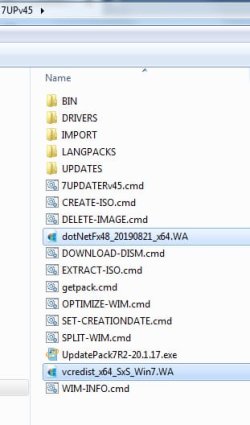
Last edited:

My Computers My Computers

System One System Two

  • Computer type
    PC/Desktop
    OS
    7 X64
    CPU
    i5 8400
    Motherboard
    gigabyte b365m ds3h
    Memory
    2x8gb 3200mhz
    Hard Drives
    various
    PSU
    pure power 11 400w cm
    Case
    Coolermaster
    Cooling
    cryorig m9i
  • Computer type
    PC/Desktop
    OS
    7x64
    CPU
    g5400
    Motherboard
    ga b365m ds3h
    Memory
    8gb ddr4 2400
    PSU
    xfx pro 450w
Hi SIW2,


just wanted to post back and say many thanks for your efforts. The method worked great for me with no hiccups. Instructions were concise and easily followed.


Regarding the Asus TUF board I posted about earlier, EZinstall did the trick. There is a device driver missing in device manager that should have been provided in the chipset drivers, but I think Win 7 on Z370 may be the issue. I'll post a thread in the hardware forum later, but just wanted to mention it here in case any others have similar issues.


Again, thanks very much for making it so simple to do. It saved me loads of time stumbling around trying to make it work.
 

My Computer My Computer

Computer type
PC/Desktop
Computer Manufacturer/Model Number
custom
OS
windows 7 Pro 64 Bit
CPU
i5 4670K
Motherboard
Asus Max Hero 1150 socket
Memory
16GB DDR3@933mhz
Graphics Card(s)
Radeon R9 390 8192mb
Monitor(s) Displays
Dell U2415 x3
Screen Resolution
1920 (5760) x 1200 x3
Hard Drives
System: Kingston 128GB SSD

Installing to Samsung 860 EVO 500GB
WD Black 2 TB & 1 TB
PSU
Corsair CX750M
Cooling
Hyper 312
Internet Speed
50mbps
Back
Top